
( 276 )
Unclaimed: Are you working at Zoom Events and Webinars?





Zoom Events and Webinars Reviews: 4.4/5 — Solid Choice
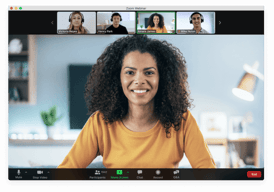
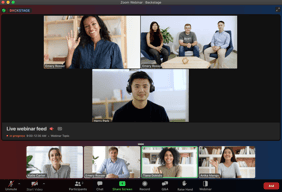
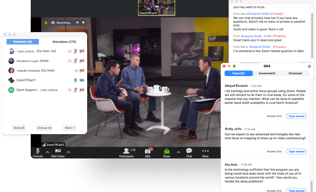
Zoom may be software that you're already familiar with but their Video Webinar is definitely a more robust and comprehensive communications tool that most have yet to explore. With Video Webinar, users get access to features such as presentation engagement tools, dual screen support, live broadcasting to YouTube, polling, and other features that are essential for webinar streaming and virtual events.




| Capabilities |
API
|
|---|---|
| Segment |
Small Business
Mid Market
Enterprise
|
| Deployment | Cloud / SaaS / Web-Based, Desktop Mac, Desktop Windows, Mobile Android, Mobile iPad, Mobile iPhone |
| Support | 24/7 (Live rep), Chat, Email/Help Desk, FAQs/Forum, Knowledge Base, Phone Support |
| Training | Documentation |
| Languages | English |
Zoom Events and Webinars Pros and Cons
- 'Access video meetings on mobile devices
- Remote keyboard and mouse control
- Live streams to your social media channels
- Supports large participant groups (up to 1000)
- Poor customer support
- No cloud storage on the freemium plan

Compare Zoom Events and Webinars with other popular tools in the same category.
Ease in connecting. Having an "instant" meeting room. Clarity and stability of connection.
I really need breakout rooms that are more than discussions: I need the whiteboards in breakout rooms to be persistent during the meeting, even when everyone leaves the room, so people can go back and get some of the data they brainstormed in the small group and bring it to the main whiteboard.
I participate in or facilitate many remote meetings. One day we had a serious ice storm, and we were able to tell people to stay home for safety, and still have the critical meeting virtually on Zoom.
Zoom gives you all the features you need with none of the technical frustrations
Haven't had any complaints or issues after using for over two years
Zoom is used for meetings, training, and demonstrations.Because it can be integrated with our video hosting platform it is easy to edit and share long-term.
Zoom is incredibly easy to use compared to other platforms. There is very little we need to do to instruct new users to Zoom. Just a simple link, quick download, and we are off to the races.
This is pretty nitpicky because there's not much I don't like about Zoom. However, I would like a quick way to just copy my personal meeting link without all the other instructions that come along with the "copy" function.
We work with a traditionally non-tech savvy demographic. Zoom allows us to quickly connect with our clients and work through any technical difficulties users may be having with our platform.
Easy to record meetings Screen sharing Ability to see participants as they are speaking Easy to chat with participants during the meeting Easy to identify who is speaking even when they are not seen
There is nothing much to dislike about this tool. The only thing that I've found is that the tool is inconsistent in remembering my settings. Sometimes it automatically puts me on mute and disables my video and sometimes it doesn't remember and I have to manually do it.
Our development resources are located throughout the country. Zoom allows us to conduct meetings face to face and reduces the barriers. You are able to see the individuals speaking and what they are presenting simultaneously.
I like that the quality of the video is always really good and sound quality is great as well.
There isn't really anything I don't like about Zoom! It always works really well.
We solve business problems with Zoom because a lot of us in the company work from home so when there are company meetings, we are sent the link for Zoom, we click on it and open the app, and we can be right there in the meeting!
The best feature of Zoom is the ability to create breakout rooms to have private discussions with a smaller group of people before reconvening with the rest of the meeting attendees.
I would prefer to be able to record conferences on my end without the need to request it.
Zoom provides a hassle-free experience for setting up meetings with a large group of people who are working remotely.

Ease of use, being able to share screen with the people I'm speaking to
Some small glitches occasionally but things I've been able to resolve
Connecting with my prospects and being able to easily connect with a full team that sits in different locations.
Zoom offers ease of use for both business and clients in a sleek and modern format. I really like the ability to stream live from zoom!
I dislike the difficulty of creating different rooms
Zoom allows me to easily meet with clients all over the world
I primarily use Zoom Video Webinar to set up meetings for my Account Representatives. It's extremely easy to set it up for them, and easy for their prospects to follow directions in which to use.
There is nothing I dislike about using Zoom.
Zoom allows me to set up screen-sharing videos with my prospects. We also use it internally when people work remote, or to connect with coworkers in international offices.

Zoom events and webinars can support and handle a large amount of audience in real time. It has break out room feature as well to break large audience into smaller groups. It's ideal for brainstorming and mind mapping sessions.
Zoom events and webinars has a scope of improvement in providing security measures. The customer support services also need to be improved to resolve various issues faced by audience and event host.
Zoom events and webinars have enhanced the use of technology to cross the technical barriers. It has deeply penetrated into the society all over the world and helping in bringing the interested and enthusiastic audience into the mainstream technological advancements. It's helping me to largely increase my reach to much greater regions of the world and helping me grow in my career. It's helping me to take real-time sessions and also record them to review and share with the left out audience. It's optimal utilisation of resources and cost effective solution is helping business grow at decent pace.
Easy to setup. Easy to bulk add multiple people and has great video quality.
Sometimes it takes time to login and start
Most users do not face a challenge in joining the call, We have multiple features, allowing access for people to join is easy
Congregates so many people together No issues of switching on and off of videocameras Easy to interact
The host cant see the participants video Feels like talking to a screen
Conducting webinars for counts of people at once - helping in spreading knowledge of current industry trends.
Zoom has a lot of very convenient features for the people attending the seminars, like raising hands and writing questions to the presenter. All the staff trainings that happen over the weekends are conducted over Zoom, and they are extremely helpful and easy to use via this software. No training is needed to upskill as the UI is very straightforward for any user.
Sometimes, calls and meetings log you off abruptly, even though the meetings are still in progress. So, we have to log back in again. This probably could be because of network congestion, but I think that this needs to be improved.
Zoom has made virtual seminars very easy to attend, as all of us can attend from anywhere we are comfortable. This became a boon during COVID times, as physical face-to-face trainings and seminars could not be held. As most of the organized webinars are during weekends when the school is non-operational, it becomes very convenient for hundreds of staff members to attend them virtually.

The best thing that I like about Zoom Events and Webinars is it's highest maximum participants capacity and it's user friendly interface. We can add as much people as we want.
It's lack of comment control and HD video is not standard and this thing is very sad to have in this. Also you need to download an app to use this, there should be a website link for the meeting too.
Zoom Events and Webinars allows us to host webinars with upto 10000 participants and it offers support for questions and answers,chat with audience members abd live streaming to various platforms. These are problems it is solving.
Zoom has so many other apps that work well with the software - we use captioning services from a third party and the integration makes it easy for staff to set up. Additionally, most people are comfortable with Zoom and large agencies often have firewalls that make using other programs difficult.
The events platform was difficult for my small staff to grasp, we do not have an IT department so new programs require a "champion" on the team to want to learn and share. We use large meetings and webinars more often than events.
Post pandemic, people still have some preference to do online training events. The recording aspect also allows us to save content and share with those who could not attend the live session. The registration reports are very helpful and we are able to upload information into our other systems with that information.
Easy to use, the same usability as the Zoom meeting
Only one admin can view the back-end - the collaboration functionalities is not as good as others
Easy to set up B2B webinars
It is more reliable and ease to use. Completely Well versed platform to have a professional meets.Excellent tools and better optimization. Best online platform for virtual meet.
Less time meetings in basic plan. Getting lag sometimes. While some important times it gets delayed to get open. Some server errors need to be optimized. If more than 300 participants means it getting lag
Perfectly a virtual meets can be easily handled by using the Zoom. Very convenient and user friendly.Able to schedule the meetings whenever needed with high ease of usage.

It has a creative and straightforward interface that makes it so friendly for hosting webinars or online events. It can be integrated to host the event on social media; Participants can join quickly from mobile phones.
Customer service response should be faster in responding to inquiries. I did not notice any other things that I disliked during the experience.
It was an excellent solution for the company to use Zoom Events and Webinars to generate and host events and webinars easily without the complexity and keep track of our participants all over the globe through any occasion. Audio and Video Quality for the events and webinars was excellent, which made Zoom the best solution for us.
One of the great things about Zoom events and webinars is that they are incredibly convenient
Technical issues like poor internet connectivity or audio problems can sometimes interfere with the experience.
Geographic barriers: Traditional in-person events are often limited by geography, which can make it difficult for people who live in remote areas or who cannot travel to attend. Zoom events and webinars eliminate this barrier by allowing people from all over the world to participate.
I like the controllable options for attendees and host, the options of having a meeting or webinar are perfect, sending a reminder for the attendees is very helpful.
One of the things I dislike is Lifestream, it can't be on more than one platform because of the camera, I used to do Lifestream on youtube but I couldn't do it on Facebook at the same time.
Interactive lectures, which can be recorded and published on youtube, with no limit of attendees for Fundraising events, we do in-person events and we stream them on zoon at the same time for capacity place purpose.
O software permite que me comunique com várias pessoas de diferentes locais, permitindo realizar reuniões e treinamentos à distância. Uso para me comunicar com toda minha equipe a empresa de maneira prática. Ele contribui muito para a comunicação interna e externa na minha empresa. Realizamos além de reunões, eventos informais.
A qualidade da imagem da câmera não é boa, algumas vezes trava o áudio e a imagem. e o volume do áudio por vezes é baixo.
Gosto da praticidade que ele trás para minha vida corrida, com muitas reuniões e treinamentos. Com ele consigo participar de todas elas, sem sair de casa. Isso me economiza muito tempo.
Straightforward interface, less complicated compared to Microsoft Teams
Good for beginners but advanced features are missing
Accessible to schedule meetings. Good communication and few glitches

I find Zoom Events and Webinars to be an excellent choice for virtual collaboration. It is cost-effective and seamlessly integrates with a range of software and tools such as Google Drive, Microsoft Teams, and Slack. Zoom's capabilities make it a potent tool for remote collaboration, enabling effortless communication among team members. Its user-friendly interface makes it easy to conduct meetings and presentations, even for individuals who may not be technologically savvy. Furthermore, Zoom's multi-platform functionality ensures that it can be used across different operating systems and even on older computers.
One aspect of Zoom Events and Webinars that I find less appealing is the pricing of certain tiers. It would be helpful if they could introduce more affordable options for small businesses that don't require the capacity to host 500 or more attendees. Additionally, there are some concerns regarding privacy policies and security when using Zoom. Another drawback is the limit on the number of users who can join.
With Zoom Events and Webinars, I can easily organize webinars from my desktop or mobile device. Its compatibility with both desktop and mobile versions makes it a breeze to conduct webinars from anywhere. During the pandemic era, Zoom Events and Webinars proved particularly helpful for me to host online shows, which led to the development of other online courses and seminars that I continue to offer to this day. The platform's convenience has allowed me to optimize my day by avoiding the need to travel to remote locations for meetings.
Branding & customization of photos, fonts, and colors for the Zoom Events Expo counters, Crowd management, meetings inside the expo , payment gateways, making it a one-stop solution, Zoom Webinar 50000 capacity, flexible controls.
Although there are many features, even the license cost is high. User training is not provided at specific intervals, a high set of feature making it at times difficult to handle,
Branding of sponsors has become too easy; less skill set to schedule a zoom event, and managing the webinar & events in a smooth manner , customizing & previewing the design.

Zoom Events and Webinars has the best user experience compared to all the other Applications of the similar kind, since I've used most of them. Also, there are more features available which can be easily customized by the user.
There is nothing which I dislike about Zoom Events and Webinars.
The most important feature for me is the High Quality Video experience. I noticed on other video conferencing applications the video quality is much degraded but for Zoom I can see HD Video which ensures better meeting experience.
Ease of use, familiarity, robust toolset, good customer service, intuitive and seems to be growing as the preferred platform for webinars
We have just implemented the new service as our webinar platform. No significant issues have been noted as of yet. The updates seem to be working fine
More excellent client retention and outreach. Provides a recording for prospects to view if they were unable to view the live webinar and emails a link to send them.
I love to use Zoom Events and Webinars for virtual collaboration. Zoom is cost-effective and integrated with several software and tools like Google Drive, Microsoft Teams and Slack. Overall, Zoom is a powerful tool for remote collaboration and makes it easy to communicate with each other.
I have a few dislikes about Zoom; with increased virtual meetings, many people are experiencing meeting fatigue, and staying engaged and productive during long virtual conferences is very challenging.
I attended webinars and meetings on this platform in my village. I want to say that Zoom can also be used in rural areas because the bandwidth is good, and internet connections make us to use this platform anywhere. I benefited a lot through this platform for my virtual classes and projects.
The best thing about zoom is that helps to conduct meetings and events in online mode. The interface when using is very impressive. And it is used by many organisations to conduct different types of meetings and with no premium required. And the audio and video quality given by it is awesome.
Some of the disadvantages when using zoom is there are some privacy policy and security reasons. And it can be joined by limited users. The audio cannot be muted. And some inbuilt chat option is not good
Solving the problem of remote and virtual communication, making it possible for individuals and organizations to conduct meetings, events, and training sessions o nline
The best thing about Zoom Events and Webinars is, besides being multi-platform, the fact that the software works in old computers with outdated OS. Lots of compatibilities
Maybe what I like the least about Zoom Events and Webinars is the price for some tiers. Perhaps they could implement lower pricing tiers for small businesses that don´t expect 500 or more attendees.
Zoom Events and Webinars help me to implement some online shows during the pandemic era, which eventually helped me to develop other seminaries and online courses that I give to this day.
I love how easy it is and how quickly it connects
I would like participants not to be able to see each other when the option is webminar.
Meeting with a large number of people