

Unclaimed: Are you working at Asana?
Asana Reviews: 4.3/5 — Solid Choice
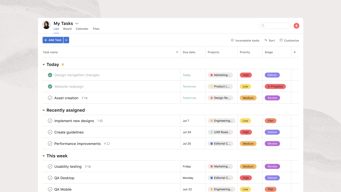
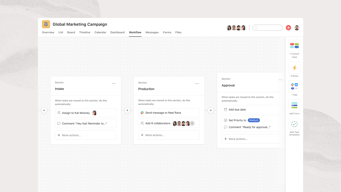
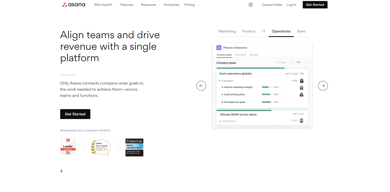
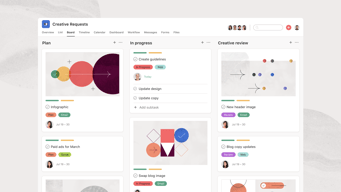
Considered one of the pioneering cloud-based project management tools, Asana offers four views for its users – List View, Timeline, Calendar, and Boards – all of which help teams get both a macro and micro view of all the moving parts of projects and tasks. It provides a comprehensive roadmap of ongoing projects from start to finish, clearly outlining dependencies, project milestones, and feedback and approval processes. For project managers, strong reporting capabilities that show completion rates, individual workloads, and potential delays just to name a few create opportunities for real-time project optimization, collaboration, stronger forecasting, and better planning for future similar projects.





| Capabilities |
API
|
|---|---|
| Segment |
Small Business
Mid Market
Enterprise
|
| Deployment | Cloud / SaaS / Web-Based, Mobile Android, Mobile iPad, Mobile iPhone |
| Support | 24/7 (Live rep), Chat, Email/Help Desk, FAQs/Forum, Knowledge Base, Phone Support |
| Training | Documentation |
| Languages | English |
Asana Pros and Cons
- Tons of great integrations
- Easy to use and clean environment
- Lots of timeline tracking tools
- Automation features built-in
- Various customization options
- No budgeting or invoicing features
- The volume of features can be overwhelming
- No time tracking feature
- The volume of features can be overwhelming
- No time tracking feature







Asana cut its free plan from 15 users to 2, and a great deal of published information has not caught up. Accounts created on or after 12 November 2025 get two seats on the Personal plan. Older accounts keep a legacy allowance of up to ten, but lose it permanently if they downgrade and re-upgrade. If you are choosing Asana because you heard the free tier supports a small team, that is no longer true.
- What it is: A project management platform for tracking work across tasks, projects, portfolios, and goals.
- Best for: Mid-size and larger teams coordinating structured work across departments, where portfolios and goals matter.
- Pricing: Personal free for 2 users. Starter €10.99, Advanced €24.99 per user per month billed annually. Enterprise is custom. Verified in July 2026.
- The honest catch: Beyond the free-plan change, AI Studio credits are allocated per billing account rather than per user, so a large team shares one pool.
What Is Asana?
Asana is one of the two or three products that defined modern work management. Its model is a hierarchy: tasks belong to projects, projects roll into portfolios, portfolios connect to goals. That structure is why larger organizations choose it. When an executive asks how a quarterly objective is progressing, Asana can answer from work people are actually doing rather than from a status document.
That focus also explains where it is weaker. Asana is less flexible than monday.com, less spreadsheet-like than Smartsheet, and less simple than Trello. It rewards organizations that want a consistent structure imposed across teams, and frustrates ones that want each team to work its own way.
The independent evidence base is very large, with more than 11,000 reviews on G2 alone, and satisfaction scores remain strong despite the free-plan controversy.
How Asana Works
- Tasks, projects, portfolios, goals. The hierarchy is the product, and portfolios and goals are what separate Advanced from Starter.
- Multiple views. List, board, and calendar on every plan, with timeline and Gantt from Starter.
- Automation. Unlimited automations from Starter, which is more generous than competitors that meter them.
- Workload and capacity. Resource management on Advanced, plus universal workload and capacity planning on Enterprise.
- AI Studio. Credit-based AI, at 50,000 on Starter, 75,000 on Advanced, and 200,000 on Enterprise, allocated per billing account per month.
- Integrations. Salesforce, Tableau, and Power BI connectivity from Advanced.
Asana Pricing
Four tiers, with the free plan now materially smaller than its reputation. Figures verified on Asana’s pricing page in July 2026, billed yearly. Asana localizes currency, and the euro figures correspond numerically to its dollar pricing.
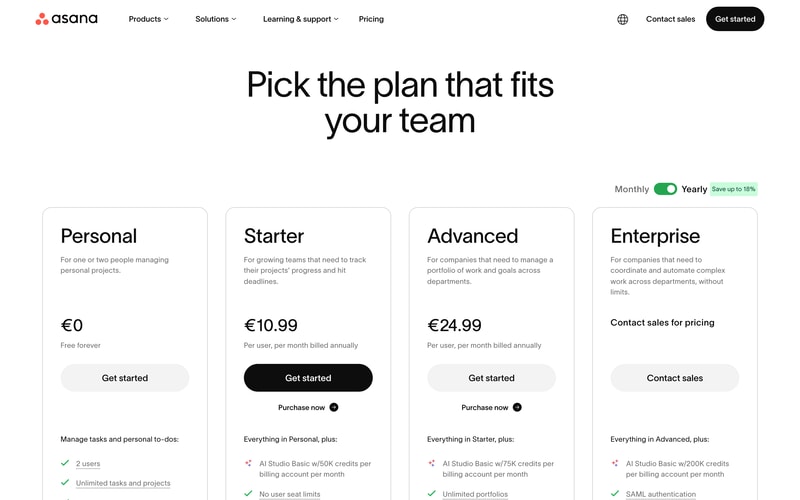
| Plan | Per user/mo (yearly) | Users | AI Studio credits | Key additions |
|---|---|---|---|---|
| Personal | €0 | 2 | — | Unlimited tasks and projects, list, board and calendar views |
| Starter | €10.99 | No seat limit | 50,000/account | Timeline and Gantt, dashboards, unlimited automations, forms, custom fields |
| Advanced | €24.99 | No seat limit | 75,000/account | Portfolios, goals, workload, approvals and proofing, time tracking, Salesforce and BI integrations |
| Enterprise | Custom | Unlimited | 200,000/account | SAML, SCIM provisioning, capacity planning, admin controls |
The details that matter most:
- The free plan is two users. Reduced from fifteen for any account created on or after 12 November 2025. This is the single most important change in Asana’s pricing in years, and much published comparison content, including some review aggregator pricing pages, still describes the old limits.
- Legacy accounts have a trap. Accounts predating the change keep up to ten users on a Legacy Personal Plan, but cannot recover that allowance if they downgrade and re-upgrade. If you are on a legacy free plan, do not experiment with plan changes.
- AI credits are per account, not per user. 50,000 credits on Starter is shared across your whole billing account, so a fifty-person team gets the same pool as a five-person one. This is unusual and worth modelling if AI features matter.
- Portfolios and goals require Advanced. At €24.99 per user, more than double Starter. Since portfolio-level visibility is the main reason larger organizations choose Asana, Advanced is the realistic tier for that use case.
- Yearly billing saves up to 18%.
- No seat minimums on paid plans, which is a genuine advantage over monday.com’s three-seat floor.
Who Should Use Asana
- Mid-size organizations coordinating across teams. The clearest case, and where the portfolio and goal hierarchy earns its price.
- Teams that outgrew a simpler tool. Asana is the common destination for teams hitting Trello’s dependency limits, and it handles dependencies properly.
- Companies that run on OKRs or similar. Goals connected to actual work is genuinely useful rather than decorative.
- Teams wanting structure. If consistency across departments matters more than per-team flexibility, Asana suits better than monday.com.
It fits poorly for individuals and pairs on the free plan, which is now extremely limited, for very small teams on a budget, since €10.99 per user adds up quickly, and for teams wanting to shape the tool around an unusual process, where monday.com’s flexibility is better.
Honest Pros and Cons
Strengths
- Excellent structural model. Tasks to projects to portfolios to goals is coherent and genuinely useful at scale.
- Proper dependency handling. Unlike Trello, Asana models work that waits on other work.
- Unlimited automations from Starter. More generous than competitors that meter automation runs.
- No seat minimums. You can buy exactly the seats you need.
- A very large evidence base. More than 11,000 G2 reviews with consistently strong satisfaction.
- Mature integrations. Salesforce, Tableau, and Power BI on Advanced for organizations that need reporting elsewhere.
Limitations
- The free plan is now two users. Cut from fifteen, and the change is poorly reflected in third-party documentation.
- The legacy grandfathering is fragile. Downgrade and re-upgrade and you lose the higher allowance permanently.
- AI credits are pooled per account. A large team shares the same allocation as a small one.
- Portfolios and goals need Advanced. More than double the Starter price for the capability larger buyers actually want.
- Less flexible than monday.com. Asana imposes structure, which some teams experience as rigidity.
- Cost at scale. €24.99 per user across a large organization is a serious line item.
Asana Alternatives and How It Compares
- monday.com is more flexible and more visual, with a three-seat minimum and less rigorous portfolio structure.
- ClickUp offers more features per dollar and a genuinely usable free tier, at the cost of a busier interface.
- Trello is simpler and cheaper, and lacks dependencies entirely, which is the usual reason teams move to Asana.
- Smartsheet suits organizations whose work already lives in spreadsheets.
- Teamwork is better for agencies that need billable time and project profitability.
For a broader survey see our guide to the best project management software.
The Verdict
Asana remains one of the strongest work management platforms for organizations that want structure rather than flexibility. The hierarchy from tasks through portfolios to goals is coherent, dependencies work properly, and unlimited automations from the entry paid tier is more generous than most competitors. For a mid-size company coordinating work across departments, it is a sound default.
The free plan is no longer part of the argument. Cutting it from fifteen users to two for accounts created after 12 November 2025 changes what Asana is for small teams, and the change is badly reflected in third-party sources, including some review-site pricing pages that still quote the old figures. If you are evaluating Asana for a small team on the strength of its free tier, check the current limit rather than the guide you are reading.
Two specifics worth acting on. If you hold a legacy free account with up to ten users, do not downgrade and re-upgrade, because the allowance does not come back. And if AI features factor into your decision, note that AI Studio credits are pooled per billing account rather than per user, which makes them meaningfully less generous for large teams than the headline numbers suggest. Price Asana at Advanced if portfolios and goals are why you want it, because that is where they live.
FAQ
How many users does Asana’s free plan support?
Two, for any account created on or after 12 November 2025. It was previously fifteen. Accounts created before that date are grandfathered onto a Legacy Personal Plan supporting up to ten users. Much published comparison content, including some review aggregator pricing pages, still describes the older, larger limits.
I have an older Asana free account. Should I change plans?
Be careful. Legacy accounts keep up to ten users, but Asana does not restore that allowance if you downgrade and subsequently re-upgrade. If you are on a legacy free plan and value the extra seats, avoid experimenting with plan changes, since the higher limit cannot be recovered once lost.
How much does Asana cost in 2026?
Billed yearly, Starter is €10.99 per user per month and Advanced €24.99, with Enterprise custom priced and Personal free for two users. Yearly billing saves up to 18%. There are no seat minimums on paid plans, and Asana localizes currency so its dollar pricing corresponds numerically.
Are Asana’s AI credits per user or per team?
Per billing account, which is the less generous interpretation. Starter includes 50,000 AI Studio credits per month for the whole account, Advanced 75,000, and Enterprise 200,000, regardless of how many users you have. A fifty-person team receives the same allocation as a five-person team, so model your expected usage before assuming the allowance is sufficient.
Is Asana better than monday.com?
They optimize differently. Asana imposes a consistent structure across teams and handles portfolios and goals more rigorously, which suits larger organizations. monday.com is more flexible and visual, letting each team shape the tool around its own process, and has a three-seat minimum. Choose Asana for structure and monday.com for adaptability.

Compare Asana with other popular tools in the same category.
I like how easy it is to use and how you can track what everyone on the team is working on in one organized place. It increases productivity and accountability in the team.
I don't dislike anything about this service itself. If anything, it may not be as accessible to smaller organizations because of the payment required to upgrade. However, the free version provides many insights and is worth having.
Asana helps us as a team stay on top of our projects and see what other team members are working on. It allows us to measure the availability of team members and how time is being managed in the office.
Really easy to use, Love it as a way to organize tasks and link to what needs to be done. Perfect tool for onboarding new employees
Can't really think of anything I didn't like. Maybe some kind of connection to email with reminders would be good (I may have missed that feature)
Keeping new hires on schedule with trainings and to do's

Real time tracking with task and can measure efforts against task
For small task need to more efforts for management
Asana not solved problem but it help to how to solve problems

It supports encourages enables collaboration which is imperative for an online workplace.
It's very busy and sometimes it's hard to hone in on the information I need but in time navigation should get more familiar.
Communicating with coworkers across the country from home

I like the dashboard of asana. It is straightforward to understand and use.
There is nothing to dislike about asana.
I was facing several issues with my team on project management. Then we start using asana, making it easy for us to communicate and assign tasks each other on asana.
Asana is very helpful as it integrates quite well with other apps, and the gamification component gives it a good advantage overall and helps in task management of the organization.
Asana could be improved with task management as it leaves the task open and is open. It ended should be giving better operability to the administrator overall.
Best workforce management platform for small-sized organizations, and its benefits with prioritizing tasks and managing and tracking all tasks given to the employee.

Asana is very cost effective, good for all departments in an organisation, be it tech, product, sales or ops. Its easy integrate
They can make Adcance search easier, Currently I found this sort of complext
It's making our day easy, to mange end to end task management and helping in building my product road map.
Very easy to manage tasks, and most used functions are exactly where I would want them to be. I love that each task has its place on its board where everyone sees it, but still, I can move it and prioritize it among my own tasks.
If you have a very complex problem, with lots of back-and-forth, lots of comments and subtasks, it can get very complicated.
Allows me to track tasks and deadlines, both mine and others. It can also act as a planning and collaboration tool
I can share what I'm doing with others. Even remote-working cannot be an excuse for any work-related delays. 100% clear on what the others are doing. It helps me a lot.
Nothing particular. But I think that Korean explanation can be improved. Other than that, no issue at all and 100% satisfied with Asana product.
Remote working can be very hard for collaboration. But Asana really helps us.
I have been using Asana for the past three months, and the experience has been great. I love the User Interface of this tool. It's easy to use and understand, and also it helps me get organised.
Nothing as of now. Will edit and add if I find anything.
Asana helps me to get my work done before my deadline. I also get remainder emails which are helpful.
With Asana's task management process, I don't forget any tasks anymore and always make sure I am productive and finish my deliverables on time. Whats even better is I can easily track the progress of any employee on tasks assigned to them and ensures each employee is accountable to their deliverables while being open and accessible on our workload.
Some minor issues like attachments getting copied over when a task recurs, but nothing major
Task management - never forget tasks youre supposed to do again Workload management - see how much work is being done (or not done) by your teams Project collaboration - easily collaborate with other departments for multi department tasks and projects

I absolutely love Asana, this platform helps keep you organized and stay on top of your day to day tasks as well as projects and team!
Wish there were more options to customize the boards directly to your company or department.
Keeping our team extremely organized and help show us what is due, what needs to be done and provides you with subtasks as well to check off as you go.
This is the one of the best platforms to update work reports and assign tasks for teams and implement tasks without any other apps, and also it is stored and upadted every time when ppl assign task for or you assign task for others.
On starting it's free as of now it's working properly and perfectly,the only disadvantage about this is if any person is assign task to your group it will notify to you which is unnessecery to respected persons.
Previously we are using WhatsApp groups for work reports and allocation, but now it's very easy to maintain work flow & task managements, and also it will store the data and updated every day.
Asana is very practical and easy to use. This platform has increased my team's productivity, as well as managing task allocation. And they allow us to access the software freely. The UI/UX is super user-friendly.
The pricing plan are quite high. I wish we can get cheaper price. And the number of user for free plan is too less. Hope we can have better package that suitable for our need :)
I manage a marketing team consisting of 6 people and this team is quite new so they never have a standardized procedure on how to manage tasks and take requests from other departments. With Asana, task allocation, and request management has been much easier and clear. And we can track all the tasks and projects, and as proof to management that we are very productive.

It helps me in keeping track of my tasks and organising them in an order which even makes me appreciate work in a much more diverse manner. It has helped me in understanding the scope of my work and skills that i am developing through my work.
The basic paid plan makes it restrictive to customize it according to my needs for eg. The dashboard that displays information within the company doesn't work without premium which makes it a tad bit difficult to understand the need of an employee over another.
Asana helps in managing my workflow by organising, reminding and making sure that i complete tasks in a systematic manner and avoiding responsibilities that are a part of my KRA.
Keeping everyone on our team in the loop about each others' tasks and progress. Our lists on Asana help move along more complex projects by informing everyone of where we're at and how close to completion we are.
Some of the details of a task are hidden more than I would like. A user interface with the option to view all subtasks and details more efficiently would be appreciated!
Asana helps keep everyone on our team aware of what steps must be taken to move the project forward. It allows us to communicate the needs of a task and the overall project succinctly and clearly. Because of this, we've become significantly more productive, and our business performance has increased.
I have been using Asana for several years now, and I can confidently say that it has had a significant positive impact on my productivity and overall workflow. One of the things I love most about Asana is its intuitive and user-friendly interface. It is easy to navigate and understand, even for those who are not tech-savvy. The various features and functions are well-organized and easy to find, and the platform itself is highly customizable, allowing me to tailor it to my specific needs and preferences.
Although Asana is highly customizable, there are still limitations to what you can do with the platform. Some users may find that they need more advanced customization options or that certain features are not available in Asana. This can be a drawback for businesses with very specific needs. Also, Asana can be expensive for larger teams or organizations. While the basic plan is free, the premium and business plans can be quite costly. This can be a significant drawback for users who are on a tight budget.
The collaborative features of Asana are also incredibly impressive. It is so easy to share tasks and projects with team members and track progress in real-time. The ability to assign tasks to specific team members, set deadlines, and track progress on various projects has been a game-changer for my team, allowing us to stay on top of everything and work more efficiently.

instant message from the continuing projects and notions of new progression
Indeed there is no any dislike process while using asana. But I like if developers add some more tools for team members.
collaborate with the team member instantly and project schedule work flows

I like having all the information I need for each project as well as the due date for when it needs to be completed. I like that you can post updates and create subtasks. I love being able to attach images/content as well.
Sometimes it is confusing because not all the assignments show up unless you toggle between upcoming and overdue. It sends a lot of notifications unless you adjust the settings.
Asana helps me know what my manager needs to be done. It keeps all my tasks in one place, and I love checking them off as complete each one. It also lets me create further jobs for myself and change the due date if I need to.
I love that the home page has an overview of what I need to know at a glance. It shows my priorities, if I have any overdue tasks, and I can review completed tasks.
On the calender view of my tasks, sometimes I can't view the full information that I input so at a glance I can't exactly see what the task is. I have to open it up fully.
Asana allows me to input information to follow up on at a later date so I don't have to rely on remembering it myself. This has allowed me to be more efficient working with our customers.

As a user of Asana, I love its user-friendly interface and the ability to easily track and manage tasks. The collaboration features make it easy to communicate with team members and stay organized. I also appreciate the customization options, allowing us to tailor Asana to our specific needs. The integration with other tools and services is also a huge plus. Overall, Asana has been a valuable asset to our team, improving our productivity and efficiency.
I would say that at times, the notifications can be overwhelming and distracting. Additionally, the reporting and analytics features could be improved, with more options for customization and visualization. The pricing for some of the advanced features can also be a bit steep for smaller teams. These are minor issues, but they have been noted as areas of improvement. Overall, Asana is still a great tool that our team relies on heavily for project management.
Asana is solving several problems that my organization face when it comes to project management. Some of the key issues it addresses include: 1- Task Management: Asana provides an efficient way to create, assign, and track tasks, ensuring everyone is on the same page and reducing the likelihood of missed deadlines. 2- Collaboration: The tool helps my team communicate and work together more effectively, reducing miscommunication and increasing productivity. 3- Visibility: With Asana, everyone has a clear view of what needs to be done and what has been accomplished, making it easier to track progress and make data-driven decisions. 4- Customization: Asana allows me to customize my workspace to match my needs and workflows, making it easier for me to streamline processes and increase efficiency. By solving these problems, Asana is helping me and my team in reducing confusion, improving communication and collaboration, and increasing productivity and efficiency.
I like how it can efficiently manage tasks and projects in a team setting. Its user-friendly interface and customizable options make it the best choice for individuals and organizations looking to streamline their workflow. Additionally, its integrations with other tools and its mobile app make it accessible and convenient for users on the go.
Its numerous features are overwhelming, and it may take time to utilize its capabilities thoroughly. It also has limited integration options compared to other project management tools.
It helps me organize tasks and projects into lists, boards, and calendars for clear visibility and prioritization; assign tasks and deadlines to team members, enabling teamwork and collaboration; Track progress and receive updates in real-time, keeping everyone informed and on the same page; Store and share files, attachments, and information related to tasks and projects in one place.
Helps me stay super organized and allows me to collaborate with various teams. I love this product and don't know how I'd live without it!
I don't have many negative things to say about Asana.
Asana helps our teams collaborate more efficiently, as well as keep my own tasks organized.
Asana offers a variety of views of what you put into it, and it provides several ways to tag or otherwise group tasks. There is a coherent logic that makes creating new tasks easy.
Asana, why did you take away the ability to copy a subtask and move it to another task? Losing this ability adds time to tasks if they have to be duplicated, but only partly. Archiving also could be considerably better organized—so much so that I have taken to creating a separate (nonarchived) archive project and adding finished tasks there. This makes them easier to retrieve if necessary. Why isn't that a feature?
This team (content) has multiple moving parts. We work with internal stakeholders, external customers, and cross-functional teams. Asana makes it much easier to keep track of all of these subtasks with a clear, easy-to-follow workflow.
+I can keep my tasks organized without relying on pen and paper or my memory +I can create projects to separate out between different priorities +I can collaborate with colleagues and with friends and family without getting things crossed
The mobile app isn't always as user-friendly as the online version. It is hard to navigate between projects on the app. Can get confusing between workspaces, teams, and projects.
I have a hard time remembering all the small tasks that need to get done. Asana helps me keep track of things that would get lost otherwise. Helpful to collaborate with coworkers, friends, and family too.

Verstality is Asana's strongest point, as far as I am concerned and it is also what I have come to cherish the most about this project management software. I have found Asana to be very flexible , and able to work with different project management methodologies , thus allowing it to be deployed in different departments at my organization , despite the unique and diverse project management needs of each department.
Too many email notifications from Asana . As much as this has sometimes turned out to be very helpful , there have also been situations where-in , I felt the number of Asana email notifications in my inbox , were simply overwhelming.
Asana helps to address critical project management needs across a variety of departments, at my company. The ability to connect teams and organize work is one of the most vital benefit that I have gotten off the Asana platform.
I find the to-do list most helpful because it helps me stay on top of my daily and weekly tasks.
There is nothing I have disliked about Asana.
Asana helps me solve my time management issues because I can efficiently prioritize my tasks.

One of the many things I like about Asana is that it allows us to document everything about our projects in one place and makes it much easier to track progress on them; therefore, Asana helps us quickly solve our concerns regarding project tracking easily and efficiently. It is a tool with little or no complexity, is easy to learn, and has features that promote collaboration among team members; moreover, it allows project supervisors to interactively visualize the daily progress of the projects being carried out in the organization. Something I also like about Asana is that it has tools to create surveys, which has helped make queries and gather information in a much simpler way.
We have not found a way to integrate it with Microsoft tools, and it is essential to have an internet connection to use the service.
Asana has helped us to solve many issues related to project management and to track accurately; it makes it accessible to track daily progress on projects and keeps relevant colleagues informed. Asana allows us to group all documentation, daily progress of projects and appropriate resources in one place, thus avoiding losing project status details and information. Moreover, it has functions that allow work teams to maintain constant communication and cooperation; Asana has increased our overall productivity.
Easy to build team projects and also it's a user friendly Great for tasks management Forms functionality
I haven't experienced any dislikes about it and it has been great for our company
Personal tasks tracking

Asana is easy to use and has an app. What more could anyone want from a CRM?
Just like with any program, there's downtime while your employees and team learn to communicate on the same page as Asana. But it's worth it.
This keeps all info in one place so whomever needs to access it can see their tasks, each step, due dates and who their collaborating with.