

Unclaimed: Are you working at Basecamp?






Basecamp Reviews: 4.1/5 — Solid Choice
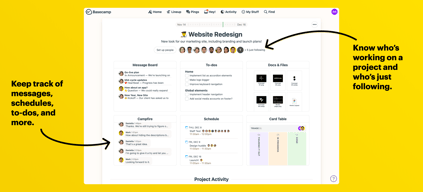
Basecamp has evolved as a project management platform since its launch in 2004 but its mission to help remote teams stay organized, productive, and efficient remains. One new feature that Basecamp recently added is called Basecamp Hill – a visual representation that divides the component of a project into a phase of uncertainty, unknowns, and problem-solving (uphill) and a phase of certainty, confidence, and execution (downhill). This is on top of Basecamp’s core features which include a Message Board, To-dos, Calendar, Documents and Files, Group Chat, and Automated Check-ins. It’s a top-down and bottom-up platform for everyone in a business or organization – from proprietors and C-level executives to project managers and individual team members.





| Capabilities |
API
|
|---|---|
| Segment |
Small Business
Mid Market
Enterprise
|
| Deployment | Cloud / SaaS / Web-Based, Mobile Android, Mobile iPad, Mobile iPhone |
| Support | 24/7 (Live rep), Chat, Email/Help Desk, FAQs/Forum, Knowledge Base, Phone Support |
| Training | Documentation |
| Languages | English |
Basecamp Pros and Cons
- Excellent for schedule and to-do list management
- Automatic check-ins and group chat for remote work
- Helpful message board
- Useful for finding crucial documents
- Easy and customizable environment
- Requires third-party integration for time tracking
- Features need to be a bit more flexible to achieve better functionality

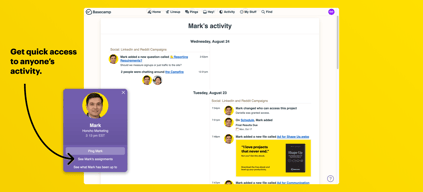
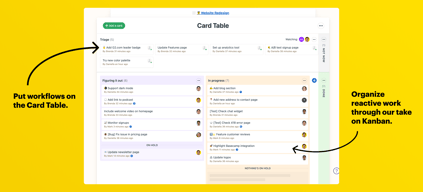
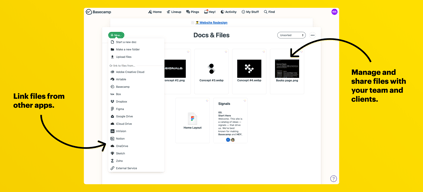
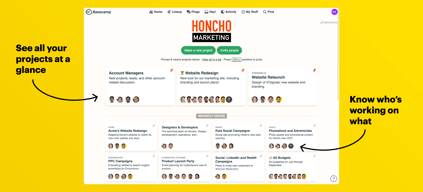
Compare Basecamp with other popular tools in the same category.
I love that Basecamp is a one stop shop for all our team needs to send messages, files, manage projects, share results, and bring our team together online.
I only have one issue with Basecamp and it's in the weeds of setting up a to-do list. There is no option for setting up a weekly or monthly or daily recurring to-do and I have a lot of those. It would be helpful to be able to add this type of task on the list and then set it up as recurring instead of having to continually add it to a daily list.
Basecamp has brought better efficiency within our team as it acts as the main portal to communication and messaging instead of working through a long list of emails.

Basecamp seemed to me to be an effective marketing management tool as it allows us the possibility of accessing each of our projects and favours the fact that it allows us a fluid flow of information between users.
To tell the truth, it is little or nothing that I question to Basecamp since it has been of great utility. As time goes by, all software is updated and improved, the same should happen with basecamp, because in my opinion, this software should operate without the need for Internet access.
Something we have been able to solve is the time factor. With the good use of this tool, the exchange of information can be done in real time, all the issues related to the projects in execution, even if we participate in different places.
The most helpful part of Basecamp is the check-list and the ability to assign specific tasks to other teammates.
Basecamp is a little hard to maneuver at first, but after a couple uses it is easier to locate the desired document/dashboard.
My team and I are strategically planning an executive report for a nonprofit organization.
It makes tracking projects and people a bit easier.
There isnt much that I dislike about Basecamp, If there was a way to automate certain parts may make for a better service
helps keep track of teams that are involved in multiple projects
I liked how easy it was to communicate with a large group of people on one project.
I didn't like how you could only assign tasks to people in one area of the program.
We used basecamp to collaborate on a research project with multiple team members. We had members from the research lab, university, and Boston Hospitals all working on one project. There were many opinions in one group and basecamp allowed for us to communicate effectively and in an organized manner.
Basecamp provides an easy to use platform as a hub for all information on a project.
If I don't check basecamp regularly I may miss if someone uploads a new document.
Basecamp has been a great resource for solving our communication needs throughout our teams. Many projects of ours includes team members in different countries. This platform provide a space to make quick notes, provide feedback, and house relevant documents.
I like the fact that clients and colleagues can all integrate work and communicate efficiently.
The software is quite expensive. The software is quite basic.
I am improving time keeping skills and team communication efficiency.
I love that I can stay organized and focused on what I am supposed to be working on according to what day it is and keep track of my team's progress.
I wish that there was a faster way to get back to a to-do list after you checked something off as done.
We are solving our problem of having paper lists with info on them being lost, instead, we use Basecamp Docs and it's all in one place for your team!
I like the threads are super easy to access!
Great software! Not much to dislike here!
I can go back very easily and see when an update was implemented which helps me to back track reporting and timing of optimizations!
Basecamp is a very easy platform to use with cross-functional teams for project management.
I didn't have any preliminary training, so I wasn't able to use all the functions.
I have used Basecamp to upload and share project documents with different team members.

The thing I like the most about base camp is the to do lists, this allows me to organize all the work that needs to be accomplished and delegate this down to my team, it allows me to assign tasks and set due dates, and will follow up if an employee slips up and goes overdue on a task. I really enjoy the trial and the free Verizon that will allow me to learn the product before I decide to buy.
Mainly don't like the 99 dollar fee a month, that is really steep unless used in a big corporation, but when used in small business that could cut into my profit margins. The File storage system can make me feel uneasy sometimes due to security, Im a IT Sec professionally and would like to know more about how they keep files secure.
This allows me to have real time chat with my company if we are not in the same location, checking in is useful to track hours. and the to do lists I believe is the best because it really drives productivity
Basecamp was very useful for bringing people together and allowing them to share important information with the the rest of the organization. Before my organization used basecamp, we communicated through a confusing web of emails and people were always complaining about missing information and being left off of an email list. With basecamp, all of the necessary information can be organized in one central location.
The only issue I have had with basecamp is sending private messages on the mobile app. This gave me a number of errors. I never had to deal with these errors on desktop.
We have a lot less confusion and frustration in my organization when it comes to keeping everybody updated with important information.

I like the very well-organized collaboration features on this website. I can assign tasks or be assigned tasks and keep up to date on them automatically, plus see my schedule in one click. Its interface is extremely user-friendly, and it's pretty much self-contained--there are messages, notifications, calendars, project descriptions, team member lists, and more all within the site/app.
It's not very useful to use Basecamp on my own, although I could really use the organizational features by myself for my own, individual and self-contained projects. It feels like I am forced to add other team members in order for the site/app to be useful.
I have used Basecamp before to respond to employers' project guidelines, to keep up to date on assigned group tasks, and to delegate work to others. I use it now mainly for the integrated calendar (my Google calendar is too hectic).

It has a simple, intuitive layout and it's very orderly. Easy to stay organized and check down the list.
Would like to see more capabilities for customizing personal dashboard. Such as, I have 10 things due by Friday and I'd like to organize them by day throughout the week to keep my workflow optimal.
Keeping my tasks in front of me and organized in a simple way.
I really appreciate how Basecamp is organized with a big picture dashboard and then smaller widgets to access portions of the project. I also really appreciate that it is user friendly and easy to use with multiple organizations/agencies with an invite.
I dislike the app more than anything as it is not as easy to access for me as the website is. Really, there are just more button clicks and screens that make the app seem more onerous than the browser application.
I've worked w/ community partners and organizations nation wide to develop technology solutions re: access to legal aid in the elder rural population.

It’s easy to use and I found it user friendly because I was just invited and it just opened and I was able to follow along without training on it.
The fact that it’s slow in loading when you open it’s the worse that can happen in the modern days of applications.
We are a board of directors in a non profit organization where we put items on the list and we work on them independently and report on the app so that everyone can see the progress. It’s saving us time to meet weekly.
Easy to organize and keep notes in separate projects
takes time to ramp up to when you haven't used it before
It was really easy to keep things organized for the greater team so we all had insights into projects
It has streamlined the process of managing numerous projects at one time
The email notifications can get overwhelming. I’d like to have the ability to prioritize what I get email alerts for.
Organizing tasks and team projects
Basecamp is a really good way to manage group projects; in my office we used it to coordinate a digital marketing campaign with our office workers and our graphic designers. it allowed for feedback in real time across various offices.
Nothing! Basecamp is super day to utilize.
As stated previously, we used it to ensure the graphic designers were achieving our visions for our social media marketing campaigns.
I love their notifications and how simple it is to start projects
Requires a lot of manual organizing and setup. Someone has to be prepared to manage the platform.
It helped a lot with communicating between teams with the absence of a project manager.

I like having all files, projects, customers in one place.
I have no complaints at this point. It has been amazing for me and my team
It is awesome to keep track of who is doing what, and when. All activity is logged into Basecamp.
Basecamp is useful because it allows the team to easily communicate with our clients. We can share files and get quick feedback shared with everyone involved.
Long discussions can sometimes be overwhelming, lots of emails sent of every update made.
Everything can be found in one place and accessed by our clients if given the authority. Takes away the need of emailing back and forth.
For me it is much more than a project management tool ... it helps me to be much more organized and productive together with the team. I speed up the time having everything organized.
It takes several years with the same interface, I would change it and make it much more intuitive and modern..
I save my time and have everything better organized.
Basecamp is a program that allows you to manage multpiple branches at the same time and you get your own mini website to post dates and to allow other users to manage things that need to be done
I dislike that there are not that many customization options and to allow users to hide things from users that dont need to see certain things and maybe a little better database
Work time, less time to manage,easy group management very fast good program
I like the real-time email updates when someone has made a comment or added something in a discussion of a certain project.
When you open a project, it takes you to the very beginning of that discussion instead of opening it on the newest comments.
It has made it easier to get projects completed without having to have sit down meetings with our design department. It can all be done right from the computer.
I like to be able to keep my tasks managed.
I wish it could make a ping noise when someone messages me. I would also like to open more tabs within the app.
Task management.

I liked that everyone involved in the project can see the notes/messages
It seemed that I didn't always get a notification of new messages, but that could have been user error within the settings.
We used Basecamp when implementing a marketing automation platform
Has great features to keep clients, projects, and users organized.
No more time tracking feature available.
Managing projects and timelines. Keeping project and client files stored in one place.
I like how I can be a part of different departments and have all the tasks in one place that I need to complete.
The only thing I would change is having more reminders sent after the tasks is not completed.
Keeping track of tasks I have accomplished as well as realizing what I still need to finish.

Since every individual at my company has their own way of completing a different tasks such as mobile app development, ecommerce development, and more! They are able to collaborate with other team members more efficiently. Prior to using Basecamp, they would have to email files to each other and sometimes they were not sure who was taking care of what whereas the app gives them the opportunity to see exactly who is doing what and what have been completed.
To be quite honest I have been a long time Basecamp user and the initial dashboard was atrocious it was not user friendly, but they have since upgraded and I have no major complaints. I think there is some room for improvement with the dashboard in terms of design.
There are so many problems this application has been able to solve for me and my team but the primary issue it has solved was the fact that it eliminated the daunting task for team project members to figure out exactly what has been completed.