
Unclaimed: Are you working at Basecamp?

Basecamp Reviews: 4.1/5 — Solid Choice
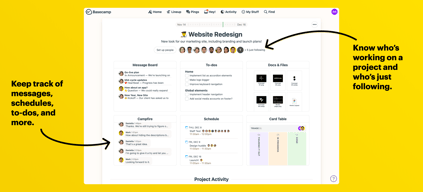
Basecamp has evolved as a project management platform since its launch in 2004 but its mission to help remote teams stay organized, productive, and efficient remains. One new feature that Basecamp recently added is called Basecamp Hill – a visual representation that divides the component of a project into a phase of uncertainty, unknowns, and problem-solving (uphill) and a phase of certainty, confidence, and execution (downhill). This is on top of Basecamp’s core features which include a Message Board, To-dos, Calendar, Documents and Files, Group Chat, and Automated Check-ins. It’s a top-down and bottom-up platform for everyone in a business or organization – from proprietors and C-level executives to project managers and individual team members.

| Capabilities |
API
|
|---|---|
| Segment |
Small Business
Mid Market
Enterprise
|
| Deployment | Cloud / SaaS / Web-Based, Mobile Android, Mobile iPad, Mobile iPhone |
| Support | 24/7 (Live rep), Chat, Email/Help Desk, FAQs/Forum, Knowledge Base, Phone Support |
| Training | Documentation |
| Languages | English |
Basecamp Pros and Cons
- Excellent for schedule and to-do list management
- Automatic check-ins and group chat for remote work
- Helpful message board
- Useful for finding crucial documents
- Easy and customizable environment
- Requires third-party integration for time tracking
- Features need to be a bit more flexible to achieve better functionality
Compare Basecamp with other popular tools in the same category.
I like the options of connecting the entire team or just certain members. I like the tracking features and storage for documents and message history. Receiving the messages in my regular inbox, without needing to login was also really helpful and sped up the communication process.
Nothing really. It worked great for us and we didn't experience any issues.
We worked with a website developer and were able to connect as needed and they could respond quickly, all via remote access. It helped us manage our project, keep track of unfinished tasks and what was assigned to us. The communication and project management features helped us build a beautiful website from several physical locations.
I LIKE IT SO MUCH AS IT IS A COMMUNICATION SYSTEM WHERE IN THE COMPANY WE CAN COMMUNICATE INTERNALLY AND EXTERNALLY WITH OTHER COMPANIES
WHAT I DON'T LIKE A LOT IS THAT THE ENTRY TRAY OF MY MAIL IS ALWAYS FULL
COMMUNICATION ERROR AND WE SOLVE IT WITH THIS SOFTWARE WHERE WE ALL PUBLISH WHAT WE NEED TO CHANGE OR SHARE WITH OTHER USERS
The retention of the project history and attachment retention.
It took my a couple user sessions to understand how it worked.
Communication with several individuals from the marketing company we use. The "paper trail" is super helpful.
I like how the startup gets straight to the point.
The downside of basesisde is the software starts to slow down a little or glitch.
It’s help us all learn the software and cut time when we’re helping customers
It's very user-friendly and not overwhelming
Sometimes the communications (emails every time someone responds) can be daunting. Though I'm sure this is something that can be updated in the settings
Multi-department projects. It's an easy way to house all information so all interested parties can refer to one place when going through a change or company-wide project.
Basecamp is great for content creation and campaign management. At my client-side job, we have a lot of different campaigns running concurrently as well as editing workflows and small action items that need to be kept track of. Basecamp makes organizing it all very simple and efficient. It's also great for assigning different coworkers with their assignments and creating To-Do lists that are helpful and save you time. You will save time, better manage projects and timelines, organize priorities better, and have better team collaboration with Basecamp for the simple reason that it's functionalities are all meant to promote team work and efficiency.
The order projects go in is automatically chronological so it's not always the best when we need higher priority stuff to show up first and sifting through things take a few extra unnecessary seconds. It's not too bad though. It does take a few weeks of onboarding and personal use to get used to all the features it offers, but after that it's very intuitive and you start to learn as you go.
Keeping track of assignments and individual responsibilities is made easy with BC. It also solves editing workflow issues and puts everything in organized flows so things aren't mixed up or mislabeled. It's great for advertising, public relations, or really content creation job position where you have multiple people working on one project and you need it to be organized.
User-friendly, ease of sharing and notifying
Projects tab search functionality- we have a ton of projects listed in this section, and it can be challenging to try and find a specific one. For example if you don't scroll down at least halfway on the project page, the search function won't even work. While scrolling can help, sometimes it still won't generate the right list and you end up just having to scroll and scroll until you find what you need.
Marketing campaign asset management for creation, review and approvals. The main benefit is the ability to keep everything in one place, and speed up the entire creative request and approval process.
BaseCamp allows our law firm to organize projects by client and project type, and then communicate/share files with other attorneys and clients within those projects. It allows us to calendar important due dates, assign to-dos, and track our hours billed. Overall, it is great for our law firm.
What I dislike about Basecamp is that the 'sharing email' that you are supposedly allowed to CC on communications to have those communications appear in the Basecamp project can sometimes be shoddy. I also wish that there was a way to customize milestone reminders (right now it reminds you two days before a milestone is due, whereas sometimes I'd like the remind on the day of something needs to be done).
Problems Solved = Client organization. The idea is that all communications, files, documents, etc. are all located in one place so someone unfamiliar with the project can get caught up if they are brought onto a project. Benefits = All in one secured extranet for us to communicate with each other and clients.
I liked best that all users no matter their tech skill level, could easily use the platform.
The mobile app wasn't as easy to navigate.
Event planning for a festival
I love that everyone from our team can work on various projects together. I also love the calendar feature where I can set daily/monthly/yearly reminders for myself and the check in feature which we use internally and for clients.
The only thing I dislike is that there isn't a way to go back into your Pings and search for a specific instance of something said. Often in big group pings, things can get lost.
I cannot imagine tracking progress and managing tasks any other way. Basecamp makes it so incredibly intuitive. I love using this platform.
This was a really cool software that I used by one of the people I was working with was using it. He was able to share graphic content for a new logo design and it made working together much easier since we were not at the same place.
I dont have anything I dislike. I havent used it enough to really dislike anything. It was a greater program.
We were able to continuously edit and create the company logo we wanted by sharing files on this system. It worked great.
I keep all of my big progjects in basecamp. it allows my entire team to make additions and see updates if needed.
finding old info is sometimes difficult. being able to sort or setup sorting would be great.
keeps documents with the project items- that is the biggest win for our group.
I love that basecamp holds everything I need across the company in one place
When getting email notifications from Basecamp replying can be difficult
Storing and keeping information
It has extensive list of tools that allows you to administer in a very simple way the in wich I can approach a project and also culminate them without problems. The message board works great because it allows you to group a number of emails without having to manually write the CCs corresponding to the team members appropiate to each project. What fascinates me the most is the interface which its desing is prctically like a social network, being this friendly for a any user, helping it in the understanding of this software
It has slightly expensive prices for small business that start in their growing processes, however it is worth it for the price for which it is paid. It would also be a good integration with billing for other CRM products so it would be easier to tell everything at hand. In other words it works well and has good tools for good project management and team communication so I don't have any more negtive ideas about this product.
The time it took us manually to manage all the paperwork to manage an extensive project has been drastically reduced thanks to Basecamp, positively helping my work team and myself allowing us to simultaneously coordinate when excuting a project. In addition to this, it possible to upload storage manager, saving costs and summarizing all our work in one.
The ease of working together with a team is improved by the features of basecamp.
Nothing sticks out to me as a flaw with basecamp.
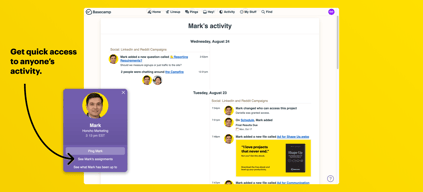
It's easy to see where each user is at during a shared project.
I like that basecamp links to our emails for reminders and alerts.
I don’t like that my basecamp 2 is an option for me because it gets confusing now that I’m using basecamp 3 more.
Using the to do lists helps keep everyone on track and organized. It helps because emails can get lost in the mix.
Basecamps ability to store files, instant message/ping colleagues as well as solicit feedback is great as it is held in one central area. Cuts down on email communication significantly.
Sometimes it feels like when organizing, files can get buried or require a lot of clicks to get where you want to go.
Mass email and communication between Home office and local offices nationwide.
This software really helps get things done in a timely manner. Everyone knows what the others are doing and what else needs to be addressed. AND you can make a podcast. Thats a big deal right now. This software is an amazing way to help each other get the job done
I could not see anything that I didn't like.
Basecamp solves the issues of not knowing what part of a project is incomplete and what part needs more attention. Everytime I go on it I find something new and some really helpful suggestions
This is a high performance company I love the return time
I love you and everything I like the company
They are helping my business expand
I really like the ease of use that this tool has. Practically no more experience or tutorials are needed to learn how to use it. The internal chat is a great advantage. It is also an excellent option that allows teamwork and solve management problems quickly. I really quite like this software. I was originally looking at replacing this at a prospect who was using basecamp with teams but I have to admit that the software is fast, efficient and easy to use. There doesn't look like there is a Gantt chart functionality or ability to cost projects but the timeline and campfire sessions are pretty cool and not really available in Teams. I also like the automatic check in's. The sorting and searching features are great and it works better Teams to assign groups of people tasks. I would think that this software is excellent for a small business with a team of 5-8 people.
I don't think this is software for large or enterprise organizations. Companies of this size will have more formal project management tools, like Office. Basecamp seems to isolate the team from the rest of the organization and would not provide the visibility required for upper management. It wasn't easy to find information on the internet about this product (tips, tricks, how I setup projects, etc.) but it wasn't difficult to figure out either. I would think training a large organization to build consistent usage of the software would be hard.
Create project management, tasks, to-do's and conversations in particular if you don't have or want to purchase a $15/month office software for everyone.
How often have you heard the phrase that the left hand doesn't know what the right hand is doing? Basecamp helps to ensure that you know the status of what your team members are working on and keeps every team member on track.
It's hardly something I "dislike" but because they offer so many features you'll want to spend a little time familiarizing yourself with them.
It used to be very time consuming to try and obtain status updates from other team members. With Basecamp keeping track of where everyone is on their assigned projects has never been easier!
I've been using Basecamp for about ten years. The interface is easy and so clear. I can move tasks around and track them on a calendar. I've tried other project management tools and this one is the best so far.
It's not Basecamp's fault, but getting client buy-in to use the tool can be difficult.
I mostly work on developing content for websites. It's so easy to tag a client, a graphic designer, a photographer and keep everyone on the same page.
I use Basecamp to manage my teams daily activities, one of the biggest positives is the app. I can be sitting in a meeting and assigned to-do to my team one my phone.
They have a hill chart function that can be activated by lining up to-dos or milestones in order. I find it difficult to get everything lined up to actually tracked how a project is progressing.
One mode of communication is the biggest problem Basecamp solves for me. Between the campfire chat function, the message board and the automated update emails I can eliminate the needs for multiple systems such as Skype, Email and a to-do list.
I really like everything about basecamp. I've used it for a few different jobs before and its great how you can communicate to everyone or someone privately. I also enjoy how you can submit project files through there or directly make a document on there!
The only thing I dislike is that you can comment on literally everything so sometimes its hard to figure out where people are talking or what they are commenting on or referring to when they tell you to fix something on there.
Basecamp benefits bigger companies. I've used it for the real estate and photography industry and there were different benefits I realized in both. In one it was great for team communication and sharing new accomplishments and for the other it was a easy platform to submit all of our work to our managers for review and pick up events.
The ability to write out my to do lists in a quick fashion. Also it is helpful to have the visual representation of my workload, too.
I don't love the lack of more in-depth project management options. Such as a gantt chart, or the ability to run recurring tasks.
I am definitely solving the problem of forgetting important tasks, as well as tracking the progress of big projects. The one major benefit I have found is the option to add clients to certain boards and projects. This has improved my client communication, too.
The boosting feature is my favorite part.
I wish there were more emojis available.
Working in an agency comes with a lot of departmental back and forth. Basecamp helps our agency save time by getting all the information out to each team member without having to schedule a meeting. It's also nice to have all our account information saved in one spot, rather than hunting down old email chains, etc.
All of your work stays in one place. Instead of sending out a mass email, I can use the campfire feature and ask my question among my coworkers.
It was a little difficult to navigate at first but became easier with time.
Communication. Basecamp makes it easier to get to the point with the people you need to communicate with. Instead of it being muddled through countless emails, you can keep it all in one spot.
This app has become an everyday practice to communication between my co-workers and even my media vendor. Recently we also started using Basecamp as a task tracker and it's amazingly useful. Gone are the days of work documents or notebooks with scribbles and notes that we all forget about. This is an everyday organization tool for all the projects going on.
So far I have not found things I don't enjoy about the platform. The only thing I wish they didn't change was the logo recently lol. But that is minor.
Communication between co-workers, open dialogue and personal task management.
I like that I have access to everyone's projects. As a production manager I need to be able to access all project art and notes that pertain to the order
The search button is not always easy with recognizing code titles (IE : KK1234567)
We are able to solve many communication issues and have made it easier for everyone to have access on one platform.
Basecamp provides employees tools for success.
Everything is great, great tools for new hires.
There are no problems. I have use it for employee information.