

Unclaimed: Are you working at ClickUp?
ClickUp Reviews: 4.7/5 — Highly Rated
More than just a task management tool, ClickUp is a 360-degree productivity suite that offers functionalities that expand and scale together with a business’ evolving needs. With more than 15 views and over 35 apps, it allows teams of all sizes from across different disciplines to set strategic project goals, manage workflows, collaborate, iterate and optimize, and track progress. There are unique features for every team such as bug tracking and reporting (engineering), sales automation (sales and marketing), and employee onboarding (HR) just to name a few. ClickUp comes pre-loaded with templates that can be utilized out of the box while offering rich customization options.

| Capabilities |
API
|
|---|---|
| Segment |
Small Business
Mid Market
Enterprise
|
| Deployment | Cloud / SaaS / Web-Based, Desktop Mac, Desktop Windows, Mobile Android, Mobile iPad, Mobile iPhone |
| Support | 24/7 (Live rep), Chat, Email/Help Desk, FAQs/Forum, Knowledge Base, Phone Support |
| Training | Documentation |
| Languages | English |
ClickUp Pros and Cons
- Customizable dashboards
- Features and functions best suited for solopreneurs and small teams
- Comprehensive freemium plan
- Built-in chat feature for both private and public communication
- Offers extensive features with the option to customize under the free plan.
- Onboarding process can be complicated
- No built-in video conferencing feature
- Additional customizable features will require an annual fee
- Platform can easily overwhelm new users


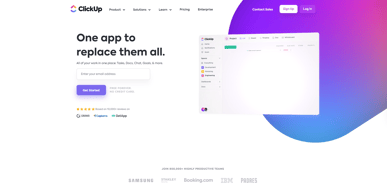
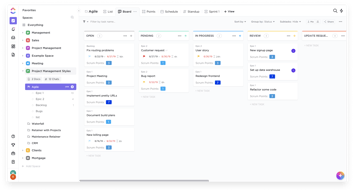
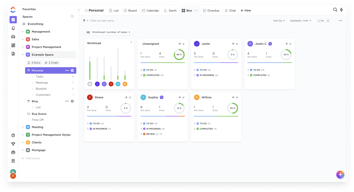
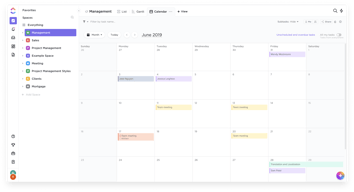
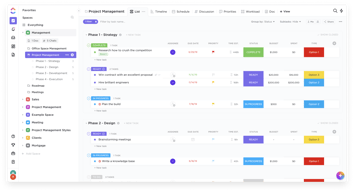





In the realm of project management tools, ClickUp has emerged as a comprehensive solution that caters to a wide range of users. From freelancers managing their own tasks to large corporations coordinating complex projects, ClickUp aims to simplify and streamline the process. But does it deliver on its promise? In this review, we’ll take a close look at ClickUp, dissecting its features, user interface, support, and pricing structure. Our goal is to provide an unbiased and thorough examination of this software, helping you decide if it’s the right fit for your needs. So, without further ado, let’s delve into the world of ClickUp.
What is ClickUp?
ClickUp is a cloud-based productivity platform that aims to centralize all your work and tasks in one place. It’s a comprehensive project management tool designed to help individuals and teams plan, organize, and collaborate on projects.
The software offers a wide range of features including task management, time tracking, goal setting, document sharing, and more. It also provides multiple views for project tracking such as list view, board view, and Gantt chart view, allowing users to customize their workspace according to their preference.
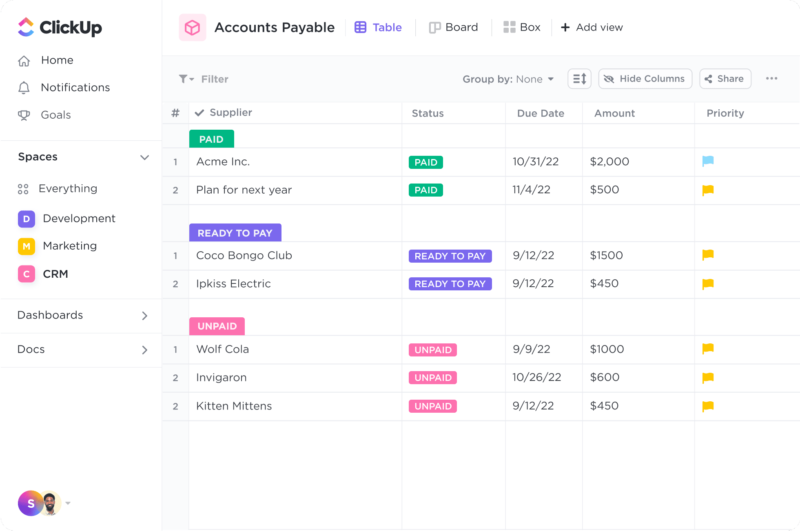
ClickUp Dashboard
ClickUp’s target users range from freelancers and small businesses to large corporations. It’s designed to be flexible and adaptable, catering to different industries and project types. Whether you’re managing a marketing campaign, developing software, or planning an event, ClickUp aims to provide the tools you need to keep your project on track.
In essence, ClickUp is more than just a project management tool. It’s a productivity platform that seeks to eliminate the need for using multiple, disjointed tools by providing a unified, all-in-one solution.
ClickUp Core Features
ClickUp is packed with a variety of features designed to enhance productivity and streamline project management. Here are some of its core features:
- Task Management : ClickUp allows users to create, assign, prioritize, and schedule tasks. You can also set dependencies between tasks, making it easier to manage complex projects.
- Multiple Views : ClickUp offers several views for managing your projects, including list view, board view, box view, Gantt chart view, and calendar view. This allows you to visualize your tasks and projects in a way that suits your working style.
- Time Management : ClickUp includes time tracking features, allowing you to monitor how much time is spent on each task. It also includes scheduling and capacity management features, helping you to plan your time effectively.
- Collaboration Tools : ClickUp facilitates team collaboration with features like real-time chat, comment assignment, document sharing, and in-app video recording. These features make it easier for teams to communicate and collaborate on tasks and projects.
- Customizable Workflows : ClickUp allows you to create custom workflows that match your team’s processes. You can set up statuses for tasks and move them through different stages as they progress.
- Integrations : ClickUp integrates with a wide range of other tools, including Google Drive, Slack, GitHub, and more. This allows you to bring all your work into one place, reducing the need to switch between different apps.
ClickUp Pricing Plans
ClickUp offers a variety of pricing plans to cater to different user needs. Here’s a breakdown of their tiered pricing structure:
ClickUp offers Free, Unlimited, Business, and Enterprise plans — see ClickUp pricing for current rates.
The Free plan is a great starting point for small teams or individuals who want to try out ClickUp’s basic features. The Unlimited plan offers more flexibility and customization options, making it a good choice for growing teams. The Business and Enterprise plans offer advanced features and increased automation, making them suitable for larger teams or businesses with complex project management needs.
ClickUp has since launched ClickUp Brain, an AI assistant integrated across the platform for writing, summarization, and project insights.
Remember, it’s important to choose a plan that aligns with your team’s size, budget, and requirements. You can always start with a lower-tier plan and upgrade as your needs evolve.
ClickUp Competitor & Alternatives
ClickUp competes with tools like monday.com, Trello, and Asana. Each tool has its own strengths and weaknesses. ClickUp stands out for its wide range of task display views, real-time chat, and in-app video recording features. However, other tools like monday.com and Asana also offer robust features, although they lack real-time chat and in-app video recording. Trello, on the other hand, is a more budget-friendly option, but it lacks time tracking and budgeting tools.
ClickUp FAQs
Is ClickUp’s free plan really free?
Absolutely! ClickUp’s free plan is indeed free, with no hidden costs or strings attached. This plan offers a robust set of features including unlimited tasks, unlimited members, and up to 100MB of storage. It’s a great option for individuals or small teams who are just getting started with project management software.
While the free plan does have some limitations compared to the paid plans (such as storage limits and access to premium features), it still provides a comprehensive toolset for managing tasks and projects. So, you can definitely start using ClickUp for free and then decide if you want to upgrade to a paid plan as your needs grow.
What does project management software do?
Project management software is a digital tool that helps teams plan, organize, and manage tasks. It facilitates collaboration, scheduling, resource allocation, and progress tracking, making project execution more efficient and streamlined.
Bottom Line – ClickUp
ClickUp is a robust and versatile project management tool that can significantly benefit businesses of all sizes. Its comprehensive features for task management, collaboration, and project tracking make it an excellent choice for teams aiming to streamline their workflows and enhance productivity. While it has a rich feature set, it’s designed with user-friendliness in mind, making it accessible even to those new to project management software.

Compare ClickUp with other popular tools in the same category.
The most robust project management tool I've come across, and the price makes it an obvious choice for smaller teams. As an online business manager, I've implemented ClickUp with most of my clients and it has had an incredible positive impact across the board. The breadth of features allows me to customize it based on each team's needs so well that I've stopped using and recommending other PM tools!
The desktop app can sometimes be glitchy or not reflect updates right away, but a refresh seems to always fix things.
ClickUp helps me get everyone on the same page and set clear expectations, timelines, deliverables, etc. Automations save us all time and brain space. It's an essential daily tool for my business and for most of my clients.

The amount of free resources without us having to buy a license. This is so amazing that it makes me look at ClickUp as a future investment in paid licenses. Better than any competitor I've tested.
Community very focused on foreign audiences. I still see the poor community in Brazil. More Brazilian representatives on the platform.
I use it to manage my projects in detail in more than one company. I manage about 10 people in all. It makes me much more productive and the company's results have improved...
I love the great magnitude of features and functionalities that allow users to be able to personalize and optimize their productive workspace, best suited to their goals and desired outcomes. There is a great support team behind this product, always listening and well-receptive to feedback.
I wish the mobile app could match up in some ways in performance to the desktop. I love the Goals feature that I have set up via the browser/desktop. It would be great to have prominent features like these also mirrored on mobile.
What problems aren't they solving? There are always new updates and enhancements being released. So it is wonderful to see that there is an active support team behind the bettering of this product. All enhancements and solutions so far have been of great benefit to my work environment.
It's straightforward to use. It has too many options, so we can use this in any way.
No, it's working well for me. Some times it's a bit hevy to load
It's solving the problem of task managements

ClickUp stands out for its remarkable versatility, catering to a wide range of industries and teams, making it a perfect fit for project management in various domains. Whether you're organizing a marketing campaign, handling software development projects, or simply managing personal tasks, ClickUp possesses the adaptability to meet your unique needs. The platform's user-friendly interface is a major highlight, ensuring effortless navigation and usage. Its clean design and well-structured layout enhance productivity by minimizing the time spent on learning how to operate the tool. ClickUp's intuitive nature enables even novice users to quickly familiarize themselves with the platform and effectively manage their projects right from the start. One of ClickUp's key strengths is its extensive range of features designed to streamline project management. From assigning tasks and creating timelines to implementing custom workflows and automations, ClickUp provides a comprehensive toolkit that simplifies even the most complex projects. Furthermore, its seamless integration with various third-party apps amplifies its functionality and adds an extra layer of power to the platform.
Overwhelming for Simple Projects: ClickUp's feature-rich nature, while beneficial for complex projects, may feel overwhelming for smaller or simpler tasks. Users who require a basic task management solution might find the abundance of options and customization possibilities unnecessary, potentially leading to a steeper learning curve than desired. Complexity of Customization: While ClickUp allows extensive customization, configuring and fine-tuning the platform to match specific requirements can sometimes be a complex process. Users with limited technical knowledge or those seeking quick setup might find themselves needing assistance or investing additional time to achieve the desired customization level. Integration Challenges: Although ClickUp offers integration with various third-party apps, users might face challenges in integrating certain niche or less common tools. While the platform provides a range of integration options, it's worth confirming compatibility with specific applications or services beforehand. Mobile App Limitations: While ClickUp provides a mobile app for on-the-go access, some users have reported limitations in functionality compared to the web version. Users heavily reliant on mobile usage may find certain features or customization options less accessible or less optimized for their needs. Pricing Tiers and Features: ClickUp offers multiple pricing tiers, each with its own set of features and limitations. Users seeking specific functionalities may need to carefully review and compare the available plans to ensure they have access to the required features without exceeding their budget.
Disorganized Workflows: ClickUp solves the problem of fragmented or disorganized workflows by providing a centralized platform. By consolidating tasks, communication, files, and deadlines in one place, ClickUp streamlines project management, reducing the need for multiple tools and improving efficiency. Lack of Collaboration: ClickUp fosters collaboration among team members, especially in remote or distributed teams. With features like real-time communication, file sharing, and task assignment, ClickUp facilitates seamless collaboration, enabling effective teamwork and knowledge sharing. Effective Task Management: ClickUp addresses the challenge of inefficient task management by providing robust features such as task assignment, due dates, reminders, and priority settings. These tools empower users to organize, track, and prioritize tasks effectively.
ClickUp was the most affordable option I could find for a project management system that included time tracking. As a freelancer, I don't have much of a budget for tools so everything I use needs to solve multiple problems. The template system is great. I also love that they are always improving and adding more features. The automation saves me a lot of time that I can spend on my clients instead of manually updating tasks.
There are a few features of ClickUp I can't use because I don't have a high enough tier account - specifically the time reports. Not being able to see how much time I've spent in a particular space in a given time period is extremely frustrating and I had to create an elaborate workaround to solve it. I really wanted ClickUp to be the perfect tool for me but I can't afford to pay three times as much just for one feature.
ClickUp helps me keep track of all my ongoing projects across multiple clients. It helps me keep everything organize and ensure I deliver the results my clients hired me for in the first place.
The "embed" function, because it allows me to use other sites without leaving ClickUp.
Sometimes it can be a little slow, but it's ok.
ClickUp allows us to look at the same process with different views.
There are so many ways this app can be used. It's incredibly customisable once you get used to what's available.
The smallest unit of planning content is called a "task" whereas, this can be used in a variety of ways, not only as a task (which is great). This could be renamed something like "item".
As a project manager, I do diverse work, and clickup is able to contain all of these diverse projects in the one place, because I can use clickup differently for the different projects. The benefit is efficiency and sanity!
Broad-ranging potential for customisation. I use ClickUp to organise and control many aspects of my professional and personal life.
Reporting has improved, but formatting options are limited.
It solves difficulties in managing a significant workload regarding task completion, project control, and delegation. Life without ClcikUp would be chaotic and unproductive.
I love ClickUp's very flexible interface. You can design it how you need it and how your company, task, and position require you to use it. :) I have searched for similar apps, but ClickUp suits my team's needs.
Our office in PH is a satellite office of our campuses in Australia, and I can only use the free forever account for my team, I just dislike that exporting my team's record is only limited to 5 export. I used my first few ones as practice and trial on how it would look like on spread sheet. but then again, it is already counted as one.
My team loves the ClickUp interface. They also like seeing their everyday progress at work, specially that I have newly joined members of the team, they really get challenged to work on their numbers
Task management and automation and alerts
Pricing is heavy for small medium sized businesses
Complete task management and getting alerts
Search bar is easy, easy to organise, tons of videos, user friendly, free version allows great options, great collaboration with partner!
There's so many options I don't know that could easily help me create an optimal organization. Hard to ask for something if you don't know how to phrase it...
Regrouping all information that we gathered individually in a way that we can consult rapidly and reminding ourselves of all ideas we had along the way

Features Flexibility and powerful management of single phase of project
Nothing yo say, nowaday. I'm using it by 5 months
Team management of complex processes
I work as a consultant with multiple clients and I always introduce Clickup as the first step towards a more efficient collaboration internally and with 3rd party service providers. Regardless of the business mode and team appraoch, clickup is always fit.
Since I have multiple clients, each has a clickup account. I cannot log in to them all at once and switch as needed. I need to log out/in multiple times and if I have 5-7 meetings in a raw that can be somewhat annoying. But if you have one account for your own company then you will not face this issue.
I like its one ecosystem for all needs and all its features are integrated together, especially the document integration with tasks and the multi-level chats . I don't need to jump between tools to handle any project.

Taking in tasks from different departments in our organization and having them properly assigned to the correct teams is a massive time-saver for us. The capability to add watchers, comment on tasks, and just being able to provide different kinds of information or files directly to the task itself enables us to streamline our processes.
Sometimes the UI is not working unless we refresh the page, it is just a minor inconvenience, but it is not a deal breaker for me. I hope they improve the UI responsiveness in future updates.
We are operating a department that does different types of services for various departments in our organization, and being able to collaborate seamlessly with the other people in the company enables us to become leaner and reduce the waste in our processes. We save a significant amount of time doing admin tasks with the help of ClickUp's automated systems.
One of the most useful aspects of ClickUp is its comprehensive task management capabilities. It allows you to create, assign, and track tasks effortlessly. With features such as due dates, priorities, subtasks, and task dependencies, ClickUp helps you stay organized and ensures that nothing falls through the cracks.
While ClickUp offers a comprehensive set of features, the platform can have a bit of a learning curve, especially for new users. The extensive customization options and advanced features may take some time to fully grasp, requiring additional effort to familiarize yourself with all the functionalities.
ClickUp eliminates the need for multiple tools and platforms by providing a centralized hub for task management. It allows you to create, assign, and track tasks in one place, reducing confusion and improving efficiency. Improved organization and visibility: With ClickUp, you can organize tasks into projects
I have been utilizing ClickUp extensively for both internal projects and client management, specifically for project management purposes. ClickUp has truly empowered me to construct innovative and user-friendly workflows that cater to the unique requirements of my clients. The platform's flexibility allows me to customize and tailor workflows with ease, ensuring a seamless and efficient process. Navigating through ClickUp is a breeze, thanks to its intuitive interface, enabling me to set up projects, assign tasks, and collaborate effortlessly. The platform's communication features, such as comments and task attachments, facilitate smooth collaboration with clients, eliminating confusion and fostering transparency. With ClickUp, I have gained complete control over my projects, from tracking progress to meeting deadlines, resulting in enhanced organization and client satisfaction. The platform's integration capabilities with tools like Google Drive and Slack have further streamlined my workflow, while its robust reporting and analytics functionalities provide valuable insights into project performance. Overall, ClickUp has revolutionized my project management approach, enabling me to create intuitive workflows and effectively manage client projects. As an active user, I highly recommend ClickUp on G2 as a powerful project management solution. Its ability to build creative and intuitive workflows, along with its user-friendly interface, makes it a top choice for businesses seeking efficient project management tools. By sharing my experience with ClickUp, I aim to provide valuable insights to my peers on G2, helping them make informed decisions based on real user experiences. ClickUp has become an indispensable asset in my project management toolkit, driving productivity, collaboration, and overall success.
One aspect that I would like to see improved in ClickUp is the implementation of feature requests. While ClickUp already offers a vast array of features, there are certainly areas where additional functionalities could enhance the user experience. It would be beneficial if ClickUp could establish a more efficient system for prioritizing and implementing feature requests based on user voting. For instance, if a feature request receives a significant number of votes within a specific timeframe, it would be great to see it expedited and incorporated into the platform promptly. This approach would not only demonstrate ClickUp's commitment to meeting user needs but also ensure that the platform continues to evolve based on the demands and preferences of its user community.
Building systems for my clients! ClickUp is effectively solving the problem of establishing streamlined systems and workflows for my clients' businesses. By utilizing ClickUp's intuitive platform, I can create customized workflows that align with their specific needs, enabling efficient task management, collaboration, and project tracking. This not only brings organization and clarity to their operations but also enhances productivity and ensures smoother communication among team members. Ultimately, ClickUp's ability to facilitate the construction of tailored workflows benefits me by enabling me to deliver comprehensive and effective solutions to my clients, enhancing their overall business efficiency and success.
It's the most rebust tool out there and its very customizable pretty much to any workflow. Dependancies beetwin tasks, ClickUp automations, being able to document processes in the same application, all of this makes clickup the best tool. I tested all of the other tools out there, I was Asana user, Basecamp user, Wrike user, trello user, Monday, etc.. You name it, I tested over 30 most popular tools and ClickUp is the number one.
Maybe adding featuse to not notify me in clickup notifications about tasks changes in case some automation decided to add me as watcher, even if I already 1 time clicked not to notify me about it. Because sometimes notifications will be sent because some automation overrites notifications settings (unsubscribe from notifications from this task). Also sometimes description menu takes little longer to load - like 2-3 seconds. If you can speed task description area to work faster, would be perfect.
having templates that I can use over and over for same product launch process helps me to ensure every time we do same process and wont skip some steps. Also feature dependancies lets me to notify other team members that task is unblocked and its now their turn to do next action item and that now they are the bottle neck. Removes unnessesary communication and makes things turn around faster.
Ability to check on due dates, next/incoming projects, and tasks. Which tasks are dependents on others and my team
A little more automation when it comes to recurring tasks (Dynamic assignees)
Daily tasks, progress tracking for new releases in our platform
I find that the visual aspect of ClickUp is my favorite aspect. I can look at data or tasks in a number of different ways, which really helps me process information. I am also really loving the new AI features within Doc. This one has been a game-changer for me as well. It's saved me so much time!
The only downside i have is that the template center is a little slow to use. I am hoping, though with the 3.0 upgrade that this will be resolved! Looking forward to that!
I have pretty severe ADHD, as well as a reading and writing comprehension learning disability. I have struggled for YEARS, trying to find a task management system that works for me but had no luck. I tried a number of software systems, templates, paper planners, sticky notes and more, but nothing ever stuck. ClickUp allows me to visually organize my tasks and view them in different ways that keeps me from getting overwhelmed or confused. I have so many other wonderful things to say about ClickUp, but I am having a hard time putting those thoughts into words. You guys just rock.

I have tried more than my fair share of workflow companies like ClickUp. My main experience was with smartsheets and Monday.com, and ClickUp is the best use case scenario between both of them. It achieves the complicated functionality that Smartsheets excells in while having more usability and user support than Monday. I love that I can chat with a live human when I need anything from ClickUp.
It has taken a while for me to feel like i have a grasp of the software. I also think you need to start on paper when it comes to hierarchy before you apply anything to the workspace.
ClickUp has allowed our business to move off of excel forms and into a dynamic workflow environment. It allows us to do much more during our practice meetings as well as add collaboration between remote team members.
I've been using ClickUp for over a year now, and let me tell you, it's absolutely fantastic. It's like magic in the way it adapts to your needs and opens up countless possibilities that you wouldn't have considered otherwise. I understand that there have been frustrations within the community, and I have personally experienced some of them. However, I firmly believe that with the release of version 3.0, ClickUp will reach a turning point and become even more magnificent. I want to emphasize that I'm an experienced user who has thoroughly explored ClickUp's features. I've used it to transform outdated, analog company procedures into efficient project management systems. The flexibility and potential of ClickUp are truly limitless. I'm sharing this because I feel that there isn't enough positive content about ClickUp on Reddit. Moreover, I'd be more than happy to help anyone on this platform who may not be familiar with even the most basic aspects of what ClickUp is capable of. Bring it on!
It can feel overwhelming because there are nearly too many features. Although I enjoy the ongoing improvements and some of the features, it sometimes feels impossible to keep up.
The ability of ClickUp to deliver real-time information on project progress is one of the features I like most. Including tools like time tracking.
Click-up has been a game-changer for my team.! We use it uniquely, to manage an ecommerce account from a sales and marketing perspective. The team was struggling to track notes, completion dates, tasks, advertising tactics, and categorization for our entire process. Using Google calendars, tasks, excel sheets (pivot tables) and power-points was inefficient, time-consuming, and not readily adaptable to adjust on the fly. It did not allow for fluid ways to examine our business. We began using Click-Up to track our business - utilizing a project management tool has completely changed how we can share information with our sales team and across all channels within our company. It was a unique process to set up, thinking outside of the box on how to organize our information in a non-traditional way that Click-Up is usually used, but this service has been a true game changer. Click-Up allows us to track critical content changes, an advertising calendar, meeting notes and results, marketing and advertising data as well as sales goals and targets! In the last 6 months, we have been able to track key components of our business, share information with management and pivot our directions where needed. Creating automations to add projects to different lists in one efficient step has also been a huge time saver to allow us to review our business from many different perspectives.
We are still exploring all the features of Click-Up and how we can adapt them to our unique situation. Because we are using it slightly differently than how, for example, our creative departments would use this from a project management perspective, we have to explore and find ways to adapt the system to our needs. There is no perfect guideline how to manage an e-commerce business from a project management perspective. The most complex challenge at the beginning was figuring out notifications for each user. If not set up correctly, users can be inundated with emails to their inbox on content not relevant for them to take immediate action. Once we explored these filters and what each team member needed, it made it much easier to get critical information and flags to review tasks in a timely fashion. We also wish that if we wanted to add a field to all projects we could import the information in to fill each respective field but we can't find a way to do a mass upload when a project template has already been started.
It is solving how to manage our commerce business in a fast-moving and challenging pace that constantly requires note-taking and collaboration between sales, marketing and advertising.
As a dedicated user and brand ambassador of ClickUp, I am delighted to share my personal review of this exceptional task management tool. ClickUp offers an impressive array of features that align perfectly with my preferences, such as organizing tasks by sprints, versatile functions and data fields, task association with multiple lists, collaborative editing, and multi-view capabilities. These functionalities have significantly improved my workflow and productivity. As an ambassador, I wholeheartedly recommend ClickUp to others, as it has become an indispensable tool in my daily routine.
While ClickUp is an effective task management app, there are some drawbacks that I would like to highlight. One aspect is the slow and limited customization options for dashboards. Panel views can be slow to load and offer limited customization, impacting the user experience. Another downside is the automatic reload of the task list. At times, the list refreshes unexpectedly, causing interruptions and difficulties in maintaining focus on ongoing work. This automatic reload can be frustrating and hinder efficiency. Additionally, a notable drawback is the lack of integration with Google Chat. While ClickUp integrates with various other popular tools, the absence of Google Chat integration may limit communication and collaboration for those who rely on this specific platform. Lastly, ClickUp's loading speed can be an issue, especially when there is a significant number of tasks in a list. Depending on the workload, the app may take some time to load, causing delays and impacting productivity. Overall, although ClickUp is a powerful tool, these drawbacks such as slow and limited dashboards, automatic task list reload, lack of Google Chat integration, and loading speed issues can affect the user experience and work efficiency. It is important to consider these aspects before deciding to use ClickUp as your primary task management tool.
ClickUp has been instrumental in resolving various challenges I face in managing my advertising agency. Firstly, it helps me streamline client service by efficiently handling multiple clients' requirements and ensuring smooth communication. Secondly, it simplifies the coordination of diverse professionals and projects by providing a centralized platform for task management. Additionally, ClickUp allows me to consolidate and access important information in one application, eliminating the need for multiple sources. It also facilitates centralized report generation, saving time and effort. Lastly, the ability to share tasks directly with clients promotes transparency and enhances agility in our workflow. Overall, ClickUp has proven invaluable in addressing these key issues and improving the overall efficiency and effectiveness of my agency operations.
We are using your product for about 3 years for various deptartments (implenetations, DEV, integrations, IT, etc.) and we are all happy as we can accommodate all our needs. You constantly keep adding new features, what is a key for us as we are also constantly evolving our needs
Well, there is nothing i would not like at all, so this is kind of hard for me to specify it.
as i am head of implementations, ClickUp mainly helps in terms of planning project portfolio, managing workload and also sharing project views with our customer, so they can be on track
ClickUp is a project management and collaboration tool that offers features designed to enhance task clarity and optimize team productivity. Here's a more elaborate explanation of how ClickUp helps in achieving these benefits: Task Clarity: ClickUp provides a centralized platform where tasks can be created, organized, and assigned to team members. Each task can include detailed descriptions, due dates, priorities, attachments, and subtasks. This level of information ensures that team members have a clear understanding of the tasks at hand, including the objectives, requirements, and any relevant documentation. Workload Visibility: ClickUp offers a workload view that allows you to see the distribution of tasks across team members. This visual representation provides insights into individual workloads, helping to identify any imbalances or bottlenecks. With this information readily available, you can make informed decisions when assigning new tasks, ensuring that workload is evenly distributed and team members are not overwhelmed. Task Allocation: Based on the workload visibility, ClickUp enables you to allocate tasks effectively. You can identify team members who have the capacity to take on additional work and assign tasks accordingly. By distributing tasks evenly and leveraging the available resources efficiently, you can optimize productivity and prevent any one team member from becoming overloaded. Faster Project Completion: With enhanced task clarity and efficient task allocation, ClickUp facilitates faster project completion. When team members have a clear understanding of their assigned tasks and can easily access all the necessary information and resources within ClickUp, they can work more effectively and make progress without unnecessary delays. The workload visibility also allows you to identify any potential bottlenecks or areas where additional support may be needed, enabling you to take proactive measures to keep the project on track. Overall, ClickUp's features support effective task management, workload visibility, and task allocation, enabling teams to work more cohesively and efficiently towards project completion.
ClickUp's performance can be sluggish at times, and it lacks optimal mobile compatibility. Viewing ClickUp on mobile devices can be challenging, and co-editing tasks together may require frequent refreshing to synchronize changes.
You can easily access and view the task list in various formats and perspectives.
It is free. The time track is the most helpful. I appreciate that it is available across devices. One of the best things about this is accuracy. This stands out compared to competitors!
None so far. I did not see something not working well. There is nothing not realized in the solution. Maybe this could be better if it had charts. I would like to see an improvement in the dashboard of each space. Thank you!
ClickUp is helping us solve proper time tracking. The benefits include adequate time tracking and work management, which makes us more productive and helps increase performance.
All in one solution. We don't need any other app to get things organized and done.
Design could be more "beautiful" and UI friendly. Clickup mobile app doesn't give as much clarity as the desktop app.
With Clickup we can see all projects task in one view and have kick overview about it. Things now are much more organized
It has lot of unique features. When we try to buy new project management tool in phug Matrix clickup came first. Lot of new feature and automation tool build inside that.
As of now I like all beacuse we have customise all the project management things towards our organisation. If we find anything difficult we use customise things.
Scrum ban model which helping us to solve many things. When a task is completed it will line with other task we can easily track and take up other one when develoer are free
I love the clear, easy-to-parse graphical interface choices that ClickUp offers. It's also easy to get going with, despite having so many features; you can get going quickly and build up your planning complexity as you go. They also have lots of very clear video tutorials.
I suppose that it can be a bit overwhelming if you are not sure what you want to do with it, but I found that it didn't take too long to lose my apprehension and start to appreciate what it could do for me.
For me, it's "out of sight, out of mind." Having such an intuitive graphical interface is great because I can quickly peruse my goals, projects, and to-do lists. I also find that the dependency function is exceptionally useful for me as it prevents me from skipping a step.