

Unclaimed: Are you working at ClickUp?
ClickUp Reviews: 4.7/5 — Highly Rated
More than just a task management tool, ClickUp is a 360-degree productivity suite that offers functionalities that expand and scale together with a business’ evolving needs. With more than 15 views and over 35 apps, it allows teams of all sizes from across different disciplines to set strategic project goals, manage workflows, collaborate, iterate and optimize, and track progress. There are unique features for every team such as bug tracking and reporting (engineering), sales automation (sales and marketing), and employee onboarding (HR) just to name a few. ClickUp comes pre-loaded with templates that can be utilized out of the box while offering rich customization options.

| Capabilities |
API
|
|---|---|
| Segment |
Small Business
Mid Market
Enterprise
|
| Deployment | Cloud / SaaS / Web-Based, Desktop Mac, Desktop Windows, Mobile Android, Mobile iPad, Mobile iPhone |
| Support | 24/7 (Live rep), Chat, Email/Help Desk, FAQs/Forum, Knowledge Base, Phone Support |
| Training | Documentation |
| Languages | English |
ClickUp Pros and Cons
- Customizable dashboards
- Features and functions best suited for solopreneurs and small teams
- Comprehensive freemium plan
- Built-in chat feature for both private and public communication
- Offers extensive features with the option to customize under the free plan.
- Onboarding process can be complicated
- No built-in video conferencing feature
- Additional customizable features will require an annual fee
- Platform can easily overwhelm new users


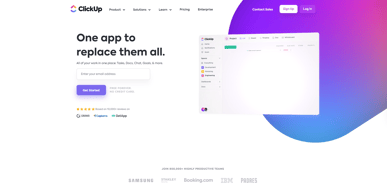
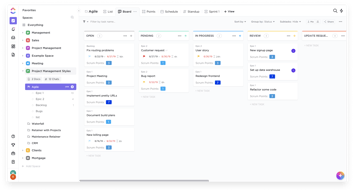
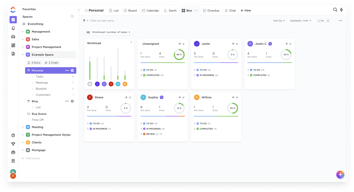
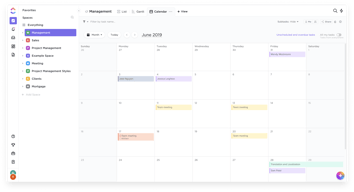






In the realm of project management tools, ClickUp has emerged as a comprehensive solution that caters to a wide range of users. From freelancers managing their own tasks to large corporations coordinating complex projects, ClickUp aims to simplify and streamline the process. But does it deliver on its promise? In this review, we’ll take a close look at ClickUp, dissecting its features, user interface, support, and pricing structure. Our goal is to provide an unbiased and thorough examination of this software, helping you decide if it’s the right fit for your needs. So, without further ado, let’s delve into the world of ClickUp.
What is ClickUp?
ClickUp is a cloud-based productivity platform that aims to centralize all your work and tasks in one place. It’s a comprehensive project management tool designed to help individuals and teams plan, organize, and collaborate on projects.
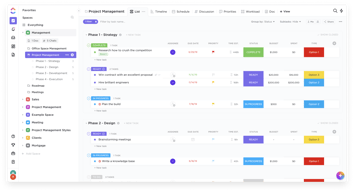
The software offers a wide range of features including task management, time tracking, goal setting, document sharing, and more. It also provides multiple views for project tracking such as list view, board view, and Gantt chart view, allowing users to customize their workspace according to their preference.
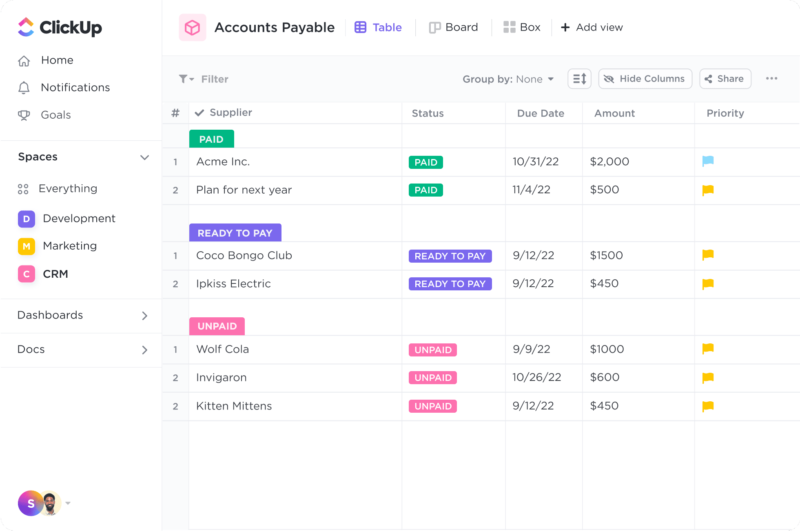
ClickUp Dashboard
ClickUp’s target users range from freelancers and small businesses to large corporations. It’s designed to be flexible and adaptable, catering to different industries and project types. Whether you’re managing a marketing campaign, developing software, or planning an event, ClickUp aims to provide the tools you need to keep your project on track.
In essence, ClickUp is more than just a project management tool. It’s a productivity platform that seeks to eliminate the need for using multiple, disjointed tools by providing a unified, all-in-one solution.
ClickUp Core Features
ClickUp is packed with a variety of features designed to enhance productivity and streamline project management. Here are some of its core features:
- Task Management : ClickUp allows users to create, assign, prioritize, and schedule tasks. You can also set dependencies between tasks, making it easier to manage complex projects.
- Multiple Views : ClickUp offers several views for managing your projects, including list view, board view, box view, Gantt chart view, and calendar view. This allows you to visualize your tasks and projects in a way that suits your working style.
- Time Management : ClickUp includes time tracking features, allowing you to monitor how much time is spent on each task. It also includes scheduling and capacity management features, helping you to plan your time effectively.
- Collaboration Tools : ClickUp facilitates team collaboration with features like real-time chat, comment assignment, document sharing, and in-app video recording. These features make it easier for teams to communicate and collaborate on tasks and projects.
- Customizable Workflows : ClickUp allows you to create custom workflows that match your team’s processes. You can set up statuses for tasks and move them through different stages as they progress.
- Integrations : ClickUp integrates with a wide range of other tools, including Google Drive, Slack, GitHub, and more. This allows you to bring all your work into one place, reducing the need to switch between different apps.
ClickUp Pricing Plans
ClickUp offers a variety of pricing plans to cater to different user needs. Here’s a breakdown of their tiered pricing structure:
ClickUp offers Free, Unlimited, Business, and Enterprise plans — see ClickUp pricing for current rates.
The Free plan is a great starting point for small teams or individuals who want to try out ClickUp’s basic features. The Unlimited plan offers more flexibility and customization options, making it a good choice for growing teams. The Business and Enterprise plans offer advanced features and increased automation, making them suitable for larger teams or businesses with complex project management needs.
ClickUp has since launched ClickUp Brain, an AI assistant integrated across the platform for writing, summarization, and project insights.
Remember, it’s important to choose a plan that aligns with your team’s size, budget, and requirements. You can always start with a lower-tier plan and upgrade as your needs evolve.
ClickUp Competitor & Alternatives
ClickUp competes with tools like monday.com, Trello, and Asana. Each tool has its own strengths and weaknesses. ClickUp stands out for its wide range of task display views, real-time chat, and in-app video recording features. However, other tools like monday.com and Asana also offer robust features, although they lack real-time chat and in-app video recording. Trello, on the other hand, is a more budget-friendly option, but it lacks time tracking and budgeting tools.
ClickUp FAQs
Is ClickUp’s free plan really free?
Absolutely! ClickUp’s free plan is indeed free, with no hidden costs or strings attached. This plan offers a robust set of features including unlimited tasks, unlimited members, and up to 100MB of storage. It’s a great option for individuals or small teams who are just getting started with project management software.
While the free plan does have some limitations compared to the paid plans (such as storage limits and access to premium features), it still provides a comprehensive toolset for managing tasks and projects. So, you can definitely start using ClickUp for free and then decide if you want to upgrade to a paid plan as your needs grow.
What does project management software do?
Project management software is a digital tool that helps teams plan, organize, and manage tasks. It facilitates collaboration, scheduling, resource allocation, and progress tracking, making project execution more efficient and streamlined.
Bottom Line – ClickUp
ClickUp is a robust and versatile project management tool that can significantly benefit businesses of all sizes. Its comprehensive features for task management, collaboration, and project tracking make it an excellent choice for teams aiming to streamline their workflows and enhance productivity. While it has a rich feature set, it’s designed with user-friendliness in mind, making it accessible even to those new to project management software.

Compare ClickUp with other popular tools in the same category.
Task Management and Time Tracking Features are Good Sign in /Sign up Process is very Easy
Sometimes Users have reported Slow down for this Tool while using it
Excellent tool for Handling Project with Task list with Client. User can have Time Tracking also here for the work done and that can be useful at client end.
The system they use is very intuitive and easy to use. The way you can link all the staff to supervise your team its impressive. We are going to improve a lot as a company with your app.
Actually, at the moment, I didnt find anything bad, maybe in the future when we use more tools on the software we find somenthing to improve.
click up is helping us keep track of our documentation, what department it is in and what person it last received. We use many contracts because we are a real estate company that has more than 2000 plots of land in stock which are sold every day.

ClickUp is a very flexible and powerful work management platform with the most features available in a free plan.
For some users, setting up the working environment may be too complex, especially when going through settings of nested elements.
Project management with deep task customisation
Highly Customizable: ClickUp's exceptional level of customization empowers users to tailor the platform to their unique workflow requirements. From task lists to statuses and workflows, ClickUp ensures flexibility that adapts to diverse project management needs. Rich Features: ClickUp boasts a comprehensive suite of features that covers everything from task management and document collaboration to time tracking and reporting. The platform's rich feature set provides a holistic solution for project teams, streamlining collaboration and boosting productivity. Template Center: The centralized template center in ClickUp is a game-changer for teams looking to standardize processes and workflows. The abundance of pre-built templates, coupled with the ability to create and share custom templates, significantly accelerates project setup and execution.
Performance Speed: One noticeable drawback is the occasional lag in response time, where ClickUp can be slow to execute commands. While not a constant issue, optimizing the platform's responsiveness could enhance overall user satisfaction and efficiency.
Visual Collaboration Platforms: Problem: Lack of a centralized space for visual collaboration. Solution: ClickUp offers customizable views and boards, facilitating visual collaboration and providing a dynamic space for teams to brainstorm, plan, and execute projects. Time Tracking: Problem: Difficulty in accurately tracking and managing time spent on tasks. Solution: ClickUp integrates robust time tracking features, allowing users to log time against specific tasks, improving accuracy in project timelines and resource allocation. Bug Tracking: Problem: Inefficient bug tracking leading to project delays. Solution: ClickUp provides dedicated tools for bug tracking, helping teams identify, prioritize, and resolve issues promptly, ensuring smoother project progress. Collaborative Whiteboard: Problem: Absence of a digital whiteboard for collaborative ideation and planning. Solution: ClickUp's customizable views include a collaborative whiteboard feature, enabling teams to ideate and plan in real-time, fostering creativity and improving project outcomes. Document Creation: Problem: Disparate document creation tools causing fragmentation. Solution: ClickUp integrates document creation features, allowing teams to create, edit, and collaborate on documents within the platform, reducing the need for external tools. Event Planning: Problem: Lack of a dedicated platform for comprehensive event planning. Solution: ClickUp provides tools for scheduling, task management, and collaboration, streamlining the event planning process and ensuring all stakeholders are on the same page. Kanban Project Management: Problem: Inefficient project tracking using traditional methods. Solution: ClickUp's Kanban boards offer a visual and flexible project management approach, allowing teams to manage tasks, workflows, and project progress with ease. Knowledge Base: Problem: Difficulty in organizing and accessing important information. Solution: ClickUp serves as a centralized knowledge base, providing a structured repository for information, ensuring easy access and knowledge sharing within the team. Marketing Calendar: Problem: Lack of a comprehensive marketing calendar for campaign planning. Solution: ClickUp's features include a marketing calendar, helping marketing teams plan, schedule, and track campaigns effectively. Marketing Resource Management: Problem: Inefficient resource allocation in marketing projects. Solution: ClickUp facilitates resource management, allowing teams to allocate and monitor resources for marketing initiatives, improving overall project efficiency. In essence, ClickUp's multifaceted approach addresses the diverse needs of teams across different functions, enhancing collaboration, streamlining workflows, and improving overall project management efficiency.
The Clickup is very complex and usefull software
Nothing I don't like about it at the moment
We use the program as a marketing agency. The best thing is that we can see all the tasks with deadlines and keep everything under control.
The ability to integrate with almost any optimization and tracking tool is a major plus for me. I also like the bubble on the browser that comes with the extension. A nice nifty little addition that I stumbled upon that has become a great saver is Notepads. I used to use sticky notes before but now with notepads I can itemize my mementos and talking points categorized based on topic, client and priority particularly when I need to remember something before client meetings.
The downloadable client side hangs quite a bit and sometimes changes in the cards take seconds to reflect. This gives the impression that the changes haven't been made which can inadvertently cause one to duplicate the changes.
1. Having a birds eye view of all of my client accounts, progress, salient events, blockers and timelines. This saves me lots of mental real estate 2. Categorizing mementos and talking points so I can whip them up when I need them right on the spot. That way I don't have to flood my desktop with color coded sticky notes 3. Creating a central repositiory for all important information about my accounts or at least links to them. Bye bye bookmarks
It's very practical to use and the way things are organized makes life much easier
The time-tracking module still has a long way to go. Reports and API limitations.
It mainly helps the team to iterate on a given problem. Everyone involved can follow and contribute in a practical way

Los espacios de trabajos son geniales y las plantillas facilitan los trabajos.
Todo funciona correctamente, todas las funciones de clickup son grandiosas 😎
La gestión de las tareas, documentación de todo el proyecto en un solo lugar.
Ease of use and intuitive interface. Excellent collaboration tool. Interface has great looks
Reporting is not optimal. Formatting of output is not the best.
Manage Help desk for clients
The ability to create custom fields and tags to tracl things across multiple lists and spaces is great, and I also love having the proofing funtionality built in.
You do have to build out all of the custom views for both individual lists and the folder and also space they're contained in to be able to see the same columns whether you're on the list, folder or space instead of just having the container above automatically show everything selected for view in each of the lists.
I work remotely for a College that has the bullk of it's employees on-campus, and my direct supervisor and I oversee all recruitment marketing efforts so haveing ClickUp to keep us all on the same page, have a place to keep all final versions of the files that's accessible to both of us on the go, and keep our inboxes clear from all of our back and forth on every single project we work together on has been great.
I find ClickUp to be great for keeping track of tasks and recording procedures (great for plan implementation). It has many capabilities including integration and is good when collaborating across multiple locations with multiple people. I use it a few times each week to stay on task.
I find it tricky to get first time users engaged in the product - some can find it a little difficult to use. I point them in the direction of customer support which can occassionally help with this barrier.
ClickUp is solving the problem of collaborative workflow management, by allowing tasks to be assigned to individuals within the overall project. It is also offering this for free which is incredibly helpful for small, non profit businesses.
Easily assign tasks Track Time Display load on people
can not add custom calculates fields can not display multiple currencies in one row missing soe basic excel features
Easy task managment, easily split tasks between peoject members Project details and description easy messiging within task
Todas las posibilidades que ofrece para complementar el flujo de los proyectos que se estan implementando y la facilidad del manejo de la plataforma ya que es muy intuitiva. La integración con otras plataformas reelevantes y mas usadas en proyectos es un plus que se agradece y complementa facilmente la gestion de proyectos.
La demora de carga o procesamiento de cambios que se realizan en la plataforma.
La gestión de HU y Epicas creadas cada año
The scrum integration. It was easy to set up and It's great for organising a saas startup while not forcing us into a rigid schema. Clickup is now a second brain for me and I rely on it daily.
In the old version, collaboration was difficult because things took a long time to sync up. With V3 that's a problem of the past though as far as I can tell
Transparency within our organisation, keeping track of tasks, scheduling, whiteboarding, documentation... We couldn't operate without anymore.
I am obsessed with how easy it is to stay on track with ClickUp tasks. In our organization, we use ClickUp daily to track all of our client marketing, internal marketing, and our operations. ClickUp streamlines our processes and keeps everyone organized.
If too many hands are in the "ClickUp cookie jar" it can get messy really fast. If there are too many people with permission to create boards/ items in ClickUp it can become overwhelming if everyone is not following the same naming conventions/ process, etc.
ClickUp helps us stay organized and hit our deadlines. This tool enables us to assign specific work tasks to certain individuals, give them a place to track their time/ work and document their findings/ results etc. and tag in any other team members that should be looped in. It gives us all one central location to share and collaborate together to serve our clients.

Definitely flexibility. You can use it to manage your company, plan your shopping list, schedule your studies or even catalog your coin collection. What's more, the functionalities make sense and adapt to different needs. For example, the sprint points can be adapted as measures of effort for an SEO audit.
The learning curve can be long for most users. There are so many possibilities that you can get a little lost at first. This gets worse if you're using the tool at a professional level (within a company, for example).
I use ClickUp as my second brain. There, I store insights, ideas, links to videos, and summaries of my understandings on various subjects. It also works for my SEO agency's project and lead management. The SOPs for my clients are also stored there. In addition, I use it as a tool to manage my studies in Data Science and personal planner.
clickups makes it easy for me to see all of my tasks in one place and keep track of everything I need to do everyday. I also like that anyone can set me tasks, including myself. And I can add any notes I want to any of my tasks.
Sometimes I forget to mark my tasks as done even when I have them finished by the deadline. I usually change the due date and then mark it as done but to my manager this will appear as though i completed the task late.
I am easily forgetful and clickup helps me to organise my tasks and add any notes that I know I might forget.
It has soooo many features and so much versatility, you can pretty much do anything you want to.
Sometimes, it doesn't refresh right away with new data/changes that you've just entered. That lag in refreshing is annoying.
if you send an email to me, it gets lost. If you assign it to me in ClickUp...there's accountability/transparency for both of us! ClickUp is making sure the little things don't get forgotten or fall between the cracks.
I've used a lot of different task managers but Clickup gives me the biggest pallet of customization options. It can handle IT-related sprints but also home duties calendar. I use it every single day. Along with mobile apps and browser addons it is very easy to integrate it into your daily habits.
What is the biggest advantage is also a disadvantage. Because of how big it is it's not always easy to set everything up.
With large numbers of different projects, it helps organise daily work. Some of them are big, and some are small but because I use clickup for both work and home stuff it's very easy not to get lost in managing my time.

The system allows me to run multiple business needs simutaniously, Their API allows for a quick and easy integration that saves a lot of time connecting to different business platforms such as my website and email marketing system. I use it daily for my business needs. Also they keep sending updates all the time.
Sometimes the system works slowly and has bugs.
I run my Leads, Clients and Tasks in one spot. Makes it easy for me to run a small boutique team of 6 people.
I can group tasks in separate lists and receive notifications for each one. I can also set statuses and group the tasks per status. There is also a Gantt chart and a whiteboard.
There is nothing I dislike. ClickUp can accommodate all project management needs. From simple ones to complicated.
ClickUp is a versatile project management tool that helos me put an order in the chaos of many tasks and projects I run every day. It streamlines communication, enhances project visibility, optimizes workflows, and boosts productivity. With its customizable views, diverse integrations, and affordable pricing, ClickUp caters to a wide range of users and needs.
The best of click up is the incredible flexibilty of the task the possibility to nest other subtask and add custom field with also different visualization
The worst part is the spaces management and visualization, we use to organize all our clients as a space and that part for us must to be always visible for the frequncy of use
ClickUp help us to track all tasks in a project and the involved people
very easy to use, great design and usability, great features and makes daily work faster and more fficient
nothing I love it - should be used by all emploess and units to make cross-unit work easier
Keep tracking our daily tasks, plan tasks throughtout teams, assign tasks to digfferent team members, get notifications on daily work plans
The versatality of different views, which facilitates the tracking and planning efforts.
Utill Click-3.0, the app was slow however with the new updates the load time has improved greatly. The limits of lists/sublists/tasks/spaces seems to be a bit arbitrary. The quotas pages are not clear on what assets could be deleted or not.
I have been a todo-list and productivity nerd since my University years and different tools offer different approaches like lists/kanban/documents and spreadsheets. ClickUp however, is quite ambitious in its approach to combining everything together for a holistic view of the situation and planning.
I love the flexibility to create custom categories and filters to make it really easy to sort your data in any number of ways depending on the current need. I use this tool individually for the most part, to manage my own workload and it has been a life saver. I also use it to manage household stuff with my husband and it works nicely for that so I can only imagine how great it would be for cross team collaboration.
The mobile app is my least favorite part about this program. It's very stripped down compared to the desktop app, which of course makes sense for mobile, but this really kills the usefulness. I have found it to be a less intuitive UI and I run into problems when posting new to-dos (I have to select the list every time) and how the filter views opperate are a bit funky. I also wish you could customize what you see on the "home" screen.
Just tweaks to the desktop app here and there to make it more efficient. I haven't noticed any major changes lately, but I really don't have any qualms with the desktop app, so I am satisfied.
ClickUp has an incredible amount of features for a free product. Customer service is great, too.
Sometimes the UI seems a little crowded.
I work at a college, and I Initially started using ClickUp as a task list for the student employees who work for me. I wanted there to be features to assign tasks, mark different statuses, leave comments, add attachments if necessary. It works great for that. I also started using it for my own personal task management software and love it. I really like that templates feature because there are larger projects that repeat for me. Having the option for subtask due dates to automatically re-map is such a timesaver.
I have to keep track of many things: multiple tasks, teams, stakeholders, agencies, priorities. Having a place to put all of that that doesn't rely on my memory has been so valuable and I use it everyday. Where there are jobs that have dependencies on multiple teams, it's automated to become one of my tasks once they've done their bit and means I'm chasing people less and instead focusing on the task at hand.
Our company's click up space goes across multiple departments, however I've just been added to our agencies click up and I can't find a way to make that part of the click up app, instead I have to save it as a bookmark in Chrome.
Working across teams where there are dependencies and automating that has been great. Especially creating a dashboard to see our progress.
It's very customisable. It has every tool we need included in the base product. We occasionally wonder: "It would be amazing to have X feature", and someone from the team shows us that it is already included. The pricing is also quite accessible for us (based in Mexico). Simply amazing!
The learning curve may be a bit overwhelming initially, but it's worth it. Customisation may require some extra time to make appropriately but nothing too complex.
It's helping us keep track of all the projects we're currently working on. At the same time, it has helped us share documentation internally and even allows our collaborators to help us keep it updated.
I have used Clickup for nearly a year now and it has completely changed the way I work and conduct tasks. Clickup is easy to use and navigate and I like that I can prioritise my time by changing the priority. It is then easy to view what is important and the tasks that can be looked at another time. I can share my click up with my manager and he is able to add new tasks and integrate new items at ease. I find it very easy to use and implement into my day to day work, and I use it every day to check what is important and required that day. It has become an essential part of my working week to use Clickup to organise my tasks and workload.
I dislike that I cannot do a mass date change on items within a task, as this can add time to changing clickup or updating it.
Clickup helps me to time manage and prioritise my tasks, it increases my productivity and enables me to be more successful in completing tasks by knowing how to prioritise. ClickUp has also been very useful to use with my line manager as they can view my Clickup task list, add to it and effectively line manage in a quicker and more efficient way.
Centralization of all professional and personal tasks in one place
The cell phone app is very limited and crashes a lot
I can be more organized. I'm forgetting less about appointments and tasks.