

Unclaimed: Are you working at CorelDRAW Graphics Suite?
CorelDRAW Graphics Suite Reviews: 4.3/5 — Solid Choice
CorelDRAW Graphics Suite is a full-featured design toolkit that lets users create vector illustrations and layouts as well as tools that support photo editing, and typography projects. The platform is offered via a budget-friendly subscription platform that provides incredible ongoing value with instant, guaranteed access to exclusive new features and content, peak performance, and support for the latest technologies.
| Company | Corel Corporation |
|---|---|
| Year founded | 1985 |
| Company size | 501-1000 employees |
| Headquarters | Ottawa, Ontario, Canada |
| Social Media |

| Capabilities |
AI
|
|---|---|
| Segment |
Small Business
Mid Market
Enterprise
|
| Deployment | Cloud / SaaS / Web-Based, Desktop Mac, Desktop Windows, Mobile iPhone, On-Premise Linux |
| Support | 24/7 (Live rep), Chat, Email/Help Desk, FAQs/Forum, Knowledge Base, Phone Support |
| Training | Documentation |
| Languages | English |
CorelDRAW Graphics Suite Pros and Cons
- Great for productivity: The collaborative and productivity features on Corel Draw aren’t just there for show. This software really does make it easier to get connected and make progress on a shared project.
- Versatility: You can use Corel Draw on virtually device, including smooth drawing surfaces, laptops, and desktops.
- Tons of exporting options: You can export up to 48 different file types with Corel Draw, including PNG, JPG, and even CAD for 3D content.
- Huge community collection of assets: The collection of assets available is incredible. You can access fonts, templates, frames, photos, vectors, and brushes. Plus, there’s a full organized library system for keeping everything in the right place.
- No app for your smartphone if you’re working on the move
- Does require a lot of initial learning due to the wide range of features

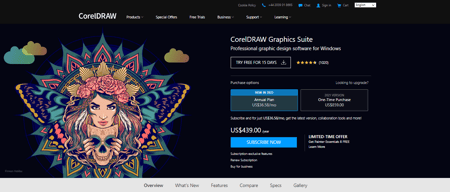









CorelDRAW Graphics Suite will still sell you the software outright. That single sentence is why it remains on shortlists in 2026. Adobe moved professional design to subscription years ago; Corel offers a one-time purchase alongside the annual plan, and by our arithmetic on its published prices the outright licence costs less than the subscription from roughly month 20 onward. If you are tired of renting your tools, this is the mainstream alternative.
- What it is: A professional graphic design suite covering vector illustration, page layout, photo editing, and typography, for Windows and Mac.
- Best for: Print, signage, and production designers who want to own their software rather than rent it.
- Pricing: Annual plan 1,137 zł for the first year then 1,750 zł; one-time purchase 2,270 zł. Verified July 2026.
- The honest catch: The perpetual licence is frozen at the 2026 version — no future upgrades, no AI credits.
What Is CorelDRAW Graphics Suite?
CorelDRAW is a full design suite rather than a single application: vector illustration, page layout, photo editing, and typography in one package for both Windows and Mac. Its historical stronghold is production work — signage, print, apparel, engraving, and vinyl cutting — where its file handling and colour management have long been trusted and where the switching cost of decades of .cdr files is real.
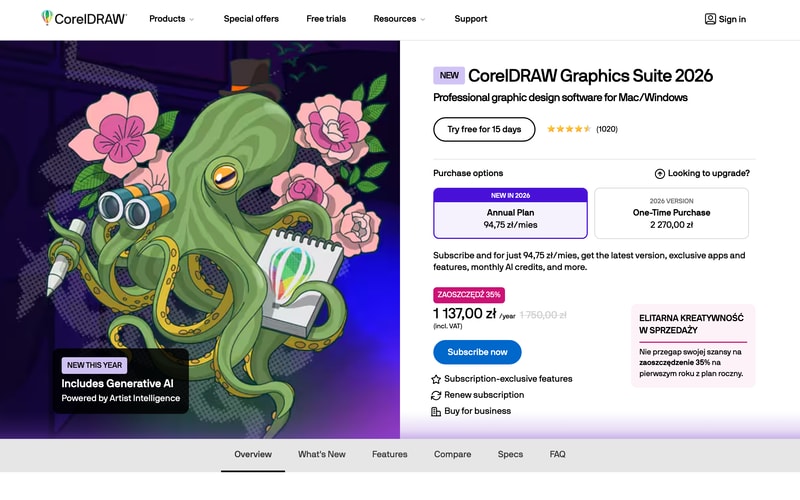
The 2026 release leads with generative AI under the “Artist Intelligence” name, and Corel has made AI credits a subscription-exclusive benefit. That is the structural point of the whole pricing page: the subscription is not simply a payment method, it is a different product with ongoing feature delivery attached.
Corel reports 4.5 stars from 1,020 reviews on its own product page, and offers a 15-day free trial with no purchase required.
How CorelDRAW Works
- Two purchase routes, which is now unusual in professional design software.
- Annual plan at 94.75 zł a month, billed 1,137 zł for the first year.
- One-time purchase at 2,270 zł, locked to the 2026 version.
- AI credits are subscription-only, as are “subscription-exclusive features”.
- Windows and Mac from the same licence.
- A 15-day free trial, no card mentioned.
CorelDRAW Pricing
Captured from CorelDRAW’s product page in July 2026. Corel geolocates aggressively — our capture returned the Polish price list in złoty including VAT, and the same figures appeared on both the international and US URLs. The structure is what transfers; check your own market for the numbers.
| Option | Cost | What you get |
|---|---|---|
| Annual plan, year one | 1,137 zł (94.75 zł/mo) | 35% off, all features, AI credits |
| Annual plan, thereafter | 1,750 zł/year | Latest version, ongoing updates |
| One-time purchase | 2,270 zł | The 2026 version, permanently |
| Free trial | — | 15 days |
What actually decides which you buy:
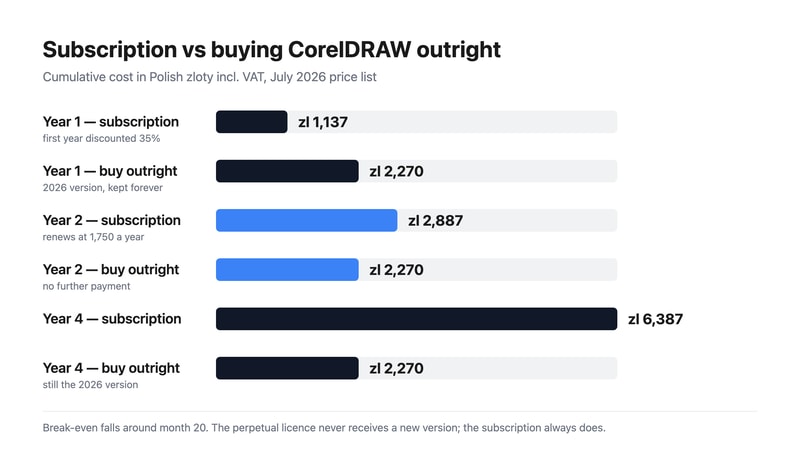
- The break-even is around month 20. Year one of the subscription costs 1,137 zł, so the outright licence is 1,133 zł more expensive at that point. Renewal then adds 1,750 zł across year two, and the subscription passes the perpetual price roughly two-thirds of the way through it. Past that, every month favours having bought.
- The 35% discount is first-year only. The strikethrough is honest — 1,137 zł against a standard 1,750 zł — but the second invoice is the real rate, and it is 54% higher than the first. Budget from 1,750 zł.
- The perpetual licence is a snapshot, not a subscription without payments. You keep CorelDRAW 2026 indefinitely; you do not get 2027, and you do not get the AI credits or the subscription-exclusive features. Whether that matters depends entirely on whether you have historically upgraded every year or every five.
- AI is the lever Corel is using to defend the subscription. Generative AI is the headline feature of the 2026 release and its credits are subscription-only. If the AI tooling is why you are interested, the perpetual option is not really available to you.
- Compare against Adobe on total cost, not monthly cost. Adobe Illustrator has no perpetual option at all, so over a five-year horizon the comparison is a fixed 2,270 zł against five years of subscription — a different question from which app you prefer.
- A 15-day trial is short for a suite this large. Learning vector illustration, layout, and photo editing in a fortnight is optimistic if you are switching from Adobe; plan the trial around one real project rather than exploration.
Who Should Use CorelDRAW
- Print and production designers. Signage, apparel, engraving, and vinyl work, where CorelDRAW has decades of established workflow.
- Anyone who wants to own their software. The clearest reason to choose it in 2026, and there are few alternatives at this level.
-
Existing CorelDRAW users. A large
.cdrarchive is a genuine reason to stay, and the perpetual option keeps that archive readable without a running subscription. - Windows-first studios. CorelDRAW’s Windows heritage is deeper than its Mac support, though both are covered.
It fits poorly for teams collaborating with Adobe-standard agencies, where file interchange creates friction; for UI and product design, where Figma is the standard; and for casual or marketing design, where Canva does the job at a fraction of the cost.
Honest Pros and Cons
Strengths
- A genuine perpetual licence. Almost unique among professional design suites.
- Break-even inside two years against its own subscription.
- A complete suite — vector, layout, photo, and typography together.
- Strong production heritage in signage, print, and apparel.
- Windows and Mac covered by one purchase.
- A published, transparent price. No quote, no sales call.
Limitations
- The perpetual version never updates. 2026 forever, including no AI credits.
- The first-year discount does not repeat. Renewal is 54% higher.
-
Adobe compatibility is imperfect where agencies and printers expect
.aifiles. - Smaller ecosystem of tutorials, plugins, and hireable talent than Adobe’s.
- A 15-day trial is short for a suite this size.
- Aggressive geolocation makes cross-market price comparison awkward.
CorelDRAW Alternatives and How It Compares
- Adobe Illustrator is the industry standard for vector work, subscription-only, and what most agencies and printers expect to receive.
- Adobe Photoshop covers the raster half of what CorelDRAW bundles, again by subscription.
- Affinity Designer is the other serious perpetual-licence option, considerably cheaper and narrower in scope.
- Inkscape is free and open source, capable for vector work and weaker on production colour management.
- Canva and Figma solve adjacent problems — marketing design and interface design — rather than competing directly.
For a broader survey, browse our graphic design directory.
The Verdict
CorelDRAW’s case in 2026 is not primarily about features, and pretending otherwise would be dishonest. Illustrator is the industry standard, the ecosystem around it is larger, and most agencies and print shops will assume you are sending .ai files. What CorelDRAW offers that Adobe does not is ownership. The one-time purchase is a real perpetual licence, and in a market that has almost entirely moved to rental, that is a genuine and increasingly rare proposition.
The arithmetic supports it if you keep software for a while. Year one of the subscription is 1,137 zł against 2,270 zł to buy, so buying costs about a thousand more up front. But the discount is first-year only — renewal is 1,750 zł — and the cumulative subscription passes the purchase price around month 20. By year four you would have paid 6,387 zł to rent against 2,270 zł to own. If your upgrade cadence has historically been “when something forces me to”, buying is straightforwardly cheaper.
The counter-argument is real and Corel has built the pricing around it. The perpetual licence is frozen at 2026 — no new versions, no subscription-exclusive features, and no AI credits, which matters because generative AI is the headline of this release. So the decision is not subscription versus purchase in the abstract; it is whether you want the 2027 and 2028 releases. Designers who upgrade every cycle should subscribe. Designers running a production shop where the software has to work rather than improve should buy, and the 15-day trial is the right way to confirm the suite handles your actual files before spending either way.
FAQ
How much does CorelDRAW Graphics Suite cost?
Captured in July 2026 on the Polish price list including VAT: the annual plan is 94.75 zł per month, billed 1,137 zł for the first year — a 35% discount from the standard 1,750 zł annual rate — and the one-time purchase of the 2026 version is 2,270 zł. Corel geolocates pricing aggressively, so check your own market; the two-option structure is what transfers.
Can you still buy CorelDRAW outright?
Yes, and it is one of very few professional design suites where you can. The one-time purchase gives you CorelDRAW Graphics Suite 2026 permanently at 2,270 zł. It does not include future versions, subscription-exclusive features, or the AI credits that come with the annual plan, so it is best understood as buying a specific release rather than a subscription without payments.
Is the subscription or the one-time purchase cheaper?
The subscription is cheaper for the first roughly 20 months, then the purchase wins. Year one of the subscription is 1,137 zł against 2,270 zł to buy; renewal at 1,750 zł pushes the cumulative subscription past the purchase price about two-thirds of the way through year two. By year four the figures are 6,387 zł against 2,270 zł. The trade is that the purchase never receives a new version.
Is CorelDRAW a good alternative to Adobe Illustrator?
For print, signage, apparel, and production work, yes — it is a mature suite with decades of established workflow and it bundles layout and photo editing that Illustrator does not. The reasons to prefer Illustrator are ecosystem and interchange: it is what agencies, printers, and collaborators expect, and the pool of tutorials and hireable talent is larger. If you work independently and want to own your tools, CorelDRAW is the stronger choice.
Does CorelDRAW include AI features?
Yes. The 2026 release leads with generative AI under Corel’s “Artist Intelligence” branding, and monthly AI credits are included with the annual subscription. They are explicitly a subscription-exclusive benefit, so the one-time purchase does not include them. If the AI tooling is a significant part of why you are considering CorelDRAW, the subscription is effectively your only option.

Compare CorelDRAW Graphics Suite with other popular tools in the same category.
This system seems so overwhelming at first until you see the tutorials and follow along
I came from using Photoshop and assumed it would be very similar but it was not. The learning curve took some getting used to.
I am able to create flyers for products easily and also quickly edit any flyers or ads i have created in the past.
It was great when it first came out. Very User Friendly. Used the program until I found a much better program.
Don't like the proprietorship of the program to be used with other programs. Limited in usage for what my digital designing requires.
In Designing to corresponding Digital commercial Imagery for my commercial clients. User Friendly.
Easy to use, user friendly, good results
Sometimes it takes to fill graphics depending on the areaof fill
It is user friendly and easy to use.
Good user interface. Has numerous functionalities of design..
Quite slow during installation. Might be vulnerable to malware if not updated. Some design tools require skills to use them.
Graphic design solutions for projects and also companies.

CoralDraw has an awesome assortment of brushes and tools to choose from straight of the bat and can open and export many formats.
CoralDraw is not that great when it comes to typography or vectors for my liking. I felt the edges were jagged or blurry when saved in some formats.
CoralDraw did not solve any business problems for me. I felt that sticking with Adobe was better in the long run and would not benefit from transitioning to CoralDraw.
Being a program with years on the market fits very well to any method of work, always helping solve cualqueir disadvantage both working methods and links with other programs. Its adaptability allows you to generate virtually any type of design where you can create a very functional and fast when elements require fast and simple solution.
To be a program with a variety of possibilities one has the first impression that can do everything within this without other tools, but this affects its operation as when realiazar something specific to "polish" an idea or concept can be somewhat short, where specialized design programs can be very easily highlight in their work purposes.
Working as a bridge to open files from one program to another, and perform simple edits design, the main advantage of this program is its power coupling router or printing programs at the time of production in physical.
Fast drawing with great drawing tools and customizable interface.
No mac version, frequent crashing (buggy), trys to do too much.
Technical Illustratiojn

Textures and brush strokes close to traditional medium. CorrelDraw offers variety of texture and brushes. Pricing is high but at least it is not monthly subscription base like Adobe programs.
Outdated UI, brush setting, and effect/filters compared to other softwares like Photoshop. Also the pricing is quite stiff for artists.
Good for hobby work or special type of task. But it cannot be an industry standard due to lack of their functions as a digital art software, it only serves a purpose of a painting software.
I'm not really a fan if Corel draw. I find it hard to navigate.
It glitches a lot and it also is hard to learn. Very slow.
Not many at all.
Since it is the most used software when it comes to non-professional users, it is definetely a must-have if you need to work with files prepared by other people. Some old school graphic designers also prefer Corel Draw, especially if they are really used to it, and are not interested in going through the effort of learning a newer, more effective vector illustration software. Therefore, even if you are an up-to-date professional graphic designer, it is important to have a running version of Corel Draw, because you will eventually need to open a .cdr file sent by clients, service providers or collaborators.
For people who are used to work with the Adobe Creative Suite, it can be really frustrating to work with Corel Draw, since the shortcuts, metaphors, and basically the whole process of using it, are totally different. It is also difficult to work with .cdr files in Adobe software such as InDesign or Photoshop. Since Adobe has its own vector graphics software (Adobe Illustrator), and it comes included in most plans people subscribe to in order to get other software anyway, Corel Draw ends up not making a lot of sense.
Corel Draw solves the problem of working with files prepared by clients, providers or collaborators who are not professional graphic designers.
I knew how to use it. upgrades didn't change the tools too drastically.
doesn't have near the graphic tools of online services now (font and image centering/placement in the work area.
I could create my own professional looking marketing images. Benefitted by its ability to import and manipulate many image formats.

I think CorelDRAW (vector Graphics) is the best graphic product around or was. I started using it when it was Corel2, sometime around 1990. It integrated fantastically with CorelPain (Bitmap Images), both felt and work similarly. I liked it so much so that we bought near 1000 copies for our Engineers and I never looked back. Before we purchased we evaluated three other products, including Arts & Letters and Adobe but by far, Corel was the best, hands down.
In the 30 years since, Corel has become so-so. Once, CorelDRAW and CorelPAIN felt like the one product, and most functions were similar. Since they feel like different products, with even a simple cut and paste between the two causing size problems, I can no longer say that it is the best on the market as I see Paint Apps with better functions than CorelPain, including masks, effects, filters, and the like. Often I use online bitmap editors instead of CorelPain and have other BitMap editors to fill CorelPaint's huge omissions. One of my biggest gripes is background removal and masks, but one thing is even worse; Corel Support. What can I say to Corel support that 100's of published gripes do not already say. Hundreds of complaints about Corel Support, especially since its 2021 expensive upgrade seems to be the least stable since the '90s. But there is one Corel Unique feature across all Pain, Draw, and Video that raises the heckles of most people to the boiling point, forced pop-up inside the program. As a Corel user, you have to log in to your account as a security feature, which is understandable. But, Corel uses this to piggyback a stream of in-program pop-up spam advertising that is difficult to stop. Yes, there is a setting, but that is a recent addition, only after hundreds or even thousands of complaints. Summary - Look around first before you buy, and consider the steep price of Coraw Graphis Suit, which tries to sell you its products as an integrated suite. It is integrated, but not very well, and the great feature it once had, that the Pain and Draw worked and felt very similar, that is long gone. With a price tag of $640, 'for the graphics enthusiast', it is not worth the cost. The cut-down, Essentials version for $235 may be good value, but they need to improve stability, remove pop-up spamming and realign the two products functions. You could do the ridiculously priced Professional version for $549/ PER YEAR or even the Technical version for $895/y but I would suggest shopping around to get exactly what you want from different products without a yearly cost. If the functions were similar as once in the 90s' then it may have been worth it as a new user, reducing vastly on the steep learning curve, but now, shop around. There are so many great and innovative products out there including the market leader Adobe Illustrator but also Affinity Designer. If you are not sure, try Inkscape, a free open-source editing program.
I loved Corel Graphics Suit, but I think their marketing, support, and design strategy is detached from the 21st century. I think they are going down the path of other products that were once market leaders but failed to adapt to the circumstances like Swiss Watches and Nokia.
The best thing will be when I don't need to use anymore
Crashes all the time especially when you spend hours creating artwork. I have used this product for a long time and it is very upsetting. Now it is just getting worse and the upgrade is even worse. I will be looking for a new product for my designs. Highly recommend not using this product. Will keep you posted on what I find
The whole program
Powerful once you know hwk to use it. Able to interface directly with our laser cutter. Seems usable for some serious design work.
Very bad user experience. No good snapping features. Need to lookup tutorials all the time. Generally unintuitive UI.
Coreldraw helps us use our laser engraver. We take images, dxf files, drawing files, pdfs, and other media and turn it into black and white raster / engrave / cut plotting data.
Vector shapes are easy to work with, the way to adjust nodes is pretty friendly
The software seems stuck in time. First of all, no Mac friendly version in a decade for a design program is a big red light, or should be. Also, tons of trouble with colors when exporting to most formats. The "pages" system is pretty awkward, specially having worked with illustrator's artboards which allow to view the whole thing at once
Not provided
It's a very outdated and non-user-friendly software, I tried to use it as an alternative for Adobe Illustrator but I did not find it easy at all.
the overall interface is just very bad. the tools are not making any sense. It's a hassle to especially edit something which is a part of a group. I wont use it unless its an utter emergecy
I used the software as some of the vendors only use CorelDraw and we wanted to get some files edited for our clinic

The laser system we use at our local maker space uses CorelDraw for cutting. Overall, the software used to be good for digital painting and other illustration.
We purchased a copy to have at the office on Nov 17, 2021. We have yet to get it to install. We have exchanged over 20 emails with Corel Support all in the same patter, Try this... that didn't work. Well, try this... that didn't work. So, I've spent over $300 for a piece of software that will not install.
We haven't realized any benefits to our investment. I'm really frustrated at this point and I hope this review steers people away from the program and to investigate other options.

Corel was the program with which I started in graphic design. At first it helped to understand basic concepts about digitization, design, logos, nodes, etc. Fortunately, Corel was the most widely used program in printing and graphics services businesses. Slowly as I progressed my studies I opted to use Adobe.
The reason I stopped using this program was the lack of compatibility that Adobe did offer. I constantly work combining design and photography, and when using Corel the compatibility was limited with Photoshop, with pdf files, etc. In addition, the interface design has never been pleasant to me.
With this program you can create multiple and varied design projects, posters, cards, logos, graphic support of any kind in vector style. The functions it offers help simplify tasks and understanding how the program works is completely simple, and the work done can be viewed at any printing press as long as you share the version.
Works mostly as advertised; smooth and intuitive, lots of helpful features, quick adn easy to learn. Export options are very good, all the usual suspects are present.
Adding a font manager to version X8 was a huge mistake, it stopped my PC from working for a whole day. I gave up trying to get a solution from their outsourced support line and finally reverted to CorelDraw X6 where I remain.
I use X6 for all graphics: animations, videos with Camtasia, presentation material, annotating photos for presentations or FaceBook posts, graphics for e-mail, wonderful results. .PDF, .PNG, .JPG, etc., Very flexible.
Cheaper than many out there in the market
Clunky and prone to crashing (version 14) and not compatible with other file types
None anymore. I upgraded
What I like good, it's fast on computers but I do not like it very much so I can not say that I like it
I dislike your tools is very complicated has too many functions and are very rare
I was designing a pair of shorts and I could not really be complicated
It allows us to use our CNC laser cutting machine
Where to start? This software is so not intuitive. I was forced to use Corel Draw in the early 90s and stopped once I got a hold of Adobe Illustrator. I was forced to use Corel Draw again because the company that makes our laser cutting machine decided to run their plugin through this software and we have no choice but to try and muddle our way through this program.
Corel Draw causes us more problems than it solves. It slows down our workflow and ends up costing us time and money. We'd be much happier if our laser cutter manufacturer would use the program everyone else is using (Adobe Illustrator).
what I like the most is that the format of corel draw is very used for the graphic industry and allows to work with the vectorized images which is a very useful function since its format is used for digital printing
what I like the least is that its interface is somewhat outdated and difficult to use in the same way it is not compatible with vector programs and the interface is a bit slow
The greatest benefit obtained by using this tool is the easy way it is to create graphic material for different areas, either for informative graphic material of my company or to vectorize certain designs for printing on garments.
It is an excellent tool to learn how to design. It is easy to use and quite intuitive for those of us who are inexperienced. I recently used it after a long time for a project of professional practices in the edition of photographs and fulfilled the objective. The final product complied with the standards requested by the company
In spite of being very functional, it is very heavy, it needs a lot of memory, which makes it somewhat slow but even though it fulfills the objectives.
I am currently studying advertising and using the tool in my professional practices and I was allowed to develop part of the project entrusted by the company. it was very useful
Two things I found useful. 1) What The Font is within the program. 2) an option to print files ready for screen printing with all the colors separated and labeled.
A dumb down version of Illustrator. Also it doesn't read a lot of Illustrator files and images.
None
You can output various types of files that can be optimized for the web, exported to pdf, etc.
The interface is not very intuitive, and the purpose of having a separate program with limited uses doesn't make a ton of sense - I can get everything I need from the Creative Suite.
Not provided