

Unclaimed: Are you working at FreshBooks?
FreshBooks Reviews: 4.5/5 — Highly Rated
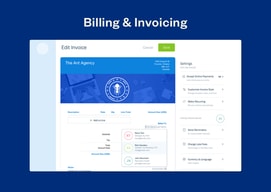
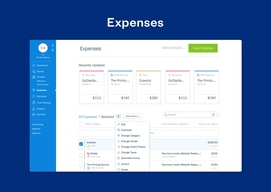
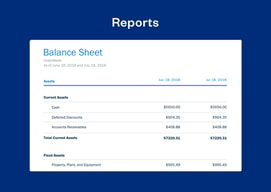
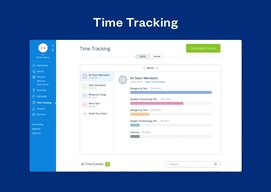
FreshBooks is a cloud-based accounting software preferred by numerous small to medium enterprises for its ability to easily manage and streamline finances. Core features include expensive tracking and invoicing, and it also helps improve operational transparency through reporting and time-tracking features.

| Capabilities |
API
|
|---|---|
| Segment |
Small Business
Mid Market
Enterprise
|
| Deployment | Cloud / SaaS / Web-Based, Desktop Mac, Desktop Windows, Mobile Android, Mobile iPad, Mobile iPhone, On-Premise Linux |
| Training | Documentation |
| Languages | English |
FreshBooks Pros and Cons
- 'Lite plan is great for startups (includes 5 billable clients)
- You can track unlimited expenses and send unlimited estimates
- Clients can pay you using credit cards
- Limited invoice customization
- The mobile app could use improvements





FreshBooks advertises $2.30 a month. The actual price is $23, and the discount lasts three months. Every plan also includes exactly one user, with additional team members at $11 each, so a three-person firm on the middle tier pays $65 a month rather than the $4.30 on the banner. The software is good and well-suited to service businesses — the pricing page just requires arithmetic.
- What it is: Accounting and invoicing software built around service businesses rather than product sellers.
- Best for: Freelancers, consultants, and agencies who bill for time and projects.
- Pricing: Lite $23, Plus $43, Premium $70 per month regular. Select quoted. Extra users $11 each. Verified July 2026.
- The honest catch: Lite allows just 5 billable clients, which most working freelancers exceed.
What Is FreshBooks?
FreshBooks approaches accounting from the invoice rather than the ledger, and that shapes everything. Where QuickBooks and Xero are built around double-entry bookkeeping with invoicing attached, FreshBooks is built around getting paid — proposals, estimates, time tracking, retainers, invoices, and payment collection — with accounting behind it.
For a consultant or agency that bills by project or hour, that orientation is genuinely better. Time tracking feeds invoices directly, retainers and proposals are first-class rather than bolted on, and project profitability tracking on Premium answers the question service businesses actually care about: are we making money on this client.
The trade-off is that it is a weaker general-purpose accounting system. Inventory is essentially absent, and businesses selling physical products will find it thin where QuickBooks is deep.
How FreshBooks Works
- Billable clients are the meter. 5 on Lite, 50 on Plus, unlimited on Premium and Select.
- One user included on every plan. Additional team members cost $11 a month each.
- Time tracking to invoice. The core workflow for service businesses.
- Proposals, retainers, e-signatures from Plus, which is where the plan becomes agency-shaped.
- Project profitability on Premium, tracking costs against project revenue.
- Payments built in. Cards, ACH, Apple Pay, Google Pay, and buy-now-pay-later.
FreshBooks Pricing
Captured from FreshBooks’ US site in July 2026. The displayed figures are promotional; the struck-through prices are the real ones.

| Plan | Regular | Promotional | Billable clients | Users |
|---|---|---|---|---|
| Lite | $23/mo | $2.30 for 3 months | 5 | 1 |
| Plus | $43/mo | $4.30 for 3 months | 50 | 1 |
| Premium | $70/mo | $7.00 for 3 months | Unlimited | 1 |
| Select | Quoted | — | Unlimited | 2 |
Add-ons: team members $11/month each, Advanced Payments $20/month, FreshBooks Payroll $40/month plus $6 per user.

What actually determines your bill:
- The 90% discount runs for three months. After that you pay $23, $43, or $70. FreshBooks discloses this clearly — the struck-through price and “90% Off for 3 Months” label are both on the card — but the large number is the promotional one, and it is what people remember. Budget from the regular rate.
- Five billable clients on Lite is the sharpest constraint. A freelancer with six clients cannot use the entry plan. This is a low ceiling by any measure, and it is the single most common reason people upgrade — not features.
- Every plan is a one-person plan. At $11 per extra team member, a three-person firm on Plus pays $65 a month rather than $43. Count your seats before comparing against competitors that bundle users differently.
- Yearly billing adds a further 10% off, on top of whatever promotion applies.
- Payroll and Advanced Payments are separate. $40 a month plus $6 per user, and $20 a month respectively — relevant if you were treating FreshBooks as an all-in finance stack.
- A 30-day money-back guarantee applies, which is the right way to test whether the client cap works for you.
Who Should Use FreshBooks
- Freelancers and consultants. The clearest case, and what the product is shaped around.
- Agencies billing by project. Proposals, retainers, and project profitability are genuinely well built.
- Anyone who tracks time and bills it. Time-to-invoice is smoother here than in general accounting tools.
- Service businesses without inventory. The absence of stock management is irrelevant to you.
It fits poorly for product businesses needing inventory, where QuickBooks and Zoho Books are far stronger; for teams of several people, where the per-seat add-on stacks up; and for businesses wanting the cheapest compliant books, where Zoho Books undercuts it substantially.
Honest Pros and Cons
Strengths
- Built for service businesses. Time, projects, and retainers are first-class rather than afterthoughts.
- Excellent invoicing. The most-praised part of the product, and the reason most people choose it.
- Project profitability on Premium. Answers the question consultancies actually need answered.
- Broad payment acceptance. Cards, ACH, Apple Pay, Google Pay, and BNPL built in.
- Genuinely easy to use. Approachable for people with no bookkeeping background.
- Clear discount disclosure. The struck-through price and three-month term are both stated.
Limitations
- Five billable clients on Lite. A very low ceiling that forces upgrades on volume, not need.
- One user per plan. $11 per additional seat.
- The headline price lasts three months. After which it is ten times higher.
- Weak inventory management. Effectively unsuitable for product businesses.
- Payroll costs extra. $40 a month plus $6 per user.
- More expensive than several rivals once seats and the regular rate are counted.
FreshBooks Alternatives and How It Compares
- QuickBooks Online is the US default with far deeper accounting and inventory, at a higher price and with repeated increases.
- Xero includes unlimited users on every plan, which is the decisive difference for teams.
- Zoho Books is substantially cheaper and strong if you use other Zoho applications.
- Sage Business Cloud Accounting is the established alternative, particularly in the UK.
- Bonsai targets freelancers specifically, bundling contracts and proposals with invoicing.
For a broader survey, browse our accounting software directory.
The Verdict
FreshBooks is the right shape for service businesses, and that matters more than a feature count. If you bill for time and projects, the workflow from tracked hours to sent invoice to collected payment is smoother than any general accounting package manages, and the proposals, retainers, and project profitability tools on the higher tiers are built for how consultancies actually work rather than adapted from bookkeeping software.
Price it from the struck-through number. The $2.30 on the pricing card is 90% off for three months; the real figure is $23, and Plus is $43 rather than $4.30. To FreshBooks’ credit both are shown clearly on the same card, which is more than several competitors manage — but the promotional price is the one in large type, and anyone budgeting from it will be surprised in month four.
The two structural constraints matter more than the tiers suggest. Lite’s five billable clients is a very low ceiling — a freelancer with six clients is already excluded, which makes Plus the realistic entry point for most working professionals and moves the effective starting price to $43. And every plan includes one user, so a three-person firm on Plus pays $65 a month once seats are added. If you have a team, Xero’s unlimited-user model is the comparison worth running, because that single structural difference outweighs most feature debates at this size.
FAQ
How much does FreshBooks cost?
Regular prices are $23 per month for Lite, $43 for Plus, and $70 for Premium, with Select quoted by sales. FreshBooks was running a promotion of 90% off for three months when captured in July 2026, displaying $2.30, $4.30, and $7.00 respectively. Additional team members cost $11 per month each, Advanced Payments $20, and FreshBooks Payroll $40 plus $6 per user. Yearly billing adds a further 10% discount.
How many clients can I invoice on FreshBooks Lite?
Five. Lite is capped at five billable clients, Plus at fifty, and Premium and Select are unlimited. This is the most restrictive limit in the lineup and the most common reason people upgrade — a freelancer working with six clients cannot use the entry plan at all, which makes Plus the realistic starting point for most working professionals.
Does FreshBooks include multiple users?
No. Every plan includes a single user, with additional team members charged at $11 per month each; only the quoted Select plan includes two. A three-person firm on Plus therefore pays $65 a month rather than $43. If you have a team, Xero includes unlimited users on all its plans and is the more natural comparison.
Is the FreshBooks discount permanent?
No. The advertised 90% discount applies for three months, after which the regular rate takes effect. FreshBooks displays both the discounted price and the struck-through regular price on each plan card along with a “90% Off for 3 Months” label, so it is disclosed rather than hidden — but budgeting from the promotional figure will produce an unpleasant surprise in the fourth month.
What is FreshBooks best for?
Freelancers, consultants, and agencies that bill for time and projects rather than selling products. Its time tracking, proposals, retainers, and project profitability tools are built specifically for service work, and its invoicing is the strongest part of the product. It is a poor fit for businesses needing inventory management, and expensive for teams once per-seat costs are included.

Compare FreshBooks with other popular tools in the same category.
Freshbooks is intuitive and easy to use. I can easily track my time and spending. It's a reliable program. Their customer service has been very good. It's easy to write and track invoices. I do recommend this product to other small businesses.
I can't think of any downsides. I really appreciate using Freshbooks.
It helps me organize all my time, spending, and accounts receivable.

I love being able to track my time for each project, and later be able to quickly add that to an invoice. Easy to track clients and projects, and to set prices for different situations.
My biggest frustration is with the iOS version of the app -- while the computer/browser version is great, it's not possible to look at the time tracking on the smart phone. Every month I'm asked (while away from my computer) "how many hours do you estimate for project X this month?" and I cannot anser that without going to the browser version (yes, I can do that on my phone, but then why have the phone app?).
I am able to keep clear records of the time spent on every project and for every client. Since my business is practically all billed by the hour, this is invaluable. I love being able to click "start" when I start my time on a project, and pause or end it as needed. I'm not a clock-watcher, so this really helps me know just how much time I'm putting into a project. FreshBooks also has the ability to charge different fees for differnt projects, clients and/or activities. This is also invaluable, since I use differnt rates depending on the job parameters. Their support team has always been knowledgeable and usually quick to respond to any issues I've had.
The estimate and proposal features makes it easy to quote jobs and then convert to an invoice when the customer accepts.
I wish there was a library of Terms that could be easily applied to invoices.
I needed an easy way to create professional invoices in the field and show progress payments. Freshbooks was the best answer!
As a new business owner, keeping track of invoicing, payments, bills, and taxes is important. FreshBooks has a very easy user interface and has made the administrative part of my business life regarding financial things so much easier. My accounting representative reviews my books and helps me keep everything categorized properly.
I did have to obtain a separate tax professional, but I used a partner company, Bench, and that has proven to be a great idea. I have not found anything to dislike it and have been using FreshBooks since July 2023.
All of my invoicing and payments are matched, so I never lose track of money owed to my company. My business accounts are connected, and I can easily categorize business expenses from company bank accounts and credit cards. I know exactly what the financial status of my company is. As my books were perfect, the tax professional was able to review things after the New Year to see what needed to be fixed, and nothing did. All I need do is submit tax forms from clients, etc. and it will be done.

There are so many things I like about FreshBooks, it's difficult to say what I like best about it. If I had to narrow it down to one thing I would say it's their phenomenal support. Whenever I have a question, whether it be big or small, I love the fact that I can call a number and reach a real person quickly. Support is always friendly and knowledgable. They've helped me out of a jam more than a few times.
There is not much bad I can say about FreshBooks, however I think they could add a few more features that might make it more attractive to freelancers. I think it would be great to have a way that I could create payment buttons to put on my website.
FreshBooks has made tax time so much easier. I use it to import all of my banking information so it's a great way to keep track of all my spending. Then I categorize my spending into categories that are congruent with my expense categories that I use when I file my taxes. Anything that is a personal expense, not related to business, I put in a personal category. This helps me to keep running totals of all my business expenses and keeps them "separate" from personal expenses.

I started a professional residential organizing business 13 years ago and have been using Freshbooks since the beginning. I love the ability to easily keep up with my invoices and accounting every day as I work with my clients. The tech support is awesome and at the end of the year I just pass the reports on to my accountant for super easy tax prep.
Honestly I love everything about Freshbooks
Freshbooks makes it super easy to keep up with my expenses and invoices.
I really like the user interface. It's very intuitive and easy to read, so it was a very quick learning curve. So I almost do it for fun each day.
I wish it allowed me to track other things, that would help me get an overall picture of my business. For example, I would like to track my LLC Partners' Capital account transactions.
It's giving me one place to track all my income and expenses for my LLC business records. It minimizes my need to input every expense because those that repeat can be set up as recurring expenses.
I love the client/contractor integration. It is very user friendly for my business, particularly as we have grown since 2013. FreshBooks also has the best customer support. They treat every question thoughtfully and make sure I understand the answer.
I am still learning the upgraded version and definitely miss parts of the classic version of FreshBooks - however I am still in love with FreshBooks!
I need continuity regarding seeing which contractors my clients have interacted with over time. I'm not sure I would be able to track that information without having something like the FreshBooks system.

Easy to use No learning curve App for the phone is excellent (scanning receipts) Creating invoices is simple Tracking and sorting expenses is easy
Reporting function isn't as robust as Quickbooks BUT it is a quarter of the cost!
Invoicing to customers, expense tracking and revenue reporting. An overall financial management program.

It has team collaboration tools so all remarks to the projects or business objectives could be times and referred during reporting cycle. Fresh Books also have build in time tracking tool which is important for small teams. It works very fast and stores reliably data. Has good options for creating reports and estimates. FB has good mobile app.
More people should know about that awesome accounting software! Good to have more integrations with postal and freight services to track goods in transit and use barcodes. Payments feature is good to be expanded on international neobanks gateways to use worldwide not only export in bank for swift.
We use it for project who has own expences balance. It works reliable and no will to change on another. We can rise from mid to large sized company in one accounting system, that matter and reduces errors.
I love this tool because it is easy to use, it helps me with the accounting of my small business and best of all is that I do not have to have great knowledge of the subject, what I like most about FreshBooks is its ability to create and manage custom invoices, it integrates seamlessly with accounts like PayPal which facilitates even more online payments, it is amazing the control that keeps track of expenses allowing me to keep up with the profits and losses of my company. I consider that for not having any experience in accounting this tool has been a great help. It does most of the work, so if you are in a bind this platform will always be a great option,
Overall I find it to be very comprehensive and very useful for my company which is small, however for much larger companies it does not offer all the features you might need, nor is it as powerful as other accounting software.
Having FreshBooks has provided me with a better management of my company's finances as it keeps track of cats, and has helped me in an easy way to understand accounting, I have saved me a lot of time as I don't have to spend time on recurring customer invoices every month because FreshBooks does it automatically, and overall it is a tool worth having.
Freshbooks is easy to use, and have built in dasboard, accounting feature, and allows us to generate more than thousands of invocices each month. We can mail out invoices or have e-invoice email to our customers
I like Freshbooks, which allows our customers to be to login to the invoice, print them, look at history, pay by various method, including check, PAYPAL, Stripe, Wepay or via Bank transfer.
It can setup as recurring invoices and we just need to set it up the first time and tell Freshbooks to either email or print out the invoice and mail to the customers.
Freshbooks helps keep things simple. With it's easy to use platform I'm able to quickly send quotes, invoices, and track my expenses in one easy format.
With the simplicity and ease of use it definitely is limited in its ability to fully paint a picture. If you are more financially inclined or have a larger business, this doesn't give you a deep deep dive into how the company is preforming
It's allowing us an easy solution to send out bills quotes and estimates without having to put in too much time... as a small business owner this is key when time and resources are limited.
I love how simple Freshbooks is to keep track of your company's bookkeeping and invoicing.
I wish it let you customize the invoices more.
Tracking time spent on projects and helping to invoice clients accurately
I love freshbooks because it helps me to stay organized while I am working, I can time track for all of my different clients in one convenient space and send them invoices from the same area.
I wish that the first tier of accounts was 10 contracts instead of 5.
Freshbooks has helped me to easily keep tabs on every clients time that I spend.

It was helpful to get us up and running with an online estimating/invoicing solution.
We outgrew it after a few years. That's all. Otherwise it was really a great system.
Like I said before, it gave us the opportunity to turn to the cloud for our accounting setup.
The best thing I like about Freshbooks, is that it is not QuickBooks.
The invoice layouts are limited and could be better.
I am able to invoice, track expenses, track time, organize by project, accept payments, manage accounting tasks, and reports.
Very flexible, simple navigation, easy to understand workflow, best for sending estimates and invoices. Excellent customer support as well.
No built-in payroll module. In the US it integrates with external apps like Gusto and in Canada with the Payment Evolution.
With its features like project creation, team collaboration, and time tracking it has increased the speed and visibility of the status of each project my team is working on. Clients can be billed accurately and auto-payment reminders can be set up as well.

Ability to create and manage customized invoices is what I like best about FreshBooks. FreshBooks integrates seamlessly with PayPal hence enhancing ease of accepting online payments. Expense tracking and managing is well done using this tool. Profit and loss reports can be generated quickly hence possible to know the status of our organization.
FreshBooks makes accounting and bookkeeping activities to look more simple and I got nothing to comment as negative vibe.
Bills can be processed and managed more efficiently with FreshBooks. It's simple to track and manage cash transactions with this tool.
I love the ease of use and the way all my clients are saved in Freshbooks. I've used it for over 10 years and have all my client data stored there. I frequently look back at my old billing history to see how I've changed my packages and pricing over the years. Saved items are also a huge help -- it's like a menu of services that are saved and can be reused on invoices over and over again, making sending a new proposal/invoice to a new client a cinch.
There isn't much to dislike. They've added signatures for proposals, which saves me having to have a HelloSign or AdobeSign license. Their customer support is amazing.
FB saves me so much time. I don't meddle with Excel spreadsheets and each quarter I download my profit and loss for my business financial manager. They use the numbers to calculate my self-employment taxes. It's a huge time savings and by the end of the year, I'm totally organized for tax season.

Its working and smoothness is wow you can control and decide workflow for your customer journey that is the key which I liked the most
There is nothing to dislike very good and advanced application for business management
From inquiry to customer onboarding follow up , remainders automatic alerts everything which will automatically working after defining workflow
Where should I start? Well, Freshbooks is a breeze when it comes to creating invoices and managing expenses. It's fast, easy to master and gets the job done without much effort. And whenever required the support team is there.
To be very frank, I cannot think of anything that I dislike about this tool. I made a switch from another tool in the similar domain and Freshbooks is way better in almost every way.
Managing accounting. Creating invoices. collecting payments

Ease of use, easily customizable, online payments
Bugs and server issues, it happens at least once a month that there is some issue
Easy cloud accounting

Remote and customised software. globally know and knowledged software. easy to use and fast learning.
little old version as compared to current market standard though not much.
day to day accounting.
For 5 years, I used Quickbooks for my accounting and invoicing. I avoided logging in to QB because it was difficult to navigate and just plain ugly. A friend told me about Freshbooks and I hesitantly made the switch. Doing my accounting through Quickbooks was like going to the dentist. Painful! Doing accounting with Freshbooks is like going to the Spa! I do not regret this decision! I love how easy it is to create invoices, the automatic expense capturing, and the dashboard. Plus, if you need help, the customer service is fanatical.
I cannot think of a downside. I want to move more processes to Freshbooks. I wish you had a mileage tracker so that I could track those within the platform as well.
One delightful benefit is the automated reminders that are sent to customers who have an unpaid account.

Simplicity, Its very easy to understand, unlike quick books.
Not being able to write cash recipes for clients.
It makes accounting fast and easy. My accountant can access my account easily. I can use it on the go . Easily take pictures of receipts and upload them.
The UI is flawless and simple to use. Also, the support is super quick and they are very friendly.
Nothing, I love the app exactly the way it is.
Keeps track of money spent to money earned for my small business. Invoicing is beautiful.
Freshbooks is continuously innovating their product! They release a lot of new features that are actually useful to me as a freelancer. I use Freshbooks daily for time-tracking, invoicing and reporting.
If you have a feature request, they listen but you don't often see action. Nothing I've requested so far (no matter how small) has actually happened.
Easy invoicing, payment solutions and time-tracking. FB makes it simple for me to collect money from clients.
I love the ease of use, automation, and customer support are superb. I've never had an issue and things just KEEP continuing to get better.
I have no dislikes. Freshbooks has always taken a serious approach to my previous concerns about certain recurring billing and made the situation better.
The end of quarter/year tax balance sheet is something sent from the angels.
Freshbooks is the perfect online tool for small businesses for estmates, invoicing, payables, and tax prep. Affordable and easy.
The invoice header is not beautiful at the top.
I'm terrible with invoicing. Quickbooks makes it easy and fun.