

Unclaimed: Are you working at GetResponse?
GetResponse Reviews: 4.3/5 — Solid Choice
GetResponse is a reliable email marketing software with marketing automation capabilities that can deliver tailored marketing experiences, engage customers, and boost sales through its extensive selection of features. A recent addition to the platform includes web push notifications and an email chat function. Improved automation workflows and SMS marketing features make it a preferred software for users.
Best known for being a platform that provides comprehensive marketing tools for small businesses, bloggers, and marketing agencies, GetResponse is a cloud-based software that simplifies communication with your core audience. GetResponse primary feature is an email creator that allows users to create professionally designed emails for mass sending through its selection of templates. The platform can build marketing automation workflows based on data and behavior ensuring personalized marketing experiences, better-engaged customers, and higher sales.

| Capabilities |
AI
API
|
|---|---|
| Segment |
Small Business
Mid Market
Enterprise
|
| Deployment | Cloud / SaaS / Web-Based, Mobile Android, Mobile iPad, Mobile iPhone |
| Support | 24/7 (Live rep), Chat, Email/Help Desk, FAQs/Forum, Knowledge Base, Phone Support |
| Training | Documentation |
| Languages | English |
GetResponse Pros and Cons
- List building and list automation options available
- GetResponse offers good templates
- Easy-to-use design and spam testing
- Supports powerful lead generation features best for eCommerce sites and webinar promotions
- Lets users monitor Google, Facebook, and Instagram from the GetResponse account
- Some of the landing pages don’t work great on mobile devices
- The drag-and-drop feature could use some tweaks
- The deliverability rate needs improvement
- Basic plan doesn’t offer webinar features
- Phone support is available only for the custom paid price plan








Are you looking for a new comprehensive email marketing solution? If you have an online business that relies on reaching out to and nurturing leads, you’ll definitely need a reliable tool to help you do it.
For many marketers, that solution is GetResponse—a powerful email marketing tool that has evolved into an all-in-one marketing automation platform with a comprehensive selection of inbound marketing solutions.
In this post, we’re going to provide a detailed review of the cloud-based software GetResponse to help you decide if this is the software that your business needs.
What is GetResponse?
GetResponse is an all-in-one email marketing software solution that you can use for all your email marketing needs. It’s a simple, yet robust tool that lets users send customized emails, generate leads, engage customers, automate marketing tasks, and even help boost sales.
Because of its numerous automation features, users spend less time crafting and sending emails and more time driving effective strategies for their brands. This also means users get more timely responses and see more efficiency in their marketing efforts.
The platform is focused on providing solutions for email marketing, which means the tools that it offers are built to help a company grow its audience and contact list, promote its services and sell its products in the most personalized way. Notably, the platform’s user-friendly navigation, affordable price points, and numerous customizable options make it ideal for a wide range of businesses—whether you’re a fledgling start-up or a blue-chip organization.
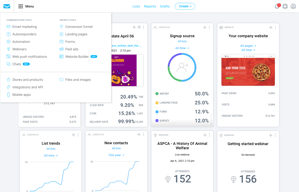
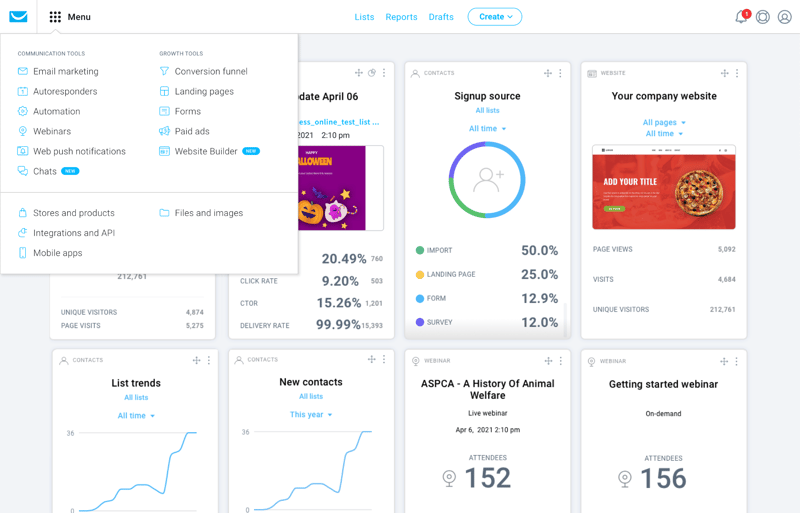
With GetResponse, you also don’t just get email marketing. It touts itself as an all-in-one marketing tool and thankfully, they live up to this promise. With GetResponse, users also get integrated email marketing features, autoresponders, automated landing page tools, and advanced analytics.
GetResponse has added AI-powered features including an AI email generator and AI campaign builder.
How GetResponse Works: Key Features
Now, let’s take a closer look at what features you can expect from this all-in-one marketing software.
Email Marketing
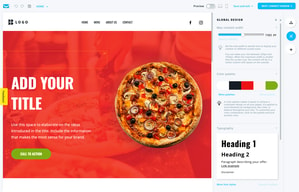
GetResponse’s lineup of key features is designed to get users more opens, clicks, and ultimately sales. The platform gives users the option to create custom emails using a simple drag-and-drop builder or choose from a variety of free, ready-made templates that can be personalized to fit their brand. The customization tools are user-friendly and offer a wide range of professional templates to choose from.
Some notable tools to take note of are:
- Newsletter Templates – GetResponse’s newsletter template feature is a powerful tool for creating professional and engaging emails that let users choose from a wide range of pre-designed templates that can be customized to fit your brand. With this feature, you can create newsletters that are visually appealing and help you connect with your subscribers.
- Autoresponders – GetResponse’s Autoresponders feature is one of the platform’s most useful tools for streamlining email marketing efforts, helping users save time and effort by automating repetitive tasks. Because it’s a fully customizable feature, businesses can tailor the timing, and frequency of autoresponder emails and personalize content to fit a brand.
- Automation emails – To improve the overall effectiveness of campaigns, GetResponse lets users create action-based, automated emails that help engage audiences and encourage more sales.
- Automated Blog Digest – This is a user is a time-saving tool that allows you to send a weekly or monthly email to your subscribers highlighting your latest blog posts. It ensures subscribers are engaged and up-to-date on your latest content, without having to manually create and send an email each time you publish a new post.
- Perfect Timing feature – GetResponse’s Perfect Timing feature is a unique and useful tool that allows users to send emails at the optimal time for maximum engagement. The platform analyzes data from past campaigns and taking into account subscriber time zones, the platform automatically determines the best time to send an email to each recipient.
- Transactional emails – This feature is a paid add-on that uses SMTP-triggered emails so you can send receipts or personalized reminders to your contacts.
- A/B testing – You can also A/B test your emails to ensure you’re sending out the most engaging and relevant emails.

Marketing Automation Builder
GetResponse’s automation feature makes it an incredibly efficient platform for creating a personalized customer journey. By automating your email marketing efforts based on customer data and behavior, it can deliver highly personalized content that is tailored to each customer, resulting in a more enjoyable and engaging experience. In short, the automation feature is what makes GetResponse stand out and helps users achieve their ideal customer journey.
Top features include:
- Visual Workflow Builder: Their visual drag-and-drop automation builder can help you set up your automation to make sure your customers get the experience they want. Once your marketing processes are automated, this can help you save time and focus more on capturing new leads and selling your products.
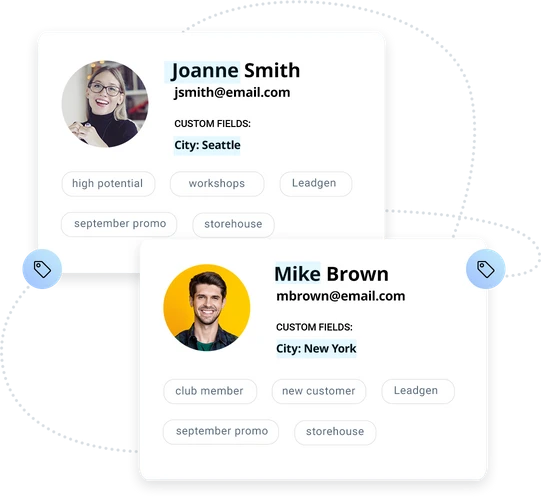
- Customer Segments: By using an unlimited number of tags to appropriately profile your customers, you’ll be able to deliver exactly what they want.
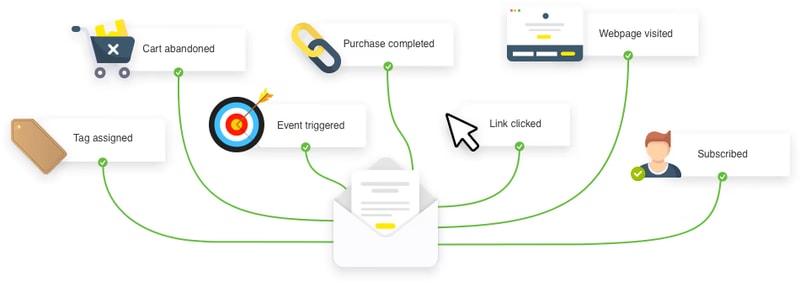
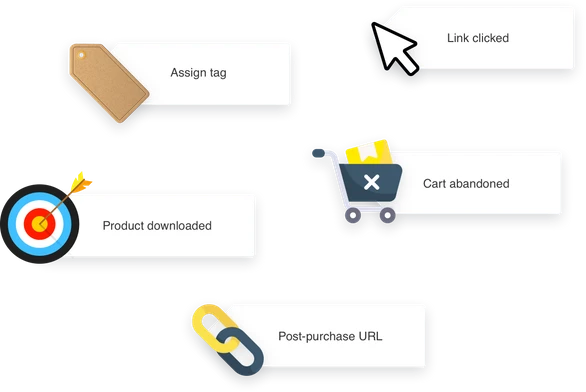
- Web Events: GetResponse let users choose to receive alerts whenever a customer takes a certain action on your website (e.g. logs in, watches a video, abandons a cart, or downloads content). This will help you identify what your customers are engaging with so you can improve their experience.
Conversion Funnel
This is one of GetResponse’s standout features. It’s a lead-generation feature that helps you create sales funnels and landing pages for the different parts of your business. You’ll have access to over 30 conversion-optimized scenarios to help you build your contacts, and sell your offers.
If you’re running an e-commerce store or promoting a webinar or other events, this will be a valuable addition for you.
Landing Pages
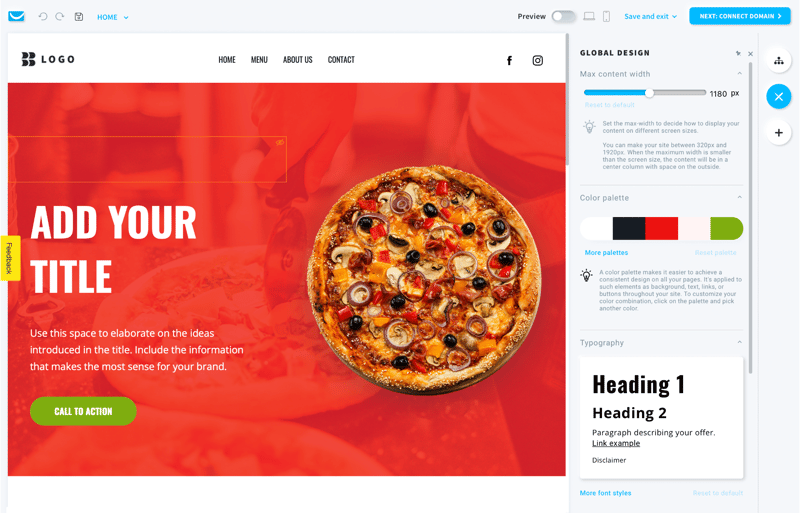
Your landing pages are what’s going to convert your traffic into leads as they showcase your product lists and any other promotional content. GetResponse simplifies this process while still ensuring that it’s effective by allowing you to build your landing pages in minutes using a drag-and-drop editor.
This builder also includes:
- Sign-up forms to help grow your contact list
- A/B testing for your pages
- SEO optimization directly from the platform so you can ensure your landing page appears in search results
- Customizable landing page templates
Website Builder
GetResponse has an AI-driven, and code-free website builder. If you need more guidance and don’t want to build from scratch, this feature simplifies the entire process so much that even those with no coding experience can easily build and tailor a site for their specific needs. Simply input your business description and your brand’s visual preferences to receive personalized web templates.
Webinar Builder
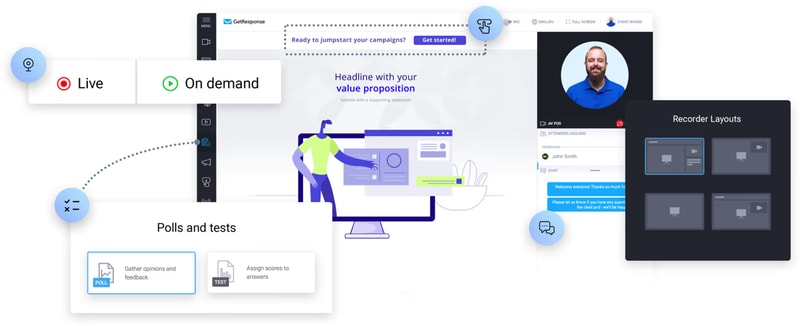
GetResponse’s webinar builder is a no-download tool capable of connecting and engaging with your audience anywhere and anytime, which means it will give users a real opportunity to encourage conversions.
Some key perks to take note of in this specific feature are:
- Ability to host unlimited webinars
- Access to a room for up to 1,000 live attendees
- Platform sharing with two other presenters
- Storage of up to 20 hours of webinar recordings
Who is GetResponse For?
Whether you’re looking to grow your email list, increase engagement, or drive sales, GetResponse is the ideal platform for anyone looking to maximize their email marketing efforts and achieve their marketing goals. But given its range of tools and features, GetResponse is great for:
Entrepreneurs
GetResponse is an excellent platform for entrepreneurs looking to market their businesses online. The platform offers a range of features that are specifically designed to help entrepreneurs reach potential clients and build relationships, including email marketing, a website builder, and paid ads. With email marketing, entrepreneurs can create custom emails, use ready-made templates, and automate their email campaigns to reach their target audience.
Online marketers
For entrepreneurs who are looking to generate and convert leads, this is a great option. The platform offers a range of features specifically designed for online marketers, including sales funnels, popup forms, and autoresponders. These tools provide entrepreneurs with the flexibility they need to effectively reach their target audience and convert leads into paying customers. Whether you’re looking to grow your email list, increase engagement, or boost sales, GetResponse has the tools and features you need to achieve your marketing goals
Marketing managers
With GetResponse, these professionals can easily reach specific customer segments by using personalized and automated messaging across various channels. This includes email, website tracking, and the ability to host live and on-demand webinars. These features allow entrepreneurs to effectively engage with their target audience and drive results, that can help take their marketing efforts to the next level.
Mid and large companies
With its ability to increase return on investment (ROI) with various tools that are tailored to meet the specific needs of businesses, GetResponse is a great platform for businesses. This means that regardless of the size of the business, GetResponse can help achieve key metrics across the customer journey. The platform’s transactional emails and dedicated customer support are just two examples of how GetResponse is specifically designed to help entrepreneurs succeed.
GetResponse Pricing
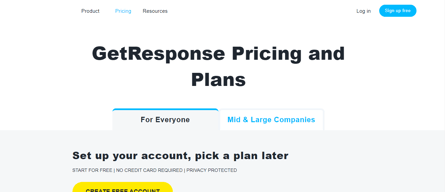
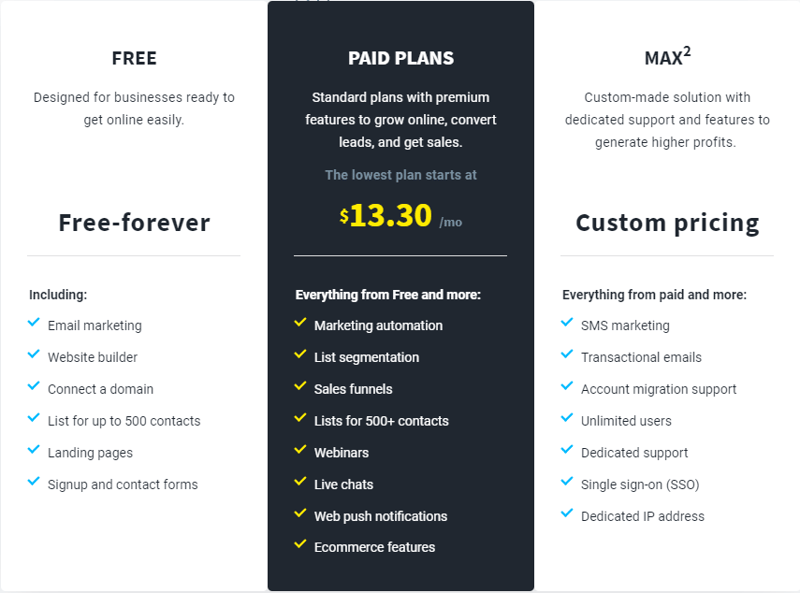
GetResponse offers three main tiers in their pricing; Free , Paid Plans , and MAX² (for large enterprises).
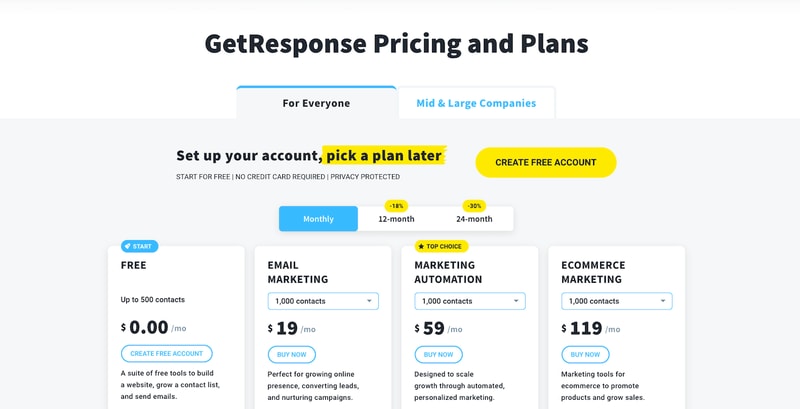
The paid plans are also divided into email marketing, marketing automation, and e-commerce marketing.
Email Marketing Plan
With the email marketing plan, you can build your email list and deliver valuable information to your audience. You’ll be able to create a website with an unlimited number of landing pages to generate signups. You can also segment your subscribers, but only based on the basic information you’ll have collected about them. This plan works best for those who don’t need complex automation, like small businesses, entrepreneurs, bloggers, etc.
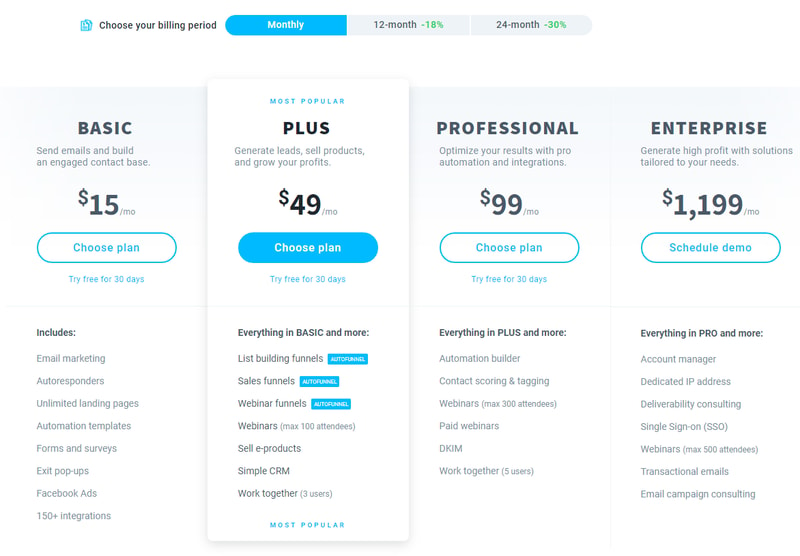
Pricing varies depending on your contract length and the number of contacts. See GetResponse pricing for current rates.
Marketing Automation Plan
If you want to include more advanced automation settings and segmentation, then this is the plan for you. It includes all the features in the free plan, and email marketing plan, as well as trigger and event-based sequences to collect more data on your audience. You’ll be able to create automated email chains so customers can receive personalized emails based on their behavior and preferences.
Additionally, you’ll get access to the webinar builder so this plan is typically great for B2B and tech companies that want to nurture their leads.
See GetResponse pricing for current Marketing Automation plan rates.
E-commerce Marketing Plan
This plan includes everything from the two previous plans and includes web push notifications, abandoned cart recovery, product recommendations, transactional emails, and promo codes. Of course, this plan is beneficial if you want to increase sales for your online store.
See GetResponse pricing for current E-commerce Marketing plan rates. Pricing scales with the number of subscribers.
GetResponse Pros & Cons
Pros
- The free plan includes valuable marketing features.
- GetResponse is feature-rich while being easy to use.
- This a great option if you have an e-commerce business.
- GetResponse integrates with over 120 tools. You can also use GetResponse’s advanced API to build your integration.
- Choose from over 2,000,000 Shutterstock images and GIFs from GIPHY to add an attractive and professional touch to your emails. No extra purchases are necessary.
- Caters to various devices so you can design and preview well-formatted emails that look good on any device (desktop, tablet, or mobile).
- You get digital marketing reports to track your marketing campaign’s performance.
- You can create and monitor your paid Google, Facebook, and Instagram ads from your GetResponse account.
- 24/7 live representative customer support is available via email or live chat.
- 30-day free trial available, with no credit card required, for all features.
- A discounted plan is offered for charities and NGOs (50% off every monthly plan)
Cons
- Although GetResponse integrates with over 120 tools, it omits some notable project management platforms. Also, integrations with PayPal and Eventbrite can only be done using Zapier.
- GreatResponse doesn’t automatically create a mobile-friendly version of your landing pages. You need to remember to design the mobile-friendly version separately.
- Although GetResponse’s mobile app is great at showing you the progress of your campaigns, the drag-and-drop editor is difficult to use and makes it hard to make changes while you’re on the go.
Conclusion
GetResponse is a great and affordable tool to help you upstart your email marketing campaigns. They have other offerings that are all designed to complement core features and boost your presence online, including a selection of builders, for websites, landing pages, and even webinars. GetResponse also has a customer support team that is always available to help users onboard and address any concerns.
However, don’t forget that there are still other email marketing software options available—all with their own set of unique features and tools. Be sure to take a look at our wide range of software categories to find the perfect software that your business needs.

Compare GetResponse with other popular tools in the same category.
GetResponse est semble-t-il l'autorépondeur qui offre le meilleur taux de délivrabilité, et surtout quand il y a un problème, par exemple un blacklistage chez certains opérateurs mails, on a quelqun en face qui gère et résoud le problème !
Le bémol, c'est le prix... à part ça je ne vois rien d'autre à critiquer.
Getresponse permet de réaliser des shoots mails "propres" avec un bon taux de délivrabilité, et c'est surtout ça que je demande.
I regularly use GetResponse to reach out to a big database of music fans with newsletters featuring news, new music, new merchanise and anything else relevant that needs to be promoted. As someone who works in the music industry, I feel GetResponse is a great tool for artists and musicians looking to expand their reach and connect with their fanbase. Not only is GetResponse really easy to use (you don’t need to be an expert to get your head around it), it also integrates various other programmes, such as wordpress. This integration allows me to collect hundreds of email addresses every week, passively. These are people who have opted in to receive newsletters via our website as well as those who choose to receive merchandise newsletters while making purchases from the online merch store. Back to making newsletters: GetResponse allows you to customise your newsletters however you deem fit. It makes it very easy to send out emails that are representative of your brand – you can add images, use any colour you could possibly want etc. You can be as creative as you like! Another thing I’ve used GetResponse for are card abandonment emails. These have contributed greatly to boosting sales. Finally, I can’t fault GetResponse's customer service – it’s been fantastic every time I’ve needed assistance.
We have yet to come across anything that we dislike about GetResponse.
GetResponse is looking into some design/template issues we are facing, namely some lines that appear. Nothing too serious.
The chat help and other features. I like
That now I may loose my Ray White email as I need to verify it and I cannot do it as it's a corporate website
They solve any problem I may have. How to add attachments to email, link urls, etc
Honestly, I am not a particularly technically orientated user and so, for me, the superb tech support is their best feature. Every time I need to query how to do something, they are on hand with patient, helpful staff who are well trained and proficient in every aspect of the product.
Sometimes, because Getresponse is so feature packed, I forget exactly how to carry out particular tasks. Hence, I get to use their tech support chat a lot.
Keeping in constant contact with my email lists to enhance engagement and affiliate sales.
The most used feature is the autoresponder, it's easy to use and works perfectly
Nothing, so far so good, I would like to be able to get the full access though
It's easier for me to create mailing marketing strategies
It's versatility and customization in the making of my newsletter
That I got to separate subscribers if I want to send certain emails to certain people
Helping me to stand out in front of the crowd with my messages
We've been implementing GetResponse Max since 2020 and have deployed it in nearly 65 offices worldwide to strengthen our communication and optimize our sales performance. We chose GetResponse MAX because the interface is translated into many languages. GetReponse is very easy to use, with an optimized UI. GetResponse provide centralized access for multiple accounts and users. And finally, we use API integration for synchronizing contacts and data with our ERP system. And, last but not least, the customer support is really great. Our dedicated Product Support Expert knows very well the product but also our needs so that they respond to our requests without delay and very often within the hour. They also take into account any bugs we may report and fix them.
The global contact search engine sometimes lacks precision but we can find another way to find it and the segment creation engine is very powerful but sometimes difficult to use. There too many features available and even if we don't use all the numerous functions for capturing leads and launching multi-channel communication campaigns, we know we can rely on when we will be ready to use it.
GetResponse enables us to ensure maximum deliverability of our campaigns and it helps us to acquire an excellent reputation. It helps us to synchronize with available APIs our data and contact with our ERP system very easily and quickly
Quickly inform my customers about last news.
I can't think of any negatives about Getresponse.
Getting the latest information to my clients.

Generally, I use Get Response to create my list and contact them. The best feature is landing pages. It's very simple to use with drag and drop action. The customer service is impressive and always in support. I hit an very good profit after using Get Response.
Limited access for API services, I generally use number of plugin which I use to connect getresponse VIA API, I found the access is limited to use them.
Email marketing & Product newsletter feature help me a lots to getting customer up to date. I earned more with use of these 2 features in get response. Email marketing drive into sales and I am very happy to use this tools.
While a little overwhelmed at first once I got exploring the vast array of services and tools in GetResponse I couldn't stop it really is built to be easily navigated and has plenty of tutorials to help guide you through. I loved designing some flow charts and tailoring my own specific funnel. The website templates were incredibly useful and gave me some ideas for the future. While only at the beginner stage of using this site I feel it has all the requirements in one site.
Nothing as of yet I am enjoying the tools it provides and have found it better than most competitors.
The functionality of the site is more intuitive I feel compared to other website builders that require more intensive coding parameters I feel this would be incredibly useful for teams with low and high experience levels.
Their support team is chat available 24/7
To be totally honest, I've hadn't found one!
Any time i come acros something new, I'm not familiar with, support will put together a short video, explaining it step by step
I love that I can do most of what I need with GetResponse. Yes, I can do the basic email marketing things I need to do like sending emails, tagging subscribers, following up with my audience, and delivering lead magnets. But I can also create landing pages, entire funnels, run webinars, and a bunch more. I've found myself canceling multiple services because GetResponse covers so many aspects of my business. Also, the way they have implemented AI features to make things easier is awesome. I don't use it to fully create everything for me, but it does give me a pretty good jump start when I need to create assets.
I wish I could have better access via API. For example, there are a numer of plugins and services that I use that connect to GetResponse via API. However, that access is limited. I can add them to my list, but not tag them in specific ways based on the actions they take. Fortunately, they have a lot of features that could take the place of those plugins and services, which works for me.
It allows me to engage my audience in a deeper level and nurture a relationship with them. It also allows me to promote my products and services so that I can make money, which is always good.
Fairly easy to use and help is available.
There is a lot of GetResponse that I don't know about...there is training, I need to learn more.
It is my main autoresponder and I use this to manage my list and create email posts to my list.
How easy it is to operate. It really has a very seamless interface. And it has a very good client service.
nothing up to now, I really have liked everything.
custmer nurturing.
The platform is easy to use and provides several modern, stylish templates for email marketing. I am often inspired by their templates when designing our own content. We also enjoy the live analytics map that shows open and click rates as soon as the email is sent. The transition from our previous platform was a breeze and we're very happy with GetResponse!
I'd love to see even more templates and designs to choose from!
GetResponse makes email marketing easy and fun. The templates often inspire our own content and design and the analytics are outstanding.
I like their website builder and email platform. Very easy to use both and when questions arise, support is quick and very good.
There haven't been any downsides to using this program. Support is fast and helpful.
I've been building websites for years and it's always changing. I no longer build sites professionally but this helps with my own website without having to get into coding.

GetResponse is a very important platform for online business. Many other platforms or software, depending on GetResponse to fully functioning.
I like everything about GetResponse user friendly and it gives you every tool you need to succeed,
I am happy to use GetResponse to build my list of subscribers that can be potential customers. My first landing page generated 67 subscribers in few days.

The variety of tools and the pricing are affordable.
Perhaps the UX interface could be a bit simpler.
Basically, I created a landing page for a product I am promoting and I connected it with the marketing automation tool from GetResponse.
The quick response time to our queries. Having live chat is something which has been invaluable and all of our queries are answered quickly and efficiently with videos/images provided when needed to make instructions simple to follow.
Nothing. We had issues in the part with losing emails as there was not an auto-save feature but we fed this back and it was brought in meaning we've not lost any drafts since!
Having a platform to quickly and easily access all of our customers via. There are a lot more tools that GetResponse offer that we would love to utilise so we need to put some time aside to make the most of the additional features and build customer bases/workflows etc better.
Get Response has literally the most amazing customer support I have ever seen. I was a newbie to email automation and the crew have taught me to create automations and email sequences like a pro - something that i could never have envisaged being able to do. It is very intuitve and user friendly A++
The only improvement would be to have the ability to open up different functions without having to re-sign in on another browser tab sometimes. But that is a very minor issue!
Basically they deal with issues as they arise, so all good!
All of my email functions are in one place and for not very much money either. I can create as many email campaigns as I want to keep up with my promotions and customers.
I am really enjoying GetResponse so far, so this question is not relevant to me.
So far, I haven't had any problems with GR.
I can contact all my subscribers and they can stay connected to my team and get the right information.
not much it is such a great platform and it is easy to use
Getting accurate information to subscribers

The drag-and-drop html email creator, landing page and
Integration with HubSpot should be better
Landing page + html email - I can create both in one platform
Get Response was the easiest to get started for a newbie. I have tried many, many other products. GetResponse is for a new beginner to a very well-educated individual in Email Marketing. If you have questions, they are there for you. They have uploaded many step-by-step videos for you to watch to make this a very satisfying experience. If you come to a roadblock, email the GetResponse team, who will help you figure everything out.
I haven't encountered anything in GetResponse that I am not satisfied with as long as I have used this software.
Using GetResponse has allowed me to automate my email marketing which in return has saved me countless hours.
GetResponse is easy to use email marketing provider, it also has many helpful landing page templates and a great dashboard for reviewing the metrics and is integrated well with many other applications.
Nothing so far, except requiring an upgrade if want to use sales conversion features.
Help me to set up email campaigns and autoresponders easily to grow my business.
Get Response is an email autoresponder that is a breeze to use. It is fairly easy to get to grips with. An added bonus, is a low monthly subscription and a free version (500 contacts).
The Facebook and Google Ads service may need a couple of more features. Bing or more correctly Microsoft Ads would be helpful. Along with features for YouTube Adverts.
Communicating with my customers and leads. To encourage engagement

The statistic system is detailed and proper and they provide original templates it is very easy to write in detail. the best part of it, they give a free account option
They prescribe a support of clean records and, surprisingly, in the wake of being cleaned, messages and records are dismissed.and it is not easy to edit templates
it was difficult to market my small business get response solve my problem. i can easily import contacts and email them easily it boost my sales and increase traffic
Integrating Getresponse with my marketing software was easy. I depend on it to be successful in my marketing efforts. It is the best email marketing platform because it offers features such as email automation, templates, and autoresponders. It is possible to send emails, sequence autoresponders, automate landing pages, use forms, and conduct surveys.
Bounce rate data cannot be obtained due to invalid email addresses, and excessive time is wasted updating the landing page for mobile devices.
Creating an email campaign takes a lot of time, but this tool enables me to do so in a few simple steps because I always find email marketing to be a good way to promote my business. There are many templates available for your emails, making it simple to design them with more confidence. I really enjoy the program.

Get response provides organic traffic to your business.
It is little costly for the service provide
Giving huge organic traffic to your online business.

The easy-to-use, autoresponder to send emails.
Not able to afford the whole system yet.
I can advertise constantly without being present all the time.