

Unclaimed: Are you working at HubSpot Service Hub?
HubSpot Service Hub Reviews: 4.4/5 — Solid Choice
Hubspot, a giant in the digital marketing category, offers a wide range of software solutions with comprehensive free tools. This makes expanding your toolkit across sales, operations, marketing, etc., very easy. Its CRM system is at the heart of HubSpot’s offering. The platform makes it an excellent option for managing customers and progressing them through your funnel. As a result, Hubspot’s Service Hub’s an incredible range of features, including team management tools available via higher plans and real-time reporting.

| Capabilities |
AI
API
|
|---|---|
| Segment |
Small Business
Mid Market
Enterprise
|
| Deployment | Cloud / SaaS / Web-Based, Mobile Android, Mobile iPad, Mobile iPhone |
| Support | 24/7 (Live rep), Chat, Email/Help Desk, FAQs/Forum, Knowledge Base, Phone Support |
| Training | Documentation |
| Languages | English |
HubSpot Service Hub Pros and Cons
- Extendable with a range of other Hubspot tools, many of which are free, including a CRM, as well as operations, marketing, and sales features.
- Hubspot focuses on CRM integration to produce great customer insights.
- You get access to powerful analytics.
- There’s a steep learning curve.
- The complex pricing tiers are challenging to navigate.

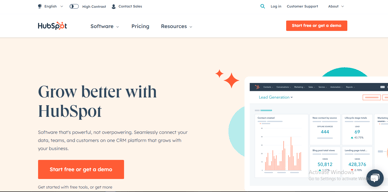

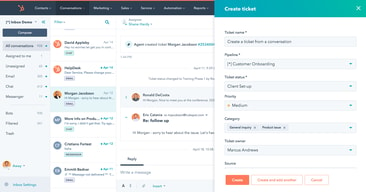
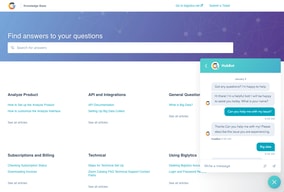
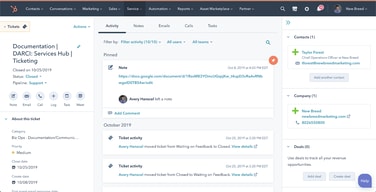






HubSpot Service Hub puts support tickets on the same contact record as marketing and sales, which is its entire reason to exist and a genuinely good one. The pricing needs care, though. At Starter you get ticketing and little else, and reviewers say so directly. The knowledge base, help desk workspace, and customer portal all require Professional at around $90 per seat, which also carries a mandatory onboarding fee.
- What it is: A help desk platform built on HubSpot’s Smart CRM, covering tickets, live chat, calling, knowledge base, and customer portals.
- Best for: Companies already running HubSpot for sales or marketing who want support on the same customer record.
- Pricing: Free for up to 2 users. Starter from $7 per seat, Professional from $90, Enterprise from $150 per month. Verified in July 2026.
- The honest catch: Professional requires a one-time onboarding fee of roughly $1,500, disclosed only in a footnote, and it is the tier where self-service actually begins.
What Is HubSpot Service Hub?

Service Hub is the customer support product in HubSpot’s suite, built on the same Smart CRM that powers Marketing Hub and Sales Hub. A support ticket sits on the same contact record as the marketing emails that person received and the deals they were part of, which is a genuine structural advantage over running a standalone help desk alongside a separate CRM.
The functional scope is conventional: ticket pipelines and routing, live chat, calling, canned snippets, and reporting at the lower tiers, with a knowledge base, help desk workspace, customer portal, and feedback surveys arriving higher up. HubSpot has added AI in the form of Agent Hub and the Breeze Customer Agent at Professional.
The independent rating is respectable on a modest sample: 4.4 out of 5 on Capterra across 190 reviews. The praise is about consolidation and ease of use; the criticism is almost entirely about price and about how little the Starter plan includes.
How HubSpot Service Hub Works
- Tickets on the CRM record. The central idea. Support history, marketing history, and deal history in one place, with no integration to maintain.
- Ticketing and routing. Pipelines, ticket routing, and conversation routing from Starter.
- Live chat and calling. Both included at Starter, where the notable upgrade is removing HubSpot branding from live chat.
- Knowledge base and customer portal. Self-service, arriving at Professional. This is the feature that reduces ticket volume, and therefore the one with the clearest economic case.
- Help Desk Workspace and Agent Hub. A dedicated agent interface plus AI-assisted resolution, also Professional.
- Enterprise controls. Conditional SLAs, skill-based routing, and customer journey analytics at the top tier.
HubSpot Service Hub Pricing
Four tiers, with a large step in the middle. Figures verified on HubSpot’s Service Hub pricing page in July 2026. HubSpot localizes currency, and the euro figures shown to European visitors correspond numerically to its dollar pricing.

| Plan | Per seat/mo | Credits | Mandatory onboarding | Key additions |
|---|---|---|---|---|
| Free | $0 | — | None | Up to 2 users, free service tools alongside marketing, sales, content and data tools |
| Starter | From $7 (list $20) | 500 | None | Ticket pipelines and routing, live chat without HubSpot branding, calling, canned snippets, conversation routing, reporting dashboard |
| Professional | From $90 (list $100) | 3,000 | ~$1,500 one-time | Agent Hub, Breeze Customer Agent, Help Desk Workspace, customer success workspace, knowledge base, customer portal, feedback surveys |
| Enterprise | From $150 | 5,000 | Higher one-time fee | Conditional SLAs, customer journey analytics, skill-based routing, AI transcript enrichment |
The details that decide the real cost:
- Starter is ticketing, and reviewers say so. Capterra reviewers on the Starter plan report that “ticketing was pretty much the only task” available to them. That matches the plan contents exactly: no knowledge base, no customer portal, no help desk workspace.
- Self-service starts at Professional. A knowledge base is the highest-leverage feature in any help desk, because deflected tickets are the cheapest tickets. Putting it at $90 per seat means the tier that actually reduces your support cost is thirteen times the entry price.
- Professional carries a mandatory onboarding fee. HubSpot’s own page footnotes a required one-time fee of roughly $1,500 at Professional, with a higher figure at Enterprise. Any comparison that omits it understates first-year cost.
- The $7 Starter price is promotional. List price is $20 per seat, so model renewals at the higher figure.
- AI runs on credits. 500 at Starter, 3,000 at Professional, 5,000 at Enterprise, metered on top of seats.
- Free live chat carries HubSpot branding. Removing it is one of the headline reasons to move from Free to Starter.
Who Should Use HubSpot Service Hub
- Existing HubSpot customers. The clearest and, honestly, close to the only compelling case. Support on the same record as sales and marketing genuinely removes integration work.
- Small teams needing basic ticketing. Free for two users, or Starter for structured pipelines, is reasonable value if ticketing is all you need.
- Companies where support informs revenue. Seeing a customer’s marketing and deal history while handling their ticket is a real advantage for account management.
- Teams that will use the AI layer. Agent Hub and Breeze at Professional are competitive with what Zendesk offers.
It fits poorly for standalone support teams not otherwise using HubSpot, where Freshdesk and Zoho Desk deliver more help desk for less, for small teams needing a knowledge base, since that alone forces a thirteen-fold price jump, and for cost-sensitive organizations, where the onboarding fee compounds an already high per-seat price.
Honest Pros and Cons
Strengths
- One record across marketing, sales, and support. The genuine architectural advantage, and difficult to replicate by integrating separate tools.
- A free tier that works. Two users with real service tools, no card required.
- Starter is inexpensive for ticketing. At the promotional $7 per seat it is cheaper than most dedicated help desks.
- Easy to adopt. Consistently praised, particularly by teams already on HubSpot.
- Capable AI at Professional. Agent Hub and Breeze Customer Agent are credible against Zendesk’s equivalents.
- Large partner ecosystem. Extensive documentation and a deep pool of implementation help.
Limitations
- Starter is ticketing only. Reviewers state this plainly, and the plan contents confirm it.
- The knowledge base is gated to Professional. The single most consequential gap, since self-service is what reduces support cost.
- A mandatory onboarding fee at Professional. Roughly $1,500, disclosed in a footnote rather than the price.
- A thirteen-fold jump from Starter to Professional. $7 to $90 per seat is among the steepest steps in this category.
- Price is the dominant complaint. Reviewers describe it as high against dedicated chat and help desk tools.
- Dashboard performance. Slow loading is reported by some reviewers.
- A modest review base. 190 Capterra reviews is thin next to Zendesk’s 4,000-plus.
HubSpot Service Hub Alternatives and How It Compares
- Zendesk Support Suite is the enterprise incumbent, with far greater depth and its own gating problem, since chat and knowledge base start at $55 per agent.
- Freshdesk is typically cheaper at comparable capability and offers a free tier for small teams.
- Zoho Desk substantially undercuts both and is the value pick, especially inside the Zoho ecosystem.
- Help Scout suits small teams wanting an email-first, human experience without enterprise complexity.
- Intercom competes on messaging-led support and AI resolution at comparable cost.
For a broader survey see our guide to the best help desk software.
The Verdict
HubSpot Service Hub makes sense as part of a decision you have already made. If your marketing and sales run on HubSpot, putting support on the same contact record is worth real money in avoided integration work and better context for agents, and the 4.4 Capterra rating reflects teams who get that benefit.
As a standalone help desk it is harder to justify. Starter at $7 gives you ticketing and, in reviewers’ own words, little else. The knowledge base, customer portal, and help desk workspace, the features that actually reduce support volume, all require Professional at around $90 per seat plus a mandatory onboarding fee of roughly $1,500. At that point you are comparing against Zendesk, Freshdesk, and Zoho Desk on their terms, and Service Hub is not obviously winning.
The practical test is simple. If you already pay HubSpot, price Service Hub as an addition to a platform you use and it is usually a sound choice. If you do not, price it honestly at Professional including onboarding, compare it against Zoho Desk and Freshdesk, and be prepared for the answer to be no. Either way, note that self-service starts at Professional, because that single fact determines whether the entry price is relevant to you at all.
FAQ
How much does HubSpot Service Hub cost in 2026?
Free for up to 2 users. Starter is promotionally priced from about $7 per seat per month against a $20 list price, Professional from about $90, and Enterprise from about $150. Professional additionally requires a one-time onboarding fee of roughly $1,500, with a higher fee at Enterprise. AI features consume HubSpot Credits, allocated per tier.
Does the Starter plan include a knowledge base?
No. Starter covers ticket pipelines and routing, live chat without HubSpot branding, calling, canned snippets, conversation routing, and a reporting dashboard. The knowledge base, customer portal, help desk workspace, and customer feedback surveys all require the Professional plan. Capterra reviewers on Starter describe ticketing as essentially the only capability available.
Does HubSpot charge an onboarding fee for Service Hub?
Yes, on the higher tiers. HubSpot’s pricing page footnotes a required one-time onboarding fee of roughly $1,500 for Service Hub Professional, with a larger fee at Enterprise. These are mandatory and additional to the per-seat subscription, and they are frequently omitted from comparison articles.
Is HubSpot Service Hub worth it if I do not use HubSpot already?
Usually not. Its main advantage is sharing one customer record with HubSpot’s marketing and sales products, which is irrelevant if you use neither. As a standalone help desk at Professional pricing plus onboarding, Freshdesk and Zoho Desk generally deliver more capability for less money.
What is HubSpot Service Hub best for?
Companies already running HubSpot for marketing or sales that want support tickets on the same customer record, with full history visible to agents. It is strongest as an extension of an existing HubSpot investment rather than as a help desk chosen on its own merits.

Compare HubSpot Service Hub with other popular tools in the same category.
The availability and access to helpful resources.
If the interface was a little bit more user-friendly it may ease the process.
Hubspot is helping me be more successful.
The inbox can be linked with several input channels as email and WhatsApp
It's not possible to proactively send WhatsApp messages without a workflow
We get all the inflow communications from clients at the same inbox for both email and WhatsApp
I have found Hubspot to be very organized, and it helps to sort out the emails for what I need to do.
It is a little difficult to find things sometimes, but that would be because of the amount of informationon there.
It helps me to focus on different tasks and not get distracted.
Sales and Service functionalities in single platform
Service related functions and customization is limited
We used service for our product support dept
Having the KB, tickets, reports all in one place. Automated reporting.
Emailing via Hubspot never turns out as expected. Formatting can get messed up. Logging emails doesnt seem to work right. On occasion, 2 people will email and the reply will be sent to the wrong one of the two.
Provides a Knowledge Base with a search filter out the box. Will be used for ticket deferral when our software is better documented.

Easy to share articles with integrations
Limited editig possibiltys in articles and menus.
Making articles to share with clients and coworkers. Easy to share info
I like the premade questions. I do not have expertise in question writing, so being able to use a template to get what I need with data integrity is helpful. I also like the customization of the logo and tokens.
I cannot do what I think should be simple. I want to be able to send a survey after I move a meeting to completion, and I cannot do this nor manually send a survey.
You aren't solving it yet =) But I am hoping that you will be able to increase our response rate to our service and feedback inquiries. We currently do not have a good response rate to our mid-year/end-of-year survey and I'm hoping that by asking in real time it will increase our response rate.

Nothing to be honest, we have struggled with an easy way to use this. Others departments are using just fine but acccounting it is not working for.
To many ways to view and close out. It also is hard to see who from and what about. Most emails look like junk emails
It is really causing us more work.
The additional possibilities that it brings us.
The increased pricing, and that it's the whole package without the parts you can buy separately.
Lack of top-down structured access management in our team.
Charts and Graphs in the feedback surveys.
There is no way to automate the export of Feedback survey data from the backend to any other software like PowerBI.
Helps to collect surveys from customers.
Knowledge base is easy to use, seems pretty easy to set up. Templates are good. Reports are helpful and easy to use. Lots of notification emails. Workflows are simple and help with efficiency.
Needs to communicate better with other parts of the system- can't copy line items from deals into tickets so difficult to see what you're working with. Could use a feature to automatically suggest articles when going through the support form. Conversations not super easy to use and can't remove forwarded messages.
Having an online knowledge base and being able to track what's being viewed and for how long. Can also easily add links in to emails. Also same with documents. Templates & snippets also useful
It makes things easy to keep track of when I have responded to tickets and ones that I need to follow up on.
It lags a lot and there are issues with tickets automatically moving when I havent touched them.
It helps keep track of all our business emails from clients and helps with shortcuts
Ticket workflows that can be set up by admin and the tasks are easy to use
Some of the processes can be convoluted and there is some basic functionality that is lacking
We have had to enter a few Tickets to Hubspot support but these have been resolved in a timely manner
- sequences - sales data and funnel analyses
- poor shared inbox system - no custom flows - poor reporting features - not good for support use
Onboarding new customers Sales funnels and prospects Closed won and lost data Customer metrics and spend
The way of handling tickets is very uncluttered. I like the information and options to add documents and links and videos in the knowledgebase. Also, the options in design are great. It is easy to work with.
However we like using forms in the knowledge base, but the forms are not visible in the preview after embedding. They stay empty white boxes in the article. Also, the answers from the forms all have to be properties. It makes it difficult when editing a page, that the form is a white box. When editing the pages, I need to reload and wait quite a while before the new version is visible. Subtitle 2 is very big. We don't have a lot of super long articles, so the subtitle is unneccesary and so big on the page. I find it annoying.
Having all the information regarding our platform visible in one place. The greatest benefit is how easy it is to switch between languages. We have three languages and it's really easy to edit the articles and go through the articles to check and edit.
I like that it creates a user-friendly Knowledge Base. The web page templates are good. We use Iorad Tutorials a lot and email. Don't really know too much about competitors.
Not familiar with the exporting features. If it does work improperly, it's probably because I don't know what I'm doing. The i-frames aren't my favorite feature.
It works well for us to upload Iorad Tutorials so our software customers can download them. I think I'm more productive with HubSpot than with some of the other tools we use in customer support.
Its comprehensive covers a lot of aspect
Not the best in any particular area (knowledge hub is average not sophisticated and covers bare min)
Customer knowledge hub understanding the complexities of a product
The amount of integration HubSpot Service Hub offers is cool.
The automated contact generation from e-mails is generating way to many contacts, that are not relevant.
We are using HubSpot Service Hub as a first line support inbox for our platform and it gets the job done.
A lot is customizable. Workflows are cool too.
2 important features missing : 1/ Tracking time on different pipe stages. It seems crazy that you calculate it only in days. 2/ Spliting and dividing tickets
Being able to answer all our customers' questions Centralizing all requests on a support pipe and process

Workflows are powerful and easy to set. It is also very easy to add new properties for your specific needs and integrate with third parties. Our staff loves the UI too, smooth and easy.
on the other hand, playing with data is complex, for example, you cannot erase a product catalogue in bulk mode, Quote statics are very limited too and that is causing issues when analysing business at that. Also the development roadmap is not clear and It would be great to, sometimes, be part of a users/admins panel to directly discuss issues and new feature
Tracking what our contacts are doing on our website, monitoring and scheduling follow up tasks to win and closed deals, and ticket automation to improve our client relationship efficiency. it is a powerful tool
Using ServiceHub for our support portal, makes it very easy to track and trend on activity per platform user
The support portal UI is not very customizable
Problems are that we may have just outgrown this part of Hubspot, but benefits were that it has been easy to keep track of an trend on support tickets per customer
I like the ease of use and simplicity of the icons, making it easy to know what I'm doing.
However - it has limits like not being able to put call outs in lists and not being able to drag and drop images rather than having to create folders and upload images manually. I also don't like not being able to customize text hues or having such a limit of options for titles, special features (icons in the call outs not available) etc.
See my dislike comments.
Hubspot service hub allows you to make customized reports which you can add to your reports dashboard. This helps our CEO to keep track of the sales team's productivity, and the report gets sent automatically to his email every day.
The main problem with HubSpot(which is a major one) is that my team and I ran a test to check if we send emails with HubSpot tracking system active on our emails, the emails once received come out as promotional, commercial emails, which can lead to people not even opening our emails
The problems I'm solving are mainly problems that were solved through custom reports. The CEO wanted to see a sales funnel where there is a continuation of leads turning into clients.
Makes ticketing simple. Able to organize workflows and automations.
Primarily designed for ticketing and surveys. Very expensive for low value compared to other software.
Support customers and triage problems.
I like the ability of HubSpot to pull in emails and create tickets. There are a lot of options for categorizing and personalizing flows. It looks like it has most functionality of Salesforce functions.
However, it is incredibly busy, and there is a lot of manual work that is required. It would be nice if it had a cleaner interface. The paywall is also outrageous. To go from paying 25 per person a month to 450 is too much for a small company to afford.
We are able to do a good baseline reporting of our contacts that we receive. Through pipeline management, we are able to manage the help stages of our customer's journey, which is great. We can also pass tickets between siloed departments so Sales can send us new customers and we can send our Sales team sales-related inquiries. It is really great for that.
The upsides about using HubSpot Service Hub is that the agents are always there to make sure that you got your answers. They try to be as quick as they can and they always ask follow-up questions to be certain that they are understanding your requests correctly. I also think that it's very helpful that they try to create videos in order to explain thoroughly the steps that should be followed. Also, the agents are always available in the chat and even when they don't know something, they always get back to you via email typically in less than 48h.
What I dislike most is that often times agents don't know the answer directly so they have to look things up and get back to you which could be a problem if you want to get things done that day. I don't like the fact that many things are not available on HubSpot. The agents always direct me to a page and they tell me to suggest features. The problem is that many features were already suggested by other clients years ago, and the features still aren't available.
I was able to set up the support process of our new website (manage ticket, create knowledge base, email templates, surveys, dashboards to evaluate the website's performance).
I like that the service hub has options for organized pipelines for different aspects of customer support.
Hubspot experiences a lot of downtime which disrupts our workflows and/or forces us to rebuild important workflow. This causes delays or mistakes in the ticketing system.
The inability to set up auto deletion for ticketing is inconvenient as we have to go in and do it manually. The contact information stays organized and easy to read when we need to look up a customer's history.
The best thing is the organization of the tickets and how they are easy to find.
I do not like that you can't see who is viewing a ticket in lie time. That would be really nice. I was used to seeing that in a program called ZenDesk. We can only lsee the owner of tickets and it is important to be able to see who is currently viewing a ticket ifor customer and restaurant support for the company that employs me. There is also a lack of a space for a company to have macros so they can easily send e-mails to people without agents having to look things up.
I am solving problems about restaurants needing menu updates, hour updates, and answering what has happened about past orders from the restaurants.
The analytics are great and let me easily see the responses that we have received. It is easy to send surveys to lists that have been created in Hubspot and set the surveys to send a follow up on a recurring basis. The NPS is simple and covers all that we need in that type of survey.
The surveys and NPS are too basic for our needs. It is not enough to have a customer experience survey that just asks the customer to select a happy sad or neutral face. There needs to be options for logic jumps and multiple questions in the surveys.
We are starting to track our NPS score over time so that we an better serve our customers and gain insight into what we can improve
The interface is very user-friendly. This reduced the learning curve during deployment among my team
-Lack of flexibility in customizing views -Only 3 custom search fields -Very limited app -When you assign a task to another person you dont get notified once that task is completed -Everything is email-driven. What if i have 2 accounts with 1 email address. this creates complications -Limited development support -Limited integrations -Limited user access control -Insufficient information about logins and user activity -Users have the ability to delete comments -Limited notification options
Before we would use several google docs to manage various tickets and customer-related issues. With service hub we managed to eliminate all of them and now we have a more central system and process. All though very limited for what we need, it is still better then what we had.