
Unclaimed: Are you working at iContact?
iContact Reviews: 4.1/5 — Solid Choice
iContact delivers professional email marketing features to ensure that it provides extensive features and tools across different stages and sizes to get real results for your campaigns. The platform is ideal for small businesses to want to leverage better campaigns with high-volume senders and subscribers.

| Capabilities |
API
|
|---|---|
| Segment |
Small Business
Mid Market
|
| Deployment | Cloud / SaaS / Web-Based |
| Support | 24/7 (Live rep), Chat, Email/Help Desk, FAQs/Forum, Knowledge Base, Phone Support |
| Training | Documentation |
| Languages | English |

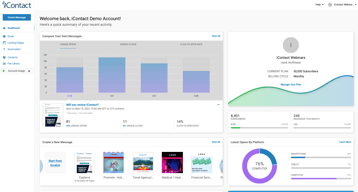
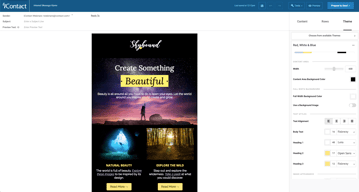






iContact puts automation on its $9 entry plan, which is where most of this category’s money is made. Constant Contact charges $35 for the tier that unlocks automation and segmentation; iContact includes automations, landing pages, and templates at $9 for 500 contacts. That single decision is the strongest argument for it, and it is easy to miss because the product markets itself on being cheap rather than on being ungated.
- What it is: An established email marketing platform with templates, landing pages, automation, and social posting.
- Best for: Small businesses that want automation without paying for a mid-tier plan to get it.
- Pricing: Standard $9, Premium $16, Ultimate $24 per month at 500 contacts. Verified July 2026.
- The honest catch: Unlimited users arrive at Premium, so Standard is not a team plan.
What Is iContact?
iContact is one of the longer-established email marketing platforms, and its positioning is straightforward: competent email marketing at a price well below the category’s better-known names. The pricing page leads with “Easy and Affordable” and a 30-day free trial, which is longer than the 14 days most competitors offer.

What distinguishes it in practice is what sits on the entry tier. Standard at $9 includes pre-designed email templates, a drag-and-drop editor, landing page templates, and — unusually — automations. In a category where the standard commercial move is to gate automation one or two tiers above the advertised price, including it at the bottom is a genuine differentiator rather than a marketing claim.
Pricing scales with contact count via a selector on the pricing page, so the figures below describe a 500-contact list and rise from there.
How iContact Works
- Priced by contact count. A dropdown sets your list size; the tier prices move with it.
- Automations on every tier, including the $9 Standard plan.
- Landing pages included from Standard, which several competitors charge extra for.
- Users are the Premium upgrade. Unlimited users arrive at $16, not at $9.
- AI assistance ladders up. Content assistant at Premium, AI templates and images at Ultimate.
- Custom plans for larger lists, quoted rather than published.
iContact Pricing
Captured from iContact’s pricing page in July 2026 in US dollars at the 500-contact setting.
| Plan | At 500 contacts | Key additions |
|---|---|---|
| Standard | $9/month | Templates, drag-and-drop editor, landing pages, automations |
| Premium | $16/month | Unlimited users, social media posting, AI content assistant |
| Ultimate | $24/month | Email verification, dynamic content, AI templates and images |
| Custom | Quoted | Larger lists, higher volume, premium support |

What actually decides your tier:
- Automation at $9 is the headline, and it is real. Constant Contact’s Lite plan at a reported $12 does not include automation or segmentation — those start at $35. Getting automations on iContact’s cheapest tier changes the comparison substantially for a small business that wants welcome sequences and follow-ups without a mid-tier subscription.
- Standard is not a team plan. Unlimited users is a Premium feature at $16. If more than one person needs access, that is your entry price, not $9.
- The 30-day trial is unusually long. Most competitors offer 14 days. A month is enough to build a list, run a real campaign, and judge deliverability rather than just the interface.
- Prices rise with contacts. The $9, $16, and $24 figures apply at 500 contacts. Set the selector to your actual list size before comparing against anything, because the curve above that is what you will actually pay.
- Email verification is an Ultimate feature. At $24 — worth knowing if list hygiene matters to you, since verification directly affects deliverability.
- Larger lists are quoted. The published tiers stop before enterprise volume.
Who Should Use iContact
- Small businesses wanting automation cheaply. The clearest case, and where the $9 tier genuinely undercuts the category.
- Solo operators. Standard’s single-user limitation is irrelevant if you are the only user.
- Anyone evaluating carefully. The 30-day trial is long enough to test properly rather than superficially.
- Businesses that want landing pages included. Bundled from the entry tier rather than sold separately.
It fits poorly for teams, where unlimited users requires Premium; for creators selling to an audience, where Kit is free to 10,000 subscribers with commerce built in; and for large infrequently-mailed lists, where Brevo’s send-based pricing is structurally cheaper.
Honest Pros and Cons
Strengths
- Automation on the entry plan. The genuine differentiator against most of the category.
- Very low entry price. $9 at 500 contacts undercuts most mainstream competitors.
- A 30-day free trial. More than twice the category norm.
- Landing pages included from Standard.
- Established platform. Long operating history and mature deliverability.
- Clear tier logic. Each step adds something identifiable rather than reshuffling limits.
Limitations
- Single user on Standard. Unlimited users starts at Premium.
- Prices scale with contacts. The headline describes a 500-contact list.
- Email verification is top-tier only. At $24, despite affecting deliverability.
- No free tier. A generous trial, but nothing permanent.
- Less modern than newer rivals. The interface and templates show their age against MailerLite.
- Enterprise pricing is quoted. No published figures for large lists.
iContact Alternatives and How It Compares
- Constant Contact is better known and considerably more expensive, gating automation and segmentation to its $35 tier.
- MailerLite has a more modern editor and a free tier, at somewhat higher paid prices.
- Zoho Campaigns is cheaper still and offers unlimited sending on paid plans.
- Brevo prices by emails sent rather than contacts stored, which suits large, rarely-mailed lists.
- Kit is the creator-focused option, free to 10,000 subscribers.
- AWeber and GetResponse occupy similar small-business ground with their own free or low-cost entry points.
- Mailchimp is the best-known alternative, with steeper escalation as lists grow.
For a broader survey, browse our email marketing directory.
The Verdict
iContact’s case rests on one decision that is easy to overlook: automation is on the cheapest plan. Across this category the standard commercial pattern is to advertise a low entry price and place automation, segmentation, or send volume one or two tiers above it — Constant Contact puts automation at $35 against a $12 entry, and Kit’s free plan permits a single automation. iContact includes automations, landing pages, and templates at $9 for 500 contacts, which means the advertised price is closer to the useful price than it usually is here.
Check two things before treating $9 as your number. Unlimited users is a Premium feature at $16, so if anyone else needs access that is the real entry point. And the $9 describes a 500-contact list — set the pricing selector to your actual list size before comparing, because contact-scaled pricing is where the meaningful differences between platforms appear and a headline at 500 contacts tells you little about 10,000.
The 30-day trial deserves a mention because it is genuinely useful rather than generous-sounding. Two weeks is enough to judge an interface; a month is enough to build a list, send several campaigns, and see how deliverability actually behaves — which is the thing that matters and the thing you cannot assess from a feature table. Use it properly, and compare against Zoho Campaigns and MailerLite at your real list size while you do.
FAQ
How much does iContact cost?
At 500 contacts, captured July 2026: Standard $9 per month, Premium $16, and Ultimate $24. Prices rise with contact count via a selector on the pricing page, and larger lists are quoted through a custom plan. A 30-day free trial is available, which is longer than the 14 days most competitors offer.
Does iContact include automation on the cheapest plan?
Yes, and this is its most distinctive feature. The $9 Standard plan includes automations along with pre-designed templates, a drag-and-drop editor, and landing page templates. Most competitors gate automation to a mid-tier plan — Constant Contact places it at $35 against a $12 entry price — so iContact’s advertised price is closer to the genuinely useful price than is typical in this category.
How many users does iContact allow?
Unlimited users are included from the Premium plan at $16 per month. The $9 Standard plan does not include unlimited users, so any team needing shared access should treat Premium as the entry point. For a solo operator the distinction is irrelevant and Standard remains the better value.
Is there a free plan?
No. iContact offers a 30-day free trial, which is unusually long, but no permanent free tier. Kit is free to 10,000 subscribers, and MailerLite and Brevo both offer free plans, so if starting at zero cost matters those are the better entry points. iContact’s trial is nonetheless long enough to evaluate deliverability properly rather than just the interface.
What is iContact best for?
Small businesses and solo operators who want email automation without paying for a mid-tier plan to unlock it. Its $9 entry plan includes automations and landing pages that competitors charge considerably more for. It is a weaker fit for teams, since unlimited users requires Premium, and for large lists mailed infrequently, where send-based pricing from Brevo is structurally cheaper.

Compare iContact with other popular tools in the same category.
We use iContact to manage thousands of email subscribers, which compared to prices like those as hubspot, is at an extremely reasonable cost.
When editing your own html in an email, it tries to update as you work, which can slow it down.
Allows us to retain and manage a large contact list outside our membership database.
I like the the connection with Salesforce
No attachments and limited template ability
Mass marketing peices which reach large number of prospects
The service has the basics down and is generally user-friendly. The service is also very cost effective, so it could be a good starting point for small businesses.
There are better service providers out there like MailChimp and Constant Contact who are a bit more sophisticated and around the same price point. I'd say get a free trial of all of them and decide which you like to work in best. If you need a program that will scale as your business grows however, I'd say Constant Contact is a better email provider.
Mass distribution mailing of press releases and other firm news. Some of my clients used IContact and it did the job. The reporting is also pretty decent on IContact but as I said, it's customization options are somewhat limited.
A very useful tool if you know how to use it. Helped keep things in place
Not much to dislike. It could be a little confusing to use. Wish it could me made a little more user friendly
Helps connect. It helps keep things in place
It’s fairly easy to use, not a huge learning curve there.
The templates are not plug and play. Instead you have to work exactly within the parameters of what they’ve created, making it very difficult for your vision of a perfectly designed email to come to fruition.
We are reaching our target audience and tracking how many people click the links.
The software is easy to use and has a good ease of entry into the email marketing realm
it has quite a few bugs with the builder if you attempt to edit the raw code
iContact is an easy way to build an email list. The wordpress plugin works very well
This platform is easy to use and quick to navigate through. The email builder works well and there's also an HTML option for custom development templates. No automation, but there's basic list sending capabilities and deliverability is good.
No glaring dislikes, but the platform could be improved with automation of list segmentation and the ability to add contacts to lists based on engagement with email marketing. It would also be nice to have the ability to better organize campaigns and emails into folders or with tags. Reporting could also use a sprucing up.
Solving the ability to send out email marketing in bulk to existing marketing lists that have been cultivated in other systems. The HTML builder also allows for complex customization so that emails are responsive and visualize properly in major email clients like Outlook.
Smooth integration with Salesforce, easy to update emails
Clunky for custom coding and tricky to modify templates
We need to send and track bulk emails to our prospective students and applicants regularly and iContact makes it possible to do so.
Best, I like the drag and drop editor and overall interface is quite good.
Design limitations and lack of support when it comes to designing for Outlook. Designs in outlook look quite antiquated.
Content marketing solutions.
It was a competent, solid tool for sending and managing emails.
It wasn't particularly intuitive when I used it (for about a year and a half). It wasn't something that was easy to pick up immediately.
Sending marketing emails. It worked!

Adequate usability for users after they're able to build familiarity with the user interface
Elements are not intuitively placed in other areas of the platform like database of users and how to export. MailChimp and Emma are more usable while providing the same functionality
Email marketing for clients
It is a very specialized email campaign manager with tons of features
The integration with Microsoft Dynamics CRM is cumbersome. More generally the use of a dedicated tool for mailing management makes the integration with all the other tools complex, not ideal for a SMB.
We used iContact to send regular email communications to our clients, partners and prospects - through mailing campaigns in particular.
Somewhat easy to use. Easier to review analytics than other programs.
Can be difficult for first time users, don't have good experiences with the troubleshooting team
Marketing
iContact met our basic needs, which was to easily send information to our entire customer base at one time.
The user interface left a lot to be desired. Additionally, the templates available ended up looking really outdated without significant customization (which required HTML/CSS knowledge).
We needed an easy way to send emails to our customer base.
It's easy to use and you can continue to work off of previous templates.
There aren't enough features to make something look really cool. It rarely works well when you insert pictures. It's overall kind of boring. It also has a lot of technical issues sometimes.
Reaching out to constituents. I'm not sure about benefits.
Good interface, and easy to use. The layout makes sense.
Deliverability is incredibly low. When I tried to correct this, I was given a very roundabout answer many times.
Reaching potential clients.

The large library of templates available for use.
Working within templates can get clunky.
Reaching a customer base with current up to date news about the brand. The benefits are the reporting capabilities and ease of deployment.
iCOntact is easy to use for people who do not have that much experience using an email program. There are a lot of templates to choose from and you can easily use one as the starting point for a custom look.
iContact doesn't have as much advanced functionality so it might not be the best for people with larger mailing lists that they want to test specific segments because some people would like to A/B Test with their lists and compare more detailed metrics.
iContact helps us solve the problem of making email marketing accessible to clients who don't have extra budget to spend on a high-end email program.
It was relatively easy to understand and executive tactics with
It didn't have all the functionality or visibility to connect with our other systems in a way that I needed
We used it for e-mail marketing only. We switched to a different tool that can do that and much more.
You have a good selection of templates available.
That you have to purchase an additional package to use all available options.
I am solving the problem of creating newsletters from scratch. The benefit I have realized would be the ability to organize contacts easily.
Loved the statistics and ease of use, once I got use to it and pretty easy to navigate. Lots of templates to use and I know there were lots of things we could do if we had more time to work with it but not enough staff to do it.
Price was too much once we surpassed 2500 clients and for our small bookstore, it just became unafforable for the amount of use we got from it.
We need to email to the masses at low cost and get statics that are trackable quickly. This did support that and we did have a good open rate of 25-40% usually, which was good for us.
Live preview and editing tools are a lifesaver. Very fast sending of bulk emails. Resending/editin emails was a breeze.
Limitations on segments, buggy interface, annoying multi-step tracking/reporting. Limited A/B capabilities. List management not intuitive.
Regular connection with potential customers. Benefits include lead generation, refining content and messaging, and ability to contact a larger base.
Some of the advanced features and products capabilities
Email design flexibility, I have had problems using provided templates and even getting ones done by vocus to work
Contacting specific customers with specific needs. Better open rates and engagements
Simple to set up and run. Basic settings and functions that suited our instance of Salesforce. We tried icontact following the need to build and market basic documents and small campaigns. It does the job but as you want to build and develop more complex campaigns we soon ran out of tools and resource
No real scalability. Functional but not fun to use with a sow process and workflow functionality. All in all not the most user friendly.
To get started with marketing and reporting for our SF instance and learn to use available data in campaigns.
iContact was very simple to pick up and use.
I couldn't accurately segment my email campaigns because the functionality wasn't there.
It enabled us to establish a regular email approach, and helped us understand what we needed in an email platform.
It was a fast way to contact many people. I thought the email templates are nice and it was easy to send out newsletters and holiday marketing.
Deleted contacts after bounced. I would have like to keep the good ones and bad ones to filter them out but tech team deleted everything from my account. I would have liked it if someone consulted me before doing this instead of just citing spam laws and deleting every contact I have.
Deleting of contacts without permission. Benefits - nice emails are sent out and trial email is nice to preview what it would look like.

The tools are very good and allow excellent control of emails, sent files and conversations.
There are no tutorials in Spanish, and it is difficult to get information online to answer questions, forcing you to turn to customer service for any questions.
it was used to manage emails for online classes and distance courses. With this, emails were sent to the students with study guides, as well as information about the courses, reminders or information about important dates (end of levels, completion of courses or deadlines for payment)
icontact is pretty easy to use and integrates with our CRM (Salesforce), which is important to our organization, and allows us to monitor and track email data.
Icontact lacks flexibility in designing e-mails (unless you know html). I have sometimes been frustrated by the limitations design-wise, because you have to stick to specific blocks. The templates are not particularly modern looking, although I have been able to create decent looking -mails.
I can integrate with Salesforce to keep track of information about how individual contacts interact with email communications.
I like being able to reuse an email once its been sent.
There are many inefficiencies with the software, such as not being able to send more than one document automatically when new contacts are added to a list.
I am making it easier for myself to send emails to large groups of people. I've realized this saves me a lot of time.
Well, it gets the job done. It's a program that sends out emails efficiently and automatically. Metrics are acceptable. Seemed to be less expensive than other options.
Nothing really stands out about iContact. Too attached to Salesforce as an add-on. The metrics and reporting isn't as robust as I would like.
We've been able to add to our contact list by importing names quickly.