Unclaimed: Are you working at Livestorm?
Livestorm Reviews: 4.4/5 — Solid Choice
Livestorm is a video engagement platform that manages virtual events, meetings, and webinars. It’s best known for providing an end-to-end video engagement solution where users have access to email templates and sequences, customizable registration pages, website widgets, social sharing features and more. Additionally, Livestorm elevates audience interaction with their platform through tools such as launch polls, Q&As, file sharing, all designed to engage participants during live sessions. The solution also takes a data-driven approach to registration and attendance tracking as well as audience engagement so users can leverage data from any event.
| Capabilities |
API
|
|---|---|
| Segment |
Small Business
Mid Market
Enterprise
|
| Deployment | Cloud / SaaS / Web-Based, Desktop Chromebook, Desktop Mac, Desktop Windows, Mobile Android, Mobile iPad, Mobile iPhone |
| Support | 24/7 (Live rep), Chat, Email/Help Desk, FAQs/Forum, Knowledge Base, Phone Support |
| Training | Documentation |
| Languages | English |
Livestorm Pros and Cons
- Comprehensive and user-friendly webinar software
- Intuitive email invitation setup
- Integrated chat functionality for audience interaction
- Seamless integration with third-party apps
- Detailed analytics for performance evaluation
- Lack of pre-configured polls and call-to-actions in webinar setup






As businesses and marketers seek effective ways to connect with their customers and leads, the demand for a robust webinar solution becomes evident. While platforms like Zoom and Skype have their advantages, they may not meet the requirements for scaling operations. Livestorm, on the other hand, is an all-in-one webinar platform designed to cater to this specific need.
In this Livestorm review, we will delve into why it is one of our top recommendations for hosting webinars and online meetings. We will also explore its marketing features that can enhance brand recognition. So, let’s dive in and discover what Livestorm has to offer.
In this comprehensive review of Livestorm, we’re going to unpack the reasons why it stands tall as one of our premier picks for conducting webinars and online meetings. We’ll also shed light on its potent marketing features that can turbocharge your brand’s visibility. So, let’s dive in and discover what Livestorm has to offer.
What is Livestorm?
Livestorm is a powerful webinar software that provides a range of features to facilitate seamless online meetings and webinars. Developed with the goal of offering an all-in-one solution, Livestorm caters to businesses and marketers who are looking to host engaging and interactive webinars.
The platform is designed to support a variety of webinar types, including live, on-demand, and automated webinars, making it a versatile choice for businesses. Livestorm also places a significant focus on integration, offering a marketplace of over 1000+ integrations that allow users to connect the platform with their existing tech stack.
Key Features and Functionalities
Livestorm offers a plethora of features that set it apart from other webinar software tools. Besides standard webinar-related functionalities, Livestorm is committed to providing robust marketing tools. Its built-in landing page builder and funnel analytics are testament to this focus, enabling users to effectively market their webinars and analyze their performance.
Let’s have a look at its other standout features:
Email Invitations
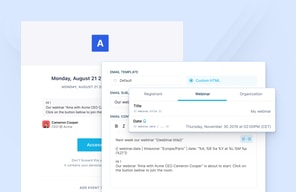
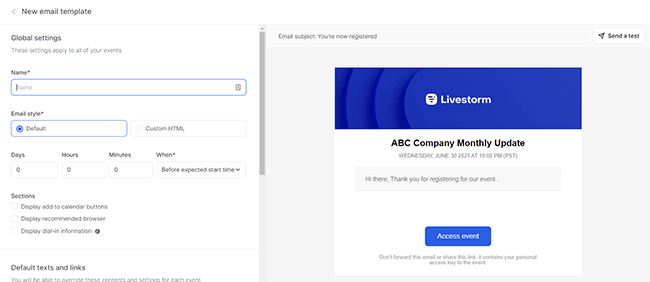
Livestorm simplifies the process of sending email invitations to attendees. The intuitive user interface allows you to create separate emails for different segments, preview how the emails will appear, and easily edit their contents.
Audience Interaction
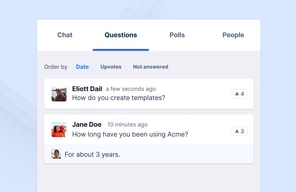
Livestorm provides integrated chat functionality, allowing you to engage with your audience during webinars. You can choose between public and private chat options, and even make the slideshow available for immediate download as a PDF file.
Polls and Call-to-Actions
While Livestorm lacks the ability to pre-configure polls and call-to-actions in the webinar setup, it does offer these interactive features during live sessions. This enables you to gather valuable insights and drive engagement among attendees.
Integrations
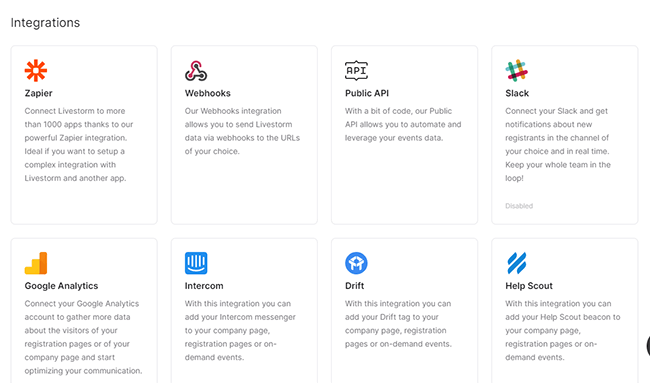
Livestorm integrates seamlessly with various third-party apps, expanding its functionality. With integrations such as Zapier, Webhooks, Slack, Google Analytics, HubSpot, and Pipedrive, you can enhance your webinar experience and streamline your workflow.
Analytics
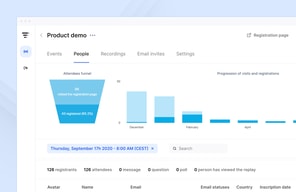
Livestorm provides comprehensive analytics to help you measure the success of your webinars. From key metrics to attendee and replay views, you can gain valuable insights into the performance of your events. The reports can be exported in Excel, CSV, or ODS format for further analysis.

Instant Meetings
Livestorm offers the convenience of impromptu meetings through its Instant Meetings feature. With just your name and a URL slug, you can quickly create a meeting room and invite team members to join. This feature is particularly useful for immediate collaboration or support sessions.
User Interface
Livestorm boasts a user-friendly interface that makes setting up and managing webinars a breeze. The platform’s intuitive design ensures that even users with limited technical expertise can navigate through the various features effortlessly.
The webinar email setup, for instance, is remarkably straightforward. The interface allows you to easily preview and edit the contents of your email invitations, making it one of the smoothest parts of using Livestorm. You can customize the email texts, add shortcodes, and even modify button texts and colors to align with your branding.
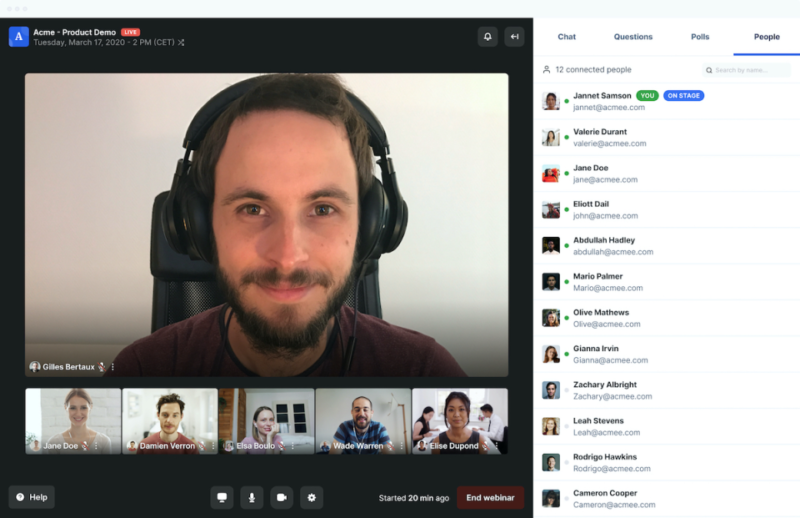
During the webinar itself, Livestorm offers a range of audience interaction options. You can set up an integrated chat that can be either public or private, allowing for seamless communication between participants. Additionally, Livestorm provides the option to make the slideshow immediately available for download as a PDF file, enabling attendees to review the material at their convenience.
One area where Livestorm could improve is in the pre-configuration of polls and call-to-actions. While the platform does offer these features, they cannot be pre-configured during the webinar setup. This limitation may be a drawback for those running product demos or online meetings where real-time interaction is crucial.
When it comes to mobile experience, Livestorm performs well overall. Joining a webinar on a mobile device is seamless, with the interface being perfectly responsive. The webcam and slideshow presentations are clearly visible, and the chat and interaction tools are conveniently placed below the webinar video. However, it’s worth noting that there is a 15-second video delay on mobile devices, which may impact the overall event performance.
Performance and Reliability
Livestorm is known for its reliable performance, ensuring smooth and uninterrupted webinars. The platform is designed to handle high attendee volumes without compromising on quality. Users can rely on Livestorm to deliver a seamless webinar experience, minimizing the risk of technical glitches or crashes.
Pricing and Value
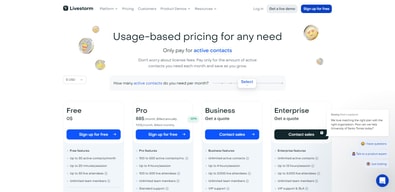
Livestorm offers a range of plans to cater to different needs and audience sizes. The Free plan is a great starting point for small-scale webinars, while the Starter, Premium, and Enterprise plans provide increased attendee limits and additional features. The Enterprise Plus plan offers custom pricing for organizations with specific requirements.
| Plan | Features | Price per Month |
|---|---|---|
| Free | Unlimited webinars, limited attendees, 20-minute webinar sessions, no on-demand webinars | Free |
| Pro | Higher attendee limits, 4-hour webinar sessions, unlimited live or pre-recorded events, invite unlimited moderators | See current pricing |
| Business | Up to 3000 attendees, 4-hour webinar sessions, unlimited live or pre-recorded events, invite unlimited moderators | Custom Pricing |
| Enterprise | Custom attendee limit, 12-hour webinar sessions, unlimited live or pre-recorded events, invite unlimited moderators | Custom Pricing |
See Livestorm pricing for current rates and plan details.
Please note that the pricing mentioned above is subject to change and may vary based on specific requirements or promotions. It’s always recommended to visit the official Livestorm website for the most up-to-date pricing information.
Remember, choosing the right plan depends on your specific needs and the scale of your webinars. It’s important to evaluate the features and benefits of each plan to determine the best fit for your business.
Frequently Asked Questions
Is Livestorm suitable for beginners?
Absolutely! Livestorm is designed to be user-friendly and intuitive, making it an ideal choice for beginners who are new to hosting live webinars. The platform offers a seamless user experience and provides all the necessary tools to run successful webinars without requiring any technical expertise.
Can I integrate Livestorm with other tools I use?
Yes, you can, Livestorm offers a vast marketplace of integrations, with over 1000+ options available. This makes it easy to connect Livestorm with the rest of your tech stack, allowing you to streamline your workflows and enhance your webinar experience.
Does Livestorm provide analytics for my webinars?
Yes, Livestorm offers funnel analytics to help you track the performance of your webinars. While it may not have the same level of features as dedicated analytics tools, the built-in analytics provide valuable insights into attendee engagement, conversion rates, and other key metrics to help you measure the success of your webinars.
Does Livestorm offer a free plan?
A: Yes, Livestorm does offer a free plan that includes many of the platform’s features. However, it is important to note that the free plan has limitations, such as a maximum duration of 20 minutes per event and limited registrants per event. Check Livestorm for current free plan limits. For more extensive usage and additional features, you may need to consider one of the paid plans.
Livestorm Review: Summary
In conclusion, Livestorm is a highly recommended webinar platform, particularly for those who are new to hosting live webinars. It offers a wide range of options for online meetings, virtual events, and various types of webinars, including on-demand and automated webinars. One of its standout features is the extensive marketplace of integrations, with over 1000+ options available, making it easy to connect Livestorm with other tools in your tech stack.
Additionally, Livestorm provides a built-in landing page builder and funnel analytics, which, while not as feature-rich as third-party landing page software, still offer solid functionality that will meet the needs of most users. It’s important to note that if you anticipate a large number of attendees, you may need to purchase an add-on. However, the pricing for these add-ons remains competitive compared to other webinar platforms.
Overall, Livestorm is a fantastic platform with a great user interface that is incredibly user-friendly. It offers a comprehensive set of features that cater to all your webinar needs.

Compare Livestorm with other popular tools in the same category.
Ease of use. Good integration with Hubspot. Easy registration process
Not much. Pricing is a bit confusing at times
Good platform for online events with larger audiences
It's very easy to use nd extremely user-friendly for participants and hosts.
It can be a little tricky to share your screen and the clock can be a little annoying.
I don't really have any problems with Livestorm, and I would say most of my colleagues use it very well.
The platform is very easy to set up and manage during the webinar, easy, intuitive and fast. The sections to be used for progamming are well done and easy. Uploading files is very quick. Once live, on the webinar side, I have never had any connection problems and even when videos are shown there have never been any slowdowns. You can choose if and how you can you can decide how much you want to interact with the audience, create polls, receive questions.
During the usage I found two main issues: you can't record the speech directly in the platform and you can't share files except in pdf. The alternative is to share the screen but this is not the ideal solution for us
Have a reliable platform, easy and quick to use; it is used for client facing webinar that involve different speakers connected by different places. Never received bad feedback from the audience for technical issues!
It's extremely user-friendly. This is the first virtual event hosting service I ever used and had no trouble navigating it. From setting up events to revisiting past events for attendee info, Livestorm makes it easy.
Options for customizing the reservation landing page could expand a bit more.
We needed a third-party virtual event hosting platform to run Marketing events
Livestorm is a platform that we used for webinar. Realy simple, nice and quality
The only thing i dislike is the fact that only the administrator can start the stream
The platform is really intuitive and that what i like about the product
event design functions, automated e-mails, event registration portal, useful data about participants, good support team
it doesn't allow to use power point for shared presentations, when all speakers need to navigate one document.
collects information about registrants for the event; provides a professional interface for an event and related communication.
The overall UX of the product is great. It is very simple and easy to set up the webinars. Also, the customer support is very responsive and helpful.
Some areas of the product need improvement and I already escalated the issue to the Product team and they are working on it.
We are conducting a range of webinar series for our different markets and the idea is to educate our customers through these webinar series.

Livestorm's UI is nice and the landing pages they generate look great. I like the feature of adding guest or team speakers to display their profile pictures automatically. The webinar room itself works fine, I like the virtual backgrounds and emoji reactions. The reminder emails with dynamic fields are amazingly useful. It's nice that I can use the room link to do dry runs before the actual event.
Biggest complaint: I can't see participant video when I'm sharing my screen! There's no dual or split screen functionality. Livestorm's concept of "Sessions" is not very intuitive and it confuses some newer team members. Also, we've run into some bugs where people get randomly logged out of Livestorm or the "participate" button never shows up. Reporting could be better and I'd like more filtering options for the people tab.
We needed a solid webinar platform that integrates with HubSpot forms and has automated emails, so Livestorm checks off those boxes. It helps us automate and manage webinars.
We chose Livestorm for its engagement features (open chat, polls and questions pushed on stage), its modern user experience and for features that would help us maximize attendance rate (such as granularity of email reminders). The platform is also continuously being improved with new features implemented on a regular basis.
The business model based on the number of active contacts is a bit disturbing.
Livestorm help us convey a modern image and help us create more engagement with our audience, so that we can propose interactive and dynamic webinars.
Livestrom is super easy to use. The dashboard is amazing and the attendee engagement during the webinars is one of the finest I've seen.
Nothing that I can think of. It is great overall!
We are mostly using it for our webinars and it's been amazing! Great value for the cost.
User interface is very easy to navigate. Also it allows you to do Zapier connections with other apps, which creates an omnichannel approach.
More options for email editting would be nice
We are using it for our owned webinars. In terms of CRM, we can track and analyze channel performance as well

I have experienced Livestorm to be a very easy-to-use tool. It makes it easy to use different backgrounds, share exactly the information you want and even share several screens at the same time.
What could be improved about Livestorm is the fact that polls need to be created and then published one by one rather than just a bulk publish. And a full report about the poll answers and attendees would also be handy.
Livestorm gave us an alternative to other costly software solutions out there, in order to reach as many people as possible without being restricted by a client that needs downloading.
One of the nice things about the software is how easy it is to use. With just a few clicks, it is easy to understand how a video conference works. The fact that users can register themselves is also a time saver. The system of selecting the screens to be highlighted is also a good feature, it allows to create dynamism on the screen while focusing the attention of the audience.
The event registration page is not linked to a token or an email, so anyone who clicks on the link can register and follow the conference. This is quite tricky to manage when you want to run private events.
This provides to users and conference participants a simple platform (website) to follow their events. Speakers do not have to be on the same recording stage, which greatly simplifies logistics.
A full systeme to organize webinars. (Invitation, E-mails, Live room, recording, ...)
I'm a not sure that is still the case, but in the passed I couldn't set automatic webinars.
Make webinars easy

Facile d'utilisation, prise en main rapide, s'occupe de quasiment tout dans l'organisation du webinar
Il manque encore certaines fonctionnalités et l'évolution du pricing est embêtante
Nous voulions avoir une solution pour nos webinars.
connexion facile, facilité à changer les slides pour les participants, pas besoin de donner la main
lorsque l'on perd la connexion çà prend pas mal de temps pour revenir à l'écran
très utile lors de notre animation commerciale
Very easy to use - never had a problem with running a webinar and all the features are very self explanitory
It's quite expensive compared to other platforms on the market
Lead generation and customer success/retention through webinars
Livestorm is a very flexible and effective tool for the webinars we organize (usually around 100-300 attendees, up to >1000 sometimes) - very easy to use with a comprehensive help center and a reactive customer service. No bugs to report. Super cool point : people don't need to download an add-on or a special app for people to attend.
Not much downsides to signal, except that pricing has gone up recently - the price of quality I guess. Product can also become messy when you organize a lot of events - creating a tag or folder system would be helpful !
Livestorm helps us organize targeted and well-working webinars, with hundreds to thousand of attendees. It's very well integrated with other tools like Hubspot, very convenient!
We use Livestorm to do monthly webinars for our clients and leads. It's easy for your sales team and for our users as well. The registration page is speedy to set up and can be customised to our brand
It's almost impossible to export data to analyze. We wanted to export all our database (+3000 registrants) and we cannot do it as a massive export... we have to go event to event to do it :(
Brand awareness and lead magnet
The ability to have Q&A, share screens, and control participant interactions (ie mute attendees)
Only the moderator can start webinars, it would be great if all presenters had the same ability - such as when the organiser is unable to join the webinar to start it.
The ability to educate our partners and connect with them regardless of their location. Being able to share recordings of these webinars to those that were unable to attend is also a great tool
La solution tout en un et globale : création et mise en ligne des webinars, gestion des inscriptions et reporting, suivi post webinar. Interface très simple, intuitive et rapide. Le support via le chat et échange en direct avec un conseiller humain est très disponible et la réponse est très rapide.
Rien à signaler pour le moment. Je n'ai pas rencontré de problème.
Génération de leads
It is very simple to use as an administrative person. Since it is also mostly browser based, it is very easy to have people and speakers join as well. They are constantly evolving as well their features.
Because it is a French company and not as popular in the United States, schools and other similary secure entitites will frequently block it instead of mobile applications like Zoom.
How to have multiple speaker in HD video with slides and make it as easy as possible for attendees to join. We have great data collection now on what kind of people attend our webinars. I've got ideas on how to convert them to monetary positives.
- Simple d'utilisation : on peut créer facilement la page d'inscription mais également programmer des emails - Fiabilité du service - Service client hyper réactif
- Prix : Assez cher de rajouter des sièges d'animateur - La personnalisation de la page d'inscription peut être compliquée, il faut passer par du code personnalisé
Livestorm me permet de créer rapidement un événement en ligne et de programmer les différentes relances ou encore d'envoyer automatiquement le replay. De nombreuses intégrations sont disponibles également pour aller plus loin. Ce que j'apprécie également c'est d'avoir des statistiques claires sur les inscrits et les participants.
I tried Livestorm with colleagues across the world and always found it to be easy to access and navigate both as an audience member and a host speaker.
Sometimes it took some tweaking to get camera and mic access but was always resolvable.
Conmectonf people who cannot meet in person due to restrictions on travel.
I like that I have design options and that's it's really easy to use. The UI/UX of the tool makes it easy to use even if you are a beginner in Saas tools.
It takes a bit longer than I'd like to get support issues sorted.
We host our webinars and educate our users and potential clients on the benefits and features of our platform and email marketing in general.

I liked the customization options Livestorm offered. The ability to add custom branding and themes made my virtual events look professional and unique. The real-time engagement features like Q&A, live polls and interactive surveys kept the audience engaged.
Livestorm had a few drawbacks that led me to switch to Demio. The platform was sometimes buggy and caused occasional glitches that disrupted my virtual events. The video recording options were limited and lacked customization and control.
Livestorm solved the problem of conducting effective and efficient online events and webinars. The platform provided all the tools I needed to run successful webinars and virtual events. I no longer had to switch between multiple tools or platforms; everything I needed was in one place.
-Registration to the webinar and reminders are all taking place in one single platform -Can host a lot of participants -Chat for questions -Possibility to share screen -Online surveys -Attendance report following the webinar -Automated Recording -Public chat vs private chat options
At the very beginning of the webinar when it is not live yet, we can see the attendees although they cannot hear us. This is confusing.
Hosting webinars
It's really easy to use. Did a global recorded Webinar on Livestorm and it was quite easy to set up everything. They have a great integration with HubSpot which makes our lifes easier.
As we only did recorded Webinars so far I can't say much about the live aspect. What did not work out was the utm links Livestorm sends to the attendees before the webinar, the mail ended up in spam folder and we had a lot of people not attending because they did not check their spam folder
We were looking for a solution for our Webinars and Livestorm checked all our boxes and their HubSpot Integration is great. We can host a lot of people on the platform without worrying.
There is a learning curve as with anything but it got so easy once I played around with it. Easy interface and lots of features is what I liked most. I especially like the handouts.
The camera functionality was a little weird. It may have just been my internet but never experienced that before with other platforms. I will definitely figure it out but camera kept going in and out.
Its solving training issues. We want certain people to participate and others to be able to just watch so it is great for that. The benefits of training and holding webinars are what I am excited for.
Setting up an online webinar with Livestorm is super easy. Also, the fact that you can adapt your CD in emails and landing pages is great. Talking from a user's perspective, the interface is simple, and interactions with the hosts/moderators are easily feasible. Last but not least I like the fact that you run the registration of a series of webinars within the same landing page.
Nothing much to mention here. The only thing that could make the admin's life easier is to provide the possibility to save the customized landing page and e-mails and to have them selected per default when creating a new event. Also, the possibility of generating UTM links directly in Livestorm would be a plus. As far as I know, UTM links have to be created externally.
We mainly use Livestorm to organize online webinars for potential/existing customers and business partners. Livestorm provides a solid reporting overview of each webinar, making evaluating the format and content easier.