

Unclaimed: Are you working at monday.com?
monday.com Reviews: 4.7/5 — Highly Rated
monday.com packages itself as a Work OS built for a new way of working. Providing businesses with a single source of truth, all monday.com products are built on seven building blocks – boards, views, dashboards, integrations, automation, apps, and docs. There are currently five monday.com products, the core being Monday Work Management. The other four are Monday Sales CRM, Monday Marketer, Monday Dev, and Monday Projects. It’s free to use for individual users and paid plans are available on a per-seat basis.
| Company | monday.com |
|---|---|
| Year founded | 2012 |
| Company size | 5001-10,000 employees |
| Headquarters | Tel Aviv, Israel |
| Social Media |

| Capabilities |
API
|
|---|---|
| Segment |
Small Business
Mid Market
Enterprise
|
| Deployment | Cloud / SaaS / Web-Based, Mobile Android, Mobile iPad, Mobile iPhone |
| Support | 24/7 (Live rep), Chat, Email/Help Desk, FAQs/Forum, Knowledge Base, Phone Support |
| Training | Documentation |
| Languages | English |
monday.com Pros and Cons
- Excellent dashboard environment
- Fantastic for beginners
- Range of features like time tracking and budgeting
- Suitable for larger teams
- Built for multiple. users
- No free version
- Basic plan offers very limited functionalities
- Doesn’t offer a Gantt chart view option
- Requires a bit of learning curve –you will need to dedicate time to learning the platform









Project management tools can help you structure your team, improve your workflow, and automate the tedious parts of everyone’s job. They’re indispensable to any team that wants to be productive. So which one should you invest in?
If you’ve ever looked into project management (PM) platforms, you’ve already heard of Monday.com. It’s hailed as one of the best apps in its niche, and it has stellar reviews.
But just how good is it? Is Monday.com the right choice for your business? Let’s find out in this Monday.com review.
Monday.com Quick Overview
Monday.com is a good choice for anyone that wants to bring a bit of structure to their day-to-day operations. From freelancers to big enterprises, Monday has tools and plans for everyone.

That’s not to say it’s a perfect tool. Monday can get expensive for large teams. Plus, people that aren’t tech-savvy might find it hard to get started. But by and large, we recommend it to anyone looking to level-up their productivity with a project management platform.
If you want the full scoop, keep reading this Monday.com review.
Monday.com Features
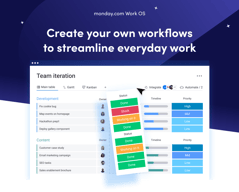
Each task you track with Monday has its own card. These cards store any data you need, like files, a task outline, updates from management, and even an activity log. All Monday cards are grouped in boards, which are themselves grouped into workspaces.
That’s the basic gist of how Monday works. But you can tweak this simple system quite a lot. Let me show you how.
Boards and Cards
Creating a new board is very easy. You just give it a title, choose a view for the project, and start adding tasks.
When you create your first board on Monday, you’ll get a dedicated guide to set it up.

Monday offers plenty of ways to visualize tasks. You can arrange them in a table, in Gantt charts, in Kanban, in a calendar, and more.
As you’re adding cards to your first board, the guide will also give you a preview of how they’ll look:

This makes it easy for most people to understand the core functionality of Monday.
You can further bundle cards from the same board in groups. For example, you can group them by what week the tasks are due.

You also get visually-coded statuses for all tasks. The default ones are “Working on it,” “Done,” and “Stuck.” But you can create your own, to further customize your boards:

You can set due dates for all tasks, which helps you keep track of projects. In the Pro plan, you also get advanced time tracking, which lets you visualize how much time you have left before a deadline.

This is useful, but the feature does much more. By tracking time, managers can see the availability of each team member. This makes task allocation much easier.
Of course, you can customize the board view in a ton of ways. For example, you can add different columns to the table view:

And you can analyze each card individually, to add comments, files, task lists and even check its activity log.

Monday’s core functionality is top-noth. Even beginners can use their project management software to create simple tasks and dashboards. But Monday’s true power lies in its advanced customization options.
Customizability
We’ve used Monday.com for years, and we researched all of its quirks for this review. Throughout all of this experience, Monday’s automation stood out the most. You can easily set-up automated processes with the platform, even if you’re a non-techie:

And the possibilities are endless. You get templates for the most commonly-used automations, like notifying someone when a task’s status changes. You also can create your own custom automations, or modify the dozens of templates that are already here.
For example, you can set up an automation that moves a task from one board to another when its status changes and then notifies the person responsible for it. This is useful for tasks that need oversight.
That’s how my editors know to check my work. I change a card’s status to “Needs Review”, and that automatically moves the card to the Editor’s board, and notifies the person that needs to give it a look.
And this is just one example. Monday.com’s automations can do a lot more. And again, they’re extremely easy to create. You don’t need to know any code or use complicated APIs. It’s all made with natural language:

Besides automations, you can also heavily customize board views. You’ve already seen how to add new columns to the table view. But you might be surprised by how many options there are. You can include text, buttons, timelines, numbers, checkboxes, tags, and much more. There are so many options, Monday actually has a dedicated column center.

Each board can have multiple views, which makes dashboards on Monday.com very flexible. For example, team members can use the table view to see task details, deadlines, and manage their work. Managers can use the chart view for the exact same dashboard to get an overview of task statuses and deadlines.

When analyzing a board, you can also filter results by anything (person assigned, status, deadline, etc):

If a filter’s useful, you can turn it into a new view for that board.
All of these options make Monday.com extremely customizable. If you spend some time playing around with its features, you can most likely create anything your team needs. And if Monday’s suite is lacking, you can always complement it with integrations.
Integration with other tools
Monday.com has a lot of integrations. So many, they actually have an entire app marketplace to make it easier to find the extensions you need

Monday’s integrations let you fine-tune your boards, cards, automations, and more.
For example, the Google Apps integration makes it extremely easy to embed and collaborate on Google Sheets, Slides, Docs, Forms, and more. If you’re using Monday as a CRM, you can use the Tableau Connector for advanced insights into your processes and results.
Not to mention, you can also integrate Monday.com with popular tools like Zapier, Zoom, Google Calendar, and more. These let you automate processes outside of Monday.com, so your team won’t have to worry about repetitive tasks.
Integrations are one of Monday’s biggest perks. The only downside is that you’ll need at least a Standard plan to use them. They’re not available with the free or Basic subscription.
Ease of Use
Monday.com is surprisingly easy to use, especially for how customizable it is. All plans come with onboarding guides, explanation videos, and loads of support articles to help you get started. Enterprise clients even get a customer success manager. They will help you set up all the advanced features, and provide dedicated support no matter what you need.
Even without all of that support, Monday.com is intuitive to use. And that’s mostly thanks to its well-made user interface.
User Interface
Monday.com has one of the best user interfaces out of all project management apps. The design’s smooth, you get color-coded statuses, big buttons, and detailed breakdowns of your tasks.

You can quickly switch between views on a board, all the options are pretty intuitive, and you don’t need a degree to find important features. It’s easy to navigate Monday.com even without an onboarding guide.
What we like most is their comments section. All cards have one, where you can write updates about a task, interact with your coworker’s messages, and make notes of everything related to that task.

And if you need anyone to join the conversation, you can quickly add them as a card subscriber. This will automatically notify them about any messages.

Getting started and customizing Monday boards – is it easy?
When you sign-up for Monday, you’ll fill in some details about your company, like its size, industry, and what you’ll use Monday for. These choices will affect the features and templates recommended to you, but they won’t limit your tool stack..

For example, I said I’ll use Monday for operations management. This made my automation recommendations the most commonly used for ops.
After this initial sign-up, you’ll also get a step-by-step guide on how to create boards and cards on Monday.

This guide is pretty good to understand how Monday’s core functionality works. If you have minimal experience with project management tools, it’s more than enough. However, it’s not the best if you’re a complete beginner.
You might need more guidance on how each view works, as well as the difference between views, boards, and workspaces. Not to mention, beginners might need a similar startup guide for other features, like automation. All of this support is available in the knowledge center. But it would be better fleshed out in a lengthier onboarding guide.
And we’re not saying this just to pick on Monday. A lot of the complaints you’ll see online about Monday.com mention a steep learning curve. Sometimes, these reviews even complain about the lack of features that are actually there, like more views beyond the default table. A more in-depth start-up guide could solve these issues.
Monday.com Security and Privacy
Monday is pretty serious about its security features. They have a trust center that outlines their stance on security and privacy, as well as a detailed security white paper, which showcases how they protect customer data.
Monday.com uses advanced encryption protocols (especially for Enterprise users) and high-end security methods. They analyze their vulnerabilities weekly and run a bug bounty program to avoid hacks. If you need a secure project management app, this is as safe as it gets.
Lastly, Monday.com collaborates with some sub-processors to collect and process your data. This might worry you, but the third parties are mandated to protect your data under the same terms Monday.com is, so your company is not at a higher risk because of it.
Customer Support
Monday.com has a very well-organized knowledge base, which provides most of the guidance you’ll need to get started with the platform.

They also have a community where you can post or browse specific questions, a University center to learn more about Monday’s advanced features, and detailed API documentation.
If you need any extra guidance, Monday.com also offers 24/7 live chat support.

Their agents are prompt and helpful, especially if you’re on a paid plan. That will get you priority support. If your problem’s not urgent, you can also email Monday.com. If you have a billing issue, you can even hop on a call with a Monday agent.
Overall, Monday’s support system is robust. If you run into any problem, you’ll get the guidance you need to keep your project on track.
Monday.com Pricing

monday.com offers Individual (free), Basic, Standard, Pro, and Enterprise plans — see monday.com pricing for current rates.
The tool can get pricey if you have a big team. So if you’re not sure which plan works for your business, let’s break it down.
Individual
Monday.com’s free plan is a great choice for individuals that want some structure in their day-to-day life. But it’s not limited to personal use. The Individual plan works great for freelancers that want to manage their work and even small businesses. You can add up to 2 seats to your projects in the free plan.
Granted, you are limited by an Individual subscription. You can only create up to three boards, 1,000 items, and you only get 500 MB of storage. But it’s more than enough to test Monday.com and see if it’s right for you.
Basic
Monday’s Basic plan offers much more flexibility than the free tier. You can create unlimited items, you get 5GB of storage, unlimited boards, unlimited free viewers, and priority support.
However, you don’t get access to most of Monday’s automations with this plan.
Standard
The Standard plan probably has the best price-to-value ratio. It comes with guest access, more views, integrations, and automations, making it a better choice than a Basic subscription for most teams.
But if you want the full Monday.com experience, you’ll need the Pro plan.
Pro
Monday’s Pro plan offers 100 GB of storage, a full year of activity logs, unlimited guest access, time tracking, dependencies, a formula column, more views, and advanced security.
If you run a medium to big company, the Pro plan is probably the best for you.
Enterprise
Enterprise plans are custom-made for big organizations, so we can’t tell you how much it will cost, or exactly what features it will have. But we do know you’ll get premium integrations, a dedicated customer success manager, advanced security options, and better analytics.
User Reviews
People really like Monday.com. The platform has top scores across all big review aggregators.

Monday gets praise for its advanced customization and great interface. But there are unhappy customers too. Most people that complained about the tool had problems with the slightly steep learning curve and higher pricing for big teams.
Pros
- Excellent and intuitive dashboards
- Fantastic for beginners
- Range of features like time tracking and budgeting
- Suitable for larger teams
- Supports extensive integrations for CRM, marketing, project management and more
- Visual boards allow for easy and accurate tracking
Cons
- Can be a steep learning curve for some users
- Can get pricey for larger teams
- Limited task dependencies, especially on the cheaper plans
Our biggest gripe with Monday.com was that you’re limited when creating task dependencies. You can only set them up via automations. Meanwhile, competitors like Asana let you take care of the same thing in 1-2 clicks. But it’s a minor issue and something that will probably be fixed in the future.
Quick Conclusion: Monday.com Review
monday.com has expanded beyond project management into a full work platform, offering monday CRM, monday Dev, and monday Service as dedicated products. The platform also includes AI-powered features for task automation, content generation, and project insights.
Monday.com does almost everything right. It has a strong project management suite, advanced customization, and some of the best integrations we’ve seen in project management software.
It is a bit hard to learn for non-techies. And it can be expensive for large teams. But in our opinion, these are minor inconveniences. Monday’s so good, they’re small hurdles to overcome.
You can see for yourself, Monday’s free to try:

Compare monday.com with other popular tools in the same category.
Very self explanatory in the UI once you click around a bit.
The side bar on the left is clunky to use and I wish more options were available without multiple clicks. An incognito mode might be interesting too but is unnecessary
Keeping clients and OKRs organized throughout the year
We use Monday mostly to organize our work routine and delegate tasks. The friendly interface helps to make it fast to fill everything.
some of our automations don´t work as we expect.
Helps us to keep track of our daily tasks and projects.
I like how easy it is to manage a project with a lot of different stakeholder. You can talk, manage, track, upload et inform all in one single place. I use it everyday and our projects have never been so successfull.
The notifications are a bit of a pain in the ass, it's kinda hard to get through all of them and manage them. I wish it would be easier to set up the one you really want.
Working with different stakeholder who have different roles in the project. They can follow the project and be involved exactly where they are needed, without having to double check if everyone follows. Makes my job as a project manager way easier.

I like the fact that you can integrate Monday.com into almost all external pieces of software we use.
I wish that we could have multiple column layouts wihtin the same board. I know it defeats the purpose of Monday.com but its something that I'd love to see.
Monday.com helps us to run our agency with ease. We use it to comminicate with clients, track progress on projects, get sign off and then after launch we use it for ongoign support
Monday.com allows you to build your work flow the way that works for you best. They provide the tools and many ways to customize and automate processes. If you can think of it, you can likely make it happen in Monday.com
The only real downside is a rather small thing. It has to do with the reminders you can set for items within Monday.com when you can click the "bell icon". You are limited to selecting; 20 minutes, 1 hours, 3 hours, tomorrow, or next wee (which is always the next monday). Using the tools and customization options Monday.com provides, I was able to program my own system that would allow me to choose a time on the hour and any day of the week/ month. There are many times that the provided options are too limiting to what kind of reminder I need.
Monday.com allows our business to more easily organize and track our projects through out every phase including the first point of customer contact and all the way up to their invoice being paid in full and everything else in between.
The customization of data entry and the range of tools for process control.
The incapacity to export backup of files within tasks.
Monday is the primarily tool in our company to manage task and control processes. It help us monitor and quantify efficiency.
I like that I can organize my tasks and communicate with co-workers about the subject. Therefore, I can increase my productivity and monitor the progress of processes. Also, monday is very intuitive and has a very dynamic layout. Automations are very useful and speed up everyday steps.
Some table formatting gets out of adjustment when you paste it on body item.
Monday solve our task history problems. Before Monday it was not possible to track which tasks had been done and when they were finished. Now we can always measure our how long each task takes.
It is easy to organize my tasks and to be integrated with my team.
I think monday could have more insights about my tasks and be easier to edit tables in a task.
It used to be hard to track what everyone else was doing. Now we can put all the relavant informations in one place.
A opção de inserir tempo para as respostas das tarefas.
Não tem nada que eu não goste, acho a ferramente bem completa.
Facilidade no processo, com isso tenho visibilidade ampla de todos os processos.
What I like about Monday is that it helps keep my work organized
What I dislike about monday, theres nothing to dislike.Theres really no downside
Monday is helping me stay on track with my documents.

