

Unclaimed: Are you working at Ninox?






Ninox Reviews: 4.7/5 — Highly Rated
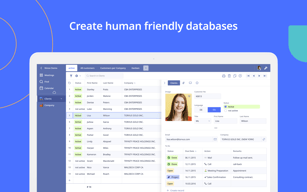
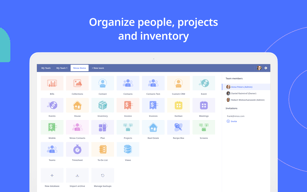
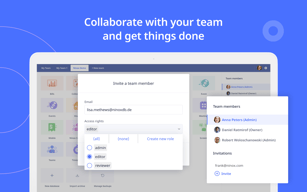
Ninox coding software is a platform that lets users create custom databases, automate workflows and manage data. It provides a user-friendly interface for building custom forms, reports, and charts, making it easy for non-technical users to create and manage databases. The software also integrates with other apps and platforms, making it easy to share data and work collaboratively. With its robust feature set and ease of use, Ninox is an ideal choice for small businesses, freelancers, and teams looking to streamline their data management processes.


| Capabilities |
API
|
|---|---|
| Segment |
Small Business
Mid Market
Enterprise
|
| Deployment | Cloud / SaaS / Web-Based, Desktop Mac, Desktop Windows, Mobile iPad, Mobile iPhone |
| Support | 24/7 (Live rep), Chat, Email/Help Desk, FAQs/Forum, Knowledge Base, Phone Support |
| Training | Documentation |
| Languages | English |

Compare Ninox with other popular tools in the same category.
I like the easy use on the iOS platform. It allows for easy table setup so that you can get up and running quickly.
I would like to see more robust scripting abilities. The documentation is thin. Support of standard SQL would be great!
Production timelines and inventory have been the first and major tasks I have used Ninox for. The ability to carry the database around on my iPad and have it sync to my phone or computer via iCloud has been terrific. I can look up our production information at any time.
Ninox is an easy to use database for almost any purpose and has proven to be far more usable than its competitors. What frustrated me about several of the other databases available all seem to work better with Ninox.
I think the numbering system is a bit off, but I understand why it's set up that way. I also don't particularly care for the view, but I'm hoping that's fixed with the new update.
We use it to manage a comprehensive PR database and it has served us very well.
I especially like the fact that the product is kept simple, and can be easily administered without much prior knowledge.
Maybe the functionality could be a bit bigger. In particular, the presentation of graphics. But the developer regularly updates the app.
I use the application to create and administer multiple databases.
Ninox is complete enough that you can do whatever you need to do. It is fully featured
The display was a little plain until they added the new views
Musical databases for production, distribution and licensing. Staying organized and automated in the delivery process.
I love that it's customizable and that you can link the information between sheets.
Program doesn't feel as organized in layout as I would have liked. Not as intuitive as I expected.
Contact management. Ability to sort contacts based on a variety of criteria.
Ninox es amigable, potente y con buen soporte de sus técnicos
Mantenimiento muy costoso: Cuando se realizan nuevas tablas con opciones adicionales, hay que escribirlas en cada uno de los clientes que disponen de la aplicación original, se optimizaría enormemente el mantenimiento si se pudieran importar las tablas con sus atributos de una base de datos a otra Se precisaría información más detallada de la base de datos para las opciones de conectividad con terceros El hosting es caro, el almacenamiento en otras bases de datos como Dropbox, etc., tienen precios mucho más razonables (120 € anuales por 1 Gb ó 240 € anuales por 2 Gb, es muy poco almacenamiento) El idioma español sigue siendo un problema
Desarrollo rápido y fiable
Flexibility to build everything like I need, without overhead of features or compromises for the users.
Building the user interface could be more flexible. In some cases i found the user experience of could be better.
Inventory management and invoicing, trying to get product development also into it.
The option to create things my own eay but have also templates.
The layout is kind of dry wpilf be great to have some option to change field design or colors.
Trading ecommerce, database, crm options

Ohne Programmierkenntnisse lassen sich in Ninox Datenbanken und Register mit Verknüpfungen erstellen und nutzen, die verschiedenste Anwendungen und Branchenbedürfnissen genügen. Bei Bedarf kann die Datenbank entweder lokal oder via Cloud gehostet werden. Für Gruppen ist die Datenbank damit auch Mehrbenutzerfähig. Die Datenbank kann über die Mobile App auch jederzeit von überall auf dem Handy genutzt werden.
Für spezielle Anwendungen und spezifische Anpassungen etwa für formale Anpassungen lt Unternehmens CI erscheinen die Möglichkeiten eingeschränkt. Die Formularfelder sind zwar frei erstellbar und erweiterbar, die visuelle Gestaltung jedoch kaum anpassbar
Kundenlisten und einfaches CRM mit Kontaktpunkten mit Fälligkeiten und Zuständigkeiten ohne großen Aufwand realisiert. Eine weitere Anwendung für das Arbeitsverzeichnis und die rechtliche Dokumentation im Bereich der DSGVO erstellt. Sehr individuell konfigurierbar und auch für Datenbank Dummies einfach einsetzbar ;-)

Ninox is incredibly flexible, whether you are setting up a personal database synced between your phone and your home device or setting up a small enterprise server based application it has you covered. The platform continues to slowly improve and evolve and the early API seems promising for web apps and IOT use.
The user interface is unorthodox and does not use recognised OS level controls nor does it use a well known cross platform UI kit (such as Material, Bootstrap, Ant Design etc). This means that usability is a compromise, with a lot of users feeling uncomfortable or unfamiliar with the sliding panel style interface. It is also hard to navigate a more complex application built in Ninox because it is possible to get to the same record in many ways and go round in circles. Integration to other applications and cloud services has also been non existent so far.
Excellent for keeping personal records, accounts and pockets of well organised data which needs gathering on the move and syncing to a base site. Also very good for small enterprise business workflow systems such as medical or CRM record systems used in a small-medium team.
Ninox is very user friendly compared to other programs and apps. I could figure it out without help from customer service. I have contacted customer service many times and they have responded very timely. They have also encouraged me to set up an appointment with them using Zoom (something new to me). Due to my remote location, the video call was not completed because of poor service on my end. But the rep was very good about suggesting other times to call.
Customizing Ninox isn't intuitive. It might just be that I need more knowledge about tables though. It would be helpful if there was a video tutorial to watch. I live in a remote area and video conferencing is difficult because of poor bandwidth.
I am in education. I am trying to use Ninox as a way to keep records with student performance. I am having difficulty having more than 8 field showing, even after I went back in and made sure that additional fields are visible.
Uncluttered interface and a nice approach to presenting data in default layouts.
Some clients may need more customization that a product such as FileMaker Pro is more suited to. That said, Ninox has an attractive pricing model and is an aggressive newcomer to this field.
A lot of simple, flat database needs such as contact directories, product inventories and project lists are well suited to Ninox.
Easy to use interface for non-technical staff as well. Good options for customization in the frontend.
Slow API for sharing as JSON files, takes multiple seconds to fetch data unfortunately.
Managing courses and their respective dates.
ease of design, ease of use, ease to explain
share editing with other (public) users is relative expensive
straight forward, prototyping support of business processes

It looks like you have many possibility and offer quite a lot of different solutions
It's not really user friendly. They should improve in oder to make easier the data base and have a better layout user friendly and programming faster. Than It will be interesting to have a sort of free cloud in order to synchronize every thing
I had to change CRM more close to to Apple system
Ability to easily link multiple sheets together
inability to import to multiple sheets at the same time
abiliy to keep track of age old records
Die Datenbankbedienung sieht sehr übersichtlich aus.
Eine Programmierung ist notwendig, ich habe keine funktionierende CRM
crm

I recall using the web-based version of this software. However, I had a hard time assembling the category information. In fact, it was so long ago, I do not recall even how I did the process.
Perhaps I did not look over the NInox Site o find he knowledge database or the tutorial on how to get started.
no response
I like the fact that Ninox comes from Germany. I think it's good that the forum is in German and the support also speaks German. The manual is also in German, so understandable for anyone who does not speak English. In addition, unfortunately, I find no property that I really like.Everything seems not really mature yet and is not yet suitable for daily use.The new design is a big improvement, but still not enough. But anyway, I believe that Ninox will be really good someday. Bisdahin it is still a long way.
Although everything seems pretty tidy and simple at the first glance, in my opinion it quickly becomes confusing. Maybe you have to deal with the software a bit more to get routine. I think the iOS app is not good either. On the iPhone you can not use them at all, because they are in my opinion totally confusing and many features I could not find. What bothers me most is the fact that you can not password protect the database on the Mac. That really is very bad and a basic feature for me. For companies, the subscription model is certainly relatively cheap. For a freelancer it is devinitatively too expensive.
Not yet, because so far Ninox has not convinced me yet.