

Unclaimed: Are you working at Olark?






Olark Reviews: 4.3/5 — Solid Choice
Olark is WCAG 2.0 AA compliant, accessible, and GDPR-ready platform touted as the best way to help boost business sales, solve issues and understand your customers. It gives customers the answers they need immediately and helps deliver powerful insights about what they want to build lasting customer relationships.





| Capabilities |
API
|
|---|---|
| Segment |
Small Business
Mid Market
Enterprise
|
| Deployment | Cloud / SaaS / Web-Based, Desktop Chromebook, Desktop Mac, Desktop Windows, Mobile Android, Mobile iPad, Mobile iPhone |
| Support | 24/7 (Live rep), Chat, Email/Help Desk, FAQs/Forum, Knowledge Base, Phone Support |
| Training | Documentation |
| Languages | English |

Compare Olark with other popular tools in the same category.

The shortcuts work really well. It’s easy to search previous conversations as well.
I’d like to edit the appearance more and make even more customised. Having said that I loved the wee holiday themes last Christmas!
The customers can contact us easily. Live chat can make people 30% more likely to convert.
Accessibility for individuals who prefer to type over talk
Not HIPPA compliant, so conversations may require an actual phone call
Easier way for anxious, shy individuals to communicate real-time
With Olark, now we can have real-time chats with our website visitors who some turn to be customers. I am glad of what Olark can do when implemented and we have also noticed an increase in sales since our customer team is actively talking to customers on our website. The other good thing for using Olark is that it is easy to integrate to Wordpress and other softwares we are using.
The monthly subscription fee can make someone stop using Olark especially for small startups like ours. I wish they can have have a free package so that people who cannot afford the monthly subscription fee can still benefit from one of the best chat apps for a website.
We wanted a way to engage more with our customers and website visitors, thanks to Olark now we have solved that challenge.
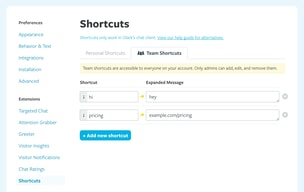
The shortcut keys for text. Provides a company feel to all customers receiving a uniformed message. Also saves time when navigating between multiple chats.
The design doesn't feel very modern. There could be a better UI designed and possible personalising for user-facing settings.
Visitors coming to our site for assistance with our platform. Email and call volumes decreased as a result. Customers feel they can reach us immediately as Olark links directly from our software.
Great chat platform have use for over two years software is up-to-date and efficient between agents and the web
The lack of personal communication face to face
Better communication among employees
It is very user friendly and has the ability for anyone in our company to work with. It has helped out customers get a faster response to their questions or concerns for their visits, treatment and results.
It would be great to have a options for the customer to pick their language to better assist them in asking their questions or concerns. A translator button would be great. Over the years we have found that there are certain words that do not translate correctly.
Customers language translations.
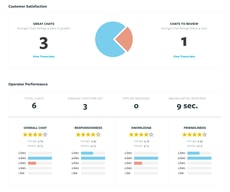
Olark is a great reporting tool that pulls in the most important google analytics data that you choose and put it in a dashboard for you that you can send directly to your clients for easy transfer of metrics and reporting
There is not really much that I dislike about Olark. The only thing I would say is that for some reason I cannot add users to my account, my whole team has to use one log in which is a little frustrating
reporting
The instant notifications and simple design help me stay in touch with clients; answering questions, communications and sales are made easier with a platform I can rely on. I can assist clients in real-time while they are browsing my site and keep track of the specific items they are requesting.
There is very little to improve on but I do have a few suggestions: It would be great to have this platform linked with my commerce platform so that payments can be handled within the chat. I also think that the popup chat bar could be more discreet but that is only a minor issue. Overall I am quite pleased with this product. It hasn't failed me yet.
As an independent artist, I am responsible for every part of my sales, presentation, customer service, and outreach. I can easily communicate with my clients and receive direct messages about interest in a piece or commission requests. The ability to send automated messages to peak my customer's interest and inform them of updates to my website is also a huge benefit.
I really loved that with Olark we were able to use shortcuts. This made our response time wicked fast and error free!
I didn't like that sometimes it wouldn't show me which of my colleagues were online all of the time. It was nice to know when I was free to leave Olark and when they needed me there.
We were able to help get potential clients on the phone with sales representatives very quickly. It really helped with our inbound leads
What I like best is being able to review transcripts from previous conversations. That way information is not lost when relaying message to others.
What is dislike is that people can ask questions without filling in all their contact info. It makes it difficult to follow up when we don't exactly know who we are chatting with.
We can communicate with people on our website and answer any questions they may having, giving us great customer service.
Most of our chats are handled by a specific team so we don't always get to see what their day to day is like. With the sales force integration we can easily get a look into that to better assist our customers.
No major issues at the moment. If options are added in the future to further the salesforce integration that would be great.
Customer Support
I like the ease of quickly answering clients questions while logged in AND while logged off.
I haven't found anything that I don't like yet
Answering clients' questions that aren't able to be answered from the information on our website.
I like the fact that Olark is nice and simple to setup !!
It could do with more integration with other products
Potential customers can get a response in real-time and they do like this
We are able to customize our customer experience and also that of our employees. We love having sample answers available and getting to limit ourselves to only 3 chats at a time.
There have been a lot of outages in the last few weeks. Olark support was helpful and reached out to us about the problems.
We are much more available for customers and many have said they appreciate this.
Olark is super easy to use and understand. My favorite extension is their shortcut feature. While chatting, you simply hit the semicolon key and all the available shortcuts will pop up. Their system is very modern and fun to use! They also have actions where you can transfer the chat to a different team member, block chatters, or tag a ticket to track issues!
I wish there was a way for an agent to send attachments. This would be super helpful to provide the best and fastest feedback for the customer. Also, there needs to be a way to change the subject of the emails they send you for the offline messages.
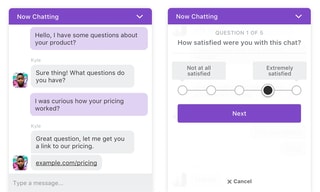
Immediate answers for our customers is our goal. Olark gives a targeted chat, which allows you to set up rules to pop up for specific customers. They also offer an offline version. From here the customer can submit a question and you receive an email to respond to. You can personalize the chat as well. You can change the colors, fonts and add names and pictures of your clients. I noticed that when we added a name, people stopped assuming that it was a robot. Olark also integrated with Google Analytics. This is great to see conversion rates. There is a way to email the transcript to yourself or the customer directly from the chat. Olark also has surveys. These are in real-time and the customer is notified once the chat ends. This is great to see immediate feedback.
The chat flow, the way in which chats come in.
I wish you could change the homepage screen.
Customer service work and help with software.
It makes communicating with potential clients much easier, and makes us more approachable
Notifications are sometimes easily missed
Increase number of new clients
It makes exchanging info with customers Quick, easy to learn, effective.
I wish I could make the chat box larger when I’m typinf a longer reply.
Communication with customers

I like how easy this was to install on my site. The analytics are great - especially the integration with Google Analytics. I like several of the extensions and the possibility of integrating chat with other applications. I like that they have free trial. The chat interface and its behavior are customizable to match our site's look and feel and business workflow. You can define the number of users and get billed based on the actual number of users. You can go up and down on the number of of users depending on your needs. Olark's customer service is helpful and responsive.
This product affects page load speed (which slows down my site, although it's true of many website add ons). I wish the pricing was more affordable with larger number of users. I'd like to see more integrations with CRM's - especially with Zoho CRM. Pulling up transcripts is a little slow, but fortunately we don't need to do this very often.
Helps conversion of website visitors to better sales leads. We are able to track conversions on Google Analytics which is quite helpful for optimizing our pages and even digital advertising. It's also works well when an agent isn't available to respond by taking a message via the chat window. It will send an email to us when someone wants to chat (and there is nobody available to take the call).

Olark makes the conversation with the customer effortless and easy. With a polite bubble ping, the employee is not only notified of incoming messages but also able to reach out to existing users that have yet to reach out. You can push the customer to certain pages as well as allow them to share their screen with you. Simple commands using a "!" at the beginning allow for automated responses created by the admin. Transcripts easily upload into customer management platforms such as SalesForce to allow for documentation practices to be upheld. Each chat offers an opportunity to review at the end. This can be monitored by the admin on the home page when the admin logs in. Low chat scores are easily identifiable. Should off-hours be present or they just barely miss an available agent, the chat is swiftly converted into an e-mail that requires follow-up by an agent.
My preference would be for Olark to have its own built-in spell checking method. For example, if the agent had 1-2 typos, it would refrain from allowing them to click on send without fixing them. I would prefer that it would be advanced to check for incorrect use of words or grammatical errors. Although the normal computer program tracks this, I'd recommend installing an add-on to the web browser to ensure additional accuracy when managing a larger team. The notification integration is also poor as it can only be used in specific browsers. Desktop notifications need work.
Olark made us available to our customers in as many forms as possible. For those that prefer online communication, it allows a safe and easy point of contact with freedom to speak without constraints that many chats give. You're speaking with a LIVE person - not a bot!
I like the easy to use interface on the user end and on the customer side. It's easy to navigate .
I honestly don't have too many dislikes. I really enjoy the platform. I wish maybe there were some improvements available for the transfer function, but besides that I'm pretty happy.
Being able to reach the customer not on the phone is a very useful function and Olark is very useful in being able to achieve this.
It's really easy to connect Olark to Zendesk, so this way, there's always a place for messages to go.
Nothing at all. It does what it's supposed to do in a simple manner.
Direct chat and always having an outlet to chat with us as a customer.
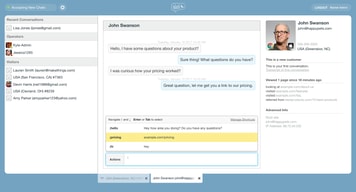
Olark allows you to create easy shortcuts to use in your chats! Instead of typing each question or comment, I can preload shortcuts so that I only need to type a character! The chat's ability to tell a location and whether or not the visitor is a current or new customer is also extremely helpful! The integration with Salesforce is awesome! Leads get pushed directly to our CRM
Sometimes the chat can lag the correct page that the visitor is on. But other than that no complaints!
The ability to talk to potential new customers through the chat is great! I am able to answer questions for prospective customers, and identify those that are current customers!

Olark is easy to navigate and simple to use. I like the notification style and workflow of it, and it makes my job easier.
I dislike that you can only have 5 operators. It would be easier if you could have more.
Solving coach issues using technology. I've realized that coaches like to chat rather than call for help.
The amount of features you get for the small amount you pay. We researched multiple options but this was the best value. I like the ability to reach out to customers if they are stuck on pages and the ability to screen share so we can see what customers are looking at.
There are no features that I dislike at this time.
We are trying to reduce the amount of calls coming into our call center. We are seeing multiple users using our chat functionality, which is cheaper than if the same user called into our call center since one agent can chat with multiple customers.
Very easy to use dashboard. It allows you to store a generous amount of prepared responses to common questions to improve efficiency as well as give quicker responses to prospects.
It seems to go in rest mode too quickly which I think I probably have control over. Really nothing to complain about. It is pretty efficient.
It allows us to respond to prospects and customers questions a lot faster an with a lot less steps then in the past
I like the alert feature and that you can set up an automated message to people browsing the site after a set amount of time. Also being able to chat with co-workers at our other location for a quick question or clarification on something is handy as well.
Sometimes the audio alerts don't happen and I've missed chats because of this.
Not really solving any problems, but giving more access to easy question answering to potential customers who visit the site.
It is simple to use, integrates well so we can use iPhone app and desktop client.
I think it is expensive for what it is and vs other options on the market. I also find that the online support they offer is always offline so have never been able to get support (we are in Sydney AUS, so I know this is probably dude to time zones - but just a disappointment)
We use it as both a customer service tool and a lead generation tool.

Easy code integration into our ecommerce website. Easy learning curve. Follow the customer as they browse. Looks good, works even better. Away times are useful too.
Nothing I can think of. Except maybe more of a way to save past customer details.
Having the ability to see who's on your site is also valuable, even if they don't interact, you can see what pages people spend time on. You can reduce cart abandonment too, if someone has a question in their late stage of the buying process. I like Olark because it has all of the features I want, and it's a great value.
Ease of use, functionality, ability to integrate into almost any website
other chat provider provide similar features for a lower cost or free
retail wholesale experience and site bugs