

Unclaimed: Are you working at Olark?






Olark Reviews: 4.3/5 — Solid Choice
Olark is WCAG 2.0 AA compliant, accessible, and GDPR-ready platform touted as the best way to help boost business sales, solve issues and understand your customers. It gives customers the answers they need immediately and helps deliver powerful insights about what they want to build lasting customer relationships.





| Capabilities |
API
|
|---|---|
| Segment |
Small Business
Mid Market
Enterprise
|
| Deployment | Cloud / SaaS / Web-Based, Desktop Chromebook, Desktop Mac, Desktop Windows, Mobile Android, Mobile iPad, Mobile iPhone |
| Support | 24/7 (Live rep), Chat, Email/Help Desk, FAQs/Forum, Knowledge Base, Phone Support |
| Training | Documentation |
| Languages | English |

Compare Olark with other popular tools in the same category.
I like that you can.... -See the customer's screen -See info about what browser/system they use -Easily learn the ropes of how it works
I don't like that you can't do a shift/enter in the chat so that you enter within a comment. It just posts it no matter what
Easy access to Customer Support. HUGE HUGE benefit!
Nice and simple web chat plugin. It's affordable and (so far) I've found it relatively simple to customize.
Whilst I'm in trial mode, I've not found anything that I don't like. So far so good!
Looking for ways to get visitors to stay on the website for longer and capture their attention.
Olark is the simplest chat website plugin on the market. We were able to add the code and get started affordably while customizing the chat to fit our website. After upgrading from the free version we were able to adjust the account and prospect engagement based on our needs. We now also added the chat functionality to our marketing pages and blog as we're generating leads and moving them along in the sales process.
No major things to dislike. We've already upgraded and moved to more advanced functionality.
Capture attention of website visitors to ask their questions as they have them before you lose them. This results in both new lead generation and lead nurturing for existing ones.

Flexibility of setup options. Easy integration with our website. Generally high service availability. And accessibility (via live chat), responsiveness and technical ability of the vendor's customer service agents.
A very nitpicky feature request, but one I personally find disappointing that it's not there: Would prefer audio notifications of new chats only until chat is accepted; is not necessary (for us) to have an audio notification of every chat transmission sent by a website visitor once the chat is accepted. Leads to a lot of muting of agents' computer sound, which causes them to miss notifications of new chats.
I believe we have better engagement with users and prospects with this system.
Easy and friendly user experience allows for a seamless chat experience.
That the messages are broken up into segments when shown on the screen.
First had experience with students, parents, educators allows for another form of interaction.
I like the enabled notifications. It is extremely helpful to have a popup notifying me of a new chat. I also enjoy the feature of putting my status in away if I am idle for a certain amount of time. I like being able to see which pages the guest has visited on our website.
I wish that from the main chat page I could easily click a button to review previous transcripts instead of having to open a new page and make a few clicks.
I work at a college, and a lot of high school students prefer a live chat option so for us it is extremely beneficial to have this as an outlet for them to contact us. It is also convenient for parents who work 9-5 to just hop on our website and ask their questions instead of having to make a phone call. Typically the questions are simple enough that we can simply send them a link.
Olark is a great chat tool. Simple to use, great features, customizeable. The UI is intuitive and easy to use. This tool is very helpful in facilitating business for my organization. The ability to also pull data from the web application for the users that are signed is very useful.
Wish there was the ability to tag users so you know when they come back. Also an easier way to block certain users, we had issues of someone coming on as a prank repeatedly. A more automated way of logging off of chat.
Allows us to serve potential clients while they are on our website, this is extremely valuable. We have had many great prospects that were generated because of Olark. Having chat is a necessary business tool.
Easy to use platform. I like that the message can be customized by the page. I think we get some good engagement with prospects/customers.
I dislike that there's no pop-up or notification if the prospect goes to another tab and I reply. This can often lead to the person leaving and forgetting to come back. Perhaps this feature is available and I'm not aware of it.
Many people have questions when they stop by the website but don't want to fill out a form with all of their information. I think we're able to engage with people earlier and make sure their questions are answered.
Able to utilise this tool on your website straight away, agent interface really ease to adopt
Improvements in reporting for analysis of chats, notifications on chats could also be improved
Transparency of the online journey, instant audience insights, real-time improvements to the website, technical problems instantly highlight, delivering great online experiences
Being able to assign an agent as accepting or not accepting new chats, with the automatic email notification of chats when no one is available to take them
It's a little boxy and customization is not very intuitive
we're able to offer a live chat option to our membership which helps drive down incoming call volume
Quick notifications via email when someone leaves a question or inquiry about our website
Plenty of SPAM Bots can operate the form and get by, but that's not to big a deal.
Customers and Clients reaching out to us when we are away from the website and during off-peak hours. Chat-to-Email works great and we can respond via email vs having to sign into the site to respond.
Easy to understand interface. Great introduction to chat support.
There were several instances of okay being down, much so customers accused us of lying about or chat support hours.
Connecting in real time with customers. Quicker solutions without the as immediate pressure of over the phone support.
Their customer service is amazing. Whenever they mess up or it fails( which isn’t often), they always reach out and let us know and try to fix it as soon as possible. It’s really user friendly and efficient
It would be nice if you could see more info on what the customer is doing. Also it’ll look like the customer is typing for a really long time when their not. If they could change that to where it says customer stopped typing or something that would be better
We deal with a lot of info and showing customers where links are on our website. It’s really nice because it’s very efficient and easy to use
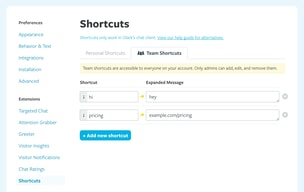
I like the shortcuts Olark provides to deliver a quick response to the customer.
I dislike that it sends your message when you hit Enter. It's easy to send before you are finished typing your response.
Minimized calls we receive by answering customer questions via live chat. Customers appreciate the fast response to questions rather than calling or emailing in.
The interface on all pages is clean and well thought out. The controls are all extremely easy to manage as well.
The reporting is a bit difficult to play with and to export into our home grown system.
It allows us to handle multiple customers at the same time instead of being on the phone. It also allows us to freely pass customers to different agents which is a nice perk.
Olark has all of the functions you need to help customers quickly as long as you do not have a huge workload.
The aoftware seems to be down more often than I would like. Many times your 3 maximum customers turns into 1 for no apparent reason as well.
Having Live Chat is always a bonus for customers because they want their problem or question solved ASAP.

The simplicity of the product that provides a seamless user experience.
There's not much innovation within the product while the competitors who charge way higher, seem to be adding a new feature with time.
We used Olark for support within the product and engagement with users who came on our website. We were able to succeed solving both using Olark.
Easy to use and communicate with customers
Integration is kind of a pain and you need to use a third party app to utilize
It's helpful to quickly communicate with customers and either close sales or offer support
It's easy to use, and it's easy to implement. I think we were up and running within a week of buying the software.
It'd be nice to be able to attach files, as when we work with students, we often need to send them documents, so it'd be nice to do that via chat.
It's a great way to communicate. People don't always want to call or email, so this gives them another option. It's widely utilized.
Incredibly customizable, with an easy-to-use interface.
No native Windows app, which makes it hard to use some of the features that they only offer on web.
Giving customers an option for live contact with support representatives, in a format that is more efficient for the team to handle.
It's easy to use and ping in. I like that it gives me the option at the end to send a copy of the chat transcript to my email in case I need to reference it later.
When it goes down, it's impossible to get in touch with the person I need.
Chat with resolution team

Ease of use is probably the #1 likability factor I have using Olark.
System preferences would be what I would describe as what I dislike most.
Communication division between customers and employees.
Olark was easy to setup and even easier to use. Customers can quickly get a response and interaction with them makes it a friendly experience.
There's not much to dislike - maybe some more custom options would be nice.
Olark gives a business a great solution to communicate with their clients at a moment's notice. Everyone understands how chat works and this solution gets the job done.
Olark is super simple to implement and get running with. Once you initially set up your preferences this is pretty plug and play and works as you would expect. Interface is wonderfully customization and the company n general is a delight to work with due to their fantastic customer support and documentation.
The dislikes I have mainly stem from our organizations outgrowing of the platform. We are in desperate need of a queue which Olark does not have and I don't foresee them having for some time. They also do not have a robust API which would allow us to create custom dashboards and tap into data housed within Olark to display to our team. Uptime has also been lacking in the past 6 month. We rely on our live chat for our customer support and when customers are not able to get in to chat with us it's not a pretty sight. Olark is always very responsive and great about updating when they have an issue, sadly this has been more often than one would expect. And finally we have seen buggy issues with the way chat times are calculated resulting in statistics such as average chat time really worthless as chats do not close properly and thus it seems they continue forever.
We use Olark to handle our on site live chat in support of our SASS product.
Quick deployment, clean interface, minimal learning curve for both admins and users.
Mediocre support, no option to modify pre-chat survey questions to help qualify users. Fairly feature-limited.
We are using this platform to engage with prospects - we've been quite surprised at the volume of questions that exist, and are actually working to find ways to scale this tool internally.
Great for tracking new customers. Allows them to ask questions with sales representatives and set up meetings immediately. Setting meetings immediately allows us to get them into our pipeline much faster.
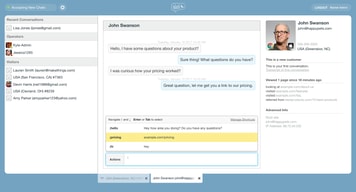
It looks a little out-dated. It could be easier to read. The chat features (info shown about person chatting) its hard to read as well.
Solving inbound emails going straight to chat. Instead of support getting the emails the sales team gets them all directly. It allows us to set meeting much faster and get them to the buying stage faster.

- Simple chat Setup - Teams feature - Business hours
- Lack of advanced features - Fewer integrations
Olark helped us setup chat on our website & customers were chat agents were able to assist customers that reached out via chat
I like the ability to transfer chats, see analytics on the team and chat into their support team.
Olark does not easily integrate its analytics into Salesforce.
Customer Support, live chat on our website to help customers with their issues in our software.
The design is simple and easy to use, nice integrations with other products and services (like CloudApp and Slack), and easy customization. Great for most businesses and a way to test how effective a live chat feature could benefit your company website. Includes nice reports on how well your conversations with customers went and highlights areas of needed improvement. Olark customer support is great and super responsive.
Lack of customization options and minimal changes can be made by a developers standpoint. "One size fits all" function does not work for every business. We have run into some bug issues with responsiveness and overall function, but hasn't completely disabled use. It would be nice to have a better "team" experience where Olark users can join the same chat and take over the discussion if needed. Transferring the chat doesn't work as well.
A quicker and easier way for online customers to get questions answered and to voice concerns. Olark chat has easily boosted sales. We have recently launched a new website and had it not been for this live chat feature, we would not have been able to identify sales-impacting bugs in our site.
- Olark is great for chatting prospects via instant messaging. - It is easy to log a chat into the CRM I use with a simple command. - Transcripts from previous conversations are accessible within the platform.
- If a chat ends before using the command to log it into my CRM, you are unable to push the transcript into your notes easily. In order to log it at that point, you would have to copy and paste it into the CRM which just does not make any sense to me. - Olark's automatic log out feature is not very convenient. It logs you out after 5 mins of inactivity.
- Olark allows me to communicate with customers easily and quickly.