Unclaimed: Are you working at QuickBooks Desktop Pro?
QuickBooks Desktop Pro Reviews: 4.3/5 — Solid Choice
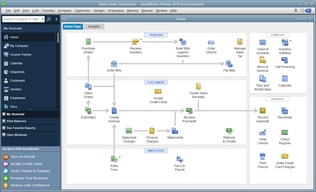
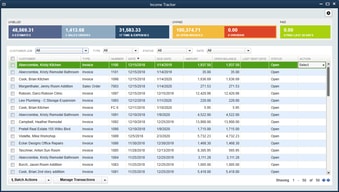
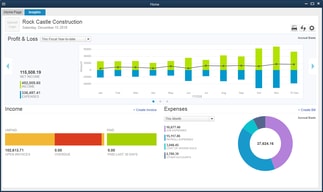
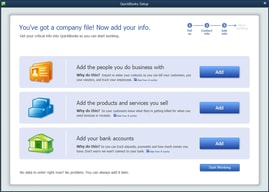
QuickBooks Desktop Pro is a platform that lets users automate key processes in the accounting system, including billing and invoicing. With Desktop Pro, users have the option to link bank accounts, define workflows, and make automated payments for efficiency. This solution also lets users manage employee payrolls via a single application. Other key features include business expense tracking, report generation, and time tracking.
| Company | Intuit Inc. |
|---|---|
| Year founded | 1983 |
| Company size | 10,001+ employees |
| Headquarters | Mountain View, California, United States |
| Social Media |

| Capabilities |
API
|
|---|---|
| Segment |
Small Business
Mid Market
Enterprise
|
| Deployment | Cloud / SaaS / Web-Based, Desktop Windows, On-Premise Windows |
| Support | 24/7 (Live rep), Chat, Email/Help Desk, FAQs/Forum, Knowledge Base, Phone Support |
| Training | Documentation |
| Languages | English |







Compare QuickBooks Desktop Pro with other popular tools in the same category.
It easy to use Quickbooks and we are able to enter all the necessary information to run our business. We can run reports, enter payroll, process invoices, and pay bills easily.
Quickbooks has not caused any problems for us.
We use Quickbooks for invoicing, paying bills, payroll, and reporting. The process is quick, easy, and detailed. Because all of this is in one easy software, it saves time and keeps everything well-recorded.
Quickbooks is streamlined and easy to use. It is easy to learn while at the same time keeps detailed records for future reference.
We have no complaints with how Quickbooks is set up and runs.
We use Quickbooks for all our accounts payable, accounts receivable, payroll, and reporting. This allows all our records to be in one organized, detailed place, which is very helpful for running our business.
I love that everything is linked together and very organized, easy way to complete your tasks.
So far there is nothing I dislike about QuickBooks.
Since using QuickBooks desktop Pro I've learned so much with adding customer information vendor information getting my billing done sending invoices as well as gathering information for purchase orders. At my new company I love that when you enter a new company you have the option to enter separate jobs which require individual information, that helps me a lot.
Quickbooks is very easy and straightforward to use, but at the same time collects all the details needed to keep thorough records for reporting.
It would be helpful if more details would print on the customer information page. Also, the windows minimize when certain account windows are opened, and that can be somewhat annoying.
We use Quickbooks for all our bookkeeping...from accounts payable, accounts receivable, payroll, reports, and everything in between. It has been incredibly helpful to have so many details available when printing reports for year end.
Quickbooks is simple, easy, and straightforward. It gives us a thorough way to keep track of all our bookkeeping.
Some windows minimize when customer account windows are opened, which is frustrating.
We use Quickbooks for accounts receivable and payable, payroll, reporting, accounting, and all our bookkeeping. It is easy to use but also very detailed which is helpful for end of year reports.

How easy it is to do payroll and it helps you do your payroll taxes
The yearly subscription price is 4200+ which is a bit expensive every year. We used to just by QB Pro and download it and it would last us for 3-5 years now that we purchased Enterprise it is a yearly subscription price which is quite a bit. But we have to have QBs because we love it and it handles everything. So we can live with the price. However, the Help Desk is not in USA and that is really difficult when trying to get support. It has been an issue in the past.
The progressive billing for us is much easier. Payroll takes half the time it use to and time sheets are much easier now that we are linked with TSheets.
I like how easy it is get send links out.
I hate it hard for me to find past things for the current month
It makes getting payments easier
The integration of financial statements so the same information is not manually entered each time.
A little outdated in design and sometimes difficult for a first time user to see all that a simple transaction can effect.
Easy to upload information and get real time updates of where finances stand.

I love QuickBooks because of the easiest and smooth application for the accounting sector, we can easily make invoices like (Tax Invoice, Performa Invoice, and Delivery challan, etc.) a great thing in this software that we can email the invoices to the debtor at the time of invoice generation, it is an online software, so that we can access anywhere our data, also we can reconcile our bank easily. Upload directly GST data to the GST portal like GSTR-3B, GSTR-1 easily.
I think there is nothing for dislike, just only a few things are there like it is an online application, we can't access our data when we are offline, also time taking software if there is low internet connection then it take lots of time to sync the data.
In this application, we generated invoices from anywhere with the help of our smartphone and share them with the concerned team, also helpful for payment follow-up, Reminder of its much helpful for growing our business, also we had to reconcile ledger and bank statement easily from its.
Quickbooks has help me organize my transactions and miles for filing my taxes for my photography business. I have a mix of contract incoming and personal income and I am able to keep everything where I need it. Being able to forward email receipts to QB and have them automatically into the system is amazing!
The only downside is that there is not the option to categorize some items that wouldn't be on a schedule c but are necessary to determine my estimated tax payments each quarter.
All of my transactions are categorized into personal or business and then sub categorized further. It's also more convenient to keep track of miles. Everything is online and ready to copy over come tax time. It also encourages me to stay on top of my expenses and receipts.
I love the ease of using the software and making calculations quick and simple.
I don't love the sharing aspect. I have found a lot of issues with this.
I have used this in completing audits and settling accounts, which can simplify the same accounts and make it easier for the office staff and patients/clients to review and understand.
QuickBooks has simplified a complex system from which we can invoice, record, report, and run our business. It is easy to upgrade, integrates well with outside programs, and provides detailed reports.
It would be helpful to print more information from the customer information summary. It would also be nice if the windows didn't minimize when I edit customer notes and name records.
We use QuickBooks for all our paperwork records and it keeps a detailed account of our many customers. We are able to run all the reports we need from the last year, which helps us run our business more effectively. We also use it for payroll, invoicing, paying bills, part numbers, and all manner of paperwork.
It is very user friendly. I hardly have any issues.
Sometimes my files don’t save right, but I’m not sure if it’s the scanner or the program
We scan in our signed invoices which makes it easier to find out who has received their orders and confirmed.
Quickbooks Desktop Pro provides a smooth, easy platform to record, process, and enter information for our business. It is easy to navigate, understand, and find information.
It would be helpful to print more information on "Customer & Job Information" and it would be helpful if the windows didn't minimize when I open/edit contact names in the customer fields.
We are able to run reports easily with Quickbooks and use that feature often. Because we can filter so many different items and export it to Excel, I have not come across any report Quickbooks can't handle.
The efficient way of tracking business expenses, cash movements and creating sales invoices. Additionally, account statements can be generated easily and timely.
A simple posting error can lead to generation of misleading accounting statements for action and cause unnecessary panic.
QuickBooks offers solutions to all manner of challenges in business accounting. It helps in keeping track of business expenses, cash movements, creditors and simplifies generation of accounts statements in time.
Easy to use. Love that you can easily integrate using American Express
Manual coding can be annoying and sometimes syncing isn’t perfect
Keeping expenses organized
The format is easy to learn and teach to others.
The yearly reaccuring fees now are a bit high.
Managing my employees time and AP's
I like that Quickbooks is easy to use, understand, and follow. Entering you info is the hardest part and that's only as difficult as you make it.
I would like to be able to create my own reports easier.
As a small business and doing our own accounting there couldn't be anything easier.
It is super simple to us. Without working with a financial program before, it is easy to figure out and very simple for anyone to use. It is a straightforward and easy way to keep your financials in line.
Honestly there isn't really anything at all that I dislike. I guess if I had to say something it would be the price, but really I would say nothing.
We use Quickbooks for all of our accounting needs. The reports are easy to generate and it allows us to compare previous years.
Immediate learning, immediate installation and start working immediately with flexible setup and adding apps.
NO batch processing for multiusers, to ensure data integerity
none
I love that QuickBooks Desktop pro is a one stop website for all of my business needs. I switched from ADP Payroll services to QuickBooks for my payroll, accounting, profit and loss, tax etc.
The cost. its very expensive after the free trial.
Everything is all in one place. And I dont have to leave the office at all for my payroll checks.
Quickbooks helps save time with our bank needs. From writing checks to entering deposits.
Nothing to dislike. Quickbooks is perfect for us.
Time saved, less issues with payroll and writing checks is a breeze
Quickbooks gets the information we need immediately with creativity when you produce special reports made the way we need to view. We can project and make job costing more effective and with the importance of making constant changes, the audit trail helps improve our day to day operations. Overall, QB has the best accounting program for small businesses where everyone can take part in reviewing informaton. It works well for the needs of our company.
Sometimes it takes longer when printing or calculating costs. When the QB program runs slower we cannot get the information fast enough when talking to clients on the phone. But other than that infrequency, no other complaints about QB doing its job.
We are able to do cost accounting effectively and with the detail it will allow us to recreate many items that have posted to wrong accounts. Also, we can create new reports that have the best of both worlds, giving total and combined totals when exporting to Excel reports. With Excel you can change dollar amounts and accounts without having impact on the actual posting in QB for review purposes.
The transferring of data from different platforms
Depending on computer refresh can be cumbersome
Time the biggest. Like I said the transfer between different platform is a plus
My daily job is doing in Accounting job such as bookkeeping, checking report and producing the report. Quickbook offers a full function for our current situation with our business operation. I like the feature of it such as Sale and Account Receivable, Purchase & AP, Bank and Cash Account, Inventory, Financial Reports..Etc. it is easy to understand and work on it follow by accounting principle.
Within Quickbook features and tools, I already satisfy with it. Only there some limited such as multi-language and standard form needs to be improved. But it is the most powerful tool for business controlling already
We use Excel for record and product some report by manually. But it takes more time to complete and some error need to be fixed. After we are using Quickbooks, it helps us to save time and cut off some expenses which we can easily track on a real-time basis. It gave us a fast report and tracking all income and revenue accuracy. We can get any report for our related departments within few minutes. Now We fix the most common problem we have faced before.
Ease of input and the ability to add your own accounts.
I have issues loosing all data / crash. I learned to carry a backup drive stick and faithfully update on the alternate drive to save my work in the event of another crash.
With a few selections I am able to pull reports with ease. Extremely helpful when I need to gather data in a flash. The most recent benefit was pulling reports for the tax accountant. She was ecstatic that everything was right there. No rummaging through receipts or invoices.
QuickBooks has such huge numbers of approaches to customize your pay and costs, and afterward you can run reports for everything possible! For whatever length of time that you've entered the information, QuickBooks will effectively connect the numbers and present you with a quality report that you can print or email. It just takes a couple of brief minutes. Quickbooks tech help is exceptional! They likewise shown me how to utilize accommodating highlights that I didn't know were accessible. It makes our capacity to work together increasingly proficient in all zones.
I have not so much had any significant issues with QuickBooks. The main thing that I can consider is that it always requests that you back up your data, which can be irritating, however I would prefer to back up the information than have everything get lost.
We use QuickBooks to monitor every single monetary datum and data for our not-for-profit. Snappy books enables the business to abstain from getting into budgetary inconveniences. Utilizing brisk books I am ready to accommodate accounts month to month, set up an announcement of income, asset report and a benefit and misfortune articulation, so am ready to make important modifications and make obligation asserts in time before the business gets broke. Quickbooks is significant for me as I have to remain in control consistently. The capacity to see things continuous enables me to deal with our accounts much better and particularly in our income the board. Without it, I'd do everything by hand and couldn't play out my obligations as viably.
I always had an issue keeping my receipts/invoices organized and separating them as much as I possibly good in order, by date. Thankfully I have quickbooks that is already a set up organization system specifically for your business. It works for you and not against your needs to keeping your important expenses in order. When my company has an annual audit I have everything I need to get the numbers and proof close together.
I am so happy for qb i could not find anything to dislike
Getting my finances, expenses, and proof all in one system. Making Audits and Tax Season a breeze and worry free. I never have to hope i am missing bills or receipts, proof of payments. The moment I funds are deducted or received, easily I can quickly input numbers on my desktop or even mobile!
I love how easy Quickbooks is to customize and integrate with other softwares. As the defacto accounting software pretty much all apps integrate with it which makes the workflow so much easier. The other thing I love about QB is that transactions can be changed after reconciliation (all while keeping an audit log) So if someone miscategorizes something it can be edited later, unlike other softwares I have used where once you have reconciled no edits can be made (not even to memo or chart of accounts. =)
I don't like that if you have multiple companies you can only pull selected reports across all of them. I wish there was more integrations between companies, such as vendor information and chart of accounts. (You can sometimes work around this by Classing transactions for different companies, but certain transactions such as A/R and transfers cannot be effectively classed) As basically the standard in Accounting I wish that when you were sent an invoice in QB from QB that you could automatically upload the information into the receiving company's file. (obviously then changing the chart of accounts) it would save so much time!
I am keeping a variety of types of businesses' books on Quickbooks (real estate brokerage, retail ice cream and property management company)
it is easy to learn, easy to use and enter data, and easy to teach incoming employees. All of our employees have access but certain people can access different things based on their title and role. reporting is super clean and simple
honestly not really many downsides! We have a personal downside which is just needing to connect it to our salesforce so we dont have to do manual entry on both of them.
we do all of our financial tracking and reporting.