

Unclaimed: Are you working at Trello?
Trello Reviews: 4.4/5 — Solid Choice
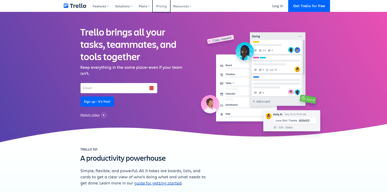
As one of the pioneering Kanban web-based project management platforms, more than 2 million teams are now using Trello worldwide since its launch in 2011. Trello is best known for its simple visual interface, with cards that can be moved across different columns. Each card holds all the information teams and assignees need to deliver on projects and execute tasks efficiently. Over the years, Trello has introduced robust improvements to its systems, which include a proprietary built-in and no-code automation feature called Butler. There are also add-ons called Power-Ups that allow teams to link your most-used productivity and business tools with Trello plugins.

| Capabilities |
API
|
|---|---|
| Segment |
Small Business
Mid Market
Enterprise
|
| Deployment | Cloud / SaaS / Web-Based, Mobile Android, Mobile iPad, Mobile iPhone |
| Support | 24/7 (Live rep), Chat, Email/Help Desk, FAQs/Forum, Knowledge Base, Phone Support |
| Training | Documentation |
| Languages | English |
Trello Pros and Cons
- Timelines and productivity metrics in one place
- Convenient Kanban-based boards for ease of use
- No-code automation features
- Lots of integrations with leading tools
- Convenient pricing packages for all companies
- No inventory and budget tracking
- No invoicing features
- Not suitable for more complex task planning that involves multiple segments and moving parts
- No Gantt chart feature
- May be too basic for complex task tracking for enterprise teams







Compare Trello with other popular tools in the same category.
I like that Trello is so easy to use. It has a straightforward interface and takes very little time to get used to using. There's even an app version!
Some features require add-ons like time-tracking.
It's a fun way to keep myself organised and on top of day-to-day tasks.
What I like most about this software is that it is very easy to handle for any user, it is really easy to organize anything, whether it is for the company or on a personal level, I love that it is free, it is very helpful, it is also very intuitive, it is very easy to create cards, you can create tasks and subtasks, I also like that it is easy to move the tasks, it has the option of drag and drops, it allows me to assign people to the task, it has a due date for the task and project, and it has a very reliable notification system, it is highly customizable and very useful to track and monitor the progress and status of a task.
I have no negative comments about this software, I had no problems at any time.
It is very visual and practical, it improves communication within the work team, I like tools such as color labels, I can also attach files to cards, the datelines and reminders are really optimal systems, it is perfect for daily planning, even on a personal level but it's also very good at collaborating with others, I love that it's very intuitive and it's free, learning it is very easy, it has a fast learning curve, I love the to-dos and checklist option, the simplicity of the interface is really nice for the user.
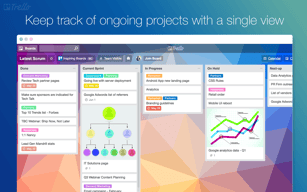
Managing the project of the entire team is wonderful. We can see the control of the work of the team from a single point of view.
Confidential views are one that we need to look into. But however, the view is in part of the team which we create the group of people who can access the project management.
To do, Doing, Done are three easy of understanding stuff of the tool. It makes it simple and easy to replicate to the team members on the same.

Able to work with my team members on multiple lists plus it integrates with Slack.
Having to access through the Atlassian portal.
We are solving our lists (project, tasks, programming bugs, etc...) management and collaboration. Using Trello allows us to ALL stay in sync.
Time management and tracking are the best part of Trello, task management is also good, highly recommended.
The pricing structure is not feasible to compare to Asana and other similar tools.
Task management, Project Management, Time tracking, Assignment.
Trello is a simple to use cloud-based software that helps keep me organized on all my projects and tasks
I can't say that I dislike anything about Trello.
Trello helps me stay organized, track progress of projects, keep my notes in one easy to find place.
The functionality and integration capabilities.
N/a - have been using for the past several months, and haven't found anything I do not like.
Organization, automation of creating cards for tasks, keeping teams members up-to-date.

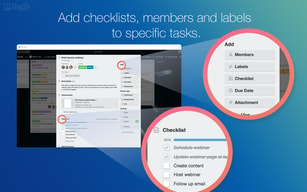
I love being able to add team members, create templates, move cards around, and add due dates, tag collaborators, and include links and files. Trello helps me keep so many things organized!
Sometimes you can pack too much information into a card and it can become overwhelming. I also don't always think the on site notifications are the best, in terms of easily navigating to updates/changes.
I find myself better organized on both a personal and professional level. Trello helps me handle project management so I can get things OUT of my brain and organized!

I like the task management list via the board. This board system is too unique and more understandable for every person.
I didn't like anything because it already provides all the functionality that i need.
- Task management systems. - Commenting options and also provide the notification option which tagged.
Visual nature of platform. and the background pictures!
Some parts of the setup are not intuitive
Able to stay on top of my business. see where I stand with each client and not make mistakes.
Task board and how you can create sticky notes and move them along to various columns. I love that you can work with a team as well!
It didnt have enough features for what we needed and didn't want to use multiple programs
were not using Trello anymore.

SUPER easy to understand interface, all within a really friendly design. As someone working on a creative team, it is great for distributing projects that have yet to be claimed. I love the drag and drop feature!
Sometimes, it can be a bit confusing to understand if a project has been taken already. I'm not sure how well this platform would work for a huge team with many ongoing projects...
Trello is helping my design team pick projects to work on that have been unclaimed. It is good for organizing what information we already have, and visualizing all that still needs to be done.
What I like the most is that it is very visual, I like that it is easy to start using it, the tools are excellent for my team to organize tasks, I love the card system, also that I can add as many cards as I need, it has an easy configuration, it allows me to have a panoramic view of all the work, I can see the status of the tasks, when they are due or who should do it, it has an excellent capacity in its search filters and I like that I can add and delete members in a simple way, easy to upload files, love the stickers and checklists.
I would like the notification system to improve, in general, it is excellent software.
I love it because it offers us work tools in real-time, working simultaneously with an optimal level of communication is ideal for us, it is perfect for carrying out projects day by day, it is easy to create lists, create boards, the labeling function and the best thing is that everything is easy to customize, it integrates with Dropbox and Google Drive, the lists, cards and boards are really intuitive, also very organized and flexible, I love the visual level of the software and the speed to get the job done.

This is very much easy to use. Helps manage the team so easily.
This product is complete. I like it. No missing option for the company that I am working with.
No problem so far but because of the many features of the tool. Sometimes it would be hard for the first-timer to navigate.

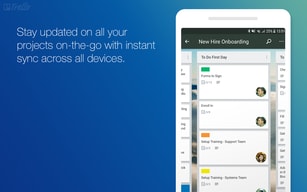
It is cross platform to all the major platforms like Android, ios,windows, macos, web etc. Your activities sync very fast to all the platforms. You can customize your activities as you like with different colors and photos. You can feel the activities going from one stage to other by drag and drop.
There are nothing to dislike per se. I would say the mobile version (Android and ios) could have been a bit better as they have long screen unlike the bigger screens. Dragging and dropping from one category to another which I don't enjoy when I use the mobile version.
I am able to keep track of many aspects of my life such as my work, my hobbies, workouts etc very easily. I am able to get things done easily which I was not able to do before.
I like that I am able to seamlessly switch views from Kanban boards to calendar views and that I am able to add so many different options within each card helps me use the app for much more than just work organization.
It would be nice to be able to have the option to look at the service with list view as some projects are easier to get a quick glance at the checklist as opposed to clicking boards open each time.
I am able to use trello to visualize different phases of projects I am working on but the best part is that I can use other boards to also manage my home life and tasks to be completed al in one space.

Me gustó de usar trello la facilidad de crear un kanban. Es super adaptable, no importa que metodología de trabajo usas, puedes adaptar trello a tu necesidad. Es un éxito. Lo recomiendo 100%
Todo lo que he podido usar de trello me ha gustado hasta el momento.
Pudo resolver con trello la administración de 3 proyectos de software sin mayores inconveniente. Pudiendo configurar cada tablero para la necesidad específica de cada proyecto.

Its interface is very good. it is quite dynamic to follow up on the pending tasks of your work. It allows you to have control of each phase of your project, having a coherent sequence of what you do. I like it a lot
There is little I could say against this tool. the truth is I am very satisfied with the objectives for which it was created I have no complaints about its performance.
I can brainstorm ideas to use in my business, or with my clients. I can set goals in writing and follow up. I can create workspaces for my team, thus giving them autonomy to fulfill their functions and at the same time monitor the assigned functions and tasks. I can have organizational control I give my work team the opportunity to contribute ideas, in the work processes

This management tool has helped our workspace go through multiple work simultaneously without any communication loss.
Some of the features are limited and require paid plan to activate.
- Faster communication - Ensures that no work gets left behind - Smoother and accurate communication and time management - Increased productivity by 210%

The interactive and custom UI of the board is the best thing I like about Trello. It is effortless to use and quick to understand. Its wide range of board options can help us with task assignments, timelines, productivity metrics, calendars, and many more features to handle the project effectively.
I am in complete love with this tool from the user perspective. The feature makes it stand out from the rest of its competitors. However, the tool's pricing seems a bit high as some freebies are available in the market.
I have used Trello for my team and assignment management. It was straightforward to allocate tasks to different team members and keep track of it. The ability of the tool to get seamlessly integrate this with an instant messaging tool made the communication even way simpler.
I love the canban view for task and status
I am little bit disappointed with its user interface
I solved my problem of managing multiple tasks at a same time.
I love how aesthetically pleasing Trello is (or can be) compared to other options. The beautiful images and simple UI help keep me organized and inspired. I also love the automation options and use those significantly.
Reporting could be better -- it is pretty rudimentary at the moment. Would love to be able to export more easily to share with non-Trello users.
Trello allows me to manage several large ongoing projects at once with many different moving components, contributors, and stakeholders. The paid version has also allowed me to work more effectively with my team, as the additional features provide more granular capabilities we need to delegate.
The more informative workflow details are beneficial in understanding and assigning tasks between colleges, it makes following more efficient
It needs a more update regarding push notification; for example, if anyone marks a task as done, the rest people should get a push notification regarding the completion of the task
Distributing tasks between colleagues, assigning tasks between them. Create TO DO list for all collegues.
I used Trello for a long and it is very easy to use. It helps me with task creation, task assignment, set priorities, Trackwork, and many more.
Something it does not work like real-time and the cost is a bit higher compared to other similar tools.
Project management, task assignment, task tracking, work updates, and many more issues solved with asana.
Trello's interface is undoubtedly one of its strong points. Thanks to its simple interface and easy handling, it can be used to carry out projects or tasks, both professional and personal, in an organized, simple, agile, flexible, and powerful way. In project management, with Trello, we can share the board with the rest of the team and know the different status of the tasks, who is working on them, if they are completed or missing. The truth is that with Trello, you can organize almost anything, not only because it is a very complete and powerful tool, but also because it is easy to use and takes advantage of one of the most intuitive and effective methods of organization and productivity: kanban. It is also customizable. I love it.
The free plan is a bit limited compared to the premium plan, but it's understandable, they give you a taste of Trello, and you decide whether or not to pay for it. Although I must add that it is productive to use only the free option, if you want something more it is also easy to pay for it, the price is quite affordable.
Trello has helped me a lot to manage my personal and professional life, at home we use it to organize our daily tasks, trips, shopping and so on and at work, our team is well organized, this way we don't forget any project and we keep up to date.

- Easy way to collaborate with team members - Easy way to create multiple boards and organize them in the best way - We can assign the priorities of the tasks and mention the due date - Integrations with other systems
- There is no such point that I dislike about this tool; I have been using Trello for two years.
- Tasks management for team and priority
Trello helps me and my team a lot when we are brainstorming or when we suddenly think about a new idea and we need a place to put this idea in. All member can access this.
The background of Trello is what I hate about it. I can not change the background to the picture I like. One other thing is that I do not know how to delete a table.
Trello helps me a lot, especially when I and my team need to brainstorm or think about new ideas for your project. We all work online and it is really hard if we do not have a general app.

Project Management has always been a challenging area while delivering projects. Through the Trello project, activities can be tracked very easily. Cost implications and budgeting can be done fast with clarity.
Trello integration with other systems is sometimes challenging.
Complete project management activities can be done through Trello and utilized in day-to-day project activities.
Its functionality and navigation system. It's really user-friendly and easy to use. the different way stages of the project management system are really awesome. Especially the function of uploading pictures and raising tickets.
some times it's messed up with the comment system. I always get confused with the new comment. I don't see the new comment on top until I click on the comment section.
Coordination is helpful through Trello. It's really helpful to use the pics and comments to communicate. In that way, we are managing the task in a fun way. It has increased our productivity.
It is a very easy-to-use tool that has all the necessary functions.
No downsides. Really. I wanted a simple tool that works, and I got it.
I'm a technical writer. My primary goal is writing and updating knowledge base articles. I get new tasks from JIRA. Once a developer implements a feature, JIRA generates a task to document it. In addition to that, I have a Trello card for each knowledge base article. Once I get a JIRA task, I link it to the cards of affected articles. This is a very easy way to track which articles need updates.