

Unclaimed: Are are working at Trello ?
Trello Reviews & Product Details
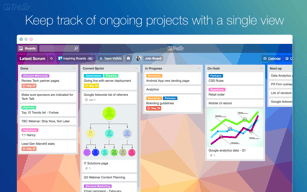
As one of the pioneering Kanban web-based project management platforms, more than 2 million teams are now using Trello worldwide since its launch in 2011. Trello is best known for its simple visual interface, with cards that can be moved across different columns. Each card holds all the information teams and assignees need to deliver on projects and execute tasks efficiently. Over the years, Trello has introduced robust improvements to its systems, which include a proprietary built-in and no-code automation feature called Butler. There are also add-ons called Power-Ups that allow teams to link your most-used productivity and business tools with Trello plugins.

| Capabilities |
API
|
|---|---|
| Segment |
Small Business
Mid Market
Enterprise
|
| Deployment | Cloud / SaaS / Web-Based, Mobile Android, Mobile iPad, Mobile iPhone |
| Support | 24/7 (Live rep), Chat, Email/Help Desk, FAQs/Forum, Knowledge Base, Phone Support |
| Training | Documentation |
| Languages | English |
Trello Pros and Cons
- Timelines and productivity metrics in one place
- Convenient Kanban-based boards for ease of use
- No-code automation features
- Lots of integrations with leading tools
- Convenient pricing packages for all companies
- No inventory and budget tracking
- No invoicing features
- Not suitable for more complex task planning that involves multiple segments and moving parts
- No Gantt chart feature
- May be too basic for complex task tracking for enterprise teams







Compare Trello with other popular tools in the same category.

About Trello I like the fact that is for everyone and you don't need previous experience with other task management apps in order to use it. Trello is suitable for professionals, students and for personal issues.
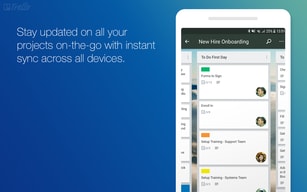
Sometimes is very limited because Trello only has the kanban view. The list view is for premium business users. The calendar view is only for each space so you can't have the total view for all your projects.
Trello gives me the opportunity to use a free software and start my projects in just a few moments because is very easy to use and install in all devices. I can connect Trello to my Google calendar and this is a must!
The best thing about Trello is you can complete team tasks or client projects with a team quickly. Everyone can do their job and show the progress in one card, and all team members are updated.
It's just that sometimes the notifications are missed may be Trello can add a notification ring or something significant that can shop the announcements when working because when doing the task, the background notifications gets missed sometimes
Before Trello, we were using slack messenger, which was not too good as there were channels, not cards. But with Trello cards, it became easier to share files in one place.
This application is essential for administrative management, allowing me to efficiently organize and monitor tasks and projects. What I like the most is its visual approach based on boards, lists and cards, which makes it easy to create a clear and structured system to follow the workflow. With Trello, I can create boards for different administrative areas, lists for the stages of each process, and cards for specific tasks. This gives me a complete and orderly view of the activities, allowing me to assign responsibilities and set deadlines to maintain rigorous monitoring.
I got very few negative details, although one of them is the lack of predefined templates for common workflows in administration can require more time and effort in the initial setup.
This application has helped me a lot because before I found it difficult to organize and follow up on tasks and projects in the department. With Trello, I have managed to establish a clear and transparent system to assign and monitor the responsibilities of my team. Additionally, the ability to add comments, attach files, and have conversations on each card has improved communication and collaboration among team members. This has streamlined administrative processes, optimizing productivity and ensuring timely delivery of results.
I love that Trello allows you to make and view your items in so many different ways. I have found the timeline and the columns to be most valuable to me, but there is even a map, or you can make a dashboard-type arrangement, too. Overall, it's a wonderful way to share to-do items with a virtual assistant (how I use it most) and to organize my thoughts and plans to make sure I'm meeting my goals.
There is nothing I dislike about Trello!
The immediate problem was communicating in a consistent and permanent forum with a VA. Emails are great for assigning tasks, but sharing a vision board like this is much better to make sure things get done and there's no confusion. I love that you can write notes to go with each item, too.
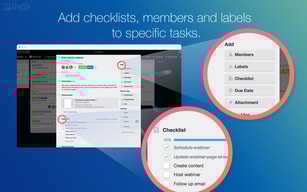
I absolutely love how you can create cards for each project that also allows you to create checklists, add pictures, links, etc, as well as organize stepped processes to keep any and all your business projects in order. It is so helpful to know where you are in the process as well as see everything related to your work and communication with a client.
I honestly cannot think of anything I dislike about Trello. I've used it since I was in graduate school, and I can't think of another platform that is better. I haven't come across one yet anyway.
Keeping clients organized so nobody is forgotten. It also helps with work management and getting tasks completed for efficiency and productivity.
I appreciate the user-friendly interface. It is easy for even the least tech-savvy users, which makes it an excellent option for teams with all kinds of people.
I do not love that you can't have unlimited cards. I also think there should be an easier way to leave comments directly on text like a word doc. I also wish it would accept larger files.
Trello solves the issue of figuring out what status our projects are in. As a team it helps us see who is working on what and track what we need to be doing ourselves. I also use it as a social media editorial calendar and backlog.
I love the drag-and-drop and color-coding features while using a board. It helps me keep everything organized but change things around quickly if needed. It keeps me on task!
I honestly don't have any complaints. Perhaps some more customization options would be nice, but then I might end up spending more time perfecting my boards than actually getting any work done!
Trello gives me an excellent way to keep tasks organized and get a bird's eye view of how things are going and what needs to be accomplished. This allows me to use my time more efficiently.
I love the ability to visually organize my tasks in a manner that supports my workflow and plan out my day. I don't use the collaboration features, but I can tell how easy it would be.
I wish there was a done button instead of just an Archive button. With a Done button, with the tracking tools, it would help me complete my timecards. There seem to be good alternatives already too.
Organizing my tasks list and day
Trello is a very powerful tool for project management. It allows clear follow-ups and easy adoption by the team. The drag-and-drop feature makes it easy to use.
The cost per user like many platforms is a bit difficult to manage. It would be nice to be able to customize the white label display of the platform. Trello keep big part of the market for sure
Information sharing, project follow-up and communication. It is very useful to know where we are and to allow clear exchanges with the customers and the different teams.
Ease of use and their use of "cards" for outlining projects in progress and those upcoming makes it very visually appealing.
Overall there's nothing I dislike about Trello, but I feel that some companies don't trust it as much as other project systems because of its free usage.
I'm able to lay out my projects in a fashion that allows me to not only look at what's on my plate currently and what lies ahead, but also share easily with co-workers.


