

Unclaimed: Are you working at Trello?
Trello Reviews: 4.4/5 — Solid Choice
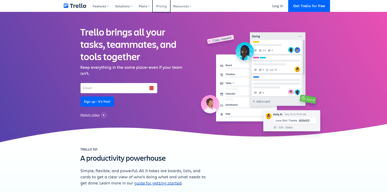
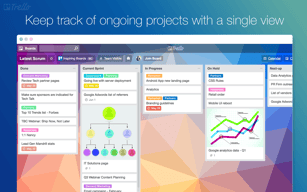
As one of the pioneering Kanban web-based project management platforms, more than 2 million teams are now using Trello worldwide since its launch in 2011. Trello is best known for its simple visual interface, with cards that can be moved across different columns. Each card holds all the information teams and assignees need to deliver on projects and execute tasks efficiently. Over the years, Trello has introduced robust improvements to its systems, which include a proprietary built-in and no-code automation feature called Butler. There are also add-ons called Power-Ups that allow teams to link your most-used productivity and business tools with Trello plugins.

| Capabilities |
API
|
|---|---|
| Segment |
Small Business
Mid Market
Enterprise
|
| Deployment | Cloud / SaaS / Web-Based, Mobile Android, Mobile iPad, Mobile iPhone |
| Support | 24/7 (Live rep), Chat, Email/Help Desk, FAQs/Forum, Knowledge Base, Phone Support |
| Training | Documentation |
| Languages | English |
Trello Pros and Cons
- Timelines and productivity metrics in one place
- Convenient Kanban-based boards for ease of use
- No-code automation features
- Lots of integrations with leading tools
- Convenient pricing packages for all companies
- No inventory and budget tracking
- No invoicing features
- Not suitable for more complex task planning that involves multiple segments and moving parts
- No Gantt chart feature
- May be too basic for complex task tracking for enterprise teams







Compare Trello with other popular tools in the same category.

I use Trello as a project management tool as well as a visual calendar to be able to show my clients their work. It's easy to use, very user friendly, and you don't need to use the paid version (although it gives you some perks).
There really isn't anything I dislike about Trello, save maybe for the fact it's not super pretty to look at. Overall, it's a great tool!
I am able to communicate where I am at on a particular project by sharing just that particular board with a client. This helps eliminate a lot of status update emails.
My company uses Asana and I am trying hard to get them to switch to Trello. It's simple, effective and gets the job done!
No dislikes. Everyone team should try Trello!
I love how my team and create "boards" with different "cards" that we can easily move around. For example, if one card is under assigned, it can easily be moved to processing and then completed when the task is finished while notifying everyone subscribed.
It's very easy to use and intuitive. I like that I can put different cards in different columns. Trello makes it easy to move the cards around, you can also add different labels suitable for your project.
I can't add story points to my card or use the burned down chart if I'm a free user
Our team can keep track of each other work easily. We can add videos or gif to illustrate what we worked on which makes it easier for other teammates to know our progress

It's super easy to use and collaborate with. The labels, extras, and lists are excellent.
You have to horizontal scroll through lists if you have too many in one board.
Project management and delegation of tasks. It helps me and my team stay organized.

I love how you can create different lists and sort them however you like. It really makes organizing simple. Along with the app. It works really well.
I would say I am pretty comfortable with the features other than having to pay for certain things that I feel should be free.
It has allowed me to keep track of my next move for my business/company.
I'm a list person. I like to thoughtfully make a list and then I LOVE scratching things off my list. I feel productive, efficient and most importantly, like I have less of a chance of missing something on those really busy days.
I wish that when I gave a card a deadline on a list, that the list would sort my cards by due date on the board view. I have to do that manually or go to home to see what is about to expire. I also like to archive and not delete. I was archiving cards on a list and had a lot to archive so I chose to archive the list hoping that it was like moving all cards on this list to another list, but in this case move all cards on this list to archive. It wasn't and I haven't figured out how to UNDO. It archived all cards AND the list, so I had to create a new list with that title.
I am more organized using Trello. I've tried a few other strategies and I like Trello better. I like that I can log in with my desktop, but go mobile with my phone as I spend a lot of time away from my desk. I had a tendency to lose my post-its or lists. And, there is nothing to lose with this.
I use Trello for grant tracking with my grant writing consultant. It is super easy to use and helps keep us organized so that we can apply for more grants and also keep in touch with the donors once we are awarded.
There is a LOT you can do with it and I definitely don't have all of the training yet to maximize the use of the platform. Sometimes they send a lot of emails with suggestions that aren't pertinent to my use of it.
I am actively working with a grant writer who is off site and who can keep me up to date in real time
I love using Trello. We operate a scrum work environment and Trello keeps my projects organised.
There is nothing I don’t like about Trello.
I love being organised but it’s difficult at times, but not anymore thanks to Trello.
You can get started right away and the changes you do are reflected without any refresh for the other person watching your board.
It would be helpful if there was an issue tracking number and if the issues could be categorized into a single story.
We are using it for simple project management. For large scale projects, we are using JIRA, while we chose Trello for the small ones. It's easier to manage and quicker to get started with than JIRA. Additionally, it's free, so why not?
I really like the “flow” of Trello boards. Paints a journey from point A to Z and offers full transparency on your workflow progress to those you share the board with.
Notifications each time I create a ticket, and then subsequent notifications for the assigned on the ticket and due date. Notification overkill.
Duplicate tickets get entered (our task list is long). I wish there was a smart tool that recognizes similar ticket titles and offers to merge them. The due date alarm is a HUGE benefit
The easy intuitive way of use, the unlimited attachments you can add to a task
Up to this point Trello is my favorite project management tool, I have nothing bad to say about it
I split huge tasks into smaller manageable tasks. I assign tasks to people and receive assignments by my team mates

What's most helpful about Trello is the kanban methodology that is built-in. It helps you prioritize your priorities by organizing, labeling and collaborating clearly.
Trello could use a built-in AI system similar to Butler.
We've hosted all of our corporate correspondence and managed both intra and inter-departmental projects.
Keep everything organized and help the company do better in terms of managing projects
There is nothing I dislike about using Trello so far.
Easy to navigate

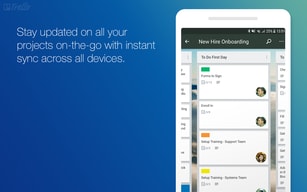
I like it a lot because it allows me to track, control and schedule all the activities, and because it has a mobile application that allows me to be connected everywhere.
When a board is created, it can not be deleted, it must be archived to stop viewing it, it is the only thing I don't like.
My experience with Trello was fantastic, and I started working with my team as a useful tool to manage projects and to monitor other team members ' activities and tasks. Usually my life is more structured.
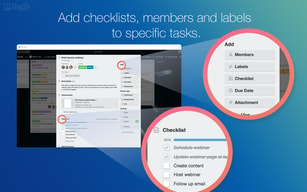
I love that you can separate and tag your contacts on Trello, and also that in every card you can add a checklist, which is very useful when talking about long projects with lots of steps
I don’t like that the cards are squared, it gets a little boring after a time
Now I can know for sure to who I assigned a certain task or duty, and I can ask for it without bothering them, because trello makes it for me
Project management tools are essential part of any industry especially for those industries working in Information Technologies and Services. There are number of project management tools floating in markets, but I like Trello for some obvious reasons like ease of use, simple UI and light weight on browser. Project and tasks creation is easy. Tasks are divided on boards according to stages. Sharing and assign of tasks to multiple users with special permissions is great. It provide quite useful feature on Free version and its paid version also suitable for small organizations.
There are some sort of lacks in tasks customization and project integration with other tools like CRMs or finance account books. One can use Trello for small scale of projects but for enterpise level of management it lacks feature like gantt charts, scrum cycles, automated reports etc. The communication between team members assigned in specific task or project is also very limited.
I am using this project management tool for my small scale project. I have created boards to cater my stages and status of tasks completion. It is easy to assign a task to a board and then to some of my junior resources. It provide all essential features in Free version which is another reasons to use it in first place. With the help of this project management tool, I can track the development cycles and time-frames of my project and tasks.

Good app for project management, the support is great, the app is very user friendly, if you do not know how to do something you can look for help and you would find a lot of information on how to add projects, tasks, checklists, notifications, etc, also in the app you would find a section for the features so we can be updated on the last modifications and improvement to the app. In general we can keep our to dos lists very well organized, adding boards for each project, and every board is divided on to dos (for the tasks you have to do), In progress (for the tasks that are in progress) and done (you can have the list of the tasks that have been done) The app counts with high level of customization, every task can be edited and you can add labels, members (assign tasks very easy), due dates and notifications, checklists, documents and have a section for the comments. We can access to the software from the web site or using the mobile app for android or iphone, very easy to use, platform works great
I do not have many things to complain about this software, but something I would like them to improve is the access to the app when you do not have data access, at least it would be great to be able to see the last updates you have done to your tasks
With trello we have experienced a new way to keep our tasks organized, thanks to the different boards we can keep an eye on the activities we have to do, the activities we are doing and the ones that have been done, and also we are able to save our boards
It’s really easy to operate. It helps you with time management immensely. It will make your life so much easier if you plan on using iy
There aren’t really a lot of things to dislike in the app. It’s really easy to use and that’s the plus point the app has
We use it to manage the tasks that are assigned in our organization
I love the UIX, very intuitive. I'm a visual person, so it's great to see those things nicely visually displayed. Trello makes it super easy to collaborate with a team on a project or be update on what other teams are working on.
Not much to dislike, sometimes it can get messy when you have too many cards, however, once you find a system for the team it works great!
Being a remote team, Trello is helping us to be updated and know what others are working on
The fact that I can organize and easily search my notes on it. I just switched from writing to trello.
The configuration and settings are not too simple.
Writing everything on paper and searching for my notes. I realized that like is so much easier with trello.
I loved the ability to collaborate with my ten members on different projects we had in the works. While I was away from the office I still felt in tune with projects with the logging of the frequent changes via the app. Nothing left ambiguous.
Free membership abilities; customization to color schemes
I’ve realized a better way to communicate with my team with my handheld PED that goes beyond the office

Easy to use, very intuitive, and the Kanban boards are a delight to use on mobile devices.
It isn't well suited to complex projects requiring detailed info to be visible. Also, you have pay to unlock analytics via power-ups.
I use it almost everyday, from personal goals and lists, to managing volunteers at TCF, to dealing with international clients.
I like the simplicity and ease of use. I also like that integrations with applications such as marker.io save me time!
I find it hard to find my colleagues to tag them. It's also easy to tag people who are not within my company and who I have not added, which can be frustrating. It would be nice to be able to create a group of people or something like that. I also find the comments hard to track. It would be nice if it was easier for the eye to follow.
Trello has made it easy to solve many different types of problems from bug tracking in development projects to workload tracking helping to determine who is responsible for what to workflow tracking to determine what phase of a project a specific deliverable is in.
Trello is all about managing your work. With Trello, you can manage your way with multiple options to view, analyze, organize and execute your projects. Dashboards in Trello are a great way to display what’s important in one central place. It makes it easy to track progress on projects and estimate workloads with my team members. These are simply the best features in my opinion.
One thing I dislike about Trello are the paid options. I’m currently working in a corporate office but with a very limited marketing budget and a small marketing team of two. It’s great to track progress, but lacks when it comes to add ons. I know we’re allowed a single add on which is nice. It would be great if the price of Trello was a bit more reasonable or at least have some paid addons. We don’t need the premium version or Trello, but it would be nice to have an extra 2-3 addons to help with everyday tasks!
We used to have an office that was completely paper wasting! Now we’ve gone paperless as many departments around the office have switched to Trello. That’s a huge tree hugging moment for us!
Trello es una herramienta buenísima para planificar los proyectos tanto en equipos como personales, cuenta con un temporizador para asignar un tiempo a cada tarea, extensión con google, notificaciones, tableros dinámicos, etc.
un modulo de sanciones para las personas que no cumplen con el trabajan asignado en el tablero de trello.
Concluí varios proyectos de desarrollo de sistemas y el mayor beneficio que me dio fue coordinar los avances del proyecto.
Firstly, the best thing about Trello is that it's interface is very easy to use. We can track the status of our Active projects that makes project management so easy. Secondly the unpaid version of Trello has so many functions that helps us to organise our daily task so easy.
There is nothing much that I dislike about Trello to be honest. The free version provides mostly all functions that helps us to do our daily scheduled task so many but one thing that I suggest to be added that the data extraction should also be given in the free version so that we can extract our data into spreadsheet format.
The task management is so easy with the help of Trello. Earlier we were using Skype chat to discuss about our ongoing projects in which there were complexity.
One of the coolest things about Trello is its Kanban style boards. You can organize your project literally any way you want. It gives you freedom to be free and adjust it accordingly to your needs. The 3rd party integration becomes very handy, specially when you have things that can post to your board.
Not being able to create multiple due dates. This can be a helpful thing for a single card project. Currently I have to spread the work over various cards.
It gives me a great overview of what needs to be done as well as all the requirements. I can also check the progress that the rest of the team is doing, that helps to keep everyone accountable.

Trello utilized the concept of boards which represent project and cards which represent tasks. It makes project management very simple. All you need to do is keep completing the cards. The best part is the zero pricing for basic service. You can assign tasks very easily. You can also archive your card records.You can easily track your progress using the progress meter
There are not many things to dislike over here. Some time the boards are unresponsive but if you cvlose and reopen the board it works smoothly
It helps us in becoming more systematized and organized. We do not need to struggle to find out the next task. It increases project management and time management and prevents us from overshooting the time limits.
Trello has an easy interface to use from one device to another. You can share your boards with others and get help right in the app along with ideas to start new boards. Most of my office uses Trello and love it.
Not much to dislike... other than some of the premium features I’d like to have aren’t free.
Working on extensive projects with multiple lists, I can share those with others and they can help me handle some of the tasks. Work smarter, not harder.
Love the lists layout, the app extensions integrated and the Unsplash integration for visual backgrounds.
So many notifications on every change someone makes on a card in a team list.
Managing better my time during my day, and a better visual understanding of my schedule.