

Unclaimed: Are are working at Webflow ?
Webflow Reviews: 4.4/5 — Solid Choice
Weblfow allows business owners, entrepreneurs, marketers, and content creators to build websites and publish content using the full power of HTML, Javascript, and CSS in a fully visual canvas without the need for coding. Combining e-commerce, marketing, content management, animation, and design function in a single platform, it empowers users to launch, manage, and promote websites and content within a quick turnaround time and in a more cost-efficient manner. Users have access to more than 1,000 templates coupled with a host of marketing capabilities such as mobile responsiveness, search engine optimization, CRM syncing, and useful integrations. Apart from its CBS features, Webflow is also e-commerce and content monetization-ready. It also offers Webflow University, a comprehensive knowledge repository of everything that users need to know to maximize the platform.

| Capabilities |
API
|
|---|---|
| Segment |
Small Business
Mid Market
Enterprise
|
| Deployment | Cloud / SaaS / Web-Based, On-Premise Linux |
| Support | 24/7 (Live rep), Chat, Email/Help Desk, FAQs/Forum, Knowledge Base, Phone Support |
| Training | Documentation |
| Languages | English |
Webflow Pros and Cons
- You can tweak designs using CSS
- Fantastic customization features
- Ideal for working with clients
- You benefit from high levels of customizability with full access to your website’s code.
- Webflow mimics popular design software like Adobe Photoshop and InDesign, which creates a smoother transition for designers familiar with these tools.
- Beginners might find it intimidating
- Not a lot of third-party integration options
- Some templates have to be paid for
- Webflow comes with a steep learning curve, especially if you don’t have any coding knowledge or experience with traditional design software.
- You can’t launch a live website with Webflow’s free plan.


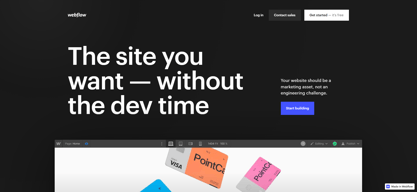






Webflow Review: Is This the No-Code Website Builder You’ve Been Searching For?
The world of low and no-code tools is finally starting to take off. More people now have access to tools that help empower creators to bring their ideas to life, even with limited coding knowledge, and turn them into functional websites, apps, and more.
One such tool leading the pack is Webflow—largely considered one of the best no-code solutions available today. So, does it really live up to the hype?
Let’s find out.
What is Webflow?
Webflow has since expanded with AI-powered design assistance, built-in localization, and Webflow Optimize for A/B testing.
Webflow is (among other things that we’ll cover later) a no-code website builder.
It allows people with no coding experience whatsoever to create beautiful, interactive websites quickly and (relatively) easily. In just a few clicks, drags, and drops, you can have a professional-looking website with all the bells and whistles you could want—from parallax scrolls to e-commerce and beyond.
How Webflow Works
Webflow is what’s known as a “visual website builder”. It’s a system that translates the building blocks of websites (HTML, CSS, and JavaScript) into a visual, drag-and-drop interface that’s more intuitive for beginners.
When you create a website from scratch in Webflow, you’re presented with a blank canvas. From there, you can drag and drop elements to build up your website—buttons, images, text boxes, forms… anything you need. You can also use integrated design tools to tweak the look of your website, add animations and interactions, or preview your work.
When you’re happy with your design, just hit “publish” and your website will go live.
Webflow Key Features
Designer
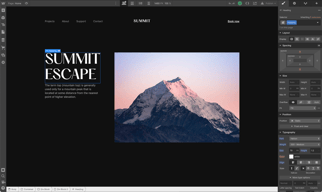
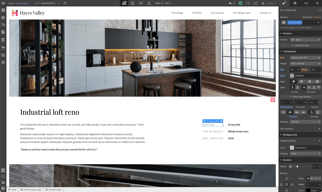
Designer is where the magic happens, so to speak. This is the interface you’ll use to build your website from the ground up—adding elements and customizing them to your liking.

To add elements to your pages, navigate to the “Add” tab at the top of the left-hand menu and drag the ones you want onto the page. You’ll find a bunch to choose from, including (though not limited to):
- images & videos
- text boxes
- buttons
- forms
- carousels
- CAPTCHAs
- Search bars
You can also add pre-built page layouts like columns, galleries, nav bars, and feature lists from this tab—great for getting the basic structure of your website up and running quickly.

Once you’ve got the elements in place, you can click on them to use Designer’s tools on the right-hand menu to tweak their look and feel. You can change background colors, fonts, borders, and more with just a few clicks.

Every element and setting in Webflow’s Designer falls under a heading that more-or-less describes what it is (or does), but the sheer number of options may still be intimidating for beginners. Luckily, there’s a decent tutorial that walks you through the basics when you create your first site.
Interactions
Interactions and animations are little details that add a ton of life to your website. In Webflow, you can use Interactions to do pretty much anything, including:
- moving
- fading in/out
- scaling
- skewing
- rotating
- toggling visibility
- and more
You can also use a pretty wide array of triggers to set off these interactions—things like first and second clicks, movement, and page scroll. These triggers, combined with the extensive range of actions available in Interactions, make Webflow feel super powerful—even for complete beginners.

Adding these interactions is pretty simple, too. Just click on an element, click on the “Interactions” tab in the top right corner of the design menu, click the “+” symbol, and choose your trigger(s) and action(s). There’s also a handy feature here that will optimize your website by deleting unused or conflicting Interactions.
CMS
Not all website builders offer a CMS, but Webflow does. With a CMS (content management system), you can create and manage content without any code—which is great for content-heavy websites like blogs.
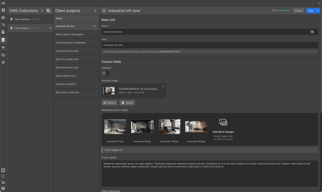
To use the CMS, you just need to populate “Collections” (think of them as categories) with content in the form of “Items”. These Items could be blog posts, products on an e-commerce store, or just about anything else you can think of.

For every Item, you can link data fields that help Webflow make your content fit within the structures you build. There are templates for common content types like blog posts, which include fields for author, main image, title, and more.

Then, when you want to display your content on the site, just pick an element and link it with the Collection you want to show. For example, linking a “Blog Post” Collection with the columns layout is an easy way to create a blog post showcase.

Ecommerce
As a standalone system (without add-ons or plug-ins), Webflow’s Ecommerce feature is decent—but far from the best.

Starting with the good, setup is very easy. The e-commerce system is essentially the same as the CMS system we covered above. You start by creating Collections for “Products” and “Categories” and populating the Items within with thumbnails, photos, price points, descriptions… whatever data points you need. These Items and Collections can then be dragged and dropped wherever they need to go.
While Webflow has continued to improve its ecommerce capabilities with additional integrations and payment options, larger e-commerce businesses may still find the feature set more limited compared to dedicated platforms.
SEO
Last but not least, Webflow offers a few useful SEO tools that are worth mentioning. One of the most useful is the ability to automatically generate metadata using fields from your CMS Collections (e.g., [Brand] | [Product]). This will save you a ton of time if you’re consistently publishing new content within an existing structure.
There’s also a solid 301 redirects management system that makes it easy to migrate old URLs and web pages to new homes.

Finally, the site audit feature can help you identify and fix common SEO issues like broken links, missing alt tags, and poor loading speed.
What Makes Webflow Stand Out From Other Platforms?
Visual Focus
Webflow is focused on design and aesthetics. It’s something the tool does much better than most of its competitors.

Just take a look at the Made in Webflow page—the designs there are much more distinctive, dynamic, and unique than you typically see with no-code website builders. That’s all thanks to Webflow’s impressive visual styling features, like the Interactions mentioned earlier.
Of course, this does come at the cost of beginner-friendliness. Creating a good-looking website is harder with Webflow than it is with simper tools like Squarespace. It’s just that the creative ceiling is higher for those who know what they’re doing.
Educational Resources
On a related note, Webflow is one of the best-documented website-building platforms out there.
Webflow University is filled with lessons, tutorials, and full-on courses that help you learn how to use the tool. There’s also a wide-reaching community of Webflow users on YouTube and Reddit who regularly post guides and answer questions.
And last but not least, there are tons of no-code boot camps and programs that focus on Webflow specifically because of the freedom we talked about above. So, to summarize, there are plenty of options when it comes to learning Webflow.
No Need For Plug-Ins & Add-Ons
One of the biggest advantages of Webflow is that it doesn’t require any plug-ins or add-ons—it’s a standalone platform. That means you don’t need to worry about compatibility issues, third-party security risks, or learning a completely new system just to add a missing feature.
Plus, the platform’s robust feature set means you don’t have to worry about running into any roadblocks with your project. It’s all there… if you know where to look!
Webflow Pricing
Webflow’s pricing depends on whether you’d like to create a standard website or an e-commerce-enabled website.
There are quite a few plans for both:
Standard Websites
Webflow offers a free Starter plan plus paid tiers including Basic, CMS, Business, and Enterprise, each with increasing CMS items, form submissions, bandwidth, and content editors.
eCommerce Websites
Webflow offers Standard, Plus, and Advanced ecommerce tiers with varying product limits, CMS items, and transaction fees.
See Webflow pricing for current rates and plan details.
Webflow Pros & Cons
Pros
- Impressive design and functionality freedom
- Easy drag-and-drop design
- UI is well signposted
- Excellent educational resources
- No need for plug-ins or add-ons
- Great template library
Cons
- The steep learning curve may scare off some users
- Higher price than competing tools
- E-commerce features are underdeveloped
- Technical SEO capabilities are limited
What’s the Verdict?
Webflow is without a doubt one of the best no-code website builders out there. It’s also likely the most comprehensive—with features ranging from hosting to e-commerce. However, this power comes with a price—namely, a steep learning curve.
If you’re curious about the Webflow alternatives out there, Findstack has your back. With in-depth reviews, product comparisons, and use cases, Findstack makes it easy to find the right tools for your business.
Start browsing today and find your dream stack!

Compare Webflow with other popular tools in the same category.

As long as you have basic knowledge of HTML/CSS - webflow is the perfect tool to use. Super simple, straightforward, drag & drop design with the ability to fully customize. I haven't run into anything it can't do yet. I use it for my freelance clients and my own portfolio. The tutorials have made me a better designer.
Quite a few different tiers for pricing, some features hidden behind additional paywalls.
- Easy to design and launch custom sites - helps me better understand the principles of web design - great tutorials, easy to get started

I'm seriously surprised by the capabilities of webflow. I was a little skeptical at first, but it genuinely is a GUI design tool that outputs a working website and or exports working HTML and CSS code. It makes design hand off and even design implementation extremely easy.
I found there to be a bit of a learning curve, but I think that's to be expected with any new tool. It did take me a little bit to get used to remapping the way I think about spatial relationships and objects, but once I had that down it was easy. Webflow provides a wealth of knowledge in their education library on everything as well.
We're creating marketing pages to widen our conversion funnel. Sometimes we'll get an idea on focusing on a specific SKU or product, or it may be something ephemeral and season specific, so being able to to have the flexibility of designing and creating a quick landing page without engineering involvement has been a big game changer.

I love that the Webflow team has a huge library of video lessons and tutorials for each question. Literally, if I don't know how to build something in WF, they already have a lesson about that! Besides, I'm very happy about the simplicity of use for both me (Designers panel) and my clients (Editor panel). I use WF every day to build projects for my clients as well as for creating my personal projects. It's fast, simple, and awesome. And I am absolutely in love with Webflow interactions!
There're no downsides, trust me. If you use Webflow, you're a winner. I just wonder why people are still using WordPress, or Tilda, or any other site builder. Many of my clients come to me thinking they would get a site on WordPress. Nope, no way! I show them Webflow and they fall in love with it.
The biggest problem I solve with Webflow is time. I used to work on WordPress before and it used to take me weeks and even months to build a website. It was also very hard to maintain and update it. It was so painful compared to my Webflow experience. Now it takes me hours or a couple of days to build a fully functional and responsive website! That's incredible! And WordPress sucks, lol! I build my personal projects on Webflow too!
WebFlow makes it easy to get a new landing page up and simplifies the management of marketing pages. It's a fantastic no-code tool that still enables tech-savvy individuals to get into the code and make custom changes while providing "university support docs" to help users learn how to use the product to get up to speed fast.
The only issue we've run into is our process for publishing new pages. Unfortunately, when you are creating new pages (outside of their CMS feature) if you want to publish your new pages, you have to publish all the pages. This has become an issue for us when working on new pages over a few weeks, but then running into a situation where we need to publish changes for another page, we can't publish changes for the page in issue until we finish the other pages that are pending.
We use WebFlow to manage all our marketing pages. It's really easy to get content out fast, and allows non-technical individuals to build/manage/maintain all aspects of our marketing pages.
I love WebFlow. Their customer service is fantastic, their product is fantastic, WebFlow Univeristy has been super helpful. I can't say enough about how awesome WebFlow is. Don't waste time with any of the other options, I have and I've made the mistake of letting various digital marketing "gurus" talk me into other products. They are all terrible when compared to WebFlow and every time that I've let myself get talked into a different service, I've alway ended up going back to WebFlow. I've learned my lesson though. Going forward I will only work with marketing gurus who use WebFlow. Seriously, don't waste time with the other products. Life is too short.
Nothing... I have found that usually, the issue is that I just didn't know how to do something and not that WebFlow was lacking. The WebFlow community is very helpful in that regard as well.
My business websites
I love their informative and slightly humorous videos. Their online video academy allows users to see and learn about the product prior to jumping in. And when you're ready to jump in, the UX is pleasing and straightforward. Learning and using a tool like this is extremely valuable to your development and career as a design or development professional. A real asset to have in your digital toolset.
The pricing is slightly confusing. You have to understand the difference between Account plans and Site plans. Which they do a pretty good job of differentiating on their site. But I can see certain users possibly not understanding the difference and signing up for the incorrect plan.
Faster design and development of company landing pages and microsites. Webflow sites require less technical setup and mainetance than some of their competitors.

Awesome templates, easy integration with 3rdparty tools, a huge documentation and community
The editor view for customers. I hope that administrators can modify the information that our customers can modify or touch on the web.
Web creator for all type of projects. Fast deployment, cheap and easy to make a mockup In ten minutes.
Being able to transfer from design to development seamlessly
I don't think there's a way to build userbases which has forced me to use other apps. I would love to see that come to Webflow
Launching prettier products faster
The high focus on quality design and the visual coding approach.
A tiny bit of custom code is still needed for certain tasks.
Quick and visually stunning web designs that are responsive, clean, and quick to deliver.

From the tutorials to the helpful Webflow community, there is never a shortage of new things to learn about Webflow. As someone without a formal tech or design background, I was able to use Webflow's resources to build the website of my dreams. I'm constantly iterating and finding new ways to use the platform. It seems like the possibilities are endless!
Since I am not an expert web developer, it would be nice to have more collaborative features or places to leave notes/comments for future iterations.
How to present my brand in a way that is simple, elegant and effective. One main benefit I've noticed since using Webflow is understanding how it builds off of HTML/CSS framework, which helps me better understand how websites work.


