






Worksection Reviews: 4.8/5 — Highly Rated
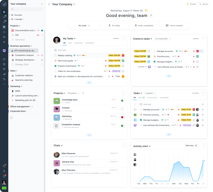
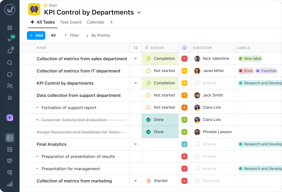
Worksection is one tool instead of five: tasks, a project timeline, time tracking, work chats, and file storage in a single workspace. It replaces a separate project manager, planner (Gantt + Kanban + calendar), time tracker, team chat, and file store — for one per-user price.
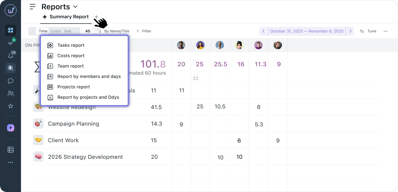
Its standout feature is built-in time tracking with client billing at hourly rates, which competing tools sell as paid add-ons. Worksection fits teams of 5 to 50+ — agencies, IT, consulting, manufacturing, and construction — especially those that bill clients for their hours.
In business since 2008, Worksection serves 9,000+ companies, is GDPR and ISO 27001 certified, and is available in 11 languages.





| Capabilities |
API
|
|---|---|
| Segment |
Small Business
Mid Market
Enterprise
|
| Deployment | Cloud / SaaS / Web-Based, Mobile Android, Mobile iPad, Mobile iPhone |
| Support | 24/7 (Live rep), Chat, Email/Help Desk, FAQs/Forum, Knowledge Base, Phone Support |
| Training | Documentation |
| Languages | English |

Compare Worksection with other popular tools in the same category.

This toll is very handy for a lot of reasons: 1. Flexibility - you can add Projects, Tasks, Sub-tasks, managing people, you have reports, GANTT diagram, etc. 2. Permissions and roles - this is the killer feature. 3. Few types of tasks view: list, kanban, by emploeers, etc. 4. There is a quite good and fast support. 5. International interface.
Didn't met real issues yet, for a few years. It's handy and it worth it's money. Sometimes there is some issues with variables for recurring tasks names, but it's not a big deal.
Organized all the Rubika Agency processes. Now all the emploees have clear understanding of the workflow and ongoing tasks instead of stickers. Our productivity increased minimum two times.
Worksection is really useful and easy to understand. My favorite feature is live-support right in your task-manager
Don't really know what to leave as dislikes
Let's all the team be on the same page, really comfortable way of tracking life of project
We work on projects in a team of 15 people, our field is business communications and online advertising. It’s very convenient for us to set tasks both on a PC and through a mobile application, the functionality is intuitive and simple
it is not possible to assign several people responsible for a task at once/ lack of internal chat and calls, but this is not a significant disadvantage
Allows you to manage more than 20 projects for different clients/meet deadlines and bring projects to fruition

What's really cool about Worksection is how it helps you manage your tasks. You can make tasks, give them to your team, and keep an eye on them. You can also say when they need to be done and what's most important. This makes it easy to keep your work organized and get things done on time.
Worksection is a unique tool because it's user-friendly and hepls team work together smoothly. The is nothing I don't like.
It helps your team work together smoothly.

This application allows you to save time and understand the processes in the team. In the work of the marketing department, it is important to strictly meet deadlines and prioritize correctly, which Worksection allows you to do. I would like to add that our team is very comfortable working with Worksection because it is clear, easy to learn, and convenient.
I've been using Worksection for more than a year now, and I don't plan to switch to another app because I don't see any downsides.
Thanks to Worksection, we can track how long it takes to complete certain tasks, and it's also convenient to track our progress on a project.

I tried to use notion and teams for the same goals, but it wasn't enough for my team, so we accepted to create our Worcsection acc and it was best solution, just because I saved a lot of time to organize projects and different types of tasks. So, totally recommend!
didn't find nothing bad in this tool, and I've been using it every day
We have clear list of our projects and tasks inside that projects and it's easy to invite new people and give them roles

I've been using Worksection for a while now, and I must say it's been an exceptional project management tool for my needs. The platform's user-friendly interface, powerful task management features, and collaboration capabilities have significantly improved our team's efficiency. It's easy to organize tasks, track progress, and communicate with team members within the platform. The ability to create custom workflows and templates has streamlined our project processes. I highly recommend Worksection to anyone seeking a reliable project management solution.
I am completely satisfied with this tool.
Worksection is solving our project management and collaboration challenges, benefiting us by streamlining task organization, improving communication among team members, and standardizing project procedures. This has resulted in increased productivity and better project outcomes for our team.

Using Worksection for managing and delegating SEO, development and web design tasks for more than 2 years already. It has a clear UX with solid functionality which allows literally any company/team to manage their tasks.
A minor setback is the absence of a native desktop client.
It solves several problems for me. The major ones are the difficulty in tracking progress and lack of in-team organization.

Fast clean and transparent. We searched for "our" tool for a long time. Easy to manage lots of teams. Easy to control lots of tasks. Useful reports.
I`d like to have additional, more extended functionality for accounting
Project Management Project Collaboration Time Tracking Task Management Work Management
controlling your time for certain projects easy to use affordable
sometimes the timer glitches no more difficulties were encountered
records the time spent. helps to note down the principle of the project
Worksection is an exceptional project management program that has made a significant difference in how our team collaborates and manages tasks at work. Since we started using Worksection, our workflow has become more organized, efficient, and productive. Here are some key points from our experience with the program: User-Friendly Interface: One of the standout features of Worksection is its user-friendly interface. It's intuitive and easy to navigate, which made the transition for our team members seamless. New team members quickly adapted to the platform without any major learning curve. Task Management: Worksection excels in task management. It allows us to create and assign tasks, set deadlines, and track progress effortlessly. The ability to prioritize tasks and set dependencies has greatly improved our project planning and execution.
I haven't noticed any flaws yet because I've been using it for 2 months. I like everything.
Helps control time for projects.
My experience is 1 month. And at the moment, I like working on this platform. First of all, it's nice to be able to edit the comments on the tasks, thanks a lot! Secondly, intuitive design, I can find everything I need myself, without using the help of Google. And thirdly, the timer. Those who work understand why we love them. In my opinion, if a person uses the product, and does not even notice it, then everything is cool with him. This is exactly what happens with Worksection.
So far, there have been no situations where the functionality of Worksection did not suit me somehow.
Thanks to the platform Worksection our clients can easily track the progress of their tasks. As a performer, I understand more over time how much time and what tasks should be allocated in general.
Simple, very easy to use, intuitive. I use it often. It has a lot of functions for work. Working every day on this platform, I realize that without it, I would have a hard time working.
So far, I have not found any drawbacks .
Planning, tracking work and time spent on projects

Hello! I would like to write a few words about the work of WS. It is easy to use for both advanced users and beginners. Intuitive interface.
There are no negative experiences when using.
Control of project work throughout the entire cycle

Tried a lot of tools - write, basecamp and others. But for the last 5 years, we have been enjoying excellent work with worksection. The time tracker works great.
worksection developers hear all our requirements and advice
time tracking and team management
This application is easy to use, has a friendly interface, is fast in operation, and is well suited for project management and employee monitoring. The application has a convenient task book, a report on completed work, a calendar of planned tasks.
Lack of popularity among European companies. For large companies, it would be convenient to divide users into departments. Lack of ability to create calls, conferences
Remote personnel management. Management of projects and tasks. Control of the time spent on the task, communication with clients
WS is very convenient for dividing work processes into departments. Quickly track statuses and stages of task completion
Some tasks can be performed in parallel to each other, but in the WS you cannot run two timers simultaneously
It is convenient to create and assign tasks to other project employees. It is possible to keep track of tasks together with clients.
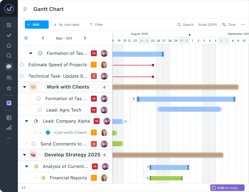
Worksection is, without a doubt, a game-changer in the world of project management. From my experience with the software, I can confidently say that it offers a comprehensive and exceptionally user-friendly platform that has revolutionized the way my team collaborates and manages projects. Managing tasks has never been easier. Worksection provides a wealth of options for creating, assigning, and tracking tasks. The ability to set deadlines, priorities, and dependencies ensures that nothing falls through the cracks. The Gantt chart view provides a visually stunning and highly informative way to monitor project timelines. Worksection excels in fostering collaboration. The discussion threads and task comments feature makes communication a breeze. No more sifting through endless email chains or using multiple communication tools – everything you need is right within the platform.
While the platform is user-friendly, the absence of comprehensive onboarding materials or tutorials may require new users to explore and learn the software independently, potentially resulting in a longer adjustment period.
Worksection helps our team plan, organize, and track projects. It allows to create project plans, set deadlines, assign tasks, and monitor progress in real-time.
Procurement control Setting tasks and changing the status of movement, which is seen by the sales manager and the purchasing manager as a requisitioner Different order statuses (in progress, delayed, completed)
When I find it, I'll add it. So far, I've been using it for about a month and I only miss the customization of the interface.
Control of b2b orders and tasking between departments

We have managed our work in perfect way:) Recommend
I haven't noticed any downsides For my team everything is useful
Worksection has been solved all downsides from our process which we have faced before these are: Time management Absence of correct tasks Chaos
- UX/UI - Using - That it's a Ukrainian product
- price - not super flexible workflow for sprints
- connect all business tasks inside of one place
Зручний інтерфейс. Все максимально зрозуміло. Є можливість підключити сторонні ресурси: календар, сервіси Google і навіть Viber. Оновлення завжди вчасні і доречні. Служба підтримки працює відмінно!
Не вважаю це недоліком, можливо, особливість роботи нашої компаніі ісправа в налаштуваннях системи і прав доступу, але відсутня можливість закривати виконані задачі. Доводиться звертатись за допомогою до керівника.
Всі задачі структуровані за важливістю виконання, терміни виконання чітко визначені, все дуже наглядно і точно, шанс щось пропустити мінімальний, можливість додавати підзадачі або якось змінювати існуючі - ще одна вагома перевага.
A very useful tool for planning and management operations. It helps department heads and project managers to distribute tasks among their employees. Also, Worksection makes it possible to control and effectively manage the time of all team members, units or department members. The manager can see the stages of work execution, fulfillment history, and results. Just log in to the manager’s account in Worksection. There is no need to organize permanent meetings with the team. The product interface is simple and intuitive. Even a user far from the world of technology will quickly and easily understand the principles of working in it. In addition, working in the Work section does not require much time as it may immediately seem. It's enough to add the main tasks to the project and then make adjustments in subtasks, comments, labels, and deadlines during execution. Everything is very easy!
Unfortunately, there is no chat to communicate with our team members in Worksection. In addition, it is inconvenient that you cannot create directories within the project.
Planning tasks and deadlines, distributing functions among the team members, controlling and management of project members' time, having the opportunity to see the stages of work execution, fulfillment history, and results, ability to adjust tasks in the process of execution, saving time on communication with colleagues and subordinates, simple and intuitive product interface.
- зручна проектна робота - зрозумілий функціонал - крута ціна для таких можливостей - можливість адаптувати проекти під власні потреби (я зробила срм - як прокт, карточки клієнта - як завдання, робота з карточкою клієнта (угоди і контакти - як підзадачі) -чати ми реалізували також як проект, а кожне завдання в ньому - як чат між відповідними групами та співробітниками) - покриває всі базові потреби, і якщо розібратись і трішки проявити смикалку - буде аналог Бітрікс24
- немає можливості надавати доступ певним людям до певних папок з контактами - немає можливості створювати папки для файлів - немає чатів - немає срм - немає можливості гнучно розподіляти доступ по ролях
покриває всі базові портеби, я дуже задоволена
Дуже зручно фіксувати витрати часу та фінансів по проектах. Також дуже зручні звіти, наглядні та зрозумілі. Легкий та інтуїтивно зрозумілий інтерфейс. Зручний мобільний додаток.
Немає чатів для спілкування між колегами.
Дуже зручно контролювати досягнення цілей через розбивку їх на проекти. Наглядно видно весь процес.

As a project manager, I've used a variety of different project management tools over the years, but I have to say that Worksection is one of the best I've come across. The platform is incredibly user-friendly, with a clean and intuitive interface that makes it easy to manage projects and collaborate with team members. One of the things I appreciate most about Worksection is its advanced project management capabilities. The time tracking feature, in particular, is incredibly useful for keeping track of how much time is being spent on each task, which can help me identify areas where we need to be more efficient. The budget management tools are also very helpful, as they allow me to keep a close eye on project expenses and make sure we're staying within budget. Another thing I really like about Worksection is the level of customization it offers. I can create custom fields for tasks, set up custom roles for team members, and even customize the look and feel of the platform to match my company's branding. This flexibility means that I can tailor the platform to meet the specific needs of my projects, which is really helpful.
While I've generally had a positive experience using Worksection, there are a few areas where I think the platform could be improved. For one thing, I've noticed that the platform can be a bit slow to load at times, especially when working with larger projects or teams. This can be frustrating when I'm trying to quickly access important information or update project details.
Before using Worksection, I struggled with keeping track of all my tasks, deadlines, and projects. I would often forget about important tasks, miss deadlines, or spend hours searching for the information I needed. This not only caused stress and frustration but also affected the quality of my work. Since I started using Worksection, things have changed for the better. Worksection provides me with a centralized platform where I can manage all my tasks, projects, and deadlines in one place. This has helped me to stay organized and on top of my work, which has reduced my stress levels and improved the quality of my work. In addition to improving my productivity, Worksection has also helped me to collaborate more effectively with my team members. We can now communicate with each other in real-time, share files and documents, and work together on tasks and projects more efficiently. This has helped us to complete our work faster and with fewer errors.
1. Дисциплінує співробітників за рахунок ефективного керування часом. 2. Дозволяє контролювати навантаження на співробітників. 3. Надає можливість перегляду історії виконання задач. 4. Простий і зрозумілий інтерфейс.
1. Немає чату для спілкування між співробітниками і членами команди. 2. Відсутня можливість створювати папки всередині проєкту, всі файли лежать неструктуровано в одному місці.
Worksection дозволяє керівникам або менеджерам проєктів розподілити задачі між своїми співробітниками та ефективно керувати часом всіх членів команди або відділу. Керівник має можливість побачити етапи виконання робіт, історію виконання і результати лише, зайшовши до свого профілю у worksection, не потребуючи постійних «планьорок» та мітів з командою. Інтерфейс продукту простий та інтуїтивно-зрозумілий. Навіть користувач, далекий від світу технологій, швидко та без проблем розбереться з принципами роботи в ньому. До того ж робота в worksection не потребує витрат великої кількості часу, як може здаватись на перший погляд. Достатньо просто додати основні задачі до свого проєкту, а потім в процесі виконання вносити корективи у вигляді підзадач, коментарів, міток, термінів, тощо. Це дуже просто та зручно, швидше, ніж записати ручкою в записнику!
Workcection has all the features necessary for the proper management of studio work. We have been looking for a suitable product for planning work for a design studio for a long time and finally found it! The first thing you pay attention to is how intuitive the product is. Colleagues didn't have to figure out how the program works. Especially cool is the support, all questions are quickly answered. They listen to suggestions for possible work improvement.
Hard to say, all the functions are enough for us. But of course, it would be cool if the timer could be set as an additional app on the computer. Colleagues often forget to turn it off in the browser
Helps to distribute tasks well among the team It perfectly shows where exactly we are lagging behind, where there are problems with solving certain tasks For us, this is the best product as a task manager, it can track time, that was a priority for us
I like to use this service because it is as comfortable as possible and does not contain anything extra. In contrast to other services that we tried to use, everything we need is here.
Not easy to say what I dont't like. It would probably be nice to add the ability not only to choose between the proposed tariffs, but also to design your own tariff according to your requirements.
We manage projects, set tasks for performers and calculate the amount of time spent on projects. We do not use file storage, chats, etc. But it's good to have it nonetheless.
I like to use Worksection, this tool an excellent choice for teams looking for a comprehensive project management tool that offers a range of features, integrations, and reporting capabilities. I can use everything in one place, reminders about deadlines, a time tracker, integrations with other tools, a Gantt chart, reports, and more. Overall, I think it's a pretty great tool for teams who want to stay organized and on top of their tasks. The support team responds quickly and helps with any queries.
The interface seems complicated in the beginning and sometimes notice a few flaws, but the support team is open to resolving them.
Combine everything I need in one place - from working with documents and reports to timetracking and organising projects. Worksection helps me stay organised, save time and achieve more.