

Unclaimed: Are you working at Zoho Desk?
Zoho Desk Reviews: 4.4/5 — Solid Choice
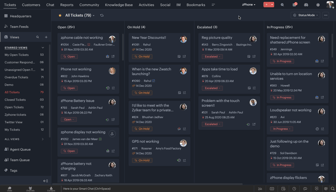
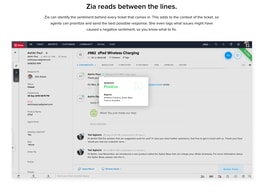
Zoho Desk is a longstanding name in its category that offers feature rich automation tools that help make your agents job easier and more efficient. One of their most lauded features includes an AI assistant that can identity repeated keywords and opinions in customers’ text to analyze customer mood and sentiment. Such smart solutions are coupled with auto-tags for tickets. You can also send automated notifications concerning ticket progress, assign tickets to specific agents, and update records via the platform.
| Company | Zoho Corporation |
|---|---|
| Year founded | 2000 |
| Company size | 10,001+ employees |
| Headquarters | Chennai, Tamil Nadu |
| Social Media |

| Capabilities |
AI
API
|
|---|---|
| Segment |
Small Business
Mid Market
Enterprise
|
| Deployment | Cloud / SaaS / Web-Based, Mobile Android, Mobile iPad, Mobile iPhone |
| Support | 24/7 (Live rep), Chat, Email/Help Desk, FAQs/Forum, Knowledge Base, Phone Support |
| Training | Documentation |
| Languages | English |
Zoho Desk Pros and Cons
- There are plenty of reporting features that provide customer insights and agent performance data
- A range of templates are available to help you respond to customers quickly and effectively
- You get real-time insights into support operations
- There’s a good free plan for new users
- The wealth of features on offer can make it harder for beginners to pick up the software.







Compare Zoho Desk with other popular tools in the same category.
Easy to setup and use. Highly recomended
There is no cons to include in my review.
Helped us to organize the service desk tasks and follow up.
I like the price I find it very easy to use, and integrate with other zoho solutions, also the integration with other common market applications and technology solutions
very limited version free, a test vey short
Frequently asked questions by social networks, we are standardizing the answers

i really enjoy that my customer can log in online and submit tickets through our web channel. I love that its seamless with Zoho CRM so everything gets logged phone, email, and chat.
There isn't much that i don't like, The only thing i would change would be pricing. there should be bundles based on the client needs.
i solving issues from password reset to network diagnostic. i love that i can cover a very broad range of technologies and create my own database for these issues
How user friendly and yet extensive in capabilities it is!
So far I have not found anything I dislike.
We are having issues streamlining our communication in our company. Zoho Desk has help organize all requests and process efficiently!

Love it. Easy to set up. I like the template to invite customers with.
I do not see any additions needed. It covers our basic need for customers to be able to submit and monitor our response to service jobs.
We are solving the need for customers to call us with service requests as they can now submit tickets.
Zoho Desk is a very intuitive helpdesk tool with a very friendly (although somewhat rustic) UI. Process of ticketing is efficient, SLAs are handy, clients management is OK, and I liked pretty much the Zoho Analytics. Reports are complete and concrete!
The lack of a ticket status that differentates unassigned and assigned open tickets. Both are considered OPEN even if not assigned yet to an agent. There should be a status like "NEW" to distinguish recently opened, unassigned tickets, just like Zendesk does. It'd help pretty much in advanced reporting!
We're solving IT needs for a wide variety of customers like schools, universities, seaports, insurance companies, hospitals and manufacturers. We sell them IT solutions and we give support for a determined time. Zoho Desk comes to be very useful especially when customers need their workers to communicate with our support staff and submit cases, so the support process can be efficient and gives a good impression to customer, mainly in terms of SLA and service performance reporting, according to a defined service contract.
Everything from the ticketing, customers contacts, customer database, user notifications, emails and chats, user profiles and roles, integration to the Zoho CRM, import/export facility, etc.
Limited Roles and profiles for users. Wish I can rename the default profiles, but anyway this is a minor issue.
Customer Experience. Easy tracking or problems and operations performance. We need to explore the Zoho CRM as well to complete the tool in the future.
no frill cloud solution with a built in reporting system, and email integration.
the list of tickets can get little confusing. perhaps better layout could help.
zoho desk has helped in logging customer tickets and providing status back to them.
We are able to organize the structure of our support in a more productive way with future opportunities to work towards as well.
The layout of Desk and 'Dashboard' is not the easiest to use, can glitch out.
Customer service about purchased products. Greater use of service Reps time.
- Multiple channels to interact with customers viz. custom domain portal with SSL, emails, social media - Great implementation of 'Knowledge base' feature
Nothing much to complain really. If I have to nitpick, Some of the competitors seem to have beautiful UIs
- Efficiency in addressing customer problems - Self-help articles through 'knowledge base' - Monitoring suppport team
Complete automation of the mailing & calling process. Automated reply based on keywords. Integration with Zoho CRM which can fetch the customer history & suggests necessary response based on their experience.
integration with other review portals like Trip Advisor for capturing the feedback & experience once the service is delivered.
Streamlining the customer support & post booking experience of the customer but before & after delivery of the booked services. Reducing the response cycle time to customer & managing the to do tasks.
Easy to start with and even the non-technology guys can set it up
Some of the features like Dependent Drop down is missing
We have been manually tracking all the emails and calls for our support and we will be using Zoho Desk to give us a overview of our customer support.
Zoho Desk can easily be provisioned. Its short learning curve is what makes the product better than its competitors. Moreover, the product offers are a wide variety of telephony platforms to integrate with. You can never go wrong with this product.
Zoho Desk's features pale in comparison with its helpdesk tools competitors.
Zoho Desk has given us the ease of funneling all customer concerns into a single platform. Whether it's voice, chat or email, Zoho Desk has easy to provision features to manage your company's pipeline.
User-friendly view The simple way to assign tickets and view data for open, pending and closed tickets, as well as the capability to remote assistance devices to provide assistance is priceless.
when connecting remotely to a device or pc it will ask the user to instal software, some user do not like to instal anything that they are not familiar with, this makes it difficult when having to troubleshoot. it would be much easier if it was web-based, and the user just had to access a web portal allow for us to remote in.
solving more cases and tickets submitted, many benefits come from this, to name a few customer satisfaction, also great reports to review agent efficiency, also allow customers to keep track of their cases and we can provide a knoledge base videos and documents that have helped minimize tickets as problems are fixed often times by user after review of this helpful information.

Zoho desk is very user friendly. I like that I can easily run any needed reports quickly and with all the information that i am required to provide to my supervisor. I also like that is really easy to search for older tickets when needed.
The only thing that I really don't care for in the zoho desk is that when I forward an email or voicemail over to it the account name does not stay accurate to the clients name. It will than change all other ticket that had been forwarded over to the same name.
Our use for zoho desk is helping with support issues that come in from our clients.
Management in admin side. We are extensively use this in testing mode in last 15 days.
Api Integration is working properly with lots of mannual work.
Customer Support
The product is really easy to set up with plenty of resources available for help. It looks professional and everything is placed where one would expect to find it.
I did not find anything to dislike in this product
New system solution for current CRM
The ease of integration and that it is ready to go from setup.
Not enough API interfases. Hard to configure for phone interaction.
We were able to start a customer service case management system and it was achieved with little effort.

We are able to connect to our general support email box and keep all our requests organized. Implementing the trial version was very quick and didn't require support or training
Sometimes we do have to go back into our email to send outgoing. It would be helpful to be able to fire off an email within Desk that doesn't necessarily integrate with a ticket.
Several of us were sharing one support email address and it was becoming very hard to manage. We tried Desk because we were already using Zoho products. It completely reversed our situation, prevented us from duplicating support, or missing requests. A game changer for us.
The UI is easy to set up and customize. Price is nice as well.
I would like email forwarding to be easier to set up
Solution for helpdesk that quick to implement
How I can integrate into O365 and Teams!
Customers cant update ticket through email and cant assign 2 agents to a single ticket
Helpdesk for company. We found that it is much simpler then other help desk systems.
We have evaluated several apps but Zoho was easiest to setup and the support was the best. So we went for Zoho.
The user interface could make more use of colors. Especially in the ticket history.
We are dealing with our customer requests and mails. Now we can work in a team on all issues.

It's integration with the Zoho Ecosystem
Web templates are too simple and I am HTML lazy
I needed a support portal and KB. Solved.
Improves efficiency. Provides solid visual reinforcement
Have yet to implement and test performance on a wider scale
Project Management
It's very easy to use, while still having all the features we need.
There's nothing to complain about with Zoho Desk. It's easy to use and packs tons of features and customizations.
Better overall service provided to customers and leaving antiquated support system.
It is easy to configure and has a user friendly gui
I didn't find anything that was not correct
we are trying to organize our customer service department and our loyalty department.
It is a full featured application, that helps you organize your customer inquiries and improve your customer communication and service. The user interface helps find every feature easily and is very self explanatory. Don't need too much time understanding how it works. Integration with other apps was a breeze.
Not many things I dislike about the product. Probably feel that sometimes some screen take more time than usual to load.
Customer service, we have improve the time to respond to problems and customer inquiries. Our process is more efficient since we can track SLA times.
Integrated solution with CRM, Desk... vey helpful
Sometimes a bit long to configure for your activity
Support for all ticketing of digital signage activity
Great clean look and feel, easy to configure, lots of nice features.
I wish their was a stronger GSuite connection for contact lookup.
Replacing a more complicated incident management system, has to potential to roll out to other departments in the company