

Unclaimed: Are you working at Aircall?
Aircall Reviews: 4.4/5 — Solid Choice
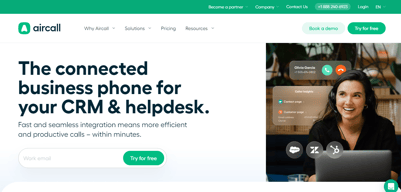
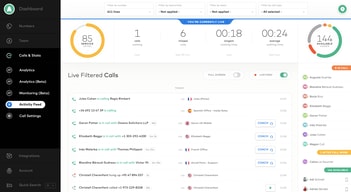
Aircall is the cloud-based call center and phone system of choice for modern businesses. A voice platform that integrates seamlessly with popular CRM and helpdesk tools.


| Capabilities |
API
|
|---|---|
| Segment |
Small Business
Mid Market
Enterprise
|
| Deployment | Cloud / SaaS / Web-Based, Desktop Mac, Desktop Windows, Mobile Android, Mobile iPad, Mobile iPhone |
| Training | Documentation |
| Languages | English |

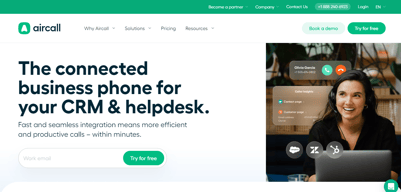






Aircall’s AI Voice Agents button reads “FROM €0.19/MINUTE”. That rate requires a custom bundle of 10,000 minutes or more. Pay as you go and the rate is €0.49 — 158% higher. The cheapest prepaid bundle, 500 minutes for €175, works out at €0.35. The €0.19 is real, but it sits at the far end of a ladder that starts at roughly €1,900 of committed spend, and nothing on the button says so.
- What it is: A cloud VoIP and customer-conversation platform with AI voice and messaging agents.
- Best for: Sales and support teams of three or more wanting calling tightly wired into a CRM.
- Pricing: Essentials €30, Professional €50 per licence per month on annual billing; Custom quoted. Verified July 2026.
- The honest catch: Single sign-on requires the Custom tier, which has a 25-licence minimum.
What Is Aircall?
Aircall is a cloud calling platform built for sales and support teams, with more than 250 integrations, a softphone for desktop and mobile, IVR, call recording, and — increasingly — an AI layer covering voice agents, messaging agents, and conversation intelligence.
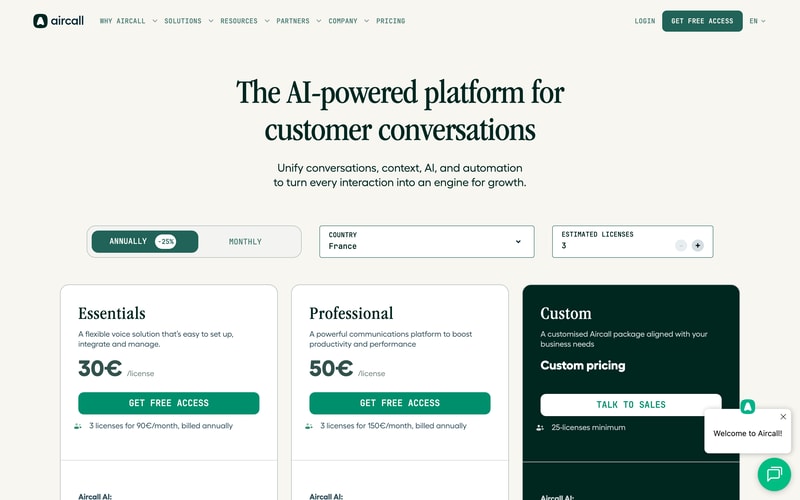
Three tiers: Essentials, Professional, and Custom. The first two carry published per-licence prices; the third is quoted and has a 25-licence minimum, which matters more than it first appears.
Both published plans require three licences minimum, so the page states the real figures itself: “3 licenses for 90€/month” and “3 licenses for 150€/month”. The toggle advertises 25% off for annual billing, and the page displayed annual rates throughout our capture.
How Aircall Works
- Priced per licence, with a three-licence minimum on both published plans.
- Essentials caps outbound calling at 1,000 domestic minutes per user per month.
- The Custom tier needs 25 licences, which is where SSO lives.
- AI voice minutes are metered separately, from €0.49 down to €0.19.
- AI Assist is a per-licence add-on at €9, or €49 for Pro.
- 50 free AI voice minutes per account per month.
Aircall Pricing
Captured from Aircall’s pricing page in July 2026 in euros, with annual billing displayed.
| Plan | Per licence/mo | Minimum | Real entry cost | Key inclusions |
|---|---|---|---|---|
| Essentials | €30 | 3 licences | €90/mo | 250+ integrations, IVR, recording, 1,000 outbound mins/user |
| Professional | €50 | 3 licences | €150/mo | Unlimited domestic outbound, Salesforce CTI, power dialer |
| Custom | Quoted | 25 licences | Quoted | Unlimited worldwide calls, SLA, SSO, API support |
AI add-ons: AI Assist €9/licence/mo · AI Assist Pro €49/licence/mo · AI Voice Agents from €0.19 to €0.49/min · AI Messaging Agents from €0.13 to €0.30/conversation
What actually decides your cost:
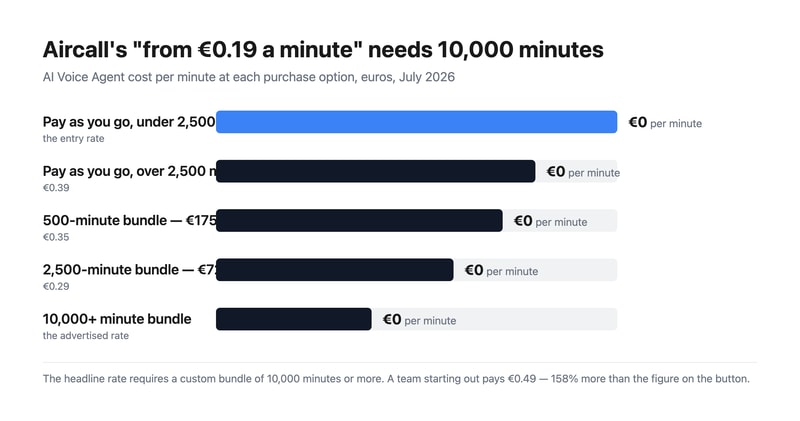
- The AI voice rate spans 158% from top to bottom. Pay as you go is €0.49 a minute under 2,500 minutes and €0.39 above it. Prepaid bundles are cheaper — 500 minutes for €175 is €0.35, and 2,500 for €725 is €0.29 — but the advertised €0.19 needs a custom bundle of 10,000 minutes or more. That is around €1,900 of committed spend before the headline rate applies.
- Three licences is the real floor, not one. Aircall states it plainly on both cards, so this is disclosed rather than hidden, but it means the entry price is €90 a month for Essentials and €150 for Professional, not €30 and €50.
- SSO is gated behind a 25-licence minimum. Single sign-on appears only on the Custom tier, and Custom requires 25 licences. So a fifteen-person team that needs SSO for compliance cannot buy it at any price — a harder gate than most, and worth contrasting with GoodAccess, which sells SSO as an add-on on its entry plan.
- Essentials meters outbound calling; Professional does not. One thousand domestic outbound minutes per user per month is about 50 minutes a working day — workable for support, tight for outbound sales. Professional makes domestic calling unlimited, and unlimited worldwide calling requires Custom.
- AI Assist Pro costs almost as much as the plan. €49 per licence per month against Professional’s €50. It adds live transcription, custom summaries, and sales playbooks over the €9 AI Assist tier. Doubling your per-seat cost for real-time coaching is a defensible trade for a sales floor and hard to justify anywhere else.
- AI messaging follows the same shape. €0.30 per conversation pay-as-you-go, dropping to €0.25 after a thousand; prepaid bundles are €220 for 1,000 (€0.22) and €1,300 for 10,000 (€0.13). As with voice, the cheapest advertised rate needs the largest commitment.
Who Should Use Aircall
- Sales teams living inside a CRM. The clearest case — 250-plus integrations and a Salesforce CTI on Professional.
- Support teams of three or more. The licence minimum makes it a team product by design.
- Businesses deploying AI voice agents. Aircall publishes per-minute rates openly, which many competitors will not.
- Outbound sales floors. Power dialer and voicemail drop are included on Professional rather than sold on top.
It fits poorly for solo operators and pairs, given the three-licence minimum; for teams under 25 that need SSO, which is unreachable; and for light AI users, who will pay €0.49 a minute rather than the advertised €0.19.
Honest Pros and Cons
Strengths
- Every AI rate is published, including pay-as-you-go and each bundle.
- The licence minimum is stated on the card, in money rather than fine print.
- Power dialer and voicemail drop included on Professional.
- 250-plus integrations and API access from the entry plan.
- 50 free AI voice minutes per account each month, plus 100 at sign-up.
- Unlimited inbound calls on every plan, toll-free excluded.
Limitations
- The advertised €0.19 AI rate needs 10,000+ minutes.
- A three-licence minimum on both published plans.
- SSO requires 25 licences via the Custom tier.
- Essentials caps outbound at 1,000 minutes per user monthly.
- AI Assist Pro at €49 nearly doubles a Professional seat.
- Worldwide calling is Custom-only.
Aircall Alternatives and How It Compares
- CloudTalk is the closest competitor for European calling, from €25 per user.
- RingCentral is the larger incumbent covering voice, video, and messaging.
- Nextiva is stronger on US business telephony and unified communications.
- Quo (formerly OpenPhone) suits small teams sharing numbers, without a licence floor.
- Grasshopper is the solo-operator option Aircall’s minimum rules out.
- Dialpad competes most directly on AI-led calling.
For a broader survey, browse our VoIP providers directory.
The Verdict
Aircall is a strong choice for a sales or support team that wants calling wired properly into its CRM, and its commercial disclosure is better than most. It publishes every AI rate — pay-as-you-go, each prepaid bundle, and per-conversation messaging — where competitors routinely hide all of it behind a sales call. It also states the licence minimum in money on the plan card itself: “3 licenses for 90€/month”. That is the opposite of burying it.
Which makes the one piece of framing that does mislead more conspicuous. The AI Voice Agents button reads “FROM €0.19/MINUTE”, and €0.19 is available only on custom bundles of 10,000 minutes or more — roughly €1,900 committed. A team trying the feature pays €0.49 a minute, 158% more. The prepaid bundles sit in between at €0.35 and €0.29. Every one of those numbers is published a few lines below the button; the button simply quotes the best of them. Budget from €0.49 and treat anything cheaper as a volume reward.
Two structural limits to check against your own headcount. Three licences is the floor on both published plans, so €90 and €150 a month are the real entry prices. And single sign-on lives only on the Custom tier, which requires 25 licences — meaning a fifteen-person team with an SSO requirement has no route to it at any price. That is a harder gate than most vendors set, and it is the constraint most likely to disqualify Aircall for a mid-sized company that otherwise fits it well.
FAQ
How much does Aircall cost?
On the euro price list captured July 2026 with annual billing: Essentials €30 per licence per month and Professional €50, both with a three-licence minimum — so €90 and €150 a month respectively. The Custom tier is quoted and requires at least 25 licences. AI Assist is €9 per licence per month, AI Assist Pro €49, and AI voice minutes are billed separately.
Why is Aircall’s AI voice pricing higher than the advertised €0.19?
Because €0.19 applies only to custom bundles of 10,000 minutes or more. Pay-as-you-go is €0.49 per minute below 2,500 minutes and €0.39 above it. Prepaid bundles fall between: 500 minutes for €175 works out at €0.35, and 2,500 minutes for €725 at €0.29. Every account also gets 50 free AI voice minutes a month, plus 100 extra at sign-up.
Does Aircall have a minimum number of users?
Yes. Both Essentials and Professional require three licences, which Aircall states directly on the plan cards as “3 licenses for 90€/month” and “3 licenses for 150€/month”. The Custom tier has a much higher floor at 25 licences. There is no single-user option, so solo operators need a different provider.
Which Aircall plan includes single sign-on?
Only Custom, which requires a minimum of 25 licences. Neither Essentials nor Professional offers SSO at any price, so teams below 25 people with a single sign-on requirement cannot meet it on Aircall. Custom also adds unlimited worldwide calling, a service-level agreement, custom onboarding, and API developer support.
What is the difference between Aircall Essentials and Professional?
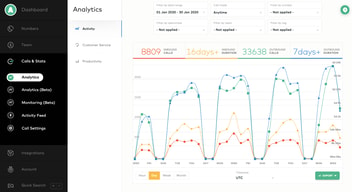
Calling volume and sales tooling. Essentials at €30 includes 1,000 domestic outbound minutes per user per month, IVR, call recording, and 250-plus integrations. Professional at €50 makes domestic outbound calling unlimited and adds Salesforce CTI, advanced analytics and live monitoring, mandatory call tagging, and sales features including power dialer and voicemail drop.

Compare Aircall with other popular tools in the same category.
Aircall's app is simple to use is very useful for the everyday use I have for contacting and receiving calls from customers. The ease of use makes it better than previous calling services that have needed to be used through a browser.
There are times when the calls seem to have a delay, specifically incoming calls. The quality of the calls is always great, however!
Aircall is making it easier to navigate my job with more ease and with a simpler system for managing phone calls.
Aircall is straightforward to use and integrates well with other tools such as Salesforce and Jimminy. My calls will be uploaded to Jimminy (call recording tool) in seconds. I like the sound quality updates, and the ease of selecting a different input source. I average about 50 outbound calls per day and I'm very happy with it. I also like how quickly it recoginises contacts.
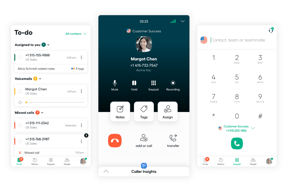
Very small thing, I don't like the missed calls going in the 'to do' box. I think that archiving the task isn't very intuitive, I don't really understand what it means to 'archive' a call.
It's allowing me to easily make calls on any device using my business number.
Very user friendly. From selecting your number before dialing to the history option when following up on previous calls.
I am not a fan of the sms option. Texting
With the options we had at our disposal. Such as selecting a local number to dial from. Our success rate of making contact has significantly improved.
LOVE THE HISTORY AND BEING ABLE TO UPDATE CONTACTS EASILY
I REALLY CAN NOT SAY I HAVE ANY DISLIKES
MAKES IT EASY TO REVIEW THE CALL FOR CUSTOMER COMPLAINTS, AND CONFIRMING INFORMATION
The app is very user-friendly and easy to navigate.
The echo in the call quality is an issue.
Our school uses Aircall for incoming and outgoing calls.
I've been using Aircall in my job where I arrange and help team tasks, and here's what I think works really well about it. We easily got our users set up and the computer program works perfectly on different types of computers. It also works well with both iPhone and Android phones. Our team members who are usually moving around a lot like this feature very much. The help given to customers was really good, mostly during the first learning times which made everything very easy.
I've seen some connection problems now and then, especially when using headphones. This can make important phone conversations a little annoying. Also, for a simple phone service tool, it doesn't have some higher-level studying features and the skill to send out info could get better.
When it comes to fixing issues, Aircall has totally shaken things up. It makes talking with the team and customers easy, ensuring that we're always only one phone call away from fixing any problems.
It syncs very nicely with our Salesforce. The installation is very easy because the Aircall app is available everywhere: PC, Mac, iOS, Android. The report function is great and it helps me manage my team easier. And Aircall offered us a very nice discount package
The number configuration is sometimes confusing, especially IVR
When you have a big sales team making hundreds of calls per day, it's hard to manage everything with just excel sheet. And sometimes it's hard to tell if someone is lying with their call stats. With Aircall managing is much easier (and less boring because you won't have to look at huge black and white excel file anymore)

Le fait que cette application soit sur l'ordinateur, empechant à l'équipe d'utiliser son téléphone perso et/ou d'investir dans des téléphones pour toute la société. Efficacité, gain de temps et d'argent.
Le fait que l'on soit déconnecté à chaque fois.
Pouvoir suivre également les appels de l'entreprise (liaison entre les services). Pour comprendre les difficultés des clients et avoir une ligne pour toute l'équipe.

Air call is super Intuitive and so easy to use. It just works! No hassles or fuss. Integration and setup was quick and simple. It is more stable in comparison to competitor products especially when having to work from home.
It is not customizable. It has a standard set of features and the option to add specific features is not available. If there was an option to leave a pre-recorded voice message when receiving voice mail that would be great.
I love the fact that I can switch outbound numbers as and when needed. The process is quick and easy with no hassles. This means that when numbers have been marked as spam or blocked they can be easily changed, thereby enabling me to continue to reach the desired prospect. This has increased productivity and success rates.
Easy to use. Friendly UI. Allows you to contact the mobile number of the candidates without using a mobile. Easy to implement and integrate.
That you cannot move up and down your arrow as you edit your text. It may help if the team would creste a search feature in the messages to easily find the name or words in a message you want to quickly check.
Remote work setup - working in the recruitment space connecting to candidates and clients based outside your country is one of the main challenges to succeed in this setup but with the help of Aircall everything seems normal.
I love the ability to dig into the analytics and data per line as well as per user. The conversation center is a great training tool for new employees during their onboarding phase. The integration with Hubspot is fantastic and plays a key role in our companies usage. Incredibly easy to use and understand.
Sometimes the data doesn't tell enough. The unanswered call reasons are not always indicative of what happened- was a call dropped or actually a spam call.
An enrollment team of people answering calls for multiple direct primary care practices. It allows the caller to assume we are actually working in the DPC clinic as opposed to a call center.
I love how i can forward call to my mobile number when needed Is an excellent tool to connect with clients and workmates around the the world Simple, fast with high quality Customer support is best
For the past two years it has been great to me and my company
Great communication with our clients and good quality
Easy to call, receive call, set the status and fantastic feature of scheduling our schedule on the basis of which it keeps us active on aircall. Fantastic software.
Nothing to dislike about. It is a great product for a team which is bound to call while work. You have software that can be on laptop as well so you don't need a phone at all. You can use it on your phone and laptop both.
Aircall is solving the problems of tracking the call. Making an international calls seamlessly. Helping us to make calls on laptop easily. This is really helpful to manage the shift as well as we don't need to keep making changes to our schedule. Just set the schedule and Aircall will make you available.
Very easy to use, works well all the time. Integrates easily with Hubspot. Inexpensive. High quality calls and an excellent dashboard.
There is a new SMS issue that is annoying due to Aircall being a European company. Otherwise it is a great tool.
An excellent phone solution for the company that has local numbers to call in countries. Also need to track calls and have recordings.
quality of call and also if we face any kind of issue we get instant resolution.
as of now nothing i like everything about aircall
if we didn't receive call or if i face any issue while login or logout so when i contact them they resolved instantly
I like that I can call everyone in the company I am prospecting just by pressing a couple of buttons to start. It integrates with HubSpot very well and makes it easy to go back and forth.
I dislike how when I power dial, I can't go back and takes notes from the contact I just called on the app. I have to go back to HubSpot and type any further notes after ending a power dialed contact. I wouldn't say I like how it automatically doesn't register unqualified statuses, so I have to double-check that before calling a list.
Aircall saves me time. Power dialing is a huge time saver because it will just blast through numbers versus me having to copy and paste each individual number per call.
Aircall is a very convenient and easy to use platform where it is very easy to manage my day to day calls. Aircall is accessible across multiple devices, such as, computer and mobile phone. Another great thing about Aircall is that it keep all the information of a client in one place and is recorded in a database, so that when the next time the same client calls up again, the database immediately pops up.
So far I have nothing to dislike about Aircall as it is very convenient, accessible and user friendly to use.
As the Customer information can be accessed straight away which is very handy.

I like that i can listen to my colleagues and easy to record call Aircall is easy to use Also is easy to communicate with our partners and clients It has clear line and sound UI is also clear Customer support
Aircall is a great platform for communication and our clients like working with it
It really helps me to communicate with clients and workmates in local areas
You can go back and listen to calls and the training feature is very handy. As I am only training it is good for my trainer to listen in and give me feed back;.
Nothing the product is great. It is a very useful tool
bug fixes

Simplicity is what we like best Aircall help us to communicate with our clients and families Clear sounds and line Good and fast support Nice interface
It has been a great tool for communication we rate it 10/10
Easy tool to use for communication
I can listen recordings of my call. I can call people easily. The Chrome add on scans pages to see if there a phone numers and I can just click them. Have used it everyday and haven't had an issues
The app closes out on it's self a couple of times during the day. Not a really a big issue just kind of annoying.
We have a lot of departments that have call links to book meetings. It's nice that I have a personal line that I can give out to people who may need me right away.
Aircall is easy to use and very suitable to linked/integrated apps
Maybe I´d like a dark skin to make it more attractive
Maybe disconnection and/or (not to frequent) BUT are rapidly solved through online/live assistance. Anyway it is a powerful tool in my work
Easy to make calls, have few different numbers and send messages! Daily use of the app for us is crucial. Easy to setup, easy to use and works great with our ticketing system.
Connection issues from time to time, "ghost calls", customer support can be rude.
Quick questiones, one touch tickets.
It is very modern, easy to use and set up. I use it every day for work.
There should be more ringtones, and more changeable features such as colours. Would also like it not to ring when starting a cofrence.
I have not had any issues with aircall so far
We have been using Aircall for a month now and the calling process has become very convenient with its simple UI and Dialer. Aircall also has a mobile application which makes life much easier, as I personally prefer calling with my mobile phone rather than my PC.The dailer lets us search the country codes and upon calling, the UI shows the timezone of the respective person.
A few numbers were blocked by the Aircall team and later it was rectified .
Aircall has really improved the calling rate per day of our sales reps. It has also helped us track and record the calls being made by our team. Aircall has made our lives easier.
No external Hardware required for setUp. It is really good VOIP software. Good support
Should have capability to integrate traditional VOIP phones
Handlind Customer Updates
The quality of calls and being able to transfer easily to teammates
Sometimes the app glitches out but can be easily fixed with a refresh
Allows our clients to easily contact our Support Team and any one of our team can jump on the call quickly
There is not much more to explain because the tool explains itself. It is very easy to use and to keep track of calls and conversations
nothing that I dislike at this time to be honest
all the calls I need to do to inbound and outbounds leads
The whole team works from one number. The aircall app also makes it easy to stay on top of any incoming messages and has been a key factor in connecting with my clients.
If I could add a feature it would be to see which team members have viewed the text messages. In Aircall, text messages don't get checked off on everyones dashboard which is great, because it means that I can keep track of my messages, but with a big team, there are a lot of new incoming texts.
Being able to call leads and clients from anywhere in the world. This is especially benificial wih a remote job. My messages and calls are all stored in a central place and does not get mixed up with my personal texts on my phone.
The ease of use with Aircall is so nice. Being able to add tags for organization and tracking purposes is a feature that I haven't personally experienced and it ties in great with the CRM software our company utilizes.
There can be a few technical issues throughout the day with call quality but the AC team is great at resolving issues quickly and transparently.
The call quality issues are quickly addressed and their support team has a rapid response that ensures the customer feels seen, heard and respected.