

Unclaimed: Are you working at Aircall?
Aircall Reviews: 4.4/5 — Solid Choice
Aircall is the cloud-based call center and phone system of choice for modern businesses. A voice platform that integrates seamlessly with popular CRM and helpdesk tools.

| Capabilities |
API
|
|---|---|
| Segment |
Small Business
Mid Market
Enterprise
|
| Deployment | Cloud / SaaS / Web-Based, Desktop Mac, Desktop Windows, Mobile Android, Mobile iPad, Mobile iPhone |
| Training | Documentation |
| Languages | English |

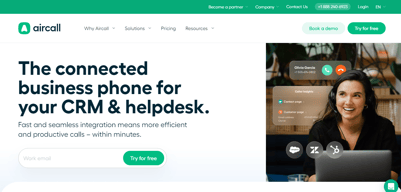





Aircall’s AI Voice Agents button reads “FROM €0.19/MINUTE”. That rate requires a custom bundle of 10,000 minutes or more. Pay as you go and the rate is €0.49 — 158% higher. The cheapest prepaid bundle, 500 minutes for €175, works out at €0.35. The €0.19 is real, but it sits at the far end of a ladder that starts at roughly €1,900 of committed spend, and nothing on the button says so.
- What it is: A cloud VoIP and customer-conversation platform with AI voice and messaging agents.
- Best for: Sales and support teams of three or more wanting calling tightly wired into a CRM.
- Pricing: Essentials €30, Professional €50 per licence per month on annual billing; Custom quoted. Verified July 2026.
- The honest catch: Single sign-on requires the Custom tier, which has a 25-licence minimum.
What Is Aircall?
Aircall is a cloud calling platform built for sales and support teams, with more than 250 integrations, a softphone for desktop and mobile, IVR, call recording, and — increasingly — an AI layer covering voice agents, messaging agents, and conversation intelligence.
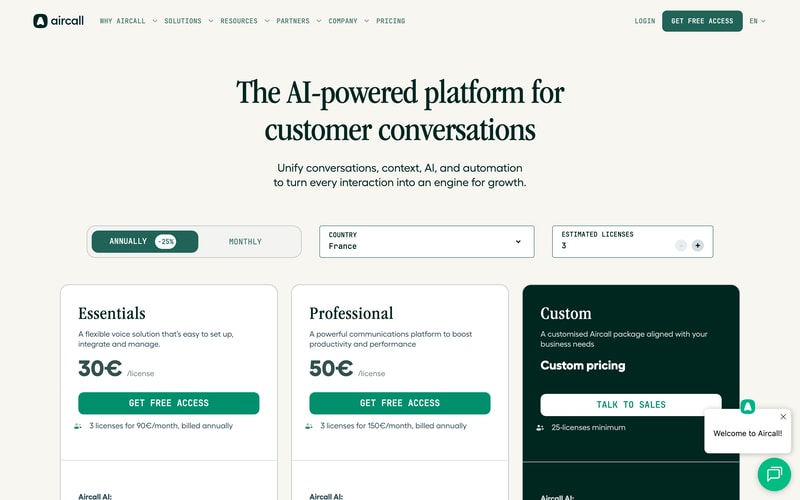
Three tiers: Essentials, Professional, and Custom. The first two carry published per-licence prices; the third is quoted and has a 25-licence minimum, which matters more than it first appears.
Both published plans require three licences minimum, so the page states the real figures itself: “3 licenses for 90€/month” and “3 licenses for 150€/month”. The toggle advertises 25% off for annual billing, and the page displayed annual rates throughout our capture.
How Aircall Works
- Priced per licence, with a three-licence minimum on both published plans.
- Essentials caps outbound calling at 1,000 domestic minutes per user per month.
- The Custom tier needs 25 licences, which is where SSO lives.
- AI voice minutes are metered separately, from €0.49 down to €0.19.
- AI Assist is a per-licence add-on at €9, or €49 for Pro.
- 50 free AI voice minutes per account per month.
Aircall Pricing
Captured from Aircall’s pricing page in July 2026 in euros, with annual billing displayed.
| Plan | Per licence/mo | Minimum | Real entry cost | Key inclusions |
|---|---|---|---|---|
| Essentials | €30 | 3 licences | €90/mo | 250+ integrations, IVR, recording, 1,000 outbound mins/user |
| Professional | €50 | 3 licences | €150/mo | Unlimited domestic outbound, Salesforce CTI, power dialer |
| Custom | Quoted | 25 licences | Quoted | Unlimited worldwide calls, SLA, SSO, API support |
AI add-ons: AI Assist €9/licence/mo · AI Assist Pro €49/licence/mo · AI Voice Agents from €0.19 to €0.49/min · AI Messaging Agents from €0.13 to €0.30/conversation
What actually decides your cost:
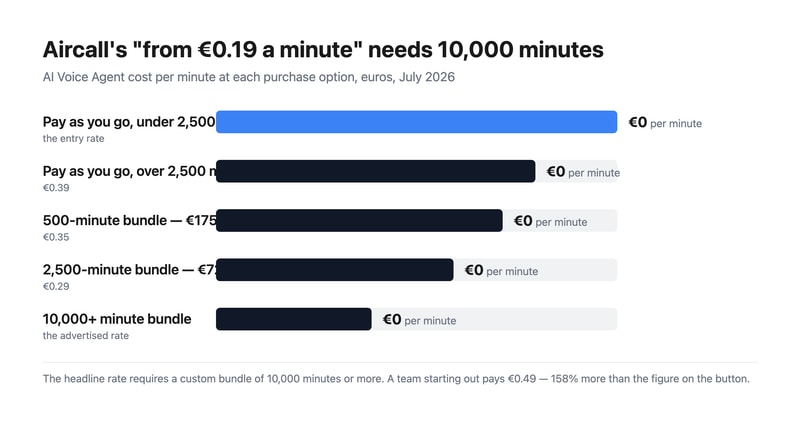
- The AI voice rate spans 158% from top to bottom. Pay as you go is €0.49 a minute under 2,500 minutes and €0.39 above it. Prepaid bundles are cheaper — 500 minutes for €175 is €0.35, and 2,500 for €725 is €0.29 — but the advertised €0.19 needs a custom bundle of 10,000 minutes or more. That is around €1,900 of committed spend before the headline rate applies.
- Three licences is the real floor, not one. Aircall states it plainly on both cards, so this is disclosed rather than hidden, but it means the entry price is €90 a month for Essentials and €150 for Professional, not €30 and €50.
- SSO is gated behind a 25-licence minimum. Single sign-on appears only on the Custom tier, and Custom requires 25 licences. So a fifteen-person team that needs SSO for compliance cannot buy it at any price — a harder gate than most, and worth contrasting with GoodAccess, which sells SSO as an add-on on its entry plan.
- Essentials meters outbound calling; Professional does not. One thousand domestic outbound minutes per user per month is about 50 minutes a working day — workable for support, tight for outbound sales. Professional makes domestic calling unlimited, and unlimited worldwide calling requires Custom.
- AI Assist Pro costs almost as much as the plan. €49 per licence per month against Professional’s €50. It adds live transcription, custom summaries, and sales playbooks over the €9 AI Assist tier. Doubling your per-seat cost for real-time coaching is a defensible trade for a sales floor and hard to justify anywhere else.
- AI messaging follows the same shape. €0.30 per conversation pay-as-you-go, dropping to €0.25 after a thousand; prepaid bundles are €220 for 1,000 (€0.22) and €1,300 for 10,000 (€0.13). As with voice, the cheapest advertised rate needs the largest commitment.
Who Should Use Aircall
- Sales teams living inside a CRM. The clearest case — 250-plus integrations and a Salesforce CTI on Professional.
- Support teams of three or more. The licence minimum makes it a team product by design.
- Businesses deploying AI voice agents. Aircall publishes per-minute rates openly, which many competitors will not.
- Outbound sales floors. Power dialer and voicemail drop are included on Professional rather than sold on top.
It fits poorly for solo operators and pairs, given the three-licence minimum; for teams under 25 that need SSO, which is unreachable; and for light AI users, who will pay €0.49 a minute rather than the advertised €0.19.
Honest Pros and Cons
Strengths
- Every AI rate is published, including pay-as-you-go and each bundle.
- The licence minimum is stated on the card, in money rather than fine print.
- Power dialer and voicemail drop included on Professional.
- 250-plus integrations and API access from the entry plan.
- 50 free AI voice minutes per account each month, plus 100 at sign-up.
- Unlimited inbound calls on every plan, toll-free excluded.
Limitations
- The advertised €0.19 AI rate needs 10,000+ minutes.
- A three-licence minimum on both published plans.
- SSO requires 25 licences via the Custom tier.
- Essentials caps outbound at 1,000 minutes per user monthly.
- AI Assist Pro at €49 nearly doubles a Professional seat.
- Worldwide calling is Custom-only.
Aircall Alternatives and How It Compares
- CloudTalk is the closest competitor for European calling, from €25 per user.
- RingCentral is the larger incumbent covering voice, video, and messaging.
- Nextiva is stronger on US business telephony and unified communications.
- Quo (formerly OpenPhone) suits small teams sharing numbers, without a licence floor.
- Grasshopper is the solo-operator option Aircall’s minimum rules out.
- Dialpad competes most directly on AI-led calling.
For a broader survey, browse our VoIP providers directory.
The Verdict
Aircall is a strong choice for a sales or support team that wants calling wired properly into its CRM, and its commercial disclosure is better than most. It publishes every AI rate — pay-as-you-go, each prepaid bundle, and per-conversation messaging — where competitors routinely hide all of it behind a sales call. It also states the licence minimum in money on the plan card itself: “3 licenses for 90€/month”. That is the opposite of burying it.
Which makes the one piece of framing that does mislead more conspicuous. The AI Voice Agents button reads “FROM €0.19/MINUTE”, and €0.19 is available only on custom bundles of 10,000 minutes or more — roughly €1,900 committed. A team trying the feature pays €0.49 a minute, 158% more. The prepaid bundles sit in between at €0.35 and €0.29. Every one of those numbers is published a few lines below the button; the button simply quotes the best of them. Budget from €0.49 and treat anything cheaper as a volume reward.
Two structural limits to check against your own headcount. Three licences is the floor on both published plans, so €90 and €150 a month are the real entry prices. And single sign-on lives only on the Custom tier, which requires 25 licences — meaning a fifteen-person team with an SSO requirement has no route to it at any price. That is a harder gate than most vendors set, and it is the constraint most likely to disqualify Aircall for a mid-sized company that otherwise fits it well.
FAQ
How much does Aircall cost?
On the euro price list captured July 2026 with annual billing: Essentials €30 per licence per month and Professional €50, both with a three-licence minimum — so €90 and €150 a month respectively. The Custom tier is quoted and requires at least 25 licences. AI Assist is €9 per licence per month, AI Assist Pro €49, and AI voice minutes are billed separately.
Why is Aircall’s AI voice pricing higher than the advertised €0.19?
Because €0.19 applies only to custom bundles of 10,000 minutes or more. Pay-as-you-go is €0.49 per minute below 2,500 minutes and €0.39 above it. Prepaid bundles fall between: 500 minutes for €175 works out at €0.35, and 2,500 minutes for €725 at €0.29. Every account also gets 50 free AI voice minutes a month, plus 100 extra at sign-up.
Does Aircall have a minimum number of users?
Yes. Both Essentials and Professional require three licences, which Aircall states directly on the plan cards as “3 licenses for 90€/month” and “3 licenses for 150€/month”. The Custom tier has a much higher floor at 25 licences. There is no single-user option, so solo operators need a different provider.
Which Aircall plan includes single sign-on?
Only Custom, which requires a minimum of 25 licences. Neither Essentials nor Professional offers SSO at any price, so teams below 25 people with a single sign-on requirement cannot meet it on Aircall. Custom also adds unlimited worldwide calling, a service-level agreement, custom onboarding, and API developer support.
What is the difference between Aircall Essentials and Professional?
Calling volume and sales tooling. Essentials at €30 includes 1,000 domestic outbound minutes per user per month, IVR, call recording, and 250-plus integrations. Professional at €50 makes domestic outbound calling unlimited and adds Salesforce CTI, advanced analytics and live monitoring, mandatory call tagging, and sales features including power dialer and voicemail drop.

Compare Aircall with other popular tools in the same category.
Quick onboarding, extensive routing options and leading technology. The system is fairly customizable and the support (both help desk and our customer success rep) are responsive and helpful.
The reporting is a bit clunky. We sometimes have issues with dropped calls but it's much rarer than our old system.
Our phone activity used to be a black hole so having reporting in Aircall is helpful on that front. Quickly transferring calls or adding new members to a call is very helpful for our support team. Also as managers train new employees, the coaching and whisper feature is very helpful as well. In short, the new technology has been a big boost to our team.
Mobile App Interface. Running an iPhone XR and the app runs great. Excellent integration options.
I am pretty satisfied with all the features. One area I would like to see development is text to speech software of on-going calls for better documentation of professional communications with clients.
In Software, it can take a million generic interactions or a similar amount with bots as a user to finally have a meaningful interaction or to have one with a human on the other end of the line when it comes to solutions provider. Aircall creates benefits by creating proximity, making sure our users know they are dealing with a human.
Air Call is a very User-friendly application that will help you communicate with different areas of the country.
There are times that Air Call is not responding, it took some time to load and dial the numbers
With the use of Air Call, it makes me more productive since it's very easy to use and if I need to call the client it's just a click away I would be able to reach out to my prospect real-time.

We love the interface with Front which is an email and texting platform. Teams can see 100% of our communication with clients.
We have seen a great improvement in call quality since starting to use AirCall but the wifi connection can sometimes cause issues.
We no longer are working from a centralized location due to the Pandemic. Aircall allows us he flexibility to assign and transfer calls and voicemails to the right team member. We are a smaller company so call distribution and responsiveness is important. Reporting in Aircall allows us to see where we can improve our communication.
The mobile app when I'm on the go and click to dial when I'm on my computer.
There's a bit of a lag when answering the call, when the call comes through to your phone and laptop at the same time.
Reaching customers through their preferred or most appropriate channel of communication.
Portability has become even more important now than ever. Aircall can get you that and more!
Need a very strong internet connection for optimal results.
Having access from any location to your phone and having statistics to efficiently manage your team from anywhere is really great.
The Recording feature is my favourite feature
The switch from Laptop mic to my headsets is not easy and I have to restart my pc for that
I get to call people from different time zones and get the same features as a normal phone number but on pc
User friendly, can take notes on calls, assign to teammates, and the design is sleek. I like the dashboard and the stats as well! KPI are made easy.
Can have a bug that causes calls to switch numbers but I think it's fixed now
Remote working is made easy! Helping customers with their live event ticket questions
I like the features where you can see who is calling and it connects to our Hubspot system so I can pull student's profile up. I also like that you can click to dial and view call history.
Sometimes quality of call cuts in and out or drops calls.
It allows me to have communication with my students. Whenever, I have issues normally when I log out and log back problems resolve.
The 3rd party integrations (Twilio, Front app, Pipedrive, Salesforce) is what I like the most about Aircall. It really helps us build Aircall within our existing Tech stack
I wish the mobile app was a bit more robust in features, the desktop has substantially more features than does the mobile app.
- the initial problem we solved was that our previous provider has bad call quality and we would frequently drop calls - We are getting more efficient with our operations by leveraging the Aircall analytics platform to inform our Ops team
When it comes to making and receiving calls, no one wants to have to think about it, it should be simple, seamless, easy, but it has to work perfectly. Aircall has all the key features one would expect with a cloud-based call center app, but it's the user experience that matters. And Aircall does that perfectly.
Aircall lacks robust SMS text messaging functionality.
Efficiency throughout the entire call process, with both inbound and outbound calls. Plus, we we have virtually eliminated the need for expensive phones systems.
I appreciate the many utilities - such as the phone app, and being able to listen to the recorded phone calls, assigning calls to other team members, and the custom hours.
This is more of an internal problem, but I get forwarded calls as a group, and we're looking to fix that. I also wish you could conference in other contacts while using the phone app.
It's very useful for training and feedback purposes, when there are new team members.
Aircall est un outil que l'on peut transportera partout avec nous, sur un pc, sur un téléphone, ce qui évite de louper des appels et ce qui permet de pouvoir répondre à tous les clients ou protagonistes de notre société.
J'aimerais savoir que j'ai un double appel, ne serait-ce que par un petit bip car je ne vais pas systématiquement vérifier sur inbox lorsque je termine un appel et du coup des fois je rappelle des personnes longtemps après. Et j'aimerais également avoir la possibilité de choisir la langue de la plateforme, je ne suis pas très à l'aise avec l'anglais, le français me conviendrait mieux
RAS
We are super happy about Aircall : quick setup (numbers, users, teams and SVI), easy to use and lots of information and support from their team ! We have a huge volume of calls, in different languages : the stats page really helps to track everything !
Nothing for me, just suggestions to ease even more the usage : priorization of numbers and saved filters on the dashboard page
We were looking for a reliable product, easy to install and change. As an international company, fastly growing, we needed a solution that can support various numbers, add quickly users and high volume of calls.
Handling is intuitive as similar to smartphone, split between inbox and history makes sense
Would be great to not always start with Switzerland as standard country; editing a number after it has been typed or copied in could be improved; link to Outlook would be great
Not having a phone on my small desk, usable from everywhere,
Aircall walks you through the setup process and its systems as well as sending plenty of resource material. It is easy to pick up and use, easy to connect to your lines and CRM systems, and transparent on logged calls.
Headset settings are finicky. If a headset is connected, seems to work fine. If it is disconnected, it bugs you about permissions instead of just using another headset/built in audio which are both options.
Support calls. Great CRM tie-in.
easy and user-friendly call quality is good
sometimes unable to transfer calls or incorrect info pops up
better voice quality
Aircall is easy to use and maintain. It has a very good level of automation. I highly recommend the app to others. It is very well established product with regular updates and very good level of support. I am very happy of the quality of the line we are getting and multi channel workflow available for our team. Handling the support lines between different offices can be very useful option as well. Overall Aircall is going into the right direction. I always look forward for the next release to check what new features were added. Many thanks to the development team for delivering such a great product.
It would be nice to have a wider choice of headsets supported.
It is helping us to operate a Helpdesk, providing the automation for out of support hours and holidays. We also use it for transferring calls between the teams.
Calls work well most of the time, ability to add different phone numbers and area codes, stats & metrics on calls, ability to manage teams well on platform
Call connection is sometimes slow and interrupted (most of the time it is good, however)
Being able to set up different phone numbers all within one system for different needs, calling directly from your computer (efficiency)
I like that it's fast ,easy to use ,clear sound,and totally convenient,no matter where you are,basically you have the world in your phone.
Well ,sometimes,it takes time to dial,and depends on your internet connection,in order to have a good sound,you better have good internet.
I am using it for work,my bussines.
The ease of use - I registered for the trial and was up and running literally in a matter of minutes. Migrating our old (and quite cumbersome) service was really easy. They do have an onboarding team, but there was no need for them to get involved.
Pricing is quite on the expensive side compared to other services we've used in the past - especially the extended package.
Running our customer care department.
The solution appears to improve every month passing by. Constant improvement cycle is impressive.
ring tones! and sometimes it keeps ringing on other devices after a call is picked up.
Multi-device is key. Ability for users to answer calls from laptops or mobiles and of course to manage users.
I like it's simplicity, very user friendly. I did not have a hard time navigating the first time I used it. It gives me access to listen to voice mails when I am out of the office. Listen to my phone calls if ever I missed out something from the conversation. Over all very good. Keep it up
The only downside i am experiencing so far is the fact that I do not have access to see how many calls I had. I mean I can see phone calls but I need to count it manually unlike my supervisor who have full access to see it without manual counting. Aside from that, nothing really negative
I am a career consultant and I do outbound phone interviews within Queensland Australia. Its very beneficial for me to have access to phone recordings as I get some personal details from applicants. If ever I forgot something, can easily get to recordings to double check.
I like it simple design and for its user-friendly interface. I like when I customize my ringtone whenever I receive incoming call. I love the clarity and how crisp the sound given to ever call. enabling us to customize our working hours when should we receive incoming and the most I love is the recording where I can review every call I do and monitor the quality at the same time.
none so much major, but what really concerns me is there are times that the call is cutting in and out even we have a great internet connection. And I want to recommend is to have at least an option to block numbers and to control volume in-app
the main problem that we resolved with the help of Aircall is our monthly phone bill that cost us thousands and the money we save is allotted to other important matter. And also took advantage to monitor every call reviewing it and checking its quality
I've been using Aircall as a cloud phone solution for almost a year now, and I got to say that it's one of the best products at the moment. The calls are very clean(no noise whatsoever), and the customer's voice when speaking at the other end is loud, clear, and audible - overall a great sound quality. So far it's been a great experience for me as I use AirCall almost daily to converse with the clients to solve different issue through phone. I highly recommend it.
Nothing to dislike about AirCall. This product is great.
The type of problems I usually solve via AirCall are of a technical nature. The calls are mostly long as I have to solve almost everything through phone on client's computer environment. The call quality is solid and there are no interruptions no matter the length of call.

Excellent online support and innovative product that cakes without requirements of additional hardware
Lack of visibility of the roadmap it would be good to see upcoming features. Need a more professional call queue and also dashboard which allows addition of our own metrics
Scalable call handling on a call centre

I like the user friendly usability and how easy it was to implement and people do not need to be trained to know how to used it. Also the APP is a real benefit when you do home office or travel.
the price is a quite high and you need to pay for a minimum of 3 licences.
Aicall provide a real benefit in terms of getting a strong and stable voip solution within 24 hours and that it can be implemented easily by a non-tech employee. The API to Salesforce is working and the offered dashboards for reporting is a good template to use
The support team is awesome. Always available, helpful and knowledgeable. Makes Aircall a standout!
There are always odd things that occur with any third-party software, but Aircall is always responsive. I understand more features on the way, like the ability to transfer calls using the mobile app. Looking forward to it!
We are able to provide a seamless experience to our clients with minimal intervention. We are more efficient and capable of meeting/exceeding client expectations.
The customer support is amazing and they helped me get all set up.
I would love text ability and a more streamlined porting process.
Having greater insight and access to my team's call history.
Very useful for sales when talking too many different prospects , recognize country code directly and tells you when calls can't be dialed because of a mistake
Could be useful to have a clearer overview on call history but not much else to say
Talking to anyone anywhere