

Unclaimed: Are you working at Airtable?
Airtable Reviews: 4.6/5 — Highly Rated
Airtable is a powerful visual project management platform that synergizes data, workflows, and execution teams on a unified dashboard. Streamlining work streams, the platform provides a synced and up-to-date information database that can be accessed by all stakeholders across different departments. Customization is at the heart of Airtable, allowing teams to create personalized apps and a tailored interface allowing easy access to relevant information and giving clear sightlines to the next steps. While customization is a key benefit, it also offers ready-to-use and pre-loaded industry-agnostic templates while extensive integrations and expandability make it scalable and agile.

| Capabilities |
API
|
|---|---|
| Segment |
Small Business
Mid Market
Enterprise
|
| Deployment | Cloud / SaaS / Web-Based, Mobile Android, Mobile iPad, Mobile iPhone |
| Support | 24/7 (Live rep), Chat, Email/Help Desk, FAQs/Forum, Knowledge Base, Phone Support |
| Training | Documentation |
| Languages | English |






Workflow management is a critical part of any job. It’s what keeps a project moving, and a team motivated to see it through. But, how do you support effective workflow management?
You start with understanding better what tools, platforms, and software are out there that can support your team’s ability to effectively manage workflow and collaborate within their teams and beyond.
To that end, we’ve identified Airtable as a strong market leader in workflow management software. So, let’s dive into Airtable’s features, capabilities, and price points to help you better understand your options.
What Is Airtable?
Airtable is a workflow management application with highly customizable database management tools used predominantly for collaborative project management.
The focus on having accessible, easy-to-use software to help with project management is increasing, and Airtable is a top choice. It features a familiar spreadsheet interface, but unlike traditional spreadsheet software that only records data, Airtable can also help you organize, sync, and manage your data and customize exactly how you need it.
For example, let’s say you’re using Airtable to manage vendor management workflow for an event. This would entail designing the database to include fields for:
- Vendors’ contact details
- Links to their websites
- Inputting key information, such as lead times, product availabilities, and prices
- Uploading order confirmations
- Uploading invoices
- Important notes and comments about the vendor
The option to invite collaborators to this database is also critical so individual users can easily update data in real-time. Having all these features in a single platform means users can clearly follow the progression of a particular project and keep everyone in the team up-to-date on their tasks and next steps.
How Much is Airtable
Airtable’s interface is very flexible and is ideal for numerous industries. While it has been marketed to larger corporations, most users who have had hands-on experience with the platform say that it is just as useful for smaller businesses.
This is reflected in Airtable’s pricing, which follows a monthly subscription model. This subscription cost increases depending on the number of features and ‘seats’ you choose to purchase, making it highly scalable depending on your organization’s needs.
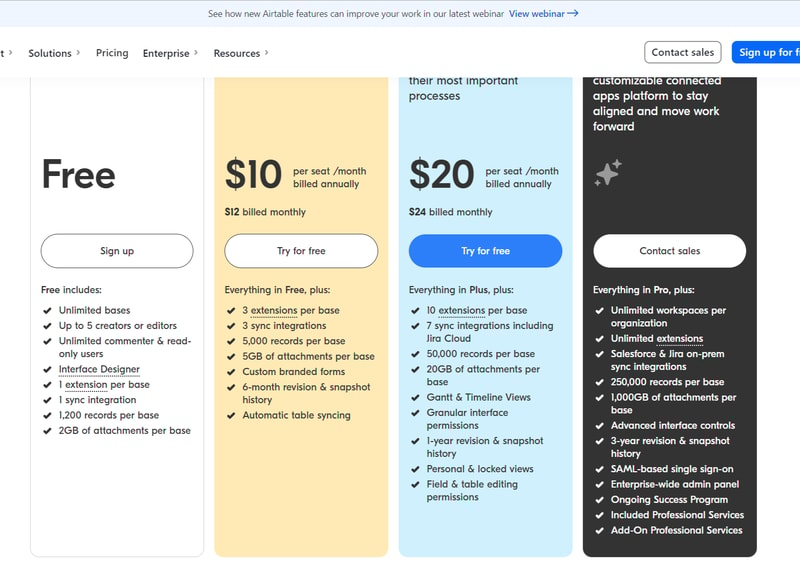
Airtable’s features are grouped into four levels, and the price per seat rises accordingly. A breakdown of each level can be found below:
Note: Airtable has restructured its plans — current tiers are Free, Team, Business, and Enterprise Scale.
Free
- Designed for very small teams or individuals
- Up to 5 editors and unlimited ‘read-only’ users
- Record limits vary by plan
- 2GB of attachments
Team
- For small to medium-sized organizations
- Eliminates information silos within a team by connecting applications
- More advanced collaboration features
- Higher record limits per base
- 5GB of attachments
Business
- For medium to large organizations who need to streamline and collaborate on top-priority data
- More advanced features
- Higher record limits per base
- 20 GB of attachments
Enterprise Scale
- Price is customized to your organization’s needs
- Enterprise-wide admin panel
- For organizations who need a scalable product to keep up with workloads
- Unlimited workspaces per organization
- Highest record limits per base
- 1,000 GB of attachments
See Airtable pricing for current rates.
How Airtable Works
Airtable was built to be as customizable as possible, giving users the ability to display their data in a way that meets their specific needs—whether that means a simple presentation or a more complex one.
Getting started is simple.
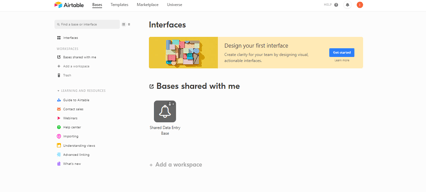
You start with an empty Airtable, which is essentially your ‘base.’ From here, you just fill it with your data. You can either use a template and bring in data from another source or construct a database from scratch. Whatever the case, you can leverage Airtable’s features to tailor the platform to meet your needs. For example, you can use the Interface Design feature to visually present data in a way that makes the most sense to you and your team.
Familiarizing and understanding all of Airtable’s features and capabilities may require some effort, but the payoff is worth it. Taking the time to learn the platform will ensure users have full control over their data and workflow management.
Features
Access to Airtable’s numerous features will depend on your subscription and, subsequently, the scalability of your projects. However, all subscription options should include:
- Unlimited bases
- Sync integrations
- The ability to add attachments
- Revision and snapshot history reporting
- Field and editing permissions
- Extension add-ons (e.g., data visualization or reporting extensions)
Airtable also provides:
Customizable Views
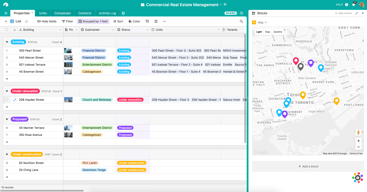
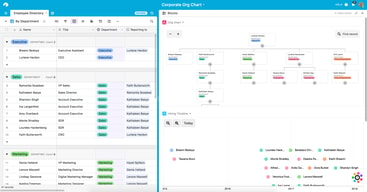
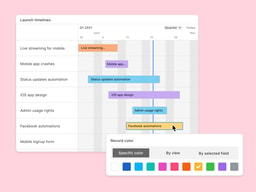
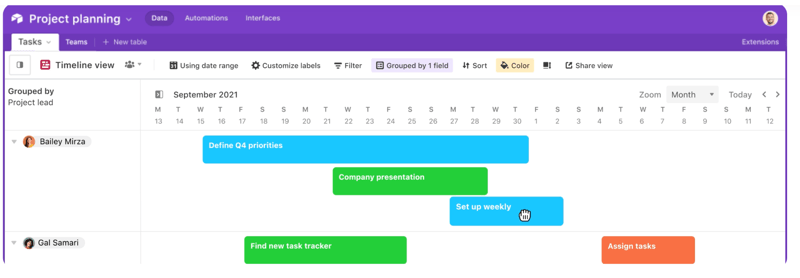
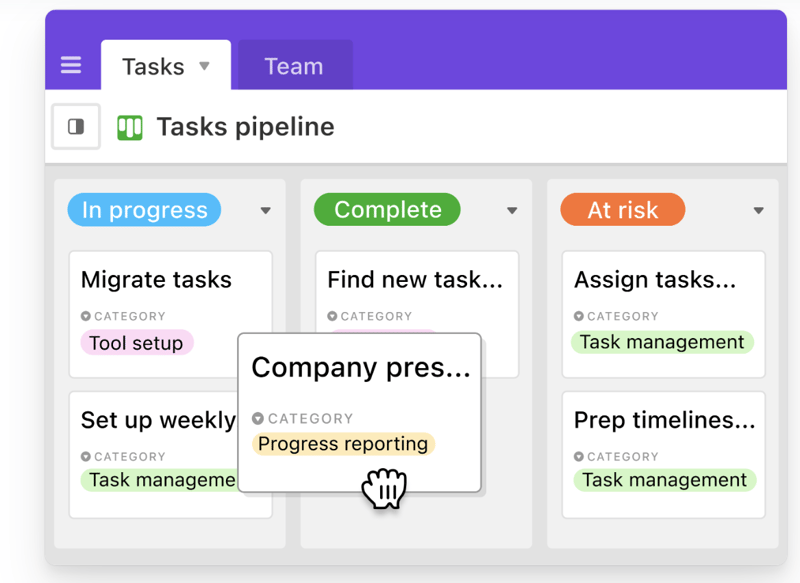
With a click of a button, this feature gives users the flexibility to switch between different data views. Users can view project timelines via the Timeline View, and easily switch to managing team tasks on the collaborative Kanban View. Other viewing options are also available ensuring that you can customize your viewing experience so you can maximize the platform.
The Timeline View
The Kanban View
Automations
Airtable Automations lets users streamline their work processes and boost team efficiency by providing customization options for notifications and creating multi-step workflows. The feature is helpful in terms of tracking project timelines and helping eliminate manual, repetitive tasks. Additionally, it can also minimize the risk of user error.
Syncing
Airtable’s ability to synchronize data means users have a central repository of information that is updated in real-time across all users and departments. It’s a useful tool that promotes seamless collaboration and data integrations, allowing everyone to enjoy a comprehensive understanding of project status or workflows at the speed of need.
Reporting
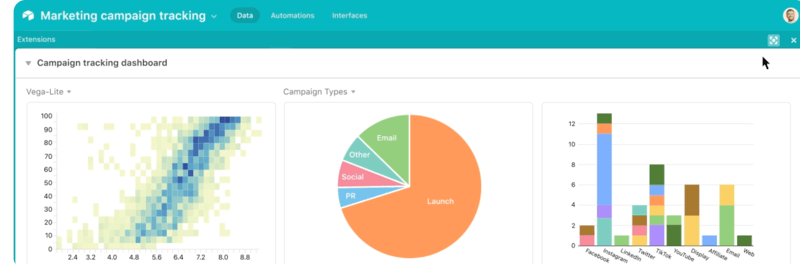
To enhance your project’s reporting capabilities, Airtable’s powerful reporting tools and extensions let users create highly customized reports that visualize your data in a simple understandable way. You can choose from a variety of charts, graphs, and tables to ensure that information is presented in a way that is easy to understand.
Integrations
Airtable offers robust integration that lets you connect the platform to a wide range of software; ensuring that all the project management tools that you use operate seamlessly. Airtable’s integrations mean multiple applications can be streamlined to automatically sync data, share information between different platforms, and automate tasks so workflows can be further improved.
Templates
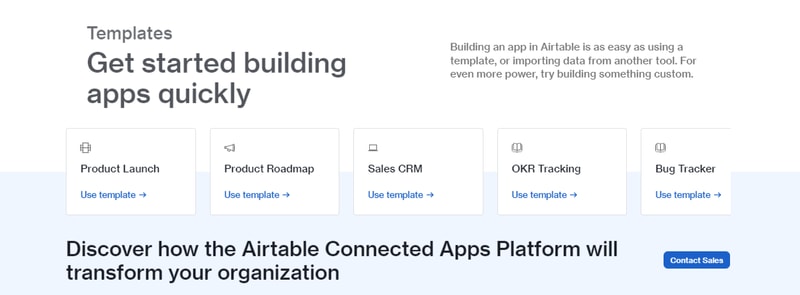
Airtable’s templates can be used to effectively organize every aspect of your project’s workflows. Their pre-designed databases can be used as a great starting point for your projects. Conveniently, Airtable templates are also organized into several categories and industries, which helps you save time and effort from creating a new one from scratch. As always, these pre-populated grids are highly customizable.
Airtable Pros and Cons
Pros
- Facilitates easy collaboration between teams with company-wide visibility of plans, calendars, and workflows.
- Both Google and non-Google users can take advantage of all the features and integrations to support workflow management and collaboration
- Highly customizable bases and effective reporting features
Cons
- The platform’s user interface can be complicated for beginners
- Requires a significant learning curve
AI Features
Airtable has also introduced AI features, including an AI field type for summarization, categorization, and text generation directly within your bases.
Airtable Alternatives
A great way to decide whether Airtable is the right software for you is to compare it to other options in the workflow management space.
Eliminate the hassle of comparing options by choosing from your top choices below. With the ability to review features and relevant information in one place, you can utilize our comprehensive product reviews to gather the necessary data you need to make well-informed decisions.
ClickUp
An all-in-one project management application, Clickup is designed to be used across any industry. From solo users to larger organizations, Clickup focuses on task management to help teams streamline their workflow.
ClickUp offers numerous workflow features and data views, including a built-in Table View to ensure your team always has access to a condensed, actionable snapshot of your projects.
Notion
Designed for smaller teams or individuals, Notion is an all-in-one SaaS note-taking app and database for streamlined project management. Some features include:
- A web clipper so you can easily save images and sites
- A real-time messenger feature
- Allows for category and page hierarchy organization
Hive
With a focus on automation tools, Hive aims to simplify overly complicated work processes through email and task automation. Boasting a user-friendly dashboard, Hive aims to help teams of all sizes automate time-consuming work tasks to give time back to a project’s creation and growth.
A Final Findstack Opinion
Overall, Airtable is a highly comprehensive and customizable workflow management application.
Airtable’s app offers flexibility by allowing you to switch views and integrate reporting extensions, ensuring your data is suitable for various applications. Additionally, its extensive list of integrations enables you to consolidate all your preferred tools and their data in one convenient location.
It’s important to keep in mind, however, that these features are only useful for those willing to take the time to learn them. Airtable’s interface can be quite overwhelming for new users so our advice is to scale to higher subscription packages only after you’ve taken the time to learn the app’s features and familiarize yourself with them.

Compare Airtable with other popular tools in the same category.
It's ability to manage complexity plus simplicity. Very easy to use in a basic way, plus lots of connections to build out for different use cases. We use it for pipeline management and due diligence.
Each row is a bit too inter dependant to each other. The interfaces are good build still quite basic Vs powerbi or other platforms.
Managing a big pipeline and moving away from Excel
Airtable is so easy that you'll have your database up in no time. Then you can make different views to share with anyone! I'm starting to love Interface Builder too.
Making calculated field content permanent requires scripting. Using a button to initiate the script is a good workaround. If Airtable had a field type that would take a calculated field as input and use the output just once, that would be helpful.
Our data is managed in a system that was developed ten years ago. Using an Airtable extension, Data Fetcher, we can automatically import a JSON file from that old system. Airtable allows us to present the information how we want it to appear. We are also able to add additional custom information. Then I share different Airtable views with each of our schools.
Airtable is visually appealing with strong integrations. We use it everyday and share content with clients easily.
Honestly, just the price for a full team to utilize.
Airtable allows us to track invoicing and create and share content with a simplified approval and revision process.
I like this outstanding database and cloud collaboration platform. Its easy-to-implement, got lots of wonderful features good for project management, coordination, teamwork and delivery. Have found it integrates well with productivity tools like Asana and Slack. Which greatly simplifies workflow. Looks like a solution we will be using frequently for sure.
At first was a challenge to get about it. Steep learning curve and all. But user support has always been there to guide us. So no real complaints. It's good enough.
Basically it solves the challenge of task and project management, collaboration and coordination, teamwork and workflow management for us. Through connection platforms that simplify processes, streamline operations.
Airtable is easy to use and has all the functionality or excel and a database. We use it for many different things . Onboarding staffs right through to actual end user software we provide.
It's not really designed for mass scale/ real time solutions. Overall it's a great tool with limits.
Best but i need sometimes to learn more about it

It is highly customizable and easy to use. I use it as a form, CRM, and task manager and it's damn easy to implement and track the output. It supports integration with all the major business tools with helpful resources and good support.
As far as disliking, I am quite satisfied with Airtable and found nothing to disappoint with.
It helps me manage the internal database along with tracking tasks efficiently. Sometimes it also works as a data source on our website.
The ability to transform to the database to an app Customizable, alot of templates to choose and increases productivity in our workload Airtable experience is very user-friendly interface and navigation is easy
The platform has limitations and restrictions
User interface is so clean
Airtable has many futures to meet our services. The features are well presented and designed making it easier to operate. Airtable is mach flexible, shifting place to place thus saves time.
In use for two years, we have not yet discovered any dislike, Airtable has been a platform to have for our Project Management.
Airtable has made it easy to manage our project and task.
Easy to use, yet as complex as you want it to be. Beginner friendly and great interface
Some of the formulas can get complicated and hard to understand, I would like more documentation rather than community forums
We are a chatbot building company and offer Airtable as a native integration for users who need to integrate with a database
Customizable, alot of templates to choose and increase productivity in our workload. It has great features ie document management, database and data workflow. User-friendly interface
for me i have great experience since last year cause it has been serving me better
I love how user interface is clean
The platform's strength lies in its intuitive interface, providing a user-friendly experience for users with varying levels of technical expertise. The ability to seamlessly organize, collaborate, and customize databases according to specific needs has streamlined our workflows significantly. One of Airtable's standout features is its flexibility; the platform serves as a dynamic canvas where users can design databases, project trackers, and collaborative workspaces tailored to their requirements. It's also very easy to integrate.
There is a certain learning curve associated with more advanced features and configurations. The extension panel is not always very complete.
It has transformed our approach to data management, offering a unique blend of versatility and collaboration that stands out in the market.
Much better than Excel, very graphic and colorfull.
Nothing, it as lots of features and is easy to integrate and implement.
Is helping me organize and view my inventory in multiple ways.
Air table is a great tool to follow up on my projects. Creating noneditable views for my customers avoids many questions, since they can see all changes in real time.
I have been using AirTable for a year and as of now, I have nothing negative to say about it. The longer you use it the most indispensable it becomes for your business.
It has been a year since Im using Airtable and it helps in several ways, the most notable thing about air table in my business is the way it helps to organize and manage data. The AirTable is very versatile since you can create customs tables with fields. The charts are also very useful for data analysis.
It assist me to manage my project and I monitoring every single detail, as keeping track of different work at a time in a list. I really like filter feature. Very easy to use interface and ease of integration. I almost daily use to keep my work on track.
Pricing is a factor for disliking, There are lots of modification capabilities are in limited.
I choose airtable because it offers me lots of organizing choices that allow me to keep track of my every single project on my fingers. I've been able to centralize my data, strealime projects management and team collaboration.

In this we can have view of different ways for the same data
Best tool which does not have any dislike
We were using roadmap for our marketing team data in google sheet but now we are using this and it is good
Allows teams to collaborate and manage project workflows
Can be a little overwhelming when you first start using it. It's only as good as your or your team make it
Allows colleagues from different teams to collaborate across workflows
I love Airtable's flexibility. It's easy to learn to use for basic database construction and as an information hub, yet capable of complex relationships.
I still struggle at times with Airtable assuming I understand certain jargon or how it names or refers to things.
Airtable is helping me and my team keep a lot of info and links organized and handy to copy/paste or just click to access a URL.
I use Airtable to manage the production of a quarterly magazine. It makes it so incredibly easy for me to assign articles and deadlines, keep track of progress, and maintain a database of contacts.
My only complaint about Airtable is that you can't archive bases or put them into folders. I typically create a new base for every new issue of the magazine, and it would be ideal to be able to archive them once an issue is complete.
Airtable's ability to filter and tag team members makes it so much better than Google Sheets or similar for keeping track of projects and maintaining databases.
Airtable is an incredibly flexible platform that enables me to quickly build proof-of-concept and production assets that have been able to help me at work and home.
It is difficult to be too hard on Airtable because they're constantly building new features. The Automations that they've built in are quite nice, but lacking in a lot of depth. There is a custom scripting capability, but it is limited to JavaScript and not Python, which I'd prefer.
Airtable solves the problem of having to meticulously build out databases just for a proof of concept - something that my company is unable to do on our own. I've built internal tools to help with giving feedback and shoutouts, a CRM to manage a small segment of our business that doesn't fit in with out standard operating procedures, and more.
I use Airtable to track inventory for real estate, retail, and a customer portal. Without Airtable I'm not sure how much time I would spend each week just trying to go through everything.
One downside to Airtable is the form not being able to integrate with a payment method for me.
Airtable solves my inventory problems, loan problems and more
High degree of customizations. I've always been able to find good resources online for customizing my databases and creating templates. I love the continuously work to make the product better and far reaching.
Starting with it can feel daunting. You need some support creating the databases that would be needed specifically for you.
We keep all our service databases and contacts for our company. We also use it for AP and AR record tracking.
Assigning tasks, organizing workload and tagging
better notifications are sometimes needed by my team
Publication schedules for the organization I work at
What I liked the most is Airtable is a friendly user and one of the standout features is its felxibility.
None, Airtable provides a comprehensive solution for organizing, tracking, and managing data.
Airtable is powerful filtering, sorting, and grouping capabilities enable efficient data organization and analysis.
Airtable is extremely easy to use for a wide range of needs. Our organisation uses it every single day. I love the option to have different views such as list, kanban, filtering by columns etc. It took less than a week to integrate into our organisation which was very appealing to me. I appreciate the option to have different projects and within that, different tables.
I don't think there's anything I could fault about Airtable!
We needed a place to easily and clearly list where different clients were at within a workflow and Airtable has been perfect for that. We have definitely saved on time since utilising Airtable. Communication has also improved.
Très facile d’utilisation, fonctionnalités puissantes.
Pas de possibilité d’hébergement sur une machine virtuelle.
Il m’aide à piloter mon activité et à construire une application interactive
The benefits of using Airtable in my profession are very clear. This is an all-purpose toolbox for data management which provides unmatched flexibility for various tasks. Managing projects is so simple because I have tailored the version to suit my needs. Surprisingly its user friendly interface is something that one would not expect from a digital tool.
Although, it can be said that Airtable is very flexible, when it comes to specific sectors, it may be necessary to turn to some other platforms with more refined functionalities. It might not, however, be adequate for complex data modelling in accounting when there are specialized tools which are more efficient than it.
My work has become much easier with airtable as I effortlessly track and report tasks. It’s narrowing the divide between spreadsheets and databases. Appreciate how it has streamlined most of my activities.
I have observed that Airtable helps to custom personalize boards according to the team’s workflow. Projects have been made more orderly and systematic through the boards. Appreciate how it is always syncing in real time, keeping everyone on the team updated. Universe is a nice addition, giving numerous methodologies to use in different projects. Its integration with social media also ensures that we plan our outreach effectively.
Although Airtable has many features, its interface may not always be simple and easy to use. It was quite a patient affair during the set up, and especially in attempting to mold a template to the specific ideas and procedures.
We have simplified our planning and tracking and reduced the time spent on manual updates because of Airtable. Its boards help to provide clarity on tasks and progress to keep projects on track. Consequently, we are able to work better together as a unit and achieve more productive sprints that produce the desired outcomes.
It is more enhanced and easy to use for integration
Not able to view the image in the full form
It is more feasible and whenver the row is added all the details are coming along with it

Airtable is a powerful and flexible tool for storing and managing opportunities. It is easy to use, affordable, and constantly evolving. Airtable is a lifesaver for managing and recieving opportunities for our marketplace. I love that it connects with softrand BOOM I have a functional subscription application.
Airtable can be overwhelming at first. There are a lot of features and options, and it can be a bit complex to learn at first, especially if you are not familiar with relational databases.
I am able to store opportunities I've manually found for my Community. I also use Airtable to recieve opportunities from organizations who want to list their submission on our platform. Summery of use: Organize my work more efficiently Keep track of important deadlines Collaborate with others more easily Make better decisions based on data
Airtable has really changed my app development projects’ management. I especially love the automation feature since it saves life, especially for those repetitive tasks that could take much of my time. Smooth linking between different tables and ability to connect various data. The interface makes it easy for me to create custom views and dashboards, which makes my database work more efficient and streamlined.
Of course, Airtable is definitely a big learning curve when starting with it, just because of everything you can do with Airtable. Another con also that I have experienced with it is the cost it is associated with when you want to integrate advanced features or to bring large number of collaberators in a base.
Airtable has virtually removed the manual handling of my project workflows. With my database needs being organized and automated, I can now undertake the real development. It has proven to be very good for my efficiency and shortened project lengths.