

Unclaimed: Are are working at Airtable ?
Airtable Reviews: 4.6/5 — Highly Rated
Airtable is a powerful visual project management platform that synergizes data, workflows, and execution teams on a unified dashboard. Streamlining work streams, the platform provides a synced and up-to-date information database that can be accessed by all stakeholders across different departments. Customization is at the heart of Airtable, allowing teams to create personalized apps and a tailored interface allowing easy access to relevant information and giving clear sightlines to the next steps. While customization is a key benefit, it also offers ready-to-use and pre-loaded industry-agnostic templates while extensive integrations and expandability make it scalable and agile.

| Capabilities |
API
|
|---|---|
| Segment |
Small Business
Mid Market
Enterprise
|
| Deployment | Cloud / SaaS / Web-Based, Mobile Android, Mobile iPad, Mobile iPhone |
| Support | 24/7 (Live rep), Chat, Email/Help Desk, FAQs/Forum, Knowledge Base, Phone Support |
| Training | Documentation |
| Languages | English |







Workflow management is a critical part of any job. It’s what keeps a project moving, and a team motivated to see it through. But, how do you support effective workflow management?
You start with understanding better what tools, platforms, and software are out there that can support your team’s ability to effectively manage workflow and collaborate within their teams and beyond.
To that end, we’ve identified Airtable as a strong market leader in workflow management software. So, let’s dive into Airtable’s features, capabilities, and price points to help you better understand your options.

What Is Airtable?
Airtable is a workflow management application with highly customizable database management tools used predominantly for collaborative project management.
The focus on having accessible, easy-to-use software to help with project management is increasing, and Airtable is a top choice. It features a familiar spreadsheet interface, but unlike traditional spreadsheet software that only records data, Airtable can also help you organize, sync, and manage your data and customize exactly how you need it.
For example, let’s say you’re using Airtable to manage vendor management workflow for an event. This would entail designing the database to include fields for:
- Vendors’ contact details
- Links to their websites
- Inputting key information, such as lead times, product availabilities, and prices
- Uploading order confirmations
- Uploading invoices
- Important notes and comments about the vendor
The option to invite collaborators to this database is also critical so individual users can easily update data in real-time. Having all these features in a single platform means users can clearly follow the progression of a particular project and keep everyone in the team up-to-date on their tasks and next steps.
How Much is Airtable
Airtable’s interface is very flexible and is ideal for numerous industries. While it has been marketed to larger corporations, most users who have had hands-on experience with the platform say that it is just as useful for smaller businesses.
This is reflected in Airtable’s pricing, which follows a monthly subscription model. This subscription cost increases depending on the number of features and ‘seats’ you choose to purchase, making it highly scalable depending on your organization’s needs.
Airtable’s features are grouped into four levels, and the price per seat rises accordingly. A breakdown of each level can be found below:
Note: Airtable has restructured its plans — current tiers are Free, Team, Business, and Enterprise Scale.
Free
- Designed for very small teams or individuals
- Up to 5 editors and unlimited ‘read-only’ users
- Record limits vary by plan
- 2GB of attachments
Team
- For small to medium-sized organizations
- Eliminates information silos within a team by connecting applications
- More advanced collaboration features
- Higher record limits per base
- 5GB of attachments
Business
- For medium to large organizations who need to streamline and collaborate on top-priority data
- More advanced features
- Higher record limits per base
- 20 GB of attachments
Enterprise Scale
- Price is customized to your organization’s needs
- Enterprise-wide admin panel
- For organizations who need a scalable product to keep up with workloads
- Unlimited workspaces per organization
- Highest record limits per base
- 1,000 GB of attachments
See Airtable pricing for current rates.

How Airtable Works
Airtable was built to be as customizable as possible, giving users the ability to display their data in a way that meets their specific needs—whether that means a simple presentation or a more complex one.
Getting started is simple.
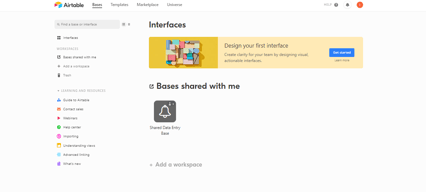
You start with an empty Airtable, which is essentially your ‘base.’ From here, you just fill it with your data. You can either use a template and bring in data from another source or construct a database from scratch. Whatever the case, you can leverage Airtable’s features to tailor the platform to meet your needs. For example, you can use the Interface Design feature to visually present data in a way that makes the most sense to you and your team.
Familiarizing and understanding all of Airtable’s features and capabilities may require some effort, but the payoff is worth it. Taking the time to learn the platform will ensure users have full control over their data and workflow management.
Features
Access to Airtable’s numerous features will depend on your subscription and, subsequently, the scalability of your projects. However, all subscription options should include:
- Unlimited bases
- Sync integrations
- The ability to add attachments
- Revision and snapshot history reporting
- Field and editing permissions
- Extension add-ons (e.g., data visualization or reporting extensions)
Airtable also provides:
Customizable Views
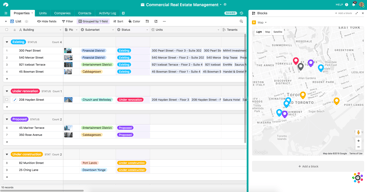
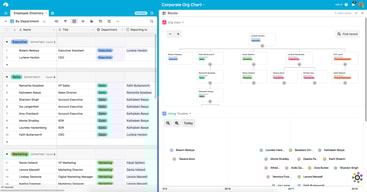
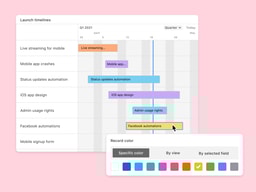
With a click of a button, this feature gives users the flexibility to switch between different data views. Users can view project timelines via the Timeline View, and easily switch to managing team tasks on the collaborative Kanban View. Other viewing options are also available ensuring that you can customize your viewing experience so you can maximize the platform.
The Timeline View

The Kanban View

Automations
Airtable Automations lets users streamline their work processes and boost team efficiency by providing customization options for notifications and creating multi-step workflows. The feature is helpful in terms of tracking project timelines and helping eliminate manual, repetitive tasks. Additionally, it can also minimize the risk of user error.
Syncing
Airtable’s ability to synchronize data means users have a central repository of information that is updated in real-time across all users and departments. It’s a useful tool that promotes seamless collaboration and data integrations, allowing everyone to enjoy a comprehensive understanding of project status or workflows at the speed of need.
Reporting
To enhance your project’s reporting capabilities, Airtable’s powerful reporting tools and extensions let users create highly customized reports that visualize your data in a simple understandable way. You can choose from a variety of charts, graphs, and tables to ensure that information is presented in a way that is easy to understand.

Integrations
Airtable offers robust integration that lets you connect the platform to a wide range of software; ensuring that all the project management tools that you use operate seamlessly. Airtable’s integrations mean multiple applications can be streamlined to automatically sync data, share information between different platforms, and automate tasks so workflows can be further improved.

Templates
Airtable’s templates can be used to effectively organize every aspect of your project’s workflows. Their pre-designed databases can be used as a great starting point for your projects. Conveniently, Airtable templates are also organized into several categories and industries, which helps you save time and effort from creating a new one from scratch. As always, these pre-populated grids are highly customizable.

Airtable Pros and Cons
Pros
- Facilitates easy collaboration between teams with company-wide visibility of plans, calendars, and workflows.
- Both Google and non-Google users can take advantage of all the features and integrations to support workflow management and collaboration
- Highly customizable bases and effective reporting features
Cons
- The platform’s user interface can be complicated for beginners
- Requires a significant learning curve
AI Features
Airtable has also introduced AI features, including an AI field type for summarization, categorization, and text generation directly within your bases.
Airtable Alternatives
A great way to decide whether Airtable is the right software for you is to compare it to other options in the workflow management space.
Eliminate the hassle of comparing options by choosing from your top choices below. With the ability to review features and relevant information in one place, you can utilize our comprehensive product reviews to gather the necessary data you need to make well-informed decisions.
ClickUp
An all-in-one project management application, Clickup is designed to be used across any industry. From solo users to larger organizations, Clickup focuses on task management to help teams streamline their workflow.
ClickUp offers numerous workflow features and data views, including a built-in Table View to ensure your team always has access to a condensed, actionable snapshot of your projects.
Notion
Designed for smaller teams or individuals, Notion is an all-in-one SaaS note-taking app and database for streamlined project management. Some features include:
- A web clipper so you can easily save images and sites
- A real-time messenger feature
- Allows for category and page hierarchy organization
Hive
With a focus on automation tools, Hive aims to simplify overly complicated work processes through email and task automation. Boasting a user-friendly dashboard, Hive aims to help teams of all sizes automate time-consuming work tasks to give time back to a project’s creation and growth.
A Final Findstack Opinion
Overall, Airtable is a highly comprehensive and customizable workflow management application.
Airtable’s app offers flexibility by allowing you to switch views and integrate reporting extensions, ensuring your data is suitable for various applications. Additionally, its extensive list of integrations enables you to consolidate all your preferred tools and their data in one convenient location.
It’s important to keep in mind, however, that these features are only useful for those willing to take the time to learn them. Airtable’s interface can be quite overwhelming for new users so our advice is to scale to higher subscription packages only after you’ve taken the time to learn the app’s features and familiarize yourself with them.

Compare Airtable with other popular tools in the same category.
Assigning tasks are extremely easy, keeping track of tasks is also very easy. Also, it is a good place to store documents/files.
Newcomers in the company sometimes have a hard time understanding our bases on airtable since they can be complex.
New features have always been super helpful
The integrations, filters, and user friendly are really helpful for the teams and the company process.
For now, everything is perfect for us. Maybe other flexibility for calendars but it is ok
The tag manager and the updates for the filters has been perfect for our process
It's very didactic, easy to use (once you get a hold of it) and it's just nice to present data in a more graphic and friendly way. It's a prettier excel and much more fun to use.
It can be tricky in the beginning; you might feel overwhelmed. But you soon catch up to it, and it'll change your way of viewing and using data
It is helping me have more clean data and present it in an impactful way without spending a lot of hours creating dashboards
Great way for my leadership team to collaborate and keep all of our notes in one place.
Needs more tutorials (step by step). Possible video or tech support to build platforms.
It supports our ability to share information and work together.

It's easy to use and understand. Its visually appealing and works seamlessly. I love that you can set automations and you can get alerts through Slack or email.
Nothing much. Works just fine too me. It can be a bit difficult for people to learn how to use it in the beginning
Work flows more easily, plus we are able to see what everyone in the team is doing. Makes us more productive and collaborative.

Airtable is fast, secure (supports SSO login as well), provides easy data visualisation and it's from the best tools that can be used from teams to communicate. It can also be used as a task assignment software and thanks to history recall and commenting functionality, teams within an organisation can really talk to other things without being experts on other's team field. For instance a support agent can create a bug request to the development team without the support agent having to access more complicated bug mangament software.
If you don't have a premium plan and you want to synchronise data between two databases, there is a button that synch the data. It's really difficult to find that button. I am searching for it all the time. And with the latest changes on the UI, I am searching even more every time.
Mainly it helps to gather data easily via Airtable forms and process them. It's helping on HR process, managing social media posts schedule thanks to the calendar feature and assigning tasks to team members.
It is a simple interface with a lot of options.
The only downside I see is that some of the equation functions are a little complicated.
Airtable solves a ton of our record keeping issues. The benefits have been that we are able to keep a solid client and product list.
It is simple and yet complex all the while being completely customisable.
Perhaps a click-of-a-button email to all/selected contacts function. You may already have it that I haven't seen without going into the automation section.
AirTable is providing our organisation with a fully functional crm system that is easily customisable without needing to be a coder!

You can use for backend for your applications or you can just use it as it is to leverage all the cool features, build relations between tables and roll-up all relevant info
Sometimes integrating with your app requires that extra step to create the key and connect which is a bit more annoying than just going with default backend but worth it
I needed a tool to store and organize all the content for my startup. We built the MVP using airtable as our database with a modular hierarchical structure and worked perfectly
I love how flexible the spreadsheets are & how you can move the categories around. Plus it organizes it in multiple views. Plus much more! It's way better then the competitors.
nothing. there's nothing that isn't working correctly.
It's helping my team be in constant communication with up to date, up to the minute, accurate live information on the files that we are working on.


