

Unclaimed: Are you working at Airtable?
Airtable Reviews: 4.6/5 — Highly Rated
Airtable is a powerful visual project management platform that synergizes data, workflows, and execution teams on a unified dashboard. Streamlining work streams, the platform provides a synced and up-to-date information database that can be accessed by all stakeholders across different departments. Customization is at the heart of Airtable, allowing teams to create personalized apps and a tailored interface allowing easy access to relevant information and giving clear sightlines to the next steps. While customization is a key benefit, it also offers ready-to-use and pre-loaded industry-agnostic templates while extensive integrations and expandability make it scalable and agile.

| Capabilities |
API
|
|---|---|
| Segment |
Small Business
Mid Market
Enterprise
|
| Deployment | Cloud / SaaS / Web-Based, Mobile Android, Mobile iPad, Mobile iPhone |
| Support | 24/7 (Live rep), Chat, Email/Help Desk, FAQs/Forum, Knowledge Base, Phone Support |
| Training | Documentation |
| Languages | English |







Workflow management is a critical part of any job. It’s what keeps a project moving, and a team motivated to see it through. But, how do you support effective workflow management?
You start with understanding better what tools, platforms, and software are out there that can support your team’s ability to effectively manage workflow and collaborate within their teams and beyond.
To that end, we’ve identified Airtable as a strong market leader in workflow management software. So, let’s dive into Airtable’s features, capabilities, and price points to help you better understand your options.
What Is Airtable?
Airtable is a workflow management application with highly customizable database management tools used predominantly for collaborative project management.
The focus on having accessible, easy-to-use software to help with project management is increasing, and Airtable is a top choice. It features a familiar spreadsheet interface, but unlike traditional spreadsheet software that only records data, Airtable can also help you organize, sync, and manage your data and customize exactly how you need it.
For example, let’s say you’re using Airtable to manage vendor management workflow for an event. This would entail designing the database to include fields for:
- Vendors’ contact details
- Links to their websites
- Inputting key information, such as lead times, product availabilities, and prices
- Uploading order confirmations
- Uploading invoices
- Important notes and comments about the vendor
The option to invite collaborators to this database is also critical so individual users can easily update data in real-time. Having all these features in a single platform means users can clearly follow the progression of a particular project and keep everyone in the team up-to-date on their tasks and next steps.
How Much is Airtable
Airtable’s interface is very flexible and is ideal for numerous industries. While it has been marketed to larger corporations, most users who have had hands-on experience with the platform say that it is just as useful for smaller businesses.
This is reflected in Airtable’s pricing, which follows a monthly subscription model. This subscription cost increases depending on the number of features and ‘seats’ you choose to purchase, making it highly scalable depending on your organization’s needs.
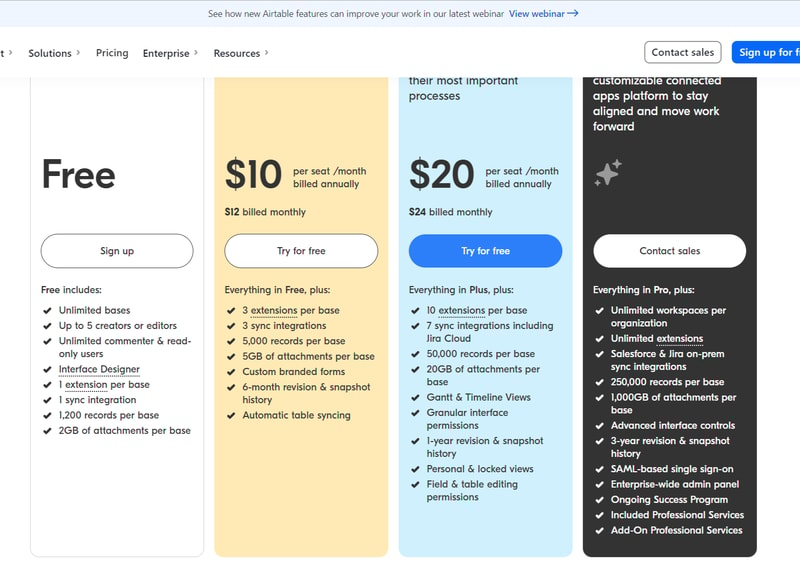
Airtable’s features are grouped into four levels, and the price per seat rises accordingly. A breakdown of each level can be found below:
Note: Airtable has restructured its plans — current tiers are Free, Team, Business, and Enterprise Scale.
Free
- Designed for very small teams or individuals
- Up to 5 editors and unlimited ‘read-only’ users
- Record limits vary by plan
- 2GB of attachments
Team
- For small to medium-sized organizations
- Eliminates information silos within a team by connecting applications
- More advanced collaboration features
- Higher record limits per base
- 5GB of attachments
Business
- For medium to large organizations who need to streamline and collaborate on top-priority data
- More advanced features
- Higher record limits per base
- 20 GB of attachments
Enterprise Scale
- Price is customized to your organization’s needs
- Enterprise-wide admin panel
- For organizations who need a scalable product to keep up with workloads
- Unlimited workspaces per organization
- Highest record limits per base
- 1,000 GB of attachments
See Airtable pricing for current rates.
How Airtable Works
Airtable was built to be as customizable as possible, giving users the ability to display their data in a way that meets their specific needs—whether that means a simple presentation or a more complex one.
Getting started is simple.
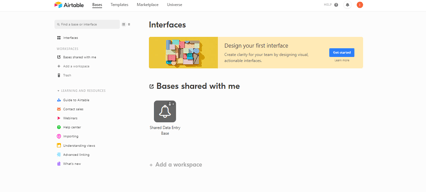
You start with an empty Airtable, which is essentially your ‘base.’ From here, you just fill it with your data. You can either use a template and bring in data from another source or construct a database from scratch. Whatever the case, you can leverage Airtable’s features to tailor the platform to meet your needs. For example, you can use the Interface Design feature to visually present data in a way that makes the most sense to you and your team.
Familiarizing and understanding all of Airtable’s features and capabilities may require some effort, but the payoff is worth it. Taking the time to learn the platform will ensure users have full control over their data and workflow management.
Features
Access to Airtable’s numerous features will depend on your subscription and, subsequently, the scalability of your projects. However, all subscription options should include:
- Unlimited bases
- Sync integrations
- The ability to add attachments
- Revision and snapshot history reporting
- Field and editing permissions
- Extension add-ons (e.g., data visualization or reporting extensions)
Airtable also provides:
Customizable Views
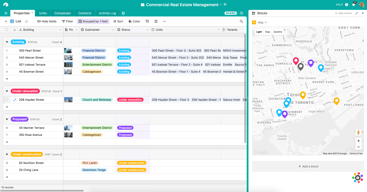
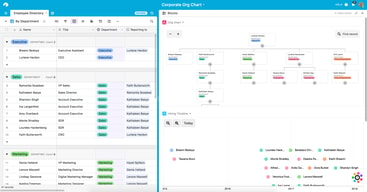
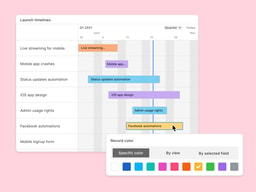
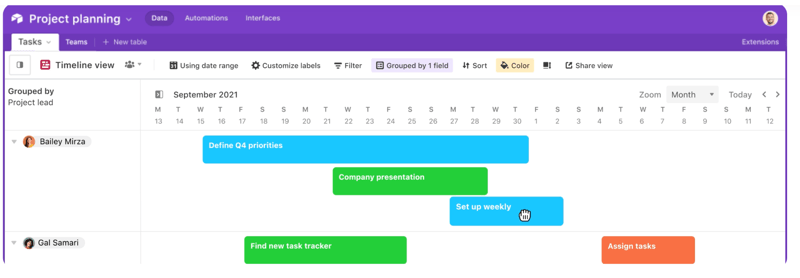
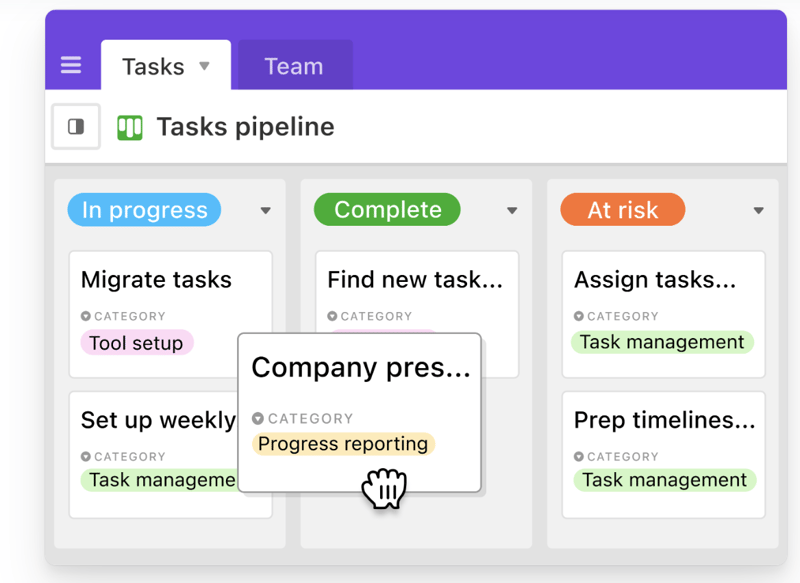
With a click of a button, this feature gives users the flexibility to switch between different data views. Users can view project timelines via the Timeline View, and easily switch to managing team tasks on the collaborative Kanban View. Other viewing options are also available ensuring that you can customize your viewing experience so you can maximize the platform.
The Timeline View
The Kanban View
Automations
Airtable Automations lets users streamline their work processes and boost team efficiency by providing customization options for notifications and creating multi-step workflows. The feature is helpful in terms of tracking project timelines and helping eliminate manual, repetitive tasks. Additionally, it can also minimize the risk of user error.
Syncing
Airtable’s ability to synchronize data means users have a central repository of information that is updated in real-time across all users and departments. It’s a useful tool that promotes seamless collaboration and data integrations, allowing everyone to enjoy a comprehensive understanding of project status or workflows at the speed of need.
Reporting
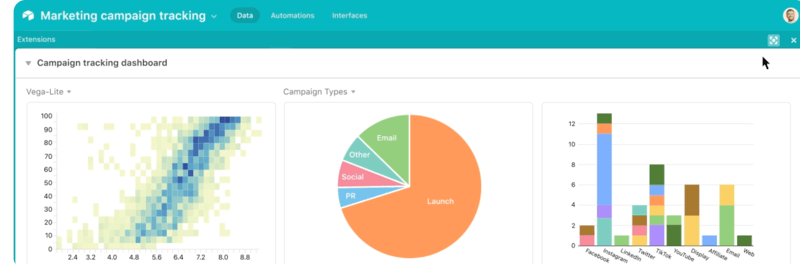
To enhance your project’s reporting capabilities, Airtable’s powerful reporting tools and extensions let users create highly customized reports that visualize your data in a simple understandable way. You can choose from a variety of charts, graphs, and tables to ensure that information is presented in a way that is easy to understand.
Integrations
Airtable offers robust integration that lets you connect the platform to a wide range of software; ensuring that all the project management tools that you use operate seamlessly. Airtable’s integrations mean multiple applications can be streamlined to automatically sync data, share information between different platforms, and automate tasks so workflows can be further improved.
Templates
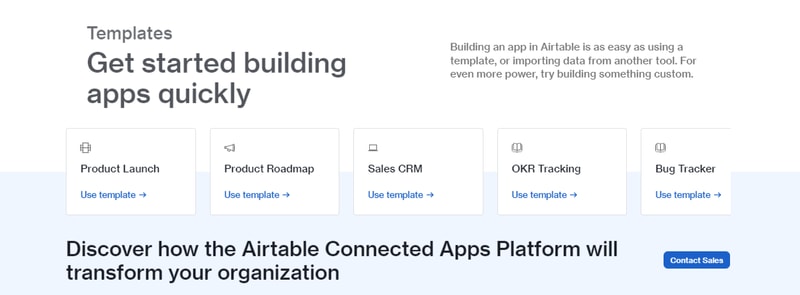
Airtable’s templates can be used to effectively organize every aspect of your project’s workflows. Their pre-designed databases can be used as a great starting point for your projects. Conveniently, Airtable templates are also organized into several categories and industries, which helps you save time and effort from creating a new one from scratch. As always, these pre-populated grids are highly customizable.
Airtable Pros and Cons
Pros
- Facilitates easy collaboration between teams with company-wide visibility of plans, calendars, and workflows.
- Both Google and non-Google users can take advantage of all the features and integrations to support workflow management and collaboration
- Highly customizable bases and effective reporting features
Cons
- The platform’s user interface can be complicated for beginners
- Requires a significant learning curve
AI Features
Airtable has also introduced AI features, including an AI field type for summarization, categorization, and text generation directly within your bases.
Airtable Alternatives
A great way to decide whether Airtable is the right software for you is to compare it to other options in the workflow management space.
Eliminate the hassle of comparing options by choosing from your top choices below. With the ability to review features and relevant information in one place, you can utilize our comprehensive product reviews to gather the necessary data you need to make well-informed decisions.
ClickUp
An all-in-one project management application, Clickup is designed to be used across any industry. From solo users to larger organizations, Clickup focuses on task management to help teams streamline their workflow.
ClickUp offers numerous workflow features and data views, including a built-in Table View to ensure your team always has access to a condensed, actionable snapshot of your projects.
Notion
Designed for smaller teams or individuals, Notion is an all-in-one SaaS note-taking app and database for streamlined project management. Some features include:
- A web clipper so you can easily save images and sites
- A real-time messenger feature
- Allows for category and page hierarchy organization
Hive
With a focus on automation tools, Hive aims to simplify overly complicated work processes through email and task automation. Boasting a user-friendly dashboard, Hive aims to help teams of all sizes automate time-consuming work tasks to give time back to a project’s creation and growth.
A Final Findstack Opinion
Overall, Airtable is a highly comprehensive and customizable workflow management application.
Airtable’s app offers flexibility by allowing you to switch views and integrate reporting extensions, ensuring your data is suitable for various applications. Additionally, its extensive list of integrations enables you to consolidate all your preferred tools and their data in one convenient location.
It’s important to keep in mind, however, that these features are only useful for those willing to take the time to learn them. Airtable’s interface can be quite overwhelming for new users so our advice is to scale to higher subscription packages only after you’ve taken the time to learn the app’s features and familiarize yourself with them.

Compare Airtable with other popular tools in the same category.

It has a great many uses for organizations big or small
The support is terrible, as in nonexistent. Critical or small issues, none are supported by the Airtable Team
I'd like to solve problems with Airtable, but they refuse to help with why certain features are not working, and their submit a ticket button just shows a large X when you try to submit a support ticket

The software offers an amazing amount of flexibility and capability.
Not as much a dislike as a barrier; It takes a lot of time to become competent in the software.
I wanted to use the software as a workflow tool, tracking certain aspects of my practice; For example, the number of clients who have businesses.
It is a great way to maximize data previously stored in a spreadsheet. It offers great views and data segmentation options.
It is trying to fit into too many spaces. I don't find it effective as a Kansan board or content manager. I think they should stay focused on the database features and maximize ways to view and share the data stored. Increasing the number of products integrations offered for free and simplified integration processes would also be beneficial.
Organizing and sharing a roadmap of work. We have managed to consolidate the data into a way that is meaningful, but it would have been easier to do and share in a tool created for this purpose.
I was a data analyst in a past life ... I should be the ideal Airtable user. I like the concept of building your own software to your immediate business needs. However...
I don't know of an easy way to transport the environments you've built in Excel/Google Sheets over to Airtable. It may be there, but there is a steep learning curve that I haven't conquered yet.
I wanted to build a Sales Prospecting Tracking environment similar to what I had in Google Sheets and Excel. Were it quicker to get started in Airtable, I imagine I'd have realized some benefits.
I like that I can track my leads in one place and filter views, etc. It also zaps data into Hubspot and Salesforce.
It's really sensitive, and inconsistent. It requires a lot of manual work.
Zapping data from Airtable to other platforms can be challenging. Benefits are that it works most of the time.
Airtable is great for those that are coming from Excel or Sheets and prefer a spreadsheet display. Airtable offers the ability to write your own scripts and create automation. Super useful for those with the time to learn it.
There is a definite learning curve to Airtable. It has a ton of versatility and a ton of ways to view the same data, which, while helpful, is easy to get lost within. On-boarding new team members take a long time, and there is often pushback in getting them to use it.
We use Airtable for everything - product tracking, notes, sprint tracking, Gantt charts, general tasks, reference materials, etc.
Great database and really well thought through design Easy to integrate into applications
They DO NOT respond to questions about upgrading. I have submitted the form 3x and haven't heard. I'm already paying you. What does it take to speak to someone to potentially pay more?
Basic database for application

I like how easy they are easy to fill out and straight to the point. The website is very organized and easy to navigate.
You have to pay for more premium features but that is to be expected. I recently started using it for my own personal business so I don't have any other major dislikes.
It is easy to set up. It will allow me to be gathered more information with my audience and potential clients.
Lots of ways to collaborate in one and free
Think MS Office is better (fulfils all the same abilities and more)
Good for group collaborations, lack compatibility and freedom to do what I want (too constrained)
I use this platform for my sales reps can collect customer information with a series of questions, which gets put directly into a spreadsheet.
The spreadsheet lacks all excel features. You can’t use formalas, and there’s 0 analytics that can be done!
This allows my sales reps to collect info, but they can’t go into the spreadsheet after to take the info or collect anyone’s personal info, or change anyone’s info.
The idea seems great. But maybe it’s for larger businesses that have dedicated personnel to focus on this software to get it rolling.
Big time commitment for a sole person to go through.
No benefits yet. More confusing.
Blocks and templates create powerful new ways to visualize data easily.
Unless you're paying for premium features, Google Docs is better and free.
Airtable has helped us identify ways to organize complex projects, such as new product development.
How easy it is to use. Doesnt take long to learn your way around the program
Nothinf it is amazing and i do not dislike anything
It makes everything simply from the hiring applications to termination papers
It's a very good option because I was able to store my files and organize them by tables and alphabetically
I did not like that it can be slow at times but it improves in a matter of minutes
It was quite beneficial to organize information in an easy and fast way
So far it is easy to use and shows promise in helping me organize a variety of projects
Being asked to leave a review in order to secure an educational discount on the Pro version. I don't feelcomfortable recommending until I know more about it.
Finding a way to manage multiple projects individually, and perhaps with team members once I become more comfortable
Cross platform capability. Real time collaboration features. Customizable views to suit multiple users
Cloud hosting makes interface slow and laggy. Cloud hosting also raises security concerns. No option for local hosting and no intention to offer it soon. Lack of integration with mainstream office applications such as Microsoft OneNote or outlook. Continued UI bugs - particularly with file attachment system. Customer service responds quickly but has yet to take seriously any reported bugs or requests for feature upgrades. Lack of any real tools to perform quantitative analysis Rudimentary print interface limits usefulness as a report generation tool
Activity and issue tracking. Has allowed for much higher team integration in reporting and tracking progress and has increased level of collaboration and insight across the organisation
Airtable has been adequate as a CRM for our nonprofit social enterprise during its first two fiscal years, but we may switch to salesforce as we grow.
Airtable can be clunky, and its interface is less intuitive than other CRMs
Airtable has been valuable as a CRM for our nascent nonprofit, particularly for a team working remotely from several cities
I like the free credits. I like that it's supposed to do a lot of different things (even though I don't know how to do most of it).
I dislike the the integrations, I dislike setting up the automations, I want to like the interface but it's too complicated and time consuming to set.
Honestly nothing. We use airtable as a backup server for jot form.
Connects will with Slack. Has good basic/free features.
Not very comprehensive. If you're looking for true project management software, this only scrapes the surface. I run a marketing team and we switched to Asana.
We used Airtable for project management and it just didn't have enough features. I couldn't accurately track project/task completion by team members and dates.
I like the ease of using and creating surveys for others.
The loading and processing can take an incredibly long time.
Connection with employees and clients.
Airtable offers a robust set of features that are very beneficial for managing and organizing data. The interface is user-friendly and intuitive, making it easy for our team to collaborate and keep track of our projects. The versatility of the tool is impressive, with a wide array of applications and integrations that can be customized to suit our specific needs.
ur startup was initially attracted to Airtable due to its comprehensive features. However, when our financial circumstances changed and we needed to adjust our plan, we found Airtable's support to be lacking. While they did respond to our communications, there was a distinct lack of flexibility or understanding regarding our situation. Despite numerous attempts to negotiate and propose alternative solutions, the responses we received were rigid and dismissive of our particular circumstances. This experience has shown us that while Airtable may be a practical tool for stable businesses, it may not be the best fit for startups that need agility and understanding from their service providers. Based on our experience, we recommend startups to carefully consider the terms of their contract and the level of customer support before choosing Airtable.
Airtable has been instrumental in solving several organizational and data management problems for our startup. With its robust features, we've been able to centralize our data, streamline our project management, and improve our team collaboration. The ability to customize fields and views has made it easier for us to track progress, assign tasks, and manage deadlines. This has significantly reduced the time spent on administrative tasks and allowed us to focus more on our core business operations. Additionally, the integration capabilities of Airtable have allowed us to seamlessly connect with other tools we use, creating a more efficient workflow. However, the challenge we've faced is Airtable's lack of flexibility in contract adjustments, which has posed a financial strain on our startup during challenging times. Despite the operational benefits we've gained, this issue has dampened our overall experience.

The interface is great- I found that it was easier to navigate than a trello- and integrated all of of my use-cases into one space.
Tableau just does everything better- and not having our entire team on Airtable made it challenging
-Data visualization, -data monitoring, -Project management and other reporting opportunities
The automations and integrations available.
The customer support. Kris was the absolute worst to deal with and is why I decided to cancel. Unbelievably rude.
It helped me primarily by keeping track of content production for our team. However, if you run into issues, support is a nightmare to deal with.
Airtable can be helpful when you have it set up correctly and is really nice to have a visual calendar for what your timeline of campaigns might look like. It's also nice to be able to see what other people on your team might be working on.
If your administrator or person who set up the airtable didn't do it right it can be a bit confusing to keep track of projects. Our team was using it for marketing campaigns and it just was not the right use case for Airtable.
It was helpful to see the campaign timelines and how they would progress and it also was helpful to see what teammates were doing so that we could all stay on track with our work.
It seems like it could maybe be a bit more useful than excel, but I've yet to find a situation where it could do something excel couldn't.
The app feels very unnecessary when you can get google sheets for free.
Airtable makes tables. Its really similar to excel or google sheets. We have not realized any benefits.
The Comprehensive nature of the site and ability to include a wide variety of information
The pre-filled tables, etc were great for example but not functional in set-up
Project management and CRM. Benefits is connectivity of info entered but very complicated
Is interesting to be able to upload pictures and attachments. I like the fact it has all the characteristics of excel.
I have lost information and my trust plumbed. I can't trust is not loosing my data.
I was able to co-work in real time and collaborate with my peers.
Nothing it's hard do use and has many bugs
Everything it's constantly closing and freezing
None