

Unclaimed: Are you working at Asana?
Asana Reviews: 4.3/5 — Solid Choice
Considered one of the pioneering cloud-based project management tools, Asana offers four views for its users – List View, Timeline, Calendar, and Boards – all of which help teams get both a macro and micro view of all the moving parts of projects and tasks. It provides a comprehensive roadmap of ongoing projects from start to finish, clearly outlining dependencies, project milestones, and feedback and approval processes. For project managers, strong reporting capabilities that show completion rates, individual workloads, and potential delays just to name a few create opportunities for real-time project optimization, collaboration, stronger forecasting, and better planning for future similar projects.





| Capabilities |
API
|
|---|---|
| Segment |
Small Business
Mid Market
Enterprise
|
| Deployment | Cloud / SaaS / Web-Based, Mobile Android, Mobile iPad, Mobile iPhone |
| Support | 24/7 (Live rep), Chat, Email/Help Desk, FAQs/Forum, Knowledge Base, Phone Support |
| Training | Documentation |
| Languages | English |
Asana Pros and Cons
- Tons of great integrations
- Easy to use and clean environment
- Lots of timeline tracking tools
- Automation features built-in
- Various customization options
- No budgeting or invoicing features
- The volume of features can be overwhelming
- No time tracking feature
- The volume of features can be overwhelming
- No time tracking feature








Asana cut its free plan from 15 users to 2, and a great deal of published information has not caught up. Accounts created on or after 12 November 2025 get two seats on the Personal plan. Older accounts keep a legacy allowance of up to ten, but lose it permanently if they downgrade and re-upgrade. If you are choosing Asana because you heard the free tier supports a small team, that is no longer true.
- What it is: A project management platform for tracking work across tasks, projects, portfolios, and goals.
- Best for: Mid-size and larger teams coordinating structured work across departments, where portfolios and goals matter.
- Pricing: Personal free for 2 users. Starter €10.99, Advanced €24.99 per user per month billed annually. Enterprise is custom. Verified in July 2026.
- The honest catch: Beyond the free-plan change, AI Studio credits are allocated per billing account rather than per user, so a large team shares one pool.
What Is Asana?
Asana is one of the two or three products that defined modern work management. Its model is a hierarchy: tasks belong to projects, projects roll into portfolios, portfolios connect to goals. That structure is why larger organizations choose it. When an executive asks how a quarterly objective is progressing, Asana can answer from work people are actually doing rather than from a status document.
That focus also explains where it is weaker. Asana is less flexible than monday.com, less spreadsheet-like than Smartsheet, and less simple than Trello. It rewards organizations that want a consistent structure imposed across teams, and frustrates ones that want each team to work its own way.
The independent evidence base is very large, with more than 11,000 reviews on G2 alone, and satisfaction scores remain strong despite the free-plan controversy.
How Asana Works
- Tasks, projects, portfolios, goals. The hierarchy is the product, and portfolios and goals are what separate Advanced from Starter.
- Multiple views. List, board, and calendar on every plan, with timeline and Gantt from Starter.
- Automation. Unlimited automations from Starter, which is more generous than competitors that meter them.
- Workload and capacity. Resource management on Advanced, plus universal workload and capacity planning on Enterprise.
- AI Studio. Credit-based AI, at 50,000 on Starter, 75,000 on Advanced, and 200,000 on Enterprise, allocated per billing account per month.
- Integrations. Salesforce, Tableau, and Power BI connectivity from Advanced.
Asana Pricing
Four tiers, with the free plan now materially smaller than its reputation. Figures verified on Asana’s pricing page in July 2026, billed yearly. Asana localizes currency, and the euro figures correspond numerically to its dollar pricing.
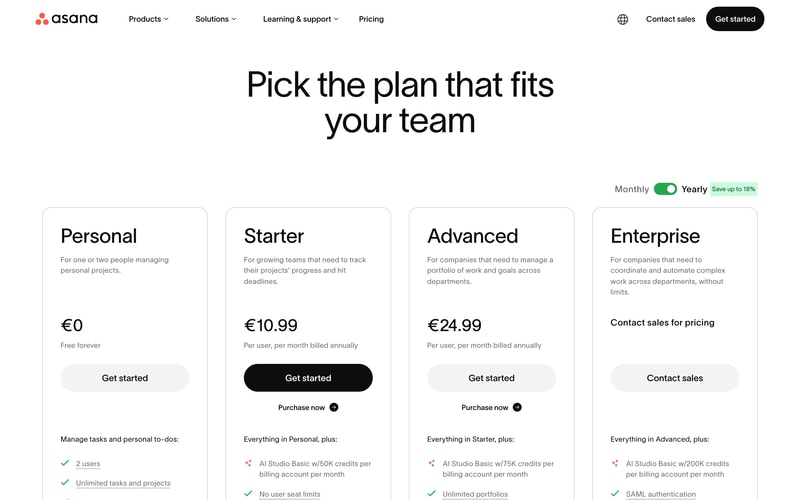
| Plan | Per user/mo (yearly) | Users | AI Studio credits | Key additions |
|---|---|---|---|---|
| Personal | €0 | 2 | — | Unlimited tasks and projects, list, board and calendar views |
| Starter | €10.99 | No seat limit | 50,000/account | Timeline and Gantt, dashboards, unlimited automations, forms, custom fields |
| Advanced | €24.99 | No seat limit | 75,000/account | Portfolios, goals, workload, approvals and proofing, time tracking, Salesforce and BI integrations |
| Enterprise | Custom | Unlimited | 200,000/account | SAML, SCIM provisioning, capacity planning, admin controls |
The details that matter most:
- The free plan is two users. Reduced from fifteen for any account created on or after 12 November 2025. This is the single most important change in Asana’s pricing in years, and much published comparison content, including some review aggregator pricing pages, still describes the old limits.
- Legacy accounts have a trap. Accounts predating the change keep up to ten users on a Legacy Personal Plan, but cannot recover that allowance if they downgrade and re-upgrade. If you are on a legacy free plan, do not experiment with plan changes.
- AI credits are per account, not per user. 50,000 credits on Starter is shared across your whole billing account, so a fifty-person team gets the same pool as a five-person one. This is unusual and worth modelling if AI features matter.
- Portfolios and goals require Advanced. At €24.99 per user, more than double Starter. Since portfolio-level visibility is the main reason larger organizations choose Asana, Advanced is the realistic tier for that use case.
- Yearly billing saves up to 18%.
- No seat minimums on paid plans, which is a genuine advantage over monday.com’s three-seat floor.
Who Should Use Asana
- Mid-size organizations coordinating across teams. The clearest case, and where the portfolio and goal hierarchy earns its price.
- Teams that outgrew a simpler tool. Asana is the common destination for teams hitting Trello’s dependency limits, and it handles dependencies properly.
- Companies that run on OKRs or similar. Goals connected to actual work is genuinely useful rather than decorative.
- Teams wanting structure. If consistency across departments matters more than per-team flexibility, Asana suits better than monday.com.
It fits poorly for individuals and pairs on the free plan, which is now extremely limited, for very small teams on a budget, since €10.99 per user adds up quickly, and for teams wanting to shape the tool around an unusual process, where monday.com’s flexibility is better.
Honest Pros and Cons
Strengths
- Excellent structural model. Tasks to projects to portfolios to goals is coherent and genuinely useful at scale.
- Proper dependency handling. Unlike Trello, Asana models work that waits on other work.
- Unlimited automations from Starter. More generous than competitors that meter automation runs.
- No seat minimums. You can buy exactly the seats you need.
- A very large evidence base. More than 11,000 G2 reviews with consistently strong satisfaction.
- Mature integrations. Salesforce, Tableau, and Power BI on Advanced for organizations that need reporting elsewhere.
Limitations
- The free plan is now two users. Cut from fifteen, and the change is poorly reflected in third-party documentation.
- The legacy grandfathering is fragile. Downgrade and re-upgrade and you lose the higher allowance permanently.
- AI credits are pooled per account. A large team shares the same allocation as a small one.
- Portfolios and goals need Advanced. More than double the Starter price for the capability larger buyers actually want.
- Less flexible than monday.com. Asana imposes structure, which some teams experience as rigidity.
- Cost at scale. €24.99 per user across a large organization is a serious line item.
Asana Alternatives and How It Compares
- monday.com is more flexible and more visual, with a three-seat minimum and less rigorous portfolio structure.
- ClickUp offers more features per dollar and a genuinely usable free tier, at the cost of a busier interface.
- Trello is simpler and cheaper, and lacks dependencies entirely, which is the usual reason teams move to Asana.
- Smartsheet suits organizations whose work already lives in spreadsheets.
- Teamwork is better for agencies that need billable time and project profitability.
For a broader survey see our guide to the best project management software.
The Verdict
Asana remains one of the strongest work management platforms for organizations that want structure rather than flexibility. The hierarchy from tasks through portfolios to goals is coherent, dependencies work properly, and unlimited automations from the entry paid tier is more generous than most competitors. For a mid-size company coordinating work across departments, it is a sound default.
The free plan is no longer part of the argument. Cutting it from fifteen users to two for accounts created after 12 November 2025 changes what Asana is for small teams, and the change is badly reflected in third-party sources, including some review-site pricing pages that still quote the old figures. If you are evaluating Asana for a small team on the strength of its free tier, check the current limit rather than the guide you are reading.
Two specifics worth acting on. If you hold a legacy free account with up to ten users, do not downgrade and re-upgrade, because the allowance does not come back. And if AI features factor into your decision, note that AI Studio credits are pooled per billing account rather than per user, which makes them meaningfully less generous for large teams than the headline numbers suggest. Price Asana at Advanced if portfolios and goals are why you want it, because that is where they live.
FAQ
How many users does Asana’s free plan support?
Two, for any account created on or after 12 November 2025. It was previously fifteen. Accounts created before that date are grandfathered onto a Legacy Personal Plan supporting up to ten users. Much published comparison content, including some review aggregator pricing pages, still describes the older, larger limits.
I have an older Asana free account. Should I change plans?
Be careful. Legacy accounts keep up to ten users, but Asana does not restore that allowance if you downgrade and subsequently re-upgrade. If you are on a legacy free plan and value the extra seats, avoid experimenting with plan changes, since the higher limit cannot be recovered once lost.
How much does Asana cost in 2026?
Billed yearly, Starter is €10.99 per user per month and Advanced €24.99, with Enterprise custom priced and Personal free for two users. Yearly billing saves up to 18%. There are no seat minimums on paid plans, and Asana localizes currency so its dollar pricing corresponds numerically.
Are Asana’s AI credits per user or per team?
Per billing account, which is the less generous interpretation. Starter includes 50,000 AI Studio credits per month for the whole account, Advanced 75,000, and Enterprise 200,000, regardless of how many users you have. A fifty-person team receives the same allocation as a five-person team, so model your expected usage before assuming the allowance is sufficient.
Is Asana better than monday.com?
They optimize differently. Asana imposes a consistent structure across teams and handles portfolios and goals more rigorously, which suits larger organizations. monday.com is more flexible and visual, letting each team shape the tool around its own process, and has a three-seat minimum. Choose Asana for structure and monday.com for adaptability.

Compare Asana with other popular tools in the same category.
The best features of it are: 1. Asana provides one of the best automation and delegation features/functions in its platform due to which the user experience becomes great and smoother. 2. This platform also provides an Email integration feature with the help of which feature we can send a work request to the member through email. 3. With the help of Asana, one can easily see the entire team's performance by seeing what they are doing what work theories are assigned, and many more.
The features I disliked about it are: 1. Asana should provide cloud storage facilities to their users just like other platforms so that the user experience becomes better and people can access their files from anywhere on any device at any time. 2. I was not able to copy and paste subtasks and retain hierarch during my work. 3. There are bugs present in the website as sometimes the website takes time to load even if with a good internet connection.
Asana is one of the best work management platforms out there. It provides various features and functions that lets me keep a track of tasks, collaborate on projects and many more. I was able to note down my important tasks with the help of this and I am glad I used it.
I can track my task here daily, if you forget your task, one can simply login into this, and you can find his task there.
Nothing to dislike in this particular software. Very good and awesome software. I like it very much.
I am tracking my daily project tasks, update the same and mark as complete, incomplete, and you can put a due date also in it

I like its steamline processes to minimize the errors in daily work tasks. It help to create calender for my team's work and easily can share with them. I can check status of work of each member of my team. I can easily collaborate with my team by sending and receiving their work at one place.
There is nothing which i dislike about Asana but it can be make more userfriendly. It is confusing for new member in starting only.
Asana make it easy for me to communicate with my team member about their work and also can track the status of their work. It help me in reducing the error in daily tasks. Its live status of any project's status help me alot.
It is a very easy to use tool as it has a fairly simple interface and suitable to adapt to all types of projects, it encourages teamwork in a formidable way with its commenting functions and the way in which information is shared, it is compatible with different devices and can be used from mobiles, tablets or computers.
It misses an option that allows to visualize the projects in a complete way to have a better perspective of them, it is not so easy to integrate Asana with other project management platforms, some functions should be added to be able to invest less time and resources when carrying out the different projects that we manage.
With Asana we can keep in order all the data of our projects and keep them up to date, facilitates efficient communication between partners who are running projects, we can follow the operational processes that carry out the projects in real time from anywhere where we are on any device. Asana is a comprehensive solution for the development of projects via web that has great features helping the management of tasks, organization of work, division of project phases, creation of calendars and file storage, also providing the ability to add comments and notifications to ongoing projects.

Flexibiility to create tasks, and tasks within tasks. This allows us to holistically keep track of our projects
User interface can be better. Its sometimes hard to find the features you are looking for.
Keeping track of our project tasks and setting achievable deadlines.
Support is amazing, the functionality is now at a stage that we dont need other apps. We can do it all in asana. We have been using a number of others but the functionality in the business suite is more than enough to enable us to keep out team accountable and reduce wasted time in WIP meetings.
Not much, the only thing is with all great products it will take you some time to put the effort in to get out the best from this. But in life you get out what you put in at least it's easy to navigate and get our head around.
The biggest thing for me is being able to have forsight on when a project deadline won't be met or if a number of tasks are NOT done which may start a fire. Having visability on not only my team but the whole organisation is a godsend. Know what is being done is great, but when there are so many projects and possible deadlines being missed the person who is ultimatley responsible is me. So having this visability allows me to be a person of my word. Asana will continue to assist me in being able to be a person of my word to my board, and more importantly honest with myself.
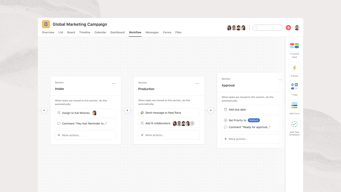
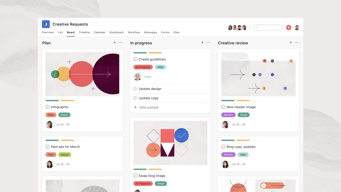
I am a fan of the board view in particular - but I generally set projects up in the list view to start with. The ability to add ad hoc columns/fields is powerful because each project can have its own key markers - not every project fits into the standard metrics of stage and priority. Users can jump right into because the Project/Task dynamic is easy to understand, then as they build knowledge, they can move to subtasks, dependencies, and ultimately to rollup views in Portfolios and Reporting. There is an ability to be functional with the product from day one - while allowing super users to really make use of tools that move project management to the next level. Workflows are a wonderful tool for getting staff to think about how a project flows from start to finish - we find it very useful.
It is less about Asana than it is about how one integrates it into the company...each individual and team can adopt it and use it successfully, but for the kind of advantage one could truly get out of Asana - you need company-wide understanding of top-down goals, and so starting with the Reporting and Portfolios may be a better approach. Otherwise - adoption can look good, but not be as impactful. An actual feature that is sometimes harder to make work in some scenarios is the Due Date. My work is more "ASAP" oriented with due dates being somewhat irrelevant...or too far out and "soft" to matter. So Start Date is key because then I see what has been sitting too long. Asana does not quite have time options that work perfectly for that. I also like to put completion dates in...but I don't want to clutter my calendar view with a long bar across a month or two. So I use dates less than I'd like.
Duplication of effort, missed communications when several teams are working independently on overlapping areas of a project, accountability and ownership. All of these areas are seeing considerable improvement as more staff adopt Asana into their workflows.
The ease to use. It has a very user friendly interface which you can master from day one.
There could be integrations available for multiple third party apps to ease the user from switching tabs
It helps us keep track of our progress and manage tasks efficiently among the team.
I like that you can look at all your tasks at a glance and you can sort them by due date. It's pretty robust as we post proofs though Asana as well. I've used other project management software at a previous job and hated it after using Asana before that. I'm not back to using it and loving it.
It can be a bit confusing as you delve into it. Luckily, we have an expert on our team that does all the hard stuff.
Keeps my work organized and keeps me hitting my deadlines. It's a great communication tool as well.
It makes very easy to stay organized and easily delegate specific tasks to certain people. Duh tasks are my favorite feature.
The recurring task capability could definitrly be improved. It gets a little funky with sub tasks and dates
Asana ensures that everyone in my organization is aware of their responsibilities and can easily tap in other people when they are needed. It creates an automatic to do list.
It's easy to user friendly, helps keep track of tasks.
Nothing as such that i dislike about Asana
It helps men keep track of all the tasks at once place, the organization structure of the tasks help me plan a step ahead.
It helps me take notes, keep track, let others keep track if they want, etc. The coding/calendar/board options are super helpful for a marketer who engages many types of creative projects and project management across many functions. It's way more fun/engaging than a word doc or Excel!
I think I get a lot for the "free" version. I see the perks in the upgrade, but I personally couldn't afford it, which is why I would want work to pay for it. Couldn't be happier.
I can keep track of things. My tasks can have sub-tasks which is great. I can collaborate/give permissions on certain projects while keeping other projects private.
It is super easy to use It is simple and transparent
I has nothing to state as a dislike I reason love asana
Much easier to track tasks and projects in comparison to email comms
The power to assign tasks to teammates in real time, email notification and project segmentation makes it easier for us to control and make good use of time. It is possible to connect it with Google Drive and other solutions.
The cost it has can be very expensive for some teams, since billing is per user and not per work team. Another thing is that if you don't take the time to understand it, you can't fully take advantage of the platform.
Asana helped us to organize the company's workflow better, giving the possibility of constant monitoring of the tasks that are carried out. We started with the free license, and we are already paying for it.
We use it for task management for business. It is very effective for team management. It provides convenience when assigning tasks to each other within the team.
A Task can be assigned to only one person, but sometimes some tasks are shared.
It solves the archive problem as well as task management. Every task done is archived.
Asana allows me to keep all my work in order. Definitely a very good helper if you are doing teamwork. Plus, it's a great warehouse. Even if I close the tasks, the latest versions of the jobs remain saved there.
There is an issue in asana that I would like to be fixed. After you open the task, you can assign it to only 1 person. Since this is a team job, some jobs may have more than one responsibility. therefore more than one person can be added.
Asana allows me to follow my work much more regularly. It has a very simple and understandable interface for teams. I can schedule my work and follow my other teammates.
Asana let's us create tasks, meetings and plan everything according to the priority and availability
There is nothing that I dislike about Asana
My manager meetings are scheduled on ASANA

Task management among Team is very helpful, even All Team members who are part of particular project/task get email as a notification so that all team members come to know the status.
Some times the user interface of Asana board get lags , sometimes The user interface and filters also does not allowes to click and select perticular assignee.
It brings all team members together and we can come to know about the status of all of our team members and there are verious project management modules. We can select whichever we want.
assigning people to tasks based on date, integrations with software.
There is nothing to dislike in this amazing tool.
Keeps track of tasks, It remembers everything that I create for it to remember, Easy management of workflow of the team
Great UI and very straightforward. I love that we can create templates. It saves us a lot of time!
I just couldn't duplicate project templates right away.
Being on top of all activities as it's easy to navigate Asana. It shows right away what the priorities for the day are and sends out email summary too.
From my experience, Asana is very easy to use; I am essay track my junior's tasks, as well as I can set deadlines. Asana also Supports third-party tools such as Google Drive, Slack, and Dropbox.
For my juniors, Asana is hard to understand because its UI is complex. Also, Asaana Gives Limited Free Plan And that free plan may not be sufficient for me.
As I said before, UI can be better understood. For the particular task, Asana has provided a comment section as well as they need to give disabled text support if, from the senior task allocated to someone, then they can not edit or delete that task.
Customizable rules (so useful and fun to create), OneDrive/SharePoint integration, Portfolio layout for display of Status Updates and Milestones (very clean and effective), the ability to favorite and archive Projects, the Mark as Approval feature, Project Templates, the ability to add Tasks to as many Projects as you like.
The inability to assign one Task to two users, the inability to construct exceptions to Rules in a direct way, the inability to filter Tasks by a customizable timeframe, the tracking of every single change that is made to a Task, the inability to drag/drop attachments.
Asana is solving the following problems: -Inefficiency in the communication of project work scope/expectations and project progress and setbacks -Inefficiency in the sharing of files -Lack of clarity on processes -Lack of clarity on short, medium, and long term goals Asana is benefitting me by making all of the above more efficient and more clear.
User Interface. I find the UI of the product to be very friendly and easy to use.
There is only one thing that I dislike in Asana that it does not support time tracking.
We use Asana to manage our software development sprints. It is very easy to create an epic, connect it with GitLab, create subtasks and add milestones. We can maintain our releases too using tags.

I love Asana not only did it help me to manage my daily work projects but also my personal tasks.Makes your day more productive since all repetitive tasks are automated and easy to deal with them at ease.It is easy to learn ,operate and implement every person I have shown Asana has loved it and were able to use it quickly without having any learning class.Alot of customization is available that adapt to every need of the company.
Honestly Asana is great,very much satisfied with all it comprise of.
Provides a wide range of features that are in place that really help teams to collaborate and communicate effectively when working on a certain project. Managing tasks and projects is easy since it allow real time tracking of every progress thus improves our productivity as well as teams are able to work more efficiently.
What I like most about Asana it how easy it is to navigate the app with your keyboard. The shortcuts are amazing and the experience within the app is flawless. I also love it's flexibility and it's structure, allowing teams to make it become language when it comes to managing projects with it.
It's learning curve can become a blocker for team's adoption. It's flexibility, which is a good aspect, can easily become a weak point if teams do not organize themselves well to make it become language. Language can unite or divide depending on the approach.
Asana helps me give visibility over projects so my customers are always aware of what has to be done by whom and the respective deadlines. It is also a hub for document sharing and comms on everything related to the projects.
Asana allows you to create a scaleable intake process that can span across multiple teams.
Inability to easily integrate with Marketo, Salesforce, and other apps. It would be great to see a low code no code solution for this.
- Handoffs between teams can be automated - Daily task views are easy to access - Asana works well as an email calendar
Easy to operate, have created multiple projects and tasks and asana helped a lot to manage all of them. Functionality-wise, it's also good. It's a very helpful tool for managing task.
There is nothing negative that i have observed to explain about asana.i would suggest asana to add few more features that can help more to manage professional work via this tool.
It helps to manage all the official tasks, Projects, and their tracking. Also, helping to create monthly pipelines. Its very help in work management, help teams organise their work , track it.
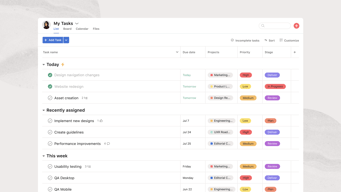
Asana makes it easy for me to view and reorder my tasks. Whether I'm viewing in a list or board view, I can reorder tasks by dragging, which isn't a given in other project management software. When I click on a task, its detail view appears on the side of my screen instead of covering the entire screen or opening a new page, so it's easy for me to click through each of my tasks in a list. The My Tasks view is useful for organizing tasks across multiple projects by due date so I don't get overwhelmed. I can see which ones I have to work on today vs. later - allowing me to plan my week - and tasks automatically move up to the Today section once their due date approaches. Adding tasks and subtasks in list view is also quick. All you have to do is type and hit Enter instead of clicking multiple buttons.
Currently, I'm the only one using it on my team. But in a previous role, I used it with many others, and I remember that the comments section in each task was hard to read when too many images were pasted. It might be nice if images could have their own captions or images were made smaller and flowed horizontally if there were a lot in one comment.
Every other task or project management software that I've tried makes it hard to quickly view a list of, reorder, or add tasks. I haven't had those issues with Asana at all, so I can focus on design instead of organizing my to-dos. It keeps me from getting overwhelmed because it organizes and automatically moves my tasks based on due date.
1. Asana is a great way to minimise sync or undocumented task record. 2. Super easy to assign task, ask details and add sub tasks for breaking down a big task to smaller chunks. 3. The flying unicorn is my most fav :P
1. I don't think there's anything to dislike about Asana. It does best what it claims. 2. The only thing it can improve on is : Please, Please allow multiple people to be assigned to a task or atleast make it easier for collaborators to easily find the tasks where they are collaborators.
1. Best way to collaborate on a project, assign a person and add a deadline. makes it all easier to work towards finishing it. 2. Makes it super productive when people just assign tasks on Asana for each other when they need something to be done.
We use Asana for daily tasks. It is straightforward to assign tasks and modify them, validate or track the incomplete ones. Very intuitive tool.
For our use, I can find a negative point about Asana.
It is solving collaborations for daily tasks that are automatically created by forwarding the email or calendar update to the Asana group email, which generates a task. From there, we know the tasks are created automatically and we can complete them independently without worrying if a teammate already worked on it.