

Unclaimed: Are you working at Bluehost?
Bluehost Reviews: 3.6/5 — Good for the Price
Bluehost is a website building tool that is meant to help businesses create and manage WordPress websites from a single platform. Using the software allows companies to streamline numerous critical operations including migrating business files, streamlining shared web hosting operations, and managing domains.
| Company | Endurance International Group |
|---|---|
| Year founded | 1995 |
| Company size | 1001-5000 employees |
| Headquarters | Burlington, Massachusetts, United States |
| Social Media |

| Capabilities |
CLI
|
|---|---|
| Segment |
Small Business
Mid Market
|
| Deployment | Cloud / SaaS / Web-Based |
| Support | 24/7 (Live rep), Chat, Email/Help Desk, FAQs/Forum, Knowledge Base, Phone Support |
| Training | Documentation |
| Languages | English |
Bluehost Pros and Cons
- Unmetered bandwidth
- Free SSL certificate and domains
- Excellent uptime
- Affordable first-term contract
- Reliable uptime
- Limited storage on the cheapest plan
- Limitations on monthly site visitors
- Their system constantly bombards users with upsells
- Entry-level plans have limited backup options
- Uses only US-based servers











Bluehost is famous for its cheap web hosting, especially for WordPress websites and WooCommerce stores. But hype aside, is Bluehost a good choice for your website or online store?
So buckle in, and let’s find out. Here, in this Bluehost review, we’re uncovering everything you need to know about the service.
Bluehost Web Hosting at Glance
| Global Performance Grade | A |
|---|---|
| Uptime Guarantee | ✔ |
| Free SSL | ✔ |
| Hosting Types | Shared, Dedicated, WordPress, VPS |
| Basic Plan Features | 1 Website, 50 GB SSD Storage, 24/7 Support |
| Starting Price | See current pricing |
| Learn more at Bluehost.com |
What is Bluehost?
Bluehost is one of the largest web hosting providers in the world. At the time of writing, they host over two million web domains. The company was founded in 2003 in Utah. But, Bluehost really gained momentum in 2009 when the company introduced CPU throttling technology to increase the efficiency and speed of its servers.
Fast forward to 2010, and they joined a conglomerate of other web service providers under Newfold Digital (formerly Endurance International Group). Since then, Bluehost has become a significant player in the web hosting industry, with an estimated market share of 3.4%.
Bluehost: Features and Functionalities
Now that we’ve covered a bit about who Bluehost is, let’s look closer at its features and functionality…
Bluehost Interface
Bluehost Rock Interface
Bluehost’s easy-to-use interface is one of its many appeals.
In fact, there are two interface options available:
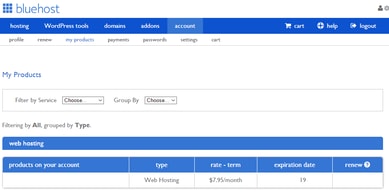
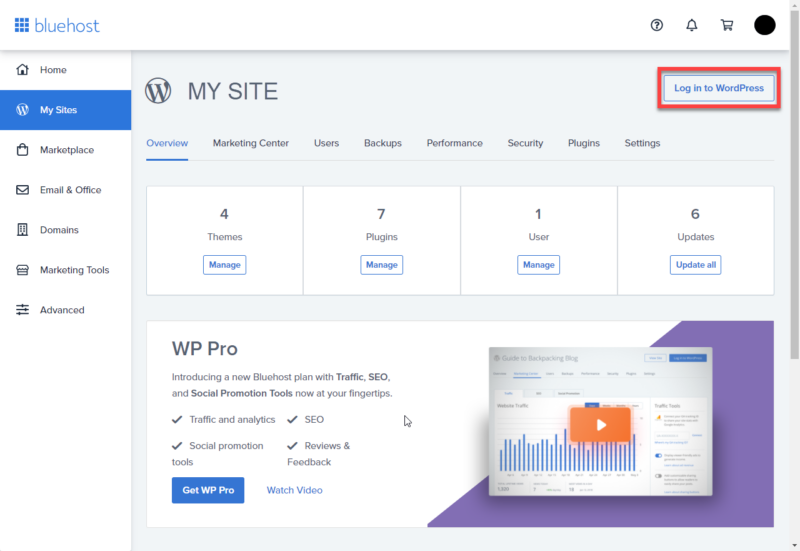
- Rock : This simplifies the Legacy model (see below). It uses vertical navigation to provide easy access to your websites, WordPress tools, and Bluehost’s marketplace.
- Legacy : This is Bluehost’s older interface model. You can still access it within your account management panel. That said, it’s being phased out of use. It uses horizontal navigation, and each section is compartmentalized. In other words, you have to go into each section separately to find your websites, WordPress tools, etc.
Dashboard
Within your Bluehost dashboard, you’ll find a one-click setup for WordPress. Installing WordPress is as simple as logging in, finding the website section on your dashboard, and hitting “Install WordPress.”
You’ll then be asked to choose your domain name. At this point, you also need to provide an email address and create a username and password for your new installation.
Bluehost SEO
SEO or (AKA Search Engine Optimization) refers to how easily findable your website is on search engines. Bluehost analyze your website and provides you with an online marketing report that’s divided into easy-to-read sections:
- Start: First, you get an overall score; the higher the score, the better. Essentially, this score reflects how well optimized your website is for SEO.
- Search Engine Submissions: Bluehost will submit your site to Google, Yahoo, and Bing.
- Visitors: This tracks how many website visitors you have and where they come from. In time, you can compare your visitor numbers over 15 days, one month, or three months.
- Rankings: Here, you can check where your site ranks on search engines and see how well your keywords are doing compared with your competitors.
- Site Review: This highlights any technical issues, such as long loading times.
- Search Optimization: Here, you can check how search-engine-friendly your site is. For example, whether your site’s structure is understandable and whether links and titles are in order.
- Content: Regularly uploading high-quality content is one of the best ways to improve your SEO. Bluehost will analyze your content and provide tips for improvement.
- Mobile: Bluehost will analyze your website and inform you whether your site is responsive and loads fast enough on mobile devices.
- Popularity: Popularity is measured by how many backlinks you have; the more links you get from other sites, the better.
Overall, Bluehost provides a wealth of information to help you improve your website’s SEO.
Bluehost Email Hosting

Using Microsoft 365, Bluehost lets you create a custom professional email address where your domain name is simply transferred to your new email. If you already own a web domain, you can add it to your Office 365 subscription through its management dashboard (which you can access via your Bluehost control panel).
There are three email hosting plans to choose from:
- Email Essentials: manage your professional calendar and email.
- Business Plus: suitable for collaborating with a team.
- Business Pro: unlocks multiple devices and local app access.
See Bluehost pricing for current rates.
All plans include:
- Microsoft Outlook Web Access
- Automatic Microsoft updates
- Microsoft’s 99.9% uptime guarantee
- Security and disaster recovery
- Access to an intuitive management dashboard
- 24/7 support
You’re free to upgrade or cancel your subscription whenever you want (with no cancellation fees). Before canceling your subscription, be sure to download any data you require; however, you can still access this up to 30 days after canceling.
Bluehost Customer Support
Bluehost claims to always be on hand to support its customers. So regardless of your chosen pricing plan, you’re entitled to 24/7 telephone and live chat support. To utilize the latter, hit the “chat now” button on Bluehost’s website. You’ll be asked if you’re a new or existing customer and a way to identify you, such as your web domain, phone number, or email address.
Bluehost also offers a blog, online knowledge base, and resource center. Here you can find answers to questions, how-to guides, and gather more info on topics about business, creating a website, and marketing. An interesting feature in the resource center is that you can filter by skill level: basic, intermediate, or advanced to ensure access to the information you’ll actually understand.
Bluehost cPanel
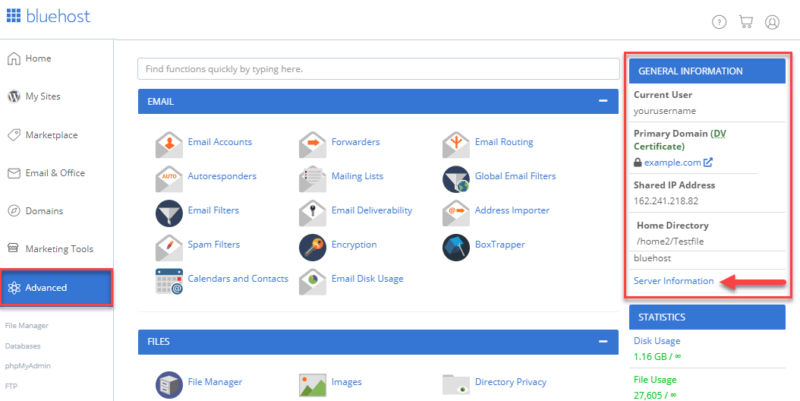
CPanel (AKA Control Panel) is Bluehost’s website management platform. You can access this via the advanced section of your Bluehost dashboard. From here, you can manage integrations and access a range of applications where you can add useful scripts to your website, such as:
- Server information
- Hit counters
- Mailing lists
- Blogs
- eCommerce functionality
- Password-protected subdirectories
- Searches
Bluehost Integrations
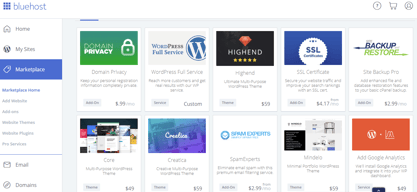
The Bluehost Marketplace is where you browse, purchase, install, and manage your WordPress plugins, add-ons, and themes. You can choose from over 900 themes and tons of plugins.
Simply log into your Bluehost account and locate the marketplace button on the left-hand side menu to access the marketplace. To give you an idea of the kinds of plugins on offer, let’s focus on WooCommerce specifically. There are 18 WooCommerce-related extensions (plugins) covering shipping, scheduling, and payment processing functionality.
More specifically:
- PayPal Pro
- Amazon Pay
- Stripe
- Xero
- WooCommerce Booking
…to name a few.
Bluehost Performance
Performance is imperative when picking the right web hosting service.
The key metrics here are twofold:
- Uptime: A measure of the reliability of your website’s performance.
- Site speed: How quickly internet browsers can load pages from your website
Uptime
BlueHost boasts an impressive 99.99% uptime guarantee. In theory, this means your website should only experience minimal downtime per year, which is a competitive standard in the hosting industry.
Site Speed
As we’ve already hinted, site speed refers to the number of seconds it takes for a web page to load. Needless to say, the quicker, the better. Bluehost’s loading speeds are competitive, though not always the fastest in the market. If you expect high traffic volumes, there’s a cache setting you can utilize to improve your website’s performance. Caching allows you to store assets in a temporary storage location to load your site faster. You can find this feature in your Bluehost portal under ‘My Site’ and then “Performance.”
Security
We’re living in an age where digital fraud is rife, and, as such, secure web hosting is essential. With that in mind, let’s see what Bluehost offers:
-
Paid and free SSL certificates :
- Free: All Bluehost plans come with a free SSL certificate.
- Paid: You can also purchase a private SSL certificate for extra encryption. See Bluehost pricing for current rates.
-
CDN : Bluehost uses Cloudflare’s content delivery network to ensure secure interactions between your website and visitors. You’ll receive a free CDN certificate will all plans.
-
Firewalls and attack protection:
-
SiteLock: This is a PCI-compliant service for managing your website security. The cost of this service is charged annually and includes malware protection, page scanning, and firewall security (more on this below).
-
CSF: This is a free firewall plugin for VPS and dedicated servers.
Creating Your Website with Bluehost
WordPress website creation can be a daunting task, but Bluehost tries to make the process as easy and quick as possible:
#1: Getting Web Hosting and a Domain Name
For the uninitiated, web hosting refers to a website’s allotted space on a web server. The website’s files are stored here: code, images, etc. This enables your website to be accessible on the web.
In contrast, a web domain is simply your website’s URL address. The issue that many great domain names are already taken so you have to be quite creative when choosing one.
Give it a go and see if the domain name you like is available:
You need both web hosting and domain name to launch a website. To hit the ground running with this, click “Get Started” or “Start Building.” From there, choose the plan you want. Bluehost offers three pricing plans and makes it easy to understand what’s included in each.
But, in a nutshell:
Basic: ”Perfect for bloggers and personal websites.”
Plus: ”Perfect for business sites.”
Online Store: ”Perfect for online stores with product shipping.”
See Bluehost pricing for current rates.
All plans include web hosting, unlimited websites (which means you can host as many websites as you need), and over 300 templates. You also have unlimited access to their image library, email marketing tools, and blog post management features.
The Plus and Online Store options unlock additional features, including extra premium template designs, domain privacy, and online selling features.
Once you’ve chosen your plan, if you already have a web domain name, enter it now. Or you can skip this step if you want to tackle this later. If you’re creating a new web domain, enter your desired URL, and Bluehost will tell you whether it’s available. If it is, then you can proceed. It’s worth noting that your web domain is free for only a year; after that, you’ll need to pay.
Next, you’ll be asked to enter your personal details and agree to their terms and conditions.
Bluehost wants to tailor the user experience as much as possible. So they’ll ask a few short questions about the type of website you intend to make, your goals, and how comfortable you are with website creation.
#2: Building Your WordPress Website
Bluehost automatically provides a default website design for you, which you can view by clicking “visit site.”
However, you’ll probably want to change this as it’s very simplistic. WordPress is pre-installed to save you the hassle of doing this yourself.
To create, edit, and design your website, head to your WordPress dashboard. First, you’ll most likely want to select a theme for your website. To do this, click on “Appearance,” then “Themes,” and finally, “Add a new theme.” From here, you can search for a theme. Scrolling through the vast array of options can seem overwhelming. But you can use the filters to help narrow down your search.
Some themes are free, while others have a price tag. The best theme for your website comes down to what you visualize your website looking like. You may find it worthwhile paying a little bit for the look you want, but the choice is yours. When you find a template you’re happy with, simply install it and then hit “Activate.”
Step 3: Editing Made Easy
After logging onto your Bluehost control panel, go to “My site” found on the left-hand menu, followed by the “manage site” button. This takes you to your WordPress dashboard, where you can click “website builder.”
From there, you can begin editing as you like. You can click on any web page and select the different elements you want to change. For example, you can edit text, text on buttons, images, color preferences, and background. You can also edit the pictures by searching through Bluehost’s vast library of images or uploading your own.
Whatever aesthetic you’re after, WordPress can help you achieve it. You can even change the headers and logos using the “customize” button.
To add new pages, simply click on the “pages” tab on the left menu and then locate “add new” by the “Pages” title.
Bluehost’s drag-and-drop editor makes it easy to edit your template and add features to your website. Overall, creating and editing your website with Bluehost is really that simple. What it really takes is a bit of exploration and an idea of what you want your finished product to look like.
Bluehost Pricing & Web Hosting Options
Bluehost provides many different web hosting plans to choose from. We’ve made a short summary table so you can get your head around all of them.
| Shared Hosting | Yes |
|---|---|
| WordPress Hosting | Yes |
| Cloud Hosting | No |
| VPS Hosting | Yes |
| Dedicated Hosting | Yes |
| Reseller Hosting | Yes |
| Linux Servers | Yes |
| Windows Servers | No |
In this review we will focus on three most popular options, namely:
- Shared Hosting
- VPS
- Dedicated
Let’s take a look at what these mean:
Bluehost Shared Hosting Pricing
In shared hosting you share server resources with other customers. It’s by far the most popular hosting plan thanks its affordability and it’s perfect for those creating a website or blog for the first time. When considering shared hosting, there are a further four 12 month plans to pick from:
Basic
Best for one site
- Custom themes
- 50 GB SSD Storage
- Free CDN included
- An SSL Certificate
Plus
Best for multiple sites
- Unlimited websites
- Unlimited SSD storage
- 30 days of Office 365 for free
Choice Plus
Added security
- All previous features
- Free domain privacy
- One year of free automated backups
Pro
Additional resources
- Optimized resources
- Unlimited free automated backups
- A dedicated IP address
See Bluehost pricing for current rates. Prices are promotional for the first term only and renew at regular rates.
Besides the above mentioned key features all plans also include:
- Custom themes
- 24/7 customer support
- Access to the easy-to-use WordPress website builder
- An SSL Certificate
- Resource protection
- Domain manager: where you can update, purchase, transfer, and manage in one place
- Google Ads credit
Bluehost VPS (Virtual Private Server) Pricing
Considered perfect for expanding websites needing more control. There are three plans available: Standard, Enhanced and Ultimate.
All plans come with 24/7 customer support, and each program runs on a 36-month basis.
Bluehost offers Standard, Enhanced, and Ultimate VPS tiers with varying cores, SSD storage, RAM, bandwidth, and IP addresses. See Bluehost pricing for current rates.
Bluehost Dedicated Hosting Pricing
Aptly named, the Dedicated plan provides a dedicated server for just one individual, application, or organization. In other words, you won’t be sharing a server with anyone else. If you’re running a business or your website’s snowballing, you may want to consider this option. But, ultimately, you have to decide whether it makes sense for your budget and business plans.
There are three plans to choose from: Standard, Enhanced, and Premium, each offering increasing CPU power, RAM, storage, bandwidth, and dedicated IPs. See Bluehost pricing for current rates. Prices are promotional for the first term only and renew at regular rates.
Bluehost: Pros and Cons
We’ve covered lots of information here, so let’s condense what we’ve discussed into a quick pro-cons list:
Pros:
- Low pricing (initially at least)
- Bluehost is beginner-friendly
- Recommended by WordPress
- Website creation is quick and easy
- Flexibility with design creation
- Access to security features- SSL certificates and CDN
- You benefit from a free web domain name
- 24/7 access to customer service
- You benefit from a reliable hosting service with good uptime
Cons:
- Bluehost websites suffer slower load times than competitors
- Higher renewal prices
- Bluehost servers are based in the US. So, load time might be slower if you live outside this region
Blueshost Affiliate Program
Bluehost also offers an affiliate program. You can find Bluehost’s affiliate program by scrolling to the bottom of their home page and clicking ‘Affiliates’. The affiliate scheme is free to join. You just have to sign up, and you’re immediately provided with a unique tracking code and affiliate links or custom banners (or both).
Then, for every visitor who clicks on the link and signs up to Bluehost, you receive a commission that increases with the volume of referred customers. From there, you can earn an unlimited amount: the more people who sign up to Bluehost via your link, the more money you’ll make.
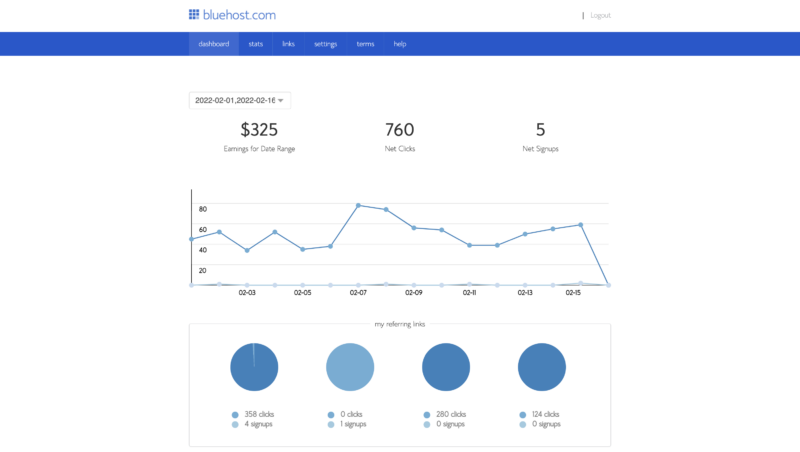
Overall, this affiliate marketing scheme is pretty decent and has one of the better payouts in the web hosting space. What’s more, Bluehost provides you with support and promotional resources to give you the best shot at earning as much as possible.
Bluehost Alternatives
If you decide Bluehost isn’t for you, don’t fret. There are plenty of other great options to choose from:

Hostinger: Most Affordable Web Host

Hostinger is a European-based web hosting company boasting decent website speeds and affordable hosting plans. You can host up to 100 websites with their shared hosting plans, and you’ll get a free web domain. Other freebies include an SSL certificate and weekly site backups. See Hostinger pricing for current rates.

Hostgator: Web Hosting with a Website Builder
Hostgator is a popular US-based web hosting solution. They’ve been around since 2002 and have made their mark, offering low, competitive prices. You can expect to host one website, connect a custom domain, and have an SSL certificate. In addition, Hostgator boasts good uptime speed, so you can be sure of its reliability. You’ll also have access to an AI-fuelled website builder, so you can set up a WordPress site in just a few clicks.
Hostgator’s drawbacks lie in its poor customer service. For example, they have notoriously long waiting times for their support chats. In addition, customers have complained that their team didn’t have a good technical understanding of website management.

Siteground: Best Shared Host Customer Support
SiteGround is an excellent choice if you’re looking for quick website speeds and reliable uptime as they reign supreme in both areas. They’re another European-based provider gradually gaining popularity for their well-priced and fast hosting services.
Their Starter plan gives you one website, SSL, and CDN certificate. You also receive free daily backups, access to their website builder tool, and free firewall security built into your website. Finally, they also have WooCommerce integration options available. See SiteGround pricing for current rates.
On the downside, Siteground only offers shared hosting plans. They don’t provide VPS hosting or dedicated servers. Your resource space is also considerably limited compared to competitors. Moreover, it doesn’t offer a free domain name.
Bluehost: Our Final Thoughts
So, there you have it. This concludes our Bluehost review. We hope we’ve provided everything you need to decide whether they’re a good choice for your website. There are many aspects to consider, from security to functionality to ease of use. But, Bluehost is regarded as one of the best overall hosting providers on the market.
As we’ve discussed, it allows you to design, optimize and host your website for a reasonably low price. The price hike for renewing your subscription is still pretty reasonable for beginners looking to get their business off the ground.
All in all, Bluehost provides everything you need to kickstart your online business, from an intuitive website builder to web domains to helpful plugins – and tons more to boot!
Is Bluehost the right choice for your business? Tell us your thoughts in the comments box below!
We hope this review was useful. Click below to let us know what you think or leave a comment in the comment section!

Compare Bluehost with other popular tools in the same category.

Nothing. quick setup but it's a scam to get more money while providing terrible service
Customer service is terrible, no way to edit existing charges - only buy more
Website hosting (not good though)
The pricing was cheap and the service was somehow recommended by Google Domains, but the actual product was super busy.
I tried using Bluehost for their managed Wordpress service. I was able to create an account and put in my credit card information, but when I went to the dashboard, I just got an error message telling me to contact support. I did that, and they were able to get the dashboard working. I thought the problem was fixed but then I tried to launch a wordpress instance from within the Bluehost dashboard and I got the same error message. At this point, I decided to use a different service and wanted to cancel my account. However, there was no option to do this within my dashboard. Once again, I had to contact support. I'm pretty sure the support rep was a bot, because I had to repeat everything multiple times. They asked why I wanted to cancel, and I told them the dashboard was buggy. They suggested that it was my browser (Chrome) and asked me to download a VPS browser, whatever that is. Once they finally said they would cancel my account, they said they would need my password. I wasn't comfortable doing this, and they submitted a password reset instead. That email never came through so I had to send my original password. This was after they authenticated me using an email token, so they really should've had no reason to need my password and the whole experience seemed very insecure and sketchy. I was prompted to leave feedback after the live chat support session. However, the submit button didn't work. haha of course not.
Wordpress managed hosting
Its a hosting just like any other company
Our ecommerce website was down for 3 days and their support was unable to expedite the issue. It cost us business big time as it was peak time for RV trailer sales.
Not with bluehost anymore. Switched to Kinsta
What do you expect from a webhost? I think the consensus is this: You expect 1: Websites and email to work properly at least 99.9 percent of the time- until now the sites at least have worked for the most part.
2 and 3: Communication when things are not working correctly, and fix them when they don't. Now. Who knows how long this email problem has been ongoing, but when you call tech support it does announce the issue and say they are working on it. Then they send your call to a black hole, where you wait 45 minutes and it hangs up on you. Unacceptable, completely! The site speeds have also been
This webhost has not solved my problems.

Their hosting service is easy to use and links seamlessly with Wordpress.
Their accounts and customer service is dire. The accounts duplicate bill and debit and then customer service state that they have no records of the duplicate transactions. After this happening repeatedly for three months, I cancelled the duplicate charge through my bank and Bluehost suspended my web sites, saying I had initiated a chargeback without consulting them. I lost hours of my time trying to sort this out. Customer service will keep you on the Chat going round in circles without a resolution.
None.

I can only say the price. Nothing else is likeable.
Their support is the worst in the industry
We just need a stable host with good support
CPanel and hosting options - its actually very easy on Bluehost.
Payments were set to expire but to my shock, they were changed without my consent to automatic and automatically deducted with a markup of 100%. When I raised this with customer service they responded with we auto changed this for you and will not be able to refund or do anything about violating my rights. Appaling customer service where it took over 50 prompts to get them to write up a formal complaint which I still have not received any email communication, to say the least.
Billing is a massive issue. Payments without authorization is the second and also acknowledgement with any communication from their end is non-existant.
When I started with Bluehost, it seemed like a good hosting service. I wasn't comfortable with using WordPress, but they had their own templatized, drag-and-drop tool (Bluehost Editor). I was able to get my site up and was initially pleased with how it looked. Then, one day I went to make a change to the page and the Bluehost Editor would just hang and not open the tool...see next item for what happened next.
One month later and I still cannot get into the tool. I have had multiple interactions with their tech support and every time get the exact same response: "we're working on it and will get back to you when it's fixed". Attempts to get in touch with someone who actually knows something have gone nowhere. Tech support also seems to be completely unknowledgeable about this tool...they say "just use WordPress to make page edits", even though that's not possible since the pages were created with the Bluehost Editor templates...WordPress makes me try to get back into that tool which then fails. Someone in tech support even told me to just re-build my site from scratch and then closed my case as being resolved by that proposal! Terrible support for their own tool. I also tried getting an answer through their Twitter support handle (which they claim to actively monitor) and got no response.
I secured my domain and was able to get my site created, but that doesn't mean much when I can't make any changes.

The most basic tier of bluehost is okay, because you can host unlimited sites if you can tolerate 6-7 load times.
Everything else about bluehost is really terrible. Customer support is frustrating and being passed around for hour after hour. Their WP Pro package was a $400 mistake, now I'm hosted with SiteGround which actually works. They got me to hang on until the month guarantee expired, and then never fixed my problems: Backups don't work. Period. There is no value to the backup package that comes with Pro. Cloudfront could not be configured with SSL; in fact Cloudfront could not be configured at all. Whenever there is any change to make at all, they blame *everything* on a 72-hour DNS change when every mature web hosting company in the world can tell you how to stage your DNS change with minimal outage. They just don't *want* to. I finally got *one* rep (out of literally 20) to change a DNS TTL for me to 1 hour (instead of the default 6 hours), so I *know* they can do it. Then, to top it all, whenever your site is unavailable due to DNS, there is a Bluehost error message displayed that makes you look like you didn't pay your Bluehost bill. This service is not something you would ever provide to a customer; you will look terrible and you'll *still* end up paying for some other service.
For a while, it looked like Bluehost could be used to host a low-latency Wordpress installation. But that turned out not to be true. I have wasted hundreds and hundreds of hours with this terrible, terrible company.
Guess their uptime? Even not sure about that.
How Bluehost is squeezing you everywhere they can. They are raising prices on parked domains all the time. I have a bunch of parked domains that I don't want to renew and they don't have an easy way to mark them to not renew. They deliberately made it so you have to go into every single one of them and switch. Not surprisingly to early renew it is only a drop-down menu item. :-( When you go back from that domain, you end up on top of the list again and scrolling is so slow, that I am using this time to write this review. Really frustrating.
Hosting my company/personal business URL there.
At this point, not much. We are transferring our domains away from BlueHost to a provider that has great customer support.
The customer support is awful. During a recent outage, I was told by two reps that my issue was being taken care of and my site would be rebuilt within 1-2 hours. A few hours later, my site was still down so when I called a 3rd time it was only then was I told they couldn't fix my site because the files were deleted. They only sent one warning email that they would delete my site within 30 days, which was sent amongst a bunch of other renewal notices. For something as important as a website, you would hope they would send multiple warnings before deletion. Because of the hosting lapse and the files being deleted, I was going to need to rebuild the site from my WordPress backup (which was well beyond my technical understanding.) Instead of being helped, I was continuously sent a link to a tutorial instead of being walked through it by the rep. I asked at least 5 times if there was someone that could download the files from the link I provided since it was beyond my abilities, even after reviewing the tutorial, and was ignored and sent a link to another tutorial.
I'm not. It's caused me problems, including deleting my entire website with only one notification email, which was missed by an employee.
The only plus to this company is it has the highest uptime available. That alone is not enough for really anyone except server-based companies.
Terrible communication - their domains team is "email only" but they don't know how to reply to emails, send updates, or solve simple issues in general. Call companies - They use random customer service companies that don't know how to solve any issues and are basically there only to tell the customers something is happening, even though nothing is. Faulty backend - Their backend is so full of bugs you would think a high schooler designed it for a project during his lunches. Absolutely abysmal customer service - They are so overwhelmed because of so many issues that you will be 1 of 1000 people constantly in the queue looking for help. Good luck getting any specialized support on that except for a guy on the phone to tell you that there's too many people to help. I waited 5 days for an update on the hosting transfer, then after 1244 redirects to different departments, they told me to initiate the transfer. IT WAS SUPPOSED TO BE DONE ALREADY.
Bluehost cannot solve a single problem that other companies aren't already solving. They have uptime over the competition but I don't even believe that anymore.
I had almost two years of not having issues with Bluehost. Its kind of a bare bones service. Its cheap, thats for sure.
They forced an upgrade on my site without letting me know, which caused my website to go down. They never admitted to this, until after maybe 10 chats with their overseas customer support. I ended up having to spend $ to move to Dreamhost. All told, I probably spent 12 hours with their customer service. It was impossible to speak to managers or to escalate issues. If you want the feeling of being powerless with an issue, their shared service is for you.
I needed an affordable service while I was starting a company.
There was not much about Bluehost that I liked.
Their customer service was lacking and extremely slow.
I used to utilize Bluehost as my website host, until I switched over to Siteground

The hosting uses cpanel and is fairly easy to set up.
The lack of customer service, the lack of motivation to solve problems (a CS rep accidentally canceled the wrong service and it ended up in my email and site going down and wasted advertising dollars as it was during a launch and heavy ad time) My experience with them is HANDS DOWN the worst experience I've had working with any company in the past decade.
None, they were great when I needed a basic website and non-reliable service and email, but once it became something I used and relied on, they cost more than they were worth.
There isn't much to like... outdated website, pricing at rates like other providers, and unstable tech... I'm trying to think of one nice thing, but there's not much to say. Even if not helpful, the tech people are at least nice.
The service keeps crashing, when you call you get upsold on new services, the tech support can't help you if you do have an issue. In our case, our site kept crashing for 45 days because of issues from their side and it took countless hours on tech support to solve it.
We use it to host our Wordpress blog. No business benefit realized as their service keeps crashing.
The price is cheap, and we're able to manage our site without too much difficulty.
We've experienced numerous multi-day outages with Bluehost. We've also had many difficulties with their customer support in terms of solving any issue we might have.
Needed a cost effective place to host our business website, and they met those requirements. However, we were unprepared for the downtime we have experienced, and the difficulties with support. Both have cost our business thousands.
None, its a very bad hosting service.... do not get it.
everything, poor customer service, slow server, easily hacked servers.
marketing our company website
Not much. Once considered a good option for WordPress hosting, this is now a host to avoid.
Their low-price hosting options should be avoided. Their multi-tenant hosting options are VERY SLOW and poorly supported. My recommendation is to go with another host entirely.
WordPress hosting is the reason I recommended BlueHost to a client a couple years ago.
Pricing and Wordpres support were what got me to consider and sign up for Bluehost.
Once a customer, I had numerous downtime issues and was plagued with slow server response times.
Was looking for reasonably priced shared hosting for development and staging sites for my clients.
I tried Bluehost because of all the great reviews online, but I should have realized the referral program they have running makes it almost impossible to find an unbiased review. I like that it's inexpensive, that's about it.
I had a tough time getting set up, found the customer service lacking and slow, and was disappointed with the clunky interface.
Not provided
They have good deals and good customer service which is helpful if you need a lot of 1:1 time with them.
Basically the same deal as HostGator. Why would I use BlueHost when there are so many other options that are cheaper, faster, and more flexible.
Not provided