

Unclaimed: Are you working at Bluehost?
Bluehost Reviews: 3.6/5 — Good for the Price
Bluehost is a website building tool that is meant to help businesses create and manage WordPress websites from a single platform. Using the software allows companies to streamline numerous critical operations including migrating business files, streamlining shared web hosting operations, and managing domains.
| Company | Endurance International Group |
|---|---|
| Year founded | 1995 |
| Company size | 1001-5000 employees |
| Headquarters | Burlington, Massachusetts, United States |
| Social Media |

| Capabilities |
CLI
|
|---|---|
| Segment |
Small Business
Mid Market
|
| Deployment | Cloud / SaaS / Web-Based |
| Support | 24/7 (Live rep), Chat, Email/Help Desk, FAQs/Forum, Knowledge Base, Phone Support |
| Training | Documentation |
| Languages | English |
Bluehost Pros and Cons
- Unmetered bandwidth
- Free SSL certificate and domains
- Excellent uptime
- Affordable first-term contract
- Reliable uptime
- Limited storage on the cheapest plan
- Limitations on monthly site visitors
- Their system constantly bombards users with upsells
- Entry-level plans have limited backup options
- Uses only US-based servers











Bluehost is famous for its cheap web hosting, especially for WordPress websites and WooCommerce stores. But hype aside, is Bluehost a good choice for your website or online store?
So buckle in, and let’s find out. Here, in this Bluehost review, we’re uncovering everything you need to know about the service.
Bluehost Web Hosting at Glance
| Global Performance Grade | A |
|---|---|
| Uptime Guarantee | ✔ |
| Free SSL | ✔ |
| Hosting Types | Shared, Dedicated, WordPress, VPS |
| Basic Plan Features | 1 Website, 50 GB SSD Storage, 24/7 Support |
| Starting Price | See current pricing |
| Learn more at Bluehost.com |
What is Bluehost?
Bluehost is one of the largest web hosting providers in the world. At the time of writing, they host over two million web domains. The company was founded in 2003 in Utah. But, Bluehost really gained momentum in 2009 when the company introduced CPU throttling technology to increase the efficiency and speed of its servers.
Fast forward to 2010, and they joined a conglomerate of other web service providers under Newfold Digital (formerly Endurance International Group). Since then, Bluehost has become a significant player in the web hosting industry, with an estimated market share of 3.4%.
Bluehost: Features and Functionalities
Now that we’ve covered a bit about who Bluehost is, let’s look closer at its features and functionality…
Bluehost Interface
Bluehost Rock Interface
Bluehost’s easy-to-use interface is one of its many appeals.
In fact, there are two interface options available:
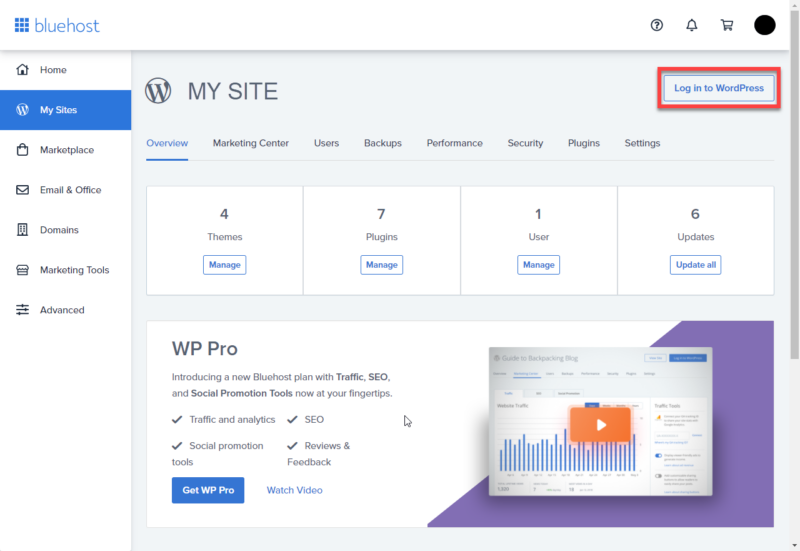
- Rock : This simplifies the Legacy model (see below). It uses vertical navigation to provide easy access to your websites, WordPress tools, and Bluehost’s marketplace.
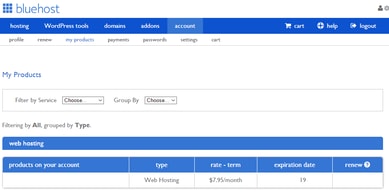
- Legacy : This is Bluehost’s older interface model. You can still access it within your account management panel. That said, it’s being phased out of use. It uses horizontal navigation, and each section is compartmentalized. In other words, you have to go into each section separately to find your websites, WordPress tools, etc.
Dashboard
Within your Bluehost dashboard, you’ll find a one-click setup for WordPress. Installing WordPress is as simple as logging in, finding the website section on your dashboard, and hitting “Install WordPress.”
You’ll then be asked to choose your domain name. At this point, you also need to provide an email address and create a username and password for your new installation.
Bluehost SEO
SEO or (AKA Search Engine Optimization) refers to how easily findable your website is on search engines. Bluehost analyze your website and provides you with an online marketing report that’s divided into easy-to-read sections:
- Start: First, you get an overall score; the higher the score, the better. Essentially, this score reflects how well optimized your website is for SEO.
- Search Engine Submissions: Bluehost will submit your site to Google, Yahoo, and Bing.
- Visitors: This tracks how many website visitors you have and where they come from. In time, you can compare your visitor numbers over 15 days, one month, or three months.
- Rankings: Here, you can check where your site ranks on search engines and see how well your keywords are doing compared with your competitors.
- Site Review: This highlights any technical issues, such as long loading times.
- Search Optimization: Here, you can check how search-engine-friendly your site is. For example, whether your site’s structure is understandable and whether links and titles are in order.
- Content: Regularly uploading high-quality content is one of the best ways to improve your SEO. Bluehost will analyze your content and provide tips for improvement.
- Mobile: Bluehost will analyze your website and inform you whether your site is responsive and loads fast enough on mobile devices.
- Popularity: Popularity is measured by how many backlinks you have; the more links you get from other sites, the better.
Overall, Bluehost provides a wealth of information to help you improve your website’s SEO.
Bluehost Email Hosting

Using Microsoft 365, Bluehost lets you create a custom professional email address where your domain name is simply transferred to your new email. If you already own a web domain, you can add it to your Office 365 subscription through its management dashboard (which you can access via your Bluehost control panel).
There are three email hosting plans to choose from:
- Email Essentials: manage your professional calendar and email.
- Business Plus: suitable for collaborating with a team.
- Business Pro: unlocks multiple devices and local app access.
See Bluehost pricing for current rates.
All plans include:
- Microsoft Outlook Web Access
- Automatic Microsoft updates
- Microsoft’s 99.9% uptime guarantee
- Security and disaster recovery
- Access to an intuitive management dashboard
- 24/7 support
You’re free to upgrade or cancel your subscription whenever you want (with no cancellation fees). Before canceling your subscription, be sure to download any data you require; however, you can still access this up to 30 days after canceling.
Bluehost Customer Support
Bluehost claims to always be on hand to support its customers. So regardless of your chosen pricing plan, you’re entitled to 24/7 telephone and live chat support. To utilize the latter, hit the “chat now” button on Bluehost’s website. You’ll be asked if you’re a new or existing customer and a way to identify you, such as your web domain, phone number, or email address.
Bluehost also offers a blog, online knowledge base, and resource center. Here you can find answers to questions, how-to guides, and gather more info on topics about business, creating a website, and marketing. An interesting feature in the resource center is that you can filter by skill level: basic, intermediate, or advanced to ensure access to the information you’ll actually understand.
Bluehost cPanel
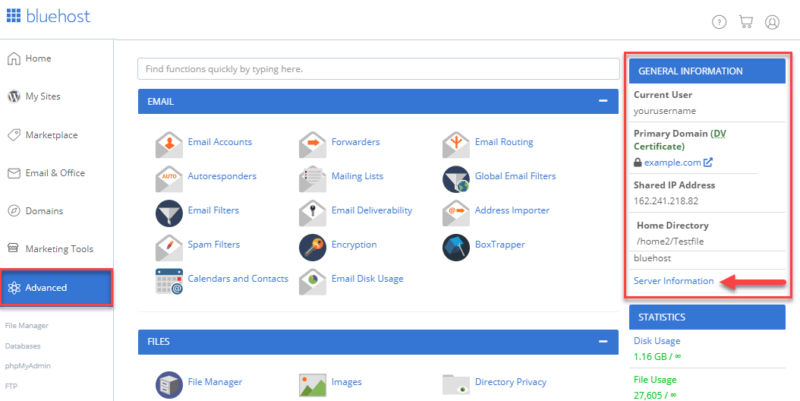
CPanel (AKA Control Panel) is Bluehost’s website management platform. You can access this via the advanced section of your Bluehost dashboard. From here, you can manage integrations and access a range of applications where you can add useful scripts to your website, such as:
- Server information
- Hit counters
- Mailing lists
- Blogs
- eCommerce functionality
- Password-protected subdirectories
- Searches
Bluehost Integrations
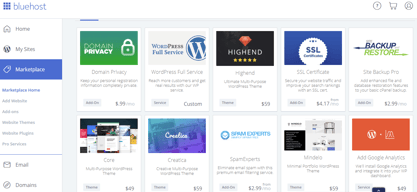
The Bluehost Marketplace is where you browse, purchase, install, and manage your WordPress plugins, add-ons, and themes. You can choose from over 900 themes and tons of plugins.
Simply log into your Bluehost account and locate the marketplace button on the left-hand side menu to access the marketplace. To give you an idea of the kinds of plugins on offer, let’s focus on WooCommerce specifically. There are 18 WooCommerce-related extensions (plugins) covering shipping, scheduling, and payment processing functionality.
More specifically:
- PayPal Pro
- Amazon Pay
- Stripe
- Xero
- WooCommerce Booking
…to name a few.
Bluehost Performance
Performance is imperative when picking the right web hosting service.
The key metrics here are twofold:
- Uptime: A measure of the reliability of your website’s performance.
- Site speed: How quickly internet browsers can load pages from your website
Uptime
BlueHost boasts an impressive 99.99% uptime guarantee. In theory, this means your website should only experience minimal downtime per year, which is a competitive standard in the hosting industry.
Site Speed
As we’ve already hinted, site speed refers to the number of seconds it takes for a web page to load. Needless to say, the quicker, the better. Bluehost’s loading speeds are competitive, though not always the fastest in the market. If you expect high traffic volumes, there’s a cache setting you can utilize to improve your website’s performance. Caching allows you to store assets in a temporary storage location to load your site faster. You can find this feature in your Bluehost portal under ‘My Site’ and then “Performance.”
Security
We’re living in an age where digital fraud is rife, and, as such, secure web hosting is essential. With that in mind, let’s see what Bluehost offers:
-
Paid and free SSL certificates :
- Free: All Bluehost plans come with a free SSL certificate.
- Paid: You can also purchase a private SSL certificate for extra encryption. See Bluehost pricing for current rates.
-
CDN : Bluehost uses Cloudflare’s content delivery network to ensure secure interactions between your website and visitors. You’ll receive a free CDN certificate will all plans.
-
Firewalls and attack protection:
-
SiteLock: This is a PCI-compliant service for managing your website security. The cost of this service is charged annually and includes malware protection, page scanning, and firewall security (more on this below).
-
CSF: This is a free firewall plugin for VPS and dedicated servers.
Creating Your Website with Bluehost
WordPress website creation can be a daunting task, but Bluehost tries to make the process as easy and quick as possible:
#1: Getting Web Hosting and a Domain Name
For the uninitiated, web hosting refers to a website’s allotted space on a web server. The website’s files are stored here: code, images, etc. This enables your website to be accessible on the web.
In contrast, a web domain is simply your website’s URL address. The issue that many great domain names are already taken so you have to be quite creative when choosing one.
Give it a go and see if the domain name you like is available:
You need both web hosting and domain name to launch a website. To hit the ground running with this, click “Get Started” or “Start Building.” From there, choose the plan you want. Bluehost offers three pricing plans and makes it easy to understand what’s included in each.
But, in a nutshell:
Basic: ”Perfect for bloggers and personal websites.”
Plus: ”Perfect for business sites.”
Online Store: ”Perfect for online stores with product shipping.”
See Bluehost pricing for current rates.
All plans include web hosting, unlimited websites (which means you can host as many websites as you need), and over 300 templates. You also have unlimited access to their image library, email marketing tools, and blog post management features.
The Plus and Online Store options unlock additional features, including extra premium template designs, domain privacy, and online selling features.
Once you’ve chosen your plan, if you already have a web domain name, enter it now. Or you can skip this step if you want to tackle this later. If you’re creating a new web domain, enter your desired URL, and Bluehost will tell you whether it’s available. If it is, then you can proceed. It’s worth noting that your web domain is free for only a year; after that, you’ll need to pay.
Next, you’ll be asked to enter your personal details and agree to their terms and conditions.
Bluehost wants to tailor the user experience as much as possible. So they’ll ask a few short questions about the type of website you intend to make, your goals, and how comfortable you are with website creation.
#2: Building Your WordPress Website
Bluehost automatically provides a default website design for you, which you can view by clicking “visit site.”
However, you’ll probably want to change this as it’s very simplistic. WordPress is pre-installed to save you the hassle of doing this yourself.
To create, edit, and design your website, head to your WordPress dashboard. First, you’ll most likely want to select a theme for your website. To do this, click on “Appearance,” then “Themes,” and finally, “Add a new theme.” From here, you can search for a theme. Scrolling through the vast array of options can seem overwhelming. But you can use the filters to help narrow down your search.
Some themes are free, while others have a price tag. The best theme for your website comes down to what you visualize your website looking like. You may find it worthwhile paying a little bit for the look you want, but the choice is yours. When you find a template you’re happy with, simply install it and then hit “Activate.”
Step 3: Editing Made Easy
After logging onto your Bluehost control panel, go to “My site” found on the left-hand menu, followed by the “manage site” button. This takes you to your WordPress dashboard, where you can click “website builder.”
From there, you can begin editing as you like. You can click on any web page and select the different elements you want to change. For example, you can edit text, text on buttons, images, color preferences, and background. You can also edit the pictures by searching through Bluehost’s vast library of images or uploading your own.
Whatever aesthetic you’re after, WordPress can help you achieve it. You can even change the headers and logos using the “customize” button.
To add new pages, simply click on the “pages” tab on the left menu and then locate “add new” by the “Pages” title.
Bluehost’s drag-and-drop editor makes it easy to edit your template and add features to your website. Overall, creating and editing your website with Bluehost is really that simple. What it really takes is a bit of exploration and an idea of what you want your finished product to look like.
Bluehost Pricing & Web Hosting Options
Bluehost provides many different web hosting plans to choose from. We’ve made a short summary table so you can get your head around all of them.
| Shared Hosting | Yes |
|---|---|
| WordPress Hosting | Yes |
| Cloud Hosting | No |
| VPS Hosting | Yes |
| Dedicated Hosting | Yes |
| Reseller Hosting | Yes |
| Linux Servers | Yes |
| Windows Servers | No |
In this review we will focus on three most popular options, namely:
- Shared Hosting
- VPS
- Dedicated
Let’s take a look at what these mean:
Bluehost Shared Hosting Pricing
In shared hosting you share server resources with other customers. It’s by far the most popular hosting plan thanks its affordability and it’s perfect for those creating a website or blog for the first time. When considering shared hosting, there are a further four 12 month plans to pick from:
Basic
Best for one site
- Custom themes
- 50 GB SSD Storage
- Free CDN included
- An SSL Certificate
Plus
Best for multiple sites
- Unlimited websites
- Unlimited SSD storage
- 30 days of Office 365 for free
Choice Plus
Added security
- All previous features
- Free domain privacy
- One year of free automated backups
Pro
Additional resources
- Optimized resources
- Unlimited free automated backups
- A dedicated IP address
See Bluehost pricing for current rates. Prices are promotional for the first term only and renew at regular rates.
Besides the above mentioned key features all plans also include:
- Custom themes
- 24/7 customer support
- Access to the easy-to-use WordPress website builder
- An SSL Certificate
- Resource protection
- Domain manager: where you can update, purchase, transfer, and manage in one place
- Google Ads credit
Bluehost VPS (Virtual Private Server) Pricing
Considered perfect for expanding websites needing more control. There are three plans available: Standard, Enhanced and Ultimate.
All plans come with 24/7 customer support, and each program runs on a 36-month basis.
Bluehost offers Standard, Enhanced, and Ultimate VPS tiers with varying cores, SSD storage, RAM, bandwidth, and IP addresses. See Bluehost pricing for current rates.
Bluehost Dedicated Hosting Pricing
Aptly named, the Dedicated plan provides a dedicated server for just one individual, application, or organization. In other words, you won’t be sharing a server with anyone else. If you’re running a business or your website’s snowballing, you may want to consider this option. But, ultimately, you have to decide whether it makes sense for your budget and business plans.
There are three plans to choose from: Standard, Enhanced, and Premium, each offering increasing CPU power, RAM, storage, bandwidth, and dedicated IPs. See Bluehost pricing for current rates. Prices are promotional for the first term only and renew at regular rates.
Bluehost: Pros and Cons
We’ve covered lots of information here, so let’s condense what we’ve discussed into a quick pro-cons list:
Pros:
- Low pricing (initially at least)
- Bluehost is beginner-friendly
- Recommended by WordPress
- Website creation is quick and easy
- Flexibility with design creation
- Access to security features- SSL certificates and CDN
- You benefit from a free web domain name
- 24/7 access to customer service
- You benefit from a reliable hosting service with good uptime
Cons:
- Bluehost websites suffer slower load times than competitors
- Higher renewal prices
- Bluehost servers are based in the US. So, load time might be slower if you live outside this region
Blueshost Affiliate Program
Bluehost also offers an affiliate program. You can find Bluehost’s affiliate program by scrolling to the bottom of their home page and clicking ‘Affiliates’. The affiliate scheme is free to join. You just have to sign up, and you’re immediately provided with a unique tracking code and affiliate links or custom banners (or both).
Then, for every visitor who clicks on the link and signs up to Bluehost, you receive a commission that increases with the volume of referred customers. From there, you can earn an unlimited amount: the more people who sign up to Bluehost via your link, the more money you’ll make.
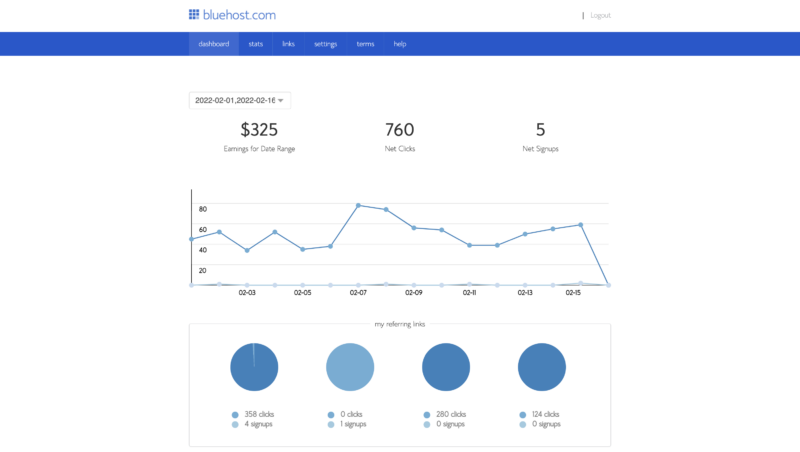
Overall, this affiliate marketing scheme is pretty decent and has one of the better payouts in the web hosting space. What’s more, Bluehost provides you with support and promotional resources to give you the best shot at earning as much as possible.
Bluehost Alternatives
If you decide Bluehost isn’t for you, don’t fret. There are plenty of other great options to choose from:

Hostinger: Most Affordable Web Host

Hostinger is a European-based web hosting company boasting decent website speeds and affordable hosting plans. You can host up to 100 websites with their shared hosting plans, and you’ll get a free web domain. Other freebies include an SSL certificate and weekly site backups. See Hostinger pricing for current rates.

Hostgator: Web Hosting with a Website Builder
Hostgator is a popular US-based web hosting solution. They’ve been around since 2002 and have made their mark, offering low, competitive prices. You can expect to host one website, connect a custom domain, and have an SSL certificate. In addition, Hostgator boasts good uptime speed, so you can be sure of its reliability. You’ll also have access to an AI-fuelled website builder, so you can set up a WordPress site in just a few clicks.
Hostgator’s drawbacks lie in its poor customer service. For example, they have notoriously long waiting times for their support chats. In addition, customers have complained that their team didn’t have a good technical understanding of website management.

Siteground: Best Shared Host Customer Support
SiteGround is an excellent choice if you’re looking for quick website speeds and reliable uptime as they reign supreme in both areas. They’re another European-based provider gradually gaining popularity for their well-priced and fast hosting services.
Their Starter plan gives you one website, SSL, and CDN certificate. You also receive free daily backups, access to their website builder tool, and free firewall security built into your website. Finally, they also have WooCommerce integration options available. See SiteGround pricing for current rates.
On the downside, Siteground only offers shared hosting plans. They don’t provide VPS hosting or dedicated servers. Your resource space is also considerably limited compared to competitors. Moreover, it doesn’t offer a free domain name.
Bluehost: Our Final Thoughts
So, there you have it. This concludes our Bluehost review. We hope we’ve provided everything you need to decide whether they’re a good choice for your website. There are many aspects to consider, from security to functionality to ease of use. But, Bluehost is regarded as one of the best overall hosting providers on the market.
As we’ve discussed, it allows you to design, optimize and host your website for a reasonably low price. The price hike for renewing your subscription is still pretty reasonable for beginners looking to get their business off the ground.
All in all, Bluehost provides everything you need to kickstart your online business, from an intuitive website builder to web domains to helpful plugins – and tons more to boot!
Is Bluehost the right choice for your business? Tell us your thoughts in the comments box below!
We hope this review was useful. Click below to let us know what you think or leave a comment in the comment section!

Compare Bluehost with other popular tools in the same category.
We have a plan with unlimited sites, I like being able to add on a test site or two when I need to
Cheaper plans only allow one site, and they limit emails on cheaper plans
Attracting a lot of customers with our Wordpress site, it's so easy to maintain! The Bluehost control planel is great!
Ease of use. Its super easy in bluehost to manage multiple website and add any new services or plugins.
I am using bluehost for multiple website and didn't find anything in particular which I don;t like.
My Go-To Choice is Bluehost for Efficiently Managing Multiple WordPress Websites, Thanks to its Budget-Friendly Hosting Space Sharing Amongst Various Clients.

Bluehost is one of the leading web hosting service providers made it very affordable for general people to start their own website or blog. They are serving the world of internet with their wide range of services for more than 2 decades now. Therefore, Bluehost is trusted by many people for their consistency in what they do and loved because of the low cost of their services. I loved their web hosting services because of low cost, excellent service and ease of managing a Wordpress blog from their cPanel. To make their shared hosting attractive, they offer many attractive addons such as free domain name, free SSL, website builders etc. Bluehost also have plans for dedicated hosting, VPS and online store. Online store seems to be a very popular plan as it is a complete package of themes, plugins and tools that are required to build, deploy, and manage an online store of any kind.
I have used Bluehost shared hosting for a year to manage few blogs for my spouse before moving onto another provider. I loved Bluehost for their low cost for shared hosting, 24x7 support and worldwide data centers. I should appreciate their response time for support tickets. Lately there are other new service providers came into competition providing even cheer services. I moved to a different service provider for my spouse’s blogs because of the cost factor only.
Bluehost is pioneer in providing low-cost web hosting service providers, never compromised with quality of the service. I recommend you to try Bluehost if you are looking for cheaper web hosting services.

The best part about Bluehost is that it provides all the necessary stuff like SSL, subdomains, custom email, etc absolutely free of cost. It also offers a free domain for 1 year along with a free CDN service with a yearly hosting plan for your website. Bluehost also provides other useful tools for free like – a free website migration service, stock image library, drag and drop website builder, WordPress themes, and free security for websites.
It should also provide free automatic backup and free domain privacy for websites without any addon fee. Everything else is very good in Bluehost.
I am using it for our company website. It has all the tools like security, SEO, analytics tools, and email tools and features that help running my company website.

This is the best hosting domain provider with ssl certificate
Need to upgrade security and the speed of processing.
All good ni problem found

immediate action by support and 100% online server
i dont dislike anything about bluehost, am a current customer
as you can see the website provides server and data centers for various websites, i run my own
I have found it much easier to use and navigate to what you want as compared to other hosting services I have used
I have had to chat with customer service more than once to try and resolve the same issue. Hopefully, it was an isolated event.
Domain and DNS settings for my website.

It's not just a hosting service provider. However, designed beautifully to host WordPress websites. It also provides free domain names and SSL for a year. The best part is the WordPress feature.
I wouldn't say I like the price and offers they came up in the last few months. The company should offer competitive prices. They should come up with innovative ideas and prices.
Bluehost is solving the website hosting issue. It offers many services that help set up any business web presence. We are technology experts. It's easy for us, like Bluehost

Bluehost was quick to help me move my website over from a previous hosting platform. Customer service was excellent.
Currently I have enjoyed all aspects of Bluehost but worry about my monthly sessions growing and creating issues on my website.
I'm able to almost completely control my website without interruptions due to the hosting platform controlling what I want to do.
Bluehost stays on top of most of the current needs for servers, programming and other web-related items. The pricing is competitive and often lower than the pricing at other popular web hosting providers. Bluehost has what seems like a large support team that can handle anything we need, whether it's our account or billing issues. The technical support team is helpful and knowledgeable enough to help me deal with most problems I run into.
Bluehost will often not be able to address certain needs for projects that are more complex.
Bluehost is a dependable hosting provider with great performance. They allow us to upload web media to be presented publicly for business and marketing activities. The server loading speeds are often fast enough for standard web loading processes. We have never had major service outages. There are automated tools that allow us to keep our Bluehost account and server settings updated when needed.

Bluehost hosting is really an incredible platform that offers different types of hosting including Shared, VPS, and Dedicated hosting. I am personally using Shared hosting for my business website and I am really satisfied with the services of Bluehost.
I think so there should be a monthly plan available for people instead of a yearly plan. Because if some people can't afford the yearly plan they can proceed with the monthly plan. All other features are awesome without cons.
I never found any problem during the use of this hosting platform. Easily I always manage my emails, control panel, and domain names. Because dashboard of Bluehost is really easy to understand and use.
Included email server with unlimited accounts and unlimited storage
Verification of accounts (for ssh access) is unclear
Web hosting at an affordable rate Easy deployment of websites Easy purchase of web domains
Bluehost is easy to use for a beginner. The dashboard is very user-friendly. Bluehost is already famous in the business for being a highly reliable host with 99.99% uptime. They host your websites with breakneck speed, and that certainly helps with SEO. Not to mention, you can choose the 1-year hosting plan with unlimited websites and free SSL. It's a terrific deal if you have multiple websites to host.
Bluehost has an expensive starting price point for hosting websites, but I think it's worth it for the quality of services that they provide.
Fast and reliable hosting service means my websites perform better on SEO. Free SSL certificate that auto-renews every three months, saving me precious time to handle this recurring task.
Bluehost is very easy to use and setup in regards to their web hosting services. However, what truly separates them from the competition is their spectacular customer service.
Although they provide a great multitude of reference material, it can sometimes be overwhelming to find them. However, their excellent customer service offerings can help direct you right to the information you desire to find.
Web hosting is needed for websites. They also offer the opportunity to purchase domains and provide the user with access to email services. These emails utilize the domain on the account.
I love their customer support team! They are always so helpful and happy to assist you. At one point I didn't know how to work the txt file for Google search console and the customer support team helped me figure it out!
It's not as easy to login directly to Wordpress. I still haven't been able to figure it out as I go to bluehost, then go to login to Wordpress. When I hire a VA I'd love to be able to have them login directly to Wordpress.
I am able to build a website From scratch without hiring any developers. And not only I did I build it all myself, I think my website looks pretty darn good!

Regarding functionality it is provides same as rest of the competitors like GoDaddy, 000webhost. But the maintenance of websites hosted using blue host are much performance oriented because if their fast servers, I never faced server down issue till yet. Personally I like it's customer service team dedication. They also provides wordpress website creation and sell domains too.
Nothing found yet. But the domains that customer can buy are limited l. Like, we can't buy .co.in domain as it is not in their bucket list.
I have used bluehost for hosting static websites mostly sites that uses only html, css, js, with no js frameworks like react, angular.

Bluehost is among the 3 best hosting companies to be recommended officially by WordPress. Bluehost is very intuitive to use and easy to navigate from page to page. It has the best uptime with easy to use interface. It has a prolific web migration service and excellent WordPress hosting.
Bluehost lacks cloud hosting and no shared plan
Reliable speed and uptime of my website and packed with security options

I use Bluehost for their hosting services. I like the fact that they have customer support where you can talk to a real person. Each time I have contacted them, I was pretty satisfied with their help. I called them once for a technical issue and then for an upgrade. In both instances, their customer reps were helpful and knowledgeable. Even if you are a beginner, it takes only a couple of hours to have your site up and running with all the necessary stuff. They are, I think, the best hosting service for a small website. Their plans are not expensive. I use Bluehost with WordPress for my website. The two are compatible. The navigation panel is straightforward. I used the Bluehost help section to get around as it's all new to me. Overall, I did not have a lot of trouble finding my way. The menu on their website is straightforward.
I think the hosting service depending on the plan, can impact the speed of your website. Overall, I am satisfied, though. When I started my website, I did not know if it will be something I would do in the long term. So it's important to me to have a good price/quality relationship. I find Bluehost was perfect for me.
I was able to start my website thanks to their hosting service. I like the fact that they accept WordPress-based websites. I have a plan where I can create additional sites at no charge. It's great to have this feature. Their hosting service is very reliable. You can easily create subdomains or folders. The process to do so is straightforward.
Low-cost service, no misunderstood fees, straightforward offerings, Office365 and Google Apps integration (or email forwarding) and unlimited domains (good for small agencies/consultants looking to host multiple SMB sites). Easy to get a website up and going, protect it and use WordPress.
Speeds. Managed hosting is expensive, and shared hosting can eat at speeds, affecting SEO. Speeds. The back end always feels like they are trying to upsell you on someting. Speeds - like using cable for internet - when everyone's on, it is sloooooooow.
I was looking for inexpensive hosting services for a SMB. The price difference returned an ROI within a month or two. Much easier to use that GoDaddy.

The best thing about Bluehost to me is the many capabilities to connect it with Wordpress to make your website even better. Bluehost is also very helpful with getting the site up and running step by step.
The only thing that I dislike about Bluehost is the multiple ways to upgrade your sites software that isn't always the most user friendly.
BLuehost solves the issue of finding a reliable website host that will also maintenance your site for you as well. The benefits that I have realized from this would be the ability for my site to run its own maintenance and security protocols even when I can not be logged in.
I like the fast response from chat and by being a new website owner I was completely confused about what I should do first and what should happen next but Bluehost has step by step guide on how to get your website up and functioning. The layout also makes it easy to use and navigate. I also was happy to be able to purchase my business email account through Bluehost.
I haven't experienced any dislikes while using Bluehost.
I realized it's best to do the recommended steps first because it keeps you on track with the things your website need. I also like how I can purchase add-ons and have multiple sites all easily accessible through Bluehost.

You get fast, reliable hosting without the higher costs of services like SSL (secure hosting with https). SSL is included in the hosting at no additional cost.
This is a very minor downside. Bluehost will occasionally ask you to use their Wordpress features. I just ignore them. You do NOT need to make a Wordpress site in order to use Bluehost.
I am solving, mainly, the high costs that I was experiencing with my previous hosting services, to get an SSL (https) certificate. There is no additional cost with Bluehost for SSL.

Ease of the dashboard. cpanel has everything you need to get to on one page
I'd like for the cpan to highlight what features are currently in use, vs those not purchased/utilized. It will make for an easier onboarding and training for support staff.
Outsourcing hosting.
I chose Bluehost because their services integrate with Wordpress.org, and I was able to easily host my site with them. Their sign-up process is fairly quick and setup does not take previous knowledge in website hosting. If I did not know the answer to a question, I was able to quickly search the question and answer forums and find the answer. This made for a customer-friendly atmosphere that made me comfortable setting up my first website.
I quite honestly do not have any dislikes about Bluehost. Website hosting is pretty straight-forward, and Bluehost has a great product.
Like I mentioned, I am able to host my site with Bluehost and integrate it with Wordpress.org. Their prices are competitive (and actually cheaper in my case) with other companies in the industry. I pay a one-time fee annually to keep my service running, and even that is affordable. So the overall benefits are simplicity and affordability.
Super easy to use compared to Go Daddy in terms of hosting. Everything is laid out, simple, and ready to use.
Nothing I dislike - very simple and useful tool.
Moved from GoDaddy hosting. Much easier to use and edit.
Beyond boarding process for setting up a WordPress website was very easy. transferring a domain name to bluehost name servers with straightforward and setting up an email address was equally easy.
There are some upsels to WordPress plugins that could be a bit annoying but very easy to disable as well.
I did not want to deal with the complexity of setting up a web server and WordPress so something like blue post that takes care of all of that for you is very convenient.
I've never had any issues with Bluehost. They are fantastic with regular contact when expecting outages. Everything else has been very stable and reliable.
There is really not much that I dislike. A few times in the past, I have had to call them to reset my password, as the system doesn't allow the user to do it online.
My website is stable, secure, and rarely offline. That's the best I can ask for.

I switched from another host owing to frequent outages & poor client service. Bluehost has been an excellent selection. it had been simple to transfer my web site with terribly obtainable client support. The dashboard is straightforward to know & navigate. the {value} may be a sensible value. they're a wonderful selection for WordPress hosting. I even have knowledgeable just about no outages since moving to Bluehost. Also, speed & server response times were a lot of improved. I'm glad I found them.
UptimeRobot indicated my website went down sixfold in a very few hours.
I've had my weblog and store for years however recognize little concerning the technical aspect of a way to set it all up so on, however I used to be in ought to modification internet hosts(ugh that previous host still offers Pine Tree State anxiety) and a handful of friends counseled Bluehost. thus I signed up and was thus shocked concerning the convenience of use. virtually everything is completed for you mechanically and also the things that you just ought to modification have tutorials or support helped Pine Tree State move into no time in the least. I even have been with them for 2 months currently and could not be happier!

Uninterrupted website hosting, Good bandwidth and affordable domains
Bluehost host is the best choice for reliable website management with excellent customer support
Domain Registration and website hosting