

( 224 )
Unclaimed: Are you working at BlueJeans Virtual Events?
BlueJeans Virtual Events Reviews: 4.4/5 — Solid Choice
BlueJeans is a cloud-based video conferencing platform that was built to facilitate communication and empower users to collaborate seamlessly on a digital workspace. The app was recently acquired by Verizon, which led to the software offering more advanced features and tools including webinar and virtual event applications in addition to its virtual meeting app. It’s also a pioneering platform that connects desktops, mobile devices, and room systems into one video meeting

| Capabilities |
API
|
|---|---|
| Segment |
Small Business
Mid Market
Enterprise
|
| Deployment | Cloud / SaaS / Web-Based, Desktop Mac, Desktop Windows, Mobile Android, Mobile iPad, Mobile iPhone |
| Support | 24/7 (Live rep), Chat, Email/Help Desk, FAQs/Forum, Knowledge Base, Phone Support |
| Training | Documentation |
| Languages | English |








Compare BlueJeans Virtual Events with other popular tools in the same category.
How easy it is to set up an event and how little time it takes.
It was a little confusing in the beginning on the difference between scheduling an event and scheduling a meeting, as well as the different roles of the moderator and presenter. It would have been nice to been provided a 'white sheet' on how to and the differences. I understand the need for the role of the moderator, however, it would be nice if this was an optional role for an event. I also wish you could edit the event/meeting title after it has been created. This has caused a few issues in the past as meeting/training event titles have been altered. I have also ran into issues trying to upload a video to play during an event so more information on how to do that would be appreciated.
We have been able to seamlessly conduct meetings with participants here at our headquarters and in our field locations states away. This has been very beneficial to our organization.
Easy to sign in, it is easy to share the bluejeans link on google meetings. You can record calls. Bluejeans events are awesome & interactive. Generally very reliable system.
Occasionally kicked off the call & experience issues if participants are not on mute
Bluejeans Events is a great feature that allows us to increase our participation and engagement during trainings.
The number of people that can join in the events. We need to accommodate at least 5000 people and Blue Jeans can fulfill that. It is also easy to moderate from my desk or at the actual meeting.
Video Quality. We can never seem to get the full video quality in our broadcasts. It has become frustrating that our broadcasts are only getting somewhere between 360P and 480p video quality.
Town Hall broadcasts to the entire company, many of which are remote. We average around 4000 individual users. Its amazing that we can broadcast easily to that many people.

Number of participants can be more, I love rewind and recording feature, mute for all is possible
Interpretation feature, simultaneous interpretation is not possible, live translation
Solving in large meeting and webinar with more participants
I love the recording and rewind feature, also live telecast, screen sharing feature and live broadcast feature
Interpretation feature, mostly simultaneous, also while assigning role.
Great for virtual meetings and webinar and solving screen sharing feature in 720p
Great for virtual hosting of any meeting and Webinar, recording and rewind feature is nice. Also registration for attendee before join the meeting is superb.
Interpretation feature and relay option to be there. Also live captioning translation.
Mostly live streaming and registration which give more security. Also live streaming in 720p is great.
I like recording and rewind feature, also registration and hosting.
Interpretation feature should come with simultaneous like WebEx
Attendee registration feature before meeting and webinar.
Best app for virtual event and and recording and registration.
Simultaneous interpretation is not at all available.
Recording, rewind and virtual events with registration.
Helps in live events and webinars like zoom
Not that aware to many and unavailable for most
Helps in conducting online webinars without any physical presence required

BlueJeans virtual events help us to gain knowledge about recent topics and events.
Very lengthy events for small topics.Need to change length.
It provides platform for live interview webinar and streaming so we can face to face give conversation.
I love the speed and ease with which events are done. Participants can join with a link and interact with responses, votes, polls, surveys, and multimedia and screen sharing. The event administrator can manage everything to maintain order. The video is of excellent quality and the audio is clean and uninterrupted, so we have smooth communication. The user interface is simple and effective. It is easy to move interruptions away from the webinar, so we have an immersive event.
Overall I think the platform is excellent. The only thing I don't like is that, if there are a lot of participants in the event, the performance gets significantly worse. I don't think it's because of our internet connection, so I think it's a software problem. That's my only complaint.
We are using BlueJeans to communicate as a team. The different departments in technology need to maintain constant communication to keep the tasks to do organized. We also use BlueJeans to receive specialized courses to improve our work. During the live stream, the use of polls and surveys helps us a lot to do quick tests during a session. The instructor is the room administrator and organizes the course sessions very well with the functions on the platform. We don't have to use any other software to receive the classes.
Blue jeans are perfect and simple video conferencing by Verizon. Its dynamic feature like recording sharing and collaborating with team on the remote is really simple and performance felt better than zoom often with high-security features and breakout room.
The user interface is pretty basic in comparison with other tools in the market but it compensates the same when we talk about performance I have never faced any issues while using the same.
Virtual meeting with the team to collaborate and work across geography. Hosting client requirement meetings and review calls is really helpful. The presentation and recording with high quality resolution make sure data can be resued for future aspects.

We operate in the food manufacturing business and are invariably required to connect with our global customers via virtual meetings/ online events on an ongoing basis. We use it across the organization for organizing, scheduling, and hosting meetings with our clients, stakeholders, and team members. It allows us to connect with our counterparts in real time and makes it much easier for us to communicate and share our files/ documents.
I wish BlueJeans should allow more options for editing the videos. Also, pricing is a significant downside of this software. The cost is comparatively higher as compared to the services offered.
The video and audio quality of BlueJeans virtual sessions is par excellence. We hardly face any interruptions, and also it makes it much easier to induct a new guest into the meeting. He can join the session with the single click of a nearby device. With BlueJeans, we can now conduct our client interactions/ confidential meetings in a more safe and conducive environment. Further, the mobile UI of this software is excellent and gives us a seamless experience altogether.

BlueJeans offers a dynamic and fluid video conferencing experience. It allows users to share their screens during seminars, facilitating the presentation of high-quality advertising events. I am fascinated by the platform's ability to interact with participants and its ease of use.
The only thing I think this platform need is integrating with commonly used document management solutions.
This platform allows us to dynamically demonstrate all our proposals to clients and potential clients through highly interactive advertising events.
Chat function- ability to view others in meeting
sometimes slow connection- Zoom seemed to work better
Ability to have clinical post conferences with students when we were not allowed to meet on site due to Covid regulations. Ability to conference at off times and in geographically distant locations
Industry accepted world wide. Every one and their momma has access.
Connection sometimes is slow. when i connect from my phone it ask me to call in but i don't have a phone number for this purpose.
Communication via meetings when in office meeting are not capable.
highlights feature that allows us to take screen shot during the presentation and view later while watching the recording
it only shows 9 participants videos at a time
online classes
Voice Quality is the best among Teams, Zoom, Google meet
1. No possibility to co-work (on the same file, in same system etc.) 2. No possibility to run project or the team and control their free time. No possibility to invite employees easily, each time it needs to send invitation by e-mail.
Financial Technical Consultancy
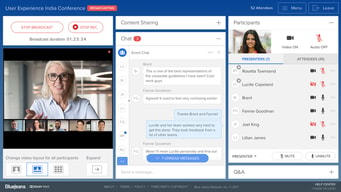
I like that employees can answer questions on a named or anonymous basis. Depending on the conversation topic, employees may feel more "safe" asking a question anonymously. I also like the different roles that can be assigned (i.e. presenter, moderator, attendee). It's hard to manage all aspects of a meeting, so having different capabilities for each role has been great!
I don't like the polling aspect as much since you can only answer one question at a time. I wished there was a way to ask multiple questions at a time.
Reaching beyond the 150 participant maximum that a single user has on their account. Given we are a global company, it's a great entry point for us to stay connected with everyone and have more folks joining. Our teams have been also using BlueJeans Events for all-employee meetings now. Before we've had a mix of in-person and virtual, so it's a helpful tool and very beneficial to our users.
* Q&A functionality: Very handy, tidy, and pretty self-explanatory for moderators, presenters, and attendees alike. The ability of attendees to upvote has made it much easier to prioritize questions by order of salience and frequency. * After-event metrics: Excellent and comprehensive after-event reports (with one drawback which I mention below). * Branding and customization: The ability to add pre- and post-event screens is very handy for conveying extra information to attendees while they wait or after they've left.
* Inability to see other presenters' videos while screen-sharing. When you are giving a presentation in the real world, it is very helpful to be able to receive nonverbal cues from other people in the room to get a sense of how they are reacting to the information. In BlueJeans Events, you don't have this ability and that is a serious detriment in my opinion. * Integration with other platforms (i.e., Facebook Live/Workplace) is kind of clunky. Live-streaming to YouTube does not seem to be an option. No option for a custom streaming service. * While the ability to add pre- and post-event splash screens and backgrounds is very helpful, there is no way to make them accessible by adding alt text or by simply typing in text that can be picked up by a screen reader. Additionally, they don't seem to be very responsive and sometimes appear stretched or condensed on certain devices. * BlueJeans Events tends to overestimate the number of people who participated in any given event in the after-event reporting. If someone, for example, was kicked off and then joined again, they are counted twice (even if joining from the same IP address, I believe). It would be nice if the reporting were a bit "smarter" so that our team would not have to dig through the Excel reports to see how many people really attended.
* Q&A functionality is unparalleled -- it's very helpful to understand what questions and topics are the most salient for our audience * With the amount of control you have over the customization, it's easy to provide a smooth, polished experience for attendees, which is especially important at a time when people are inundated with virtual event opportunities
Reliability of multiple users interface and connectivity
Time to load once you click to join the meeting.
Multiple user interface.
An easy platform to navigate if you have used bluejeans before looks like a very professional event Would be fantastic if it was integrated with the main BlueJeans meeting platform., that would add a lot of value to people's use and get them to utilise the correct product as opposed to just having large meetings on BlueJeans meetings
would be great to have the captions option to increase accessibility for people with hearing impairments Not always evident if the participants cal already see you or not Didn't know bluejeans primetime changed the name to bluejeans events, this wasn't well publicised Maybe should assist hosts in setting up their environment to look more professional Not everyone in my organisation has access to Bluejeans events and the capacity of bluejeans meetings is not large I don't think enough people are aware of the existence of this product, hence why a lot of large meetings turn into everyone listening to someone typing. more marketing is required and a better integration with the main bluejeans to draw people to use "events". The black and red background (on the screenshot) that is being used by GSMA should have been advises against by the Bluejeans set-up team as "un-inviting"
host larger organisation-wide meetings host group meditations in the organisation host lunch and learn drop-ins host webinars with external partners organise small events organise publication launches
Consistent connection ability to work well with other
The interface it's not the easiest to navigate or have private conversations
Virtual Learning, nice way to have more formal settings
Ease of sign on, integration with Google calendar, and ability to click to login in conference rooms
Sometimes it’s a little slower/clunkier than zoom
Integration into calendar events and conference rooms

The best of bluejeans is the sound quality and the easy way to use, we also love the comand center is a powerfull tool
I dint like. when use the APP on my macbook pro retina 13, use all my CPU and get to slow and hot.
We use bluejeans for all of our meeting around the country and for make training.
Without a doubt, this platform reflects the importance of being creative to achieve goals. BlueJeans Events allows the user to show the public an event -even when some individuals are unable to be present. The ability to broadcast events or conferences can be powerful in whatever field you choose to apply it in.
Links are sometimes faulty, but otherwise I have no complaints
Panel Q&As, conferences, and live events
The ability to support so many people and relay organizational information in a digital format
The fact that it is required once you get to a certain number of people
Hosting more than 35 people in a single event. Cal OES is an organization spread across the State of California. Having the Events capacity allows Cal OES bring the whole workforce and the entirety of in-state stakeholders into the same virtual room.
In general the comms quality is good and it interoperates very well with Lifesize and Huawei in room equipment -so great picture and sound
There are two apps on Mac and the Bluejeans Prime Events insists on using the old one. Also, the Prime Events option doesn't hide the name of the attendee asking questions to panelist, quite annoying. Finally, there's no usage stats for views/downloads.
I'm running influencer webinars with video, allowing us to give a more personal feel to webinars.
the ui is really nice and easy to use haven't occurred any issue
nothing irritates or is not ok with the application
big meetings in different offices

Easy to join & easy to setup the meeting. Pretty stable with the nice options to control meetings.
Sound output settings. There are not always convenient to mange you bluetooth headphones. Most of the times you have to manually choose them in the settings.
Day to day meetings with collegues, presentations on the group meetings etc.