

( 5,744 )
Unclaimed: Are you working at Constant Contact?
Constant Contact Reviews: 4.0/5 — Solid Choice
ConstantContact is an email marketing platform preferred by small to medium enterprises. The site makes it easy for businesses to customize emails and offers an extensive selection of features that can empower the growth of your business. The platform essentially serves as your one-stop shop for building email lists, creating your company logo, scheduling social media posts, and selling digital products. ConstantContact is also notable for having great deliverability rates and supporting invitation management, registrations, and tickets.
| Company | Endurance International Group |
|---|---|
| Year founded | 1995 |
| Company size | 1001-5000 employees |
| Headquarters | Burlington, Massachusetts, United States |
| Social Media |

| Capabilities |
API
|
|---|---|
| Segment |
Small Business
Mid Market
|
| Deployment | Cloud / SaaS / Web-Based, Mobile Android, Mobile iPad, Mobile iPhone |
| Support | 24/7 (Live rep), Chat, Email/Help Desk, FAQs/Forum, Knowledge Base, Phone Support |
| Training | Documentation |
| Languages | English |
Constant Contact Pros and Cons
- Lets users create your company logo, schedule social media posts, and sell digital products
- Great deliverability rates
- Also supports invitation management, registrations, and tickets
- Service cancellation requires users to call customer support
- Limited automation options








Constant Contact advertises from $12 a month, and that figure buys you 500 contacts. Reach 1,000 and reported pricing roughly doubles to $30 — a 150% increase for doubling a list, which is the steepest entry-tier escalation in mainstream email marketing. The platform itself is genuinely easy to use and has one of the longest track records in the category. The pricing curve is what deserves your attention.
- What it is: A long-established email marketing platform aimed at small businesses, nonprofits, and local organizations, with event management and social tools bundled in.
- Best for: Non-technical small businesses and nonprofits who value simplicity and support over features per dollar.
- Pricing: Lite $12, Standard $35, Premium $80 per month at 500 contacts. Scales steeply with list size. No free plan. Verified via third parties in July 2026.
- The honest catch: Price is a function of list size, not plan, and accounts above 10,001 contacts are moved onto Email Plus.
What Is Constant Contact?
Constant Contact is one of the oldest names in email marketing, and its positioning has stayed remarkably consistent: make email approachable for people who do not think of themselves as marketers. That means templates that are hard to make ugly, a drag-and-drop editor with no learning curve, and a support operation that reviewers rate well above the category norm.
It has also broadened well beyond email. Event registration and management, social media posting and ads, SMS marketing, and basic landing pages all sit inside the same product. For a local charity running a fundraiser or a small business promoting a workshop, that bundle removes the need to assemble three or four separate tools.
Independent ratings are solid rather than spectacular. G2 puts it at 4.0 out of 5 across roughly 5,770 reviews, and Capterra at 4.3 out of 5 across about 2,892. Those are large samples by any standard, and the consistency between them is more meaningful than the small gap.
How Constant Contact Works
- Contact-based pricing. Your bill is set by how many contacts you store, with the plan tier determining features. This is the mechanic that matters most.
- Templates and a drag-and-drop editor. The core strength, and the reason non-technical users pick it.
- Segmentation and automation. Available from Standard. Lite is a broadcast tool rather than a marketing automation platform.
- Event management. Registration, ticketing, and attendee tracking, which is unusual to find bundled with email.
- Social and SMS. Posting, social ads, and text campaigns from within the same account.
- Deliverability. Long-standing sender reputation is one of the quieter reasons established senders stay.
Constant Contact Pricing
Three tiers, all quoted at 500 contacts, all rising as the list grows. Figures below are third-party reported for July 2026 — Constant Contact blocks automated access from our infrastructure, so these were not read from the vendor’s own page and should be confirmed at checkout.
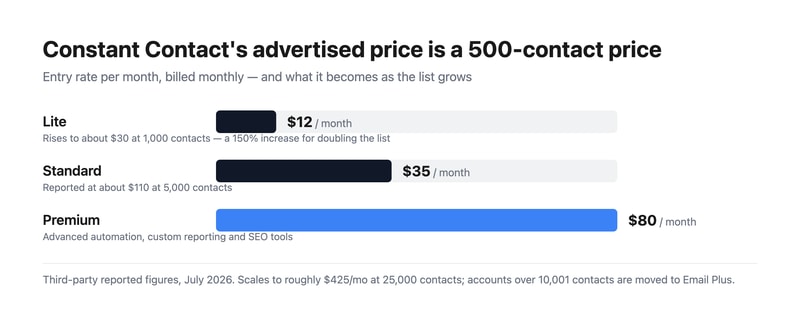
| Plan | At 500 contacts | Reported at scale | What it adds |
|---|---|---|---|
| Lite | $12/mo | ~$30/mo at 1,000 contacts | Templates, basic email, social posting, event marketing |
| Standard | $35/mo | ~$110/mo at 5,000 contacts | Segmentation, automation, A/B testing, contact management |
| Premium | $80/mo | Up to ~$425/mo at 25,000 contacts | Advanced automation, custom reporting, SEO tools |
The things that actually determine your bill:
- The advertised price is a 500-contact price. Every headline figure assumes a very small list. If yours is larger — and most businesses evaluating email marketing have more than 500 contacts — the relevant number is nowhere on the pricing page’s first screen.
- The escalation is front-loaded. Going from 500 to 1,000 contacts on Lite reportedly takes you from $12 to about $30. Doubling a list is normal growth; a 150% price increase for it is not, and it happens at the very bottom of the range where budgets are tightest.
- Above 10,001 contacts you are moved to Email Plus. This automatic transition catches people out precisely because it is not a decision you make. Model it before you cross the threshold, not after.
- Annual billing saves up to 15%, and nonprofits save up to 30%. The nonprofit discount is genuinely one of the better ones in the category and materially changes the comparison for charities.
- There is no free plan. Only a free trial. MailerLite, Brevo, and Mailchimp all offer free tiers, so the entry comparison is not like-for-like.
- Inactive contacts still count. As with most contact-priced tools, list hygiene is a direct cost control. Pruning unengaged subscribers lowers the bill and usually improves deliverability at the same time.
Who Should Use Constant Contact
- Non-technical small businesses. The clearest case. If nobody on the team wants to learn a marketing platform, this is among the easiest to pick up.
- Nonprofits and community organizations. The up-to-30% discount plus bundled event management makes it unusually well suited to fundraising and member communication.
- Organizations running events. Registration and ticketing inside the email tool is a real convenience that most competitors do not offer at all.
- Teams that value support. Responsive human support is one of the most consistently praised aspects, and it is worth paying for if email is not somebody’s full-time job.
It fits poorly for large lists, where contact-based pricing becomes expensive against competitors; for ecommerce, where Klaviyo and Omnisend offer far deeper revenue attribution and store integration; and for sophisticated automation, where Constant Contact’s workflows are simpler than ActiveCampaign’s by a wide margin.
Honest Pros and Cons
Strengths
- Genuinely easy to use. The most consistent praise across thousands of reviews, and not a trivial advantage.
- Excellent support reputation. Reachable human help, which distinguishes it from several cheaper competitors.
- Event management included. Registration and ticketing bundled with email is close to unique in this category.
- Strong nonprofit discount. Up to 30%, on top of annual savings.
- Established deliverability. A long sender history is worth something real.
- Broad channel coverage. Email, social, SMS, and landing pages in one account.
Limitations
- Steep price escalation with list size. The defining drawback: a reported 150% jump between 500 and 1,000 contacts on Lite.
- No free plan. Trial only, while several major competitors offer permanent free tiers.
- Automatic move to Email Plus above 10,001 contacts. A change made for you rather than by you.
- Automation is basic. Standard adds workflows, but they remain simple next to ActiveCampaign or Klaviyo.
- Template design feels dated. A recurring criticism, particularly against MailerLite’s more modern output.
- Weak value at scale. The larger the list, the harder the comparison gets.
Constant Contact Alternatives and How It Compares
- MailerLite is the closest value competitor, with a modern editor and a free tier, though its free plan was cut from 1,000 to 250 subscribers.
- Brevo prices by emails sent rather than contacts stored, which is dramatically cheaper for large, infrequently mailed lists.
- MailChimp is the best-known alternative with a similar contact-based model and comparable escalation.
- ActiveCampaign is the upgrade for serious automation, at a higher price and a steeper learning curve.
- Klaviyo and Omnisend are the ecommerce choices, with revenue attribution Constant Contact does not attempt.
- AWeber and GetResponse occupy similar small-business ground with their own free or lower-cost entry points.
For a broader survey, browse our email marketing directory.
The Verdict
Constant Contact is a good product sold on a pricing model that punishes exactly the outcome you are paying for. The software is easy to use, the support is better than the category norm, deliverability benefits from two decades of sender history, and the bundled event management genuinely removes a tool from many organizations’ stacks. Ratings of 4.0 on G2 across 5,770 reviews and 4.3 on Capterra across 2,892 describe a platform that satisfies most of the people who buy it.
But contact-based pricing means growth costs money, and here it costs a lot of money early. A reported jump from $12 to about $30 between 500 and 1,000 contacts is a 150% increase for doubling a list, and it lands on the smallest customers. By 5,000 contacts Standard is reportedly around $110 a month, and above 10,001 contacts the account moves to Email Plus without you choosing to. Model your cost at the list size you expect in a year, not the one you have today — and if you mail a large list infrequently, Brevo’s send-based pricing will likely be much cheaper for identical work.
Two groups should still look hard at it. Nonprofits, because a 30% discount stacked on annual billing plus bundled event registration is a genuinely strong package for fundraising organizations. And small teams with nobody to spare, because ease of use and reachable support have real value that does not show up in a feature comparison. Everyone else should price MailerLite and Brevo alongside it before committing, and should be aware that the absence of a free plan makes the entry comparison less favourable than the $12 headline implies.
FAQ
How much does Constant Contact cost?
Reported entry pricing is $12 per month for Lite, $35 for Standard, and $80 for Premium, all at 500 contacts and billed monthly. Prices rise with list size: Lite reportedly reaches about $30 at 1,000 contacts, Standard about $110 at 5,000, and the top of the range approaches $425 a month at 25,000 contacts. Annual billing saves up to 15% and nonprofits up to 30%. Constant Contact blocks automated access from our infrastructure, so confirm current figures directly at checkout.
Does Constant Contact have a free plan?
No. It offers a free trial but no permanent free tier, which is a meaningful difference from several competitors. MailerLite, Brevo, and Mailchimp all provide free plans with real subscriber allowances, so if a free starting point matters, the entry-level comparison does not favour Constant Contact.
What happens when my list passes 10,000 contacts?
Accounts above 10,001 contacts are automatically moved onto the Email Plus plan. Because the transition is automatic rather than a choice you make, it is a common source of unexpected bills. If your list is approaching that threshold, price the change deliberately in advance and treat it as a decision point about whether the platform still fits.
Is Constant Contact good for nonprofits?
It is one of the better options. The discount reaches up to 30%, stacks with annual billing savings, and the bundled event registration and ticketing suit fundraising and member communication in a way that pure email tools do not. Combined with a reputation for responsive support, that makes it a strong fit for organizations without dedicated marketing staff.
What is Constant Contact best for?
Non-technical small businesses, nonprofits, and community organizations with modest lists who want email that is easy to use and well supported, particularly those that also run events. It is a weak fit for large lists, where contact-based pricing gets expensive, for ecommerce, where Klaviyo and Omnisend attribute revenue far better, and for teams needing sophisticated automation.

Compare Constant Contact with other popular tools in the same category.

It is easy to create aesthetically pleasing emails that get used! I was able to quickly set it up and get to work!
Some areas are difficult to use, such as inserting gifs. I also tend to get frustrated that larger file sizes are not allowed to be uploaded.
Constant contact allows me to have a direct line to offer support and guidance to my customers.
Constant Contact has such great features! The drag-and-drop function is my favorite by far. I love how Constant Contact has a set of predesigned email templates that we can choose from instead of starting from a blank canvas. There are also blank email templates for those who want to create and brand their templates. The Customer Support at Constant Contact is on point! They are very friendly and always willing to help. We use Constant Contact at least three or four times a month to keep our Customers up to date on whats going on in our industry.
I would like to see more email newsletters from Constant Contact with some tips and tricks on template designs and email subjects that are effective to send to your Customers.
Constant Contact helps us keep our Customers up to date on new technology news within our industry. We use the email campaign tool the most. This is how we get our information out to our Customers. We have just started using the survey feature of the service and are excited to see how it turns out.
I like that Constant Contact not only allocates email marketing tools but also has website builder tools. It has a mobile application unlike most alternatives such as Sharpsring.
Every aspect works marvelously on my end when utilizing CC.
Email marketing automation is the main relish that I gain from Constant Contact. It makes it easy to create and design websites via drag and drop and WYSIWYG editor tools which require zero coding.
I have used or tested many digital marketing platforms and Constant Contact consistently stands above all the rest. For the price you will find no greater value.
Need to expand automation offering. Just not enough when it comes to automated options. I would like to see the ability to assign tags based on behavior in emails. Or assign tags when a subscriber joins a list.
Makes it easy to send emails and manage social media posts.

I love that I can organize my specific groups or communities depending on the nature of the email. Constant Contact is easy to use for every occasion and holiday of the year, along with the ability to schedule ahead.
I wish the text feature was standard and not an add-on.
The ability to reach numerous people at the same time.
Besides a rather user-friendly interface, integration options, automation capabilities, ease-of-implementation, template variety, you will find it exceptionally good with contact management. Delivers really well through multiple channels including email of course, chat and more, where user support os excellent.
I frequently use it and there's little to complain about. It was initially complex to navigate, but am good now.
It provides an an online marketing platform with an outstanding contract database, analytics, reach, engagement and campaign automation. Has been a revelation for us.

As a Constant Contact Partner I love that they have a dedicated support line for partners.
Consistent changes ot the platform. Some are good, some are not
High deliverability to B2B inboxes easy interface
I have been using Constant Contact for an extended duration. It allows me to automate e-mail marketing, create and design websites without coding.
I switched from Emma since Constant Contact allocates website design and domain registration tools.
It enables me to automatically create, customize and send marketing emails. Creating and designing websites is another benefit that I relish from CC.
Constant Contact is the publication tool that I used to start my newsletter for Write On Creative over a decade ago. It's simple, affordable, and easy to use with social media integration. You don't have to know HTML to create your publication and design beautiful landing pages.
You may want a more robust platform at some point, but I don't have any complaints.
It's an easy platform to navigate and designing templates is intuitive.

I appreciate its user-friendly interface, offering a drag-and-drop editor and a variety of customizable templates for easy email creation. The platform excels in list management, allowing users to segment their audience effectively. Automation features enable the setup of triggered campaigns, while robust analytics provide insights into campaign performance. Constant Contact's integration capabilities with third-party tools, strong customer support, compliance with email marketing regulations, and educational resources contribute to my appreciations. The mobile app adds flexibility for managing email campaigns on the go, making it a comprehensive choice for businesses seeking a reliable and efficient email marketing solution.
The pricing structure of Constant Contact, is relatively higher compared to some competitors. Additionally, while the platform offers a user-friendly interface, some advanced users may desire more sophisticated customization options in the email templates and design features. Despite these concerns, it's important to note that individual preferences and requirements may vary, and for my business, I still find Constant Contact to be a valuable and effective email marketing tool.
Constant Contact resolves challenges in email marketing by offering a user-friendly platform that simplifies the creation of visually appealing campaigns and addresses time constraints. The platform enhances audience targeting through segmentation and facilitates engagement with automated campaigns triggered by subscriber actions. Robust analytics track campaign performance, compliance measures ensure high deliverability, and integration capabilities support a cohesive marketing strategy. Small business owners and marketing managers benefit from time efficiency, improved targeting, and valuable insights, contributing to the overall success of their email marketing efforts.
I love that I can design beautiful emails in very little time and always impress my clients. Easy to use platform, reliable, simple yet with everything I need. I get the support I need, when I need it.
I wish there was more design templates to choose from.
Staying connected with clients and potential clients. Keeping people informed on upcoming events and sales.
I've been using Constant Contact since 2005. It is an indispensable tool for my small business. I love that I can send emails, create automated campaigns, create landing pages, and more. It is SUPER easy to use, very intuitive, and they have great customer service for the VERY few times I have needed extra support.
The event platform could use a little work, but I know that is a feature that is in the process of getting upgraded. I would love to see a blend of their lead generation landing pages and customizable landing pages, as I want the ability to make an attractive landing page that will also collect lead information.
Almost all of my marketing needs can be handled within one platform. It is so convenient to have all of these different tools talking with each other! Having a suite of products all in one place is such a time saver for me.
The interface is easy to use, and my clients can get a hold of it quickly. The support documentation and their customer team cover everything you need to know. Constant Contact has exceeded expectations to utilize AI and everything to empower users best to achieve engagement goals. The implementation is as easy as logging in and following simple. I use it to send emails, organize contacts, and get reports on a frequent basis. I also integrate it with Wordpress and woo commerce easily.
Constant Contact pricing is very competitive in the market, but I always like to access top-notch features with more affordable prices.
It takes care of all procedures smoothly and correctly. I have no worries regarding how my email campaigns will end up. My existing client engagement rate has increased successfully.

The customer service for tech support is above and beyond other companies of all sorts. You have several choices to reach customer service, but my favorite is a live person, and that is what is one of the many options to choose from.
I honestly don't have any dislikes. Customer service is the item I seek to be number one and they cover it well so NO complaints.
All-inclusive options to complete promptly, such as email marketing and combining a survey all in one shot, then to add another layer, the social media marketing is another key reference.
When i engaged this platform, i was looking for Platform that was easy-to-use, easy-to-implement, easy-to-integrate with relevant sales, marketing and advertising solutions. I got that for sure, but i got more than i bargained for.This Email Marketing Platform came with contact management, precision targeting, analytics and reporting capacity, campaign automation capability, compliance, tangible delivery rates and brilliant user support. They've been readon enough to keep me onboard!
It was initially challenging to learn and navigate, and i found its pricing model high. I have since got savvy with it and find its cost worth it as its the email marketing solution i frequently use. No real concerns i should say.
Of course its facilitating constant engagement, prospecting, marketing and advertising. Its a platform i use constantly for sure, and a platform i constantly recommend.
Helpful customer service resovles all types of issues very quickly.
I do not dislike anything about Constant Contact
Keeping in touch with client lists
The best editor for composing email, plus great contact management
There are several different levels of services for different fees.
It provides lawful compliance with Anti-Spam Act
Very user friendly, even a new starter could design with ease. Also we may copy email between related accounts.
Price could be a little more affordable.
Sending similar emails from diffrenet but related companies.

Overall efficiency of the platform is awesome
The back end contact informaiton could be more effectively used as a crm and expanded
Having a connection to my list on a weekly basis and offering solutions to them.

The interface is so intuitive, it makes it really easy and quick to create and send an email. When needed, customer service is outstanding. They really care.
I wish they had more new stock images we could use.
Email marketing is our #1 marketing tool and because of that, we need an outstanding tool.
Constant Contact is the industry leader in email marketing. We use it for our own business and recommend it to all our small business and nonprofit clients. The drag-and-drop templates are intuitive and easy to use, so you don't need a degree in graphic design to create professional quality emails.
I wish the SMS add-on didn't require two steps for subcribers to opt in.
Contact Contact helps keep us top-of-mind with former and potential clients.
What I like about Constant Contact is their people. The excellent support service!
The changes that remove services that we like.
It helps my clients keep in touch with their clients or potential clients in an easy way. It benefits me because clients may not have time or the know-how to use Constant Contact, so they hire me to manage their accounts.
As a seasoned realtor, my success relies heavily on effective communication, streamlined contact management, and staying ahead in the digital realm. I've been using Constant Contact for a significant period, and I can confidently say that it has proven to be an indispensable tool for enhancing my business. One of the standout features of Constant Contact is its robust contact management system. It seamlessly organizes and categorizes my contacts, allowing me to maintain a comprehensive database of clients, leads, and collaborators. This has significantly improved my ability to tailor my communications and marketing strategies to specific target groups, ultimately leading to more successful transactions. The SMS availability is a game-changer in today's fast-paced world. The ability to send quick, concise messages directly to clients' phones has not only expedited communication but has also increased response rates. This feature has become an invaluable asset in situations where timely communication is crucial, helping me stay agile and responsive in a competitive market. Social media integration is another aspect of Constant Contact that has transformed the way I connect with my audience. The seamless integration with popular platforms allows me to amplify my marketing efforts, reaching a broader audience and increasing my online presence. This has been instrumental in building brand awareness and attracting potential clients. The drag & drop features for newsletters and email campaigns are a real time-saver. Crafting visually appealing and engaging content is essential in the real estate industry, and Constant Contact's intuitive design tools make this process efficient and enjoyable. The flexibility offered by the drag & drop editor enables me to create professional-looking newsletters and emails without the need for extensive design skills. In summary, Constant Contact has proven to be an invaluable asset to my real estate business. The comprehensive contact management, SMS availability, seamless social media integration, and user-friendly drag & drop features have collectively elevated my communication and marketing strategies. I highly recommend Constant Contact to fellow realtors looking to stay ahead in a competitive market and enhance their overall business efficiency.
I haven't had any negative experiences with Constant Contact.
The ease of Constant Contact helps me put a safety net around leads so I can set it and forget it. I do a weekly newsletter and give dedicated time to add contacts. Prior to Constant Contact, my database and follow up was a hot mess! Since using Constant Contact and sending out a weekly newsletter, the people I meet are engaged and I have recognition with future clients that I would not have captured before.
This is the greatest email building service I have ever used. It is easy to learn, and I use it daily.
I do wish it had a little bit of a faster turn around time to implement or integrate new softwares
It makes it easy to build and send emails
It is super simple to teach. I work with a few older folks in my office and they are able to understand Constant Contact with ease compared to a few other programs I frequently use.
The "AI" tools are really helpful and have such a simple ease of integration. Everyone has a day or two when you can't think fast enough, but with the "AI" tools given, you don't have to worry about that.
The stats we get from each email campiagn the moment it is sent out is great! We were't able to see numbers like that for days with other prgrams.
Constant Contact is user-friendly and intuitive. Easy to create emails.
The latest version has some limitations on customization. While this simplifies usage for less experienced users, it does limit creativity for more experienced users.
Constant Contact is a fast solution to communicating with our members quickly.
The application is easy to use, flexible and the result reflects well on my organization.
There's nothing really that doesn't work for me.
Keeping my community information, connected and engaged. The reporting detail is hugely valuable in terms of measuring that.
Constant Contact makes it easy for my small nonprofit to send professional -looking emails to our database. The editing tools are easy and intuitive and the program allows me to schedule things without having to actively be in the office to do so.
I'd like a few more design functions, as the emails can often be constrained with a boxy format. However, this isn't onerous and I find that the design elements usually result in a clean presentation.
Constant Contact has helped up send out emails during our fundraising drive when we segment audiences and time things in a precise way. I could not do this as easily using our email system.
It makes tracking our messages sent SO easy! We love the resend feature. Also, having the system automatically send birthday and anniversary emails is so awesome! Super easy to use and integrate.
Nothing right now! We are happy with the service.
Being able to see our read rate is so important and we can do that AND resend emails to non-openers.
Facilidad de manejo y gestión de correos electrónicos para publicidad y encuestas.
Los planes de afiliación para mejora de accesos a servicios extras en los costos sobrepasa lo recomendable.
Mejora en la valoración de la relación publicidad por email marketing