

Unclaimed: Are you working at FreshBooks?
FreshBooks Reviews: 4.5/5 — Highly Rated
FreshBooks is a cloud-based accounting software preferred by numerous small to medium enterprises for its ability to easily manage and streamline finances. Core features include expensive tracking and invoicing, and it also helps improve operational transparency through reporting and time-tracking features.

| Capabilities |
API
|
|---|---|
| Segment |
Small Business
Mid Market
Enterprise
|
| Deployment | Cloud / SaaS / Web-Based, Desktop Mac, Desktop Windows, Mobile Android, Mobile iPad, Mobile iPhone, On-Premise Linux |
| Training | Documentation |
| Languages | English |
FreshBooks Pros and Cons
- 'Lite plan is great for startups (includes 5 billable clients)
- You can track unlimited expenses and send unlimited estimates
- Clients can pay you using credit cards
- Limited invoice customization
- The mobile app could use improvements


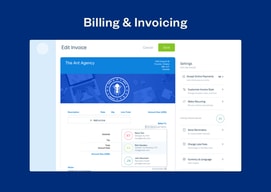
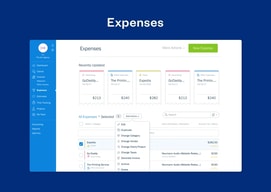
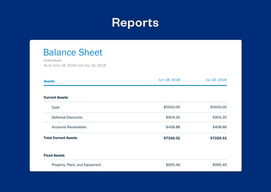
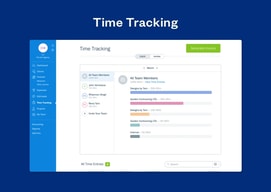



FreshBooks advertises $2.30 a month. The actual price is $23, and the discount lasts three months. Every plan also includes exactly one user, with additional team members at $11 each, so a three-person firm on the middle tier pays $65 a month rather than the $4.30 on the banner. The software is good and well-suited to service businesses — the pricing page just requires arithmetic.
- What it is: Accounting and invoicing software built around service businesses rather than product sellers.
- Best for: Freelancers, consultants, and agencies who bill for time and projects.
- Pricing: Lite $23, Plus $43, Premium $70 per month regular. Select quoted. Extra users $11 each. Verified July 2026.
- The honest catch: Lite allows just 5 billable clients, which most working freelancers exceed.
What Is FreshBooks?
FreshBooks approaches accounting from the invoice rather than the ledger, and that shapes everything. Where QuickBooks and Xero are built around double-entry bookkeeping with invoicing attached, FreshBooks is built around getting paid — proposals, estimates, time tracking, retainers, invoices, and payment collection — with accounting behind it.
For a consultant or agency that bills by project or hour, that orientation is genuinely better. Time tracking feeds invoices directly, retainers and proposals are first-class rather than bolted on, and project profitability tracking on Premium answers the question service businesses actually care about: are we making money on this client.
The trade-off is that it is a weaker general-purpose accounting system. Inventory is essentially absent, and businesses selling physical products will find it thin where QuickBooks is deep.
How FreshBooks Works
- Billable clients are the meter. 5 on Lite, 50 on Plus, unlimited on Premium and Select.
- One user included on every plan. Additional team members cost $11 a month each.
- Time tracking to invoice. The core workflow for service businesses.
- Proposals, retainers, e-signatures from Plus, which is where the plan becomes agency-shaped.
- Project profitability on Premium, tracking costs against project revenue.
- Payments built in. Cards, ACH, Apple Pay, Google Pay, and buy-now-pay-later.
FreshBooks Pricing
Captured from FreshBooks’ US site in July 2026. The displayed figures are promotional; the struck-through prices are the real ones.

| Plan | Regular | Promotional | Billable clients | Users |
|---|---|---|---|---|
| Lite | $23/mo | $2.30 for 3 months | 5 | 1 |
| Plus | $43/mo | $4.30 for 3 months | 50 | 1 |
| Premium | $70/mo | $7.00 for 3 months | Unlimited | 1 |
| Select | Quoted | — | Unlimited | 2 |
Add-ons: team members $11/month each, Advanced Payments $20/month, FreshBooks Payroll $40/month plus $6 per user.

What actually determines your bill:
- The 90% discount runs for three months. After that you pay $23, $43, or $70. FreshBooks discloses this clearly — the struck-through price and “90% Off for 3 Months” label are both on the card — but the large number is the promotional one, and it is what people remember. Budget from the regular rate.
- Five billable clients on Lite is the sharpest constraint. A freelancer with six clients cannot use the entry plan. This is a low ceiling by any measure, and it is the single most common reason people upgrade — not features.
- Every plan is a one-person plan. At $11 per extra team member, a three-person firm on Plus pays $65 a month rather than $43. Count your seats before comparing against competitors that bundle users differently.
- Yearly billing adds a further 10% off, on top of whatever promotion applies.
- Payroll and Advanced Payments are separate. $40 a month plus $6 per user, and $20 a month respectively — relevant if you were treating FreshBooks as an all-in finance stack.
- A 30-day money-back guarantee applies, which is the right way to test whether the client cap works for you.
Who Should Use FreshBooks
- Freelancers and consultants. The clearest case, and what the product is shaped around.
- Agencies billing by project. Proposals, retainers, and project profitability are genuinely well built.
- Anyone who tracks time and bills it. Time-to-invoice is smoother here than in general accounting tools.
- Service businesses without inventory. The absence of stock management is irrelevant to you.
It fits poorly for product businesses needing inventory, where QuickBooks and Zoho Books are far stronger; for teams of several people, where the per-seat add-on stacks up; and for businesses wanting the cheapest compliant books, where Zoho Books undercuts it substantially.
Honest Pros and Cons
Strengths
- Built for service businesses. Time, projects, and retainers are first-class rather than afterthoughts.
- Excellent invoicing. The most-praised part of the product, and the reason most people choose it.
- Project profitability on Premium. Answers the question consultancies actually need answered.
- Broad payment acceptance. Cards, ACH, Apple Pay, Google Pay, and BNPL built in.
- Genuinely easy to use. Approachable for people with no bookkeeping background.
- Clear discount disclosure. The struck-through price and three-month term are both stated.
Limitations
- Five billable clients on Lite. A very low ceiling that forces upgrades on volume, not need.
- One user per plan. $11 per additional seat.
- The headline price lasts three months. After which it is ten times higher.
- Weak inventory management. Effectively unsuitable for product businesses.
- Payroll costs extra. $40 a month plus $6 per user.
- More expensive than several rivals once seats and the regular rate are counted.
FreshBooks Alternatives and How It Compares
- QuickBooks Online is the US default with far deeper accounting and inventory, at a higher price and with repeated increases.
- Xero includes unlimited users on every plan, which is the decisive difference for teams.
- Zoho Books is substantially cheaper and strong if you use other Zoho applications.
- Sage Business Cloud Accounting is the established alternative, particularly in the UK.
- Bonsai targets freelancers specifically, bundling contracts and proposals with invoicing.
For a broader survey, browse our accounting software directory.
The Verdict
FreshBooks is the right shape for service businesses, and that matters more than a feature count. If you bill for time and projects, the workflow from tracked hours to sent invoice to collected payment is smoother than any general accounting package manages, and the proposals, retainers, and project profitability tools on the higher tiers are built for how consultancies actually work rather than adapted from bookkeeping software.
Price it from the struck-through number. The $2.30 on the pricing card is 90% off for three months; the real figure is $23, and Plus is $43 rather than $4.30. To FreshBooks’ credit both are shown clearly on the same card, which is more than several competitors manage — but the promotional price is the one in large type, and anyone budgeting from it will be surprised in month four.
The two structural constraints matter more than the tiers suggest. Lite’s five billable clients is a very low ceiling — a freelancer with six clients is already excluded, which makes Plus the realistic entry point for most working professionals and moves the effective starting price to $43. And every plan includes one user, so a three-person firm on Plus pays $65 a month once seats are added. If you have a team, Xero’s unlimited-user model is the comparison worth running, because that single structural difference outweighs most feature debates at this size.
FAQ
How much does FreshBooks cost?
Regular prices are $23 per month for Lite, $43 for Plus, and $70 for Premium, with Select quoted by sales. FreshBooks was running a promotion of 90% off for three months when captured in July 2026, displaying $2.30, $4.30, and $7.00 respectively. Additional team members cost $11 per month each, Advanced Payments $20, and FreshBooks Payroll $40 plus $6 per user. Yearly billing adds a further 10% discount.
How many clients can I invoice on FreshBooks Lite?
Five. Lite is capped at five billable clients, Plus at fifty, and Premium and Select are unlimited. This is the most restrictive limit in the lineup and the most common reason people upgrade — a freelancer working with six clients cannot use the entry plan at all, which makes Plus the realistic starting point for most working professionals.
Does FreshBooks include multiple users?
No. Every plan includes a single user, with additional team members charged at $11 per month each; only the quoted Select plan includes two. A three-person firm on Plus therefore pays $65 a month rather than $43. If you have a team, Xero includes unlimited users on all its plans and is the more natural comparison.
Is the FreshBooks discount permanent?
No. The advertised 90% discount applies for three months, after which the regular rate takes effect. FreshBooks displays both the discounted price and the struck-through regular price on each plan card along with a “90% Off for 3 Months” label, so it is disclosed rather than hidden — but budgeting from the promotional figure will produce an unpleasant surprise in the fourth month.
What is FreshBooks best for?
Freelancers, consultants, and agencies that bill for time and projects rather than selling products. Its time tracking, proposals, retainers, and project profitability tools are built specifically for service work, and its invoicing is the strongest part of the product. It is a poor fit for businesses needing inventory management, and expensive for teams once per-seat costs are included.

Compare FreshBooks with other popular tools in the same category.

It has several applications integrated for customers to make payments more easily as is the case of paypal or stripe. This gives payment facilities so that we as a company have more facilities to charge and customers so that they can pay with widely used means of payment. The financial documents are editable and customizable. You can modify the logo, the data, the structure, which allows creating professional documents in a simple way thanks to its good editor. The reminder of paying bills to customers is also important, as notifications and warnings are sent to remind you when to make the bills.
Inventory tracking and vendor management is not available, so these sections must be managed through other means or other systems. Every time you set up a new project, tasks are assigned automatically and you have to remove them so that they do not appear as selected. None should be selected at the beginning.
The creation of payment documents and invoices through Freshbooks is much easier than before, since they are easy to design documents with your editor and send them to our customers. We manage sales and payments through this software and provide more facilities to customers so they can pay us from different systems and at the same time, our company receives payments in our accounts and we manage everything faster than we did before.
As a contract paralegal I was looking for simple timekeeping and billing software that would allow me to manage my clients without being overly burdensome or confusing. I didn’t need something that would cost more than my PC itself. FreshBooks gives me the ability to track time, expenses (with bank integration), and invoice right from the website. It is also easy to find invoices and time entries with an easy search!
The only real complaints I have are that sometimes, the bank integration doesn’t work, and that I wish I could set different default rates by client rather than by project or service.
I basically have a streamlined process for invoicing my clients that makes it easier for them to pay me - which of course gets me paid faster!
I like how you can have a bunch of project categorized for a certain client.I like is that you can key in time enties or items on invoices.!
One issue I'm facing with Freshboosk is that I've yet determine how to remove projects/clients. This is actually clogging my list. We've got projects that we haven't been working on for a number of years. Thing is, they're still showing up on the time tracking list.!
It makes billing, accounting, and taxes easy for me.!
I like the ability to easily create invoices based on unpaid clocked hours and easily track payment on those invoices. The interface is very user-friendly.
My hourly rate does not auto-populate on the invoice and reads as $0 so I have to go through and fill it out myself.
I use freshbooks to track my freelance work hours and send invoices to my employer.
The ability to categorize expenses and create and keep track of invoices
Would like more customization of reports
Invoicing, expenses tracking, and accounting reports
The ease of interface. It's easy to find what you need. I also like the chance to upload pictures of receipts.
You can't access everything on the app. Sometimes I want to do things on the go that I can't
Tracking income, analyzing expenses
Easy billing of clients, clients can pay right when they see the invoice and I can record partial payments
Nothing really. It does what it says it's supposed to do.
Keeping track of my billable hours and then billing clients. Much easier to keep track of hours and invoices. There's a paper trail for everything.

The ability to create recurring profiles. I also like that by clicking on a profile, I can easily see a history of the customer's payment history.
The Q&A resources should be easier to solve.
Freshbook has empowered us to streamline the invoicing process. The ability to create recurring profiles is a great way to make sure we don't miss payments.
Freshbooks is a great platform to track time and bill clients.
It's not always as intuitive as it could be. Servers can be slow if you're dealing with a large amount of data.
Easily track time and bill clients. Love the reports features.
FreshBooks is extremely user friendly. As someone who was fairly new to freelancing, this was a great solution for billing clients and staying organized...to think I almost did everything manually makes me shudder in retrospect. Clean, simple. Very nice.
I had wished that FreshBooks offered different payment plans. It is quite a steep monthly fee if you are only using it for a small handful of clients. I wished there was another, lower tier plan for people who are only billing 3 or so clients at a time.
FreshBooks made my freelance business accounting extremely simple and straightforward. It kept me much more organized and really took a whole lot of extra work/thinking off my plate versus handling my own billing.
Ease of use. The ability to send invoices with the click of a button. Keeping track of unpaid invoices. Customizing templates.
At this time, I do not have any complaints or issues with this program. It seems to do everything it is supposed to do.
Invoicing clients, keeping track of accounts receivable.

I love that I can combine time tracking with invoicing and an accounting app all in one. I can track my time and create invoices from that time, send out invoices, and get paid, all in one easy-to-use package. I bought it for the time tracking features, and I stay because invoicing and payments are so easy.
The only drawback is that when I run out of my allotted number of clients/projects, I have to archive or delete some. I often have repeat clients and this seems like a disadvantage—but it's easy to reinstate a client I've archived. It would be nice to have added features at a later date, or the ability to customize the way invoice numbers are assigned for each client, but these are not deal breakers. FreshBooks is a bit expensive for my uses since I'm a freelancer and don't always have tons of invoices or clients. Would appreciate a smaller plan for my needs.
Seamless time tracking and invoicing plus payment app. It's amazing. I used to find it so cumbersome to have to track my time in one app, then calculate the rate on that, then open up my invoice app and add in the amount due, then export it and email it to a client ... now I can do all that in one place, plus I can see when the client opens the invoice. So it's a seamless process and it helps me get paid faster.
To start off my review, I like that the program is based in the cloud. This allows me to access my information in real time from anywhere on the go. Another great feature with FreshBooks is the ability to setup multiple company profiles. FreshBooks also implements intuitive features to allow you to easily generate and manage invoices or client information. As well as features such as time tracking to watch how much time you may spend on a particular task. Other features that add great value to this program is the ability to create and manage projects. Using the Project feature, I have been able to coordinate with my business partner accurately and timely. Ensuring that deadlines are met! *** In comparison to quickbooks... you get more for your money using FreshBooks***
At this moment I have been highly satisfied with FreshBooks. I especially enjoy all the features that its competitors lack.
With the use of fresh books. I have been able to manage all task related to accounting. Being able to generate accurate reports and maintain accurate records allows me to manage my company and increase profitability. * Primarily due to the nature of my business I use FreshBooks for more accounting purposes than actual billing of customers.*
Our agency primarily uses the Freshbooks for time tracking and invoices. With multiple clients and projects at any given time we need to make sure all employees are properly tracking their time on projects. Some clients request more work than others so it's important for us to make sure we are delegating the proper amount of time to specific clients. We can also request invoices through Freshbooks and track who has paid invoices and the amount of funds in the account. We can set reminders and it's simple for clients to pay which is essential. Clients will often call when employees are away from their browser, the Freshbooks app allows for time tracking on our mobile devices.
For time tracking there are two options, the timer or entering your time manually. Often we jump from project to project depending on what needs to be done. It can be difficult switching over the timer constantly. If you enter time manually it can become skewed and it turns into estimates rather than precise times.
Many employees work remotely and it can be difficult seeing what projects people are working on. Instead of getting daily or weekly email updates on how much time was spent on a project. We can simply login, view an employees time card, and see specific projects that were worked on. It only takes employees a few minutes to log their time so there's not time being wasted.
I am pretty satisfied with Freshbooks because: - it allows me to see how much progress I've made on a project based on estimate hours I input - it automatically sends out invoice reminders to clients if invoices have not been paid, so it streamlines the process and saves me time - allows my team to track hours so I can see how much time they devote to different projects in a day
- I think the interface could look better - I wish I could organize information better so all my invoices and clients aren't mixed up. It would be nice to click on a client and then only see all the invoices I have sent them - I like to look at the previous invoice before I send out a new invoice to a client, so this could be made easier rather than having to search through all my invoices to find a previous invoice
This saves me time and money. I used to track invoices manually in an excel spreadsheet which required a lot of time, organization, and memory. I feel like Freshbooks takes care of most things for me and is easy to access.
We only use the invoicing portion of FreshBooks. The automation of recurring invoices (we bill monthly or annually), overdue payment notice emails, and late fees added to overdue invoices are killer! We have been able to really buckle down and manage our A/R using this program. Sadly, we were using Word based invoices prior to FreshBooks, and now save considerable time in every aspect of invoice and A/R management.
No integration with Quickbooks Online, but really, what integrated with Quickbooks Online?
Less time spent creating and sending invoices. Quicker followup on overdue invoices. No more wondering if they got the invoice, since it tells you when they open it. Above all else, shorter timeline from invoice sending to payment receipt!
I love that I can access it from anywhere and anytime. I also love the user experience.
I wish that it had more robust features and that it integrated with my kennel software solution.
helps me track all my financial expenses, labor costs and allows me to import my financial information from Excel.
Used it a few years back, it was awesome for invoicing clients both ad-hoc and on a subscription basis. Automatically collect payments using PayPal (and I'm sure other services now). Huge help, awesome year-end reports and things.
Some of the invoice personalization options were lacking, but if you don't care too much about custom-looking invoice. Life is grand!
Invoicing is annoying - make it easy!
Freshbooks is so much less complicated than complex accounting software like Quickbooks. We don't have to worry about inventory or other brick and mortar aspects, and Freshbooks does everything we need it to in a simple and efficient way.
There is bit too much feature focus on smaller service companies. And while the customer service is very responsive, we did run into a technical issue (in which our company was an outlier) which remains unresolved, and that is a bit disappointing.
I don't need to have an accounting department, just a couple people managing things on it part time. We have been able to utilize their API as well to streamline some of our internal processes.

Recurring expenses and invoices is key for our business. Freshbooks just keeps on issuing the invoices in a schedule you design and you can easily override these settings. I also like the postage pre-paid invoices you can send for customers that like the old way of doing things. It saves lots of time.
I would like FreshBooks to have automatic reminders on invoices that are overdue by a certain date. It would be nice to set, on a customer by customer basis, how often to remind and what sort of email they should get. There is no inventory system in Freshbooks, so retail businesses probably cannot use it if they have any level of inventory to maintain.
It's pretty simple: get paid on time faster with Freshbooks. And get your bookkeeping done with a few clicks.

The ability to generate invoices easily and set estimates. It's a powerful tool compared to another one I use regularly. Good for small, medium and enterprise businesses.
It would be nice if the time tracker itself did not open in a new window and could be built into the main UI.
One benefit I like is their smartphone app.
Recurring billing profiles for clients. Saves lots of time.
The time tracking is horrendous. They should have an offline tool...and you should be able to create tasks directly from the time tracker. I also don't think Freshbooks is very friendly with fixed pricing models. It seems that you always have to enter # of hours worked. Maybe I'm missing something?
Slowly starting to save time with recurring, automated invoices. It's easy to forget to create invoices for every client. This makes it simple and quick.
Freshbooks was incredibly easy to set up and use. It looks very good and is very professional.
My one issue is the way the pricing expands once you get past two employees. It gets very expensive very quickly, and a business is likely to outgrow it at some point.
Not provided

An affordable time tracking and invoicing tool. Allows for tracking subcontractors time easily. A huge upgrade from Excel, or any other manual invoicing process that quickly gets out of hand as you add customers. Excellent customer support.
The finer points of time tracking and invoicing take a little getting used to. Example: no merging of multiple time items. Your first few invoices may need to be re-worked as how you set up projects affects how you put together your invoices, something that is not abundantly clear when you're first getting started.
Not provided
It's a great tool for a consulting business that does time and expense, timekeeping, and billing. It's exceptionally simple, and the interface was great with my consulting clients
Don't confuse this with a full-fledge accounting software like quickbooks!
Not provided
Freshbooks has a wide variety of tools within its suite of office software. The ability to invoice, view and correlate clients all in the same software makes using it very easy and seamless. They also have VERY responsive customer support, which makes solving any issue very quick and easy.
Freshbooks is VERY robust. As a small business owner, I had very simple needs for invoicing my clients. So, it didn't make sense to pay such a high price for not being able to use only what I needed. So, I guess the main drawback for me was the lack of scalability for my business.
Freshbooks allowed me to keep all of my client information in one place and easily reference invoices, balances, and history anytime I needed that information. It allowed me to constantly communicate with my clients, keeping them informed of their account statuses. It also allowed me to track clients viewings and disputes, should any arise, in their invoices. By integrating payment processing, the ease in collecting payments was a welcome change to always having to ask clients directly for payments. They could just pay their invoices online.

FreshBooks has a sleek, intuitive interface that makes it easy to search for and create invoices. It also helps to track and report your payments. Also, they have a decent mobile application.
The platform is quite complicated and also it is difficult to integrate with other CRM software like Salesforce. Also, it is a bit more expensive than other invoicing software.
Being bit complicated, FreshBooks makes accounting easy, so you can focus on what matters most – running your business. Overall, it is useful for businesses as it gives more accurate invoices.

Freshbooks does what you need it to do, but the simple version isn't extremely robust.
I don't like that it doesn't have all the integrations I need. For example, I have to enter all of my sales from my website (via Paypal) manually because I am not tech saavy and don't know how to create a 'code' or something that's needed for it to do it automatically.
There are a few random things that are off- I correct a vendor that is automatically imported as an expense from my credit card, and every single time it cannot ID the vendor by the correct name although I click the button to apply to future expenses. This is just one small example.
The fact that I can track tasks in someone else's project.
The platform isn't very intuitive and the help desk seems to have a limited understanding of their own platform.
I'm able to work with a client who wants me to track time on their project and be able to see the time I spend.
I like the painlessness of the process of creating invoices in Freshbooks
I need extra training myself to fully understand how to use the product
I have solved the problem of getting paid easily and in a professional manner.