

Unclaimed: Are you working at Keap?
Keap Reviews: 4.3/5 — Solid Choice
Formerly known as InfusionSoft, Keap is an all-in-one, cloud-based sales, and marketing software option offering customer relationship management (CRM), marketing automation tools, and eCommerce features. Keap is the preferred platform for small businesses that rely on the platform to streamline sales and manage customer experiences in a single suite. Using Keap, users can segment contact, manage and track customer interaction, send emails, and create tailored campaigns with personalized communication triggers. Users can also use Keap to manage eCommerce with inventory management features, payment gateways, and purchase fulfillment features.

| Capabilities |
API
|
|---|---|
| Segment |
Small Business
Mid Market
|
| Deployment | Cloud / SaaS / Web-Based, Mobile Android, Mobile iPad, Mobile iPhone |
| Support | 24/7 (Live rep), Chat, Email/Help Desk, FAQs/Forum, Knowledge Base, Phone Support |
| Training | Documentation |
| Languages | English |

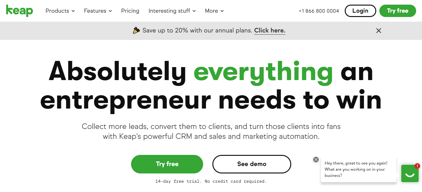

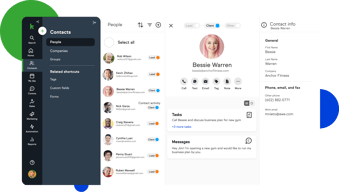

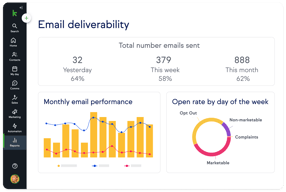
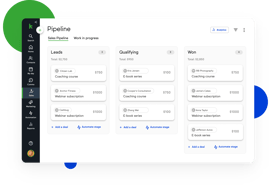
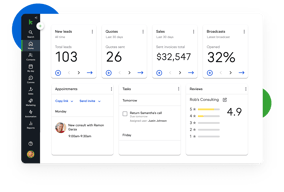





Keap bundles CRM, marketing automation, email and text, landing pages, payments, and appointments into a single plan at a single price, which is either exactly what you want or considerably more than you need. For small service businesses that would otherwise stitch together five tools, the consolidation is genuinely valuable. For everyone else, $299 a month plus a mandatory implementation fee is a lot to commit to.
- What it is: An all-in-one CRM and marketing automation platform for small businesses, formerly called Infusionsoft.
- Best for: Established small service businesses, coaches, agencies, and franchises that run genuine multi-step automation and want one vendor instead of five.
- Pricing: One plan starting at $299/month billed monthly, including 2 users and 1,500 contacts. Additional users are $39/month. Verified on Keap’s pricing page in July 2026.
- The honest catch: Implementation is mandatory and charged separately, starting around $500, and Keap holds a 4.1/5 on Capterra, the weakest independent score of any major CRM we have reviewed.
What Is Keap?

Keap started life in 2001 as Infusionsoft and spent two decades as the default marketing automation platform for small businesses that had outgrown basic email tools. It rebranded to Keap in 2019, and in October 2024 was acquired by Thryv Holdings for $80 million. The Keap logo now carries an “A Thryv, Inc. Brand” mark.
That ownership change is worth weighing. Thryv sells its own small-business platform, and acquisitions of this kind can go several ways over a few years: continued independent investment, gradual convergence with the parent product, or maintenance mode. None of those outcomes is knowable yet, but a buyer signing a multi-year commitment should ask directly about the roadmap.
Keap’s current strategic bet is simplification. Rather than tiered plans, it sells one plan containing the entire platform: CRM, automation, email and text marketing, sales pipeline, landing pages, payments, appointments, and reporting. The pricing page states the position plainly, promising an end to feature-based plans.
The independent picture is the weakest of any major CRM in this category. Keap holds roughly 4.1 out of 5 on Capterra across about 1,297 reviews. Reviewers praise the automation depth and criticize complexity, cost, and, notably, past price increases delivered with short notice.
How Keap Works
Keap’s real differentiator is automation depth, and understanding that explains both its appeal and its learning curve.
- Campaign Builder. A visual canvas for multi-step, branching automation sequences. Trigger on a form submission, wait, branch on whether an email was opened, assign a task, send a text, charge a card. Few tools at this price handle sequences of that complexity, and this is the reason long-time customers stay.
- CRM and pipeline. Contact records, lead tracking, and a sales pipeline. Competent rather than remarkable, and clearly secondary to the automation layer.
- Email and text. Broadcast and automated email plus SMS. Text is an add-on, priced in volume tiers, with the entry tier included.
- Payments and invoicing. Quotes, invoices, and card processing built in. For a service business currently running a separate payments tool, this is a real consolidation win.
- Appointments and landing pages. Booking and simple page building, adequate for straightforward use and not a replacement for dedicated tools.
The pattern is consistent: Keap is excellent at one thing, automation, and acceptable at the eight things around it. Whether that trade is good depends entirely on whether you would otherwise pay separately for those eight things.
Keap Pricing
Keap prices on users and contacts rather than features. Figures verified on Keap’s pricing page in July 2026.

| Item | Cost | Notes |
|---|---|---|
| Base plan | From $299/month | Includes 2 users and 1,500 contacts, entire feature set |
| Additional users | $39/month each | No feature difference between users |
| Additional contacts | Scales with volume | Priced via the calculator on the pricing page |
| Implementation | From ~$500 one-time | Mandatory, covers migration, setup, and strategy sessions |
| Text marketing | Entry tier included, then $24–$279/month | Overages around $0.015 per text and $0.01 per voice minute |
The parts that matter most:
- Implementation is required, not recommended. Keap’s position is that guided onboarding produces better outcomes, and there is a defensible argument for that given the platform’s complexity. It is still a mandatory cost, starting around $500 and rising with package scope, and it belongs in any first-year comparison.
- $299 is the floor, not the average. That figure covers 2 users and 1,500 contacts. A five-person business with 10,000 contacts pays materially more once extra users at $39 and contact tiers are added.
- Contacts, not just users, drive the price. This is the crucial difference from seat-priced CRMs. A small team with a large list can pay far more than a large team with a small one, so model your actual contact count.
- Text messaging is metered. Tiered plans plus per-message overages, which is normal for SMS but easy to underestimate.
- Price increase history is a genuine risk. Multiple Capterra reviewers report significant increases delivered with short notice, with at least one describing a resulting exodus of long-standing customers. Ask about price protection before signing.
A free trial is available without a credit card, but it is limited: a 25-email sending cap, no payment processing, and no text messaging. That is enough to explore the interface and not enough to test the automation properly.
Who Should Use Keap
- Established small service businesses. Coaches, consultants, clinics, home services, and agencies with a real customer lifecycle to automate. This is the intended buyer and the value case is strongest here.
- Businesses currently paying for four or five separate tools. If you are running a CRM, an email platform, a scheduler, a payment tool, and a landing page builder, consolidation can be close to cost-neutral while removing integration overhead.
- Teams with genuinely complex automation needs. Campaign Builder handles branching logic that simpler tools cannot, and this is Keap’s clearest technical advantage.
It is a poor fit in three cases. Startups and solo operators testing an idea should not commit $299 a month plus implementation. Teams that only need a CRM are paying for seven modules they will not touch, and Pipedrive or HubSpot will serve them better. And businesses without the appetite to learn a complex tool should take the reviews seriously: complexity is the most consistent criticism, and the mandatory implementation package exists precisely because self-serve onboarding does not work well here.
Honest Pros and Cons
Strengths
- Automation depth at a small-business price. Campaign Builder genuinely handles complex branching logic that most competitors in this bracket cannot.
- Real consolidation. CRM, email, text, payments, appointments, and landing pages in one system removes a meaningful amount of integration work.
- One plan, no feature gating. You are not upgraded into paying for a feature you already assumed you had, which is a refreshing contrast to the tier-gating common elsewhere.
- Payments are built in. Invoicing and card processing inside the CRM is a real advantage for service businesses.
- Two decades of domain experience. Keap understands the small-business customer lifecycle well, and it shows in the templates and campaign structure.
Limitations
- The weakest independent rating in its category. 4.1/5 on Capterra is a meaningful gap below the 4.5s that competing CRMs achieve, and it reflects real friction rather than noise.
- Complexity is the defining complaint. Reviewers repeatedly describe needing training or outside consultants to use the platform properly.
- Mandatory implementation fee. From around $500 on top of subscription, unavoidable.
- Expensive entry point. $299 a month is several times what entry-level CRMs charge, and the all-in-one bundle only pays off if you use most of it.
- A history of steep price increases. Reported by multiple reviewers as arriving with short notice. This is the single most important thing to raise with sales.
- Ownership uncertainty. The 2024 Thryv acquisition makes the long-term roadmap harder to predict.
- A restrictive trial. 25 emails, no payments, no text, which makes it hard to evaluate the thing you are actually buying.
Keap Alternatives and How It Compares
- HubSpot Sales Hub has a genuinely free tier and a cheap Starter plan, with strong marketing tooling. Its own Professional tier carries a $1,500 onboarding fee, so compare total first-year cost rather than headline price.
- Pipedrive is dramatically cheaper if what you actually need is a sales CRM rather than an automation platform.
- ActiveCampaign is the closest comparison on automation depth, generally cheaper, with a lighter CRM and no mandatory implementation fee. For many Keap evaluations this is the head-to-head that matters.
- GetResponse covers email marketing, automation, and landing pages at a fraction of the cost, without the CRM depth or payments.
- Zoho CRM paired with other Zoho apps delivers comparable consolidation for considerably less, with a steeper configuration curve.
For a wider view see our guides to the best CRM software and the best marketing automation software.
The Verdict
Keap is a capable platform with a narrow but real sweet spot. If you run an established small service business, you already do genuine multi-step automation, and you are currently paying for several tools that Keap would replace, it can be a sound consolidation with automation depth that is hard to match at this price.
Outside that profile it is difficult to recommend without qualification, and the independent scores say so. A 4.1/5 across nearly 1,300 Capterra reviews is a clear signal, and the complaints are consistent rather than scattered: it is complex, it is expensive, and some customers have been hit with sharp price rises. The mandatory implementation fee is defensible given the complexity, but it is still a cost that competitors do not impose.
If you are evaluating Keap, do three things. Price it with your real user and contact counts rather than the $299 headline. Ask directly about price protection, given the documented increase history. And compare it honestly against ActiveCampaign, which is the closest match on automation depth at a lower cost and with no implementation fee. If Keap still wins after those three checks, it is a defensible choice. If it does not, the alternative was always the better answer.
FAQ
How much does Keap cost in 2026?
Keap sells a single plan starting at $299 per month, which includes 2 users and 1,500 contacts. Additional users cost $39 per month each, and pricing rises with contact volume. A mandatory implementation package starting at roughly $500 is charged separately, and text messaging beyond the included entry tier is priced in volume tiers from about $24 to $279 per month.
Does Keap require an implementation fee?
Yes. Keap requires a paid implementation package, starting at around $500 and rising depending on scope, covering data migration, automation setup, strategy sessions, and integrations. It is not optional. Keap’s rationale is that guided onboarding produces better outcomes, which is credible given the platform’s complexity, but it should be included in any cost comparison.
Is Keap the same as Infusionsoft?
Yes. Keap is the current name of the product formerly called Infusionsoft, rebranded in 2019. Many third-party review pages still use the Infusionsoft name, which is why Capterra’s Keap reviews live under an Infusionsoft URL. Keap was acquired by Thryv Holdings in October 2024 for $80 million.
Does Keap have a free trial?
Yes, with no credit card required, but it is restricted: a 25-email sending cap, no payment processing, and no text messaging. That is enough to explore the interface but not enough to properly test the automation capabilities that are the main reason to buy Keap, so plan your evaluation accordingly.
What is the best alternative to Keap?
ActiveCampaign is the closest comparison for businesses that want Keap’s automation depth at lower cost and without a mandatory implementation fee. If you only need a sales CRM rather than an automation platform, Pipedrive or HubSpot Sales Hub will cost substantially less.

Compare Keap with other popular tools in the same category.

We changed to Infusionsoft about a year ago from Dynamics and because we are a small company, Infusionsoft is a much better fit with our company. It's very user friendly, intuitive and less expensive than our previous CRM software - and we LOVE the fact that all of our marketing is now being done exclusively through Infusionsoft.
After a year with the software, I can honestly say there is nothing we don't like about the software.
Now that we have been able to use Infusionsoft for our marketing campaigns, we have actually increased the number of marketing pieces we send out each month.
Lots of functionality that allows us to automate many business processes.
At first, the learning curve. It took time to get our heads around how to make it work best for us.
Automating emails, following up with customers, the onboarding process for new clients, progression through our online courses.

I love that the site is easy to navigate for experienced and non-experience users and if we have any questions, the customer support team is always responsive and helpful!
I haven't found anything so far that I don't like
With Infusionsoft we have been able to make contact with our partners and vendors more easily by having automated campaigns. It has also allowed our team to sit down and really think about our marketing campaigns to attract new business.
Infusionsoft has made our lives MUCH easier. I am a salesman who makes a living primarily by selling "internet leads." Infusionsoft allowed us to set up a program that automatically generates constant contact with our prospective clients. I am far from an expert on anything relating to computers, but I can easily specify the messages that I want to be sent and I am even able to personalize the messages to provide the specific information that I want to be included in every communication. The introduction of automatic texting and emailing has increased my set appointments by at least 15% through our first couple of months. The customization is incredible - It is very easy for even a novice to setup.
It would be beneficial if certain features on the dashboard automatically refreshed instead of us having to do it manually. There were some initial issues with lead importing, but that has since been fixed.
We are able to reach roughly 50% more potential quotes than we could before we started using Infusionsoft. The benefits of automatic introduction and followup letters, texts, and an easy to use tracking system help keep the entire team organized.
Infusionsoft helps us keep in touch with our clients in a variety of ways and is so easy to use.
Importing contacts and other information from other databases can be tricky, but the customer support team available with Infusionsoft is true lifesaver
It is a great way to stream line communication with our clients.
I really love that infusionsoft puts everything I need right infront of me. It is easy to manage accounts and see premium.
There really is not anything I dislike about this CRM. I think this CRM has everything an Insurance agent needs to stay organized.
This makes it easy to track old leads and generate business efficiently

Infusionsoft has so many functions that help me stay organized and create a better experience for my clients. It will help me scale my business and provide excellent customer service.
There is a lot to learn when using the software program and some of the functionality was confusing at first.
Automating and keeping all the moving pieces of my business organized is easily done with Infusionsoft. I have grown my reach and what I can accomplish in a day using the software.

Ease of understanding how to set up workflows and enter contact information. Integration with Zapier makes this do so much more than the basics!
Some of the files choosers take some trial and error to understand them fully.
Solving marketing communication, website form building.
Easy to stay organized, keep tasks in front of you, and close them when you're done with them. Easy for someone with a poor attention span to really create resolutions!
It was difficult to catch on to at first, was hard to find a demo on how to use (problem seems to now be solved.)
I love being able to follow up on jobs and quotes in a specific time window.
I find this app very useful and I really feel like it resolves a part of my job. In another order of ideas I can only say good things. I love the ability that you have to create sequences, build your contacts as you wish and leads in a beautiful way. The softwere is very easy to use also. I need to say that I have no regrets regarding this application.
Honestly, I have never been disappointed by this app. I love to work with it.
This application is helping me to create sequences.
I love the many features you can use with Infusionsoft. It's not just one thing but many. Whether it's setting up campaigns, email marketing, sales, etc. It's a one stop shop for a lot of small business needs.
The one thing I dislike is the shopping cart set up part. It just doesn't seem very intuitive. I feel they could streamline it and make it a lot easier to use.
Keeping up the relationships with our customers. We have tons of relationships with out business and Infusionsoft helps us manage those relationships and get important news out to your current and potential customers.
Infusionsoft is an adaptable apparatus for the business segment designed from the cloud, you can make a wide range of requests on the web. Infusionsoft offers an assortment of valuable highlights including email battles and email communicates. These have enabled us to effectively monitor our customers and to convey our planned messages to them dependent on a few unique details and work processes.
Perfectly good for our campaign and nothing to dislike at the moment.
Infusionsoft's email configuration instruments have made making messages a lot more straightforward and all the more fascinating that on the off chance that we utilized our own structure apparatuses to convey messages to contacts, which incorporates leads and to see understanding on the communications and intrigue our contacts have in the messages. With infusionsoft the development of our organization is improving well ordered which clearly prompts more benefit.

It is very easy to use. They also have AMAZING online video tutorials that make anytihing challenging to understand a lot easier.
This is an odd thing to write - sometime I feel like their is TOO much in IS and not sure what to use and what not to
streamlined communications with members, central place for all payments to process which has saved us time and money by using 1 tool
I like how I am able to keep my clients organized and use tags, so all of my clients are organized where they are supposed to be. I also like the format and sending broadcast e-mails, It's easy for me to keep track of my client's e-mail responses and see if they've opened their mail.
I don't like how the internal forms button is near the bottom of the page, I've had trouble filling out the Strategic Planning Session form simply because I couldn't find the button.
I think the best problem to be resolved using Infusionsoft is improved communication with my clients. I like how I am able to see whether or not they have opened my e-mails.
Infusionsoft is user-friendly. We use this program on a weekly basis and we love that all of us can log in and make edits as necessary. It's also great that the program guides you in formatting email broadcasts. The ability to upload and save images from my computer is also convenient.
There's no much that I dislike about this program. It has everything we are looking for.
Having the ability to see how many people open and unsubscribe from our emails after they are received is a benefit.
A great tool for record keeping and tracking all levels of marketing campaign. Great mapping and sequencing tool!
A little busy on the main page and navigation could be overwhelming when first starting
Many more leads are generated and cleaner campaign submission and executioon
The extensive sequences and in-depth campaigns infusionsoft enables me to build affords me the ability to plan for the growth of my business on a far greater level than any other platform I’ve used.
I wish that the funnels were as strong as that of ClickFunnels so that o may do everything in one system; but to date, I must keep ClickFunnels, because the funnel quality is so subpar. It would also be helpful to have a bit of an intermediate package of services that makes it more affordable to build your customer following, before taking on such high monthly overhead throughout the learning period.
Primarily, the ability to stay in constant communication with our audience through planned and scheduled sequences and emails is what has helped us to grow and leverage our staff.
Le straordinarie funzioni di archiviazione e segmentazione del data base; La velocità nella realizzazione di contenuti e campagne tutte in automazione.
Mi piacerebbe che fosse migliorata la funzione “drag&drop” nel Page builder, ha poche funzioni ed adattamenti grafici; Mi piacerebbe che fosse più intuitiva la ricerca di funzioni come i downloadFile nel menù principale; Mi piacerebbe avere più chiara la registrazione user e proprietario, quando ho cambiato da nome personale a nome azienda ha avuto difficoltà ad aggiornarsi perché ha preso dei dati personali da chrome; Mi piacerebbe poter modificare i dati di un cliente più velocemente aprendo una sola finestra.
Sto realizzando il sogno di avere un business automatico, senza avere dipendenti.
CRED (Customer Relationship Experience Development) is essential in business — Infusionsoft offers a scalable application.
I have no dislikes. The application is easy to use and grow with.
Combining email marketing with contact management easily.
I like that it is very customized. It is fairly user friendly, I do differ to going to Google and I have found many helpful and fun articles (written by Infusionsoft) that have helped me solve quick and easy issues.
It is pretty intricate so it is difficult to manage without an expert or consultant to help assist in using the tools and best practices.
We are able to organize and create funnels and automation for our prospects and clients. I have realized that there are more benefits that expected and I want to learn more about using Infusionsoft in the most efficient and beneficial way to us.
Ability to start campaigns with tags and email/landing page clicks
Inability to resize work-space for campaign building and only 3 font sizes (normal, heading 1 and heading 2) available in email builder. HTML module also very buggy in email builder for campaigns - check out online comments - not good...
Attracting accredited investors looking for investments and educating investment advisors on alternative investments available for them to offer to accredited investors.
I think the drip campaignes are helpful as well as the breakdown of clients. I like the ability to be able to move them through the transaction and infusionsoft sends them updates as if it were me writing them up and sending them.
I cannot think of many things that I do not like. I fee that the software is very robust and can be confusing in the beginning but after familiarizing yourself with it then it is fairly easy.
It is a time saver. In the past it has always taken time away from what I love to do just so that I can update a client. The ability to be able to move your client through the transaction and update them by just clicking on the Dropbox is a game changer for me.
The live Infusionsoft chat is so convenient for me. For little questions and tweaks, I need help with, it's great that I can chat with someone very quickly. They're very helpful and nice. The campaign builder is so easy to use.
Some parts of the CRM are just not as user-friendly as I'd like them to be. We didn't receive much training or helpful resources to get better at using it so it's taken about a year to fully utilize it.
The amount of touch points and follow-ups our clients and prospects receive is amazing. It's so easy to track, I never have to worry about balls being dropped.
For our company, InfusionSoft is an easy to use CRM that offers so many other useful features.
No so much a "dislike" but a natural consequence of having so many features, there is a learning curve that can feel steep at first.
Marketing management and CRM, we are doing more of this work because it is easy!
Infusionsoft's robust feature sets. There are so many different options/features to better your marketing campaigns and track your leads.
Campaign building can get a little bit tricky. Took a little while to understand the building and getting it to actually work.
We are able to get marketing and sales involved on one platform. We really like the tagging options and automation in regard to sending email broadcasts.
Moving my company to Infusionsoft CRM was one of the best decisions I made since starting my business. The ability to automate and integrate the CRM into each and every step in the sales process is amazing. The biggest challenge I had initially was to figure out how to use Infusionsoft to its full potential but that’s why I think Infusionsoft is so good, it has many features and ways you can customize so once I setup the funnel using the various tags and features I was able to create a clean, transparent funnel that all users share and use seamlessly. I also love the ability to integrate Infusionsoft with other software like wordpress, zapier etc. so it makes it truly unlimited.
One thing I wish I could do is use the invoicing system to create invoices for my clients without the need for another accounting/invoicing system
the ability to develop a funnel and control a large volume of leads in a transparent way with multiple users gives me the power to generate more leads therefore get more business
Being able to automate my emails, my follow up the ease of creating landing pages and sales funnels. I didn't know how to do any of this before Infusionsoft. I didn't have much of a social media presence either. But with the amazing training I continue to receive, I feel so much more confident with taking my business online.
There was a bit of a learning curve and I know there is so much more to learn. Honestly, Infusionsoft over delivers.
Automation. From being able to immediately follow up with new prospects, to creating landing pages to capture prospects on my various social media sites. It allows me to automate follow up with my team an to quickly send out messages to all my contact list.
I have been using Infusionsoft from past 6 months, I found all features very good and it is the best in its class.
UI of Broadcast is not good . you can not copy and paste things from wordpad.
Marketing
It's simple, intuitive and combines all aspects of our business … including digital marketing … into one platform. More importantly, we were able to customize Infusionsoft to fit the specific needs of our company.
I had to dig for this one … Changing my login password every few months. It's no big deal really.
We needed a platform that could manage ALL aspects of consulting and business training company. It tracks what services/courses clients purchased and deducts them as used. This is essential as we must track deferred income for tax purposes. All digital marketing is on Infusionsoft. Automation of essential client communication, reminders, onboarding, etc.
I love the ability to be able to set up fully automated & customised campaigns that really meet my customers where they are at. With the extensive ability to use tags, custom fields and others to trigger decision diamonds so that every client can get a unique experience based on their actions (Or lack of actions). Also, their support team is always willing and ready to help with even some of the most technical questions that you require. I had someone help me troubleshoot a campaign the other day that spent almost an hour working with me doing various tests till we got all the aspects working correctly and efficiently. 100% top notch support!!!!!
The lack of 'stats' for the new landing page builder. IT would be great to see numbers on how many people landed on the page, converted... I know this can be done with Google Analytics and other tracking but it would be neat to have it all in one place.
Delivering a better quality sales 'Funnel' and sales pipeline that is unique for each different client. It really helps us to deliver great service, keep in touch with them and do 95% of it automatically without us needing to keep on top of it.