
Unclaimed: Are you working at Keap?
Keap Reviews: 4.3/5 — Solid Choice
Formerly known as InfusionSoft, Keap is an all-in-one, cloud-based sales, and marketing software option offering customer relationship management (CRM), marketing automation tools, and eCommerce features. Keap is the preferred platform for small businesses that rely on the platform to streamline sales and manage customer experiences in a single suite. Using Keap, users can segment contact, manage and track customer interaction, send emails, and create tailored campaigns with personalized communication triggers. Users can also use Keap to manage eCommerce with inventory management features, payment gateways, and purchase fulfillment features.

| Capabilities |
API
|
|---|---|
| Segment |
Small Business
Mid Market
|
| Deployment | Cloud / SaaS / Web-Based, Mobile Android, Mobile iPad, Mobile iPhone |
| Support | 24/7 (Live rep), Chat, Email/Help Desk, FAQs/Forum, Knowledge Base, Phone Support |
| Training | Documentation |
| Languages | English |

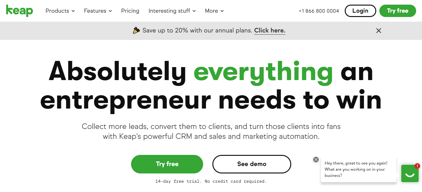

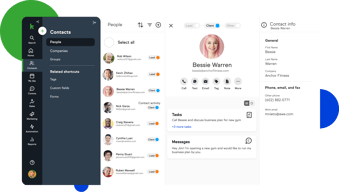
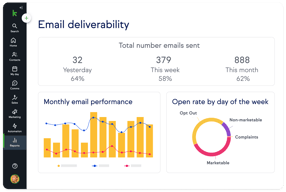
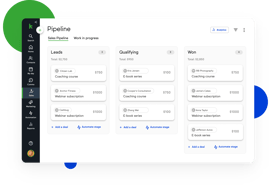
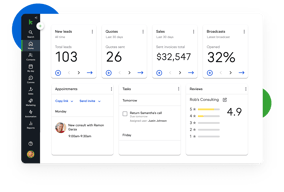





Keap bundles CRM, marketing automation, email and text, landing pages, payments, and appointments into a single plan at a single price, which is either exactly what you want or considerably more than you need. For small service businesses that would otherwise stitch together five tools, the consolidation is genuinely valuable. For everyone else, $299 a month plus a mandatory implementation fee is a lot to commit to.
- What it is: An all-in-one CRM and marketing automation platform for small businesses, formerly called Infusionsoft.
- Best for: Established small service businesses, coaches, agencies, and franchises that run genuine multi-step automation and want one vendor instead of five.
- Pricing: One plan starting at $299/month billed monthly, including 2 users and 1,500 contacts. Additional users are $39/month. Verified on Keap’s pricing page in July 2026.
- The honest catch: Implementation is mandatory and charged separately, starting around $500, and Keap holds a 4.1/5 on Capterra, the weakest independent score of any major CRM we have reviewed.
What Is Keap?

Keap started life in 2001 as Infusionsoft and spent two decades as the default marketing automation platform for small businesses that had outgrown basic email tools. It rebranded to Keap in 2019, and in October 2024 was acquired by Thryv Holdings for $80 million. The Keap logo now carries an “A Thryv, Inc. Brand” mark.
That ownership change is worth weighing. Thryv sells its own small-business platform, and acquisitions of this kind can go several ways over a few years: continued independent investment, gradual convergence with the parent product, or maintenance mode. None of those outcomes is knowable yet, but a buyer signing a multi-year commitment should ask directly about the roadmap.
Keap’s current strategic bet is simplification. Rather than tiered plans, it sells one plan containing the entire platform: CRM, automation, email and text marketing, sales pipeline, landing pages, payments, appointments, and reporting. The pricing page states the position plainly, promising an end to feature-based plans.
The independent picture is the weakest of any major CRM in this category. Keap holds roughly 4.1 out of 5 on Capterra across about 1,297 reviews. Reviewers praise the automation depth and criticize complexity, cost, and, notably, past price increases delivered with short notice.
How Keap Works
Keap’s real differentiator is automation depth, and understanding that explains both its appeal and its learning curve.
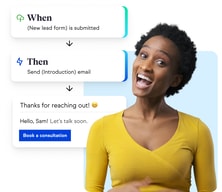
- Campaign Builder. A visual canvas for multi-step, branching automation sequences. Trigger on a form submission, wait, branch on whether an email was opened, assign a task, send a text, charge a card. Few tools at this price handle sequences of that complexity, and this is the reason long-time customers stay.
- CRM and pipeline. Contact records, lead tracking, and a sales pipeline. Competent rather than remarkable, and clearly secondary to the automation layer.
- Email and text. Broadcast and automated email plus SMS. Text is an add-on, priced in volume tiers, with the entry tier included.
- Payments and invoicing. Quotes, invoices, and card processing built in. For a service business currently running a separate payments tool, this is a real consolidation win.
- Appointments and landing pages. Booking and simple page building, adequate for straightforward use and not a replacement for dedicated tools.
The pattern is consistent: Keap is excellent at one thing, automation, and acceptable at the eight things around it. Whether that trade is good depends entirely on whether you would otherwise pay separately for those eight things.
Keap Pricing
Keap prices on users and contacts rather than features. Figures verified on Keap’s pricing page in July 2026.

| Item | Cost | Notes |
|---|---|---|
| Base plan | From $299/month | Includes 2 users and 1,500 contacts, entire feature set |
| Additional users | $39/month each | No feature difference between users |
| Additional contacts | Scales with volume | Priced via the calculator on the pricing page |
| Implementation | From ~$500 one-time | Mandatory, covers migration, setup, and strategy sessions |
| Text marketing | Entry tier included, then $24–$279/month | Overages around $0.015 per text and $0.01 per voice minute |
The parts that matter most:
- Implementation is required, not recommended. Keap’s position is that guided onboarding produces better outcomes, and there is a defensible argument for that given the platform’s complexity. It is still a mandatory cost, starting around $500 and rising with package scope, and it belongs in any first-year comparison.
- $299 is the floor, not the average. That figure covers 2 users and 1,500 contacts. A five-person business with 10,000 contacts pays materially more once extra users at $39 and contact tiers are added.
- Contacts, not just users, drive the price. This is the crucial difference from seat-priced CRMs. A small team with a large list can pay far more than a large team with a small one, so model your actual contact count.
- Text messaging is metered. Tiered plans plus per-message overages, which is normal for SMS but easy to underestimate.
- Price increase history is a genuine risk. Multiple Capterra reviewers report significant increases delivered with short notice, with at least one describing a resulting exodus of long-standing customers. Ask about price protection before signing.
A free trial is available without a credit card, but it is limited: a 25-email sending cap, no payment processing, and no text messaging. That is enough to explore the interface and not enough to test the automation properly.
Who Should Use Keap
- Established small service businesses. Coaches, consultants, clinics, home services, and agencies with a real customer lifecycle to automate. This is the intended buyer and the value case is strongest here.
- Businesses currently paying for four or five separate tools. If you are running a CRM, an email platform, a scheduler, a payment tool, and a landing page builder, consolidation can be close to cost-neutral while removing integration overhead.
- Teams with genuinely complex automation needs. Campaign Builder handles branching logic that simpler tools cannot, and this is Keap’s clearest technical advantage.
It is a poor fit in three cases. Startups and solo operators testing an idea should not commit $299 a month plus implementation. Teams that only need a CRM are paying for seven modules they will not touch, and Pipedrive or HubSpot will serve them better. And businesses without the appetite to learn a complex tool should take the reviews seriously: complexity is the most consistent criticism, and the mandatory implementation package exists precisely because self-serve onboarding does not work well here.
Honest Pros and Cons
Strengths
- Automation depth at a small-business price. Campaign Builder genuinely handles complex branching logic that most competitors in this bracket cannot.
- Real consolidation. CRM, email, text, payments, appointments, and landing pages in one system removes a meaningful amount of integration work.
- One plan, no feature gating. You are not upgraded into paying for a feature you already assumed you had, which is a refreshing contrast to the tier-gating common elsewhere.
- Payments are built in. Invoicing and card processing inside the CRM is a real advantage for service businesses.
- Two decades of domain experience. Keap understands the small-business customer lifecycle well, and it shows in the templates and campaign structure.
Limitations
- The weakest independent rating in its category. 4.1/5 on Capterra is a meaningful gap below the 4.5s that competing CRMs achieve, and it reflects real friction rather than noise.
- Complexity is the defining complaint. Reviewers repeatedly describe needing training or outside consultants to use the platform properly.
- Mandatory implementation fee. From around $500 on top of subscription, unavoidable.
- Expensive entry point. $299 a month is several times what entry-level CRMs charge, and the all-in-one bundle only pays off if you use most of it.
- A history of steep price increases. Reported by multiple reviewers as arriving with short notice. This is the single most important thing to raise with sales.
- Ownership uncertainty. The 2024 Thryv acquisition makes the long-term roadmap harder to predict.
- A restrictive trial. 25 emails, no payments, no text, which makes it hard to evaluate the thing you are actually buying.
Keap Alternatives and How It Compares
- HubSpot Sales Hub has a genuinely free tier and a cheap Starter plan, with strong marketing tooling. Its own Professional tier carries a $1,500 onboarding fee, so compare total first-year cost rather than headline price.
- Pipedrive is dramatically cheaper if what you actually need is a sales CRM rather than an automation platform.
- ActiveCampaign is the closest comparison on automation depth, generally cheaper, with a lighter CRM and no mandatory implementation fee. For many Keap evaluations this is the head-to-head that matters.
- GetResponse covers email marketing, automation, and landing pages at a fraction of the cost, without the CRM depth or payments.
- Zoho CRM paired with other Zoho apps delivers comparable consolidation for considerably less, with a steeper configuration curve.
For a wider view see our guides to the best CRM software and the best marketing automation software.
The Verdict
Keap is a capable platform with a narrow but real sweet spot. If you run an established small service business, you already do genuine multi-step automation, and you are currently paying for several tools that Keap would replace, it can be a sound consolidation with automation depth that is hard to match at this price.
Outside that profile it is difficult to recommend without qualification, and the independent scores say so. A 4.1/5 across nearly 1,300 Capterra reviews is a clear signal, and the complaints are consistent rather than scattered: it is complex, it is expensive, and some customers have been hit with sharp price rises. The mandatory implementation fee is defensible given the complexity, but it is still a cost that competitors do not impose.
If you are evaluating Keap, do three things. Price it with your real user and contact counts rather than the $299 headline. Ask directly about price protection, given the documented increase history. And compare it honestly against ActiveCampaign, which is the closest match on automation depth at a lower cost and with no implementation fee. If Keap still wins after those three checks, it is a defensible choice. If it does not, the alternative was always the better answer.
FAQ
How much does Keap cost in 2026?
Keap sells a single plan starting at $299 per month, which includes 2 users and 1,500 contacts. Additional users cost $39 per month each, and pricing rises with contact volume. A mandatory implementation package starting at roughly $500 is charged separately, and text messaging beyond the included entry tier is priced in volume tiers from about $24 to $279 per month.
Does Keap require an implementation fee?
Yes. Keap requires a paid implementation package, starting at around $500 and rising depending on scope, covering data migration, automation setup, strategy sessions, and integrations. It is not optional. Keap’s rationale is that guided onboarding produces better outcomes, which is credible given the platform’s complexity, but it should be included in any cost comparison.
Is Keap the same as Infusionsoft?
Yes. Keap is the current name of the product formerly called Infusionsoft, rebranded in 2019. Many third-party review pages still use the Infusionsoft name, which is why Capterra’s Keap reviews live under an Infusionsoft URL. Keap was acquired by Thryv Holdings in October 2024 for $80 million.
Does Keap have a free trial?
Yes, with no credit card required, but it is restricted: a 25-email sending cap, no payment processing, and no text messaging. That is enough to explore the interface but not enough to properly test the automation capabilities that are the main reason to buy Keap, so plan your evaluation accordingly.
What is the best alternative to Keap?
ActiveCampaign is the closest comparison for businesses that want Keap’s automation depth at lower cost and without a mandatory implementation fee. If you only need a sales CRM rather than an automation platform, Pipedrive or HubSpot Sales Hub will cost substantially less.

Compare Keap with other popular tools in the same category.
The extraordinary telephone support and the continuous improvement of the applications
Occasionally takes a bit more patience with complex campaigns
Offloading many tasks I previously did manually, now it is automated

It is as close to an all-in-one tool as I have found. I love that I am not as scattered across multiple tools to run my business. It has an online version and an app. I have had conversations with the Keap support chat line and had any issues solved quickly.
I do look forward to an upgraded email builder that I hear is coming. Sometimes the app seems slow.
I am able to get paid so quickly. I have had a conversation, sent a quote, converted the accepted quote to an invoice in less than three hours on a few occasions. It is so easy to get appointments set - and it integrates with my calendar so I don't double book! I have a Pipeline set up so I know where my clients are in my process. I love that all of the information from my clients are all in one place - all emails, texts (to my Keap #), quotes, and payments are all together. I feel so much more organized and follow-ups are much easier for me now. It is so easy to scan a business card into the app and immediately connect with new prospects. The scans are accurate.
It does all the things that I need it to do and more. I can send emails, invoices, appointments and it sends follow-up emails on my behalf. I can set up automation, projects and create broadcasts. I'm still learning the system. I love the automation feature. I send contracts and documents to my clients. I can set up an automation to move them through a process for sessions and classes as well. It's made my life so much easier. I can set it and go. I love that my contacts are all in one place. I can track my leads, add tags and track everything. When I send a broadcast communication the system tracks everything so that I know how many were sent, how many were opened, and how many were not sent. For my lists, the system also tells me how many emails are duplicates or incorrect. That saves a lot of time and I don't have to work with blind spots.
I would like to have the ability to send documents that require a signature via KEAP. Right now I have to send via Adobe sign Docusign. That would add another level for me. I think they were exploring the possibility of adding this feature but I haven't been informed that it's available at this time.
I'm a one-man show right now and I can set things up to take care of daily tasks. I LOVE that I can use one application instead of 3 or 4. I used to use Paypal to create invoices and send notifications to my clients. Then, I would have to remember to send a follow-up email or a reminder for payment. KEAP does all of this for me. Having one application that performs multiple functions is great.

I appreciate the all-in-one email marketing, follow-up, and landing page/shopping cart solution in one place. It really is a robust platform.
The learning curve can be steep at times - however, you get what you pay for and the live support has been great. I have a VA that also helps me - and honestly, as a business owner, I shouldn't be doing it all myself anyway.
It's hard to remember every step to onboarding new clients. Keap is helping me save time by automating some of the steps and assigning things to team members. Tracking where prospects are can also be tricky. I'm automating some of the follow-up touchpoints with new prospects and sending myself reminders. I'm using the landing page feature for additional revenue sources. It's easy to use.
All information is available for me to look up
Alerts always come up that I have to cancel out of
All my members information is available

The product has an easy-to-learn and use layout about it that makes navigation and task completion simple. The ablity to perform an email broadcase either ad hoc or as part of a campaign. Also like the ability to print labels for snail mail correspondence when email has not been authorized.
When settings are made, you need to log out and login for them to take effect. Some of the security settings are not as intuitive as I would like them to be.
Keap can manage all contacts from this platform. Keep the list segregated in any way needed for the task at hand.
The API lets me extend Infusionsoft to do things it couldn't possibly do for everyone. I have a LOT of API calls running to do many many things. I build a custom admin site to update contacts, tags etc without logging into Infusionsoft. It is my master CRM database which I sync to a local server for quicker access to the web server for my custom member's web site.
The order forms are pretty weak. I use ThriveCart to add order bumps and a sales funnel with upsells and downsells.
Keeps my contacts, sales and marketing in one place. The campaign builder is awesome and automates a ton of processes.

I've been using Keap Max Classic/Infusionsoft since 2015 to manage dozens of direct response lead generation and follow-up campaigns. In combination with PlusThis, and Zapier I'm able to integrate with all the third-party applications we've ever needed and their technical support is always eager to help. The Ecommerce functionality works extremely well and integrates easily with both Stripe and WePay for credit card payments. In short, Keap helps serious entrepreneurs and small businesses get organized, follow up, and automate their processes to create efficiency, grow their business, and free up valuable time.
Keap Max Classic is a very robust CRM with a tremendous capacity for automating the details of complex campaigns. It's not for the start-up business. There's a learning curve and it will take time to become proficient, but well worth the effort in the end. The new landing page builder is graphically better than the original, however, tagging is more complicated and submission notification is no longer available. The workaround involves creating additional steps in the campaign sequences.
With dozens of direct response campaigns running at any given time, Keap ensures no one falls through the cracks and that the right person in our office is engaged in our prospect/client journey every step of the way.

What I like best about Keap is how it can automate so much of my small business. Unlike other software that forces you to adapt the software to your business, you adapt Keap to the uniqueness of your own business.
Reporting could be better with Infusionsoft, but since it is open API and has a large open marketplace of apps you can easily find an app or export data to get the trend reports you are looking for.
No prospect or cold lead is ever forgotten. All our clients are much more engaged with us and systematically refreshed of our value and solicited for referrals. Keap markets and runs our business while we sleep. We do easily 10x the follow-up we never did but that we always wanted to, in the fraction of the time it would have taken us to do it manually or with old CRM type systems.
I like that ALL items are under one program: CRM, Automated Emails, Membership Site, E-Commerce, Sales Funnel, and Lead Scoring.
Some functionality and higher-end moves do require me to hire out tasks from an Infusionsoft Ninja.
Automated marketng, sales, auto delivery, Lead Scoring, sending contracts, etc. IT IS IMPOSSIVBLE to list all that Infusionsoft does for me. IT RUNS NEARLY EVERY ASPECT of my business.
Fast, helpful customer service, excellent tools for client management.
Some features can be a little esoteric, but they've always done an excellent job at simplifying jargon and advanced features.
Client intake and management, following up with clients and potential clients.
You can set up customized campaigns! It allows you to do so much.
Not much :) everything is very easy to use and is amazing!
Invoices have been the a life savor for us! There are so many campaigns we can run that are automatic. We used to do all of these things by hand like creating lists of emails and spread sheet invoices, now we save hours and hours per week by setting it up in InfusionSoft!

I signed up DURING a launch and had no idea how to get started. I fast-tracked the training and my onboarding coach helped me set up my whole funnel sequence, which was super helpful in understanding how to use the software going forward. It worked like a charm! Everything went out when it was supposed to and my results were amazing! While I am just learning the TRUE power of Keap, I can't wait to explore what else is possible!
Keap is not cheap! My initial reluctance was the investment. However, because I had the opportunity to see how powerful the software is during my launch, I can clearly see the value! You really do get what you pay for. Keap is an investment worth making if you are serious about email marketing, proper sequences, and powerful follow-up and sales systems!
My last launch before Keap, was very labor-intensive when setting up all of the emails that needed to go out, Keap makes this process easy once I understood how it worked. I plan to be creative in finding more uses for Keap. One of the features I like is the way it tracks where my money is!
This is such an amazing platform, it is fast, responsive and makes perfect sense. At first, I did struggle with the concept of Lifecycle Marketing, but once the penny dropped, I have not looked back.
Nothing at this stage, it just works so very well.
I was using HubSpot, but it was too complex and I always had to upgrade, however, KEAP has all that I could need.
The software allows my business to run marketing and CRM automatically.
My only dislike initially was the confusing back-end, but that is no longer an issue after spending some time with it.
Ignore the marketing; forget the CRM. This platform automates my business!
The web based platform is very easy to use
The price point is high for what you get. You're limited in the number of contacts you can store based on the price of your plan.
I'm tracking incoming payments and my pipeline.
Keap is a tremendous value for the money and has an incredibly simple learning curve. As a former hubspot customer, once I tried Keap, I made the switch and never went back.
The only downside I can think of is that the mobile app and desktop app can sometimes take a little while to sync data from one to the other.
Marketing Automation, CRM, Marketing Campaigns, and data management. The campaign builder is one of the best on the market and very easy to use. Keap's text message marketing campaign software has changed the way I think about marketing and allowed me to gain a competitive edge.
The software connects with everything with ease!
Luckily I feel there is nothing to dislike.
It is linking customers through my online services to platforms and software geared towards education. The best thing is that this links to everything, such as accounts software, websites, and more. This really is automation at its best!
Keap has excellent fundamentals for a CRM and also a lot of room for growth and complexity. I have been using it for years. The customer service is AWESOME!
There's so much you can do and it takes time to learn.
Campaigns and email distribution.
This has been a great way for our agency to keep track of our customers and all their info. We find that it offers easy ways to communicate with them directly via Text, Email or making a direct call to them.
I can not think of anything not to like about this product. It is instrumental in keeping track of our customers.
We think that the potential customers love the texting option to communicate with us. We love that it automatically sends our customers reminders without us having to do anything. Texting is so much easier to get our message out to the customers and they find it easier to communicate that way.
I like Keap's customer service, office hours with Jennifer, and support that their team has offered to better serve their community. My on boarding process was smooth and now I consider myself an expert in automation.
I think the integration tools with my website could be much better. The plug-in on word press is outdated and one-dimensional and their is no automation trigger to send emails to people who didn't open them! There are also no lists but tags instead. My tags are now cluttered. It's also very difficult to figure out how to automate a double opt in for anyone who comes into our database.
We have shaved off hours of frustration and sending emails manually. With Keap and their training we now have full autonomy of our CRM and email marketing.
It is so solid. I've used other programs that are "just like Keap only better", but the problem is, they're not - they break, automations fail, I have to creat patches and fixes to keep the other software running. With Keap, I don't. It works. It runs. It doesn't break. It is so robust. You can do so much with Keap. You can automate and systematize so much. I can multiply results of my marketing and sales and client fulfillment, and generate much more revenue while keeping clients happy. I love systems, everything I do is about building systems, and Keap is by far the best platform I've used (and I've used a lot of them on various projects). All new programs I've standardized with Keap. I don't want to work with other platforms because I don't like to have to fix things. I want campaigns, blasts, automations, memberships, to all run flawlessly, and I get that with Keap.
It takes a mindset change to go from crazy mode to creating systems that do all the hard work. This can take some time to get used to.
More leads, more sales, better follow up, and less work because systems I built are doing all the manual grunt work my team and I used to do. It's so nice having a business that can be scaled. It takes work, but suddenly it becomes reality instead of a far-fetched dream. My sales have gone up and I have great client relationships. I can focus more on the customer, solving their problems, and selling more.
Keap offers a great way to track your client, their current status, maintain communication all in one place. The ability to customize campaigns and marketing events sets Keap apart from other CRM programs.
The only downside is that there is no social media integration and no client portal.
I can communicate, bill, create marketing campaigns all in one place. I also love the pipeline feature, this allows us to provide clients with updates on their status in one central location.
We currently use the emailing feature the most. Once Covid restrictions have lifted, we will use many of the other features.
There isn't anything that I can think of.
The emails that we can send out to our database are easy to create and have added features that track our email campaigns.

I've been using Keap (formerly Infusionsoft) for 8+ years in my business. Not gunna lie...in the beginning, it was rough to learn the system. But TODAY - easy peasy! I love how simple they've made it - without losing the power of marketing, sales, and automation.
Nothing to complain about here! Seriously, they are just like the rest of us (entrepreneurs and small businesses) - they Keap getting better and better! Just when I thought it had it all, they surprise me with new features I didn't even know I wanted!
The list is (truly) endless. We use Keap to capture leads, organize tasks, communicate with our customers, manage our sales, onboard new customers, survey customers on our work, automation our follow-up and nurture, handle our appointment scheduling, and so much more!
I love Keap's ability to automate repetitive parts of my business. My prospects and clients receive regular contact and nurturing. No one gets forgotten and I can delegate parts of the process to others for support!
Keap takes quite a bit of training to get your processes up and running. Having a point person who is fully trained and knowledgeable on the software made a huge difference for me.
Organization - All of my leads are captured and nurtured in one place Lack of time - I'm able to delegate tasks like writing emails or entering contacts Effiencies - Processes can be copied and reused which saves my staff tremendous amounts of time Best practices - Every Campaign gets better as we learn and refine our processes
Everything! Is just the best CRM in the word!
Nothing. It have everything you need to succeed as a business owner.
Keap is like my personal assistant but is better: It works 24-7 365 day a year! It save me about 15 hours per week.
Personally I really really like the UI/UX of the CRM. The simplicity behind the CRM is insane. I use this as an all in one and it's just so darn good as a CRM. I recommend for anyone and everyone UNLESS you're in an industry that has more specific CRMs like being an attorney, or a financial advisor, etc.
The email automations are a bit cancerous sometimes. There's this issue that when I finish creating a template and then I preview the email. when I receive the test email in my inbox I see a bunch of code where the display text is for the email before I even click the individual email and open it up. I spent so many hours fixing my email automation templates so the code doesn't show. Keap/InfusionSoft team! Y'all need to do something about this! Also, I literally went into live chat multiple times when I was encountering email automation issues at the time. I was #1 in the queue, and no one was there to answer me? What kind of customer support is that? I literally sat in the waiting line room for like 30-60 minutes and NOTHING. MULTIPLE TIMES! Customer Service is a must guys.
Invoicing. Pipeline tracking really helps too. Appointments and the booking link is so darn convenient.
Keap is intuitive and easy to use, and I like the visual dashboard which helps keep me on point. The automations and pipeline features will assist with consistent follow up and help generate the revenue that gets lost when the follow up process breaks down. The onboarding and customer support has been terrific so far!
The only cons so far are user-related, lol... I need to practice more to create the more advanced automations, as you obviously want to get those set up right the first time. Otherwise it's been terrific.
As a small organization we suffer from breakdowns in the follow up process when things get busy, so Keap's automations will help keep us on track. The pipeline feature is also excellent for providing a clear view of where customers are in the sales process. I also appreciate the quick overview of customer information available by adding custom fields to the initial viewing screen.
I love how easy it is to use the system. Training was a must, however, Matt was brillant, supportive, patient, and knowledgable. He made sure I had everything I needed to know and where to find it if I realized later I had a question.
The only thing I disklike is the limited options of payment processing integrations. I use Square and have for a long time, but Square doesn't have an integration for Keap. Instead, I had to open a new account with another company. Not a bad thing, but not the easiest.
Time! I am solving the problem of time! No longer do I need to retype email broadcasts every time I want to send a new one. No longer do I need to manually set up appointments for new contacts. All of this is done for me! Keap makes it so easy to quickly do everything I need to do. There are limitless possibilties with their automation system. When a potential client emails me via my website form, an email is automatically sent back to them that allows them to book an appointment with me then a second is sent (after booking said appointment) with information they need to know before going into said appointment. All of this happens without me ever needing to take the time to manually respond. It's such a life saver.