
Unclaimed: Are you working at Livestorm?
Livestorm Reviews: 4.4/5 — Solid Choice
Livestorm is a video engagement platform that manages virtual events, meetings, and webinars. It’s best known for providing an end-to-end video engagement solution where users have access to email templates and sequences, customizable registration pages, website widgets, social sharing features and more. Additionally, Livestorm elevates audience interaction with their platform through tools such as launch polls, Q&As, file sharing, all designed to engage participants during live sessions. The solution also takes a data-driven approach to registration and attendance tracking as well as audience engagement so users can leverage data from any event.

| Capabilities |
API
|
|---|---|
| Segment |
Small Business
Mid Market
Enterprise
|
| Deployment | Cloud / SaaS / Web-Based, Desktop Chromebook, Desktop Mac, Desktop Windows, Mobile Android, Mobile iPad, Mobile iPhone |
| Support | 24/7 (Live rep), Chat, Email/Help Desk, FAQs/Forum, Knowledge Base, Phone Support |
| Training | Documentation |
| Languages | English |
Livestorm Pros and Cons
- Comprehensive and user-friendly webinar software
- Intuitive email invitation setup
- Integrated chat functionality for audience interaction
- Seamless integration with third-party apps
- Detailed analytics for performance evaluation
- Lack of pre-configured polls and call-to-actions in webinar setup





As businesses and marketers seek effective ways to connect with their customers and leads, the demand for a robust webinar solution becomes evident. While platforms like Zoom and Skype have their advantages, they may not meet the requirements for scaling operations. Livestorm, on the other hand, is an all-in-one webinar platform designed to cater to this specific need.
In this Livestorm review, we will delve into why it is one of our top recommendations for hosting webinars and online meetings. We will also explore its marketing features that can enhance brand recognition. So, let’s dive in and discover what Livestorm has to offer.
In this comprehensive review of Livestorm, we’re going to unpack the reasons why it stands tall as one of our premier picks for conducting webinars and online meetings. We’ll also shed light on its potent marketing features that can turbocharge your brand’s visibility. So, let’s dive in and discover what Livestorm has to offer.
What is Livestorm?
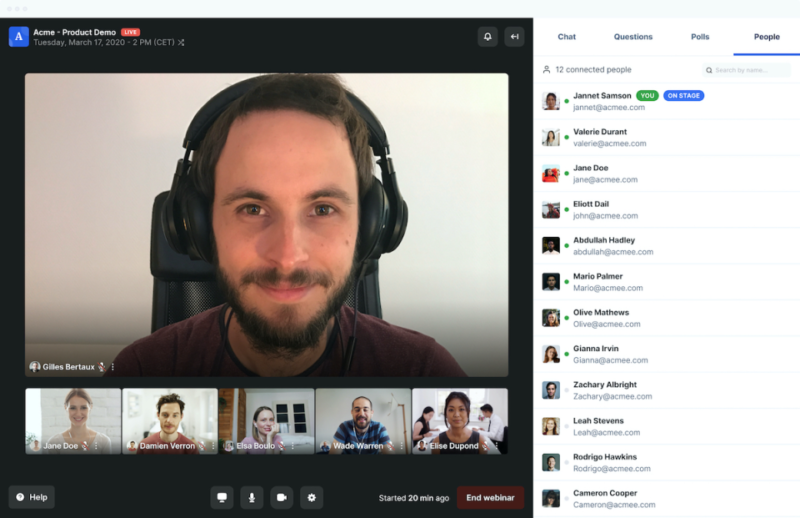
Livestorm is a powerful webinar software that provides a range of features to facilitate seamless online meetings and webinars. Developed with the goal of offering an all-in-one solution, Livestorm caters to businesses and marketers who are looking to host engaging and interactive webinars.
The platform is designed to support a variety of webinar types, including live, on-demand, and automated webinars, making it a versatile choice for businesses. Livestorm also places a significant focus on integration, offering a marketplace of over 1000+ integrations that allow users to connect the platform with their existing tech stack.
Key Features and Functionalities
Livestorm offers a plethora of features that set it apart from other webinar software tools. Besides standard webinar-related functionalities, Livestorm is committed to providing robust marketing tools. Its built-in landing page builder and funnel analytics are testament to this focus, enabling users to effectively market their webinars and analyze their performance.
Let’s have a look at its other standout features:
Email Invitations
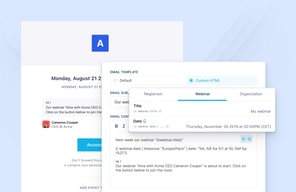
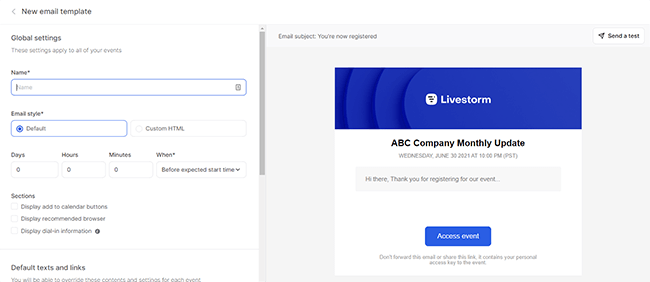
Livestorm simplifies the process of sending email invitations to attendees. The intuitive user interface allows you to create separate emails for different segments, preview how the emails will appear, and easily edit their contents.
Audience Interaction
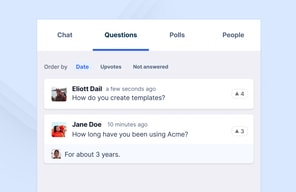
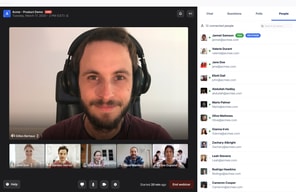
Livestorm provides integrated chat functionality, allowing you to engage with your audience during webinars. You can choose between public and private chat options, and even make the slideshow available for immediate download as a PDF file.
Polls and Call-to-Actions
While Livestorm lacks the ability to pre-configure polls and call-to-actions in the webinar setup, it does offer these interactive features during live sessions. This enables you to gather valuable insights and drive engagement among attendees.
Integrations
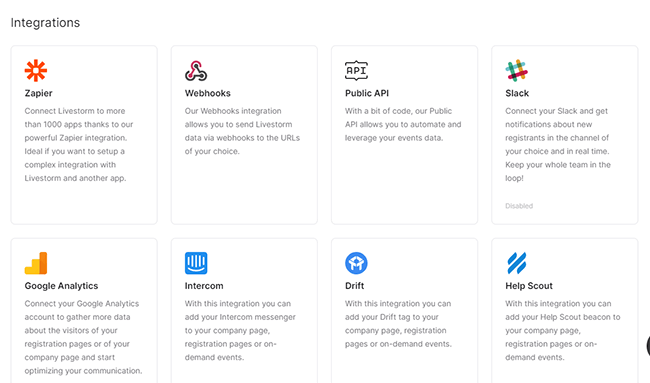
Livestorm integrates seamlessly with various third-party apps, expanding its functionality. With integrations such as Zapier, Webhooks, Slack, Google Analytics, HubSpot, and Pipedrive, you can enhance your webinar experience and streamline your workflow.
Analytics
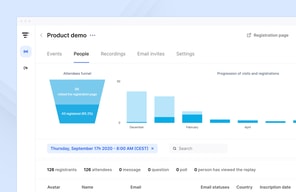
Livestorm provides comprehensive analytics to help you measure the success of your webinars. From key metrics to attendee and replay views, you can gain valuable insights into the performance of your events. The reports can be exported in Excel, CSV, or ODS format for further analysis.

Instant Meetings
Livestorm offers the convenience of impromptu meetings through its Instant Meetings feature. With just your name and a URL slug, you can quickly create a meeting room and invite team members to join. This feature is particularly useful for immediate collaboration or support sessions.
User Interface
Livestorm boasts a user-friendly interface that makes setting up and managing webinars a breeze. The platform’s intuitive design ensures that even users with limited technical expertise can navigate through the various features effortlessly.
The webinar email setup, for instance, is remarkably straightforward. The interface allows you to easily preview and edit the contents of your email invitations, making it one of the smoothest parts of using Livestorm. You can customize the email texts, add shortcodes, and even modify button texts and colors to align with your branding.
During the webinar itself, Livestorm offers a range of audience interaction options. You can set up an integrated chat that can be either public or private, allowing for seamless communication between participants. Additionally, Livestorm provides the option to make the slideshow immediately available for download as a PDF file, enabling attendees to review the material at their convenience.
One area where Livestorm could improve is in the pre-configuration of polls and call-to-actions. While the platform does offer these features, they cannot be pre-configured during the webinar setup. This limitation may be a drawback for those running product demos or online meetings where real-time interaction is crucial.
When it comes to mobile experience, Livestorm performs well overall. Joining a webinar on a mobile device is seamless, with the interface being perfectly responsive. The webcam and slideshow presentations are clearly visible, and the chat and interaction tools are conveniently placed below the webinar video. However, it’s worth noting that there is a 15-second video delay on mobile devices, which may impact the overall event performance.
Performance and Reliability
Livestorm is known for its reliable performance, ensuring smooth and uninterrupted webinars. The platform is designed to handle high attendee volumes without compromising on quality. Users can rely on Livestorm to deliver a seamless webinar experience, minimizing the risk of technical glitches or crashes.
Pricing and Value
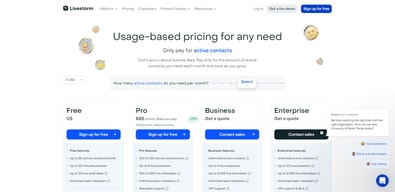
Livestorm offers a range of plans to cater to different needs and audience sizes. The Free plan is a great starting point for small-scale webinars, while the Starter, Premium, and Enterprise plans provide increased attendee limits and additional features. The Enterprise Plus plan offers custom pricing for organizations with specific requirements.
| Plan | Features | Price per Month |
|---|---|---|
| Free | Unlimited webinars, limited attendees, 20-minute webinar sessions, no on-demand webinars | Free |
| Pro | Higher attendee limits, 4-hour webinar sessions, unlimited live or pre-recorded events, invite unlimited moderators | See current pricing |
| Business | Up to 3000 attendees, 4-hour webinar sessions, unlimited live or pre-recorded events, invite unlimited moderators | Custom Pricing |
| Enterprise | Custom attendee limit, 12-hour webinar sessions, unlimited live or pre-recorded events, invite unlimited moderators | Custom Pricing |
See Livestorm pricing for current rates and plan details.
Please note that the pricing mentioned above is subject to change and may vary based on specific requirements or promotions. It’s always recommended to visit the official Livestorm website for the most up-to-date pricing information.
Remember, choosing the right plan depends on your specific needs and the scale of your webinars. It’s important to evaluate the features and benefits of each plan to determine the best fit for your business.
Frequently Asked Questions
Is Livestorm suitable for beginners?
Absolutely! Livestorm is designed to be user-friendly and intuitive, making it an ideal choice for beginners who are new to hosting live webinars. The platform offers a seamless user experience and provides all the necessary tools to run successful webinars without requiring any technical expertise.
Can I integrate Livestorm with other tools I use?
Yes, you can, Livestorm offers a vast marketplace of integrations, with over 1000+ options available. This makes it easy to connect Livestorm with the rest of your tech stack, allowing you to streamline your workflows and enhance your webinar experience.
Does Livestorm provide analytics for my webinars?
Yes, Livestorm offers funnel analytics to help you track the performance of your webinars. While it may not have the same level of features as dedicated analytics tools, the built-in analytics provide valuable insights into attendee engagement, conversion rates, and other key metrics to help you measure the success of your webinars.
Does Livestorm offer a free plan?
A: Yes, Livestorm does offer a free plan that includes many of the platform’s features. However, it is important to note that the free plan has limitations, such as a maximum duration of 20 minutes per event and limited registrants per event. Check Livestorm for current free plan limits. For more extensive usage and additional features, you may need to consider one of the paid plans.
Livestorm Review: Summary
In conclusion, Livestorm is a highly recommended webinar platform, particularly for those who are new to hosting live webinars. It offers a wide range of options for online meetings, virtual events, and various types of webinars, including on-demand and automated webinars. One of its standout features is the extensive marketplace of integrations, with over 1000+ options available, making it easy to connect Livestorm with other tools in your tech stack.
Additionally, Livestorm provides a built-in landing page builder and funnel analytics, which, while not as feature-rich as third-party landing page software, still offer solid functionality that will meet the needs of most users. It’s important to note that if you anticipate a large number of attendees, you may need to purchase an add-on. However, the pricing for these add-ons remains competitive compared to other webinar platforms.
Overall, Livestorm is a fantastic platform with a great user interface that is incredibly user-friendly. It offers a comprehensive set of features that cater to all your webinar needs.

Compare Livestorm with other popular tools in the same category.
I really enjoy Livestorm: the service is useful, the staff is helpful et they keep improving their solution.
I'm still waiting for some features : personal accounts, easy swift from slides screen to share screen etc.
Organizing webinars with Livestorm enables us to gain new leads et to spare time.
Very easy to use, yet powerful - As it is web browser based there is no need for the attendees to download any special software apart from an updated version of Chrome (recommanded) Also The hotline is friendly and quick to respond
nothing really - some companies don't allow the installation of Chrome and with other web browser you will not get the benefit of real time conference
Organizing professionnal webinar with a great plateform
No software installation is required, it as very important for us as we do B2C webinars. Anyone can participate just with a browser.
First pricing threeshold maybe a bit high, made us hesitated as we're a small company, but after our first webinar, we're sure it's a good investment !
Converting the many prospects on our newsletters to use our product. Most of them had registered months ago but had not started using it. The webinar helped to convert them.
Easy to use, great video quality and email automation
not much. I enjoy using it and it perfomes as expected .
connecting with remote prospects
Intuitive User Interface All the key features from industry leading providers for a fraction of the price Monthly billing and ability to cancel/join at any time (when needed) Customer Service team provide excellent service webinars automatically record so you don't need to remember to hit record the translation engine to set-up webinars for our overseas customers
You can't have more than one host (but the workaround is that they can use your credentials and change the name for presenting purposes). You can't record from media, just screen share.
The ability to present to all of our global customers in a professional way
I love that it is all browser based. No one needs to install any software to attend. Simply, it just works. It's easy to: - Schedule a webinar - Create an attractive landing page where attendees can register - Send reminder emails to people who registered e.g. 60 minutes before it starts - The webinar ran well. High quality video and screen sharing. No one had any connectivity issues. - Attendees could participate via chat
There is nothing I dislike about Livestorm. I wish them all the best as they grow.
Livestorm meets 100% of our Webinar requirements.
After months of searching for a simple, easy-to-use webinar software, we finally stumbled across LiveStorm. Killer platform. Way better than everything else we tried. Equally as important to us: they've have great customer service. We've been very methodical in making our decision over the last few months, and they were helpful every step of the way. They are also constantly iterating. A sign of a healthy, growing SAAS.
Price could be a little better. But it's obviously not a deal breaker. Other than that, we've found no real negatives, especially in light of webinar software alternatives.
A simple and powerful live webinar software. Something that's sorely needed in the market.

Simple customer interface. Sound and video are OK !
nothing during our test. The functionnalities missing are in the roadmap
Increase hot leads
I felt like it was a very clean experience and thought the video quality was great
I think if we could have more then 3 presenters, that would be a great add on.
Its been great having webinars with Livestorm
The customer experience is fantastic : the website is well-designed and the customer support is efficient.
t's a shame not to have video replay when you upload a document to illustrate your webinar. You have to share your screen in order to record a video.
It enables me to acquire leads. It also enables business managers to save time.
The process as a whole is very well rounded. Gilles does a great job of making sure you're all setup and ready to go for your first webinar, learning the system (which is very simple), making sure to take care of any and all questions promptly. You can tell they care. When we had problems with other webinar software, we wouldn't get a response for days, and then would get a vague response with a link to a FAQ page. Gilles and the team are very helpful and personal. I love that it's browser based, so neither myself nor attendees need to download anything or run anything. It makes the whole experience much smoother. It's almost like tuning into a podcast. Another thing I like about it is how easy it is to make a great landing page. That was important for us. Another thing is the ease of analytics. We can easily track UTM parameters and track performance of shares with the team, partners, and on different channels. Also, once you're in the webinar room, everything is so simple and easy to use. This is the biggest difference for us. For most platforms, once you get into the webinar room, everything is clunky and unintuitive. The webinar room does exactly what you want, easily, and it's intuitive. It took me about 5 minutes to comfortably do all the different things we needed to.
Nothing. The team is great. They respond to requests and make changes to help us be the best we can be.
We're using it for monthly webinars with thought leadership content and looping in customers and partners. We're also using it for recurring product demos. I have peace of mind about using it. I trust it — unlike all the others out there. It's easy to use, intuitive, has all the features and functions we need, and at a great price point.
This software is very easy-to-use and the connection is great. It's the best webinar software we as a company has ever used. All your attendees can get involced witha single click and you can get in communication with them. That way it is also easier for the audience to get in the webinar. You can then reach out your innovations and system throughout the software. To get in contact with your audience is one of the best solutions to possible problems in the company as you can share thought on such platforms. Thus, thanks to livestorm you can always share thoughts and brainstorm with your customers or employees- in our case with our freelance writers and publishers. It is very important for us to always keep in touch with our freelance community and our publishers to keep thing on track. So, livestorm provides all the things we need in that sense. We thus highly recommend companies to use livestorm in their customer relations or employee relations. Thank you livestom for the good experience we had with you!
To be honest, there's nothing that we have not liked about livestorm. It was a very good webinar experience for us.
We organise monthly webinars for our freelancer writers and publishers. That's how we get them informed about our innovations and system. Thanks to Livestorm, we could reach them on a broader platform.
I love the fact you can easily pre-record segments, this allows me time to field users questions simultaneously and means that I can run the webinar programme without needing additional assistance from colleagues. I like that Livestorm feels like an app where the developers have set out with the purpose of making the best possible Webinar workflow.
So far I have a great experience with Livestorm's Customer Service team so I will be certain to tell them if anything comes to mind!
Faster Webinar worklflow, higher quality output with fewer staff required.
I think that the ease of registering for our users made it the core argument for going with Livestorm. What's more, I don't need to be a manager (host) to be in charge of a webinar. It provides with many functionalities concerning adding additional people speaking during a webinar.
It's not a super important aspect but it'd be great to have more than one host / manager instead of contributors. Then, it would not be necessary for the host to be always present when a contributor has a webinar.
I call Livestorm our savor in terms of providing our users and customers with education. Thanks to Livestorm, we can share the valuable content with a wide audience, which significantly improves the conversation rate on our website.
The ease it takes to use the software and the customer service. A lot of softwares are complicated and sometimes other customer services take a while to get back to you. Livestorm helps me within minutes via e-mail.
There's not much that I dislike. I do not like the minimal ways to customize your registrant page, but sometimes minimalistic things are better suited for softwares like these.
Reaching out to our market and connecting with clients. It's easy to reach out to our clients without having to put forth much effort.

Easy to use and adapt Excellent Support Customizable features (E-mail reminders, forms, registration page, branding) Powerful analytics features Effective and instant engagement
Some connectivity issues for 1 or 2 attendees. But that's just a detail and may be a problem occurred by attendees.
We were searching for a webinar platform to do webinars which will provide easy-to-use management system and customizable branding features. With Livestorm, all of our needs were covered. Besides of that, we can easily track the sources of attendees and optimize our webinar promotion channels.
Quality of Video, Auto Replays, Ability to Schedule Reminders, Reporting, Connecting pre and post webinars. Love the ease of integration as well.
Pricing is a bit high. But def worth it is worth its value.
Connecting with our customers every month. Ability to share recorded sessions with those who can't attend due to timezone differences.
The interface is easy to use for ou customers to use. I like the design.
I wish there was a copy feature for daily webinar sessions. It can be tedious adding them one by one.
We needed a tool to use for our daily webinar sessions. Our customers aren't always the most tech savvy, and they appreciate a easy-to-use interface.

It is very easy to use. In the odd event we are stuck, the support team is really helpful
The process of transferring a hosting license from one team member to another is clunky.
- We are hosting webinars often to prospects and customers and setting them up is a breeze.
Easy to use and implementation. Good customer support and nice out of the box landing pages.
I think it's a bit confusing what is a session and what is an event. Find it a bit hard to organize recurring events.
Easy to set up a stable webinar tool. Made us finally take the leap and start with a recuring webinar.
UX and UI The tool is user-friendly and easy to use
So far, it answers my needs regarding webinars
It allows us to bring people together to present subjects in which we have expertise

Livestorm was a no-brainer when it came to onboarding a new webinar platform. They listened to our wants and needs (we did not want anything too flashy or complicated) and they set up our account accordingly. Our onboarding has been smooth thanks to our support team Edwin!
My one complaint so far is the double authentication sign in to prove that you are not a robot ex "select the images with a bus". It is annoying having to do that more than once in a day.
Livestorm has simplified the process. We worked with a different webinar platform last year and it was too overwhelming for what we were trying to accomplish.
- Very easy to use it. Everything is clear and already prepared as the all the mails from the subscription to the replay. - The support is also very reactive.
- The fact that the tool count the employees as users too. So if you have 3 employees who are speaking during a live, Livestorm count them as users
We save a lot of time between the invitations and the end of the live
We're new to Livestorm, but have found it very easy to set up and host live events. We've hosted a couple and have so far found it intuitive, and we've had no technical issues. The polls and chat function make it great for interacting with attendees, and the automated emails also make it easy to communicate.
It would be great to be able to customize events so they match our branding.
Using a ready-made tool that was easy to pick up and run with was essential in getting a new webinar program off the ground quickly.
Easy to use, and usefull integrations and implementation. Customer support is efficient.
Not possible to be stream on social medias as well
Create recurring events & analyze registrants infos
Le canal modérateurs et la starétgie des emails. Export en quelques clis pour analyser les stats. Facilité de mise ne place , très intuitif.
Pas possible d'avoir deux liens différents pour un même évènement pour retracer la provenance si vous avez plusieurs entités
Simplicité pour organiser des évènements à distance avec nos clients
The facility to use, with a good interface
Nothing at this moment, all's good about using it
It provides a good support to our presentations and it is really liked by our customers
It is a very user friendly platform. I find it easy to navigate and have never experience any glitches or technical issues
There isnt many downsides from my perspective i really enjoy using it
Providing us with an easy to use system that helps eliminate extra administration work. Livestorm takes full control of our reminder system for us, saving our admin team countless hours of work.
Since couple of months now I am using Livestorm as part of my new responsibility is communicating with our members via webinairs. It is an important part of my activity and during my 20 years of experience I did not yet have the opportunity to use this tool. I appreciate its easy access, after a short training I was able to use it with no problem. I also appreciate all the options : being able to receive questions, answer them, being able to download the information after the webinair. It is a complex tool with many options, with an easy access and intuitive utilization.
The first couple of times just have to double check that the webinair was correctly stated, but we put in place small strategies as asking if everyone can hear us in order to make sure everything is going well.
Livestorm represents our most important communication channel with our members : reminders of procedures, modifications of legislation to be implemented. It allows us to communicate and at the same time have their feedback by the intermediary of the questions they rise during the webinar. So it helps us to keep our members informed as well as detect potential questions or problems on their side. It is a very important tool in our daily activities.
Has all the features you want in a modern Webinar tool.
A desktop app could be nice. Screensharing a Google Slides presentation was not completely frictionless (had to open a separate window).
Creating and hosting webinars for large audiences.