

Unclaimed: Are you working at monday.com?
monday.com Reviews: 4.7/5 — Highly Rated
monday.com packages itself as a Work OS built for a new way of working. Providing businesses with a single source of truth, all monday.com products are built on seven building blocks – boards, views, dashboards, integrations, automation, apps, and docs. There are currently five monday.com products, the core being Monday Work Management. The other four are Monday Sales CRM, Monday Marketer, Monday Dev, and Monday Projects. It’s free to use for individual users and paid plans are available on a per-seat basis.
| Company | monday.com |
|---|---|
| Year founded | 2012 |
| Company size | 5001-10,000 employees |
| Headquarters | Tel Aviv, Israel |
| Social Media |

| Capabilities |
API
|
|---|---|
| Segment |
Small Business
Mid Market
Enterprise
|
| Deployment | Cloud / SaaS / Web-Based, Mobile Android, Mobile iPad, Mobile iPhone |
| Support | 24/7 (Live rep), Chat, Email/Help Desk, FAQs/Forum, Knowledge Base, Phone Support |
| Training | Documentation |
| Languages | English |
monday.com Pros and Cons
- Excellent dashboard environment
- Fantastic for beginners
- Range of features like time tracking and budgeting
- Suitable for larger teams
- Built for multiple. users
- No free version
- Basic plan offers very limited functionalities
- Doesn’t offer a Gantt chart view option
- Requires a bit of learning curve –you will need to dedicate time to learning the platform









Project management tools can help you structure your team, improve your workflow, and automate the tedious parts of everyone’s job. They’re indispensable to any team that wants to be productive. So which one should you invest in?
If you’ve ever looked into project management (PM) platforms, you’ve already heard of Monday.com. It’s hailed as one of the best apps in its niche, and it has stellar reviews.
But just how good is it? Is Monday.com the right choice for your business? Let’s find out in this Monday.com review.
Monday.com Quick Overview
Monday.com is a good choice for anyone that wants to bring a bit of structure to their day-to-day operations. From freelancers to big enterprises, Monday has tools and plans for everyone.
That’s not to say it’s a perfect tool. Monday can get expensive for large teams. Plus, people that aren’t tech-savvy might find it hard to get started. But by and large, we recommend it to anyone looking to level-up their productivity with a project management platform.
If you want the full scoop, keep reading this Monday.com review.
Monday.com Features
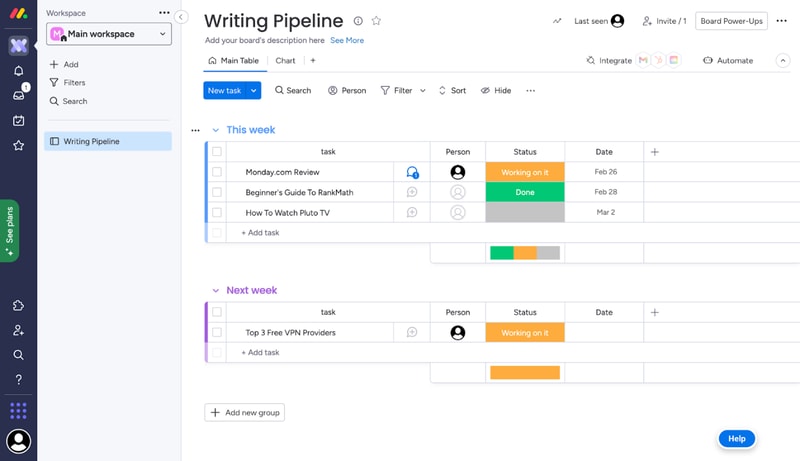
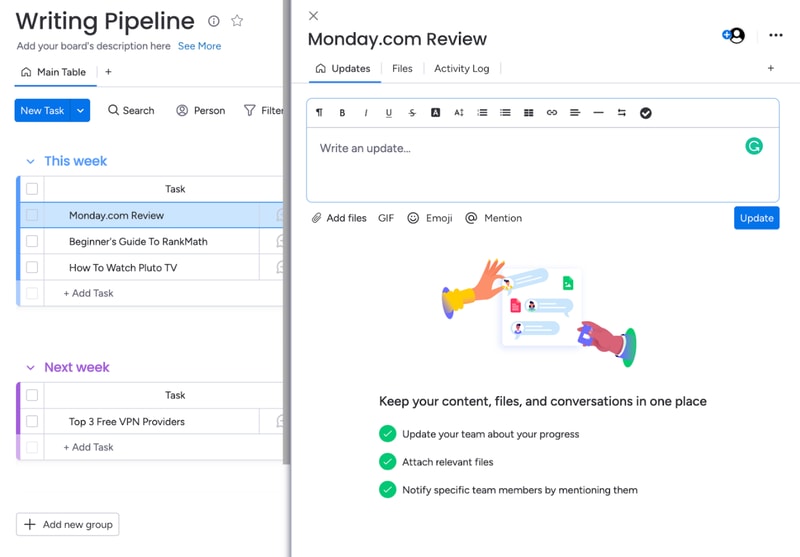
Each task you track with Monday has its own card. These cards store any data you need, like files, a task outline, updates from management, and even an activity log. All Monday cards are grouped in boards, which are themselves grouped into workspaces.
That’s the basic gist of how Monday works. But you can tweak this simple system quite a lot. Let me show you how.
Boards and Cards
Creating a new board is very easy. You just give it a title, choose a view for the project, and start adding tasks.
When you create your first board on Monday, you’ll get a dedicated guide to set it up.
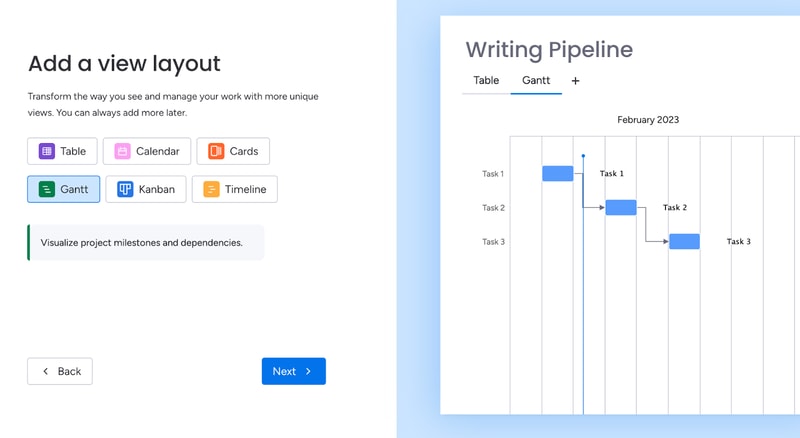
Monday offers plenty of ways to visualize tasks. You can arrange them in a table, in Gantt charts, in Kanban, in a calendar, and more.
As you’re adding cards to your first board, the guide will also give you a preview of how they’ll look:
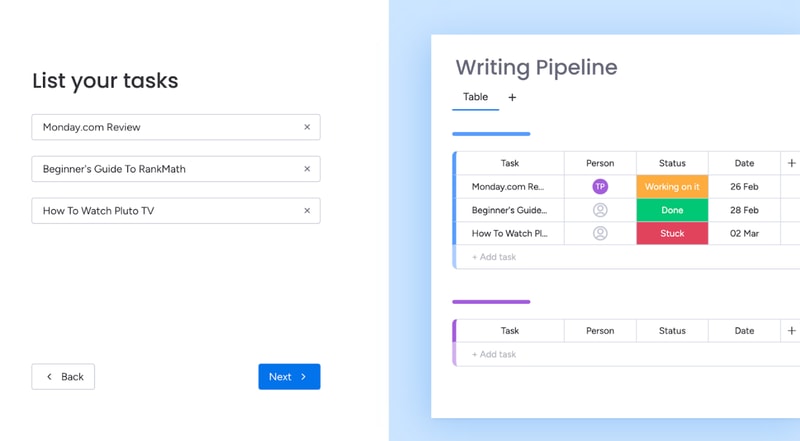
This makes it easy for most people to understand the core functionality of Monday.
You can further bundle cards from the same board in groups. For example, you can group them by what week the tasks are due.
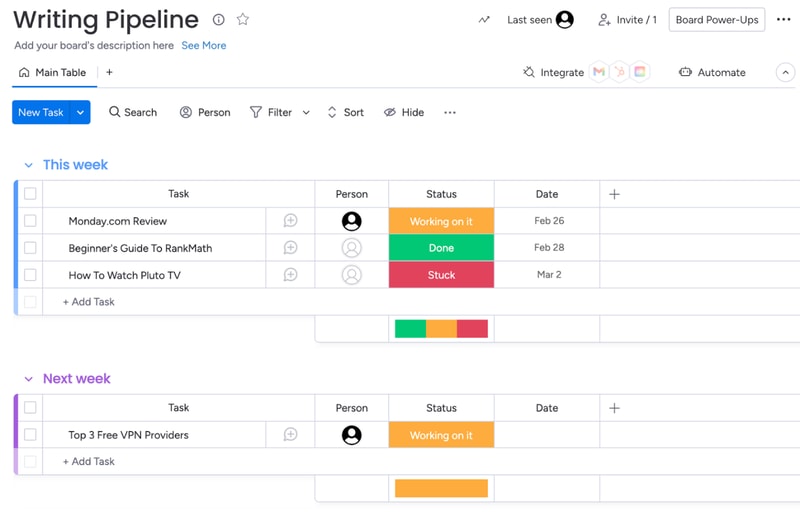
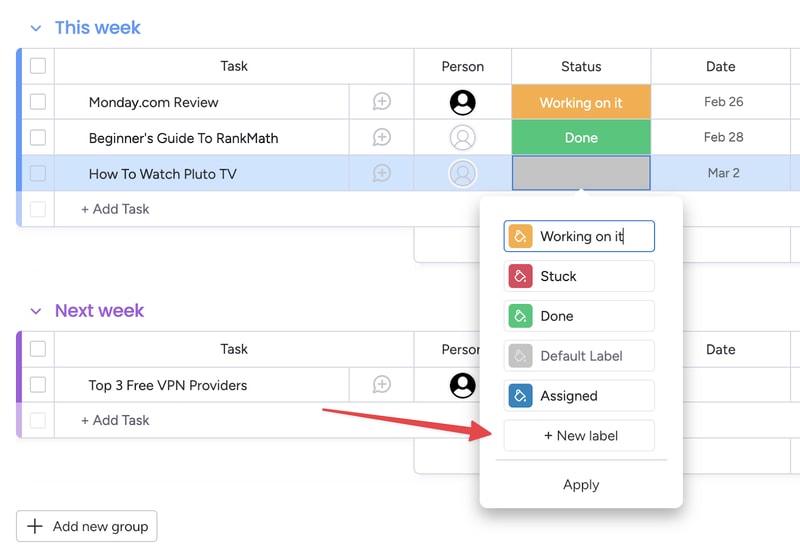
You also get visually-coded statuses for all tasks. The default ones are “Working on it,” “Done,” and “Stuck.” But you can create your own, to further customize your boards:
You can set due dates for all tasks, which helps you keep track of projects. In the Pro plan, you also get advanced time tracking, which lets you visualize how much time you have left before a deadline.
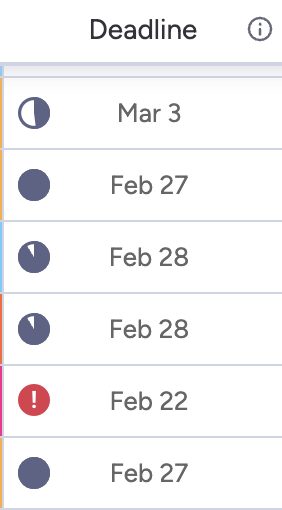
This is useful, but the feature does much more. By tracking time, managers can see the availability of each team member. This makes task allocation much easier.
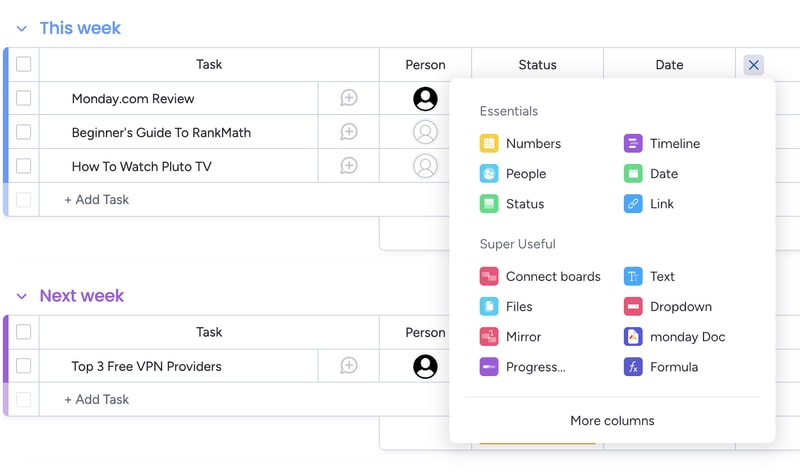
Of course, you can customize the board view in a ton of ways. For example, you can add different columns to the table view:
And you can analyze each card individually, to add comments, files, task lists and even check its activity log.
Monday’s core functionality is top-noth. Even beginners can use their project management software to create simple tasks and dashboards. But Monday’s true power lies in its advanced customization options.
Customizability
We’ve used Monday.com for years, and we researched all of its quirks for this review. Throughout all of this experience, Monday’s automation stood out the most. You can easily set-up automated processes with the platform, even if you’re a non-techie:
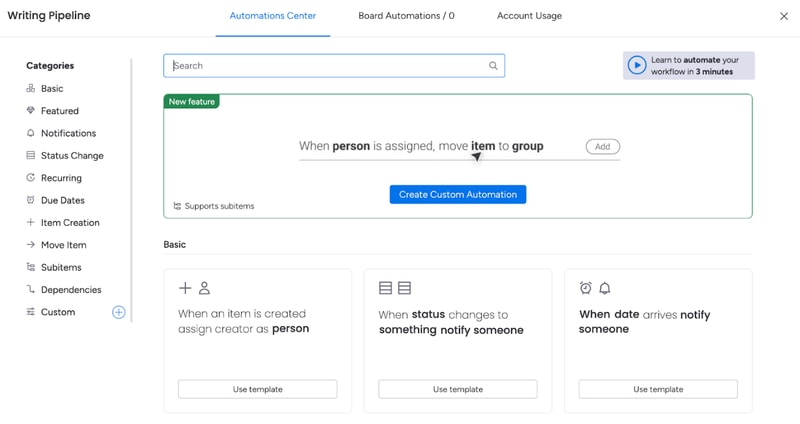
And the possibilities are endless. You get templates for the most commonly-used automations, like notifying someone when a task’s status changes. You also can create your own custom automations, or modify the dozens of templates that are already here.
For example, you can set up an automation that moves a task from one board to another when its status changes and then notifies the person responsible for it. This is useful for tasks that need oversight.
That’s how my editors know to check my work. I change a card’s status to “Needs Review”, and that automatically moves the card to the Editor’s board, and notifies the person that needs to give it a look.
And this is just one example. Monday.com’s automations can do a lot more. And again, they’re extremely easy to create. You don’t need to know any code or use complicated APIs. It’s all made with natural language:
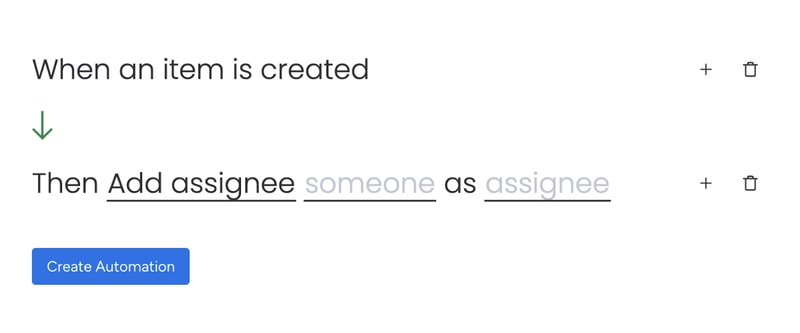
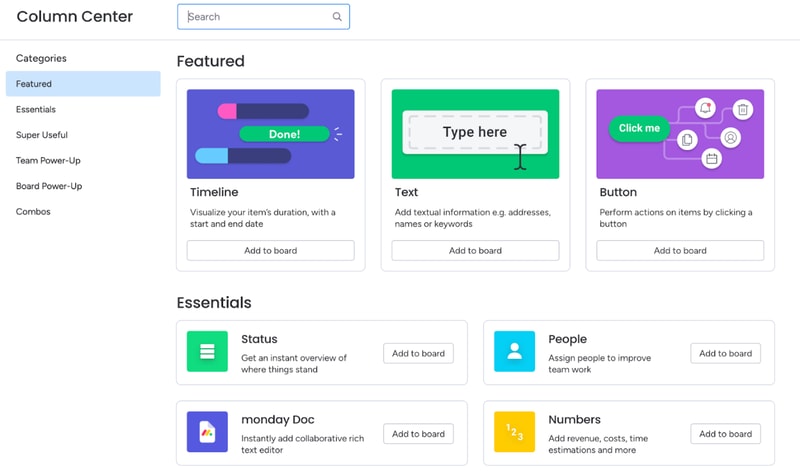
Besides automations, you can also heavily customize board views. You’ve already seen how to add new columns to the table view. But you might be surprised by how many options there are. You can include text, buttons, timelines, numbers, checkboxes, tags, and much more. There are so many options, Monday actually has a dedicated column center.
Each board can have multiple views, which makes dashboards on Monday.com very flexible. For example, team members can use the table view to see task details, deadlines, and manage their work. Managers can use the chart view for the exact same dashboard to get an overview of task statuses and deadlines.
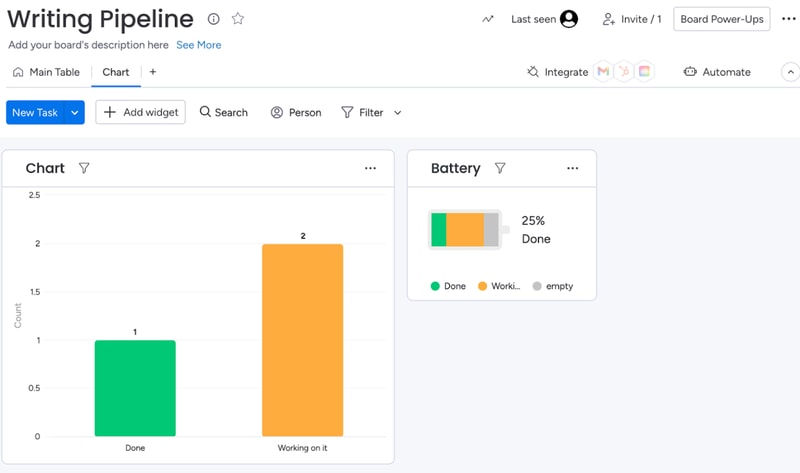
When analyzing a board, you can also filter results by anything (person assigned, status, deadline, etc):
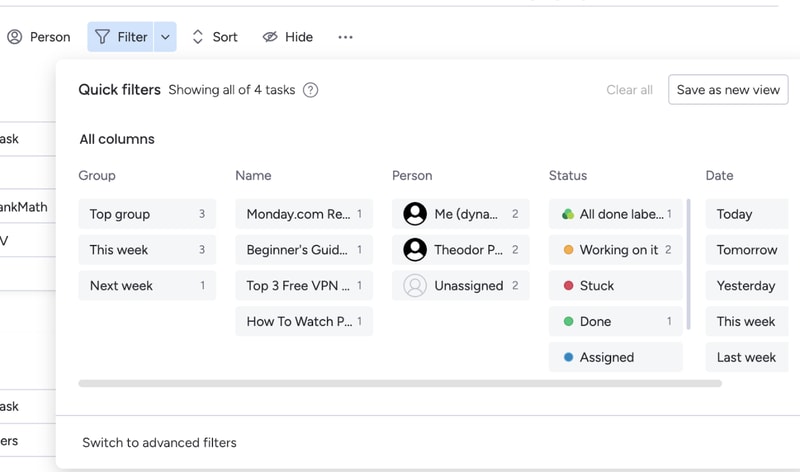
If a filter’s useful, you can turn it into a new view for that board.
All of these options make Monday.com extremely customizable. If you spend some time playing around with its features, you can most likely create anything your team needs. And if Monday’s suite is lacking, you can always complement it with integrations.
Integration with other tools
Monday.com has a lot of integrations. So many, they actually have an entire app marketplace to make it easier to find the extensions you need
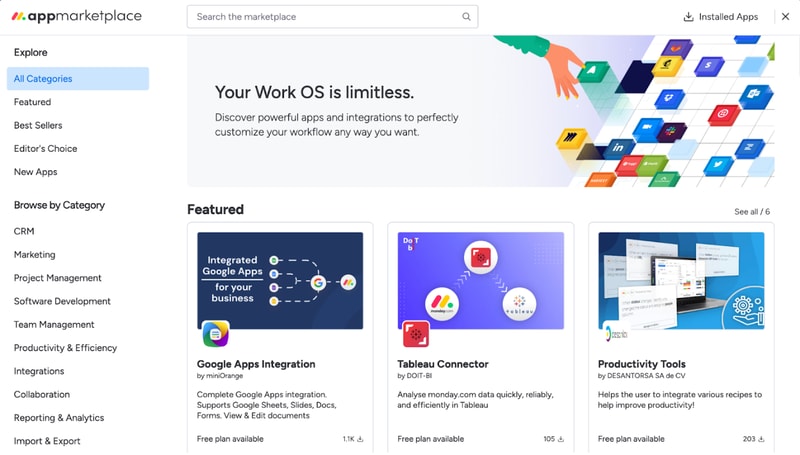
Monday’s integrations let you fine-tune your boards, cards, automations, and more.
For example, the Google Apps integration makes it extremely easy to embed and collaborate on Google Sheets, Slides, Docs, Forms, and more. If you’re using Monday as a CRM, you can use the Tableau Connector for advanced insights into your processes and results.
Not to mention, you can also integrate Monday.com with popular tools like Zapier, Zoom, Google Calendar, and more. These let you automate processes outside of Monday.com, so your team won’t have to worry about repetitive tasks.
Integrations are one of Monday’s biggest perks. The only downside is that you’ll need at least a Standard plan to use them. They’re not available with the free or Basic subscription.
Ease of Use
Monday.com is surprisingly easy to use, especially for how customizable it is. All plans come with onboarding guides, explanation videos, and loads of support articles to help you get started. Enterprise clients even get a customer success manager. They will help you set up all the advanced features, and provide dedicated support no matter what you need.
Even without all of that support, Monday.com is intuitive to use. And that’s mostly thanks to its well-made user interface.
User Interface
Monday.com has one of the best user interfaces out of all project management apps. The design’s smooth, you get color-coded statuses, big buttons, and detailed breakdowns of your tasks.
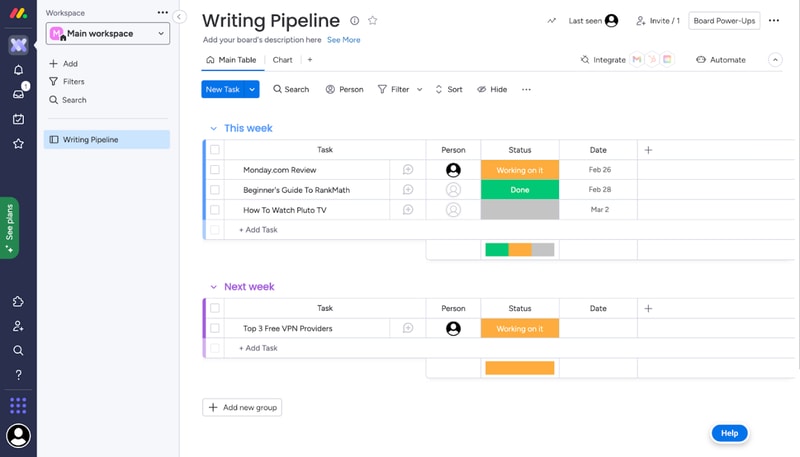
You can quickly switch between views on a board, all the options are pretty intuitive, and you don’t need a degree to find important features. It’s easy to navigate Monday.com even without an onboarding guide.
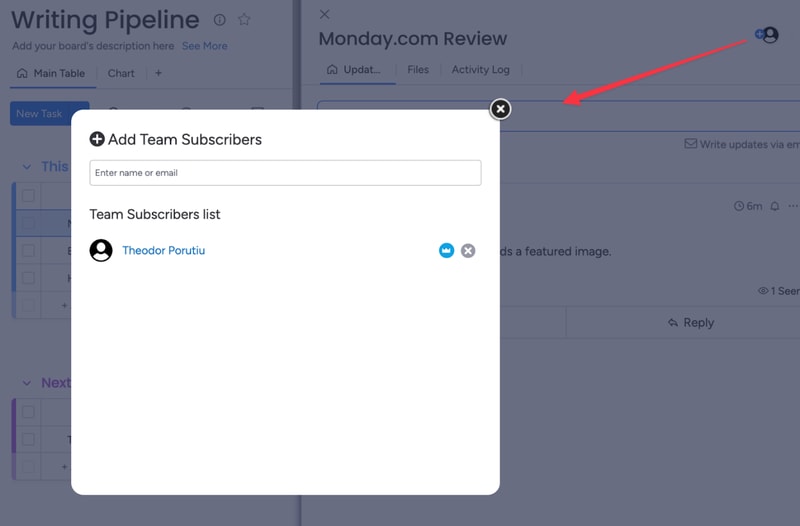
What we like most is their comments section. All cards have one, where you can write updates about a task, interact with your coworker’s messages, and make notes of everything related to that task.
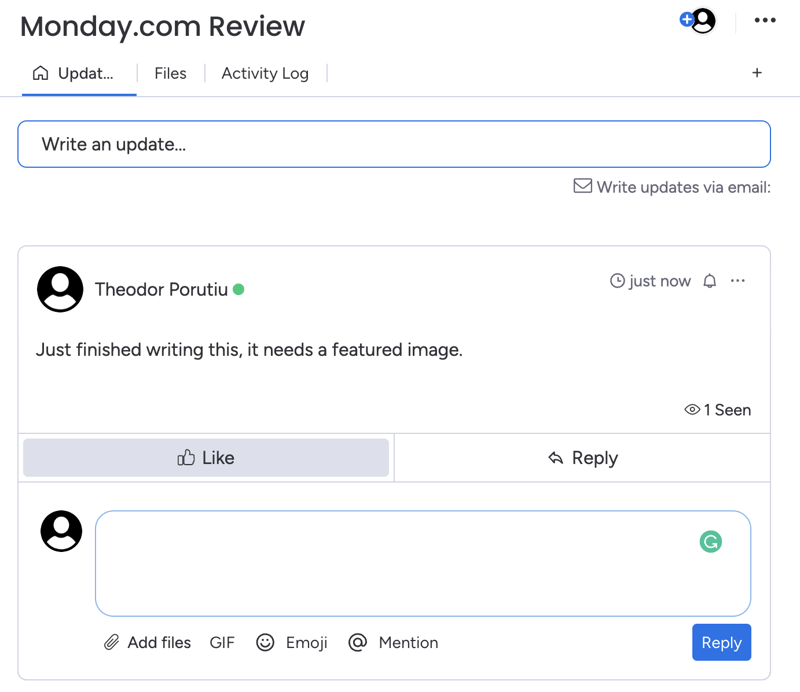
And if you need anyone to join the conversation, you can quickly add them as a card subscriber. This will automatically notify them about any messages.
Getting started and customizing Monday boards – is it easy?
When you sign-up for Monday, you’ll fill in some details about your company, like its size, industry, and what you’ll use Monday for. These choices will affect the features and templates recommended to you, but they won’t limit your tool stack..
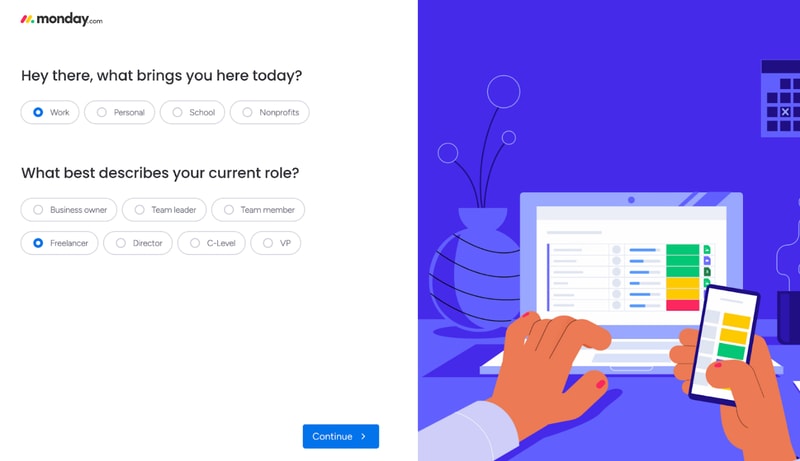
For example, I said I’ll use Monday for operations management. This made my automation recommendations the most commonly used for ops.
After this initial sign-up, you’ll also get a step-by-step guide on how to create boards and cards on Monday.
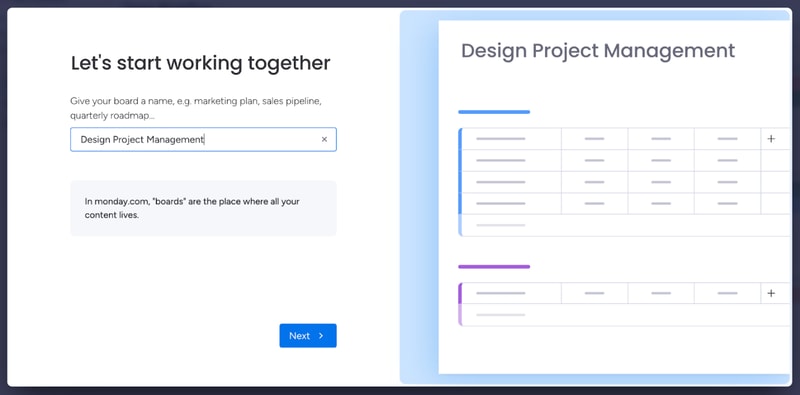
This guide is pretty good to understand how Monday’s core functionality works. If you have minimal experience with project management tools, it’s more than enough. However, it’s not the best if you’re a complete beginner.
You might need more guidance on how each view works, as well as the difference between views, boards, and workspaces. Not to mention, beginners might need a similar startup guide for other features, like automation. All of this support is available in the knowledge center. But it would be better fleshed out in a lengthier onboarding guide.
And we’re not saying this just to pick on Monday. A lot of the complaints you’ll see online about Monday.com mention a steep learning curve. Sometimes, these reviews even complain about the lack of features that are actually there, like more views beyond the default table. A more in-depth start-up guide could solve these issues.
Monday.com Security and Privacy
Monday is pretty serious about its security features. They have a trust center that outlines their stance on security and privacy, as well as a detailed security white paper, which showcases how they protect customer data.
Monday.com uses advanced encryption protocols (especially for Enterprise users) and high-end security methods. They analyze their vulnerabilities weekly and run a bug bounty program to avoid hacks. If you need a secure project management app, this is as safe as it gets.
Lastly, Monday.com collaborates with some sub-processors to collect and process your data. This might worry you, but the third parties are mandated to protect your data under the same terms Monday.com is, so your company is not at a higher risk because of it.
Customer Support
Monday.com has a very well-organized knowledge base, which provides most of the guidance you’ll need to get started with the platform.
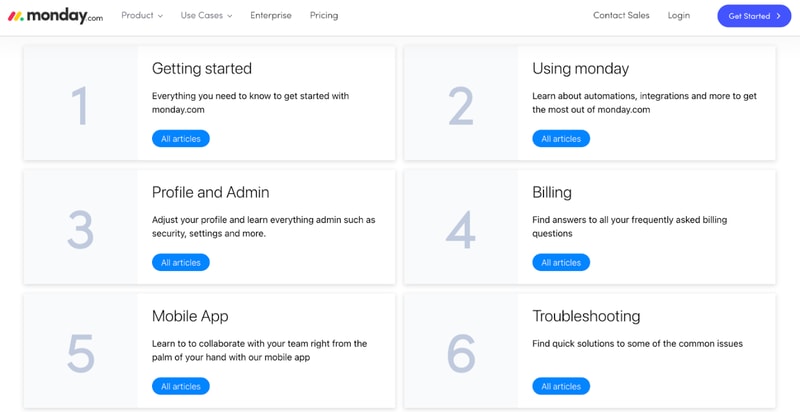
They also have a community where you can post or browse specific questions, a University center to learn more about Monday’s advanced features, and detailed API documentation.
If you need any extra guidance, Monday.com also offers 24/7 live chat support.
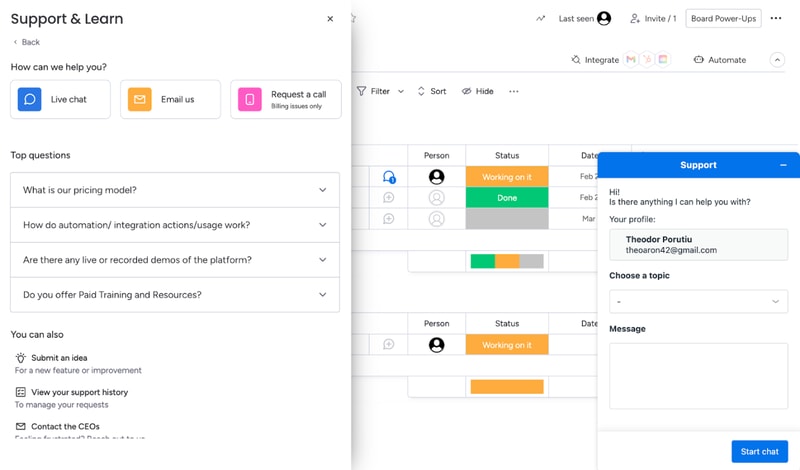
Their agents are prompt and helpful, especially if you’re on a paid plan. That will get you priority support. If your problem’s not urgent, you can also email Monday.com. If you have a billing issue, you can even hop on a call with a Monday agent.
Overall, Monday’s support system is robust. If you run into any problem, you’ll get the guidance you need to keep your project on track.
Monday.com Pricing
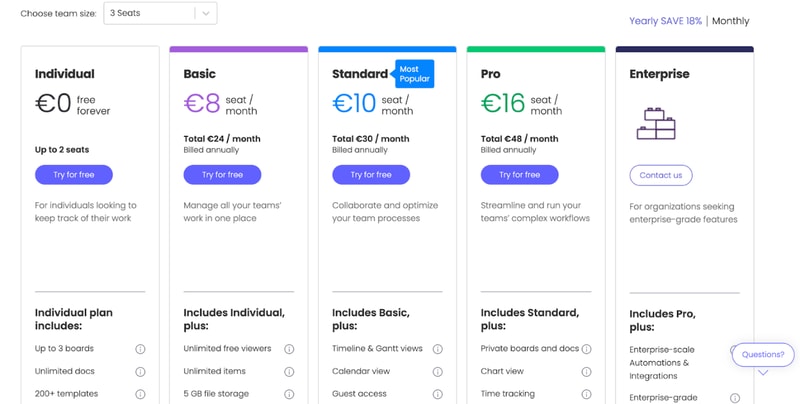
monday.com offers Individual (free), Basic, Standard, Pro, and Enterprise plans — see monday.com pricing for current rates.
The tool can get pricey if you have a big team. So if you’re not sure which plan works for your business, let’s break it down.
Individual
Monday.com’s free plan is a great choice for individuals that want some structure in their day-to-day life. But it’s not limited to personal use. The Individual plan works great for freelancers that want to manage their work and even small businesses. You can add up to 2 seats to your projects in the free plan.
Granted, you are limited by an Individual subscription. You can only create up to three boards, 1,000 items, and you only get 500 MB of storage. But it’s more than enough to test Monday.com and see if it’s right for you.
Basic
Monday’s Basic plan offers much more flexibility than the free tier. You can create unlimited items, you get 5GB of storage, unlimited boards, unlimited free viewers, and priority support.
However, you don’t get access to most of Monday’s automations with this plan.
Standard
The Standard plan probably has the best price-to-value ratio. It comes with guest access, more views, integrations, and automations, making it a better choice than a Basic subscription for most teams.
But if you want the full Monday.com experience, you’ll need the Pro plan.
Pro
Monday’s Pro plan offers 100 GB of storage, a full year of activity logs, unlimited guest access, time tracking, dependencies, a formula column, more views, and advanced security.
If you run a medium to big company, the Pro plan is probably the best for you.
Enterprise
Enterprise plans are custom-made for big organizations, so we can’t tell you how much it will cost, or exactly what features it will have. But we do know you’ll get premium integrations, a dedicated customer success manager, advanced security options, and better analytics.
User Reviews
People really like Monday.com. The platform has top scores across all big review aggregators.
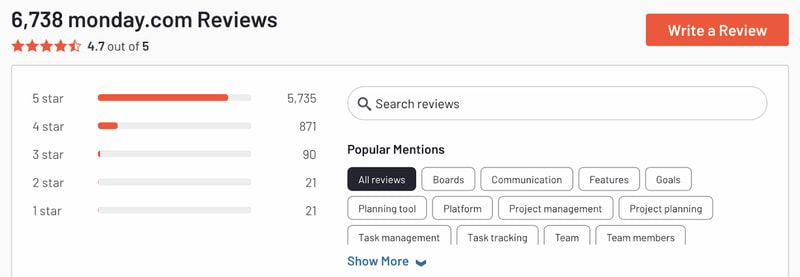
Monday gets praise for its advanced customization and great interface. But there are unhappy customers too. Most people that complained about the tool had problems with the slightly steep learning curve and higher pricing for big teams.
Pros
- Excellent and intuitive dashboards
- Fantastic for beginners
- Range of features like time tracking and budgeting
- Suitable for larger teams
- Supports extensive integrations for CRM, marketing, project management and more
- Visual boards allow for easy and accurate tracking
Cons
- Can be a steep learning curve for some users
- Can get pricey for larger teams
- Limited task dependencies, especially on the cheaper plans
Our biggest gripe with Monday.com was that you’re limited when creating task dependencies. You can only set them up via automations. Meanwhile, competitors like Asana let you take care of the same thing in 1-2 clicks. But it’s a minor issue and something that will probably be fixed in the future.
Quick Conclusion: Monday.com Review
monday.com has expanded beyond project management into a full work platform, offering monday CRM, monday Dev, and monday Service as dedicated products. The platform also includes AI-powered features for task automation, content generation, and project insights.
Monday.com does almost everything right. It has a strong project management suite, advanced customization, and some of the best integrations we’ve seen in project management software.
It is a bit hard to learn for non-techies. And it can be expensive for large teams. But in our opinion, these are minor inconveniences. Monday’s so good, they’re small hurdles to overcome.
You can see for yourself, Monday’s free to try:

Compare monday.com with other popular tools in the same category.

I like how visually attractive the platform is while keeping us organized
Workspaces can be confusing. Mainly because left bar is not very visible compared to center of the screen
Team collaboration
useful tool to utilize when uodating client file notes and to do list/ meeting etc
nothing i dont have a problem with Monday board it took a while to nagivate it though
Makes my job easier
Everything is easy to naviagte and makes working collabertively with the team easy
Nothing, i love everything about Monday.com
it solves the problem of making working as a team easier and more streamlined

The ease of use. You can do pretty much anything and set up your own automations between boards, which has been super helpful in increasing our efficiencies.
The app is only as good as the users make it. You have to have the buy-in from your team or it's of no use.
We've had issues in the past with our communication between office staff and shop. Now we post all our needs onto the Monday app and the shop is able to easily communicate to us their plan of attack.
I use it daily to track my workflow and coordinate it with the other people I am working with. There are a lot of automatization features you can use to make the workflow easier and save you a bunch of clicks that you would perform repeatedly. The flexibility of the setup makes it easy to personalize the workspace and make it tailored to your needs.
Even though automatization is a great strength of Monday.com, but learning how to implement it is a bit hard. I wish there were more small tutorials when I interact with the workflow to show me how to make things more automated and set up a better smoother workflow.
I don't need a meeting with my coworkers to know where they are at in their workload and work progress, I can see it and share it myself through Monday.
It incorporates all needed information in one setting. Very efficient.
At this time I haven't determined any downsides.
All of our HR staff and leaders can view the overall hiring platform in one place.
The platform emphasizes collaboration by allowing team members to comment on tasks, share files, and communicate within the platform. It also supports integrations with popular communication tools. Wonderful and powerful tool!
Some users may find Monday.com's interface initially complex, especially when trying to set up customized workflows. The learning curve can vary depending on the level of customization and complexity desired by the team.
Monday.com provides a centralized platform for teams to communicate, collaborate, and share information. It reduces reliance on scattered communication channels, such as emails and messaging apps, fostering better collaboration and transparency.
That I am able to see my colleagues boards, this helps with tracking work and seeing where they are at, at a specific point in time. The platform is also very user friendly & doesn't require skill to perform basic tasks. There are plenty of differnt automations you can implent into your board, which is essentially creating less work for the user.
Nothing, I find monday.com very helpful and have no dislikes.
Monday.com is helping me solve problems such as being late on a task, I have due dates set for specific tasks and if they are not completed within a certain timeframe, Monday.com notifies me by using certain symbols such as "!" to show that a task is overdue. This reduces the risk of poor time management & being unorganised.
It notifies people when you need them to.
I don't have anything I dislike about monday.com.
It helps communication between my department.
I love how easy Monday.com makes it to organize lots of different types of projects. We use it every day! As a team of doers and this platform help us stay aligned. As a manager it gives me visibility into where we're at as a team and also what my team members' individual capacity is. Plus, it keeps me personally focused and on track!
I only wish I had time to better understand how to use all the features. In the press of business I end up doing what I know but I'm sure there are time & effort saving functions I don't realize are there.
We have a small team and this frees us up to get to the work rather than building the project managent tools ourselves.
Being able to document assignments and list the work tasks associated with those assignments makes keeping track of my deliverables less confusing and minimizes depending on my memory. I am also able to update progress and attach documents for ease of reference. I can also move assignments from one board or group to another with ease as needed. I have also discovered that I can tag people in Monday to review and give feedback on items and Monday will send them a notification to their email box. Simply amazing.
I can't thing of anything i dislike at this time.
Organization of assigned tasks. Keeps me on track with what i am supposed to be doing and within the timelines. Makes me more productive and organized.
I've been using monday.com for a little less than a year but I have to say that it's helped so much with my daily and weekly organization. It's very easy to figure out how to use the product and makes it easy to track all of my tasks and projects. I like that you can also add headers, assign owners and change the status of each item.
I wish I could like the drag feature a little bit more - where you drag a task from one section to another. I'm always scared that I might drag a task to the wrong section.
monday.com is helping us with visibility and organization. Prior to using monday.com we weren't entirely sure what we worked on as a team but now we can list all of the tasks we need to do for the week. It also helps us to organize and prioritize important tasks.
With monday.com i've been able to fully automate my process as well as implement an end to end sales process, from lead management to yearly sales data. The integrations with the rest of my tech stack make work so easy and enjoyable.
Literally nothing. It's completely revolutionized the way that I do business and if there were any pain points using monday.com they've already been fixed over time by way of the regular updates and improvements that are rolled out by the monday.com team.
Monday.com has helped automate my process from end to end, giving me more time to spend with my clients, and less time on compliance and/or mundane tasks.

It's a simple and solution based software system that helps me implement and oversee multiple projects at the same time. I can also upload drafts and add stakeholders to projects, which allows large teams to stay informed.
Not much. I think it would be nice to have an analytics tool. Like something that analyzed incompleted/difficult projects, and which projects were easiest to handle.
It's very quick and helps me manage multiple tasks at the same time.
The Community & Communication aspect. We can streamline all of our work regardless how many people are involved. It genuinely makes it fun to work
We can't make multiple (sub-items) in one topic
making sure everyone is on the same page when it comes to deadlines and such and how its colaborative
I like how it allows you to customise your boards to your requirements and projects, it looks sleek and works well between all the programs.
Monday has yet to introduce a batch email feature that will allow for bulk mail outs.
It helps me tracking the status of my tenders and how the project is progressing.
The customizable functions let me put together a visual representation of all procedures for any given task. This lets everyone involved have complete transparency and knowledge of all parts of a project.
There is some disconnect between items and subitems.
monday.com is the connecting tissue that holds all of our departmernts together.
Monday provides a real-time visibility that is essential: the ability to see exactly what your teammates are doing and how long they've been at it. It saves time because there's no need to constantly ask for updates - you can see it clearly on the platform. In terms of team coordination and collaboration, it's a game-changer, specially as your team grows larger.
While the tool offers various visualizations, the ability to personalize them beyond basic adjustments is a bit restricted. You're usually confined to the pre-defined formats.
Monday solves our need to receive and organize demands, in a way that it's clear to everyone with access to it.

I love how easy it is to use. We use this for just about everything!
Sometimes it's glitchy and things will go missing without our knowledge.
We use this for multiple projects, reporting, staffing and keeping the most important information.
Monday is a great tool to help medium and large size teams collaborate. In a client services industry with many moving parts - it allows us to keep on top of every client. It has great intergration with our entire tech stack. It has been an asset to our business.
Not much to dislike. It has been a great tool for our company.
It is allowing us to keep our company organized and on task.
Easy to use and configure, great numbers of features
No such thing, didn't get to see any features that i need and were missing
Task management and project planning
It is easily customisable to allow for a very detailled task overview, and collaborating on items has never been easier.
The filtering on dates lacks from-to periods, which can be a bit tricky when working with very large boards.
All the tasks are centralised in one platform, which makes collaboration easy. The implementations with other platforms such as slack help keeping track of events.
So many different features, being able to use different boards, automations work really well, really easy to collaborate with multiple people and assign different tasks.
I haven't found anything really yet! It works extremely well for any projects, has so many features so you can tailor it to do whatever you want, assign people and keep track of everything clearly.
having a centralised place for everyone to collaborate on. Not having to worry about updating spreadsheets etc. we can all collaboratively work on it live together.
It provides a lot of features that make project management more efficient. It is easy to use and gives us many resources for learning more about how to use it properly. I use it all the time for my sprint reports.
Sometimes, automations take a lot of time and do not run as you want. This is not every case but it is important to see it.
They give me different options to organize my tasks and to carry out all my projects through their different dashboard features.
IIt is an easy-to-use platform, it is effective and versatile. Constantly growing and improving to offer more opportunities to the client.
that to achieve some functions you need other expensive applications
the organization of everyone in the company
The website has a simple layout and is easy to use. It has lots of useful functions like filtering items in the list by person or by criteria; viewing data in a list or in a Gantt chart; adding comments to an item in the list; rolling forward items from one year into the next, etc.
I have not encountered any downsides of using the website.
We use Monday.com for project management and allocation. It does a great job of gathering all of the information in one central spot, and providing tools to search and filter within that information. It allows us to save time duplicating data.
I like that you're able to customize each board the way you want. My favorite feature is the ability to color coordinate different sections and statuses.
What I dislike most is that there isn't too much flexibility with Monday when creating and using a board. This causes my team to have to create many boards because the columns are fixed throughout. I wish I could have a dynamic board where each group could be different and have diverse columns that weren't all the same.I wish there was also an easier way to transfer content from one board to another with internal linking to make finding information easier.
It allows us to proof our teams work and let's us know the order of operations for multiple projects. The automations help a lot and I prefer it over excel or manual work.
It is very useful in keeping you organized on daily tasks everyday. Especially the ease of building each group and it's sub items. Also the security of the web site is very well protected from outside hackers. The automation integration is excellent!
Originally when learning how to create the tasks, it can be a little tricky. However after you learn how to do it, you will be able to set up your task templates.
The issue with daily tasks, calendar time constraint, contact listings, payroll service are just a few things Monday.com is solving and greatly benefits my business daily.
Suas vantagem seria o amarzenamento disponivel que ofecem a você, a filtragem facil de tarefas e suas automações.
Poderia melhorar na parte de criação de subpastas, deixar mais de uma opção
Ajudando a gerenciar minhas tarefas diaria e entregar tudo no prazo e saber como me organizar
I like how it is very customizable and that it works with other applications.
I have a few issue of how you take notes and being able to add note but I may not be using it right
tracking status on tasks