

Unclaimed: Are you working at monday.com?
monday.com Reviews: 4.7/5 — Highly Rated
monday.com packages itself as a Work OS built for a new way of working. Providing businesses with a single source of truth, all monday.com products are built on seven building blocks – boards, views, dashboards, integrations, automation, apps, and docs. There are currently five monday.com products, the core being Monday Work Management. The other four are Monday Sales CRM, Monday Marketer, Monday Dev, and Monday Projects. It’s free to use for individual users and paid plans are available on a per-seat basis.
| Company | monday.com |
|---|---|
| Year founded | 2012 |
| Company size | 5001-10,000 employees |
| Headquarters | Tel Aviv, Israel |
| Social Media |

| Capabilities |
API
|
|---|---|
| Segment |
Small Business
Mid Market
Enterprise
|
| Deployment | Cloud / SaaS / Web-Based, Mobile Android, Mobile iPad, Mobile iPhone |
| Support | 24/7 (Live rep), Chat, Email/Help Desk, FAQs/Forum, Knowledge Base, Phone Support |
| Training | Documentation |
| Languages | English |
monday.com Pros and Cons
- Excellent dashboard environment
- Fantastic for beginners
- Range of features like time tracking and budgeting
- Suitable for larger teams
- Built for multiple. users
- No free version
- Basic plan offers very limited functionalities
- Doesn’t offer a Gantt chart view option
- Requires a bit of learning curve –you will need to dedicate time to learning the platform


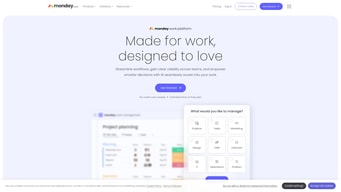





Project management tools can help you structure your team, improve your workflow, and automate the tedious parts of everyone’s job. They’re indispensable to any team that wants to be productive. So which one should you invest in?
If you’ve ever looked into project management (PM) platforms, you’ve already heard of Monday.com. It’s hailed as one of the best apps in its niche, and it has stellar reviews.
But just how good is it? Is Monday.com the right choice for your business? Let’s find out in this Monday.com review.
Monday.com Quick Overview
Monday.com is a good choice for anyone that wants to bring a bit of structure to their day-to-day operations. From freelancers to big enterprises, Monday has tools and plans for everyone.
That’s not to say it’s a perfect tool. Monday can get expensive for large teams. Plus, people that aren’t tech-savvy might find it hard to get started. But by and large, we recommend it to anyone looking to level-up their productivity with a project management platform.
If you want the full scoop, keep reading this Monday.com review.
Monday.com Features
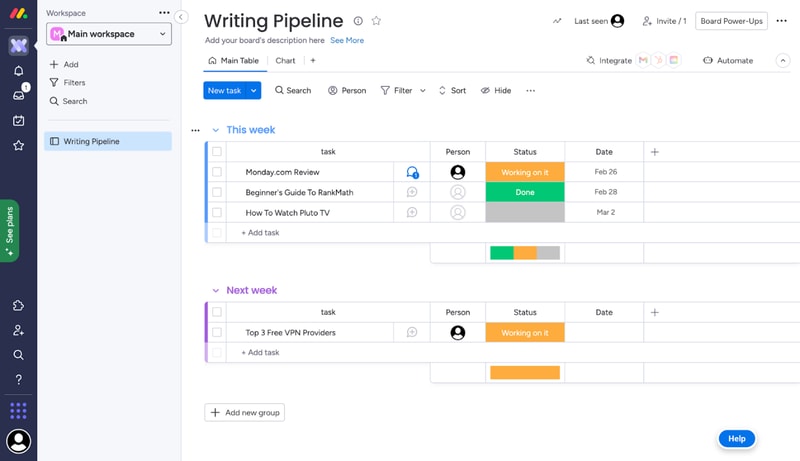
Each task you track with Monday has its own card. These cards store any data you need, like files, a task outline, updates from management, and even an activity log. All Monday cards are grouped in boards, which are themselves grouped into workspaces.
That’s the basic gist of how Monday works. But you can tweak this simple system quite a lot. Let me show you how.
Boards and Cards
Creating a new board is very easy. You just give it a title, choose a view for the project, and start adding tasks.
When you create your first board on Monday, you’ll get a dedicated guide to set it up.
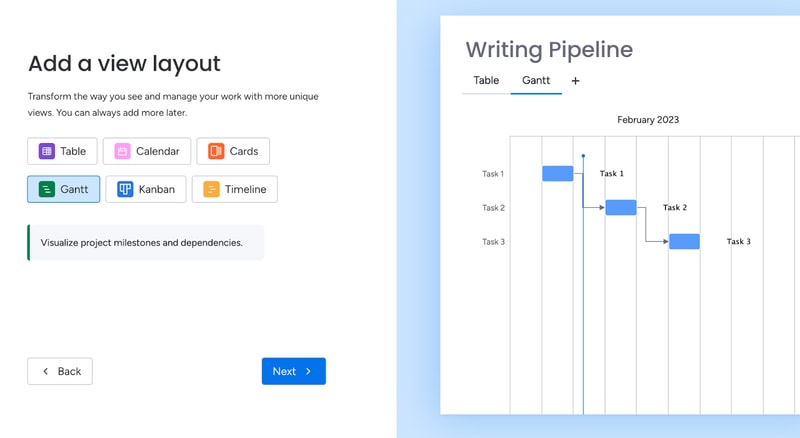
Monday offers plenty of ways to visualize tasks. You can arrange them in a table, in Gantt charts, in Kanban, in a calendar, and more.
As you’re adding cards to your first board, the guide will also give you a preview of how they’ll look:
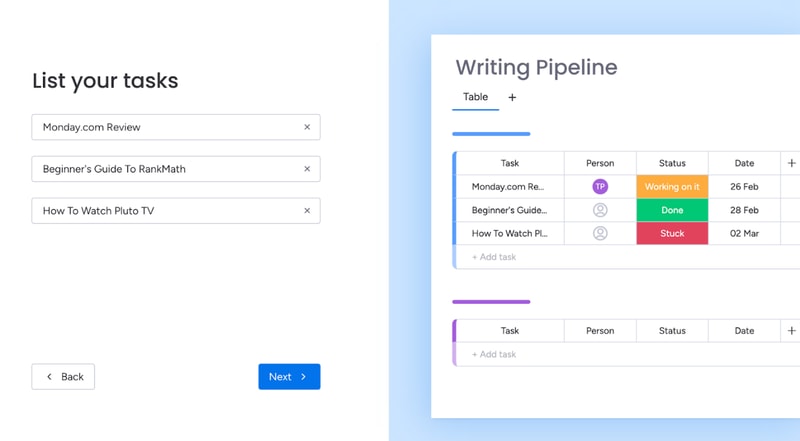
This makes it easy for most people to understand the core functionality of Monday.
You can further bundle cards from the same board in groups. For example, you can group them by what week the tasks are due.
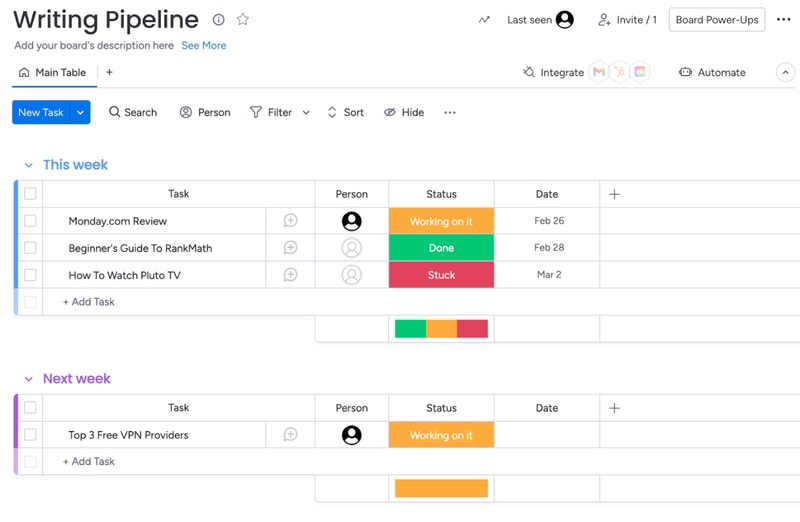
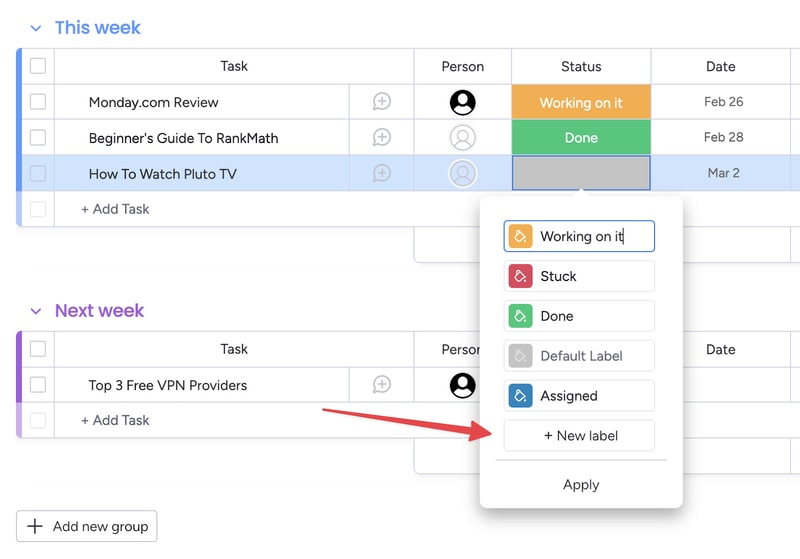
You also get visually-coded statuses for all tasks. The default ones are “Working on it,” “Done,” and “Stuck.” But you can create your own, to further customize your boards:
You can set due dates for all tasks, which helps you keep track of projects. In the Pro plan, you also get advanced time tracking, which lets you visualize how much time you have left before a deadline.
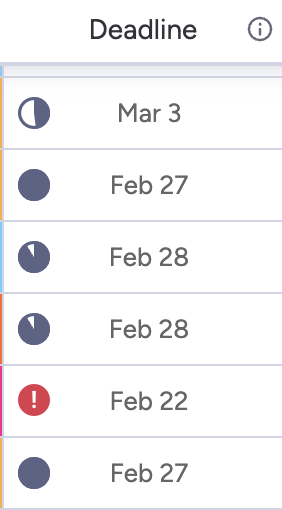
This is useful, but the feature does much more. By tracking time, managers can see the availability of each team member. This makes task allocation much easier.
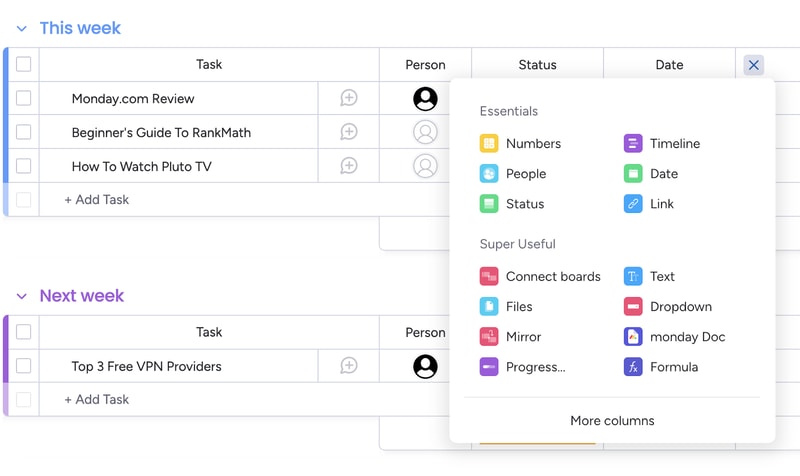
Of course, you can customize the board view in a ton of ways. For example, you can add different columns to the table view:
And you can analyze each card individually, to add comments, files, task lists and even check its activity log.
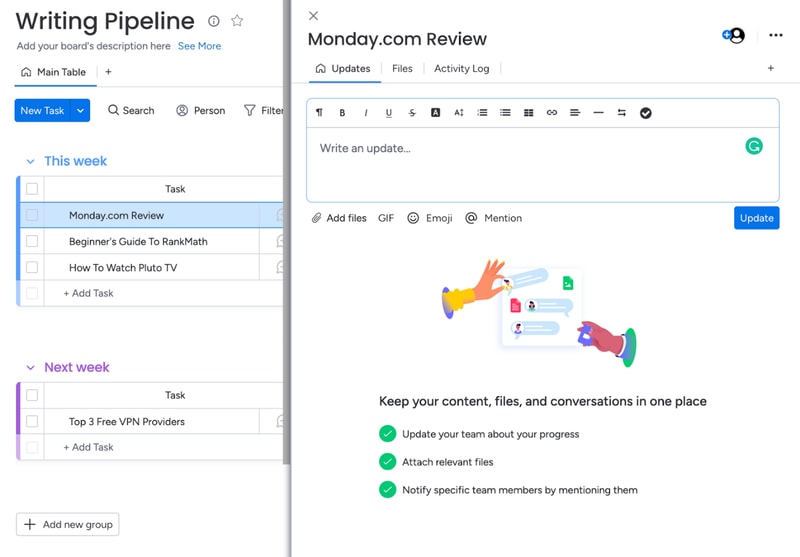
Monday’s core functionality is top-noth. Even beginners can use their project management software to create simple tasks and dashboards. But Monday’s true power lies in its advanced customization options.
Customizability
We’ve used Monday.com for years, and we researched all of its quirks for this review. Throughout all of this experience, Monday’s automation stood out the most. You can easily set-up automated processes with the platform, even if you’re a non-techie:
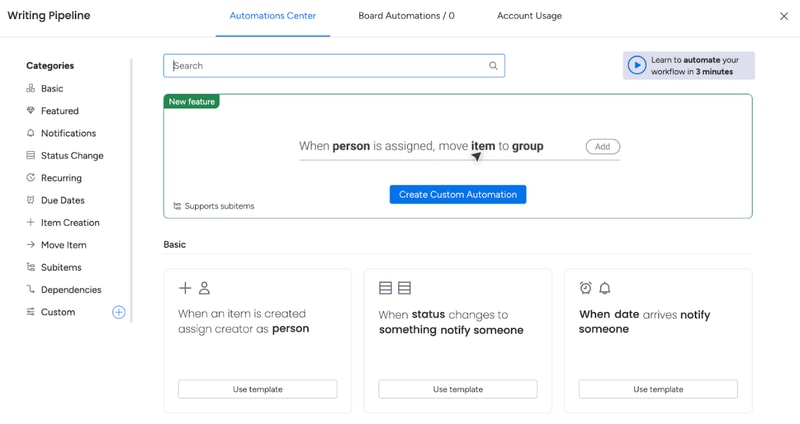
And the possibilities are endless. You get templates for the most commonly-used automations, like notifying someone when a task’s status changes. You also can create your own custom automations, or modify the dozens of templates that are already here.
For example, you can set up an automation that moves a task from one board to another when its status changes and then notifies the person responsible for it. This is useful for tasks that need oversight.
That’s how my editors know to check my work. I change a card’s status to “Needs Review”, and that automatically moves the card to the Editor’s board, and notifies the person that needs to give it a look.
And this is just one example. Monday.com’s automations can do a lot more. And again, they’re extremely easy to create. You don’t need to know any code or use complicated APIs. It’s all made with natural language:
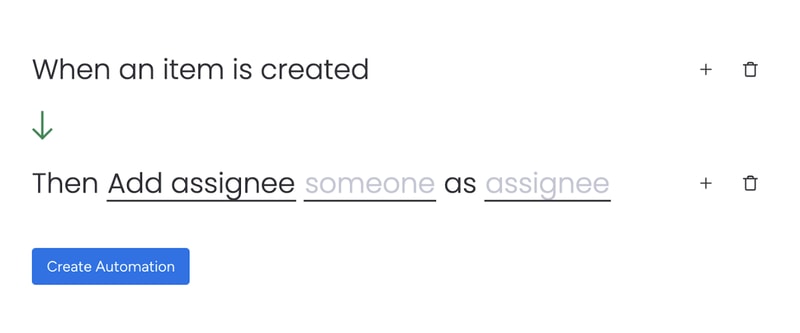
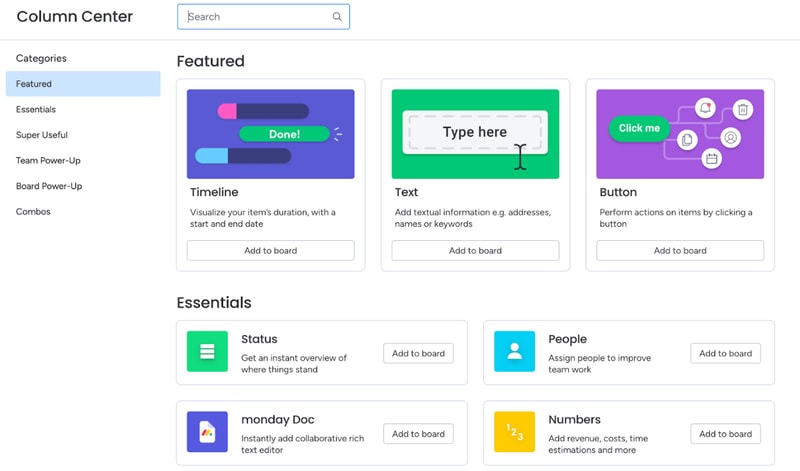
Besides automations, you can also heavily customize board views. You’ve already seen how to add new columns to the table view. But you might be surprised by how many options there are. You can include text, buttons, timelines, numbers, checkboxes, tags, and much more. There are so many options, Monday actually has a dedicated column center.
Each board can have multiple views, which makes dashboards on Monday.com very flexible. For example, team members can use the table view to see task details, deadlines, and manage their work. Managers can use the chart view for the exact same dashboard to get an overview of task statuses and deadlines.
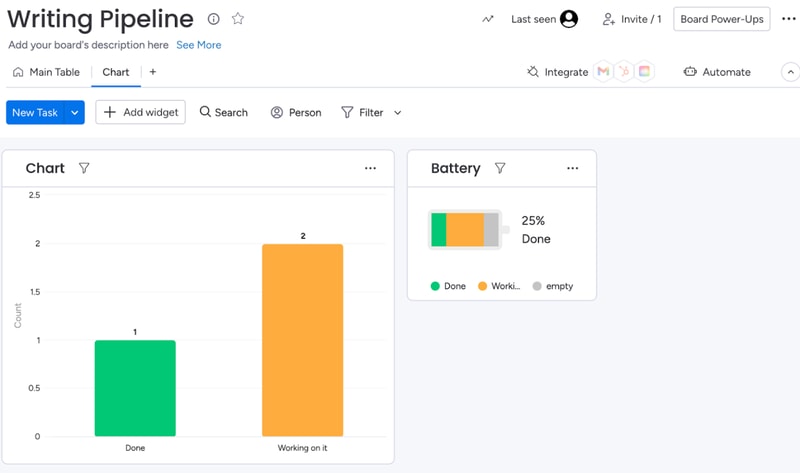
When analyzing a board, you can also filter results by anything (person assigned, status, deadline, etc):
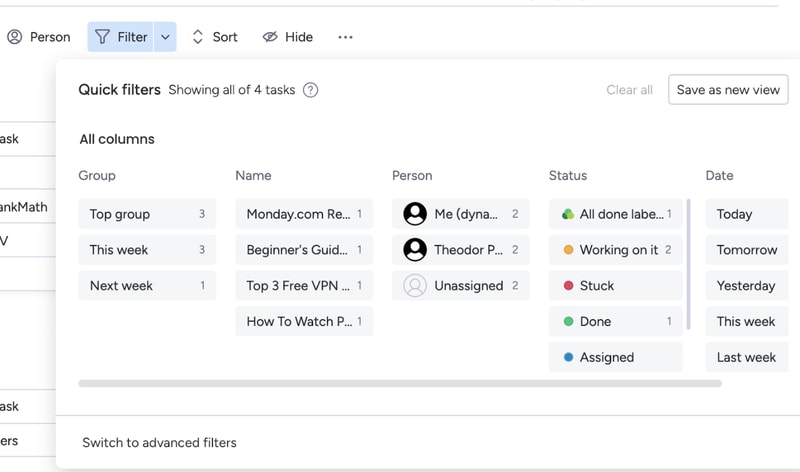
If a filter’s useful, you can turn it into a new view for that board.
All of these options make Monday.com extremely customizable. If you spend some time playing around with its features, you can most likely create anything your team needs. And if Monday’s suite is lacking, you can always complement it with integrations.
Integration with other tools
Monday.com has a lot of integrations. So many, they actually have an entire app marketplace to make it easier to find the extensions you need
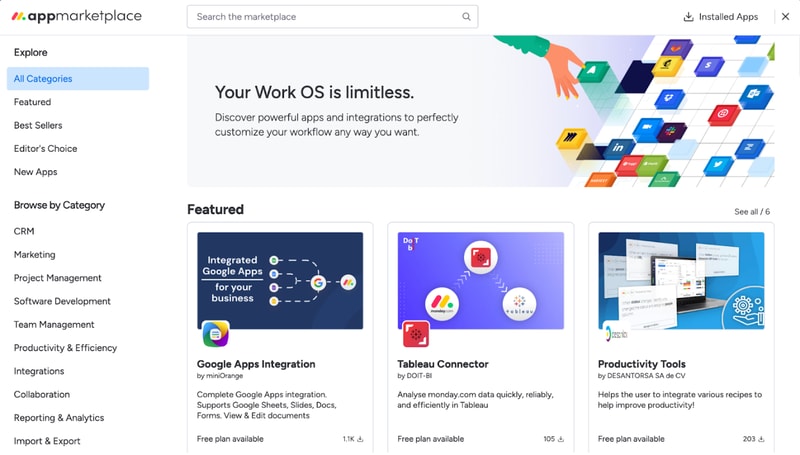
Monday’s integrations let you fine-tune your boards, cards, automations, and more.
For example, the Google Apps integration makes it extremely easy to embed and collaborate on Google Sheets, Slides, Docs, Forms, and more. If you’re using Monday as a CRM, you can use the Tableau Connector for advanced insights into your processes and results.
Not to mention, you can also integrate Monday.com with popular tools like Zapier, Zoom, Google Calendar, and more. These let you automate processes outside of Monday.com, so your team won’t have to worry about repetitive tasks.
Integrations are one of Monday’s biggest perks. The only downside is that you’ll need at least a Standard plan to use them. They’re not available with the free or Basic subscription.
Ease of Use
Monday.com is surprisingly easy to use, especially for how customizable it is. All plans come with onboarding guides, explanation videos, and loads of support articles to help you get started. Enterprise clients even get a customer success manager. They will help you set up all the advanced features, and provide dedicated support no matter what you need.
Even without all of that support, Monday.com is intuitive to use. And that’s mostly thanks to its well-made user interface.
User Interface
Monday.com has one of the best user interfaces out of all project management apps. The design’s smooth, you get color-coded statuses, big buttons, and detailed breakdowns of your tasks.
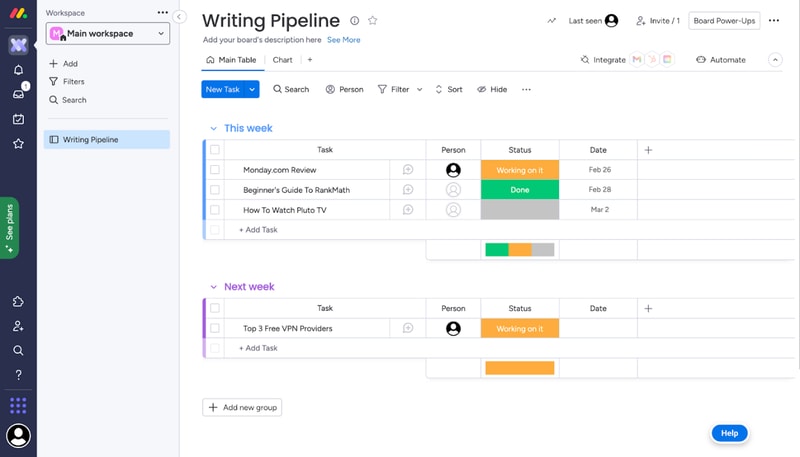
You can quickly switch between views on a board, all the options are pretty intuitive, and you don’t need a degree to find important features. It’s easy to navigate Monday.com even without an onboarding guide.
What we like most is their comments section. All cards have one, where you can write updates about a task, interact with your coworker’s messages, and make notes of everything related to that task.
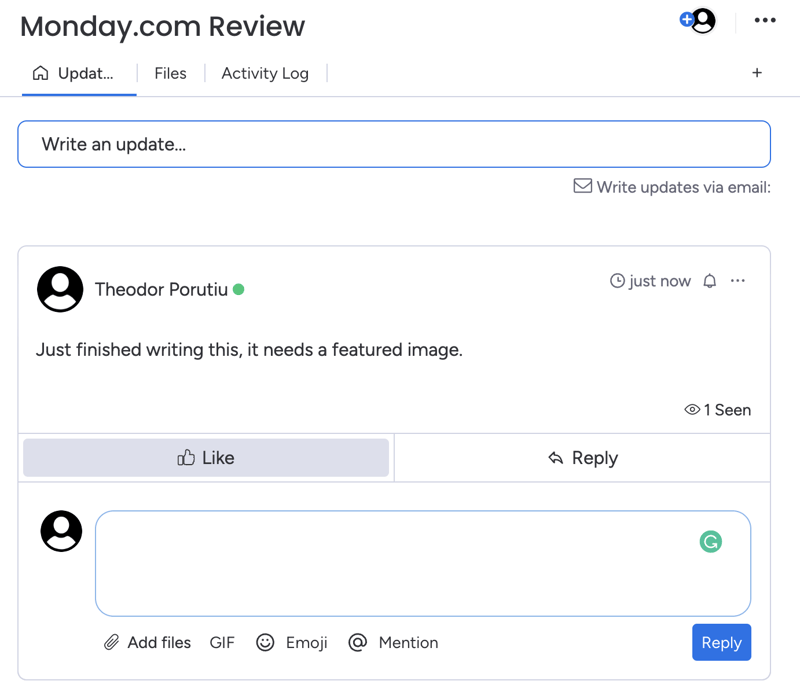
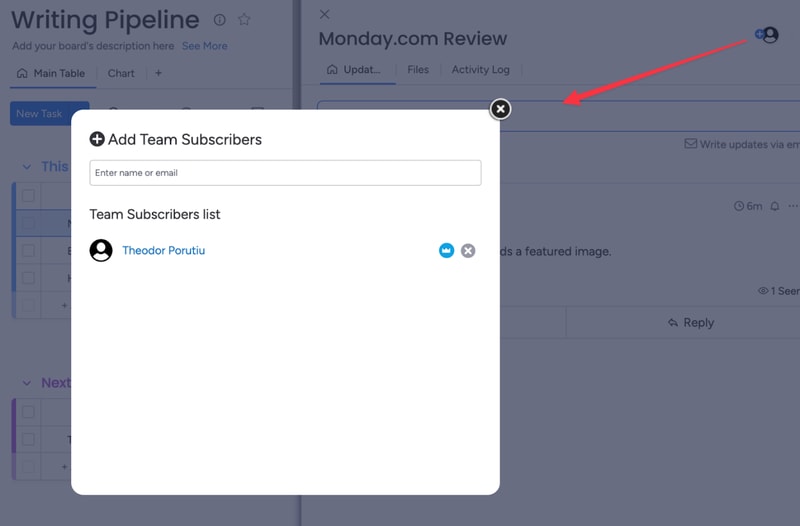
And if you need anyone to join the conversation, you can quickly add them as a card subscriber. This will automatically notify them about any messages.
Getting started and customizing Monday boards – is it easy?
When you sign-up for Monday, you’ll fill in some details about your company, like its size, industry, and what you’ll use Monday for. These choices will affect the features and templates recommended to you, but they won’t limit your tool stack..
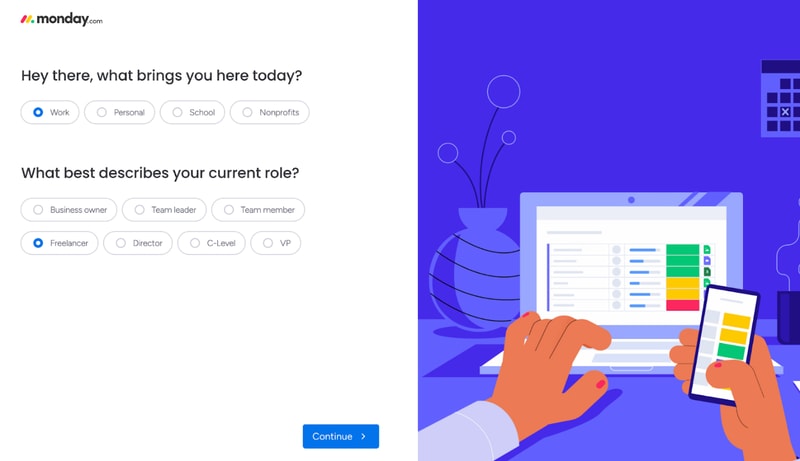
For example, I said I’ll use Monday for operations management. This made my automation recommendations the most commonly used for ops.
After this initial sign-up, you’ll also get a step-by-step guide on how to create boards and cards on Monday.
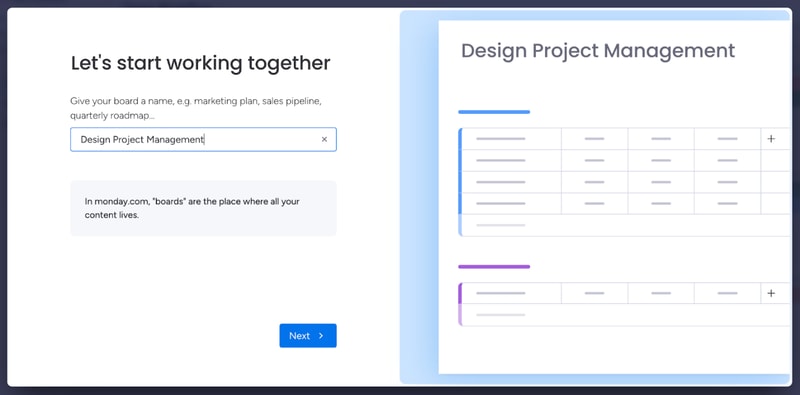
This guide is pretty good to understand how Monday’s core functionality works. If you have minimal experience with project management tools, it’s more than enough. However, it’s not the best if you’re a complete beginner.
You might need more guidance on how each view works, as well as the difference between views, boards, and workspaces. Not to mention, beginners might need a similar startup guide for other features, like automation. All of this support is available in the knowledge center. But it would be better fleshed out in a lengthier onboarding guide.
And we’re not saying this just to pick on Monday. A lot of the complaints you’ll see online about Monday.com mention a steep learning curve. Sometimes, these reviews even complain about the lack of features that are actually there, like more views beyond the default table. A more in-depth start-up guide could solve these issues.
Monday.com Security and Privacy
Monday is pretty serious about its security features. They have a trust center that outlines their stance on security and privacy, as well as a detailed security white paper, which showcases how they protect customer data.
Monday.com uses advanced encryption protocols (especially for Enterprise users) and high-end security methods. They analyze their vulnerabilities weekly and run a bug bounty program to avoid hacks. If you need a secure project management app, this is as safe as it gets.
Lastly, Monday.com collaborates with some sub-processors to collect and process your data. This might worry you, but the third parties are mandated to protect your data under the same terms Monday.com is, so your company is not at a higher risk because of it.
Customer Support
Monday.com has a very well-organized knowledge base, which provides most of the guidance you’ll need to get started with the platform.
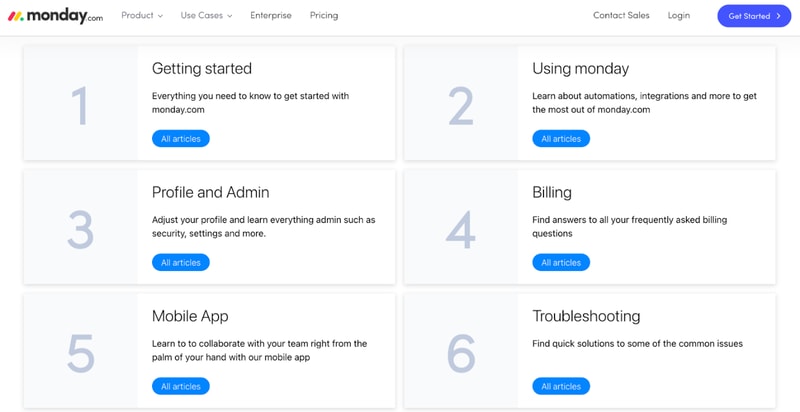
They also have a community where you can post or browse specific questions, a University center to learn more about Monday’s advanced features, and detailed API documentation.
If you need any extra guidance, Monday.com also offers 24/7 live chat support.
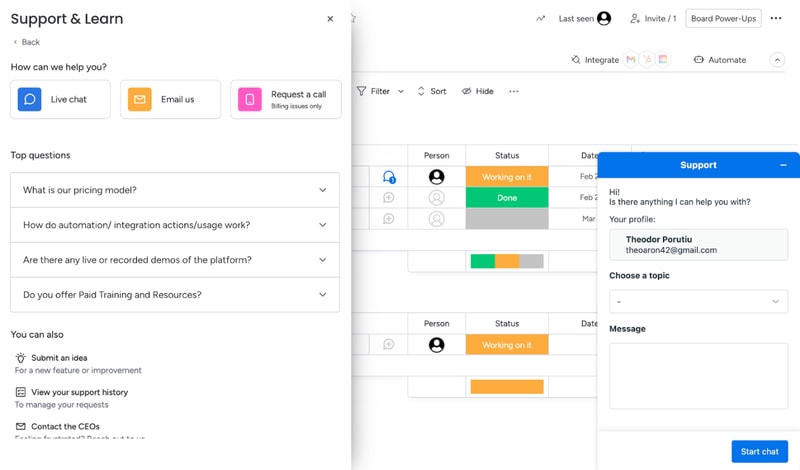
Their agents are prompt and helpful, especially if you’re on a paid plan. That will get you priority support. If your problem’s not urgent, you can also email Monday.com. If you have a billing issue, you can even hop on a call with a Monday agent.
Overall, Monday’s support system is robust. If you run into any problem, you’ll get the guidance you need to keep your project on track.
Monday.com Pricing
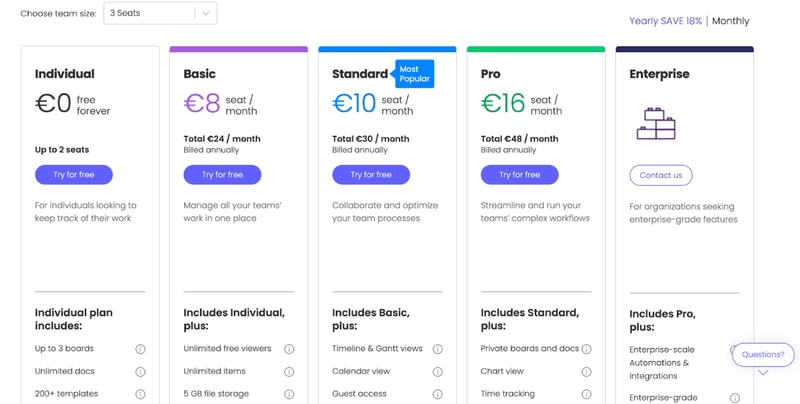
monday.com offers Individual (free), Basic, Standard, Pro, and Enterprise plans — see monday.com pricing for current rates.
The tool can get pricey if you have a big team. So if you’re not sure which plan works for your business, let’s break it down.
Individual
Monday.com’s free plan is a great choice for individuals that want some structure in their day-to-day life. But it’s not limited to personal use. The Individual plan works great for freelancers that want to manage their work and even small businesses. You can add up to 2 seats to your projects in the free plan.
Granted, you are limited by an Individual subscription. You can only create up to three boards, 1,000 items, and you only get 500 MB of storage. But it’s more than enough to test Monday.com and see if it’s right for you.
Basic
Monday’s Basic plan offers much more flexibility than the free tier. You can create unlimited items, you get 5GB of storage, unlimited boards, unlimited free viewers, and priority support.
However, you don’t get access to most of Monday’s automations with this plan.
Standard
The Standard plan probably has the best price-to-value ratio. It comes with guest access, more views, integrations, and automations, making it a better choice than a Basic subscription for most teams.
But if you want the full Monday.com experience, you’ll need the Pro plan.
Pro
Monday’s Pro plan offers 100 GB of storage, a full year of activity logs, unlimited guest access, time tracking, dependencies, a formula column, more views, and advanced security.
If you run a medium to big company, the Pro plan is probably the best for you.
Enterprise
Enterprise plans are custom-made for big organizations, so we can’t tell you how much it will cost, or exactly what features it will have. But we do know you’ll get premium integrations, a dedicated customer success manager, advanced security options, and better analytics.
User Reviews
People really like Monday.com. The platform has top scores across all big review aggregators.
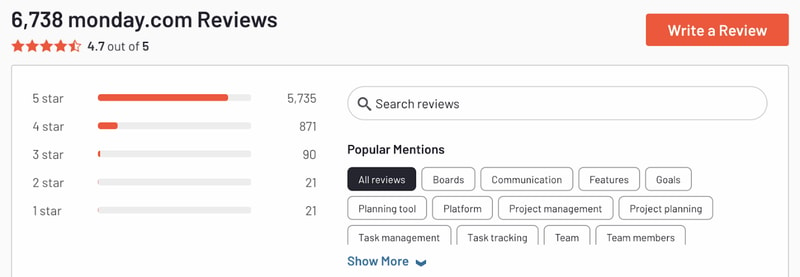
Monday gets praise for its advanced customization and great interface. But there are unhappy customers too. Most people that complained about the tool had problems with the slightly steep learning curve and higher pricing for big teams.
Pros
- Excellent and intuitive dashboards
- Fantastic for beginners
- Range of features like time tracking and budgeting
- Suitable for larger teams
- Supports extensive integrations for CRM, marketing, project management and more
- Visual boards allow for easy and accurate tracking
Cons
- Can be a steep learning curve for some users
- Can get pricey for larger teams
- Limited task dependencies, especially on the cheaper plans
Our biggest gripe with Monday.com was that you’re limited when creating task dependencies. You can only set them up via automations. Meanwhile, competitors like Asana let you take care of the same thing in 1-2 clicks. But it’s a minor issue and something that will probably be fixed in the future.
Quick Conclusion: Monday.com Review
monday.com has expanded beyond project management into a full work platform, offering monday CRM, monday Dev, and monday Service as dedicated products. The platform also includes AI-powered features for task automation, content generation, and project insights.
Monday.com does almost everything right. It has a strong project management suite, advanced customization, and some of the best integrations we’ve seen in project management software.
It is a bit hard to learn for non-techies. And it can be expensive for large teams. But in our opinion, these are minor inconveniences. Monday’s so good, they’re small hurdles to overcome.
You can see for yourself, Monday’s free to try:

Compare monday.com with other popular tools in the same category.
It is so helpful because you can organize your tasks, automate actions and have team work.
Sometimes there are some latency when automations are running
Organizing my tasks an help me don't forget anyone.
I love how it keeps me organized as well as how easy it is to use.
I think probably that it doesn't integrate with our email platform but I'm ok with that.
It allows us to manage large-scale campaigns and provides information on where we are on the project path.

I love monday.com. It's very user friendly, colorful, and has lots of features. New features are always being added and I'm always learning more.
Automations can be a bit tempermental, but I also believe it's mostly user-error. It would be nice to have the option to have different column titles in different groups on the same board.
volunteer management, collaboration, managing tasks
This system has allowed our communications team to more effectively meet deadlines and expectations. We are much more organized and strategic than before we started using Monday.com
The only downside at the moment is that we track dozens of subitems/subtasks and there is not a good way to have those rolled into a master board for easier tracking and management.
We are now able to track all aspects of every project which is helping us stay on track. This is helping us meet deadlines and improve our working relationships with other departments in the organization.
Monday keeps me organized and helps me keep track of all my projects, tasks and notes.
I have nothing bad to say about Monday. It's been a great experience so far.
Monday is allowing us to track our time on projects which shows that company how much work our Project Management team is putting into the projects we work on and it helps us stay organized and on track.
Ability to simply connect various teams and boards into a cohesive project. In the past, we used Excel for everything and had to share documents multiple times. Updates had to be physically tracked with no sort of automatic reminders on due dates. Monday solves many problems. The various tools we can use to get help is awesome. The community, videos, walk thrus, etc are all very useful in learning the multiple tools and applications that are available.
Some restrictions on maximums, which I know Monday is working on. One restriction is the ability to use formulas and mirrors in relation to automations/notifications.
Effective project management.

Monday.com has a robust API and App marketplace. This allows us to have boards automatically created as our sales teams close deals and our software implementations begin using our template board. We also use Tracket app for time tracking and that is a third party app from the marketplace. We use it all day everyday and it has been a winner with our team
In the beginning the system was quite slow at times, but recently this has improved 10x. I wish the mobile app supported the tracket app.
Organizing our projects and making time tracking easier. It also help with project billing.
Fixating deadlines, assigning tasks and updating/following progress
unique filtering options, you cant filter in the lists more than 2 columns.
Is helping our team manage different tasks and following up on dates and processes.
Absolutely evrything for most of the areas within my company can be placed, organiced & automated using the platform, with real time follow up & integrations with external platforms made it even easier.
At the begining it's a little bit confusing using some plugins & views, but once you get familiar with it there's no muc to complaint about.
The use of several platforms (One for each purpose) to comunicate and manage a team.
The accessibility and flexibility of the platform, its very easy to modify according to our needs and its something that we really enjoy.
Sometimes we feel like a specific template might not be so easy to modify, we would like it to be as flexible as any other.
Comunication, structure, transparency.
the callender is easy to use and shows quantities of leads for each day
nothing to dislike, I am happy with the service
it slike an online diary with notes, names etc and I can store all relevant files that link to each customer all in the same place
Being able to use it across our whole company. Everyone had benefitted from Monday.com being implemented and it's improved our workflow speed and quality.
Nothing really! There are a couple of integrations that could be missing, but new integrations are being added all the time.
Making sure that all members or staff can easily access project management and see where we're at within that project. It allows people to wuickly jump in and help with project management. Because of Monday.com's flexibility in boards, we've also been able to improve current internal systems, such as delegating work, or onboarding our clients.
Monday.com is extremely helpful for organizing projects in a logical, efficient way. It helps to streamline the process of generating a project and turning it into measurable, step-by-step tasks.
Monday.com can quickly become cluttered if you don't strategically archive items or create automation for archiving/moving tasks once they're completed.
Monday.com provides an ongoing record of what has been done and still remains to be done on a project. That is especially helpful when reviewing a project with a client because they have a user-friendly, visual tool that helps them see where we are in the process of their project.
the automatizations and the notification process It's easy to use, and I use every day with my team, betewn monday and asana, I preffer monday because is more easy to understand
Maybe, i would like to have a easy grill to use to creat a social calendar something similar to airtable.
to organize the task and remaind the tasks
I absolutely love the timeline and gant views on Monday.com. It's sooo easy to use and plan my days/weeks/projects all in one place. I love the usability and the ease of picking up the software.
It could become more customisable like Notion but maintain its ease of navigation.
Organising teams
The ability to invite clients to review the status of the project/deleiverables. It reduces the back and forth of emails. The UI is easy to use, so there is a reduced learning curve.
Regarding the tool itself, there are few drawbacks. However, it would be even better if it offered more interactivity and incorporated gamification elements to enhance user engagement within the app.
Streamlining product collaboration with colleagues and clients worldwide, while preserving the productivity and personal touch of face-to-face interactions.
Great UX, layout and personailsation. Easy to onboard new team members and get visibility of project progress and perople's capacity.
So far so good and nothing immediately springs to mind.
Visibility of the progress of multiple projects and worksteams involving numerous people at the click of a button.
Each user can customize as needed. Organizes workflow for visibility across organization.
Delayed email notifications from actual updates
Allowing everyone to see at what stage a project is in, who is working on what, etc. It is beneficial to have a tracker.
Monday.com speeds up so many daily tasks. The automations keep me up to date and on track. And the simplicity of setting up boards is great.
If I had to make an improvement, I would add more board templates
Monday helps to sahring information across different teams, allow us to tracking marketing performance and store\share product information
I've tried a lot of differnet productivity apps and even paid for lifetime memeberships for some but I keep coming back to monday.com becuase it is so well laid out, it's intuitive, and the learning curve is not nearly as steep as any other producitivy app I've tried. Also, the capabilities, integrations, and automations really make monday.com incredibly powerful. I could honestly go on for quite a long time about everything I love in Monday.com but that would make this review far too long. So I will simply say try it out for a few days and try to get through the learning curve (which really isn't hard) and see if it works for you. I use it for all of my businesses and it has been awesome!
The biggest drawback for me is the price. It's very annoying that you can't sign up for just 1 seat because then I would say it's much mroe reasonably priced. I don't need the other 2 seats so it makes no sense why I should pay for it. I also wish it had a better spreadsheet integration/function. But I may not have learned enough about the platform to figure out the best way to do this. At the moment I use a Google Sheets integration and its a bit clunky but does work.
Keeping track of projects, marketing campaigns, ideas and project planning, client portal, client CRM, and general tasks for my team and I.
The most helpful thing about Monday.com is the amount of creative ability you have in making a board that fits your need. The extra features on the end of each task bar make it so I can easily track my time, include a team member in, or set deadlines for myself. My team and I use this everyday and it wasn't hard to coach our mangement team on how to use it! At the beginning, we had some trouble integrating our free trial content towards our subcriction but after talking to customer support they helped us integrate all the work we already had established which was amazing.
One of the things about Monday.com I would like to see improved are the automations. While Monday can still automate several things on our baords, I would like to see Monday have a specified automation for removing a line item when it is completed.
Monday.com is allowing our team to continuously be in the know of what projects are ongoing. This helps us reduce the "micromanaging" that other companies are known for and encourage our team to collaborate and ask for feedback when prompted. Before Monday.com, we would exchange several emails a day on one topic, and when we would reference back to that information, we would go digging for the answers again. Monday keeps all of our processess, information, and discussions in an organized matter, making it easy to find!
Monday.com is extremely user-friendly and easy to customize dashboards for all needs. The integration tool to other CRM software and the visibility of project tracking are a few of my favorite features. I highly recommend utilizing the custom automation which will help streamline processes and speed up passing tasks to the next user. This software makes collaboration a breeze. Our company uses Monday.com every day and found it easy to implement new processes.
The time tracking feature is only available in a pro plan. Also having "locking" features on documents so there is not accidental editing would be great to add for a feature.
Monday.com solves multiple questions about the status of a project. Each customizable dashboard is easy to read, whether it is your first time or 100th time using Monday.com. Any user can open the account and see if a project is on track and who is working on it.
Monday helps layout processes with an automated system and allows all members of the team to see where it is in the process. Implementation was smooth and the onboarding team was extremely helpful. All of our workflows are now within Monday and we use this as our main tasks platform. It has streamlined our processes and made for more transparency.
Monday has a lot of automations, which is extemely helpful but some more complex things from board to board are limited but we have found our work arounds for these.
Monday.com is solving our workflow issues and helpfing with out automations. We have cut out the email back and forth and are able to store this strickly within the Monday platform.
I love that Monday.com helps staff members know what others are working on, the status of projects, timely updates, and lists. And I super love the dashboards and being able to see high-level insights in one place.
Setting up the functions to work like Excel can be a little tricky at first.
-Who's responsible for what -Deadlines -Timelines -Links to documents/spreadsheets It has solved so many issues relating to who's doing what for each project, and when the deadlines for each step are. Love love love this!
I started to use Monday.com about four years ago, having worked with multiple CRM and project planning systems. I found most tools were expensive and cumbersome. We used few of their features, but the team found them difficult to learn, and I kept finding important information hidden on spreadsheets on their computers. I am still using Monday.com, and I love its simplicity. I can arrange the boards exactly as I need them, and the drag and drop interface makes it easy to do so. I can keep all my data in one place and move it between boards easily. Monday.com has replaced my CRM, scheduler, project planner, and even my to do list. The interface is fun to use, and feels like social media. Finally, my team want to use the data management system - no more mystery spreadsheets!
Figuring out the logic for implementing a new idea can be intimidating, and I still don't feel I work across connected boards as well as I could. I sometimes with automations had 'not' and 'or' logic, to make them even more flexible.
It provides a shared database that the whole team can use and access, and that they want to use. It helps us stay on track of workflows, and I like being able to invite guests to single boards.
The user friendly interface along with the ease and use of the boards. We can manage projects, lists, annual activity, and all sorts of business activity. We use the form feature a lot to streamline our internal business needs.
I have not found an item I dislike yet. As soon as we think about a feature that would help us, we get the announcement that Monday.com is rolling out new features.
Cross departmental collaboration on projects. It allows our independent departments to work on day-to-day operations and share instant feedback in one shared space.
One of my favorite things about Monday.com is that you can organize your boards into more than one view, giving you a variety of perspectives on a project, for example: they have Miro boards, Gantt charts, Kanban charts, funnels, Figma workflows, tables, calendars, and even have a media library for all of your shared images and videos. We have so many projects happening at once at work, and it's a comfort to know that I can check the board daily for updates and know where other staff members are at in their process. You can mirror other co-workers boards if you're working on the same project too so you don't have to do double and triple work. You even get email notifications if a co-worker adds you to a board, assigns you to a task, or adds a comment, so you know to go into Monday to see the update. It's a one-stop-shop for organizing. It's fun to use and makes the work day a LOT easier.
The only downside I can even think of is that I want to be able to use the Miro board more, but you only get 3 free boards with Miro and then have to pay for the rest. So I'm limited there and Monday.com doesn't really offer anything similar. Otherwise, I really love using this app and don't have many complaints!
Monday.com allows for three departments at my work to succesfully collaborate on projects remotely. We have multiple boards within our group to stay organized and on task. We are able to mirror each other's boards to avoid doing extra work, and it saves time. Making to-do lists fun and extremely organized. Very user-friendly!
Monday makes it easy to manage a new Major Giving program. I came into this role a year ago with no Prospect Management database, so I had to think of something quick. I knew that other parts of our organization were already using it so I gave it a try. I was able to build a Prospecting database fairly easy and as we gained traction, making changes was easy as well. Implementation of the tool was easy as well. Now, I do know that as we grow, we may outgrow Monday, but for now, it is allowing me to manage the pool for our co-director. What I like most is that all emails are captured so that I can see as moves in Cultivation or Solicitation are made with the prospect. It allows me to also keep a column for committed solicitations and the dollars committed to manage where we are at in reaching our goal for the year. Managing the stages of the pipeline are crutial for our success. The notes column allows me to keep updates that are not hidden. I also find the platform very customizable and easy to use. Since beginning to use Monday.com, we pretty much use the platform on a daily basis for our team.
I would like to see simple analytics when using Monday.com. as we make changes to the stages of the pipeline, I would like to be able to capture those change dates and wach year pull analytics for our management.
Monday makes it easy to manage a new Major Giving program. I needed to find a tool that would allow for instant application. Monday was easy for me to set up and categorize. It allows me to keep a close eye on prospects for potential major giving. I can see when updates were last made, who made them, emails that were sent and replied to, I can manage the best contact information and manage where we are with reaching our goals. Monday has given me a better way to manage my time and a better way to manage the work of our co-director when it comes to cultivating and soliciting asks.
About monday.com, what really stands out is its intuitive interface and customizable workflows. It's super user-friendly and adaptable to various project management needs
One downside to monday.com can be its pricing structure. It might be a bit steep, especially for small businesses or individuals on a tight budget.
Monday.com streamlines project management and team collaboration, making tracking tasks and deadlines a breeze. This leads to enhanced productivity and clearer communication in teams. It's a real game-changer!
What i like the most is that i can track all my work orders and that i can costumize according what i need, tag and comment to other team members
unable to set reminders, would like kind of like a calendar page where i can set up reminders
if i'm able to keep track i can have an order on estimate dates when all is completed