

Unclaimed: Are you working at monday.com?
monday.com Reviews: 4.7/5 — Highly Rated
monday.com packages itself as a Work OS built for a new way of working. Providing businesses with a single source of truth, all monday.com products are built on seven building blocks – boards, views, dashboards, integrations, automation, apps, and docs. There are currently five monday.com products, the core being Monday Work Management. The other four are Monday Sales CRM, Monday Marketer, Monday Dev, and Monday Projects. It’s free to use for individual users and paid plans are available on a per-seat basis.
| Company | monday.com |
|---|---|
| Year founded | 2012 |
| Company size | 5001-10,000 employees |
| Headquarters | Tel Aviv, Israel |
| Social Media |

| Capabilities |
API
|
|---|---|
| Segment |
Small Business
Mid Market
Enterprise
|
| Deployment | Cloud / SaaS / Web-Based, Mobile Android, Mobile iPad, Mobile iPhone |
| Support | 24/7 (Live rep), Chat, Email/Help Desk, FAQs/Forum, Knowledge Base, Phone Support |
| Training | Documentation |
| Languages | English |
monday.com Pros and Cons
- Excellent dashboard environment
- Fantastic for beginners
- Range of features like time tracking and budgeting
- Suitable for larger teams
- Built for multiple. users
- No free version
- Basic plan offers very limited functionalities
- Doesn’t offer a Gantt chart view option
- Requires a bit of learning curve –you will need to dedicate time to learning the platform








Project management tools can help you structure your team, improve your workflow, and automate the tedious parts of everyone’s job. They’re indispensable to any team that wants to be productive. So which one should you invest in?
If you’ve ever looked into project management (PM) platforms, you’ve already heard of Monday.com. It’s hailed as one of the best apps in its niche, and it has stellar reviews.
But just how good is it? Is Monday.com the right choice for your business? Let’s find out in this Monday.com review.
Monday.com Quick Overview
Monday.com is a good choice for anyone that wants to bring a bit of structure to their day-to-day operations. From freelancers to big enterprises, Monday has tools and plans for everyone.
That’s not to say it’s a perfect tool. Monday can get expensive for large teams. Plus, people that aren’t tech-savvy might find it hard to get started. But by and large, we recommend it to anyone looking to level-up their productivity with a project management platform.
If you want the full scoop, keep reading this Monday.com review.
Monday.com Features
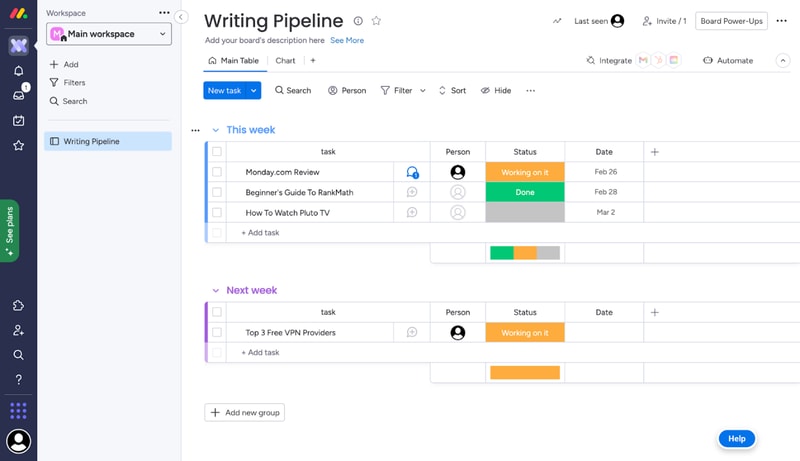
Each task you track with Monday has its own card. These cards store any data you need, like files, a task outline, updates from management, and even an activity log. All Monday cards are grouped in boards, which are themselves grouped into workspaces.
That’s the basic gist of how Monday works. But you can tweak this simple system quite a lot. Let me show you how.
Boards and Cards
Creating a new board is very easy. You just give it a title, choose a view for the project, and start adding tasks.
When you create your first board on Monday, you’ll get a dedicated guide to set it up.
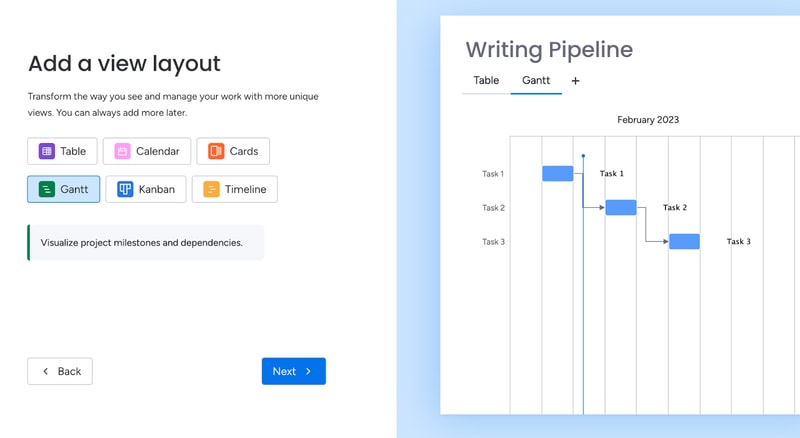
Monday offers plenty of ways to visualize tasks. You can arrange them in a table, in Gantt charts, in Kanban, in a calendar, and more.
As you’re adding cards to your first board, the guide will also give you a preview of how they’ll look:
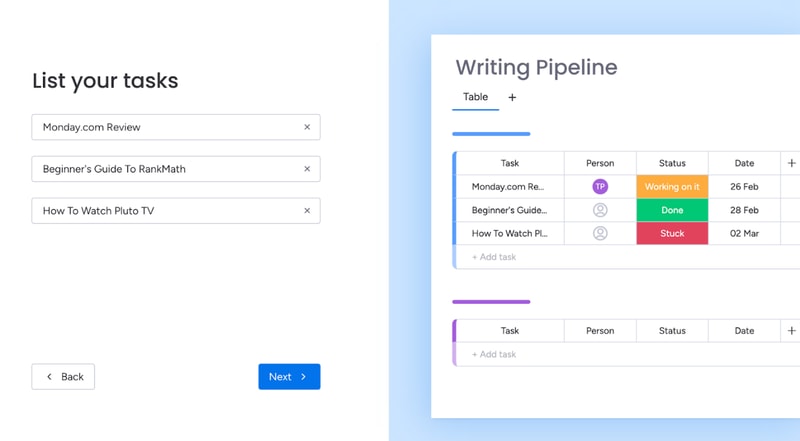
This makes it easy for most people to understand the core functionality of Monday.
You can further bundle cards from the same board in groups. For example, you can group them by what week the tasks are due.
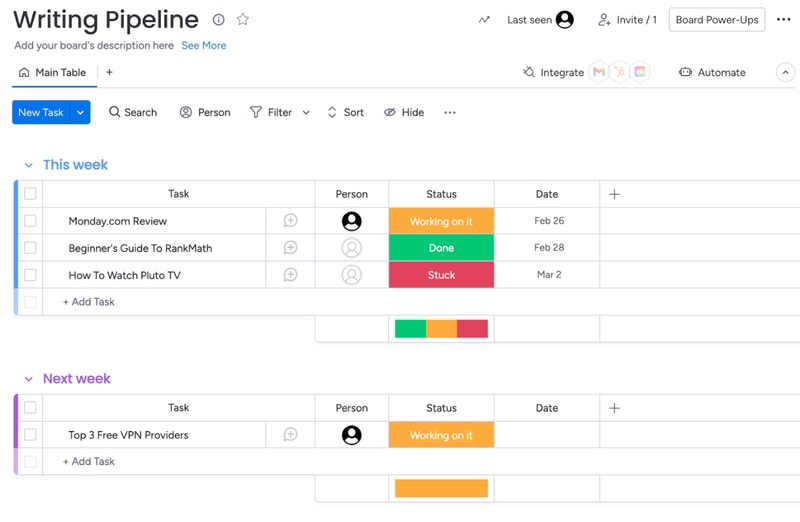
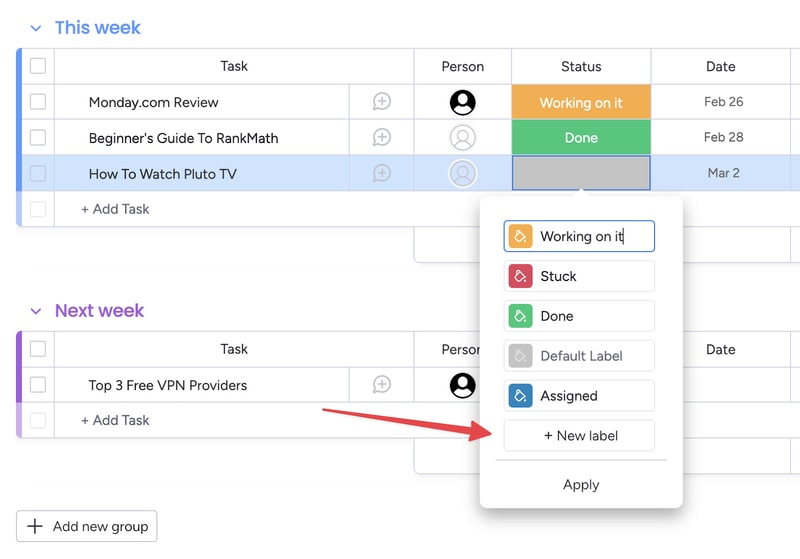
You also get visually-coded statuses for all tasks. The default ones are “Working on it,” “Done,” and “Stuck.” But you can create your own, to further customize your boards:
You can set due dates for all tasks, which helps you keep track of projects. In the Pro plan, you also get advanced time tracking, which lets you visualize how much time you have left before a deadline.
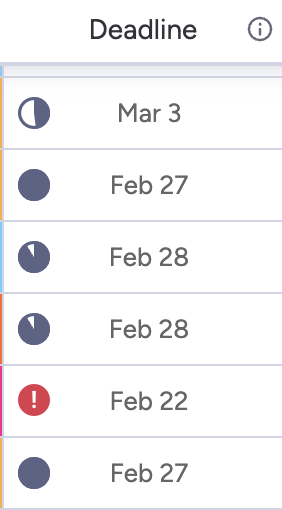
This is useful, but the feature does much more. By tracking time, managers can see the availability of each team member. This makes task allocation much easier.
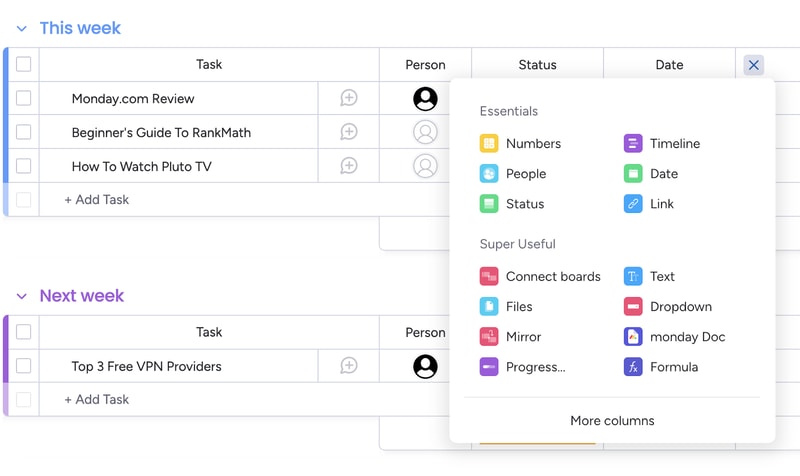
Of course, you can customize the board view in a ton of ways. For example, you can add different columns to the table view:
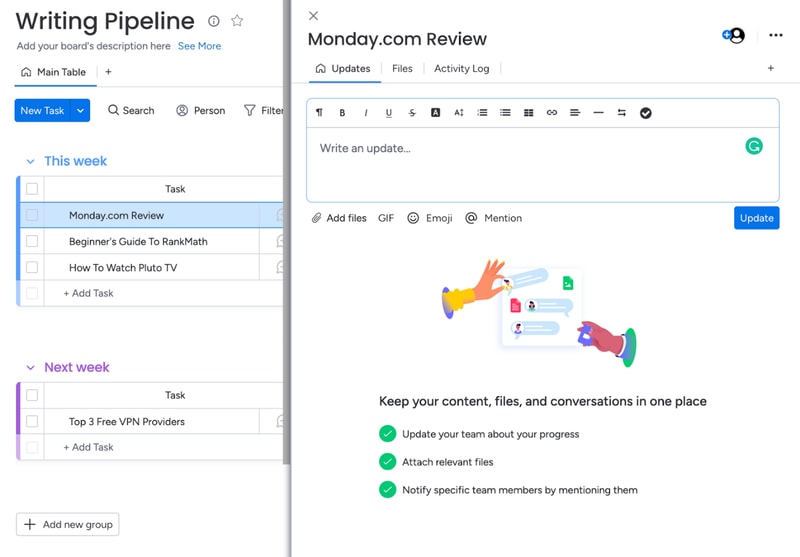
And you can analyze each card individually, to add comments, files, task lists and even check its activity log.
Monday’s core functionality is top-noth. Even beginners can use their project management software to create simple tasks and dashboards. But Monday’s true power lies in its advanced customization options.
Customizability
We’ve used Monday.com for years, and we researched all of its quirks for this review. Throughout all of this experience, Monday’s automation stood out the most. You can easily set-up automated processes with the platform, even if you’re a non-techie:
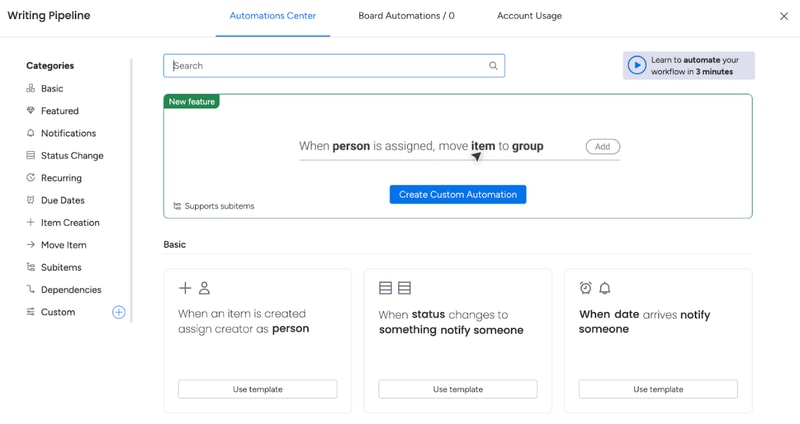
And the possibilities are endless. You get templates for the most commonly-used automations, like notifying someone when a task’s status changes. You also can create your own custom automations, or modify the dozens of templates that are already here.
For example, you can set up an automation that moves a task from one board to another when its status changes and then notifies the person responsible for it. This is useful for tasks that need oversight.
That’s how my editors know to check my work. I change a card’s status to “Needs Review”, and that automatically moves the card to the Editor’s board, and notifies the person that needs to give it a look.
And this is just one example. Monday.com’s automations can do a lot more. And again, they’re extremely easy to create. You don’t need to know any code or use complicated APIs. It’s all made with natural language:
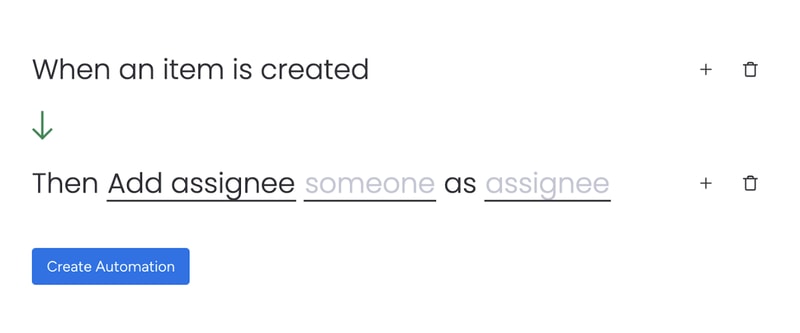
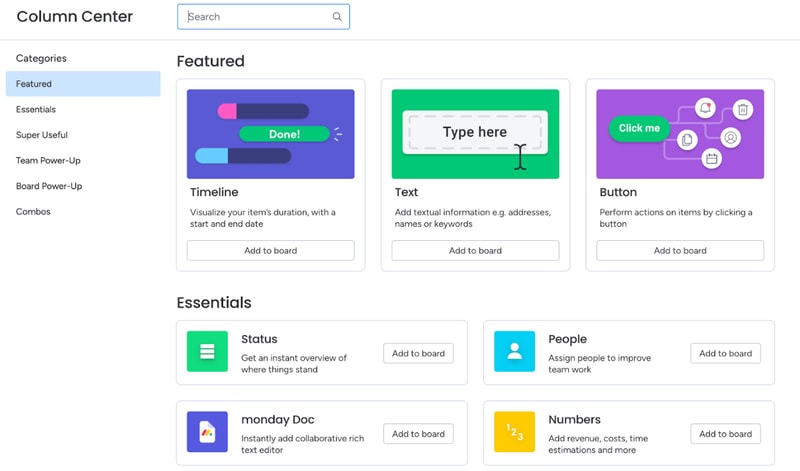
Besides automations, you can also heavily customize board views. You’ve already seen how to add new columns to the table view. But you might be surprised by how many options there are. You can include text, buttons, timelines, numbers, checkboxes, tags, and much more. There are so many options, Monday actually has a dedicated column center.
Each board can have multiple views, which makes dashboards on Monday.com very flexible. For example, team members can use the table view to see task details, deadlines, and manage their work. Managers can use the chart view for the exact same dashboard to get an overview of task statuses and deadlines.
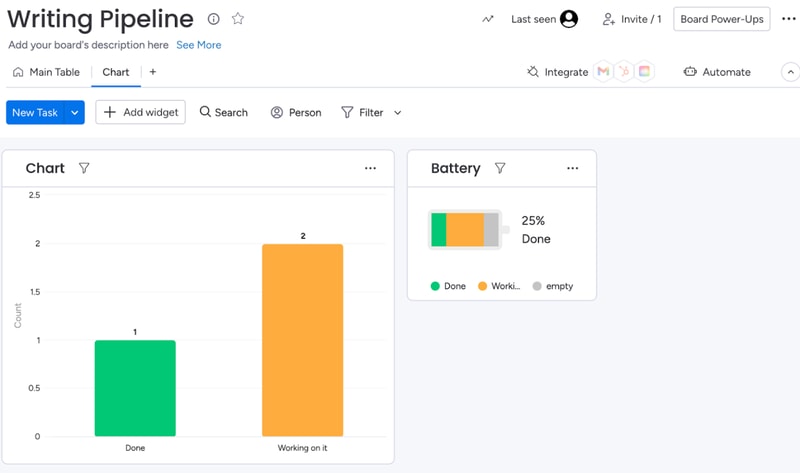
When analyzing a board, you can also filter results by anything (person assigned, status, deadline, etc):
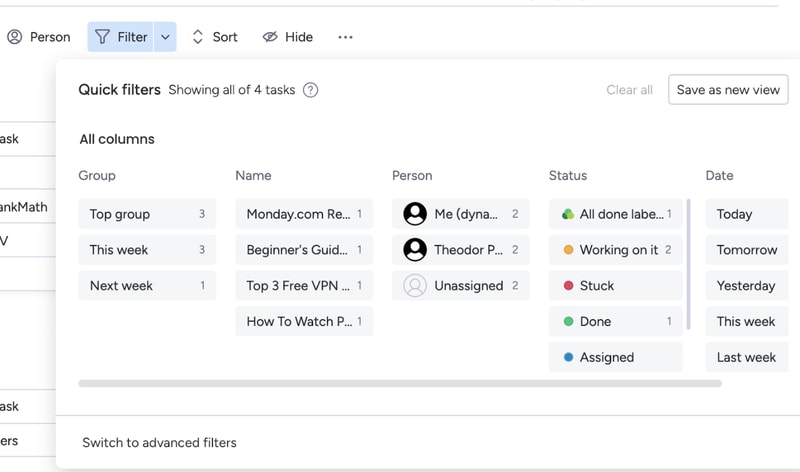
If a filter’s useful, you can turn it into a new view for that board.
All of these options make Monday.com extremely customizable. If you spend some time playing around with its features, you can most likely create anything your team needs. And if Monday’s suite is lacking, you can always complement it with integrations.
Integration with other tools
Monday.com has a lot of integrations. So many, they actually have an entire app marketplace to make it easier to find the extensions you need
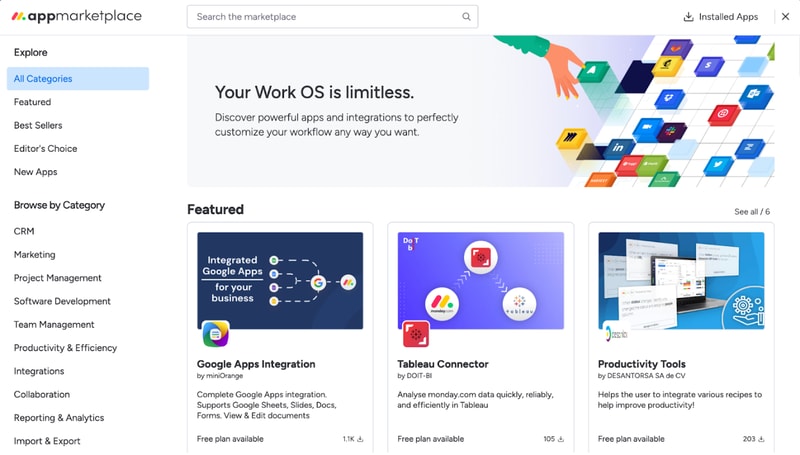
Monday’s integrations let you fine-tune your boards, cards, automations, and more.
For example, the Google Apps integration makes it extremely easy to embed and collaborate on Google Sheets, Slides, Docs, Forms, and more. If you’re using Monday as a CRM, you can use the Tableau Connector for advanced insights into your processes and results.
Not to mention, you can also integrate Monday.com with popular tools like Zapier, Zoom, Google Calendar, and more. These let you automate processes outside of Monday.com, so your team won’t have to worry about repetitive tasks.
Integrations are one of Monday’s biggest perks. The only downside is that you’ll need at least a Standard plan to use them. They’re not available with the free or Basic subscription.
Ease of Use
Monday.com is surprisingly easy to use, especially for how customizable it is. All plans come with onboarding guides, explanation videos, and loads of support articles to help you get started. Enterprise clients even get a customer success manager. They will help you set up all the advanced features, and provide dedicated support no matter what you need.
Even without all of that support, Monday.com is intuitive to use. And that’s mostly thanks to its well-made user interface.
User Interface
Monday.com has one of the best user interfaces out of all project management apps. The design’s smooth, you get color-coded statuses, big buttons, and detailed breakdowns of your tasks.
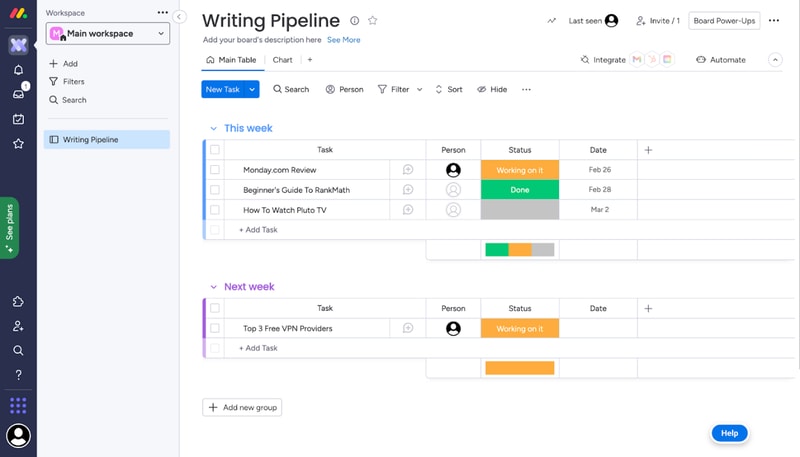
You can quickly switch between views on a board, all the options are pretty intuitive, and you don’t need a degree to find important features. It’s easy to navigate Monday.com even without an onboarding guide.
What we like most is their comments section. All cards have one, where you can write updates about a task, interact with your coworker’s messages, and make notes of everything related to that task.
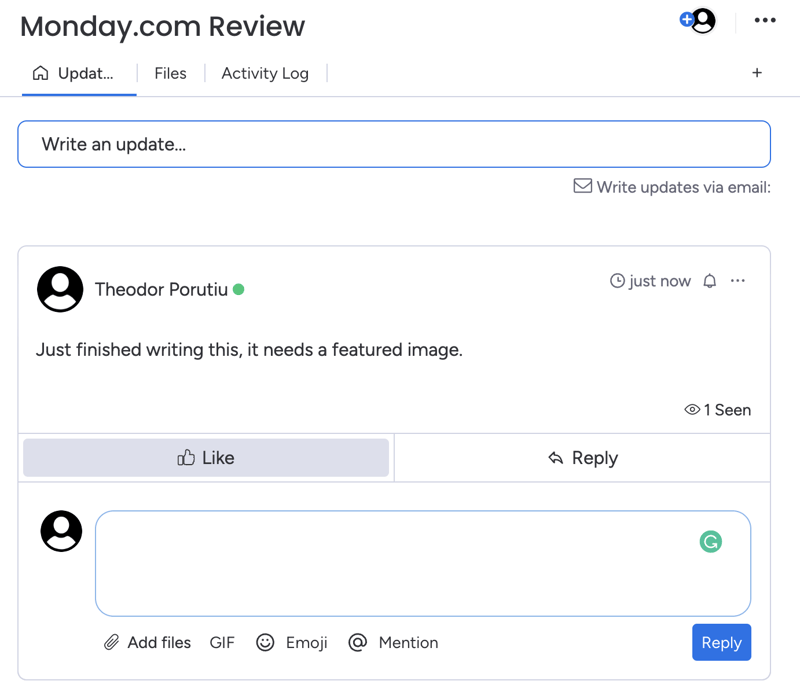
And if you need anyone to join the conversation, you can quickly add them as a card subscriber. This will automatically notify them about any messages.
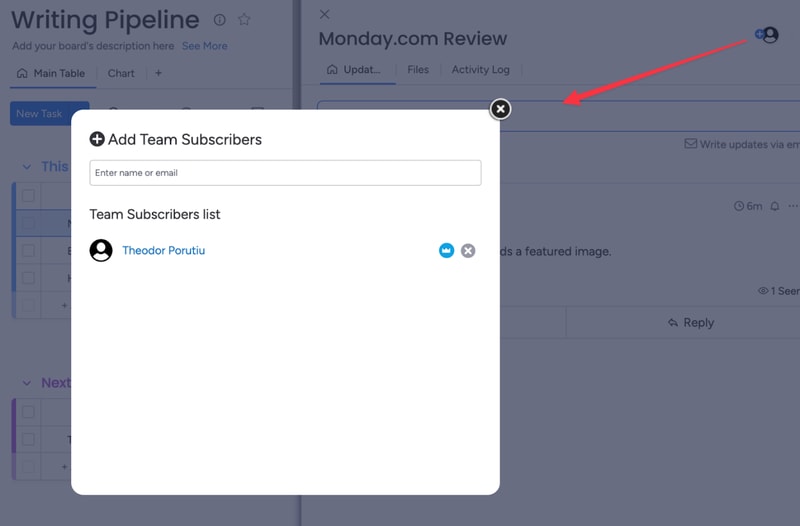
Getting started and customizing Monday boards – is it easy?
When you sign-up for Monday, you’ll fill in some details about your company, like its size, industry, and what you’ll use Monday for. These choices will affect the features and templates recommended to you, but they won’t limit your tool stack..
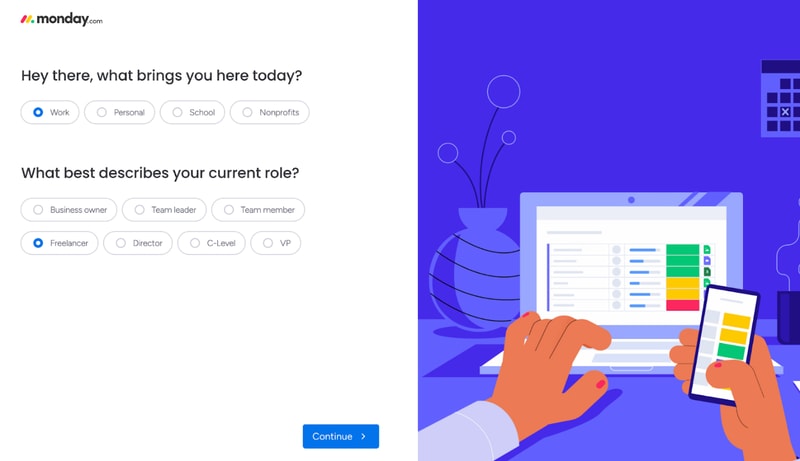
For example, I said I’ll use Monday for operations management. This made my automation recommendations the most commonly used for ops.
After this initial sign-up, you’ll also get a step-by-step guide on how to create boards and cards on Monday.
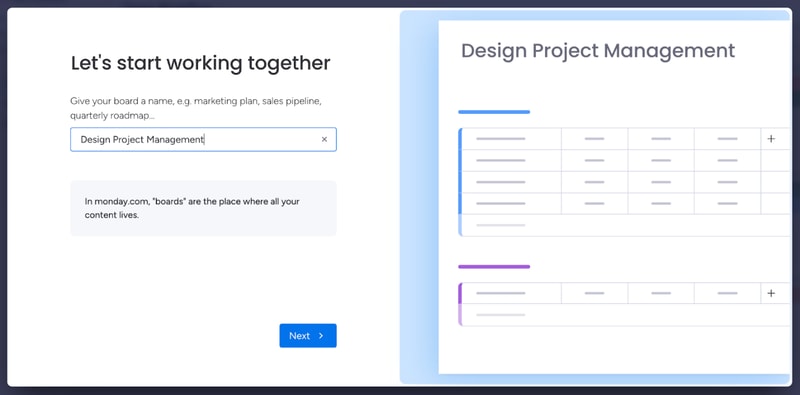
This guide is pretty good to understand how Monday’s core functionality works. If you have minimal experience with project management tools, it’s more than enough. However, it’s not the best if you’re a complete beginner.
You might need more guidance on how each view works, as well as the difference between views, boards, and workspaces. Not to mention, beginners might need a similar startup guide for other features, like automation. All of this support is available in the knowledge center. But it would be better fleshed out in a lengthier onboarding guide.
And we’re not saying this just to pick on Monday. A lot of the complaints you’ll see online about Monday.com mention a steep learning curve. Sometimes, these reviews even complain about the lack of features that are actually there, like more views beyond the default table. A more in-depth start-up guide could solve these issues.
Monday.com Security and Privacy
Monday is pretty serious about its security features. They have a trust center that outlines their stance on security and privacy, as well as a detailed security white paper, which showcases how they protect customer data.
Monday.com uses advanced encryption protocols (especially for Enterprise users) and high-end security methods. They analyze their vulnerabilities weekly and run a bug bounty program to avoid hacks. If you need a secure project management app, this is as safe as it gets.
Lastly, Monday.com collaborates with some sub-processors to collect and process your data. This might worry you, but the third parties are mandated to protect your data under the same terms Monday.com is, so your company is not at a higher risk because of it.
Customer Support
Monday.com has a very well-organized knowledge base, which provides most of the guidance you’ll need to get started with the platform.
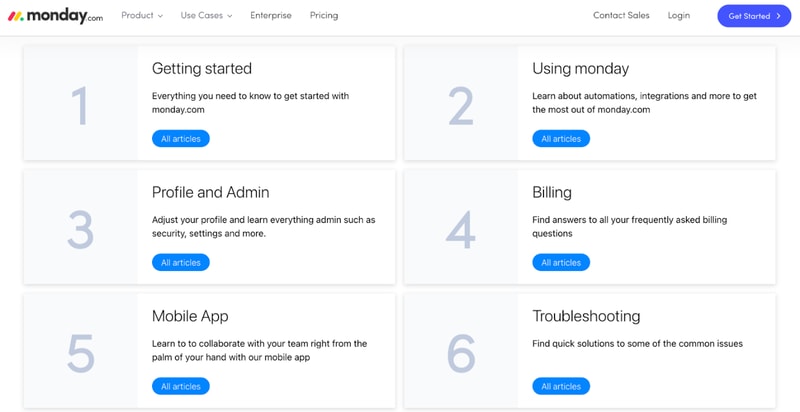
They also have a community where you can post or browse specific questions, a University center to learn more about Monday’s advanced features, and detailed API documentation.
If you need any extra guidance, Monday.com also offers 24/7 live chat support.
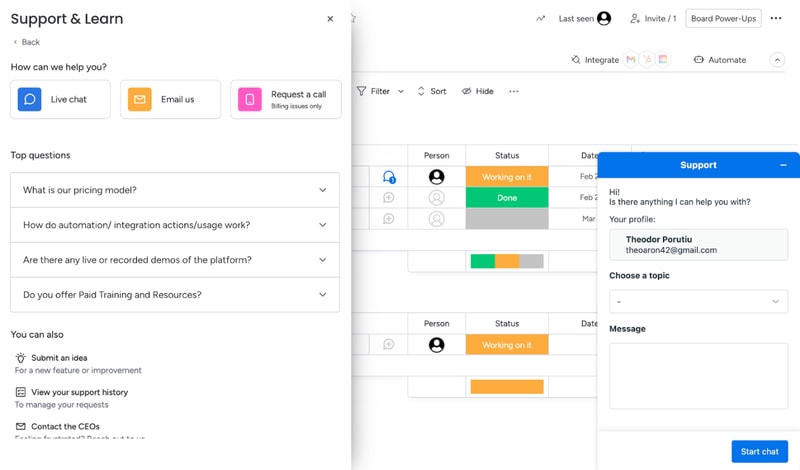
Their agents are prompt and helpful, especially if you’re on a paid plan. That will get you priority support. If your problem’s not urgent, you can also email Monday.com. If you have a billing issue, you can even hop on a call with a Monday agent.
Overall, Monday’s support system is robust. If you run into any problem, you’ll get the guidance you need to keep your project on track.
Monday.com Pricing
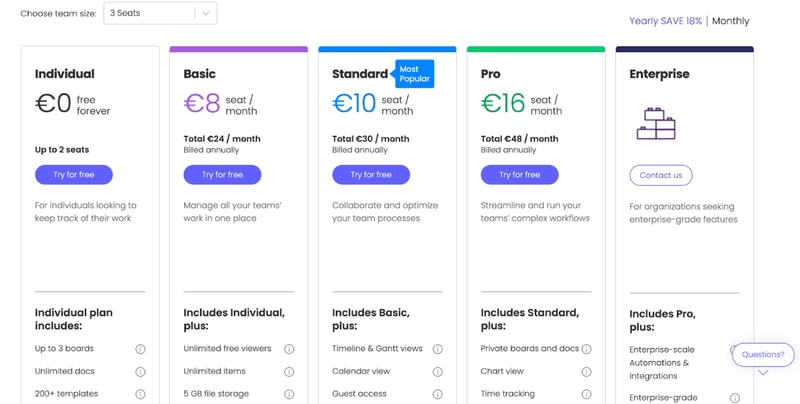
monday.com offers Individual (free), Basic, Standard, Pro, and Enterprise plans — see monday.com pricing for current rates.
The tool can get pricey if you have a big team. So if you’re not sure which plan works for your business, let’s break it down.
Individual
Monday.com’s free plan is a great choice for individuals that want some structure in their day-to-day life. But it’s not limited to personal use. The Individual plan works great for freelancers that want to manage their work and even small businesses. You can add up to 2 seats to your projects in the free plan.
Granted, you are limited by an Individual subscription. You can only create up to three boards, 1,000 items, and you only get 500 MB of storage. But it’s more than enough to test Monday.com and see if it’s right for you.
Basic
Monday’s Basic plan offers much more flexibility than the free tier. You can create unlimited items, you get 5GB of storage, unlimited boards, unlimited free viewers, and priority support.
However, you don’t get access to most of Monday’s automations with this plan.
Standard
The Standard plan probably has the best price-to-value ratio. It comes with guest access, more views, integrations, and automations, making it a better choice than a Basic subscription for most teams.
But if you want the full Monday.com experience, you’ll need the Pro plan.
Pro
Monday’s Pro plan offers 100 GB of storage, a full year of activity logs, unlimited guest access, time tracking, dependencies, a formula column, more views, and advanced security.
If you run a medium to big company, the Pro plan is probably the best for you.
Enterprise
Enterprise plans are custom-made for big organizations, so we can’t tell you how much it will cost, or exactly what features it will have. But we do know you’ll get premium integrations, a dedicated customer success manager, advanced security options, and better analytics.
User Reviews
People really like Monday.com. The platform has top scores across all big review aggregators.
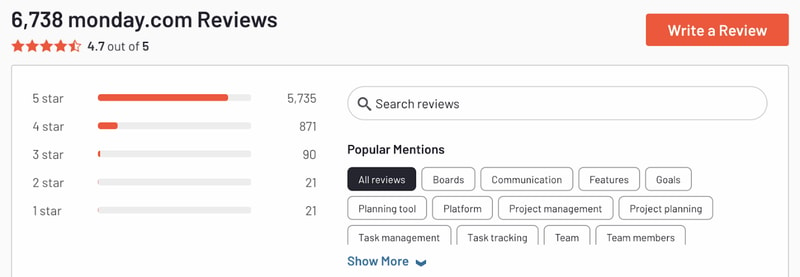
Monday gets praise for its advanced customization and great interface. But there are unhappy customers too. Most people that complained about the tool had problems with the slightly steep learning curve and higher pricing for big teams.
Pros
- Excellent and intuitive dashboards
- Fantastic for beginners
- Range of features like time tracking and budgeting
- Suitable for larger teams
- Supports extensive integrations for CRM, marketing, project management and more
- Visual boards allow for easy and accurate tracking
Cons
- Can be a steep learning curve for some users
- Can get pricey for larger teams
- Limited task dependencies, especially on the cheaper plans
Our biggest gripe with Monday.com was that you’re limited when creating task dependencies. You can only set them up via automations. Meanwhile, competitors like Asana let you take care of the same thing in 1-2 clicks. But it’s a minor issue and something that will probably be fixed in the future.
Quick Conclusion: Monday.com Review
monday.com has expanded beyond project management into a full work platform, offering monday CRM, monday Dev, and monday Service as dedicated products. The platform also includes AI-powered features for task automation, content generation, and project insights.
Monday.com does almost everything right. It has a strong project management suite, advanced customization, and some of the best integrations we’ve seen in project management software.
It is a bit hard to learn for non-techies. And it can be expensive for large teams. But in our opinion, these are minor inconveniences. Monday’s so good, they’re small hurdles to overcome.
You can see for yourself, Monday’s free to try:

Compare monday.com with other popular tools in the same category.
integration with other functions and programs
does not appear to be as user friendly as they had stated it would be
sales tracking of pipeline and activities helping our staff stay organized
So much flexibility, useful visuals and easy to get data into the system to get going
Even as a pro user its hard/impossible to manage people access to specific workstreams (i have zero trust that this works) plus dashboards are buggy and regularly fail.
organisation of data that required consolidation.
I like that you can see the dashboard of all the areas associated to the app. It does give a lot of options to keep track of your tasks and offers notifications also.
This program is more complex than what I was looking for. This may be a better option for someone trying to keep track of their team or company, not just individual tasks.
I was trying to find a simple calendar/task feature to keep track of all my work and deadlines. This program offers ways to keep track but seems like more work to learn how to use it than actually using it.
It is beautiful and simple - so if those two things are important to you then it makes sense to use Monday. Would be better used as a daily task tracker. My design team and people who really love simple UX were big fans. It was also fairly simply to onboard new team members.
The capabilities are very limited if you are managing a large project with multiple resources, milestones and dependencies. As soon as things got more complicated than a to do list, Monday's capabilities were extremely limited. As the administrator, I struggled to track projects truly end to end and wouldn't put Monday in the same category with other project management tools like Smartsheet or MS Project.
Working as a project manager for a creative team delivering copy, content and digital web updates. We used the tool to resource plan and track projects through to delivery.
The features are user friendly. Easy to navigate and color coded.
The price. For my small company spending $450 a year on software that I may log into briefly once every couple weeks is steep. Not all companies need intensive project management.
The ability to see project updates across all departments.

On paper monday really does it all. It is such an amazing tool. We were remarkably excited after we demoed the product and invested for 2 years. It seemed to have a solution, integration, or template for every possible solution.
Whereas it had a solution for everything, it isn't as intuitive to set up and maintain as we had hoped. After several false starts and failed attempts at making it work we moved on to other solutions. I'd imagine for a more tech saavy organization this would be the perfect tool. But for us the benefits were outweiged by the technical understanding requirments.
We have many different projects running at any given time. Always looking for solutions to better help us organize those efforts.
Monday advertises a lot of features that are great for project management. The interface is organized and easy to navigate.
There is way too much of a large learning curve for this software with not a lot of tutorials and support. It honestly had significantly more features than our small company needed and was a headache to try and implement.
It was for project management within our office of 10 people.

It's powerful and could be very valuable to project management
there's a monthly fee and it will take a will to implement.
Our project management
Having a project management team is better than nothing. One of the great things about DaPulse is their support staff. If you have an idea to make the product better, they can usually implement fairly quickly. We will likely find another tool in the next 1-2 months.
Hard to move tasks between boards without losing information No gantt charts we had a difficult time with user adoption hard to find tasks and threads no easy way to see all tasks assigned to any one team member Ultimately we found that Dapulse didn't fit out needs based on the way we are running programs and events
viability into what team members are working on better project management and time management
Really love all the capabilities and the colors that make it very visually appealing for visual people. My boss is one of these people and it has really helped her see progress and determine priority items.
It takes a long time to set up exactly how you want it, truly you need a dedicated person to be able to get it going perfectly. Otherwise, you will be tweaking constantly to get it fully operational and customized.
Monday helps solve prioritization bottlenecks and automation and integration struggles. There are many ways to do this, so if you do reach a dead end, there is usually a workaround using Monday.com.
Visualizations are helpful, especially when toggling between views for shared boards. Guests are also easily added to boards, even from outside of your organization - which is very helpful.
Monday documents have so much potential but are, unfortunately very non-user-friendly. I recommend sticking with Google Docs for the lags and glitches that Monday docs bring. The feature to automatically add a line of text as an action item is excellent, but unfortunately, it does not outweigh the bad user experience of the tool
Monday.com has helped keep open communication with our fully distributed team. However, we're more likely to manage tasks and deadlines and collaboration in slack - which does not have a great Monday.com integration
User-friendly online interface and quick onboarding process
Limited synching/intelligent features compared to ClickUp
Helps us coordinate marketing activities and delegate tasks in larger teams Helps me plan my weekly tasks
I like that it's easy to plan new tasks and get an overview of your day.
The handiest part, i.e. the overview, usually doesn't work. For some reason there are problems with loading everything, which makes it very slow.
Getting an overview of what needs to happen in a day and keeping my agenda
Monday does a good job of notifying you of upcoming tasks
The design of Monday.com is not very good. It is also super difficult to organize everything in one place, and the date section in the interface is confusing. I've now been part of 2 companies that have used Monday and switched to a different platform like Asana or Trello.
It is solving posting updates about projects and keeping everyone in the loop, as opposed to just an email or a slack message.
The colors are fine. Customer service is friendly.
The app feels like it was written by interns in 2003. - Slow and bloated (more than a few comments = always loads all of them resulting is super slow load times) - Search doesn't search everything, just the titles of stuff (need to search for something you put in a comment or description? Too bad... this is 100% inexcusable) - Notifications are not intuitive causing you to miss notices - Interface is illogical and convoluted; like someone thought "What if we tried to copy Asana but didn't do any user testing or hire a professional UX team" - Keyboard shortcuts that they chose are the same as some browser keyboard shortcuts. Highlighting the URL in Chrome is CMD+L, but if you do that while on Monday.com it loads the 'logs' ... worst of all, it loads the logs in such a way that you can't use your back button to go back to the previous page, and closing the logs doesn't return you to the previous page, so you basically lost whatever screen you were on with no way to recover it other than to try and remember the title and search for it. I mean, just mind numbingly annoying stuff. Anyone who has used Asana, Trello, Basecamp, or others will not like this software as it is miles and miles behind those products.
We have to work on Monday.com because one of our clients uses it. Our whole team hates it.
I thought that it was colorful, that was about it.
It is advertised a project management software and probably works for team projects, however it was not helpful with keeping projects organized as a freelancer. It was not worth the effort.
I was trying to solve the problem of keeping projects for different clients in front of me but I didn't find this helpful at all.
Other people in the company being able to see all the work.
I don't like how all the tasks or review points in one board all have to be the same and that there are no subtasks that you can build out.
Visibility into workload.
Flexible apps/features are easily added. You can customize easily.
Actions are applied globally in a set of tasks. However, sometimes within a board, you want a cluster of tasks to have that don't match others in that same board. You can do that. Once you add a column, it's added to every group and task. I hate that.
See above.
The ability to produce a timeline on the click of a button is really useful when developing project plans.
I thought it was very expensive for a small team and we eventually moved to Zenkit because it has much better functionality and is free for small teams.
Project planning and specifically resource planning - having oversight of what each employee is doing across a number of projects
There are lots of colors which is nice to have.
Everything is very, very slow on the app. That's why I don't want to use it.
We are just trying to organize our internal data

My Work is the ultimate feature and I will be lost without it.
I now have to find an alternative to monday.com becuase despite being an early adopter (when it was called DaPulse) and paying two-years at a time for the subscription. My new subscription has increased by over 30%. I cannot justify the cost and need to find an alternative.
We needed a system to pull together all the task/project management systems we were using to manage client projects. When we saw how user friendly and easy monday.com was to use, we dispensed with all the other systems. I think the most important benefit is that junior team members no longer feel intimidated about assigning tasks to more senior team members. It empowered them.
my bosses seems to like it and we have a bit of fun during team meetings writing silly things on the website
not for me. feels too overtly organised. i find it a bit redundant/pointless
it makes team meetings more organised i supposed
With monday.com, the ability to design, create, and implement specific workflows seamlessly with one platform has been most beneficial for my organization. While using monday.com, leadership has a centralized location for information and data.
The features and capabilities of monday.com can be overwhelming with all of the templates, apps, and information to make the platform fit your established workflows.
Prior to beginning my current role, my organization used email for communication and documentation storage. There was so much segmentation among the other departments that a centralized location was the next logical step to increase efficiencies and productivity.
It is very basic and user friendly for the simple users.
It is terrible for complicated processes. Automation is severaly lacking. Every time I think I have figured out a solution to work around their lack of ability, I run into a different missing feature.
Honestly, it is just creating more problems for me personally. It is helping keep the team a little more organized.
I guess MAYBE the ability to see where your companies process is, but that is IT.
Everything. E v e r y t h i n g. You can only search boards and not items. I have not receieved desktop notifications in over a month even though I have not turned them off or disabled them in anyway. When I click the bell icon the red notification number on the app doesn't disappear unless I open up the meatball menu and select Mark all as read. I tried uninstalling and reinstalling and had to fight with the app for 10 minutes to let me log in. I ended up having to change my password even though I know I was using the correct password because when I purposely put in the incorrect password it told me it was incorrect. Ridiculous app. PLEASE do not convince your company to use this app. There HAVE to be better options out there.
I have no idea what problems it's solving. I would rather use my companies old system which was entirely in EMAIL, which while aggravating is no where NEAR as aggravating as Monday.com is.
Nothing. It makes easy to do lists very complicated.
Monday is very difficult to use compared to other platforms. We are a growing agency and a simple recurring task is made extremely complex on Monday. As an example - create invoice monthly needs an automation. If you have 20 recurring tasks you need 20 different automations. It is a nightmare and we used the platform for 45 days and they refused to provide a pro rata refund for us given the platform didn't meet our needs as we grew. Initially Monday seemed okay but as soon as our business started to grow quickly we saw way too many limitations with Monday. Do not use and use Asana instead.
To do lists and task management
It has the potential to be very powerful. You can customise it to work for any company and my dealings with their support have been very positive. I can't think of anything else I like about monday.com
Their pricing & marketing is misleading. It's advertised as a project management tool but you only get their basic 'work OS' included and have to pay extra for their Projects app, which isn't mentioned anywhere on the site. On their site, they advertise it as a complete project management tool but when I queried this with their support team, they said you get a basic project management template for Work OS but that's not how they advertise the platform. When you look at their pricing, it sounds like you get everything for one decent price but then you have to pay extra for CRM & Projects (there are more). For just these 2 products (+ the work OS, which is like a to-do list) it cost £90 a month for just 3 seats. This isn't mentioned ANYWHERE on their pricing table. We would gladly pay that amount if it meant having everything on one platform and having all tools talking to each other but you have to manually implement a load of automations in order to get this to work. This sounds fine on the surface but what happens if one of the automations breaks down? You might have 10-30 live projects. There's a really good review on Reddit by an agency owner who almost lost his entire business thanks to all the automations failing and a whole host of issues https://www.reddit.com/r/productivity/comments/t2n12k/mondaycom_review_its_almost_ruined_my_business/ We've gone back to Asana because it's simple, yet powerful. Monday.com just feels like such a lot of hard work and needless complexity just to get it to work.
It's highly customisable, so you can really make it fit into your business
Interconnected databases and multiplr users
High barrier to get started. We gave up and will not continue to use
Law firm case management and assignment tracking
You can see/access everyones boards if you need to.
The setup is not appealing to the eye, looks like a cluster
I switched to broker kit

I've been too busy trying to find work arounds to the bad points that I've yet to discover any good points.
The software can export to pdf, but only a fraction of your gantt chart. Yes that's right, no overview option. People have been complaining about this on the monday.com forum for years but nothing's changed. How anyone can carry on using this software without this feature I cannot begin to fathom. I need a snapshot in time of my program that can be referred back to, I live link is ever changing and therefore cannot form part of a contract. Next thing, the software cannot add holidays like Christmas shut down. Another very basic requirement of any gantt planning software. Another problem I've had is that I cannot link tasks from one board to another. You can only link within the same board. What use is this????!
None