Unclaimed: Are you working at QuickBooks Desktop Pro?
QuickBooks Desktop Pro Reviews: 4.3/5 — Solid Choice
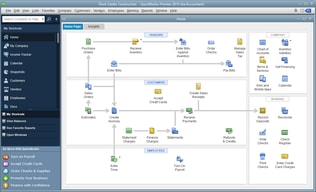
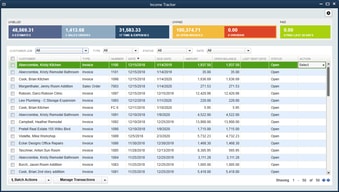
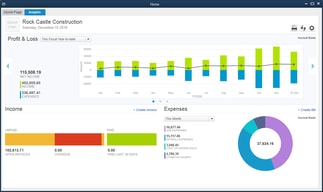
QuickBooks Desktop Pro is a platform that lets users automate key processes in the accounting system, including billing and invoicing. With Desktop Pro, users have the option to link bank accounts, define workflows, and make automated payments for efficiency. This solution also lets users manage employee payrolls via a single application. Other key features include business expense tracking, report generation, and time tracking.
| Company | Intuit Inc. |
|---|---|
| Year founded | 1983 |
| Company size | 10,001+ employees |
| Headquarters | Mountain View, California, United States |
| Social Media |

| Capabilities |
API
|
|---|---|
| Segment |
Small Business
Mid Market
Enterprise
|
| Deployment | Cloud / SaaS / Web-Based, Desktop Windows, On-Premise Windows |
| Support | 24/7 (Live rep), Chat, Email/Help Desk, FAQs/Forum, Knowledge Base, Phone Support |
| Training | Documentation |
| Languages | English |
Compare QuickBooks Desktop Pro with other popular tools in the same category.
QB is simply to understand and to use.
Sometimes some glitches can happen, we can’t open some companies.
Bookkeeping records
The empowerment of being able to process payroll and tax payments with QuickBooks are my favorite features. The nice layout allows for a whole new level of organization for managing my money.
It's quite easy to make electronic tax payments, but it's also easy to forget to go outside of QuickBooks to the individual website to file the report that coordinates with the payments. (EX: Texas Workforce Commission quarterly report)
Business Problem: Thankfully, I don't have problems to solve right now. Benefits: My accountant prefers QuickBooks so as long as I made diligent entries throughout the year, sharing my file is efficient and saves her time and saves me money.
Quickbooks is very user friendly. It's comprehensive, easy to use and quick to learn. Those with no experience can quickly become acquainted with this program. It's a perfect way to keep track of expenses and bill clients. A small business owner's best friend.
I don't have a long exposure to this program and so have no frustrations with it.
Using this program helps to keep meticulous track of the business finances and makes tax time a much simpler process as well.
I own a retail business, and Quickbooks makes it easy to keep all of my financial records up to date, which facilitates better decision making.
The only thing I don't like is Intuit's schedule for sunsetting their products. My previous version was working just fine, but as my CPA (understandably) conforms to Intuit's upgrade cycle, we were not able to share files until I upgraded this year.
Preparing for taxes is a breeze when my accounts are up to date, and QB Desktop Pro makes it easy to stay on top of all financial transactions.
There are so many possibilities with QuickBooks desktop. Many more than things that can be vs the online version. It is easy to navigate and the reports are top notch. I really like to class items and this is so great to class and get the reports I want. I love that I can send invoices to customer's to pay with the intuit payment solution.
We have to upgrade every 3 years to the newest version because we use Intuit payments for invoices.
I can get a complete picture of the company's financial situation at any time with QuickBooks. It is great to have employees enter the data and I can oversee to make sure it is correct. QuickBooks does the hard work so I don't have.
It is very user friendly and has all the bells and whistles needed to operate ef
You should not be able to delete your work only void
Bank reconciliation and credit card reconciliation save a lot of time
Easy to use; reporting functionality and integration
Improved ability to search for Invoice Numbers without having to pull up an actual invoice or simulating the creation of one. The "Find" Invoice button is on an existing or new invoice.
Fully integrated system Job and Time; Payroll; AP; AR; Billing; payment processing; etc.
Ease of use, plain language, you don't need to be an accountant to use it.
Difficult to make shortcuts on some items.
Helps us keep track of our financial picture with one click.
Easy to use and provides everything we need
some reports are hard to find or you have to pull from several reports to get what you are looking for
All AR, AP and Payroll
How intuitive the layout of QuickBooks is.
The lag between other programs and Quickbooks
Invoicing is very easy using QuickBooks, Turn around time is very quick.
Very easy to use! Software guides you through step by step
Sometimes you go through unnecessary prompts
Invoices
I like that is user friendly, easy to type in invoices, deposits, and credit card payments.
You can open additional tabs at the same time, but I wish the tabs were like excel. It would make it a lot easier to go back and forth on screens, especially if I am doing a reconciliation with the credit cards.
By processing credit card payments, this helps us stay organized. it also helps us keep track of invoices from start to finish so that we do not miss making payments on any.
Program is easy to use, updates automatically. Support staff is great and quick to get back with you on resolving your issues.
I dislike the fact that you cannot create and print previous year tax forms because the system only allows for a year update at a time and doesn't store the old information. I also have 4 users and notice that it tends to slow and hang up if connected to the network over wireless internet.
QuickBooks Desktop is great for financial planning and reporting. Payroll is easy to run and it tracks all taxes as well which allows us to plan ahead. This is a benefit to us because we are able to have all of our accounting functions in one program.
We use Quickbooks as both a customer catalog and a billing/payment service. It's a great way to track our customers' history and use as a quick and easy reference for just about any part of our business.
The only frustrating thing, while understandable, is the need to go into single user mode whenever significant changes must be made. In a crowded office, this is often difficult.
This is a great way to check into our customers' history and easily verify/reference all of their information.
G2 Crown was very efficient and the prices were better than any other website. Software download was sent in one day.
like it all. I have no complaints other than having to upgrade.
Needing to upgrade to latest version to take advantage of banking download.
I love that it’s user friendly. Even for us artistic types!
I wish that it had more user tutorials.
I am able to keep my accounts organized and track my expenses online and on the go.
Ease of use. In-depth reporting. Customer service.
DOES NOT SYNC WITH EXCEL! Would make it a perfect world if it did!
Invoicing Reporting
Easy to navigate. I use this for my company and it makes it so much easier to mange customer payments
It is a little expensive to get set up but at the same time, it is well worth it once you have it all done and figured out.
I had an issue setting it up and the customer service was quick to help.
The ease to navigate around, the description and ease finding and customizing the reports and also the ease entering data
Hard to work in multiple windows, especially when working with another program as you can't the QB window cuts out the data you need to see rather than minimizes the text. Data entry has to be kept up daily to keep information current.
A breeze to find outstanding invoices, un applied creadits and payments. Gives a great overview of your company's financials
It just works. Always available and seems to solve any accounting issue for a small company in size all the way to medium. Been involved since version 1.0 so alot of features were added the over the past 20 years of its existence.
Anything that requires a separate window that covers the entire page. You lose track of windows open unless you use the window panel.
Check reconciling, statement reconciling, 1099 input, AP and AR. Smooth and much easier then other systems as 1 click of help input away plus so much Internet help written on QB.
Ease of use and import of receips and docs.
Learning the software could be hard.
Organization of receipts, invoices and bank transactions have been really easy. Printing checks and emailing invoices is a really good addition.
You can navigate more if you use desktop than online version.
Sometimes slow and does not work but most of the time its perfect
You can work on accountants version
I've used Quickbooks for decades and at this point can make it do whatever I want to. It's a flexible, user-friendly accounting system that is adaptable for any situation — and I far prefer the desktop version to online.
Like any program, you have to jerry-rig it sometimes to do what you want. The nice thing is that that also lends to the customization possible.
Good, solid, standard double-entry accounting that can scale to any size business. Very adaptable to non-profits.
Quickbooks Pro allows me to organize and compile my financial data efficiently. Other features help me to file my taxes on time and compute my payroll in a breeze. Real time reports is a big help in analyzing the status of the company.
It costs a little bit more to take advantage of features of Quickbooks such as Payroll and Turbo Tax. I really need this in my services, so I got it.
Real time reports are generated. Easy interface, Organization and input of data is easy
My most favorite thing about QuickBooks is the easiness about it. I can print invoices and receive payments. It keeps track who has paid and who hasn’t for me!
I wish that it would let me know if I accidentally create two invoices.
I have people in and out of the office so quickly because all of their info is stored on QuickBooks and it’s so easy to take care of them quickly there.
I use it for expansive reports, enhanced payroll, timesheets, etc.
I wish it worked with Neatdesk cloud. I have to use an old version of Neatdesk to incorporate neatdesk software. I need to have others input the client and job as well as notes on my reciepts and scan them. I don't have another way. I would happily pay for this feature.
I wish that QB Desktop Pro could be in the cloud. The cloud version is not robust and limits payroll and report options.
User friendly, multiple ways to get to same screen, depending on user preference
No real dislikes, although there are times it's difficult to put in exactly what I'm searching for.
Enter AR/AP, Create Financials, Manage Cash Flow
Very easy to run reports to find information needed
I have not had any issues with this software
Easy access to various financial data
The ease of doing all our accounting in house
Some of the reports are a bit hard to create.
Having the ability to do our accounting in-house versus hiring an outside source
I like how easy it is to use. Everything is easy to find.
I didn't like that for a first time user there weren't many tips on how to navigate.
We use QuickBooks for payroll and all of our account needs. I find benefits with everything being organized and making reports very simple.