

Unclaimed: Are you working at Wrike?
Wrike Reviews: 4.2/5 — Solid Choice
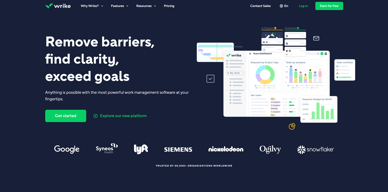
Harping on its versatility, Wrike is a project management software that features highly customizable dashboards and workflows and team-specific automation to give businesses a project platform that adapts to their current ways of working and not the other way around. Wrike’s functionalities involving over 400 tools revolve around giving a 360-degree view of projects, true interdepartmental collaboration, approvals acceleration, smarter data use, efficient workload management, and enterprise-grade security. Wrike has more than 30 well-documented use cases involving more than 15 departments and teams. Wrike also has a proprietary AI-powered capability called Work Intelligence that catalyzes results through smart automation and project risk prediction.

| Capabilities |
API
|
|---|---|
| Segment |
Small Business
Mid Market
Enterprise
|
| Deployment | Cloud / SaaS / Web-Based, Desktop Mac, Desktop Windows, Mobile Android, Mobile iPad, Mobile iPhone |
| Support | 24/7 (Live rep), Chat, Email/Help Desk, FAQs/Forum, Knowledge Base, Phone Support |
| Training | Documentation |
| Languages | English |
Wrike Pros and Cons
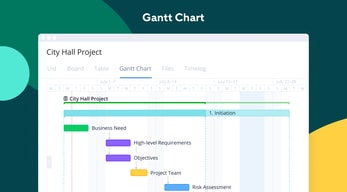
- Easy to use Gantt charts
- Customizable dashboard and schedule
- Comprehensive reports and insights
- Time-tracking tools included
- Excellent customer service
- A little pricey
- Can be difficult to get used to at first
- Frequent reports of unresponsive support
- Recorded incidents of unreliable software functionality


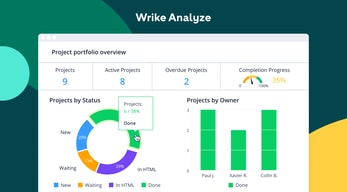
Wrike Review: Is It the Right Project Management Tool for Your Business?
Wrike has been empowering professionals and teams to better manage their work since its launch in 2006. It’s a comprehensive solution for professional service providers, marketing teams, and agencies. But all this versatility comes with a high price tag.
Is it worth it? In this Findstack review, we’re going to find out.
What is Wrike: A Quick Overview
Wrike has introduced Work Intelligence, an AI engine that powers risk prediction, task automation, and smart recommendations.
Wrike is an all-in-one work management platform that helps teams collaborate, plan projects, delegate tasks, and track progress. The platform offers a range of plans designed to meet the needs of almost any kind of business. Whether you’re a solopreneur or a department head at a Fortune 500 company, Wrike has a plan for you.
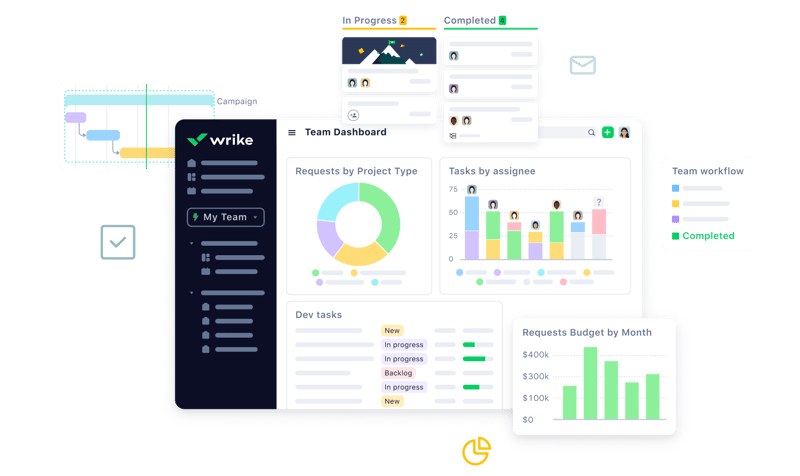
Wrike’s power lies in its ability to support both project management and collaborative work, which explains its appeal to a wide range of industries. The tool boasts a user-friendly dashboard that’s pretty simple to set up. It’s also very easy to create tasks, assign them to team members, set due dates, and track their progress.
Getting Started With Wrike
Wrike is one of the more intuitive project management tools for a new user to get started with—especially compared to competitors like ClickUp.
Wrike is available to users via web browser, desktop application, and mobile application for both Android and iOS devices.
To get started with Wrike, new users have the option to register for a free account using their business email. Once the email address is verified, users will be redirected to Wrike’s homepage to complete the initial registration process—which involves a guided walkthrough.
How Wrike Works: Key Features
Dashboards
If you’ve ever used a project management tool, Wrike’s Dashboards will feel very familiar.

For every project you create in Wrike, you can create Dashboards to display, manipulate, and analyze the project data that you’ve collected within it. They essentially give you an overview of project KPIs, metrics, due dates, and progress at a glance—saving you the hassle of seeking out each piece of data at the source.
When you create a Dashboard, you can start with a template or build one from scratch. If you go the latter route, you have quite a bit of flexibility thanks to a modular design and a wide selection of interactive widgets, including:
- Assigned tasks
- Overdue tasks assigned to you
- Overdue tasks that you assigned
- Tasks you’re following
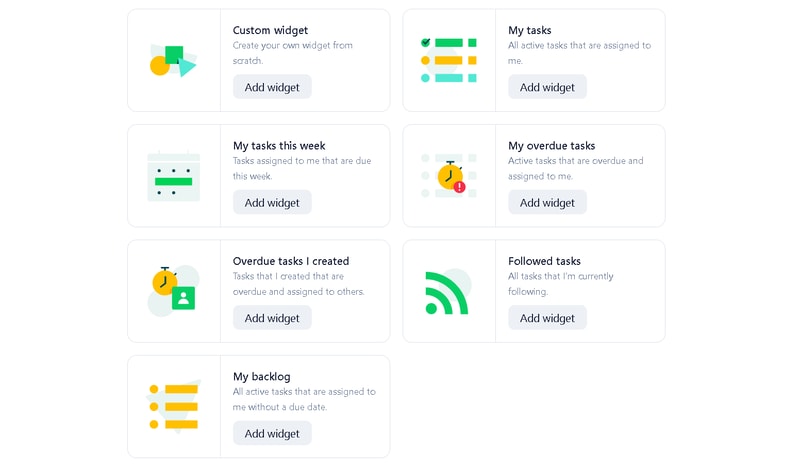
Wrike is unlike a lot of project management tools because everything you need is right at your fingertips. You don’t need to navigate to another window to see it all.
Automation
Like most modern project management tools, Wrike features an automation engine that works in the background to synch related tasks, assign workloads, and ensure tasks are completed on time with botted @mentions and comments.
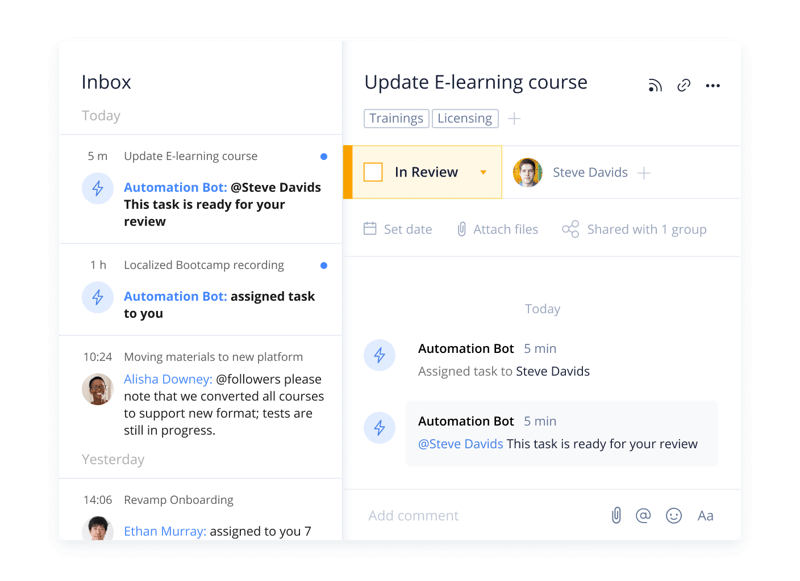
Wrike’s automation engine may not be the most complex or versatile on the market, but it’s intuitive and practical. There’s no feature bloat here—every feature is sure to get some use.
Integrations
On a related note, Wrike’s automation capabilities are supported by 400+ integrations with third-party tools. Pretty much every tool category is covered, including:
- CRM
- Communication
- BI
- Calendar
- CMS
- Storage
- Accounting
- Reporting
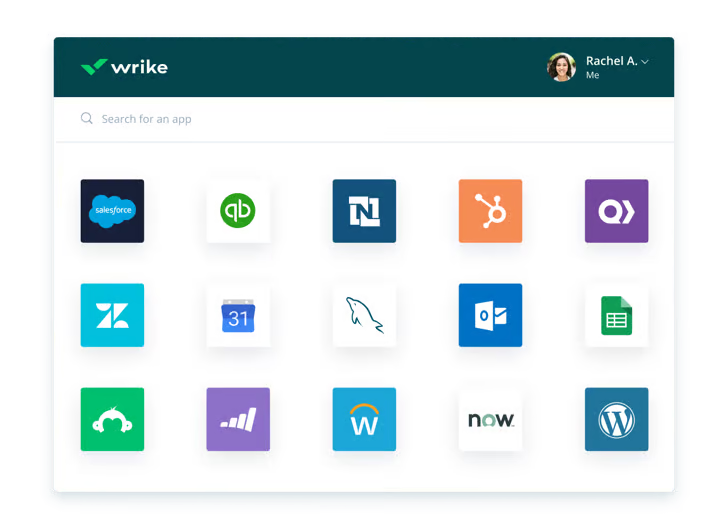
Integrating Wrike with other tools in your stack is a great way to cut out some busy work from daily workstreams and improve productivity. It’s also a surefire way to minimize human error.
Live Analytics
Wrike automatically updates every report, chart, and dashboard every 15 minutes, so you never miss a thing. 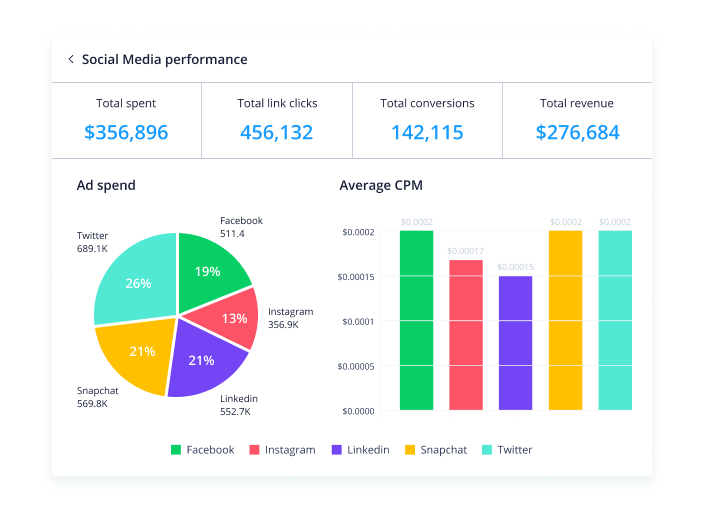
That’s a huge benefit—it means project managers don’t need to manually collect and input data from multiple sources to draw meaningful insight. Less time on busy work means more time analyzing the data for patterns, trends, and inefficiencies.
This feature is also great for project managers who are juggling multiple projects. They get a real-time overview of project statuses, team workloads, pending approvals, and tasks waiting to be assigned, so they can easily prioritize work and make meaningful progress.
Customizable Forms
Wrike has a custom form builder that you can use to create almost any kind of form—from simple team surveys to content request forms.
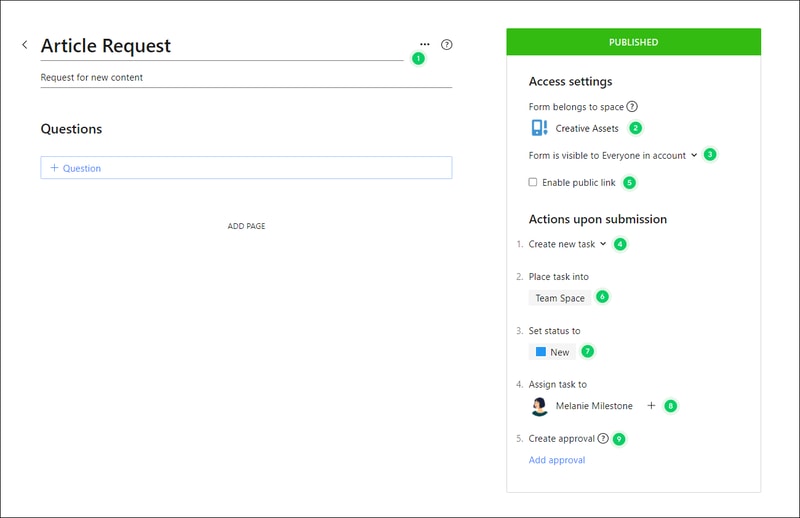
Wrike’s forms are fully customizable, and you can take advantage of role-based access controls to grant or deny access to certain pages or sections. Plus, when you create a new form, it can automatically assign tasks, set due dates based on the submission date, and populate subtasks.
Enterprise-level project management tools
Wrike offers advanced project management tools that you can access on your Home workspace to help you measure key performance indicators.
These tools include time tracking to assist in managing billable hours, visualizing cost and budget calculations, and business intelligence to assess project risk. While these tools are particularly useful for large enterprises with complex needs and a variety of teams, they can also be beneficial for small businesses that plan to scale.
In addition, the platform allows you to share files and publish assets with enterprise-grade security. The sheer number of features may be overwhelming for teams new to project managers, but Wrike provides great walkthroughs and tutorials. You may even discover features by accident that end up accelerating your workflows.
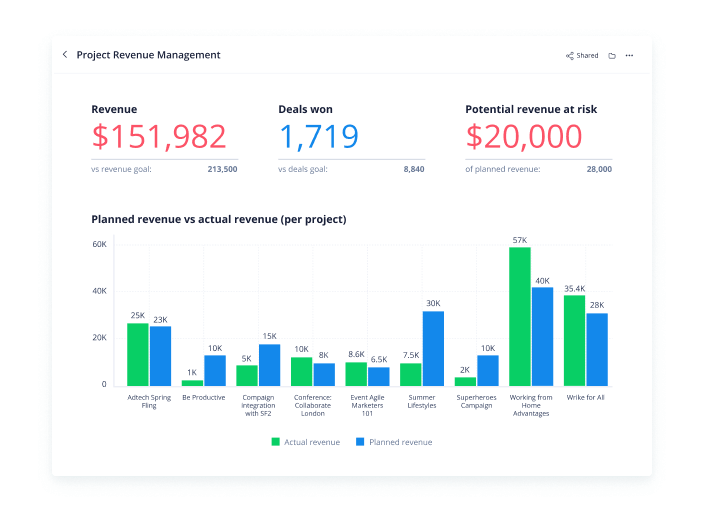
Wrike offers pre-built templates based on team roles to simplify task creation. Some of these templates include:
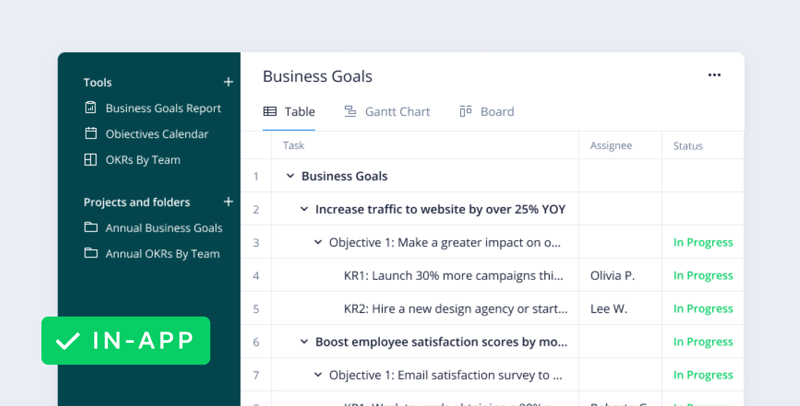
- Project performance templates
- OKR templates
- Weekly to-do list templates
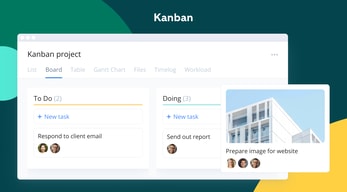
- Kanban board project templates
- Agile and IT templates
- Content operations templates
- Quarterly business review templates
- Ticketing and help desk templates
Collaboration Tools
Wrike—like most project management tools—is designed to make it easier to collaborate with your teams.
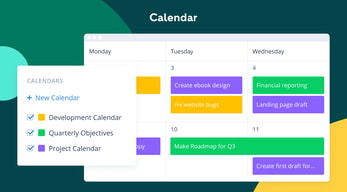
All team members have access to a global or project-based live stream of task activity, so nobody is left behind. Team members can easily communicate on specific tasks via comments and notes so that conversations are kept organized. Shared team calendars can be added to the dashboard to help with awareness of progress and submission dates. 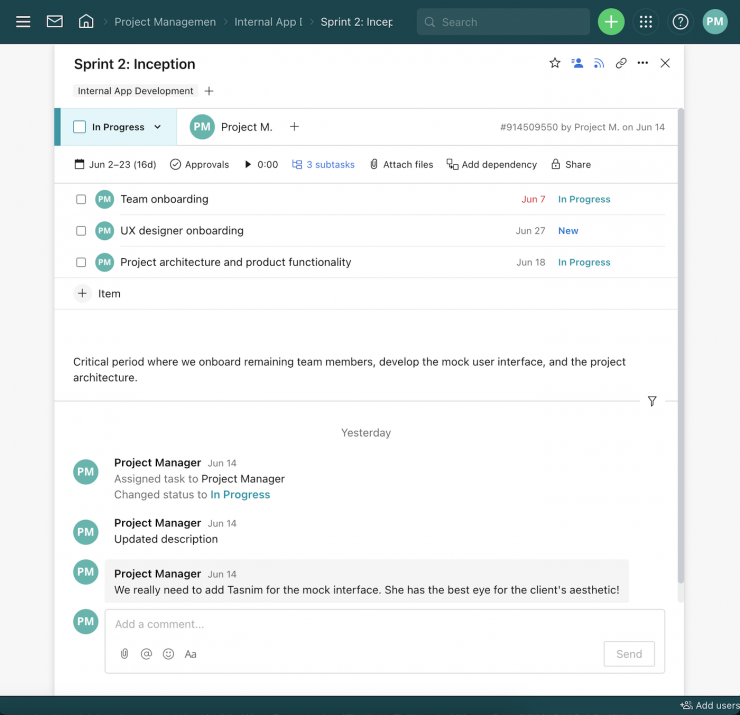
You can also invite third parties such as clients, vendors, or contractors, at no extra cost, to view the status of their projects and provide input that goes towards successful project completion.
Wrike Use Cases
Wrike’s use cases are quite impressive. Over 20,000 companies in over 140 countries have relied on Wrike to streamline their planning processes. These are companies that span a range of industries, including:
- SaaS
- Technology
- Healthcare
- Education
- financial services
- Construction
- Manufacturing
- Retail
What makes Wrike stand out from other project management platforms?
Wrike’s easy-to-create (and even easier-to-understand) Gantt chart view sets it apart from many other popular project management platforms. Plus, Wrike offers a range of other views, such as List, Board, Table, File, and Timelog. While this isn’t unique to Wrike, it isn’t super common to have that much flexibility,
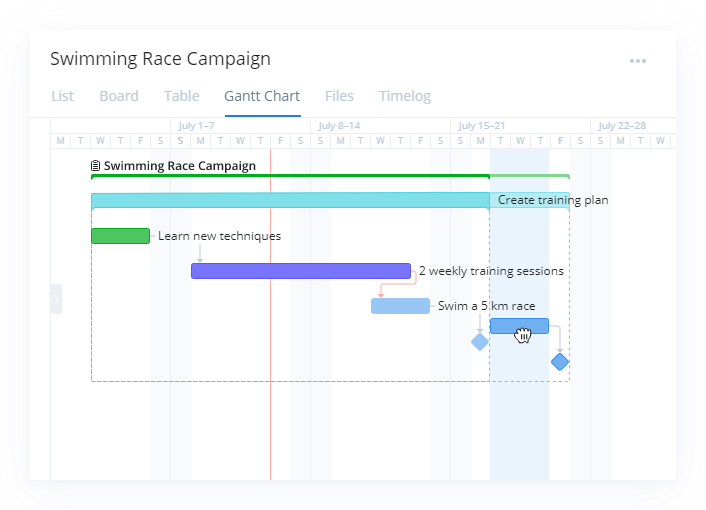
Overall, Wrike’s differentiating factor is the ease with which you can use it to manipulate project data to gain new perspectives and insights.
Wrike Pricing
Wrike offers a total of five plans, starting from a basic Free option, all the way up to an advanced Pinnacle option for large enterprises with complex needs.
Here’s a breakdown of the plans: 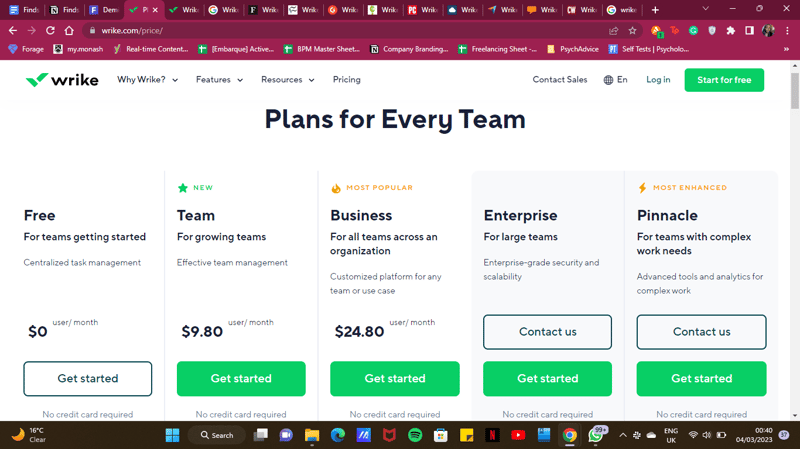
- Free : Wrike’s free plan is suitable for small teams that are just starting with project management software. However, it has limited feature options, including limited storage space, and excludes Gantt charts, time-tracking, and many customization tools.
- Team : Tailored for small teams that want to plan and collaborate on projects. This plan includes the Gantt chart view and the option to integrate with a wide range of services.
- Business : Provides access to advanced project management tools. The Business plan has everything you may need for project management for a large team.
- Enterprise : The Enterprise plan has custom pricing because Wrike will draw up a plan depending on your business needs. It is a plan to consider for large businesses that require more security controls.
- Pinnacle : This plan is for large businesses with complex work needs, including billable hours tools, job roles, and tools for planning and tracking effort put into different projects.
See Wrike pricing for current rates and plan details.
Pros and Cons of Wrike
Pros:
- Wrike offers plans for everyone, from small teams to large corporations.
- Real-time analytics are updated every 15 minutes.
- Wrike offers department-specific solutions which help different departments across your business align and communicate projects on one platform.
- Special customization is available for professional services and marketing and creative teams.
- Wrike offers training resources to help you get started on the platform.
- The free plan offers up to 2 GB of storage.
- It supports eight languages.
Cons:
- Although the project dashboards are user-friendly, those new to project management software may find Wrike overwhelming due to the wide array of features.
- Wrike’s costs can be a burden for mid-sized teams – there are cheaper project management tools with roughly equivalent features.
- Many of Wrike’s useful advanced features are offered as add-ons that can effectively double the price of the tool.
- The mobile app is not as user-friendly as other project management apps (e.g., Click Up). Managing tasks from the mobile app is not as smooth as using a desktop, and you may find that you’re unable to move and edit tasks.
- The interactive Gantt chart view is only available in the paid plans.
- The time-tracking in-app timer is only available on the Business plan and higher, and even small collaborative teams should be able to benefit from this feature.
Is Wrike right for your business?
Wrike is a comprehensive project management platform that also functions as a collaborative work management tool, making it ideal for businesses of all sizes. If you offer professional services or are part of a marketing or creative team, you can certainly benefit from Wrike’s highly customizable features.
It’s important to note that Wrike can be a bit pricey—especially with add-ons. Plus, it may be a bit overpowered for small teams who are looking for simple project management capabilities. That said, it’s a solid tool for managing multiple departments and complex projects.
If you want more insight and information into other project management software, Findstack has more helpful reviews you can take a look at.


We used Wrike to digitize our change management process between Mexico and the US. It has made communication easy using the time-based task lists and ties into the normal MS Office products. Its built-in reporting package brings visibility to all for the items that are open or behind schedule.
At times the rate of frequent software updates may confuse infrequent users. Some of the summary screens are difficult to navigate but given there quick response to customer requests for change this will probably be updated soon.
We use Wrike mainly for change requests and program driving, but many also use it for a personal task list. Many groups also use it for a bulletin board of hot topics for weekly team reviews.
Easy to use and quick to learn, app is great for on-the-go, streamlines work processes and great for project management
Interface could be updated to make it more pleasing on the eye
Project management and employee accountability
How intuitive and simple the program is to use and deploy. The Project Manager does not have to provide endless user support because the program makes seeing tasks and filing them correctly exteremly simple. Automatic notifications to users with open tasks saves time on follow-ups as well as lets the users finish when the timing suits them.
Honestly, there isn't much to dislike. The interface is simple and not cluttered. That is a plus, user/tester/contributors interfaces are extremly simple so there is minimal huffing and puffing about "learning a new system to complete one task". That's simply not the case.
By far, it makes our projects more nimble. The Project Manager has visibility and notification to everything they want. Rarely are there "didn't see that coming" moments, because the reporting and dashboarding is there for the management to pull and review. Especially with the work from home climate, being able to see 30 different people's task status' and not having to email/chat/call (becuase the notifications can do that for you). It just makes something that could be very complicated and involved, run so much more smoothly.
I like the organization of the site's layout.
I dislike the subfolders within other folders.
I'm more likely to get my work done sooner if a Wrike ticket has been made.
The ability to track and manage said projects and assets being submitted within a Wrike task. This is an amazing way to submit images and ideas to a specific project.
The easiness of understanding how to use wrike. Would be easier to have a GANT chart and assign projects on specific dates and implement micro tasks to show why it takes so long for certain projects, Alos could use a feature where end clients check off on taskings.
The problems that I solve with Wrike are mostly for design-related content and submitting for internal clients, and giving them particular assets to use for their needs. The benefits that come with doing this are that clients need to be able to sign off on certain assets instead of giving them the assets.
I like how we can manage projects and tasks all within the clean user interface. It allows our team members to collaborate across teams, and we can handle projects effectively and smoothly.
There isn't much I dislike; I have only used Wrike for project management. So I don't have much to compare it with. However, Wrike helps me solve any project that comes my way. It's effortless.
I solve basic problems like figuring out who communicated what within a project and if there was a handoff issue we can look back at previous conversations and see where the hold up is.

The system is very easy to understand once you have everything set up!
It is hard to get the filters to work properly
I am able to keep all my open projects in order by category and know where I am at all times!
Wrike is great for delegating tasks throughout our sales division and keeping track of the status of projects. It is easy to navigate and integrates well with the other systems we use.
Slow to communicate between Wrike and Salesforce.
Wrike has been incredibly beneficial for project management, project collaboration, task management, time management, and workflow management.
We use Wrike for end to end proposal support workflow management. It allows us to create customized request forms, streamlining the intake process, and workflows so we can track tasks based on our proposal process. The reporting and dashboard features allow me to easily see workload at a high level and deliver targeted insights to leadership. We process hundreds of proposals annually and wouldn't be able to effectively manage such a volume without Wrike.
Some reporting features can't be shared with Contributors, like Dashboards.
Creating a seamless process for taking in new work requests, tracking work through stages aligned with our proposal process, and providing clear and easy to pull reporting for leadership. Collaborating with my team and delegating work easily.
How easy it is to move the cards to have my work reviewed by someone else to ensure we have 2 eyes on each project.
Nothing! It has been so influential in my everyday work life.
It is solving the issues of things falling through the cracks. It has the benefit of making sure everything is getting looked at.
I like the calendar feature of Wrike to show which items need to be addressed on which days. It makes it very easy to keep track of tasks.
The only thing I dislike about Wrike is sometimes the notification system is too much. It would be good to only get notifications for high priority items.
I have solved the problem of workflow assignments and making sure my coworkers and I are equally distributing the work.
Our agency has used Wrike for the past 4 years. When first choosing Wrike I put a lot of time into research, and they seemed like the best fit. We have been using it ever since and it has been a good choice. Features are great; support is awesome.
I have nothing bad to say, other than there is a lot of capabilities with the system, so it can take a bit of time and working with it to use it within your processes and figure out the best utalization.
We use Wrike for project management and client information. The tool is great for us; we put all our clients into the system and add the projects to each client. These projects or tasks are then shared with our employees who are assigned to the task.
I like the easy edit of tasks and drag and drop fields. The dashboard keeps everything top of mind and focused.
It has that Google Sheet look and feel that I do not like.
The tasks assigned previously were sent in emails that no one could keep track of.

The flexibility of services, ease of use, and increased communication for our organization.
I would like a built-in CRM option and would also like the ability for notes to show up in other views rather than just in the list view.
We have been able to better organize and communicate with our new client onboarding. We have also increased communication and productivity.
I love how Wrike keeps a team on track and helps coordinate tasks so that we can meet our deadlines.
Wrike overall is a great tool, but it would be nice to have some templates available for common usage, such as agendas.
Our team was able to achieve tasks on time without having to send out too many individual emails.
I love the ability to connect easily with other members of our group. We can easily take meeting minutes and update each other on the status of our projects.
I think that for a larger organization, Wrike needs another level of organization. Sometimes when you have multiple pages and layers in a project, things can get lost easily.
Currently, we're organizing our lab space and proejcts on Wrike. It has been a key to stay up to date with the progress of our multiple trainees.
I really like the way it looks. You can choose how you view your info i.e. list, table, board, chart. Asset management is great. It's a one-stop-shop for my team.
It would be really nice if you could automatically send an email after a task or project is completed to external people.
Project management. Task Requests. Team communication. Asset storage. I didn't realize it would be such a good communication tool.
The organization of the platform is great and the reporting and blueprint functions are very helpful and easy to navigate.
There are a few glitches I run into frequently, and some tricks that are not as intuitive as I'd like
Project Management and Routing for compliance
Game changer for project management. My team originally worked from a Google Sheet for managing projects, then switched to Monday for a few months, and eventually landed on Wrike. Fantastic project management platform.
Not the best iOs apps. Specifically, the iPhone app is lacking.
Project management, prioritization, task management, etc.
I like how customizable Wrike is. We can be very specific about deadlines, workflows, etc. On top of that, it is extremely easy to duplicate that customization!
I dislike that it takes a while to get used to the platform. You definitely need one of your team members to become a "Wrike" expert, which is fine in the long run but makes deployment take quite a while.
We are solving deadline management and project assignment within our department. We are are using the proofing tools to streamline our cross departmental proofing.
The ability to time track per project & task. The ability to assign tasks. The ability to have dependencies and Gant charts!
It could use a bit more organizational guard rails or prompts.
The benefits of team organization and ease of collaboration across onsite and offsite staff are huge! Very robust.
There are so many options to customize the tools to suit your needs. The system is very flexible.
The sheer amount of options can be a bit overwhelming at first.
This software has made it easier to keep track of projects and coordinate the work amongst many people.
How accessible it is and easy to use. Helps to stay organized
It's a bit complicated at first but once you use it enough you get used to it
Stay organized with projects and getting a large scope of status on tasks
Easy to collaborate with a large organization.
Navigation can be cumbersome at times and locating a specific task within a project can be time-consuming.
Project management and ticketing queues for support and engineering.
The ability to customize the tool to fit our needs utilizing project templates, custom fields, and workflows to fit the business objectives is a great aspect. For example, our packaging workflow has multiple approval steps depending on what stage of development we are in. Our tooling stage workflow has automatic reminders to help team members keep up with the status of new products at our factories.
This is minor, but our greatest dislike is that there are some automation rules I would like to create that cannot be achieved yet. But they are not show-stoppers in any way.
Our team was using spreadsheets upon versions of the same spreadsheet to track work progress in outstanding tasks. When old updates were overwritten, we lost our ability to track decision reasoning in our post-mortem meetings. With Wrike, information was no longer lost in a previous version, decisions were easier to track, and workload is easier to visualize. Wrike has been a huge leap forward for our team with respect to process, workflow, project management, communication, and documentation. The ability to customize workflows specific to the task function, apply multiple approvals within a given workflow, automate notifications and reminders and utilize logic based request forms among other features has been a game changer for how work is logged and tracked across our user base. Additionally, the comments log and custom fields have allowed us to better audit our process and build out data repositories for quick access to necessary information.

I love that Wrike is so user friendly and easy to use. There is no way that my team could get the amount of work done that we need to without this service.
There is really no huge negatives. I have used several platforms, and by far Wrike is the best that I have used.
Collaboartion. Speed. Approvals. Projects. It really does allow us to speed up the work flow of everything and get feedback directly on projects that are in the works.

I love how easy it is to manage our projects and also be able to track projects easily.
I honestly don't think there is a downside on our end.
Wrike has allowed our company to flow all of our projects through this system instead of our emails. It's also allowed us to set up a review process for projects that need reviewing.

ability to easily schedule and assign tasks, with instant updates to the people they are assigned to. Also great to view workloads to see how many hours are assigned.
I'm not crazy about the new layout- preferred the old. The Mobile app is too different from the web version (easy enough, but would prefer a mirror for consistency). Need permissions enabled in versions beyond the most expensive suite- maybe offer an option.
Notification of schedules to field employees, preventing double booking by visible assignments. Techs are happier and we are more productive.

Workload planning, Gantt chart view, Custom Dashboards, reports, centralized communication, possibility to include collaborators. There is too much in there to write them all down
Nothing really. It does exactly what I need. Some would say that it is expensive, but when you look at it and consider the time it makes you save, it is like if they were giving it to you. You save money using Wrike...
I save a lot of time. Looking at dashboards and worloads gives me the insight I need to take my decisions. Centralizing all the communication under a common project or task prevents us to find important documentation that would be scattered across other softwares if we were not using Wrike.
Easy to get started, and very intuitive. It is flexible and we were able to integrate our work and adapt it to our necessities. We can share files, track time, generate reports, and create specific solutions for different parts of the project. The whole team and tasks are connected through Wrike, which makes it easy to track all the work happening.
We do not have any inconvenience with this product, the price is good for functionality and capability. Is a 10/10 for our experience. I just can't imagine our team without this tool.
Sharing files, tracking time, communications, assigning tasks, tracking tasks, reports, automated workflow, sharing information, processing, and organizing documents.