
Unclaimed: Are you working at Aircall?
Aircall Reviews: 4.4/5 — Solid Choice
Aircall is the cloud-based call center and phone system of choice for modern businesses. A voice platform that integrates seamlessly with popular CRM and helpdesk tools.

| Capabilities |
API
|
|---|---|
| Segment |
Small Business
Mid Market
Enterprise
|
| Deployment | Cloud / SaaS / Web-Based, Desktop Mac, Desktop Windows, Mobile Android, Mobile iPad, Mobile iPhone |
| Training | Documentation |
| Languages | English |

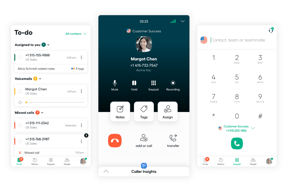
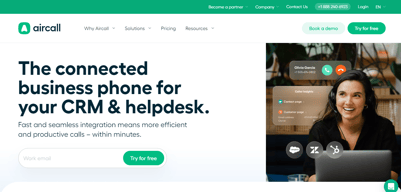





Aircall’s AI Voice Agents button reads “FROM €0.19/MINUTE”. That rate requires a custom bundle of 10,000 minutes or more. Pay as you go and the rate is €0.49 — 158% higher. The cheapest prepaid bundle, 500 minutes for €175, works out at €0.35. The €0.19 is real, but it sits at the far end of a ladder that starts at roughly €1,900 of committed spend, and nothing on the button says so.
- What it is: A cloud VoIP and customer-conversation platform with AI voice and messaging agents.
- Best for: Sales and support teams of three or more wanting calling tightly wired into a CRM.
- Pricing: Essentials €30, Professional €50 per licence per month on annual billing; Custom quoted. Verified July 2026.
- The honest catch: Single sign-on requires the Custom tier, which has a 25-licence minimum.
What Is Aircall?
Aircall is a cloud calling platform built for sales and support teams, with more than 250 integrations, a softphone for desktop and mobile, IVR, call recording, and — increasingly — an AI layer covering voice agents, messaging agents, and conversation intelligence.
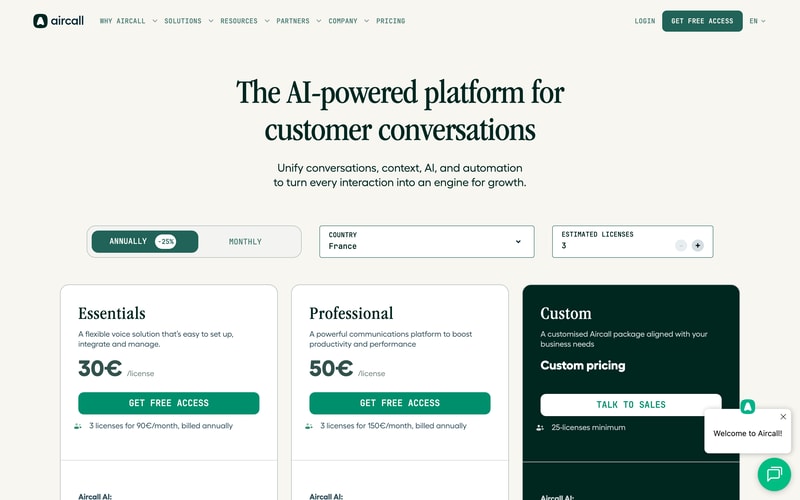
Three tiers: Essentials, Professional, and Custom. The first two carry published per-licence prices; the third is quoted and has a 25-licence minimum, which matters more than it first appears.
Both published plans require three licences minimum, so the page states the real figures itself: “3 licenses for 90€/month” and “3 licenses for 150€/month”. The toggle advertises 25% off for annual billing, and the page displayed annual rates throughout our capture.
How Aircall Works
- Priced per licence, with a three-licence minimum on both published plans.
- Essentials caps outbound calling at 1,000 domestic minutes per user per month.
- The Custom tier needs 25 licences, which is where SSO lives.
- AI voice minutes are metered separately, from €0.49 down to €0.19.
- AI Assist is a per-licence add-on at €9, or €49 for Pro.
- 50 free AI voice minutes per account per month.
Aircall Pricing
Captured from Aircall’s pricing page in July 2026 in euros, with annual billing displayed.
| Plan | Per licence/mo | Minimum | Real entry cost | Key inclusions |
|---|---|---|---|---|
| Essentials | €30 | 3 licences | €90/mo | 250+ integrations, IVR, recording, 1,000 outbound mins/user |
| Professional | €50 | 3 licences | €150/mo | Unlimited domestic outbound, Salesforce CTI, power dialer |
| Custom | Quoted | 25 licences | Quoted | Unlimited worldwide calls, SLA, SSO, API support |
AI add-ons: AI Assist €9/licence/mo · AI Assist Pro €49/licence/mo · AI Voice Agents from €0.19 to €0.49/min · AI Messaging Agents from €0.13 to €0.30/conversation
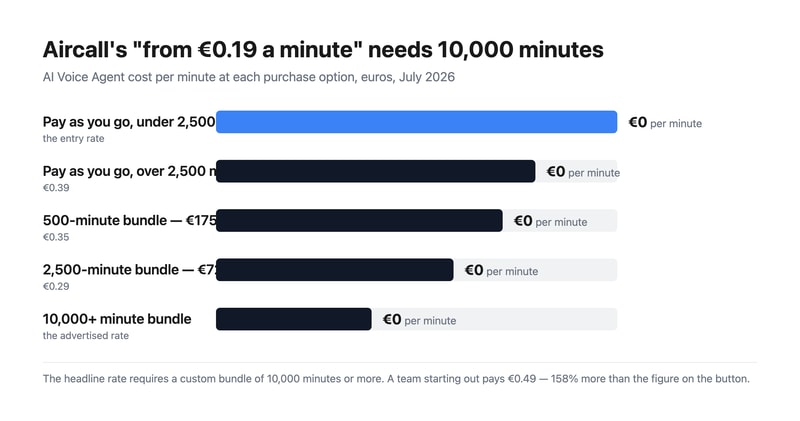
What actually decides your cost:
- The AI voice rate spans 158% from top to bottom. Pay as you go is €0.49 a minute under 2,500 minutes and €0.39 above it. Prepaid bundles are cheaper — 500 minutes for €175 is €0.35, and 2,500 for €725 is €0.29 — but the advertised €0.19 needs a custom bundle of 10,000 minutes or more. That is around €1,900 of committed spend before the headline rate applies.
- Three licences is the real floor, not one. Aircall states it plainly on both cards, so this is disclosed rather than hidden, but it means the entry price is €90 a month for Essentials and €150 for Professional, not €30 and €50.
- SSO is gated behind a 25-licence minimum. Single sign-on appears only on the Custom tier, and Custom requires 25 licences. So a fifteen-person team that needs SSO for compliance cannot buy it at any price — a harder gate than most, and worth contrasting with GoodAccess, which sells SSO as an add-on on its entry plan.
- Essentials meters outbound calling; Professional does not. One thousand domestic outbound minutes per user per month is about 50 minutes a working day — workable for support, tight for outbound sales. Professional makes domestic calling unlimited, and unlimited worldwide calling requires Custom.
- AI Assist Pro costs almost as much as the plan. €49 per licence per month against Professional’s €50. It adds live transcription, custom summaries, and sales playbooks over the €9 AI Assist tier. Doubling your per-seat cost for real-time coaching is a defensible trade for a sales floor and hard to justify anywhere else.
- AI messaging follows the same shape. €0.30 per conversation pay-as-you-go, dropping to €0.25 after a thousand; prepaid bundles are €220 for 1,000 (€0.22) and €1,300 for 10,000 (€0.13). As with voice, the cheapest advertised rate needs the largest commitment.
Who Should Use Aircall
- Sales teams living inside a CRM. The clearest case — 250-plus integrations and a Salesforce CTI on Professional.
- Support teams of three or more. The licence minimum makes it a team product by design.
- Businesses deploying AI voice agents. Aircall publishes per-minute rates openly, which many competitors will not.
- Outbound sales floors. Power dialer and voicemail drop are included on Professional rather than sold on top.
It fits poorly for solo operators and pairs, given the three-licence minimum; for teams under 25 that need SSO, which is unreachable; and for light AI users, who will pay €0.49 a minute rather than the advertised €0.19.
Honest Pros and Cons
Strengths
- Every AI rate is published, including pay-as-you-go and each bundle.
- The licence minimum is stated on the card, in money rather than fine print.
- Power dialer and voicemail drop included on Professional.
- 250-plus integrations and API access from the entry plan.
- 50 free AI voice minutes per account each month, plus 100 at sign-up.
- Unlimited inbound calls on every plan, toll-free excluded.
Limitations
- The advertised €0.19 AI rate needs 10,000+ minutes.
- A three-licence minimum on both published plans.
- SSO requires 25 licences via the Custom tier.
- Essentials caps outbound at 1,000 minutes per user monthly.
- AI Assist Pro at €49 nearly doubles a Professional seat.
- Worldwide calling is Custom-only.
Aircall Alternatives and How It Compares
- CloudTalk is the closest competitor for European calling, from €25 per user.
- RingCentral is the larger incumbent covering voice, video, and messaging.
- Nextiva is stronger on US business telephony and unified communications.
- Quo (formerly OpenPhone) suits small teams sharing numbers, without a licence floor.
- Grasshopper is the solo-operator option Aircall’s minimum rules out.
- Dialpad competes most directly on AI-led calling.
For a broader survey, browse our VoIP providers directory.
The Verdict
Aircall is a strong choice for a sales or support team that wants calling wired properly into its CRM, and its commercial disclosure is better than most. It publishes every AI rate — pay-as-you-go, each prepaid bundle, and per-conversation messaging — where competitors routinely hide all of it behind a sales call. It also states the licence minimum in money on the plan card itself: “3 licenses for 90€/month”. That is the opposite of burying it.
Which makes the one piece of framing that does mislead more conspicuous. The AI Voice Agents button reads “FROM €0.19/MINUTE”, and €0.19 is available only on custom bundles of 10,000 minutes or more — roughly €1,900 committed. A team trying the feature pays €0.49 a minute, 158% more. The prepaid bundles sit in between at €0.35 and €0.29. Every one of those numbers is published a few lines below the button; the button simply quotes the best of them. Budget from €0.49 and treat anything cheaper as a volume reward.
Two structural limits to check against your own headcount. Three licences is the floor on both published plans, so €90 and €150 a month are the real entry prices. And single sign-on lives only on the Custom tier, which requires 25 licences — meaning a fifteen-person team with an SSO requirement has no route to it at any price. That is a harder gate than most vendors set, and it is the constraint most likely to disqualify Aircall for a mid-sized company that otherwise fits it well.
FAQ
How much does Aircall cost?
On the euro price list captured July 2026 with annual billing: Essentials €30 per licence per month and Professional €50, both with a three-licence minimum — so €90 and €150 a month respectively. The Custom tier is quoted and requires at least 25 licences. AI Assist is €9 per licence per month, AI Assist Pro €49, and AI voice minutes are billed separately.
Why is Aircall’s AI voice pricing higher than the advertised €0.19?
Because €0.19 applies only to custom bundles of 10,000 minutes or more. Pay-as-you-go is €0.49 per minute below 2,500 minutes and €0.39 above it. Prepaid bundles fall between: 500 minutes for €175 works out at €0.35, and 2,500 minutes for €725 at €0.29. Every account also gets 50 free AI voice minutes a month, plus 100 extra at sign-up.
Does Aircall have a minimum number of users?
Yes. Both Essentials and Professional require three licences, which Aircall states directly on the plan cards as “3 licenses for 90€/month” and “3 licenses for 150€/month”. The Custom tier has a much higher floor at 25 licences. There is no single-user option, so solo operators need a different provider.
Which Aircall plan includes single sign-on?
Only Custom, which requires a minimum of 25 licences. Neither Essentials nor Professional offers SSO at any price, so teams below 25 people with a single sign-on requirement cannot meet it on Aircall. Custom also adds unlimited worldwide calling, a service-level agreement, custom onboarding, and API developer support.
What is the difference between Aircall Essentials and Professional?
Calling volume and sales tooling. Essentials at €30 includes 1,000 domestic outbound minutes per user per month, IVR, call recording, and 250-plus integrations. Professional at €50 makes domestic outbound calling unlimited and adds Salesforce CTI, advanced analytics and live monitoring, mandatory call tagging, and sales features including power dialer and voicemail drop.

Compare Aircall with other popular tools in the same category.
Aircall help us better assist our client over the phone. Line was clear and there is an indication on how good the connection is or if there is any issue during the particular phone call.
It would have been better if we can have a feature that if the inbound call received the outbound call that is being made will remain and will not disconnect as well.
It makes our work easier and it help us communicate well as the line was clear and there is no static line during the interaction. It helps use fully understand our client.
Aircall is a very easy to understand and navigate soft phone I have ever experience since using different kinds of soft phones while working in customer service industry.
I dont think there is anything not working well but I will say that sometimes Aircall do have a lot of loading processes and hangs most of the time but it is quite tolerable.
Aircall history management and tracking of available staff is much easier to understand and it definitely helps with better communication and much more user friendly interface.
The good thing about this app is I can manually set how many minutes or seconds i need for wrap-up time and I can also set different name on the app. I'm using different phone name due to my real name is kind of hard to explain so this feature is useful to me.
I'm not sure if it's because I am not so familiar with the app yet but Im having a hard time with it's function, especially when I'm doing outbound call(while on another call), i'm selecting call separately and from that point I don't see an option to join that call to my existing call. I know I have pressed call separately but it would be useful if there is an option to join that outbound call to the existing active call, we sometimes have to had a 3 way call in the middle of doing outbounds.
Soft phone is more efficient now than using hard phone. This will allow us to set up work from home more easily.
We can receive inbound calls and do outbound calls at the same time.
When the internet is slow the the person on the other line is choppy.
For me Aircall is easy to use and doesn't have any problems.
That I can listen to the call after I finish it, really to communicate or to do an outbound call. friendly on how to communicate with team members,
That some times even though I have a strong internet connection, gives me a message of increased latency. have not experienced wrong sides with air calls.
Solving that in one app, I can text or call clients and they can do the same while having a desktop application or Mobile application. Save me time when approaching a client or prospect
That we can rotate calls so each phone agent gets even amount of calls.
Sometimes you have to restart the app if you input your headset mid-shift.
We are assisting our clients in order placement

The tool's user-friendliness and seamless call transfer to coworkers are impressive, while the call quality is remarkable. One notable feature is the option to tag calls later, making it convenient to track communications when several people are reaching out to the same customer.
Occasionally, the tool connects to the website without permission, causing unwanted ringing and disrupting ongoing work. Sometimes, it mistakes website numbers for phone numbers and makes unwanted calls.
This tool has revolutionized our communication approach by providing better call quality with customers and improving our call tracking through labeling and monitoring. Despite some minor flaws, this tool expedites and simplifies our operations significantly.
Allows add cooments while you are on a call
It requires a very fast internet speed to work
Client contact
Aircall has really helped our customer-facing team track our interactions and keep a log of calls and assign them to the right person!
It logs me out quite a bit and if I'm not aware I'll miss calls!
I used to have my clients call my number! As we grew that became a little overwhelming. It's really nice to have a work number!

As a large team we are collaborating effectively through sharing contac, transfers and more at real-time.
All c apabilities are beyond any reasonable doubt.
We have effective communication experience throughout our business with accurate call monitoring and analytics
Aircall was a quick solution for inbound calls with a toll free number.
Can be a bit difficult to become familiar with.
Phone vendor for incoming calls and outgoing calls for the team.
Easy to conference calls , transfer , sms to clients it great !
Most of it is great but. There was a tiny issue with the audio settings
User friendly overall when I start using it for be never used it before and took me less than a few minutes to understand it all
It's userfriendly. It doesn't freeze as much as others. You can text while calling. powerdialing is also very helpful
I would love to see a mass texting option
It helps me call/text much quicker
I can call and text, but it gives me another number on my same mobile. Don't need a dedicated work phone. Also, the user interface is quite intuitive, making it easy to figure out without training.
Sometimes the call quality is a bit patchy over wifi. That could be more about the quality of the wifi than Aircall tbf.
Giving the team an easy untethered calling solution, but also providing valuable insights through out integration with ActvieCampaign CRM.
As a work-from-home call center agent, I have used several different remotely networked programs for call handling, and Aircall has definitely offered the most effortless setup and the best call quality I've worked with. Even if your internet speed dips, the audio doesn't. Were that not enough reason, it's also one of the smallest programs I've had to download. I also love the ring tones and would love to see more. Answer customer service phone calls long enough, and you associate specific rings with stress, so being able to change the ring away from one I had from a different job was highly satisfying. Out of all the programs I've experienced, I'd recommend Aircall for any smaller business that wants to handle calls through the computer.
We've had a little bugginess of "Available" call status not showing up in the server, and it requires a full PC restart to correct. Closing Aircall can leave a lot of fractional instances of the app in my active programs, and after a few days, it tends to be more likely to bug out. It would be great if "closing" Aircall completely closed it and all instances of it on my PC. It's also hard to find the sound settings, and I have not adjusted my ring and call volume easily.
Answering calls remotely through a PC for a business is essentially the future of virtually every industry. It must be easy to set up for employees with all levels of computer competency, and it has to run smoothly with as much range in internet speed as possible.

- Ability to integrate with CRM - Ability to send SMS - Mobile Application very convenient - Mobile application activity logged on CRM - Mobile Application integrates with Web application activity - Call recording - Automation and workflows - Working hours setting
- Call quality is not always reliable on mobile app, often times have to call from native cellphone calling - SMS not logged automatically on CRM
Automation Call activity logging Using call recording for quality & training
Aircall integrates with a lot of systems! This makes it a lot easier to collaborate across teams and the company while keeping a in-depth trail of said communications. Streamlining the process really.
You do lose the ability to stop or start the recording after an internal transfer has been completed. For some inbound sales teams, this may be a compliance issue.
Currently, Aircall is helping me solve some reporting problems for the data my team uses. This is super helpful because it will help me to determine the next area of much-needed focus to improve quality productivity!
in a nutshell, Aircall is a dialer so it gives me everything as I'm expecting from a dialer it's smooth and simple and I like the support team they respond fast and they are really helpful
there are some glitches happening in the dialer some issues it was an obstacle but as i mentioned the support team helped me fast and to be honest after they updated Aircall it no longer happen this much
i'm working in the real estate field as a cold caller so i'm trying to help the home owner who are in the tough situation so Aircall providing me the solution by calling them and giving me lots of numbers without destroying my budget
If the internet is working fine, the audio quality is really good and it is easy to use. I like that the call history is accessible at any time. So far I haven't had any major issues with the app.
More than dislike, I'd say feature I wish the app had. I'd love to have UI that is more colorful or that allows me to customize to have different backgrounds to make it look refreshing. Also, an option to know if a call was disconnected or dropped and if it was terminated by the customer or the user (Maybe that is too much to ask).
Being able to reach out to customers and have a smooth interaction that helps deliver a better experience is definitely the biggest benefit of the Aircall.
The most likable function of Talkdesk and Aircall is its accessibility and unambiguous live monitoring and data analytics. It also has engaging visible features/design and is very easy to navigate.
The main reason why we switched to a different tool from Aircall is that it cannot do simultaneous conversations as this tool only focuses on phone calls. We switch to gladly because it resolves this lacking issue and provides 3 ways to talk to members through chat, SMS, and call under 1 ticket/conversation.
Aircall provides easy-to-use access to members' information and helps resolve concerns faster. It also has unambiguous live monitoring and data analytics that helps provide tracking our live channel.
It's a very resourceful software, extremely helpful and easy to use.
Nothing to dislike, it's great and very very helpful.
It has helped improve call quality and makes communication easier during calls.

The UI is very fluid. Call quality & responsiveness are excellent when compared to other dialers in the market. The pricing is very affordable as well. We haven't experienced any signal degradation so far.
Loudspeaker functionality is very unpredictable (it gets blocked for certain calls, so we need to make those dials with a headset). This is becoming an issue as we need the research to be on the front when on the phone with the prospect, and loudspeaker functionality is very important there.
It helps us in touch with the warm leads as soon as possible from the inbound front and the software also helps us improve our game from an outbound perspective (making cold calls)
It's easy to use on a desktop, laptop, or mobile phone. You get email notifications. You can send and receive texts as well. It is better than the rest.
It doesn't support slow internet. Customer support takes a lot of time to respond. if you can improve on voice quality during slow internet, then that would be great, and 24x7 customer support should be there.
We work in different markets, and we can make calls and send texts on the go. Very cost-effective as well. It definitely made us more productive.
That you can keep a perfect record of each call
Sometimes when I try to answer it connects and then someone else answers the call and my call drops
We are controlling more who answers the calls and we can monitor the quality more
The switching between the lines is easy in Aircall
Sometimes Aircall doesn't connect the call.
superior call quality as I have been very helpful with using Aircall for international calls.

The integration of the app to google chrome. I love that I can just click the number and it dials right away.
This may be an option but I do not know how to block certain numbers yet. Spam calls and bad contacts have flooded my To-Do list.
It solves the issue of dialing numbers one by one. Its perfect for what I need. It makes my job that much easier to do day in and out .
Aircall is by far, the most easy dialler i have ever used. It is easy to navigate and transfers are so easy to do unlike any other diallers i have used previously.
Aircall requires a strong internet service so you can use its full function. Other than that, everything about aircall is so easy to use. It also does not occupy a huge amount of space in your screen, which is a good thing
Aircall has been widely used by my previous company in inbound and outbound calling. Good thing about aircall also is that you can listen to recordings and be on track on how many customers you have handled.
easy integration in our emailing platform Front. can be installed in every device, mobile phone, pc,tablet,etc. good calls quality
when i use it in android phone, i have to accept everyday the permision to show the notification when someone is calling. it's start ringing , but i can't answer or refuse or silence it.
reducing the cost of international calls, sometimes it recognize easly the phone numbers and just clicking on it , you can start a call.
I like the option to tag calls and leave a note after each call
Sometimes doesn't synchronize well with other platforms
I'm using Aircall both for inbound and outbound calls with my customers
Simplicity and very efficient. It helps a lot to manage our clients portfolio
Nothing. Aircall is very complete and works well
Working from home we don't neet a telephone line a prt from our computer. We can keep control and follow up of all our calls