

Unclaimed: Are you working at Aircall?
Aircall Reviews: 4.4/5 — Solid Choice
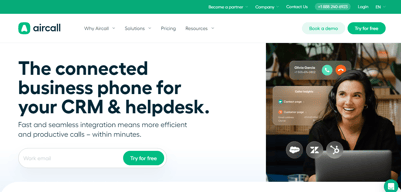
Aircall is the cloud-based call center and phone system of choice for modern businesses. A voice platform that integrates seamlessly with popular CRM and helpdesk tools.

| Capabilities |
API
|
|---|---|
| Segment |
Small Business
Mid Market
Enterprise
|
| Deployment | Cloud / SaaS / Web-Based, Desktop Mac, Desktop Windows, Mobile Android, Mobile iPad, Mobile iPhone |
| Training | Documentation |
| Languages | English |







Aircall’s AI Voice Agents button reads “FROM €0.19/MINUTE”. That rate requires a custom bundle of 10,000 minutes or more. Pay as you go and the rate is €0.49 — 158% higher. The cheapest prepaid bundle, 500 minutes for €175, works out at €0.35. The €0.19 is real, but it sits at the far end of a ladder that starts at roughly €1,900 of committed spend, and nothing on the button says so.
- What it is: A cloud VoIP and customer-conversation platform with AI voice and messaging agents.
- Best for: Sales and support teams of three or more wanting calling tightly wired into a CRM.
- Pricing: Essentials €30, Professional €50 per licence per month on annual billing; Custom quoted. Verified July 2026.
- The honest catch: Single sign-on requires the Custom tier, which has a 25-licence minimum.
What Is Aircall?
Aircall is a cloud calling platform built for sales and support teams, with more than 250 integrations, a softphone for desktop and mobile, IVR, call recording, and — increasingly — an AI layer covering voice agents, messaging agents, and conversation intelligence.
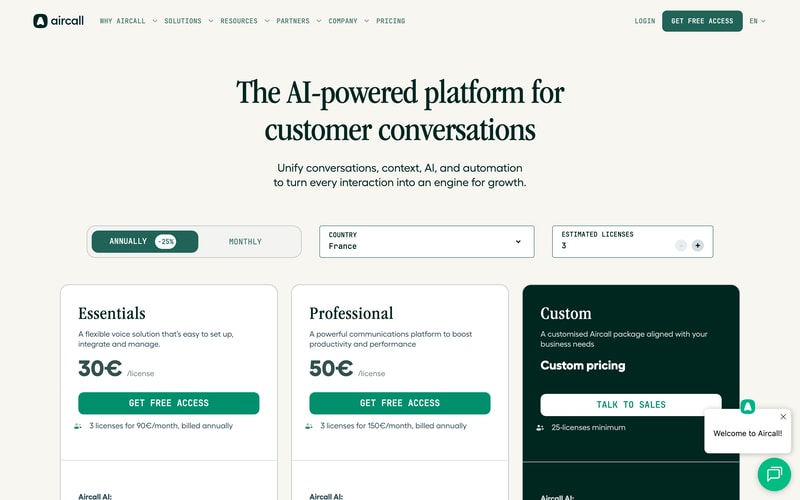
Three tiers: Essentials, Professional, and Custom. The first two carry published per-licence prices; the third is quoted and has a 25-licence minimum, which matters more than it first appears.
Both published plans require three licences minimum, so the page states the real figures itself: “3 licenses for 90€/month” and “3 licenses for 150€/month”. The toggle advertises 25% off for annual billing, and the page displayed annual rates throughout our capture.
How Aircall Works
- Priced per licence, with a three-licence minimum on both published plans.
- Essentials caps outbound calling at 1,000 domestic minutes per user per month.
- The Custom tier needs 25 licences, which is where SSO lives.
- AI voice minutes are metered separately, from €0.49 down to €0.19.
- AI Assist is a per-licence add-on at €9, or €49 for Pro.
- 50 free AI voice minutes per account per month.
Aircall Pricing
Captured from Aircall’s pricing page in July 2026 in euros, with annual billing displayed.
| Plan | Per licence/mo | Minimum | Real entry cost | Key inclusions |
|---|---|---|---|---|
| Essentials | €30 | 3 licences | €90/mo | 250+ integrations, IVR, recording, 1,000 outbound mins/user |
| Professional | €50 | 3 licences | €150/mo | Unlimited domestic outbound, Salesforce CTI, power dialer |
| Custom | Quoted | 25 licences | Quoted | Unlimited worldwide calls, SLA, SSO, API support |
AI add-ons: AI Assist €9/licence/mo · AI Assist Pro €49/licence/mo · AI Voice Agents from €0.19 to €0.49/min · AI Messaging Agents from €0.13 to €0.30/conversation
What actually decides your cost:
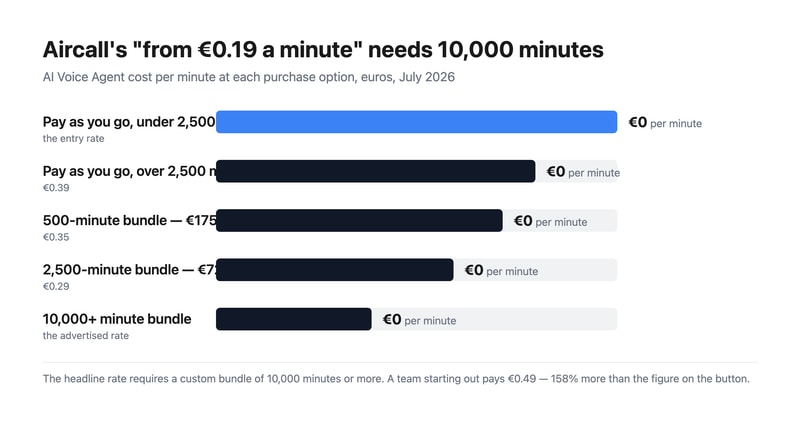
- The AI voice rate spans 158% from top to bottom. Pay as you go is €0.49 a minute under 2,500 minutes and €0.39 above it. Prepaid bundles are cheaper — 500 minutes for €175 is €0.35, and 2,500 for €725 is €0.29 — but the advertised €0.19 needs a custom bundle of 10,000 minutes or more. That is around €1,900 of committed spend before the headline rate applies.
- Three licences is the real floor, not one. Aircall states it plainly on both cards, so this is disclosed rather than hidden, but it means the entry price is €90 a month for Essentials and €150 for Professional, not €30 and €50.
- SSO is gated behind a 25-licence minimum. Single sign-on appears only on the Custom tier, and Custom requires 25 licences. So a fifteen-person team that needs SSO for compliance cannot buy it at any price — a harder gate than most, and worth contrasting with GoodAccess, which sells SSO as an add-on on its entry plan.
- Essentials meters outbound calling; Professional does not. One thousand domestic outbound minutes per user per month is about 50 minutes a working day — workable for support, tight for outbound sales. Professional makes domestic calling unlimited, and unlimited worldwide calling requires Custom.
- AI Assist Pro costs almost as much as the plan. €49 per licence per month against Professional’s €50. It adds live transcription, custom summaries, and sales playbooks over the €9 AI Assist tier. Doubling your per-seat cost for real-time coaching is a defensible trade for a sales floor and hard to justify anywhere else.
- AI messaging follows the same shape. €0.30 per conversation pay-as-you-go, dropping to €0.25 after a thousand; prepaid bundles are €220 for 1,000 (€0.22) and €1,300 for 10,000 (€0.13). As with voice, the cheapest advertised rate needs the largest commitment.
Who Should Use Aircall
- Sales teams living inside a CRM. The clearest case — 250-plus integrations and a Salesforce CTI on Professional.
- Support teams of three or more. The licence minimum makes it a team product by design.
- Businesses deploying AI voice agents. Aircall publishes per-minute rates openly, which many competitors will not.
- Outbound sales floors. Power dialer and voicemail drop are included on Professional rather than sold on top.
It fits poorly for solo operators and pairs, given the three-licence minimum; for teams under 25 that need SSO, which is unreachable; and for light AI users, who will pay €0.49 a minute rather than the advertised €0.19.
Honest Pros and Cons
Strengths
- Every AI rate is published, including pay-as-you-go and each bundle.
- The licence minimum is stated on the card, in money rather than fine print.
- Power dialer and voicemail drop included on Professional.
- 250-plus integrations and API access from the entry plan.
- 50 free AI voice minutes per account each month, plus 100 at sign-up.
- Unlimited inbound calls on every plan, toll-free excluded.
Limitations
- The advertised €0.19 AI rate needs 10,000+ minutes.
- A three-licence minimum on both published plans.
- SSO requires 25 licences via the Custom tier.
- Essentials caps outbound at 1,000 minutes per user monthly.
- AI Assist Pro at €49 nearly doubles a Professional seat.
- Worldwide calling is Custom-only.
Aircall Alternatives and How It Compares
- CloudTalk is the closest competitor for European calling, from €25 per user.
- RingCentral is the larger incumbent covering voice, video, and messaging.
- Nextiva is stronger on US business telephony and unified communications.
- Quo (formerly OpenPhone) suits small teams sharing numbers, without a licence floor.
- Grasshopper is the solo-operator option Aircall’s minimum rules out.
- Dialpad competes most directly on AI-led calling.
For a broader survey, browse our VoIP providers directory.
The Verdict
Aircall is a strong choice for a sales or support team that wants calling wired properly into its CRM, and its commercial disclosure is better than most. It publishes every AI rate — pay-as-you-go, each prepaid bundle, and per-conversation messaging — where competitors routinely hide all of it behind a sales call. It also states the licence minimum in money on the plan card itself: “3 licenses for 90€/month”. That is the opposite of burying it.
Which makes the one piece of framing that does mislead more conspicuous. The AI Voice Agents button reads “FROM €0.19/MINUTE”, and €0.19 is available only on custom bundles of 10,000 minutes or more — roughly €1,900 committed. A team trying the feature pays €0.49 a minute, 158% more. The prepaid bundles sit in between at €0.35 and €0.29. Every one of those numbers is published a few lines below the button; the button simply quotes the best of them. Budget from €0.49 and treat anything cheaper as a volume reward.
Two structural limits to check against your own headcount. Three licences is the floor on both published plans, so €90 and €150 a month are the real entry prices. And single sign-on lives only on the Custom tier, which requires 25 licences — meaning a fifteen-person team with an SSO requirement has no route to it at any price. That is a harder gate than most vendors set, and it is the constraint most likely to disqualify Aircall for a mid-sized company that otherwise fits it well.
FAQ
How much does Aircall cost?
On the euro price list captured July 2026 with annual billing: Essentials €30 per licence per month and Professional €50, both with a three-licence minimum — so €90 and €150 a month respectively. The Custom tier is quoted and requires at least 25 licences. AI Assist is €9 per licence per month, AI Assist Pro €49, and AI voice minutes are billed separately.
Why is Aircall’s AI voice pricing higher than the advertised €0.19?
Because €0.19 applies only to custom bundles of 10,000 minutes or more. Pay-as-you-go is €0.49 per minute below 2,500 minutes and €0.39 above it. Prepaid bundles fall between: 500 minutes for €175 works out at €0.35, and 2,500 minutes for €725 at €0.29. Every account also gets 50 free AI voice minutes a month, plus 100 extra at sign-up.
Does Aircall have a minimum number of users?
Yes. Both Essentials and Professional require three licences, which Aircall states directly on the plan cards as “3 licenses for 90€/month” and “3 licenses for 150€/month”. The Custom tier has a much higher floor at 25 licences. There is no single-user option, so solo operators need a different provider.
Which Aircall plan includes single sign-on?
Only Custom, which requires a minimum of 25 licences. Neither Essentials nor Professional offers SSO at any price, so teams below 25 people with a single sign-on requirement cannot meet it on Aircall. Custom also adds unlimited worldwide calling, a service-level agreement, custom onboarding, and API developer support.
What is the difference between Aircall Essentials and Professional?
Calling volume and sales tooling. Essentials at €30 includes 1,000 domestic outbound minutes per user per month, IVR, call recording, and 250-plus integrations. Professional at €50 makes domestic outbound calling unlimited and adds Salesforce CTI, advanced analytics and live monitoring, mandatory call tagging, and sales features including power dialer and voicemail drop.

Compare Aircall with other popular tools in the same category.
I like how simple it is to add people to calls and transfter calls. I like that you can link your account so that customers details come up when they call so that we know who is calling.
Sometimes the calls dont always come through to the whole team.
Finding customers contact details when their number comes up. Easily seeing voicemails.
It is comfortable and could be used from any device, computer, phone, laptop etc.
I believe it is fine, I do not have anything that bad that comes onto my mind, in general I have a good experience
it is conntected to our hubspot data base and it is automatically tracking all our customers, could be used on the computer.
Our account manager Nidhi is very helpful and gives us all the time support we need. She is good about getting our issues resolved quickly and helping us navigate the setup. I would recommend Aircall to a smaller company as a more affordable option, and setup is pretty user friendly.
The software itself has some bugs. I wish we were able to change the order of the tags, filter texts by user, send and receive images, and the mobile version definitely needs some TLC. You can't text the person you are on a call with on the mobile app which is a little frustrating for our sales team.
Aircall is helpful in getting all of our team members local phone numbers to contact each other and our customers. We don't rely on the stats for Ops, but they are helpful for sales. Problems with setting up accounts, random changes that happen in the interface that don't seem to help anyone. That's concerning.
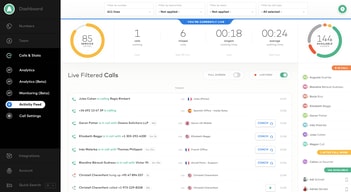
Aircall is very handy to have when making calls. It is easy to keep track of outbound and inbound calls. Not only this but it keeps a record and transcripts of past conversations.
Every now and then I find some calls dont have a transcript which can be annoying when trying to locate a particular part of the call. This isnt a major flaw as it only occurs occasionally.
As a user that makes calls to both the uk and internationally, the aircall feature to change the calling number to the natieve country code is extremely beneficial, as we find more prospects answer a recognised country code
The ease of the service and been able to flip priorities
When aircall goes down we do not get the support needed
Knowing who is available and when and that teams are in the correct status.
Calling different area codes & having call recordings
Losing connection & delayed connections sometimes
Being able to call off all area codes & having a way to interface with my call recordings to work on my pitch definitely helps. My business has somewhat improved having more than just a Google Voice Number in Cali & Atlanta.
How everything is synced with Hubspot and all of my contacts are easily accessible. The calling and messaging features are very easy to use.
When pulling up a contact from Hubspot, it says phone number and then other number instead of mobile number. Picture messaging not available.
Helping to keep information relevant and auto tracking for customers.
the quality of connection and simplicity of UI
Maybe the pricing packages - like it would be nicer for smaller companies if you would have like 1 client package or so . In our case for example 1 client still remains not used, cuz we only need it for 2 persons for now. Maybe alsosome more noice cancelling funktions in the app itself
we establish connection between the parts of company located in diffrent countries
easy to use, pretty good quality, connects fast
drops call on cellphones, sometimes the login takes a while to load
It helps dial quickly to customers and allows us to keep track of the customer calls and messages
The simple interface allows new teams to manuever around handling calls in an effecient way, considering how phone calls are in nature. The accessible contact list and the possibilities of tracking productivity, especially how easily the dashboard can be read to confirm the incoming calls is wonderful!
Two things: 1. Whenever we have an existing call and are trying to call somebody else, it does not give us the option to use our preferred assigned number (which is important if we have more than 1 assigned) and 2. whenever we conference calls - we cannot initiate ending the call from our end as it ends up dropping the whole call together. Considering this is vital, we wish we can get this added as a new feature
Multiple items are factored and solved because of Aircall. It is more versatile compared to our old telephone system when it comes to saved contact numbers that should be accessible to all team members, easier dashboards where we can track the calls coming through and also the easily accessed recordings in case audits are needed.
It is an affordable way to call people from all over the world
It can be quite glitchy sometimes, so for a business this is a problem because your integrity can be tainted
It allows me to contact people in the USA from France with a US phone number which builds trust.

set up the different numbers is very easy and fast. The integration with Hubspot is also a big plus.
Interface of the Mac App can be improved.
Managing calls directly from HubSpot
I love the convenience it is in the work places in a sales role
Its glitchy on my pc and sometimes the quality gets poor.
Taking away the use of personal numbers in the work force
I love the ease of use. Having experienced offerings from competitors, I can say Aircall was the easiest to get the hang of which assisted in efficiency through work-flows!
On occasion my team did experience technical difficulties when using aircall: inability to hear callers and calls not logging as they should. Also, I would find it beneficial if Aircall allowed MMS as I sometimes needed to send and receive images.
Aircall is solving the problem of reaching a large volume of people by call/text. I especially loved the power-dialer feature, which aided it in reaching the most clients on any given day.
There are several things that make Aircall a great choice for businesses looking to improve their communication systems: Easy to Use: Aircall has a simple and user-friendly interface that is easy to navigate, making it easy for businesses to get started quickly. Integrations: Aircall integrates with a variety of tools, such as Salesforce, Slack, and Zendesk, making it easy to manage all of your communication channels in one place. Flexibility: Aircall offers a range of pricing plans to suit businesses of all sizes and needs, and allows for easy scaling as your business grows. Advanced Features: Aircall offers a range of advanced features, such as call recording, call queuing, and call analytics, to help businesses optimize their communication processes and improve customer experience. Overall, Aircall is a powerful and reliable communication platform that can help businesses streamline their communication processes, increase efficiency, and improve customer satisfaction.
While Aircall is generally a great communication platform for businesses, there are a few potential drawbacks to consider: Limited Mobile App Functionality: Aircall's mobile app is not as fully featured as its desktop version, which could be a limitation for businesses that require mobile access to all of their communication channels. International Calling Rates: Aircall's international calling rates can be quite expensive, which could be a concern for businesses that make a lot of international calls. Limited Call Customization: While Aircall offers a range of advanced features, some users have noted that the platform is not as customizable as other communication platforms, which could be a limitation for businesses with unique communication needs. Overall, these potential drawbacks may not be significant concerns for all businesses, and Aircall still offers a lot of value as a communication platform.
Aircall solves a variety of business communication issues, including: Centralizing Communication Channels: Aircall allows businesses to centralize all of their communication channels, including phone, email, and chat, in one platform, making it easier to manage and respond to customer inquiries. Improving Customer Experience: Aircall's advanced features, such as call routing, call queuing, and call analytics, can help businesses optimize their communication processes and provide a better customer experience. Increasing Efficiency: Aircall's integrations with other business tools, such as Salesforce and Zendesk, can help businesses streamline their workflows and increase efficiency. Facilitating Remote Work: Aircall's cloud-based platform and mobile app make it easy for businesses to manage communication from anywhere, making it an ideal solution for remote teams. Overall, Aircall solves a range of business communication issues, helping businesses improve their communication processes, increase efficiency, and provide a better customer experience.
I love the fact that it tells me what time it is when I'm calling since the time difference can be a big problem when you're calling internationally. As an SDR we have to understand the working hours from different regions so we can use the perfect strategies to make an impact
The fact that you can hang up on a call and still be in it. It's extremely annoying, especially when there's a robot and it wont stop so. Therefore, you have to delete your account and create it again.
Being able to keep track of my calls and listen to them for information i might misspelt and have an insight of the call and be able to improve for my future calls with the respective call and the others.

The user interface in the dashboard and in the desktop app is super easy to navigate. Creation of users and numbers is seamless and hassle free. Tech support has a little delay (mainly because of timezones) but is very effective.
Flexibility and empathy. Contracts and terms are very rigid and don't take into consideration that companies, need to grow or reduce in size.
Training and quality assurance.
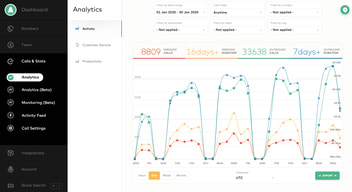
I love how I can manage my users and see reports every week to help us improve our customer service
I would love to see a call waiting feature. To show live calls coming in while on the line with a customer
It solves the need for multiple calling services. I have all 8 business numbers linked to my account and just find it is saving us time and money.
The integration with richpanel. Seems like it is going to be very easy.
That you cannot transfer a call to someone that is unavailable
Helps us keep track of callers and there history
I like how it connects to our CRM and logs the calls in real-time, even leaving me add people or put calls on hold while I pass them to someone else.
Calls to some countries have a bad connection when trying to call or will repeatedly fail when trying to make a call. (Guatemala)
I can use my aircall number to call all over the world without giving up my personal number to clients. Also it allows me to separate work from personal life because once I logged out I'm completely off.
You can easily call people in different parts of the world I really like that the time of the location you are calling at shows up Can listen to previously recorded calls. Great integrtion with hubspot
Sometimes the calls I receive do not show up.
Calling people in different parts of the world. Listen to previously recorded calls
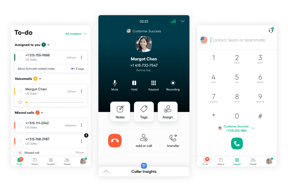
Aircall is very easy to use. I can call through the desktop software, through our CRM, or directly from my phone app
Sometimes the quality of the call is not the best but overall I had a good experience
Having a business phone number without carrying another phone with you. Also, it's ability to integrate with a CRM
History, different aspects just allow it work well, 1 click to our information system and that is has things already when call pops up.
Always shows the "owner" as busy when it is ringing. Cannot mute before call is answered.
Communicating between officies Giving info about clinets/potential clients
The facility to have it as a widget instead of needing to have a separate tool to make calls
Sometimes the widget closes or gets overlayed by other tools in the browser.
Helping reach the customers handled in the line of work very easily
What I like is its very convenient to us
That there is no time indicated on app as to how long the call is
On the application, there are instances where the name or email of the caller is reflection and you'd easily pull up the information of the customer.
Both the desktop and mobile apps are very easy to use. Making calls across any device is pretty seamless. You can also set your hours where you are available. Haven't really run into any issues using the app. Nice referral program too.
Had some issues with getting a timely and effective response from the customer service team when there were issues with my login. The desktop interface on the app could be a little cleaner maybe. It doesn't need to be so small when I'm using a big PC.
Lets our whole business make and receive calls from our extensive list of customers. Our support, development, and sales teams use Aircall to handle all customer queries and technical issues.
I love that I can call and text contacts in the same online platform. The call and messaging history is nice to go back and review. And the integrations are great, at my company we integrate with Hubspot. Plus the single sign on feature.
The audio connection doesn't always remember the last device used, so some calls may not have good audio if it happened to switch to a different audio device. There is also a weird small glitch, not a big deal, but every so often I notice this on Messages. The notification of an unread message is highlighted with the number of messages unread. There is one message I cannot seem to 'read', so that notification does not go away. It's been there for days, yet I have read the message.
Better able to track communication with clients in our CRM, better follow-ups and better nurture clients for a better client experience. We were able to eliminate our hard-line phones in the office. Plus many clients prefer to text so we text many of them now.
I like the simplicity of the interface/platform and integration aspects of Aircall. We have a lot of agents reporting that they are liking Aircall more than our previous system and that they feel like they can work faster. I appreciate the chat feature support and how our team can get help.
I wish we had more in-depth insight/information about setting up the IVR before launching (how to create a queue, how to set up a callback feature, or "press ____ for Spanish"). I wish I could look back to a specific day in the previous week, month, or year and view all the calls that an agent took (similar to the Activity Feed). The transfer feature has been a pain point; we have such a high call volume, that if any agents need to transfer to another, going on "Available" means they might get an influx of new calls, before the transfer can come through.
We wanted to merge our customer experience team under one umbrella platform. Aircall's ability to integrate with Gorgias has allowed us to do that!
The thing i like best is the fast and easy calls
There is currently not much to dislike on my end.
I am solving customer care problems for an app with aircall and it makes easy calls.
Ease of use. Call recordings are in history and agents can go through Support
Power Dailer feature not there. Higher call rates for premium numbers.
User friendly. Mobile app