

Unclaimed: Are you working at Aircall?
Aircall Reviews: 4.4/5 — Solid Choice
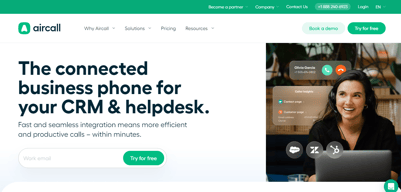
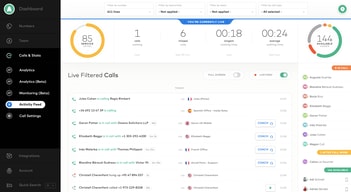
Aircall is the cloud-based call center and phone system of choice for modern businesses. A voice platform that integrates seamlessly with popular CRM and helpdesk tools.

| Capabilities |
API
|
|---|---|
| Segment |
Small Business
Mid Market
Enterprise
|
| Deployment | Cloud / SaaS / Web-Based, Desktop Mac, Desktop Windows, Mobile Android, Mobile iPad, Mobile iPhone |
| Training | Documentation |
| Languages | English |

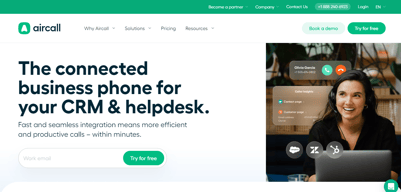






Aircall’s AI Voice Agents button reads “FROM €0.19/MINUTE”. That rate requires a custom bundle of 10,000 minutes or more. Pay as you go and the rate is €0.49 — 158% higher. The cheapest prepaid bundle, 500 minutes for €175, works out at €0.35. The €0.19 is real, but it sits at the far end of a ladder that starts at roughly €1,900 of committed spend, and nothing on the button says so.
- What it is: A cloud VoIP and customer-conversation platform with AI voice and messaging agents.
- Best for: Sales and support teams of three or more wanting calling tightly wired into a CRM.
- Pricing: Essentials €30, Professional €50 per licence per month on annual billing; Custom quoted. Verified July 2026.
- The honest catch: Single sign-on requires the Custom tier, which has a 25-licence minimum.
What Is Aircall?
Aircall is a cloud calling platform built for sales and support teams, with more than 250 integrations, a softphone for desktop and mobile, IVR, call recording, and — increasingly — an AI layer covering voice agents, messaging agents, and conversation intelligence.
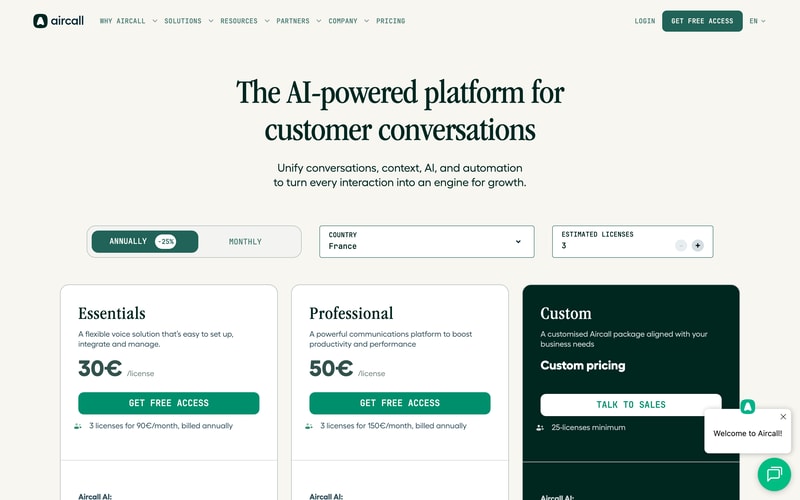
Three tiers: Essentials, Professional, and Custom. The first two carry published per-licence prices; the third is quoted and has a 25-licence minimum, which matters more than it first appears.
Both published plans require three licences minimum, so the page states the real figures itself: “3 licenses for 90€/month” and “3 licenses for 150€/month”. The toggle advertises 25% off for annual billing, and the page displayed annual rates throughout our capture.
How Aircall Works
- Priced per licence, with a three-licence minimum on both published plans.
- Essentials caps outbound calling at 1,000 domestic minutes per user per month.
- The Custom tier needs 25 licences, which is where SSO lives.
- AI voice minutes are metered separately, from €0.49 down to €0.19.
- AI Assist is a per-licence add-on at €9, or €49 for Pro.
- 50 free AI voice minutes per account per month.
Aircall Pricing
Captured from Aircall’s pricing page in July 2026 in euros, with annual billing displayed.
| Plan | Per licence/mo | Minimum | Real entry cost | Key inclusions |
|---|---|---|---|---|
| Essentials | €30 | 3 licences | €90/mo | 250+ integrations, IVR, recording, 1,000 outbound mins/user |
| Professional | €50 | 3 licences | €150/mo | Unlimited domestic outbound, Salesforce CTI, power dialer |
| Custom | Quoted | 25 licences | Quoted | Unlimited worldwide calls, SLA, SSO, API support |
AI add-ons: AI Assist €9/licence/mo · AI Assist Pro €49/licence/mo · AI Voice Agents from €0.19 to €0.49/min · AI Messaging Agents from €0.13 to €0.30/conversation
What actually decides your cost:
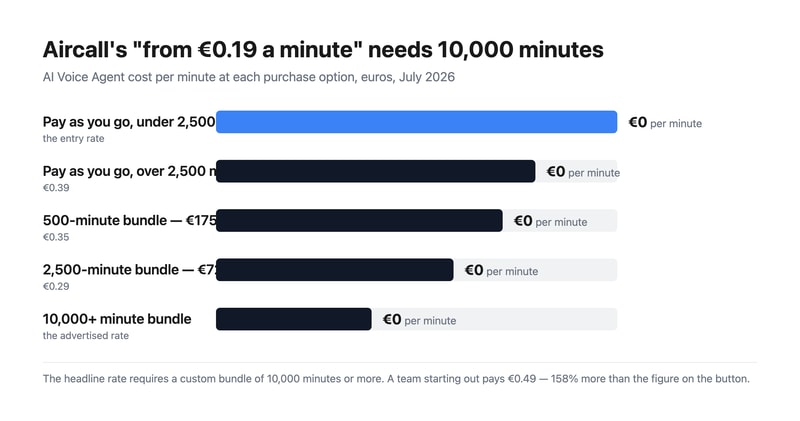
- The AI voice rate spans 158% from top to bottom. Pay as you go is €0.49 a minute under 2,500 minutes and €0.39 above it. Prepaid bundles are cheaper — 500 minutes for €175 is €0.35, and 2,500 for €725 is €0.29 — but the advertised €0.19 needs a custom bundle of 10,000 minutes or more. That is around €1,900 of committed spend before the headline rate applies.
- Three licences is the real floor, not one. Aircall states it plainly on both cards, so this is disclosed rather than hidden, but it means the entry price is €90 a month for Essentials and €150 for Professional, not €30 and €50.
- SSO is gated behind a 25-licence minimum. Single sign-on appears only on the Custom tier, and Custom requires 25 licences. So a fifteen-person team that needs SSO for compliance cannot buy it at any price — a harder gate than most, and worth contrasting with GoodAccess, which sells SSO as an add-on on its entry plan.
- Essentials meters outbound calling; Professional does not. One thousand domestic outbound minutes per user per month is about 50 minutes a working day — workable for support, tight for outbound sales. Professional makes domestic calling unlimited, and unlimited worldwide calling requires Custom.
- AI Assist Pro costs almost as much as the plan. €49 per licence per month against Professional’s €50. It adds live transcription, custom summaries, and sales playbooks over the €9 AI Assist tier. Doubling your per-seat cost for real-time coaching is a defensible trade for a sales floor and hard to justify anywhere else.
- AI messaging follows the same shape. €0.30 per conversation pay-as-you-go, dropping to €0.25 after a thousand; prepaid bundles are €220 for 1,000 (€0.22) and €1,300 for 10,000 (€0.13). As with voice, the cheapest advertised rate needs the largest commitment.
Who Should Use Aircall
- Sales teams living inside a CRM. The clearest case — 250-plus integrations and a Salesforce CTI on Professional.
- Support teams of three or more. The licence minimum makes it a team product by design.
- Businesses deploying AI voice agents. Aircall publishes per-minute rates openly, which many competitors will not.
- Outbound sales floors. Power dialer and voicemail drop are included on Professional rather than sold on top.
It fits poorly for solo operators and pairs, given the three-licence minimum; for teams under 25 that need SSO, which is unreachable; and for light AI users, who will pay €0.49 a minute rather than the advertised €0.19.
Honest Pros and Cons
Strengths
- Every AI rate is published, including pay-as-you-go and each bundle.
- The licence minimum is stated on the card, in money rather than fine print.
- Power dialer and voicemail drop included on Professional.
- 250-plus integrations and API access from the entry plan.
- 50 free AI voice minutes per account each month, plus 100 at sign-up.
- Unlimited inbound calls on every plan, toll-free excluded.
Limitations
- The advertised €0.19 AI rate needs 10,000+ minutes.
- A three-licence minimum on both published plans.
- SSO requires 25 licences via the Custom tier.
- Essentials caps outbound at 1,000 minutes per user monthly.
- AI Assist Pro at €49 nearly doubles a Professional seat.
- Worldwide calling is Custom-only.
Aircall Alternatives and How It Compares
- CloudTalk is the closest competitor for European calling, from €25 per user.
- RingCentral is the larger incumbent covering voice, video, and messaging.
- Nextiva is stronger on US business telephony and unified communications.
- Quo (formerly OpenPhone) suits small teams sharing numbers, without a licence floor.
- Grasshopper is the solo-operator option Aircall’s minimum rules out.
- Dialpad competes most directly on AI-led calling.
For a broader survey, browse our VoIP providers directory.
The Verdict
Aircall is a strong choice for a sales or support team that wants calling wired properly into its CRM, and its commercial disclosure is better than most. It publishes every AI rate — pay-as-you-go, each prepaid bundle, and per-conversation messaging — where competitors routinely hide all of it behind a sales call. It also states the licence minimum in money on the plan card itself: “3 licenses for 90€/month”. That is the opposite of burying it.
Which makes the one piece of framing that does mislead more conspicuous. The AI Voice Agents button reads “FROM €0.19/MINUTE”, and €0.19 is available only on custom bundles of 10,000 minutes or more — roughly €1,900 committed. A team trying the feature pays €0.49 a minute, 158% more. The prepaid bundles sit in between at €0.35 and €0.29. Every one of those numbers is published a few lines below the button; the button simply quotes the best of them. Budget from €0.49 and treat anything cheaper as a volume reward.
Two structural limits to check against your own headcount. Three licences is the floor on both published plans, so €90 and €150 a month are the real entry prices. And single sign-on lives only on the Custom tier, which requires 25 licences — meaning a fifteen-person team with an SSO requirement has no route to it at any price. That is a harder gate than most vendors set, and it is the constraint most likely to disqualify Aircall for a mid-sized company that otherwise fits it well.
FAQ
How much does Aircall cost?
On the euro price list captured July 2026 with annual billing: Essentials €30 per licence per month and Professional €50, both with a three-licence minimum — so €90 and €150 a month respectively. The Custom tier is quoted and requires at least 25 licences. AI Assist is €9 per licence per month, AI Assist Pro €49, and AI voice minutes are billed separately.
Why is Aircall’s AI voice pricing higher than the advertised €0.19?
Because €0.19 applies only to custom bundles of 10,000 minutes or more. Pay-as-you-go is €0.49 per minute below 2,500 minutes and €0.39 above it. Prepaid bundles fall between: 500 minutes for €175 works out at €0.35, and 2,500 minutes for €725 at €0.29. Every account also gets 50 free AI voice minutes a month, plus 100 extra at sign-up.
Does Aircall have a minimum number of users?
Yes. Both Essentials and Professional require three licences, which Aircall states directly on the plan cards as “3 licenses for 90€/month” and “3 licenses for 150€/month”. The Custom tier has a much higher floor at 25 licences. There is no single-user option, so solo operators need a different provider.
Which Aircall plan includes single sign-on?
Only Custom, which requires a minimum of 25 licences. Neither Essentials nor Professional offers SSO at any price, so teams below 25 people with a single sign-on requirement cannot meet it on Aircall. Custom also adds unlimited worldwide calling, a service-level agreement, custom onboarding, and API developer support.
What is the difference between Aircall Essentials and Professional?
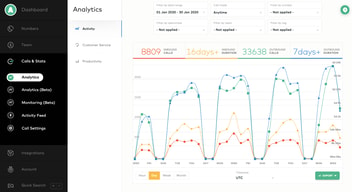
Calling volume and sales tooling. Essentials at €30 includes 1,000 domestic outbound minutes per user per month, IVR, call recording, and 250-plus integrations. Professional at €50 makes domestic outbound calling unlimited and adds Salesforce CTI, advanced analytics and live monitoring, mandatory call tagging, and sales features including power dialer and voicemail drop.

Compare Aircall with other popular tools in the same category.
It helps a lot on businesses that need to make calls to different countries. Good tool
Some connection issues sometimes, but the support for fixing that is great.
Instead of making calls to different countries, we use have an aircall international phone number.
Aircall is a light app that makes working remotely intuitive and easy with the combined power of it's desktop app as well as it's mobile app features.
Certain features are not controllable and the app sometimes has trouble remembering default settings.
We're able to now use our calling support capabilities from remote locations, which allows us to be out of the office but tied in.
-Simple -Not too expensive -Good for collaboration with team
-Some numbers don't work -Sometimes bugs a little bit
-Simpler than installing real phone lines, can take a call anywhere
Ease of use: Aircall looks like an iPhone's phone app, so it's super easy to make calls, transfer them, put them on hold, ... The support team is also very responsive.
I had issues with my USB headset at some point, so I had to relaunch the app every morning. But it seems that the issue is fixed now.
I can call all around the world and have the office's phone number displayed. I can also have my cellphone ring - which is perfect if I'm not in front of my screen. Last but not least, you can set the working hours of the tool, so that you make sure you will not be disturbed in the middle of the night!
The full suite of features offered in this virtual PBX system provide a tremendous amount of value: - Flexible call distribution for quick dispersion among teammates - Call recording for those times when you can't write down as fast as they're talking! - Phone analytics which has helped my team optimize how we do business
Aircall is definitely value priced compared to some of the more permanent PBX systems, but it does lack in places: - Relative to similiar companies it is more expensive because it's based on user, not minutes (which can be advantageous if you spend a lot of time on the phone
Aircall has let us made us appear as a large and professional business that's been around for a long time. This has built trust with our customers and intern we've seen a ROI far beyond the cost of this service. With a host of different features being added i'm confident that even in the places where Aircall lacks, they will provide additional value in the near future.
la simplicité d'utilisation, le fait de pouvoir l'utiliser à plusieurs. Le transfert d'appel. Le message vocal d'attente avant la mise en relation, la possibilité de régler les horaires d'ouverture du standard, la possibilité de laisser un message vocal. La possibilité d'enregistrer nos contacts dans un répertoire.
l'application beug parfois. Les clients ne m'entendent pas bien. Je suis obligée de la fermer et de la relancer. Cela arrive généralement lorsqu'elle reste longtemps ouverte. L'application reste ouverte toute la journée sur mon ordinateur.
Aircall nous permet de gérer notre service client, et de pouvoir le faire à plusieurs. Grâce à Aircall, nos clients peuvent nous joindre plus facilement.
It just works. Calling internationally from your laptop and your headset makes things very easy for a startup like us. Having multiple numbers for different target markets is a big plus.
Especially in the beginning Aircall had some technical issues leading to low voice quality or interrupted calls. Today we have the feeling that it gets more and more stable.
Call customers everywhere in the world with a local number from your laptop.

Aircall provides a nice way to route your calls between colleagues, with a great level of customization (waiting tones, vocal messages…). That's a perfect match for us. The dashboard is also pretty neat: the configuration of your availability is a nice feature.
There is still no mobile app to manage your call log, contacts and outgoing calls. I hope to see this feature coming this year. But the Windows and Mac OS app are great and fit most of my needs for now.
As many of ou co-workers are out of the office, Aircall allows us to make them always reachable, with a single number. Also, having the possibility to get international number give a lot of credit to your company, and surely convince foreign users to reach you.
Aircall is super easy to implement, reliable, and always improving. The team has done great work to create a product that is the perfect phone solution for small companies.
There are some lingering issues with call quality and reliability, but they have been making big strides to improve this.
We have a small team that has a minimal phone need for only incoming calls. We wanted something that was lightweight to setup, was technology enabled, mobile friendly, but when someone called we wanted to have a strong, professional presence. AirCall delivers on those metrics.
It's super simple to setup and use even for non-technical people. The user interface is really nice, simple and great to use. Setting up was also really easy and the web interface makes things easy to understand.
Lack of cross platform support for phones to begin with although I know thats coming because of the public road map. Also the costs are not great across the board when compared with other solutions. International numbers are cheap, but because of the per user cost, there are much cheaper solutions. Although granted those cheaper solutions are harder to work, setup and have a poor user experience.
We just needed an easy system that lets us route calls to our team around the world really easily no matter if we're out and about or if we're sat in the office. We don't have many calls so it just needed to be easy to get going so we could move on to more important things.
I can get calls from my customers from several countries and make myself unavailable when I'm away.
I cannot get calls from one of our most important country: Colombia.
Sometimes I can help my customers with their accounts faster than using email, and when someone isn't sure about getting a subscription, a call is better than a text message to solve questions.
My company has headquarters in The US and in Europe and our exec team is traveling a lot. With Aircall, we can pick up calls no matter the time zone and the voicemail is very handy. The Mac app is a great way to pick up calls and manage your account.
in rare cases, audio quality is not optimal - as is cell reception. Also, I would love to have more SMS options.
When we established our company in Boston, we were looking to get local phone numbers and Aircall was able to accomodate us. Being abel to share numbers across teams was also very useful to assign leads.
Set up a number in different countries in less than a few minutes. Call cascade setup also in minutes without any hardware
At the beginning the voice VOIP quality was an issue but since then there has been at least 10 upgrades and the voice quality is now very OK.
I am a startup and I can look like I am a serious company with offices in several countries. I can service my existing customers on a professional way with a very limited team. All my team can work and use Aircall from everywhere in the world.
We have been using Aircall manly for our customer service and it's working well. As being a french company working abroad is very usefull for ou client to be able to contact us via our french number provided by Aircall. It's very easy to use and we can follow very quickly our miss calls or transfer a call. We had some issues with setting up the service with our headphones at the beginning but the solution was very quickly provided by aircall support team.
An extension with magento would be interesting
Being able to have a range of different numbers in 2 sec and use them all at once without issues Call cascading no need of a "true " telephone
- a lot of funktionalities - flexible -easy to use - can be highly cutsomized - easy accesible And most of all: the staff is very nice, customer support helpful and quick. The company is honest and not gready. Can only associate positive memories to aircall and the customer support.
Company still in development and growing. therefor some funktionalisiere are not available now. The only negative aspect is that there is no app for windows and that the company has an mac-focus (seems to me at least)
calling, receiving calls, doing customer support, doing interviews, grat product.
Simplicity and no long term engagement.
Lack a android and a iOS phone applications
Get international phone numbers shared across our team
Good and fast support, nice and responsive staff, nice interface.
It was glitching a lot at the beginning, people stopped hearing me and my colleagues; it refused to call some countries that were on the list of those to call; sometimes it shows an error: on another call and I can't call anymore and need to speak to support.
Helps with international calls and this is the primary goal of my sales development team

The ability sync to HubSpot Prospects to the dailler was useful
The call quality rating after every call is annoying
Saves money as service versus using a hard line
Llamadas directas sin problemas de señal
Que no genera campañas como cloud talk, y que es muy simple
Resolvia como sistema de llamadas y actualmente cambiamos servicio por uno que si lo hace
Call flow transparency and analytics make it easy to manage. The implementation is quick and simple and training staff is a breeze.
Calls occasionally lag. Calls occasionally ring through and won't connect. Simple analytics and scheduling that should be included are an extra $15/month/user.
I have a decentralized remote team. We are now connected wherever we have a laptop and connectivity.
It provides our support team the ability to make calls, listen to recordings, and overall provide our customers and caterers great customer support. I really like the native integration with Front.
Aircall can be quite buggy from time to time. One of my agents has had recurrent issues over the past few weeks, the support team is good IMO but not wonderful. I do not like that you can not turn of SMS without an auto-responder. It makes it really annoying for us when our customers text our support line but we do not utilize that line for texting, we want to be able to turn it off and if someone texts it they get a message back, rather than it going into the ether.
Aircall solves our problem of providing telephone support to our users. That benefits us because it allows us to handle things through another channel than email etc. Having multiple channels is a great way to support our customers.
Easy to set up IVR function compared to Ring central. Voicemail is also easy to set up. Call quality is great and doesn't eat too much data if not on WIFI, which is super important to us.
Automated contact synchronization does not exist on the platform, but is marketed as simple. CSV uploads seem to be the only solution but is not really well explained, nor a suggested working process.
Aircall is providing us with phone call capabilities and speeding up our ability to be in contact with our customers. It is easy to set up if you have basic understandings of technology and simple to use.
I used Aircall in two different organizations and it works very well. It helps companies to organize their outbound teams to do effective calling to different markets. It's an easy to implement solution and provides easy ways to expand into other markets.
They could provide better solutions in terms of power hours and managing teams.
Having team members not calling to the US and being able to to abroad without the issue of requiring local phone number with physical phones.
Easy to use. Quick setup, ability to scale users and phone numbers in just a few minutes. Mobile and desktop apps.
Basic functions are being sold as an "upsell". Want to search for a specific call or number? See data on calls? It's all an extra cost and sold as an upsell for each user. 100 users means purchasing 100 upgrades to the accounts to be able to pull reporting data. Many new numbers are immediately flagged as spam by service providers, forcing you to deal with them to get the numbers unblocked.
Easy to use voice platform and SMS capabilities let us manage our own call center through the software, adding new numbers and users as needed.
A pleasure to have an option of recording each and every call and a nice interface, with different integrations with CRM, etc
Far too often clients complain about the audio quality. Clients hear the robotic sounds, and if we're talking about cold calls in sales, this lowers your chances to build rapport with the client
IP telephony is one of the best on the market, but sound quality could be much better
easy to use, intuitive. our account manager is also great.
analytics is not where it needs to be, we have a hard time getting the information we need to performance manage the SMS product is also an mvp, there is no data around its usage
supporting our customers in an inbound and outbound capacity
It is fast. the dashboards are comprehensive.
The integration of data with other apps is difficult
It is benefiting in the business.
Aircall is very user-friendly on the main app side of things. Easy to transfer calls and love the fact that all calls are recorded and stored for future listening
one thing I do not enjoy about air call is the dashboard page and prioritizing who gets the inbound calls. I'd like it to have more options and edit the distribution of calls to my liking.
Being a work from home company, air call has allowed me to have a phone on my computer and does not require me to use my own device. I do not need my company to buy me a phone or a line in order to do my job. Being on the go, I like that aircall is just on my computer.
We do calling from Hubspot. But, when HubSpot doesn't support to call Middle East region. We have chosen air call and it worked well.
Recordings can listen only in aircall, but they can be downloaded
We are able to call different countries and it mostly helps us in logging the calls in Hubspot with its great integration.
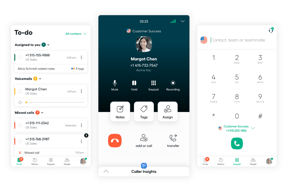
Aircall has been easy to set up since starting. Creating an IVR system was relatively easy to do on our own, even though the end product isn't perfect. The desktop app is intuitive and has great features like hold, warm & cold transfers, external transfers, and good monitoring capabilities for managers to ensure that there are enough agents on at any given time. We like the Chrome plugin, which highlights numbers for quick calling.
Our implementation managers were a bit hands-off in the set-up process. It took them a while to answer questions and they didn't seem very excited to find solutions. The IVR system is a little messy and was built using a few workarounds. The end product has some downfalls, etc. there's no way to return to the main menu after making a selection.
We previously used Twilio Flex, which was awful to set up since it needed so much engineering support. Aircall allows us to onboard agents quickly, have quick access to call logs and history, and make changes on the fly to call answering order.