

Unclaimed: Are you working at Aircall?
Aircall Reviews: 4.4/5 — Solid Choice
Aircall is the cloud-based call center and phone system of choice for modern businesses. A voice platform that integrates seamlessly with popular CRM and helpdesk tools.

| Capabilities |
API
|
|---|---|
| Segment |
Small Business
Mid Market
Enterprise
|
| Deployment | Cloud / SaaS / Web-Based, Desktop Mac, Desktop Windows, Mobile Android, Mobile iPad, Mobile iPhone |
| Training | Documentation |
| Languages | English |

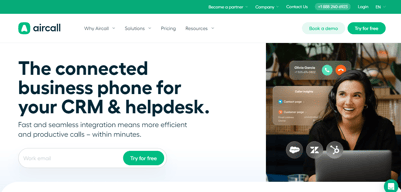






Aircall’s AI Voice Agents button reads “FROM €0.19/MINUTE”. That rate requires a custom bundle of 10,000 minutes or more. Pay as you go and the rate is €0.49 — 158% higher. The cheapest prepaid bundle, 500 minutes for €175, works out at €0.35. The €0.19 is real, but it sits at the far end of a ladder that starts at roughly €1,900 of committed spend, and nothing on the button says so.
- What it is: A cloud VoIP and customer-conversation platform with AI voice and messaging agents.
- Best for: Sales and support teams of three or more wanting calling tightly wired into a CRM.
- Pricing: Essentials €30, Professional €50 per licence per month on annual billing; Custom quoted. Verified July 2026.
- The honest catch: Single sign-on requires the Custom tier, which has a 25-licence minimum.
What Is Aircall?
Aircall is a cloud calling platform built for sales and support teams, with more than 250 integrations, a softphone for desktop and mobile, IVR, call recording, and — increasingly — an AI layer covering voice agents, messaging agents, and conversation intelligence.
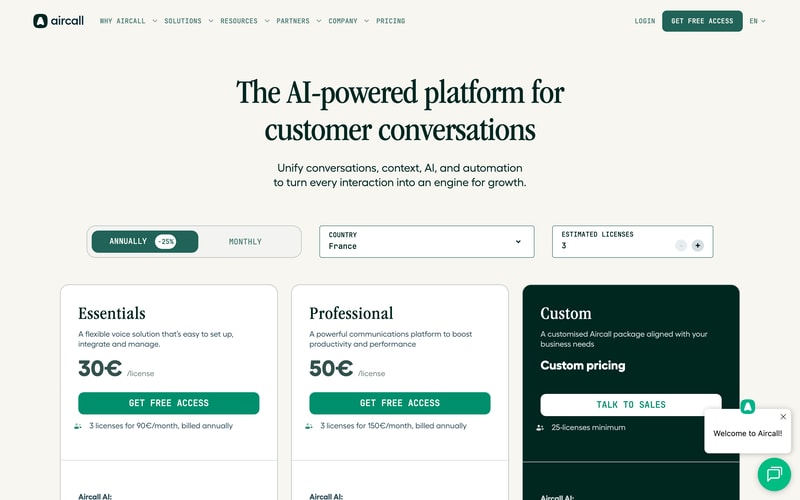
Three tiers: Essentials, Professional, and Custom. The first two carry published per-licence prices; the third is quoted and has a 25-licence minimum, which matters more than it first appears.
Both published plans require three licences minimum, so the page states the real figures itself: “3 licenses for 90€/month” and “3 licenses for 150€/month”. The toggle advertises 25% off for annual billing, and the page displayed annual rates throughout our capture.
How Aircall Works
- Priced per licence, with a three-licence minimum on both published plans.
- Essentials caps outbound calling at 1,000 domestic minutes per user per month.
- The Custom tier needs 25 licences, which is where SSO lives.
- AI voice minutes are metered separately, from €0.49 down to €0.19.
- AI Assist is a per-licence add-on at €9, or €49 for Pro.
- 50 free AI voice minutes per account per month.
Aircall Pricing
Captured from Aircall’s pricing page in July 2026 in euros, with annual billing displayed.
| Plan | Per licence/mo | Minimum | Real entry cost | Key inclusions |
|---|---|---|---|---|
| Essentials | €30 | 3 licences | €90/mo | 250+ integrations, IVR, recording, 1,000 outbound mins/user |
| Professional | €50 | 3 licences | €150/mo | Unlimited domestic outbound, Salesforce CTI, power dialer |
| Custom | Quoted | 25 licences | Quoted | Unlimited worldwide calls, SLA, SSO, API support |
AI add-ons: AI Assist €9/licence/mo · AI Assist Pro €49/licence/mo · AI Voice Agents from €0.19 to €0.49/min · AI Messaging Agents from €0.13 to €0.30/conversation
What actually decides your cost:
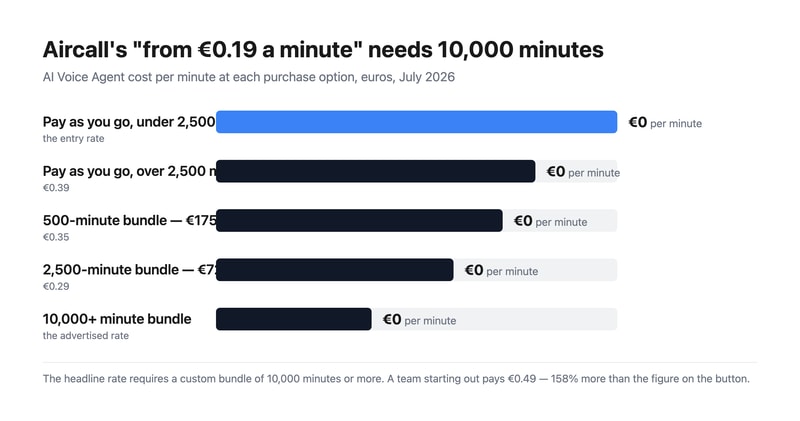
- The AI voice rate spans 158% from top to bottom. Pay as you go is €0.49 a minute under 2,500 minutes and €0.39 above it. Prepaid bundles are cheaper — 500 minutes for €175 is €0.35, and 2,500 for €725 is €0.29 — but the advertised €0.19 needs a custom bundle of 10,000 minutes or more. That is around €1,900 of committed spend before the headline rate applies.
- Three licences is the real floor, not one. Aircall states it plainly on both cards, so this is disclosed rather than hidden, but it means the entry price is €90 a month for Essentials and €150 for Professional, not €30 and €50.
- SSO is gated behind a 25-licence minimum. Single sign-on appears only on the Custom tier, and Custom requires 25 licences. So a fifteen-person team that needs SSO for compliance cannot buy it at any price — a harder gate than most, and worth contrasting with GoodAccess, which sells SSO as an add-on on its entry plan.
- Essentials meters outbound calling; Professional does not. One thousand domestic outbound minutes per user per month is about 50 minutes a working day — workable for support, tight for outbound sales. Professional makes domestic calling unlimited, and unlimited worldwide calling requires Custom.
- AI Assist Pro costs almost as much as the plan. €49 per licence per month against Professional’s €50. It adds live transcription, custom summaries, and sales playbooks over the €9 AI Assist tier. Doubling your per-seat cost for real-time coaching is a defensible trade for a sales floor and hard to justify anywhere else.
- AI messaging follows the same shape. €0.30 per conversation pay-as-you-go, dropping to €0.25 after a thousand; prepaid bundles are €220 for 1,000 (€0.22) and €1,300 for 10,000 (€0.13). As with voice, the cheapest advertised rate needs the largest commitment.
Who Should Use Aircall
- Sales teams living inside a CRM. The clearest case — 250-plus integrations and a Salesforce CTI on Professional.
- Support teams of three or more. The licence minimum makes it a team product by design.
- Businesses deploying AI voice agents. Aircall publishes per-minute rates openly, which many competitors will not.
- Outbound sales floors. Power dialer and voicemail drop are included on Professional rather than sold on top.
It fits poorly for solo operators and pairs, given the three-licence minimum; for teams under 25 that need SSO, which is unreachable; and for light AI users, who will pay €0.49 a minute rather than the advertised €0.19.
Honest Pros and Cons
Strengths
- Every AI rate is published, including pay-as-you-go and each bundle.
- The licence minimum is stated on the card, in money rather than fine print.
- Power dialer and voicemail drop included on Professional.
- 250-plus integrations and API access from the entry plan.
- 50 free AI voice minutes per account each month, plus 100 at sign-up.
- Unlimited inbound calls on every plan, toll-free excluded.
Limitations
- The advertised €0.19 AI rate needs 10,000+ minutes.
- A three-licence minimum on both published plans.
- SSO requires 25 licences via the Custom tier.
- Essentials caps outbound at 1,000 minutes per user monthly.
- AI Assist Pro at €49 nearly doubles a Professional seat.
- Worldwide calling is Custom-only.
Aircall Alternatives and How It Compares
- CloudTalk is the closest competitor for European calling, from €25 per user.
- RingCentral is the larger incumbent covering voice, video, and messaging.
- Nextiva is stronger on US business telephony and unified communications.
- Quo (formerly OpenPhone) suits small teams sharing numbers, without a licence floor.
- Grasshopper is the solo-operator option Aircall’s minimum rules out.
- Dialpad competes most directly on AI-led calling.
For a broader survey, browse our VoIP providers directory.
The Verdict
Aircall is a strong choice for a sales or support team that wants calling wired properly into its CRM, and its commercial disclosure is better than most. It publishes every AI rate — pay-as-you-go, each prepaid bundle, and per-conversation messaging — where competitors routinely hide all of it behind a sales call. It also states the licence minimum in money on the plan card itself: “3 licenses for 90€/month”. That is the opposite of burying it.
Which makes the one piece of framing that does mislead more conspicuous. The AI Voice Agents button reads “FROM €0.19/MINUTE”, and €0.19 is available only on custom bundles of 10,000 minutes or more — roughly €1,900 committed. A team trying the feature pays €0.49 a minute, 158% more. The prepaid bundles sit in between at €0.35 and €0.29. Every one of those numbers is published a few lines below the button; the button simply quotes the best of them. Budget from €0.49 and treat anything cheaper as a volume reward.
Two structural limits to check against your own headcount. Three licences is the floor on both published plans, so €90 and €150 a month are the real entry prices. And single sign-on lives only on the Custom tier, which requires 25 licences — meaning a fifteen-person team with an SSO requirement has no route to it at any price. That is a harder gate than most vendors set, and it is the constraint most likely to disqualify Aircall for a mid-sized company that otherwise fits it well.
FAQ
How much does Aircall cost?
On the euro price list captured July 2026 with annual billing: Essentials €30 per licence per month and Professional €50, both with a three-licence minimum — so €90 and €150 a month respectively. The Custom tier is quoted and requires at least 25 licences. AI Assist is €9 per licence per month, AI Assist Pro €49, and AI voice minutes are billed separately.
Why is Aircall’s AI voice pricing higher than the advertised €0.19?
Because €0.19 applies only to custom bundles of 10,000 minutes or more. Pay-as-you-go is €0.49 per minute below 2,500 minutes and €0.39 above it. Prepaid bundles fall between: 500 minutes for €175 works out at €0.35, and 2,500 minutes for €725 at €0.29. Every account also gets 50 free AI voice minutes a month, plus 100 extra at sign-up.
Does Aircall have a minimum number of users?
Yes. Both Essentials and Professional require three licences, which Aircall states directly on the plan cards as “3 licenses for 90€/month” and “3 licenses for 150€/month”. The Custom tier has a much higher floor at 25 licences. There is no single-user option, so solo operators need a different provider.
Which Aircall plan includes single sign-on?
Only Custom, which requires a minimum of 25 licences. Neither Essentials nor Professional offers SSO at any price, so teams below 25 people with a single sign-on requirement cannot meet it on Aircall. Custom also adds unlimited worldwide calling, a service-level agreement, custom onboarding, and API developer support.
What is the difference between Aircall Essentials and Professional?
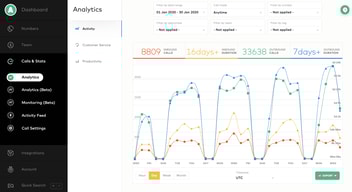
Calling volume and sales tooling. Essentials at €30 includes 1,000 domestic outbound minutes per user per month, IVR, call recording, and 250-plus integrations. Professional at €50 makes domestic outbound calling unlimited and adds Salesforce CTI, advanced analytics and live monitoring, mandatory call tagging, and sales features including power dialer and voicemail drop.

Compare Aircall with other popular tools in the same category.
Interface is nice and sleek and simple to use
Connectivity issues. Bad reception. Always cant hear the other party or vice versa
Escalted customer service issues. Easy to make calls to customers.
It got the job done! Incoming, outgoing, voicemails were all managed by aircall.
It was not able to be integrated with our support system, which led to a lot of issues.
It created more issues for us than it solved.
The most helpful feature of Aircall is that I have access to a phone number linked to my work within my phone. I do not need a separate work phone so cutting down on devices is a significant aspect. Furthermore, I can make calls while traveling worldwide using my phone without worrying about long-distance surcharges.
The ergonomics of the application are not superb. For example, if I want to message someone, I have to go to my contacts and select the person's name or number instead of simply going to the message button to send a message. Additionally, a missing feature in Aircall is when I type a number on the keypad, it will be helpful for the contact's name to show up as I type. It is an innate feature in iOS and Android phone software, but not in the Aircall app.
The most significant benefit of using Aircall is that my productivity has increased tremendously. I can make and accept calls while on the road, so I do not feel tied down to my desk.
The fact that it will let you know if a CRM contact is calling or a personal call.
it has issues with setting up and can drop calls if the internet isn't working
Dropped calls, and logging calls as answered are issues
No perdida de llamadas de otros compañeros.
El retorno de la conversacion y mala cobertura.
Unicamente el no perder llamadas de otros compañeros, ya que salta a mi aircall
We just need to type country name and the code shows up and when we call we can see the country time as well.
Sometimes it does not catch the code, cannot work if headset is not connected , network issues in a few countries.
Can use our client coun try no. is any country and the customers won't even know that we are calling through a system operated software.
I love that Aircall integrates with Hubspot and will automatically record and save the recorded calls to Hubspot. This feature is incredibly convenient and saves our team a ton of time.
Aircall does not offer the same sound quality that platforms like Zoom Phone provide. This deficit created some adoption issues for us. Recently, Aircall introduced an update that increased the number of clicks from two to five when using the Outreach.io integration. This update came as a surprise to our SDRs, and it created an inconvenient workflow. I do not recommend using Aircall with Outreach.io.
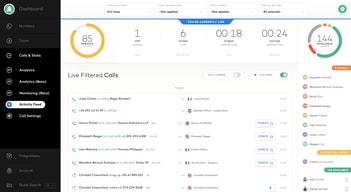
We use Aircall because we needed a solution for our SDRs to make phone calls quickly and for our managers to gain insights from those calls. We love being able to record the calls and save them to our CRM automatically. Aircall's, "Calls and Stats," page is straightforward and convenient for any manager that needs to know how their team's calls are going.
The call history provided is ok for my work
You can not text through aircall... A major issue for our company
I really don't use air call for the problem solving
I like that it tracks my calls in the CRM
There are too many errors, dropped calls and bugs
its messes up a ton

The simplicity of the interface, setting up numbers, assigning users and setting up queues
Call quality can be flaky, depending on your hardware setup. In our case we ended up with being connected to other numbers than dialed, lots of disconnects on long and short calls, and a support department that doesn't really want to help you, even if you pay >1000€ a month.
The idea was to replace our old, dusty VOIP solution with a solution that can manage and track our calls and performance in a great way.
Aircall has a great vision for what the product can be, with decent integrations and a good focus on what customers need. Outbound calling tends to be good, whether from the desktop app or the phone. Having general office numbers for our support and sales lines is great, as well as setting business hours, customizing messages, etc.
Inbound calls are extremely unreliable. Do not use Aircall if you are primarily using it to receive incoming calls from customers, clients, or prospects. When I've been on the road -- with just my cell phone -- I've had multiple calls not come through at all. A few minutes later I get a voicemail alert, with my phone not receiving any actual call. This happens completely randomly across multiple connection types (e.g., wifi, 4G). I've reached out to support multiple times, and while they are quick to answer and kind, they tend to dismiss my concerns and haven't fixed this problem (and a few other problems) at all. So be warned: Aircall provides a pretty app and they have a good vision, but they are very unreliable.
Aircall provides the individual numbers for all of my employees to make and receive calls, and also for a few general numbers (e.g., sales, support) that can then get sent to different employees depending on who is working, etc.
We have taken our organisation of 180~ users from RingCentral to Aircall, and I think we regret it. While the migration process went smoothly, we have fast realised the product is not fully polished or ready for larger organisation. For starters the admin portal has almost no BULK functionality which makes it very hard to administer large groups of users. The flow editing is nice, but take a bit of getting used too. When setting up filters for flows, you cannot set DATE rules, you can only select days of the week for the rules to apply. This made it difficuclt to schedule a XMAS group to start/stop at scheduled times. Instead we had to just edit the flow on the week of the holiday, then change it back when the office returned. Lastly we have had unexplainable issues with the flow and new groups we created. We had made a group for users in anticiapting for an event, and the group started receiving calls before we had added it to any flow!! Live chat support was useless as always, so just had to delete the group and re-do the same action on the day of the event. Pretty poor IMO. The client on application on users machines works great. Admin portal seems fast, and to setup new users is easy. But wait to you get to large groups.....painful.
No BULK add/remove of groups - like are you serious? It HAS to be done one-by-one Unexplainable flows being triggered Useless support - only live chat, hardly speaks English, reply with useless answers. Seems like a script to some degree.
We use Aircall as our primary contact method for our 5000+ clients
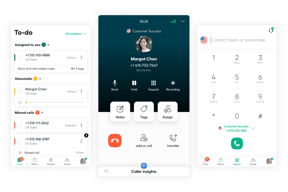
that it shows your calls and your ability to find a number and call an that my coworkers can add my call back to my to-do list
that it slacks a lot that we have to be fighting for a call that they can put 1 to one angent and then the next on that is on line it work how ever in the lines more and sometimes when you internet or just you airecall stay stock i lost it cuz m not gona get more calls
that i can find in my to do list the call back i need to and that i can find my call recording for any issues i have with my QA
The interface of Aircall is excellent. The caller Id was always perfectly in line with our Hubspot system.
Even though the interface was terrific, the call quality was usually awful. We had many dropped and broken-up calls.
We solved the issue by logging incoming and outgoing calls while having a very user-friendly application. However, the application quality does not matter when the call quality does not back it up.
I really like the design and layout of the software. It's visually pleasing, neat, tidy, and fairly easy to find what you're looking for when in a call.
The server and features are extremely unreliable. When they work, it's great! But there are so many instances where I've had to troubleshoot with agents to even get them available on the phone lines because of server errors, glitches, needing to refresh a cache, log in/out multiple times during their shift, etc. It's also a very buggy program and unavailable for Chromebooks. Next, their customer service isn't great. The inconsistency of the agent quality is wild, and it's like pulling teeth trying to get some of them to understand what's going on sometimes.
We're solving the need to talk to customers on the phone. Benefits are decreasing wait time and voicemail tickets, as well as tickets from other channels (text, email, social media etc.)
The recording feature is great. Any time we need to reference a problem or specific conversation, it's mostly easy to find.
The search feature in history isn't very good. I can search by DOT# (which we use as our "first name") or the company name and nothing will come up. If I search the phone number it will come up, but only if it's exactly typed in how it was saved in the contact. So if there's a + in the front or - between numbers, sometimes it won't find it. But sometimes it's the other way around as well. Very frustrating. I also hate that I can't share a recording with someone who doesn't have an account with aircall - what the heck is that all about?!?!?!?!
We work in transportation, so it's basically customer service all day long. The benefits are being able to prove or disprove he-said she-said problems by sharing the recording.
You can call many countries without the hassle of looking for country codes etc
Many dropped calls and poor connection every day
It is a great place to take calls and be able to use a laptop, also great for international calls.
It's a great agile product. Very nice interface and many good features.
Bugs, more bugs and even more bugs. They have a non-existent verification methodology. For such a critical-use product they should have been much more diligent. An option to disable recordings for certain calls would be great.
communicating with external customers, providing customer support.
It has a lot of functionality Easy to use Call recording Voicemail Good sound quality Call recording Automation and workflows
I have no dislike about it since it works best for me
Able to call worldwide
Integration with Salesforce makes the software intuitive and easy to use. Having the option to select which country call code you're calling from also helps when doing outreach to international prospects.
The quality of calls were inconsistent and unreliable most of the time. Aircall's support team kept putting it down to unstable internet connection when Skype, Teams, Whatsapp and Zoom calls were never an issue for us.
We no longer use Aircall, but installed the software so that our sales team could make international calls and have them logged automatically with Salesforce.
AirCall was beneficial in that it provided multiple API integrations with Front, Slack, and other tools for our team. The phone logs and recording features were helpful to ensure call quality and add notes into Front tickets.
The tool was generally very unreliable. A reason we migrated to another software was due to AirCall not connecting calls customers were making to agents or it would drop calls at a substantial percentage. This made it impossible to use both for customer support and customers trying to call in.
At the time we switched to another tool, Aircall was solving the issues of not connecting calls or dropping calls customers had made. This would have benefited our team in that it was already integrated with our systems and easy to use for customer support representatives.

The interface was nice to use. Intuitive design for the platform itself and navigating features.
Constant issues with calls. Dropped calls, or sometimes during specific times of day, the calls would not be clear, and the customer could not hear me. It would also hear other calls or interference on the call oftentimes. Customer service was not helpful and we eventually moved to an alternative platform.
Trying to answer customer inquiries and calling customers back.
We were on Dialpad before this, but we did not like their contact management and SMS so we switched to Aircall+Front integration. It is costly, but does get the job done. It is not perfect and expensive. Hence the review. But it gets the job done for a small company. Edit 9/30/20:
Aircall is really pricey for the features they offer. We pay about 70$ per user + phone minutes. Occasionally there are some bugs where the headset did not connect or when using the iOS app it just hangs up on you while trying to answer.
It did help us organize our SMS, but that is mostly due to Front and not Aircall.

Easy to setup and configure. Modern user interface. Call recordings are awesome and easy to access on mobile. The availability status on mobile makes a ton of sense also.
Significant delay when picking up the phone. There's a noticeable lag when talking that sometimes makes conversations really awkward (even on super fast Fiber based internet).
Having teams share sales and support phone lines across many different locations with dynamic team member availability
The in-call quality is on average better than the previous system we used. I also like the customizability of the hold music, etc. The call coaching feature is also super useful and sets it apart from other similar products.
The ability to answer calls, missed call functions and voicemail functions are super buggy and not user friendly.
Our previous system made it very difficult for us to change up the hold music. Aircall makes it super easy to do this, keeping it current and non-annoying for our users.
Leaving. Ring Central, Grasshoopper, Google Voice, Ooma, or 2 cups with a string would be far better.
Call Quality. Dishonest marketing. Terrible customer support.
Aircall has not solved, but only created problems. They've wasted hundreds of hours and introduced our clients to poor call quality.
Nothing! The will hold your phone # hostage
Everything! They have one employee answering phone calls if they even answer. They will not transfer the call to a manager and after 6 weeks of not being able to use my services I finally complained to the “success team” who canceled the account against my consent because they didn’t want to deal with it. I did not receive any refund for this even though I paid $500 to use the service for the year. They are are now illegally ignoring my requests to port away my business phone number.
Absolutely none. They have created problems for me that did not exist before:
UI, functions, good product; Easy to implement
Support was really bad once we paid and had a problem, Billing
Calling abroad
The digital phone desktop app is very responsive
The call quality is terrible and constantly drops. Messages do not give notifications when you receive them.
Quickly being able to make calls without needing to top up cards
Honestly, there is nothing that I like about this product besides that it works some times, which is better than it never working.
The interface is not very friendly for users. Im not able to make a personalized voicemail for myself without recording it, then uploading (which I have to send to my manager to upload). The person on the other end of the line can hardly hear me most of the times, which is the biggest issue with the product. That leads me to call them on my personal cell # to accomplish the call. And there is no call queue fucntion available for inbound calls (at least that we are aware of). Im sure there is more I could write, but this is the short list.
Not really much of anything besides my managers being able to track in/outbound calls. It has been more of a headache for the users than helpful