Unclaimed: Are you working at Canva?
Canva Reviews: 4.7/5 — Highly Rated
Canva is an easy to use graphic design and video editing platform that lets users create, design, and publish original artwork using a simple drag-and-drop editor. The platform comes with thousands of design templates and layouts for numerous projects, including social media posts, presentations, videos, posters, flyers and more.
Canva is also often used as Photo Editing of choice in Marketing and Ecommerce tech stacks.

| Capabilities |
AI
API
|
|---|---|
| Segment |
Small Business
Mid Market
Enterprise
|
| Deployment | Cloud / SaaS / Web-Based, Mobile Android, Mobile iPad, Mobile iPhone |
| Support | 24/7 (Live rep), Chat, Email/Help Desk, FAQs/Forum, Knowledge Base, Phone Support |
| Training | Documentation |
| Languages | English |
Canva Pros and Cons
- Simplicity: Canva is delightful to use. You can search for stock images and videos in seconds, drag and drop elements into place, and experiment with a huge range of filters and effects.
- Free plan: If you’re not sure how many visual assets you need yet, you can start with the free plan and work your way up.
- Versatile: You can create a lot of different kinds of graphics easily with Canva, including logos, Facebook posts, email marketing templates, and landing pages.
- Convenient easy-to-use environment for beginners
- Thousands of templates, icons, photos, fonts and other assets
- You don’t get the full control with Canva that you get with more advanced marketing tools. There aren’t as many layers as possible and advanced features to explore.
- Can be a little slow as a browser-based product.
- Very limited editing options
- No layering or re-adjustment options


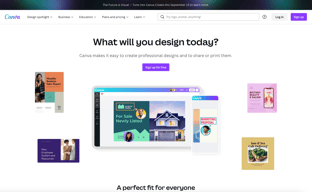






Are you a non-designer looking for graphic design software? If you need to create designs for your business, Canva is one of the top rated tools to choose. In this post, we’ll explore Canva’s pricing, features, and alternatives.
What is Canva
Canva is an online graphic design tool used by over 170 million monthly active users to create visual content for offline and online marketing. Over 9,400 Capterra reviewers have given Canva an average rating of 4.7 out of 5 stars.
Canva offers hundreds of thousands of templates and elements you can use to create designs for personal or business use. Customize your visual content with your brand kit and media from your own library.
How Much is Canva
Canva offers Free, Pro, and Teams plans – visit Canva’s pricing page for current rates.
The Free plan includes the following.
- Over 250,000 free templates.
- Over 100+ design types including business cards, presentations, and social media posts.
- Free photos, logos, fonts, photos and graphics.
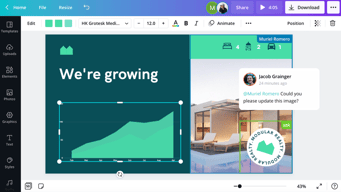
- Share, collaborate, and comment on designs with a team.
- Save your designs with 5GB of cloud storage.
- Share designs to multiple platforms including Instagram, Facebook, X, LinkedIn, Pinterest, Slack, and Tumblr.
The Pro plan includes everything from the Free plan plus the following.
- Over 100 million premium stock photos, videos, audio and graphics
- Over 610,000 premium and free templates with new designs daily
- Up to 100 Brand Kits with your companies colors, logos, and fonts
- Access to Background Remover and Magic Resize.
- Create templates from your own designs.
- Save your designs with 100GB of cloud storage.
- Schedule your social media designs on up to 8 platforms including Instagram, Facebook, X, LinkedIn, Pinterest, Slack, and Tumblr.
The Teams plan includes everything from the Pro plan plus the following.
- Use brand controls to manage your team’s access to apps, graphics, colors, logos, fonts, and uploads.
- Get approval on your designs with built-in workflows.
- Control what your team can edit and stay on-brand with template locking
- Save your designs with unlimited storage.
- Log in with single-sign on (SSO) and have access to 24/7 Enterprise-level support.
How to Use Canva
To get started on Canva, you will need to create an account using your email address, Google, Facebook, or Apple. You will then choose your account type between student, teacher, small business, large company, non-profit, or personal. Templates and additional resources will be recommended based on your chosen account type.
You can choose to start a free trial of Canva Pro or begin with the free version to see if it’s the right graphic design tool.
Designing with Canva
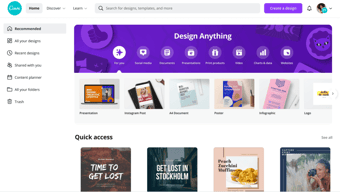
For your first design, Canva will suggest different post types to choose. Based on the type of account you set up, you will see template categories like social media posts, documents, presentations, marketing, events, ads, launch your business, build your online brand, etc.
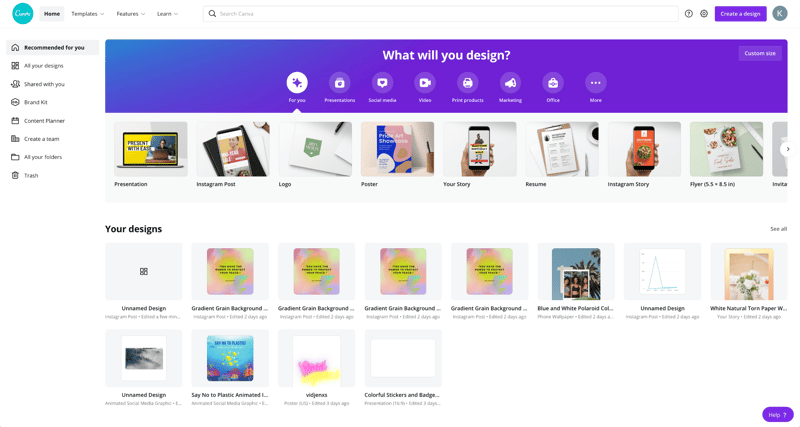
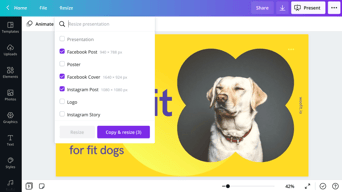
Begin by choosing the type of post you want to create or searching for something more specific. Search by social network name, for example, to see a list of templates by post type on each network.
Templates
Next, you will be able to choose a template. Templates come ready to go, with customizable photos, text, and additional elements.
You can start your design by choosing a template, searching for a template, or working with a blank template.
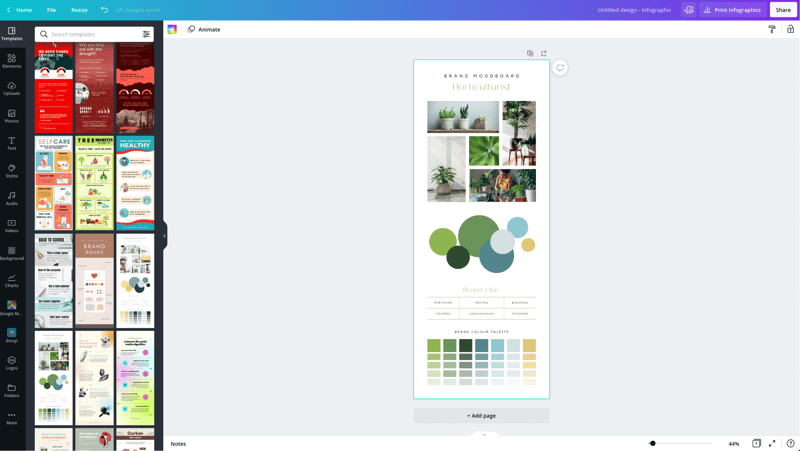
Canva has a lot to choose from, so start with a specific search. If you’re in the horticulture business, you’ll find plenty of templates for a variety of post types just by searching for plants.
You may not find the perfect template, and that’s ok. Remember there are plenty of ways to customize any template. So choose the best fit and move on to Elements.
Elements
Inside the Canva designer, the Elements tab gives you access to lines and shapes, graphics, photos, videos, audio, charts, photo frames, and photo grids. You can use the search box on the Elements tab to search everything on Canva.
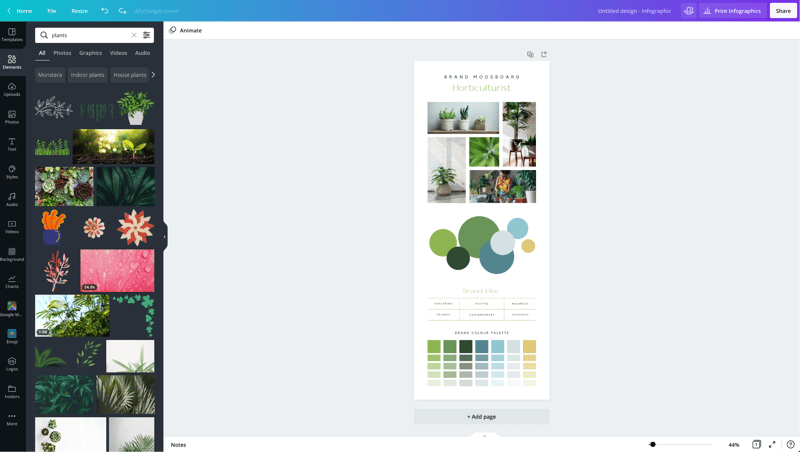
Again, Canva has a large library of elements to choose from, so be specific in your search query. You may also want to search in the following tabs to see various elements separately in the search results.
Photos
The Photos tab allows you to choose from millions of free, paid, and Pro-only stock photos.
You can replace photos on your templates to create a new look or to match a particular template to your industry.
Alternatively, you can use photos from another stock photography site or your own photos. Simply upload them in the Uploads tab.
Once you choose a photo, you can use Canva’s photo editing features to add filters, adjust the photo’s settings (brightness, contrast, saturation, etc.), crop, animate, and change the transparency.
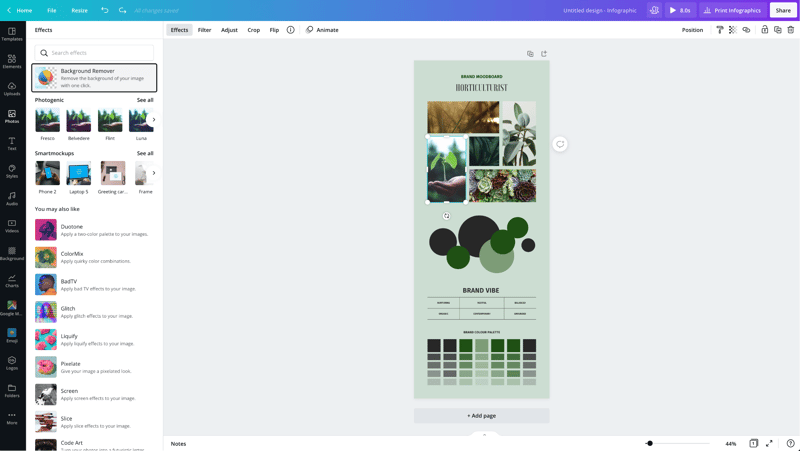
Canva Pro subscribers have access to the Background Remover. This will remove backgrounds from stock photos in the Canva library as well as photos you upload to the Uploads tab.
Canva has also introduced Magic Studio, a suite of AI-powered tools including text-to-image generation, background removal, and AI-assisted writing.
Text
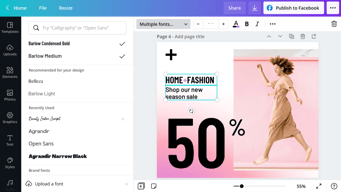
The Text tab allows you to add headings, normal text, and fancy graphical text to your design.
When you click on the text on a template, you’ll see options to adjust the font, font size, color, format, spacing, text effects (like shadows), and change the transparency.
Canva Pro subscribers can set brand fonts via the Brand Kit or the Styles tab. Enterprise-level controls will ensure that your team keeps visual content on brand.
Audio
Creating an animated image or video? Search for audio elements to add to capture user’s attention in social news feeds.
Alternatively, if you want to use audio from another stock site or your own audio tracks, you can upload them in the Uploads tab.
Video
Want to create video content? Choose from thousands of free and Pro-only stock video clips. You’ll find videos that range from a few seconds to two minutes long.
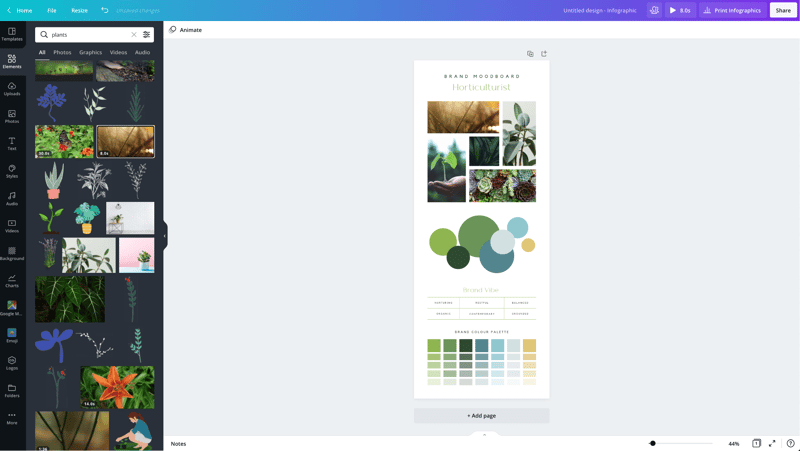
Similar to photos and audio, if you want to use videos from another stock site or your own videos, you can upload them in the Uploads tab.
Once you choose a video, you can use Canva’s video editing features to trim the video, flip it, and change the transparency.
Backgrounds
In the Background tab, you’ll find free photos specifically geared to act as backgrounds on your designs. Change out the background on a template to give it a more custom feel.
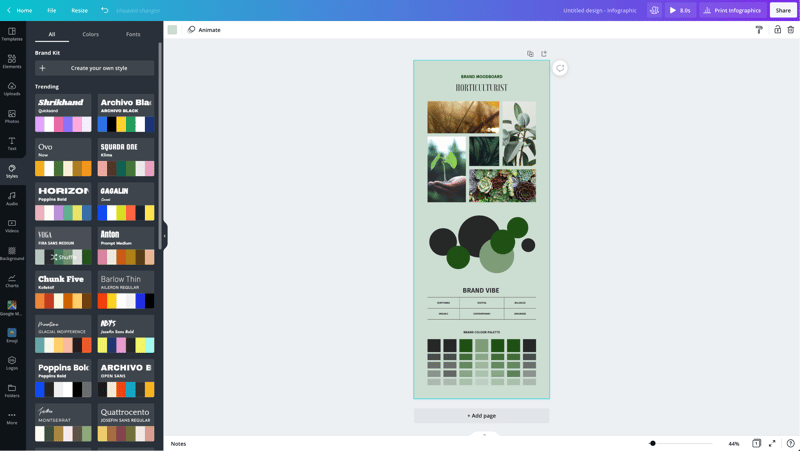
Styles
The Styles tab allows you to change the look and feel of your template quickly with different color palettes and font combinations. If you have a Canva Pro subscription, you can upload your brand’s custom colors and fonts to keep designs on brand.
Logos
If you have a Canva Pro subscription, you’ll have a Logos tab. Here, you can upload variations of your brand logo to use throughout your designs.
You can also create logos with Canva. Note that you can’t trademark logos with stock content in them.
Publishing with Canva
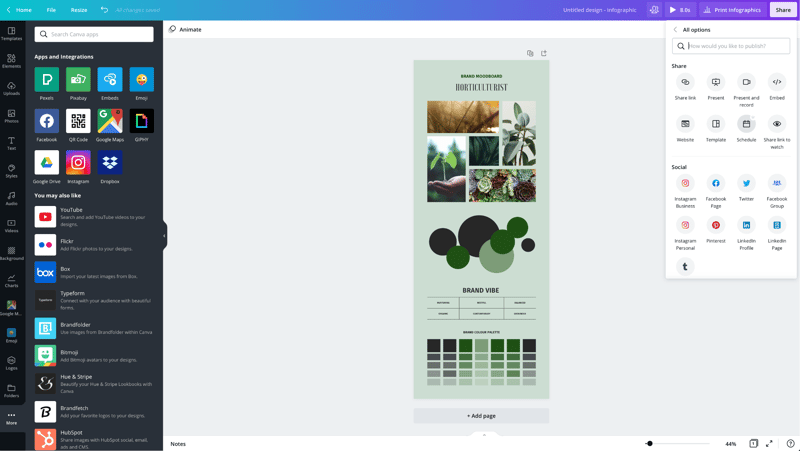
Free users of Canva can download their designs or share their designs to multiple platforms including Instagram, Facebook, X, LinkedIn, Pinterest, Slack, and Tumblr.
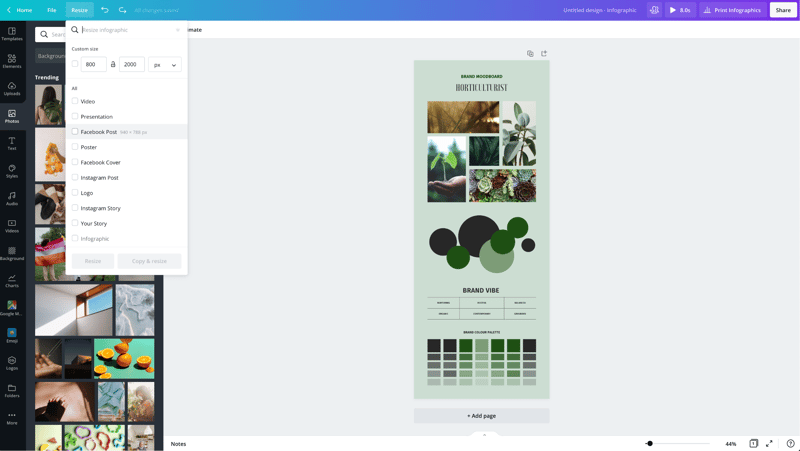
Canva Pro subscribers can use the Magic Resizer to create multiple post formats from one design. For example, you can start by designing an Instagram post. Canva’s Magic Resizer can resize it for posts on other networks, Stories, Reels, and other formats.
Canva Pro subscribers can also use Canva’s Content Planner to schedule updates to up to eight profiles/accounts on Instagram, Facebook, X, LinkedIn, Pinterest, Slack, and Tumblr.
Canva Teams
Canva Pro subscribers can work in teams to improve the visual content workflow. Designs can be created inside Canva and sent to the appropriate team members for approval. Teams can make comments, edits, revisions, and keep track via the version history.
Canva Print
If you create a design for offline marketing, Canva has a Print division to compete with companies like VistaPrint. They will print your designs on banners, wall art, mugs, t-shirts, business cards, stickers, invitations, cards, flyers, and more.
Canva Print is perfect for any business that wants customers to do some word of mouth marketing for them. Create designs people would want to stick on, wear, etc. Hand out business cards that people want to keep and share.
Canva Apps
Canva offers their own mobile app on the Apple and Google Play stores. Canva has earned a 4.9 out of five stars from over 3 million Apple users and a 4.7 out of five stars from over 188,000 Google users.
With that said, the mobile app doesn’t have all of the features you’ll find on the desktop browser version. Fortunately, you can access most of them via a mobile browser by going to the Canva website and bypassing the app.
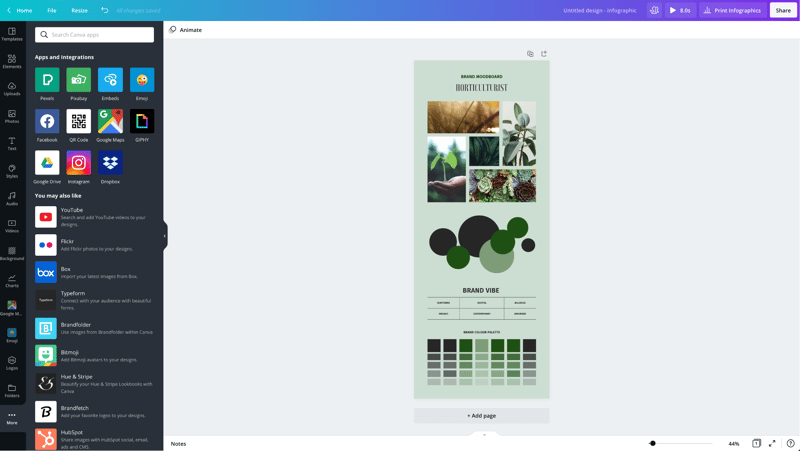
In addition to mobile apps, Canva has apps and integrations that allow you to access elements from third parties. You can add maps from Google Maps, Emojis, photos from Google Drive and Dropbox, YouTube videos, Flickr photos, Bitmojis, and other popular visual content elements.
Canva Pros and Cons
Review networks like TrustRadius allow people to leave specific pros and cons about their Canva experience. Amongst the over 500 reviews, here are some of the highlights from the pros and cons users have identified.
-
Pros :
-
An easy to learn and use interface
-
It allows people with limited graphic design skills to create professional graphics
-
Tons of templates so you never have to start from scratch
-
Branding kits to keep teams matching the brand colors and fonts
-
Ability to create visual content on the go
-
Templates that cover a wide variety of uses and networks
-
The ability to search for royalty free images, video, and audio without another service
-
Cons :
-
Seemingly basic elements (graphics, shapes, etc.) and features are Pro-only
-
Elements that fall outside of the design area are tricky to retrieve
-
Newer features (like Canva presentations) need work
-
The UI can be cluttered
-
Users of Adobe tools may find Canva features limited
-
Would like the ability to work with vectors, especially on logos
-
No analytics when sharing designs
-
Expensive enterprise pricing
-
The artboard could be larger
-
Everyone has access to templates/elements, meaning your graphics may not be as unique
Canva Alternatives
If Canva doesn’t sound like the right fit for you, you may be interested in trying the following Canva alternatives.
Adobe
Adobe has a suite of tools for beginner to advanced level graphic designers, photo editors, and video makers. One tool, Adobe Express, is a Canva-like tool that makes it easy to create social graphics and videos. They offer a free plan and paid plans with premium features.
Those with graphic design skills may prefer tools like Lightroom and Photoshop for photo editing, Adobe Illustrator for vector graphics, or Adobe Premiere Pro for video editing. Alternatively, you can get access to all Adobe tools through the Creative Cloud All Apps plan.
PicMonkey
PicMonkey is a Canva alternative that boasts better photo editing features and no hidden fees for premium templates or elements. With that said, PicMonkey does not offer a free plan. Their pricing starts at $7.99 per month for basic features.
VistaCreate
VistaCreate (formerly Crello) is a free graphic design tool that is similar to Canva. It includes thousands of templates and features like the photo background remover and brand kits. The app on the Apple store has an average rating of 4.7 stars from over 600 users.
Piktochart
Piktochart is a graphic design tool that focuses on infographics, presentations, and reports. Their goal is to help you turn data-heavy content into a compelling visual story. They offer a free forever plan plus pricing for premium features starting at $24.17 per month.
GoDaddy Studio
If you are a GoDaddy customer, you can access their free tool, GoDaddy Studio. This tool gives you access to thousands of customizable templates.
Similar to Canva, no design skill is necessary to create professional graphics. The app on the Apple store has an average rating of 4.8 stars from over 94,000 users.
Canva FAQ
Q: Is Canva for free?
Yes, Canva does have a free plan that you can choose to create professional designs.
Q: Does Canva have a watermark?
No, Canva does not place a watermark on your finalized images. You will only see a watermark on copyrighted stock elements in the Canva library unless you purchase the media or a Canva Pro or Enterprise subscription.
If you see a watermark on a previous design, it is because you had a Pro subscription and used a Pro-only template or element.
Q: Can I use Canva for free for my business?
Yes, all free elements included in the Canva free subscription can be used for commercial and non-commercial use.
Q: What is Canva good for?
Non-designers can use Canva to design a wide variety of visual content for online and offline marketing. They include social media graphics, presentations, business cards, reports, infographics, and much more.
Q: Is Canva better than Adobe Photoshop/Illustrator?
Canva markets itself as an easy to use design tool for non-designers. Adobe Photoshop and Illustrator are geared towards intermediate to advanced level photo editors and graphic designers.
Q: Is Canva good for making videos?
Yes, Canva offers an easy to use video tool for visual content creators who aren’t video experts.
Q: Is it worth paying for Canva?
Definitely, when you consider the number of Pro-only templates and elements. You can always start with the free version or cancel after the 30-day free trial if you’re unsure about the platform.
Q: Can I trademark a logo created in Canva?
Yes, unless it has any stock elements in it.
Q: Can I sell content created in Canva?
Yes, if it doesn’t include unaltered Canva media. You can read more about licensing, trademarks, and commercial usage of Canva content here.
Useful Canva Resources
Canva offers several free resources for designers.
- If you need to do simple edits, Canva has a free photo editor.
- Canva’s Color Wheel allows you to preview what colors go well together.
- The Palette Generator will generate a set of colors from an image you upload.
- The color meanings and symbolism guide can help you find the right meaningful color palette for your brand.
- The design size guide gives the current best sizes for graphics on social media, video, presentations, and more.
Additional Resources
If you want to five even deeper into graphic design, Adobe offers some insightful free guides as well. There are tips for various design types (tattoos, backgrounds, newsletters, logos, etc.) and use of graphic design principles, colors, and symbols.
Canva Review: Conclusion
Overall, Canva is an excellent solution for creators who need visual content. If you’re an experienced graphic designer, you will find their platform lacking in customization and other features – particularly vectors. But if you don’t have a lot of design experience, you’ll find Canva easier to use than advanced graphic design tools like Adobe Photoshop or Illustrator for most projects.

Compare Canva with other popular tools in the same category.
Nos da una sensación de profesionalismo a quienes no tenemos experiencia previa en diseño, permite que cualquier persona pueda utilizar sus plantillas y herramientas geniales para darle vida a las ideas
Al utilizar el pizarron algunas veces es complejo lograr que las letras queden alineadas, hay que alejar bastante el zoom
Si tengo que expresar mis ideas hacia el equipo de diseño y desarrollo canva me permite mostrar de una manera grafica como creo que debe verse el producto, lo cual amplia mis posibilidades y ayuda a mi equipo a entender mejor

I made 50 different videos for YouTube in less than 20 minutes. This alone should be enough to convince anyone. And on top, it's VERY affordable. It's so versatile, you capable. You can do so much with it.
I have yet to find the cons. Altought I have not figured out how to remove backgrounds in some instances yet, like Photoshop would allow. I use the web based version, so, maybe that's why
Content creation, content generation, quickly, efficiently at a very affordable price. Variety of samples, templates, the audio and video library available saves me the time of having to recreate it myself
I have been utilizing Canva for business and personal needs for the past few years, and it is very versatile in its uses. I like to make photo collages for marketing purposes on it mostly.
I use the free version, but there is a paid version that would give access to more.
It has helped me to market my products more effectively through creating visually appealing posts.
Easy to use and has a great variety of templates and ideas
As of today very happy with the app, haven't found any issues
Image stock. Don't have to go anywhere else to find images to complete my designs
1. Easy to use 2. No or minimum learning curve 3. Forever freemium model 4. Brilliant free templates for managing different content 5. No lag 6. Excellent UX & UI
Nothing. However, sometimes there are a few limitations in the freemium model but that is okay!
1. Creating illustrations and presentations. 2. Poster making 3. Quick resolutions for designs that otherwise have taken 10x time. 4. High-quality & excellent templates make the job extremely easy 5. Extremely user Friendly, so anyone on the team can be a creator irrespective of being a designer
That you can edit pictures inside the platform. There are so many templates to choose from. Its extremely easy to use.
The voice over section for videos are a little complicated.
It's helping me make post for social media without all the complications of Photoshop
Superb and perfect Tool to make it best use for your Business Easy to Use Abundance Of Template for Using to Make Own Template Best for Beginner Exciting Variatites to create your Cool and Happy template It is easy to write a book and easy to publish over there.
Most templates are Paid which can be useful for making our own way,
Canva is a best prbolem slover and it is benifiting me a lot with tempelates

It is a friendly user and easy to access.
Sometimes, can't save the other elements that I'm using.
It helps me to make Birthday cards and poster in an easy way since it has already a template.

My opinion of Canva is overwhelmingly positive for several key reasons: 1. User-Friendly Creativity: One of the primary reasons I love using Canva is its user-friendly and creative interface. You don't need to be a professional designer to grasp and create stunning designs. Canva democratizes design, allowing all of us to express our creativity in a simple and effective manner. 2. Accessibility Anytime, Anywhere: Another standout feature of Canva is its ability to sync across all my devices. With my designs stored in the cloud, I can access them anytime, anywhere, making my workflow much more flexible and convenient. Whether I'm in the office, at home, or on the go, I always have my projects at my fingertips. 3. Adaptability to Various Formats: Canva makes resizing and reformatting my designs a breeze. This versatility is crucial as it allows me to use my creations across a variety of contexts, from social media to professional presentations. This functionality saves me time and effort, as I don't have to start designs from scratch for each platform.
I've been using Canva for over a decade, and I've noticed significant improvements with their latest update. They've added a lot of features that I initially found lacking when I first started using it, such as more extensive photo editing, layers, and a wider variety of font styles. However, I do have some feedback regarding the mobile application. It could benefit from more user-friendly features and functionality similar to the desktop or web versions. When working on complex designs with many layers, editing them on a mobile device can be frustrating as it's not as intuitive or straightforward. Despite this, I still love using Canva. The recent updates have been impressive, and I appreciate the continued evolution of the platform. Here's to another ten years of creating amazing designs with Canva!
Canva has become my go-to solution for avoiding expensive editing programs. I'm not a professional designer, nor do I have a background in graphic design. However, with Canva, I can create highly professional designs for my social media, presentations, flyers, and even videos or Reels. This tool has proven invaluable in nearly every aspect of my crafting business.

What I like most about Canva is the ease of making posts, and the high quality of ideas put forward for free to new users. For me Canva is the best image editor, because it is lightweight, I can edit anywhere, and besides everything is free. In addition to photo editing, and post editing, I can also edit videos thanks to the new update made in the year 2022.
I as a user of many years of Canva realize how complete this Software is so there is something I do not like about Canva is all very complete. I would just like you to change the layout because it is a bit messy especially for those who have never used, this makes Canva less professional.
Canva solved several problems I had in relation to high content production, and having to produce a lot of stuff per day would be like spending a lot of time inside a room, so I went to Canva because it helped me a lot in this. For me it is the best software on the market today. ...
Canva has extensive options to fit any design need. Whether you need to build an email blast, social media post, edit a YouTube video, create print materials, Canva has everything you need. I also enjoy the additional apps that Canva offers. These provide even more capabilities!
There really isn't anything to dislike. I havn't experienced any issues with Canva so far and look forward to continueing with the site.
Canva helps when time is limited and tasks/designs need to get done. It is a huge help with time management and efficiency.
User Friendly and intuitive Endless possibilities with preset designs customer support is easy to reach and they are helpful As far as I know, there isn't a better online design product for beginners
One thing I wish was better designed is the resizing feature. I wish what I designed in a different size would snap to the resize. Instead, I'm having to resize each element to fit the new size.
I'm not a trained designer by any means, so having preset designs to help me start a project is very valuable. Canva helps me be more productive and make high quality products.
I used to dread design tasks until I found Canva. Its straightforward interface removed the usual hassle. I love how I can quickly pick a template and customize it for whatever I need, be it a social media post or presentation. The drag-and-drop feature? A total time-saver. And the abundance of graphics and fonts lets me get creative without feeling boxed in. Plus, collaborating with my team on Canva? A breeze. It's made my work life simpler and more creative. Highly recommend!
While Canva has been a blessing for my quick design needs, it's had its moments. Sometimes it slows down, especially if my design gets a bit too fancy. I appreciate the massive library, but shelling out for those premium assets? It can get pricey. For those deep into professional design, Canva might feel a bit limiting compared to specialized tools. And if you're looking to print? Make sure to double-check the quality of your exports. Some formats might not hit the mark for high-end printing jobs.
Before I stumbled upon Canva, getting a sleek design meant wrestling with fancy software or hiring a pro. Canva changed that game – it's straightforward, no prior design knowledge needed. Need a quality image or font? Forget scouring the internet for hours; Canva's library has got it. Collaborating used to be a headache – endless email chains and bulky file transfers. With Canva, it's all real-time. You can work with your team right there on the platform, no file sending drama. What I truly love? The versatility. Whether I'm designing a Facebook post, a presentation, or even a video, Canva's got tools for it. No need to juggle between different apps. And let's talk about cost. Some design tools out there can burn a hole in your pocket. Canva's free version already offers tons, and if you choose to upgrade, it's still a steal compared to some of the big-name software out there.
Easy operation, Plenty of free materials, Professional features, and very reasonable pricing. I am using it for business, and even the free version is good enough, and now I am thinking to subscribe the Canva pro plan.
Well, I do not mean dislike or have any negative meaning, but sometimes I feel a bit confused about why there aren't free adjustable frames and shapes on their height and width.
I am a web marketer positioned in a small-sized real estate company in Japan, and since I am the only person in the marketing department, I will need to do everything from making visual designs and content to coming up with strategies and putting them in work. Let me put it this way, I use Canva almost every day for my job, and 80% of my design works were done by using Canva.

It's super easy to use, it has a lot of features, and it's super intuitive and fast to learn how to use, I use it for so many things and love it, you can edit pictures, they have so many templates and much more for a really good price
They released some features that look like it's not really ready yet for example the recent AI features such as image generation, I could never make it work and tried a lot of times, but the basic features work good
It puts a lot of different features and functions that before I needed 3-4 software in 1. For example, i can edit pictures, I can edit really basic videos, I can post directly to social media and much more all in one place.
The thing i like best about Canva is how many different templates and designs they have there is something for everybody on this website. The software is easy to use and beginner friendly
The only thing i "dislike" is that a lot of the cooler/cuter option are apart of the paid service. It's not too bad because there are still plenty of free cute templates to use.
Canva is helping me advertize for work we can make attractive ads and flyers that attract Caregivers to come work with us. They offer many designs so we can cater to each type of person

Canva is very user-friendly and I appreciate the professional layouts I can customize.
I wish there were more business training-related templates.
Canva is helping me create professional and visually engaging training materials quickly.
I appreciate the convenience and flexibility that Canva offers. It's easy to create designs from templates or customize your own design. The sharing functionalities allow me to send graphics to my team seamlessly.
As Canva continues to grow, it would be great to see more functionality to search elements or templates. Currently, you have to experiment with a few different keywords to find a template or element that works for you.
Canva allows me to create a design more efficiently. Instead of creating everything from scratch I'm able to utilize Canva's elements and templates to create my design in half the time.
It's free and pro versions both are good. Solves the purpose. You don't need to have advance tools from the start itself. Provides number of templates with categorization
Free version has some limitations which is obvious but for beginners atleast some features they can provide like image size download option
Helped in making social media posts and which were later used as ads
I like that Canva has such a large variety of projects you can choose to work on, from cards, to flyers, to name badges. I also enjoy the large variety of templates to choose from, they are totally customizable as well.
It was a little bit tricky to get the hang of this program at first, but once I started going, It was pretty easy to navigate! It could improve slightly by not charging premium for brand kits, I work with non profit so Its not always the most affordable option.
Canva is helping us to create flyers for our upcoming events in house and off site. It also helps us create our name badges, so that we dont have to pay another company to make them (saves us a lot of money). We also use it to make our Logos for events and advertising.

For the creative and not-so-creative, Canva does ALL the things. Backgrounds, cool fonts, graphics plus lots more magic sh*t. Canva is for creators like fabrics are to Dolce' and Gabbana.
I dislike nothing about Canva. Everything works when it should, and the product gives me more than I could ever imagine. Who does that these days? Nice job Canva crew!
Creative business solutions for marketing and social media presence are how Canva helps me solve those day-to-day business strategies. As well as defining my marketing brand. One stop shop.
I like that it's easy to create content for social media. I use it for EVERYTHING graphic design, too.
There's nothing I really dislike, and things that I have disliked have been fixed (showing layers!!)
Canva is helping me easily stay on brand in many ways. Having the brand kit, being able to easily copy templates.

Being able to work intricate details on big project and able to test/save without so much hassle
Can't think of one. On the 'share', it would be good to know what the cover is going to be.
Pushing into video animation. The rest of the pack is going to try to catch up (maybe).

Canva is the most easy to use designing software I've come across. All I needed was to create an account and start creating beautiful graphics myself. I majorly use it to draft tutorials for the company I work at.
There's nothing much to dislike about Canva
Canva is helping me create simple designs using it's drag and drop element interface. I use it to create graphics, tutorials and so forth.

De Canva destacaría la multitud de recursos que dispone, desde plantillas de cualquier tipo hasta archivos de imagen, video,y de la manera más facil, con lo que cualquier usuario puede usarla.
Lo que menos uso son los tamaños predefinidos, no me gusta porque te limita a la hora de crear tus diseños a medida. Si es cierto que se puede modificar, pero no me convence.
Me facilita hacer portadas para presentaciones, hacer videos con plantillas para poder subir a diferentes redes sociales, poder hacer logos, cabeceras para perfiles, hacer montajes con fotos. Es muy potente y cada vez más completo.
I am not well versed at all at graphic design, or anything really that doesn't involve writing words on a page. Canva offers an easy way to create thumbnails, posters, flyers, and invitation cards that I've used for both work and non-work purposes. There is a good array of templates to choose from and a pretty easy UI that makes it simple to pick up.
I do wish that there were more video tutorials on how to use certain aspects of Canva, because I've had to learn the hard way how to not layer things and whatnot. Video tutorials would be a great way to further make the platform, which is already easy to use, even more accessible to those not technically versed.
I initially needed a way to make an attractive looking flyer for an upcoming event. Canva offered an easy way to put that together and design it. Otherwise I'd be stuck messing around with powerpoint to try and make something. I've since used Canva to make invitations, thumbnails for YouTube videos, and a poster on one occasion. The free features are plentiful enough to make me choose it over competitors, and the templates offered match current day design aesthetics.
Canva is the perfect alternative to complex editing programs, it allows you to edit your designs in an easy way, it has a wide variety of templates that can help you at any time if you don't have a clear idea of what you're looking for.
The design line that Canva can be easily recognized by people, to find something that falls outside of that parameter you have to look a little deeper in the templates.
It simplifies the task of making designs that do not have great complexity. They can be used in Keynotes or PPTx to complement or directly use the Canva page to present.

Don't let Canva fool you. The developers behind this tool are more than awesome, they are wizards of the massive world of social media and beyond! It's never a dull moment with Canva, no creative pitfalls, it's just you and pure imagination!
The one downside to Canva is that they keep on churning out goodness I can't keep up with. There is always something new and better every time, and every time, there's always room to improve!
As head of my creative team, we depend heavily on Canva on the day-to-day. Canva helps us create and that's the bottom line for content creators like us. Gone are the days where you hit the doldrums of non-creativity!
It is very usful, I sometimes use it for school ( brochures) and other times for youtube thumbnails.
I wish that there where more free tools.
I haven't had any recent problems with this aplication.

One of the standout features of Canva is its extensive library of templates and design elements. Whether you need to create social media graphics, presentations, posters, or even logos, Canva offers a vast selection of professionally designed templates that can be easily customized to suit your needs. This saves a significant amount of time and effort compared to starting from scratch.
While the platform offers a wide range of templates, certain design elements may not be as customizable as desired. This can sometimes restrict creative freedom for more advanced users.
Overall, Canva is an excellent design tool that offers a wealth of features and templates to help businesses create stunning graphics and designs. Its user-friendly interface, extensive library of templates, and collaborative capabilities make it a top choice for both beginners and experienced designers alike.