

Unclaimed: Are you working at ClickUp?
ClickUp Reviews: 4.7/5 — Highly Rated
More than just a task management tool, ClickUp is a 360-degree productivity suite that offers functionalities that expand and scale together with a business’ evolving needs. With more than 15 views and over 35 apps, it allows teams of all sizes from across different disciplines to set strategic project goals, manage workflows, collaborate, iterate and optimize, and track progress. There are unique features for every team such as bug tracking and reporting (engineering), sales automation (sales and marketing), and employee onboarding (HR) just to name a few. ClickUp comes pre-loaded with templates that can be utilized out of the box while offering rich customization options.

| Capabilities |
API
|
|---|---|
| Segment |
Small Business
Mid Market
Enterprise
|
| Deployment | Cloud / SaaS / Web-Based, Desktop Mac, Desktop Windows, Mobile Android, Mobile iPad, Mobile iPhone |
| Support | 24/7 (Live rep), Chat, Email/Help Desk, FAQs/Forum, Knowledge Base, Phone Support |
| Training | Documentation |
| Languages | English |
ClickUp Pros and Cons
- Customizable dashboards
- Features and functions best suited for solopreneurs and small teams
- Comprehensive freemium plan
- Built-in chat feature for both private and public communication
- Offers extensive features with the option to customize under the free plan.
- Onboarding process can be complicated
- No built-in video conferencing feature
- Additional customizable features will require an annual fee
- Platform can easily overwhelm new users


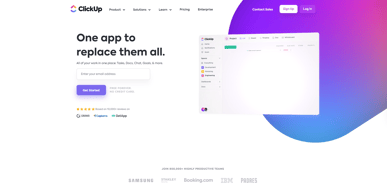
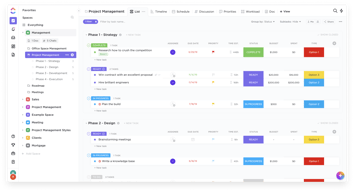






In the realm of project management tools, ClickUp has emerged as a comprehensive solution that caters to a wide range of users. From freelancers managing their own tasks to large corporations coordinating complex projects, ClickUp aims to simplify and streamline the process. But does it deliver on its promise? In this review, we’ll take a close look at ClickUp, dissecting its features, user interface, support, and pricing structure. Our goal is to provide an unbiased and thorough examination of this software, helping you decide if it’s the right fit for your needs. So, without further ado, let’s delve into the world of ClickUp.
What is ClickUp?
ClickUp is a cloud-based productivity platform that aims to centralize all your work and tasks in one place. It’s a comprehensive project management tool designed to help individuals and teams plan, organize, and collaborate on projects.
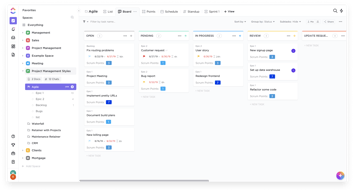
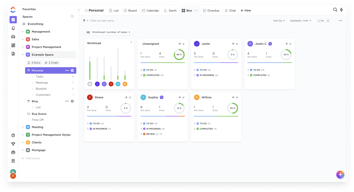
The software offers a wide range of features including task management, time tracking, goal setting, document sharing, and more. It also provides multiple views for project tracking such as list view, board view, and Gantt chart view, allowing users to customize their workspace according to their preference.
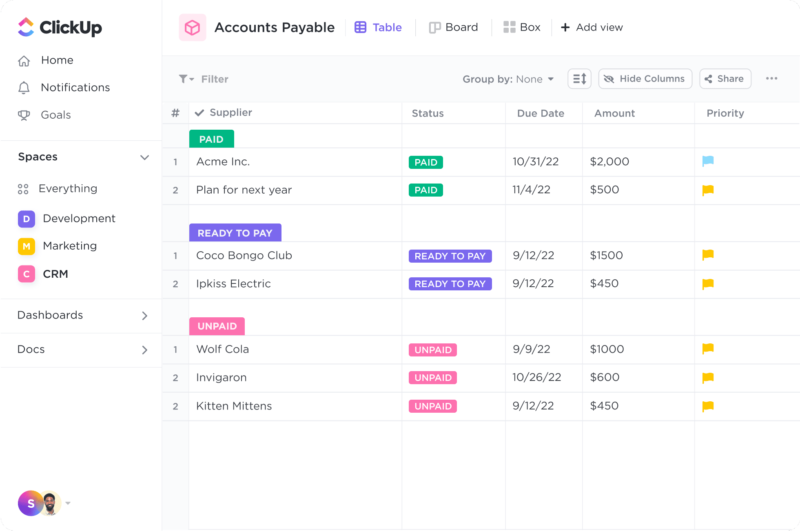
ClickUp Dashboard
ClickUp’s target users range from freelancers and small businesses to large corporations. It’s designed to be flexible and adaptable, catering to different industries and project types. Whether you’re managing a marketing campaign, developing software, or planning an event, ClickUp aims to provide the tools you need to keep your project on track.
In essence, ClickUp is more than just a project management tool. It’s a productivity platform that seeks to eliminate the need for using multiple, disjointed tools by providing a unified, all-in-one solution.
ClickUp Core Features
ClickUp is packed with a variety of features designed to enhance productivity and streamline project management. Here are some of its core features:
- Task Management : ClickUp allows users to create, assign, prioritize, and schedule tasks. You can also set dependencies between tasks, making it easier to manage complex projects.
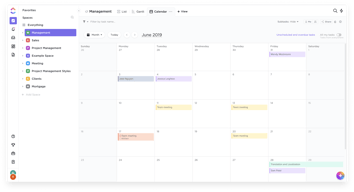
- Multiple Views : ClickUp offers several views for managing your projects, including list view, board view, box view, Gantt chart view, and calendar view. This allows you to visualize your tasks and projects in a way that suits your working style.
- Time Management : ClickUp includes time tracking features, allowing you to monitor how much time is spent on each task. It also includes scheduling and capacity management features, helping you to plan your time effectively.
- Collaboration Tools : ClickUp facilitates team collaboration with features like real-time chat, comment assignment, document sharing, and in-app video recording. These features make it easier for teams to communicate and collaborate on tasks and projects.
- Customizable Workflows : ClickUp allows you to create custom workflows that match your team’s processes. You can set up statuses for tasks and move them through different stages as they progress.
- Integrations : ClickUp integrates with a wide range of other tools, including Google Drive, Slack, GitHub, and more. This allows you to bring all your work into one place, reducing the need to switch between different apps.
ClickUp Pricing Plans
ClickUp offers a variety of pricing plans to cater to different user needs. Here’s a breakdown of their tiered pricing structure:
ClickUp offers Free, Unlimited, Business, and Enterprise plans — see ClickUp pricing for current rates.
The Free plan is a great starting point for small teams or individuals who want to try out ClickUp’s basic features. The Unlimited plan offers more flexibility and customization options, making it a good choice for growing teams. The Business and Enterprise plans offer advanced features and increased automation, making them suitable for larger teams or businesses with complex project management needs.
ClickUp has since launched ClickUp Brain, an AI assistant integrated across the platform for writing, summarization, and project insights.
Remember, it’s important to choose a plan that aligns with your team’s size, budget, and requirements. You can always start with a lower-tier plan and upgrade as your needs evolve.
ClickUp Competitor & Alternatives
ClickUp competes with tools like monday.com, Trello, and Asana. Each tool has its own strengths and weaknesses. ClickUp stands out for its wide range of task display views, real-time chat, and in-app video recording features. However, other tools like monday.com and Asana also offer robust features, although they lack real-time chat and in-app video recording. Trello, on the other hand, is a more budget-friendly option, but it lacks time tracking and budgeting tools.
ClickUp FAQs
Is ClickUp’s free plan really free?
Absolutely! ClickUp’s free plan is indeed free, with no hidden costs or strings attached. This plan offers a robust set of features including unlimited tasks, unlimited members, and up to 100MB of storage. It’s a great option for individuals or small teams who are just getting started with project management software.
While the free plan does have some limitations compared to the paid plans (such as storage limits and access to premium features), it still provides a comprehensive toolset for managing tasks and projects. So, you can definitely start using ClickUp for free and then decide if you want to upgrade to a paid plan as your needs grow.
What does project management software do?
Project management software is a digital tool that helps teams plan, organize, and manage tasks. It facilitates collaboration, scheduling, resource allocation, and progress tracking, making project execution more efficient and streamlined.
Bottom Line – ClickUp
ClickUp is a robust and versatile project management tool that can significantly benefit businesses of all sizes. Its comprehensive features for task management, collaboration, and project tracking make it an excellent choice for teams aiming to streamline their workflows and enhance productivity. While it has a rich feature set, it’s designed with user-friendliness in mind, making it accessible even to those new to project management software.

Compare ClickUp with other popular tools in the same category.
In short: We love ClickUp Click up makes it extremely easy to manage all of our product design & digital identity projects in one place. Each team environment is extremely customizable making it easy to track small projects and massive products. We track our products & features from discovery all the way through development, manage backlogs, create roadmaps, and track team analytics. It's the only complete end-to-end tool that we've used without needing plugins or workarounds.
Keyboard commands get a bit annoying. Clickup overrides other apps when using keyboard commands. For example: If I'm working in design software and use a command that clickup also uses, the clickup window will pop over my design software and pull me completely out of my workflow. I know I can turn it off, it's just not software that should have overrides like that by default.
Everything in one place.
The tasks are organised by status and has many columns for each work hence it makes tasks to appear simple to organise since most of my tasks involve many different participants. It helps me find it's ability to attach files directly to tasks as proven in valuable in keeping all relevant information in one place hence helping me always avoid confusion of tasks. It allows me to create dashboards to track my team and company's progress and performance towards its goal hence it makes organising complex projects easy as my company deals with mostly complex projects such as construction of road.
It's always simple to use hence I don't have any dislike about it.
It has helped me alot in terms of organising tasks to be done by team members.
Fexibility!! Ists so amazing to make whaever you wnat to mesure, or control, its just incredible!
Customize UX more. I would like to have HTM emails to, it would be incredible!
Organizar tudo ficou mais simples com o Clickup. Ter uma flexibilidade pra entender os processos e coloca-los no clickup te ajuda a ter uma visão incrivel!

The flexibility and sophistication of workflows in ClickUp are incredible! The possibilities in ClickUp don't just make project management easy, it drives me to design better processes!
The number of features in ClickUp can be overwhelming. It is not designed to allow users to be an expert out of the box but it is very usable out of the box and provides plenty of head room to continue growth.
ClickUp is allowing us to collaborate better and implement process improvements more rapidly across project teams.
I love that Click Up is completely customizeable to my needs both organizationally and visually.
It takes a long time to figure out if you do not have a techy background
Keeps everything I need to do my job in one place form calendar to infomation management
Good Visual and easy to use, very good for team work and knolodge of witch one tasks
I would like to have a calendar without need to create tasks
Is solving the team work traking, it helps a lot with the tasks controle
I like how simple it is to use ClickUp and the many helpful features I can use from setting up tags and creating custom fields. I've been using ClickUp for 2 years now every day for game development and day-to-day task management. It also has many useful integrations such as the Discord Bot integration which I use to send messages to my Discord server so my teammates know the status of updated tasks. I have some teammates who have implemented pipelines from ClickUp into our game development process and it has been super easy from bots , etc. Furthermore, whenever I have issues, the customer service has been super helpful in giving me the help I need.
Sometimes when I use ClickUp to setup the due date it will lock into intervals of 15 minutes for a few seconds.
ClickUp is solving complicated UI and simplyfing task management that helps me and my teammates see data we need to know in personalized ways which makes it easy for everyone to be on the same page. Whether one person likes to see tasks in Kanban view or another prefers calendar view, ClickUp has it all.
With multiple different ways to display things, ClickUp offers our users the ability to plan projects and work flows seamlessly, from Gant charts to simple to do lists, click up has it covered
Some of the new updates have effectively hidden some of the key features, ie made it harder to find them
Pulling together multiple projects, all with small teams and different "customers" has always been tricky, it with ClickUp we have a one stop shop for all of our flows, kabans and simple task lists
Useful to see all my tasks laid out in a summarized view.
You can only assign tasks to people who have profiles. I just but a tag instead.
Keepin gmy team's tasks organized.
Clickup is very ease of use and it helps me to organize my daily even from personal tasks.
I think the Customer Support could be also in Portuguese
It helps my team to organize all the tasks set to our clients.
Clickup is a very intuitive and very easy software, it has rich features for managing and analyzing projects in a simple and easy way.
The price is not one of the most interesting for the Brazilian market
He has helped me find bottlenecks in my process and directed me to focus my efforts on what has the greatest impact on my results.
The multiples views of tasks is the best feature for me, some times a need lists to get overall picture of some work others I need board, to work with a team, and in other situations I need a formal Gannt chart for old management school clients. Have all this options in the same tool is real awesome.
The way that lists are rendered on dashboards, keeping the fields of filter, search and others always visible. For me the ideal would be that these fields is rendered only in edit mode, mantaining the list view clean.
So, Clickup has become to me a kind of cockpit for: - Manager professional contacts - Manager internal projects of my company - Manager customers projects - Manager several aspects of my home, since maintenance until what I am planting in the garden - A place to setup my GTD System The main benefit is being able to follow what a need to do and prioritize what I will do first.
We have used several different services over time, Jira, Asana, Trello, etc. The issue you we before was the need for having a separate software for time tracking vs product flow tracking etc. Click up has been so useful for us as a company as all the features it has allows us to condense the programs we use into one.
I would love to see the chat functionality upgraded. If we could move away from another program like slack in order to have all conversations in one place that would be awesome. Clickup does have a chat/communication function, it is just a little less functional than would be desired to pivot from something like slack.
Condensing the need for several programs into one. We also like the ability to write and follow email communications on a task level. It makes tracking issues and progress so much easier.
Whatever the project is, whether it's a CRM, content calendar, or project tracking, you can set it up in Click Up. Then you can find the best way for you to view each of those projects. Anytime there's been a problem, customer service has been so easy to work with.
For me personally as a creative, there's a learning curve. But I work with a virtual assistant, so when we start something new it's so simple for her to show me and for me to learn how it works.
It's that one hub I can go to and know that anything I'm searching for is right there in Click Up.
I've been working with the platform for a while, while we implemented a scrum work methodology for projects. I say the above to say that what I like most about ClickUp is how it has accompanied all this experience. It is an essential tool for implementation and coordination between areas.
Some data is altered when passing it to panels, I think that the development of subtasks sometimes complicates certain functions of the platform
It is solving the problem of where to unify our institutional organization, and it is benefiting me in project management

There's a lot of integration options with third party apps. The default views and configurations are great to start with but being able to customize almost everything really make this a fantastic app that you can make all your own.
The learning curve on how to really use it is rather steep. It's only after several weeks or months of use that you start to see how customizable and applicable ClickUp can be. It can be a PM software, CRM software, or a basic Task Management; it's all up to you.
It gives me a workspace that I can customize and use with my team. I think I'll even be able to share certain views with clients but that's up to me to learn how.
It is the only tool that I have ever used that allows me to adjust and change as I go. I can make it work for all of my business and personal needs and goals.
The only thing I miss is 3.0 version. Cannot wait to switch :)
All of the problems one can encounter when running a project managing agency, having a hectic life of an ADHD mum with an ADHD teenager son ;)
I like the way we can add fata to tasks. I like that I can add several checklists in a single task in version 3.0
I dont like to change the whole layout and search filters for all the people in my team.
Sometimes i close a task and screen gets of until I refresh it.
Clickup and its automations are amazing. The dependancy tracking and ease of use is amazing. The learning curve is steep for a new user (I'm still learning) but that's only because there is so much you can do.
The learning curve is steep for a new user (I'm still learning) but that's only because there is so much you can do. Comaring Clickup the other similar products, even its free version is phenominal.
It helps plan out the projects in a simple way while tracking dependancies. It also helps to quickly see where any project is and its date for completion while automatically adapting for changes due to late deliveries.
The ability to be specific, but across many areas. A task can e added to multiple lists and spaces to be seen wherever it is relevant.
Some of the customization is cludgy. People added custom fields that were added universally. Fields are difficult to remove and modify. Using templates can be confusing sometimes.
ClickUp allows us to organize the tasks that need to be done. Before ClickUp we communicated with long email threads. Tasks got lost, and people were forgotten.
The communication tools! So great to be able to chat and ask questions in live time
Nothing! I love using the tool and it is gamechanging
Project process and implementation timeline; accountability
I love ClickUp for the flexibility and intuitiveness with which I can create tasks, reminders, and docs on the fly as I try to organize my workload for school and work. The docs have nice formatting features and are light enough that I can download them as PDFs to important into other applications at any time.
I wish it was a standalone desktop app rather than a web app. Sometimes being a web app causes issues where there isn't native functionality for some features of ClickUp.
ClickUp is solving the problem of coalescing all of my disparate tasks, reminders, and notes regarding various things in my life and providing the platform for me to put them all in one convienient location.
It's super useful to keep up with everyday tasks. Love it and I use it a lot for work.
I've had no problems so far with the program, it's very useful.
Using it with my coworkers to catch up with our work and see what tasks are already done.
Funcionabilidades e facilidade de gerenciamento das tarefas
No momento nada contra , ate agora tem cido uma experiência exelente
Organizaçâo de tarefas
We use Click-up to track and manage our team tasks, efficiently with the easy to use UI. It contains a ton of features as well that we have not yet used. The ease of use is what keeps coming back to it. The various we can view our tasks helps plan our week.
ClickUp is a bit slow sometimes but never buggy.
We have been using ClickUp to manage a multitude number of tasks efficiently and with simplicity. It gives us a good overview that helps us balance work load and estimate delivery timelines.
The options you can have to use for the team or implementations
The media storage its a bit low for the uses
The distribution of the information in the crm
The ability to manage all of our workflows in one place, including the creation of documents and resources. ClickUp enables all of our team members to communicate effectively on any given task and related project with ease and has enabled us to become far more efficient and effective as a team!
Nothing. I've found everything in ClickUp useful. It has drastically improved our business operations and trumps competitors such as Trello and Basecamp
It's helped us to prioritise projects and to break them down into simple, actionable tasks. We've customised the Kanban view in order to track projects from initial idea through to implementation. The system has also reduced our use of instant messaging on Slack/Twist, allowing us to discuss specific tasks in ClickUp and without us losing track of important conversations or topics related to specific tasks.
We appreciate comments, chat, and document sharing into the tasks.
Some users have found ClickUp to be complex and overwhelming,
ClickUp includes features for communication and collaboration, such as comments, chat, and document sharing
a. Very good organization tool to run product sprints
Laggy software at times, find it slow when trying to make tasks quickly.
Clickup makes it very easy to collaborate in an agile sort of a team
ClickUp serves as a comprehensive all-in-one solution for project management, task tracking, and team collaboration. It consolidates various tools and features into a single platform, eliminating the need for multiple applications and streamlining workflows.
The mobile app does not offer all the same features as the desktop version.
Project Management & Team Management