

Unclaimed: Are you working at FreshBooks?
FreshBooks Reviews: 4.5/5 — Highly Rated
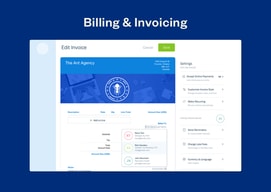
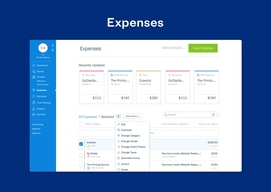
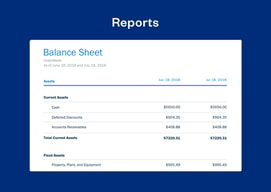
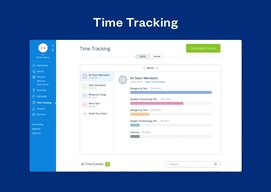
FreshBooks is a cloud-based accounting software preferred by numerous small to medium enterprises for its ability to easily manage and streamline finances. Core features include expensive tracking and invoicing, and it also helps improve operational transparency through reporting and time-tracking features.

| Capabilities |
API
|
|---|---|
| Segment |
Small Business
Mid Market
Enterprise
|
| Deployment | Cloud / SaaS / Web-Based, Desktop Mac, Desktop Windows, Mobile Android, Mobile iPad, Mobile iPhone, On-Premise Linux |
| Training | Documentation |
| Languages | English |
FreshBooks Pros and Cons
- 'Lite plan is great for startups (includes 5 billable clients)
- You can track unlimited expenses and send unlimited estimates
- Clients can pay you using credit cards
- Limited invoice customization
- The mobile app could use improvements





FreshBooks advertises $2.30 a month. The actual price is $23, and the discount lasts three months. Every plan also includes exactly one user, with additional team members at $11 each, so a three-person firm on the middle tier pays $65 a month rather than the $4.30 on the banner. The software is good and well-suited to service businesses — the pricing page just requires arithmetic.
- What it is: Accounting and invoicing software built around service businesses rather than product sellers.
- Best for: Freelancers, consultants, and agencies who bill for time and projects.
- Pricing: Lite $23, Plus $43, Premium $70 per month regular. Select quoted. Extra users $11 each. Verified July 2026.
- The honest catch: Lite allows just 5 billable clients, which most working freelancers exceed.
What Is FreshBooks?
FreshBooks approaches accounting from the invoice rather than the ledger, and that shapes everything. Where QuickBooks and Xero are built around double-entry bookkeeping with invoicing attached, FreshBooks is built around getting paid — proposals, estimates, time tracking, retainers, invoices, and payment collection — with accounting behind it.
For a consultant or agency that bills by project or hour, that orientation is genuinely better. Time tracking feeds invoices directly, retainers and proposals are first-class rather than bolted on, and project profitability tracking on Premium answers the question service businesses actually care about: are we making money on this client.
The trade-off is that it is a weaker general-purpose accounting system. Inventory is essentially absent, and businesses selling physical products will find it thin where QuickBooks is deep.
How FreshBooks Works
- Billable clients are the meter. 5 on Lite, 50 on Plus, unlimited on Premium and Select.
- One user included on every plan. Additional team members cost $11 a month each.
- Time tracking to invoice. The core workflow for service businesses.
- Proposals, retainers, e-signatures from Plus, which is where the plan becomes agency-shaped.
- Project profitability on Premium, tracking costs against project revenue.
- Payments built in. Cards, ACH, Apple Pay, Google Pay, and buy-now-pay-later.
FreshBooks Pricing
Captured from FreshBooks’ US site in July 2026. The displayed figures are promotional; the struck-through prices are the real ones.

| Plan | Regular | Promotional | Billable clients | Users |
|---|---|---|---|---|
| Lite | $23/mo | $2.30 for 3 months | 5 | 1 |
| Plus | $43/mo | $4.30 for 3 months | 50 | 1 |
| Premium | $70/mo | $7.00 for 3 months | Unlimited | 1 |
| Select | Quoted | — | Unlimited | 2 |
Add-ons: team members $11/month each, Advanced Payments $20/month, FreshBooks Payroll $40/month plus $6 per user.

What actually determines your bill:
- The 90% discount runs for three months. After that you pay $23, $43, or $70. FreshBooks discloses this clearly — the struck-through price and “90% Off for 3 Months” label are both on the card — but the large number is the promotional one, and it is what people remember. Budget from the regular rate.
- Five billable clients on Lite is the sharpest constraint. A freelancer with six clients cannot use the entry plan. This is a low ceiling by any measure, and it is the single most common reason people upgrade — not features.
- Every plan is a one-person plan. At $11 per extra team member, a three-person firm on Plus pays $65 a month rather than $43. Count your seats before comparing against competitors that bundle users differently.
- Yearly billing adds a further 10% off, on top of whatever promotion applies.
- Payroll and Advanced Payments are separate. $40 a month plus $6 per user, and $20 a month respectively — relevant if you were treating FreshBooks as an all-in finance stack.
- A 30-day money-back guarantee applies, which is the right way to test whether the client cap works for you.
Who Should Use FreshBooks
- Freelancers and consultants. The clearest case, and what the product is shaped around.
- Agencies billing by project. Proposals, retainers, and project profitability are genuinely well built.
- Anyone who tracks time and bills it. Time-to-invoice is smoother here than in general accounting tools.
- Service businesses without inventory. The absence of stock management is irrelevant to you.
It fits poorly for product businesses needing inventory, where QuickBooks and Zoho Books are far stronger; for teams of several people, where the per-seat add-on stacks up; and for businesses wanting the cheapest compliant books, where Zoho Books undercuts it substantially.
Honest Pros and Cons
Strengths
- Built for service businesses. Time, projects, and retainers are first-class rather than afterthoughts.
- Excellent invoicing. The most-praised part of the product, and the reason most people choose it.
- Project profitability on Premium. Answers the question consultancies actually need answered.
- Broad payment acceptance. Cards, ACH, Apple Pay, Google Pay, and BNPL built in.
- Genuinely easy to use. Approachable for people with no bookkeeping background.
- Clear discount disclosure. The struck-through price and three-month term are both stated.
Limitations
- Five billable clients on Lite. A very low ceiling that forces upgrades on volume, not need.
- One user per plan. $11 per additional seat.
- The headline price lasts three months. After which it is ten times higher.
- Weak inventory management. Effectively unsuitable for product businesses.
- Payroll costs extra. $40 a month plus $6 per user.
- More expensive than several rivals once seats and the regular rate are counted.
FreshBooks Alternatives and How It Compares
- QuickBooks Online is the US default with far deeper accounting and inventory, at a higher price and with repeated increases.
- Xero includes unlimited users on every plan, which is the decisive difference for teams.
- Zoho Books is substantially cheaper and strong if you use other Zoho applications.
- Sage Business Cloud Accounting is the established alternative, particularly in the UK.
- Bonsai targets freelancers specifically, bundling contracts and proposals with invoicing.
For a broader survey, browse our accounting software directory.
The Verdict
FreshBooks is the right shape for service businesses, and that matters more than a feature count. If you bill for time and projects, the workflow from tracked hours to sent invoice to collected payment is smoother than any general accounting package manages, and the proposals, retainers, and project profitability tools on the higher tiers are built for how consultancies actually work rather than adapted from bookkeeping software.
Price it from the struck-through number. The $2.30 on the pricing card is 90% off for three months; the real figure is $23, and Plus is $43 rather than $4.30. To FreshBooks’ credit both are shown clearly on the same card, which is more than several competitors manage — but the promotional price is the one in large type, and anyone budgeting from it will be surprised in month four.
The two structural constraints matter more than the tiers suggest. Lite’s five billable clients is a very low ceiling — a freelancer with six clients is already excluded, which makes Plus the realistic entry point for most working professionals and moves the effective starting price to $43. And every plan includes one user, so a three-person firm on Plus pays $65 a month once seats are added. If you have a team, Xero’s unlimited-user model is the comparison worth running, because that single structural difference outweighs most feature debates at this size.
FAQ
How much does FreshBooks cost?
Regular prices are $23 per month for Lite, $43 for Plus, and $70 for Premium, with Select quoted by sales. FreshBooks was running a promotion of 90% off for three months when captured in July 2026, displaying $2.30, $4.30, and $7.00 respectively. Additional team members cost $11 per month each, Advanced Payments $20, and FreshBooks Payroll $40 plus $6 per user. Yearly billing adds a further 10% discount.
How many clients can I invoice on FreshBooks Lite?
Five. Lite is capped at five billable clients, Plus at fifty, and Premium and Select are unlimited. This is the most restrictive limit in the lineup and the most common reason people upgrade — a freelancer working with six clients cannot use the entry plan at all, which makes Plus the realistic starting point for most working professionals.
Does FreshBooks include multiple users?
No. Every plan includes a single user, with additional team members charged at $11 per month each; only the quoted Select plan includes two. A three-person firm on Plus therefore pays $65 a month rather than $43. If you have a team, Xero includes unlimited users on all its plans and is the more natural comparison.
Is the FreshBooks discount permanent?
No. The advertised 90% discount applies for three months, after which the regular rate takes effect. FreshBooks displays both the discounted price and the struck-through regular price on each plan card along with a “90% Off for 3 Months” label, so it is disclosed rather than hidden — but budgeting from the promotional figure will produce an unpleasant surprise in the fourth month.
What is FreshBooks best for?
Freelancers, consultants, and agencies that bill for time and projects rather than selling products. Its time tracking, proposals, retainers, and project profitability tools are built specifically for service work, and its invoicing is the strongest part of the product. It is a poor fit for businesses needing inventory management, and expensive for teams once per-seat costs are included.

Compare FreshBooks with other popular tools in the same category.

Freshbooks makes billing my clients easy.
The cost of Freshbooks is a little too high.
None.

My favorite feature is that I can see when a client logs in to view their invoice.
Nothing really! It would be fun to have more stats about our billing history - but for the most part, it fits our needs.
I no longer have to spend time on custom invoice design and creation - it's so easy to use and can be automated.
Freshbooks has made it simple for our team, as a small charity, to clearly track and bill time across projects and grants. Aside from that, it also allows all of our team members to invoice partners and clients for projects without needing to access our legacy Quickbooks accounting system.
Freshbooks has been a little behind in the mobile space - the time tracking in the app is sluggish and could be vastly improved.
Freshbooks has made it much easier for us to track time spent across a projects, and has made project audits a breeze. We have had some funder refer people to us because of our great audit results, enabled by Freshbooks time tracking features.
It is easy to use and is very affordable.
The app isn't that great. I would like to be able to manage recurring profiles from the app.
We needed a way to send invoices and to collect credit card payments. This allows us to do both. We can also set up recurring profiles so we don't have to remember to bill everyone every month.
Great automation and tracking tools. Reporting is superb.
so-so time and expense tracking and no ability to multi branded invoices.
Automation of monthly recurring invoices and tracking outstanding payments.
Let's face it, most of us don't like accounting and the thought of keeping spreadsheets to manage our books sucks. We want to find and close new deals, do the work, invoice and get paid. However, those who understand their numbers are in the best position to succeed. Freshbooks takes the pain out of the onerous (but crucial) accounting tasks with an easy to use system that provides expense recording and organization, invoicing and payment reminders. It's something that I have come to depend on over the last 5 years.
Waiting eagerly for the Android update. Also would love to see some forecasting tools.
Invoicing clients. and tracking those invoices, can be complicated and painful when done manually. I benefit from having an accounting system that completes tasks efficiently and therefore get paid faster.
Freshbooks makes it easy to send invoices, either by mail or email, manually or automatically. Clients and customers can pay online via credit card or bank account, or by mail. Each client can log in to see their account summary and invoices.
I dislike that when a client is late with a payment, Freshbooks does not carry over the balance to the next, automatic invoice. In addition, while you can automatically add a late fee to an overdue invoice, it only does this one time.
I save quite a bit of time using Freshbooks over sending individual Paypal invoices. Plus, some of my clients like to automatically pay, so it keeps my cash flow moving along.
FreshBooks is unmatched in how well it handles invoice follow up. It makes it very easy to not only create and send out bills, it is quite flexible for accepting online payments as well as reminding clients -- automatically -- that their invoice is due. For service-based businesses, there's nothing else that even comes close to helping to keep the cash flowing. That's what it's all about, right?
FreshBooks is not a full double-entry bookkeeping system. In particular, it only tracks income and expenses. There is no way to reconcile bank accounts, handle deposits other than from invoice payments, or track Balance Sheet things, like purchases of new equipment (assets) or bills owed to suppliers (accounts payable). It also does not truly integrate with QuickBooks Online.
With FreshBooks it's easy to keep track of billable expenses, including attaching receipt images, which is a really nice feature. It also makes time tracking against projects a snap and helps me keep an eye on how much I expect a project to take vs. how much work is actually involved. My clients have also commented on how easy it is to pay my bill, so that means I'm getting paid MUCH faster than prior to using FreshBooks.

Auto-billing is the most useful in the field I work in.
No complaints, although better menu organization would be great.
Solving the issue of being paid on time with minimal interaction and work being done.
FreshBooks was easy to set up and manage to track revenue and expenses, create invoices, and prepare for taxes. I don't like accounting - FreshBooks eliminated the drudgery by offering a great solution at an affordable price that delivers a good user experience. I did not take advantage of all of the features, but I believe they offer a comprehensive solution with everything a small business needs.
I did try to implement the option to accept credit cards with my invoices, and had a tough time setting it up. I called customer support and they told me to contact their partner, who was providing the service. I found that odd as I've always had good customer support from FreshBooks. In the end I did not integrate this option.
I don't want to think about the accounting aspect of my business, and FreshBooks was easy enough for me to set up so I could focus on business development and providing the services I offer. My accountant likes my reports at tax time, as they are so much more organized than when I was doing those myself.

I love how easy it is to create estimates and proposals and the fact you can tell when a client has viewed it.
I wish that you could create custom design templates for estimates. If I could it would be perfect.
Being able to easily create estimates and invoices, taking online payments.

Freshbooks makes is super easy to manage my business' books. The interface is intuitive, the tools are useful and the reporting is robust. We've tried many different book keeping solutions, from excel to free software to paid, and FreshBooks is the best we've used. The app is also super easy to use and makes logging receipts and expenses very fast. No more shoe boxes of receipts and nonsense like that. FreshBooks lets us take a picture, log the expense, and keep it moving.
There is no easy/good way to track sales. There is a workaround that exists, to create invoices for all of your sales, but it is a terrible solution really. This is the only thing keeping FreshBooks from getting a 10/10 from us. Everything else is wonderful, but this is a really, truly glaring hole in the software.
FreshBooks, simply, has made our book keeping very easy. Invoicing, expenses, accounts receivable are all streamlined. The integration of three different payment services also makes it so that we get paid super fast, no matter what. Overall, this product is excellent.
Clean interface, understandable. Thoughtful features. I use it mainly for sending invoices.
It doesn't handle transfers from one account to another and forces them to be classified as some sort of expense.
Invoicing. Thinking of using it for simple bookkeeping due to great importing of transactions from financial institutions.

I love how simple and user friendly the software is. I like the invoice pay reminder emails so I don't' have to keep track. I love that it shows me how long it typically takes a client to pay that way I can adjust future contracts and etc as needed. I also absolutely love it shows me how much money has been collected/paid on the invoices versus the invoices issues for that month. It also shows if one partial paid and etc.
I wish I could designate a shipping address and/or billing address just like the primary and secondary. I also wish the financial statement could be more detailed.
Freshbooks makes it easy for us to track invoices and get them paid
The Freshbooks Customer Service is phenomenal - they always pick up within a few rings and are extremely friendly and can answer your questions within minutes.
Some of the auto-send functions sometimes appear a bit erratic - clients may receive a late invoice notification email one month, and for whatever reason they won't receive an email the following month.
All invoicing and profit & loss analysis can easily be seen on the homepage of freshbooks and helps keep us organized in a very easy way.
The ease of tracking time towards a project and then generating the invoice at the end of the month or at the end of the project.
I wish that there were better features around product sales, like the ability to store an item and associate both a cost and a sale price for the item. Also, there is no Purchase Order functionality.
I have drastically simplified my billing process and time to send out invoices. In addition, by importing bank and credit card information automatically, I am able to track all of my accounting data in one place.
Freshbooks is a great online alternative for taking care of your business on the go! Easy to maneuver and set up.
Freshbooks has limited financial reports. Wish there were more.
Tracking expenses. Freshbooks allows business owners to do this easily.
Freshbooks gets invoices to professional services customers quick and tracks by email that the customer received the invoice and read it. A new Freshbooks customer can send an invoice after a very quick and easy setup process. Sending bills frequently, shortly after service is performed and by the service provider is an excellent small business practice.
There is not a lot to dislike about Freshbooks. The internet location of your company Freshbooks account is hard to find without a link and gets a little frustrating with multiple mobil devices and multiple company users or if your an infrequent user. The program is otherwise a breeze to use without a lot of cumbersome features or high expense like a more full featured software like Quickbooks.
Onetime single service engagements done for small fees with customers communicating by email can be quickly and efficiently billed and the service provider gets paid faster with happier customers. Customers that don't pay can be tracked much easier and reminded more often with an easy to use and inexpensive online software from mobile devices or from remote locations.

Very easy to accomplish the basics that a small business needs to with invoicing for consulting time and materials (e.g. software licenses).
Could not import my historical Quickbooks Online Invoices and Payments, so I do not have a full fiscal year perspective on revenue and cash. This is a temporary problem though.
Not provided

Easy to use, intuitive interface, reliable, relatively low cost, steady stream of new feature additions, hasn't failed me in 2 years.
I think the product is great and recommend it ... there have been a few bumps with syncing credit card transactions, but that's getting smoothed out. Completely separately from the product which I love, I was frustrated that Freshbooks offered to post a guest blog post I wrote, but then ended up giving me the run-around and not posting it. Again, not a product critique, but it's the only real blemish for me on a company I otherwise think highly of.
Not provided
Turns invoicing and account into something actually manageable. Love the ability to hook up your Paypalaccount and give the ability to your users to pay online directly.
Sometimes when delete blank items lines on my invoice templates, but the keep re-appearing after I save. Haven't figured out how to avoid that yet.
Not provided

I find the customer support responsive to my questions. They have gone above and beyond to help me with troubleshooting, walking through features on Freshbooks, and giving helpful advice that I hadn't even thought of.
The ACH payment through WePay has been a frustrating.
I wanted a software that could send proposals with e-signatures, invoices, collect payment, and record my expenses. And Freshbooks hits all those features for me!
I like that I can view and create invoices and do Time Tracking from both my computer and my phone, and that there is an easy to see overview of paid & uppaid invoices.
For me, the one thing that detracts a bit from FreshBooks being ideal for me is that they're not integrated with Square for accepting credit card payments for invoices, just Stripe and PayPal.
FreshBooks is helping me streamline my (formerly) manual invoicing setup, where I had to manually keep track of unpaid invoices, and the numbering system was less than optimal. It's also very helpful to have an easier to use Time Tracking setup, when I'm at on-site appointments.
Ease of use, integrates with my software, Stripe integration.
Not any that I can think of, it works pretty well.
Invoicing, accounting, and payment collection.
I am new to running my own business (14 months in). My needs are pretty simple. Freshbooks was easy to get up and running for someone who knows little about bookeeping or accounting, yet complete enough that it can provide everything I have needed so far. It is affordable and will allow me to scale up as my business scales up. I also like the fact that I can share my books with an accountant. Freshbooks may not be a good fit for everyone, hence my unwillingness to give it a 10. If you are looking for something to get the job done, can scale with your business, and is affordable, Freshbooks is worth a look.
There are things that, if they worked, would be awesome. They don't seem to work for me. For example, there is the ability to forward invoices and receipts and have them automatically processed. I have not been able to get this to work and Freshbooks has been unable to resolve the issue. Freshbooks offers the ability to upload receipts and have them automatically scanned for reconciling with banking statements. This does not work well and requires you to upload an image (jpg, gif, pdf, etc.) for processing. However, some of my receipts arrive as emails (for example, Uber receipts). These cannot be processed as emails until you convert them to PDFs or download a PDF from Uber. Couldn't freshbooks convert emails to images on their side? Wouldn't they be even easier to process as emails instead of images? Even then, the OCR fails to fails to extract the right information. Freshbooks seems interested in improving their product, but there are clear opportunities for improvement with the existing offering.
It is making it easier for me to track client invoicing, receipts, expenses, and general bookkeeping. As a result I can be more productive and focus on what's most important for the success of my business.
Invoices created by this software looked very unique and professional Easy handling of expenses by linking to bank accounts and email.
I used once for accounting purposes but it is not made for easy use. Only accounting professional can use it correctly.
I used this software for invoice creation for my clients. And handling expenses which are readily available at the time of taxation purposes and for auditors as required by them for audit purposes
It is not complicated to use, customer service is available by email and phone call are perfectly prepared to address concerns without having to be transferring the call to several operators, improves the sending of invoices and payment gateways.
It allows sending only a small number of payment reminders, it does not present the option of chat support, the invoice formats should be more customizable.
It makes it easy for me to issue invoices and send them to customers, it allows me to accept online payments with credit cards, sending reminders of pending payments to customers is a great tool.

What I like best about Freshbooks is that it is a simple and easy to use time tracking and billing solution for a small business. It makes sending out invoices easy and provides an easy method for clients to make payments via credit card.
Not much. Occasionally there is a problem...that the design of the program does not exactly fit the way that I want to bill for or track the work that I am doing and this is rare...and the technical support team is easily available to help find a solution.
I use Freshbooks for time tracking and invoicing. It makes it easy to generate invoices and collect payments.
FreshBooks is a online accounting and invoicing software. You can track real time and expenses. easy to record all this things. Best tool for small and large business.
Sometime i faced delay while generating invoice for clients. Apart from this all features are great. Every business should use FreshBooks.
I have found best ever software for accounting, billing, expense management, and payment processing. This is all in one accounting software for any kind of business.

I am a satisfied customer of Freshbook. It helps me a lot with my financial management and making invoices for my client. Happy service, wish you all the best.
There is a currency limit, I think it should not.
Manage Bank account balance is not suitable for all countries like Bangladesh.