

Unclaimed: Are you working at monday.com?
monday.com Reviews: 4.7/5 — Highly Rated
monday.com packages itself as a Work OS built for a new way of working. Providing businesses with a single source of truth, all monday.com products are built on seven building blocks – boards, views, dashboards, integrations, automation, apps, and docs. There are currently five monday.com products, the core being Monday Work Management. The other four are Monday Sales CRM, Monday Marketer, Monday Dev, and Monday Projects. It’s free to use for individual users and paid plans are available on a per-seat basis.
| Company | monday.com |
|---|---|
| Year founded | 2012 |
| Company size | 5001-10,000 employees |
| Headquarters | Tel Aviv, Israel |
| Social Media |

| Capabilities |
API
|
|---|---|
| Segment |
Small Business
Mid Market
Enterprise
|
| Deployment | Cloud / SaaS / Web-Based, Mobile Android, Mobile iPad, Mobile iPhone |
| Support | 24/7 (Live rep), Chat, Email/Help Desk, FAQs/Forum, Knowledge Base, Phone Support |
| Training | Documentation |
| Languages | English |
monday.com Pros and Cons
- Excellent dashboard environment
- Fantastic for beginners
- Range of features like time tracking and budgeting
- Suitable for larger teams
- Built for multiple. users
- No free version
- Basic plan offers very limited functionalities
- Doesn’t offer a Gantt chart view option
- Requires a bit of learning curve –you will need to dedicate time to learning the platform









Project management tools can help you structure your team, improve your workflow, and automate the tedious parts of everyone’s job. They’re indispensable to any team that wants to be productive. So which one should you invest in?
If you’ve ever looked into project management (PM) platforms, you’ve already heard of Monday.com. It’s hailed as one of the best apps in its niche, and it has stellar reviews.
But just how good is it? Is Monday.com the right choice for your business? Let’s find out in this Monday.com review.
Monday.com Quick Overview
Monday.com is a good choice for anyone that wants to bring a bit of structure to their day-to-day operations. From freelancers to big enterprises, Monday has tools and plans for everyone.
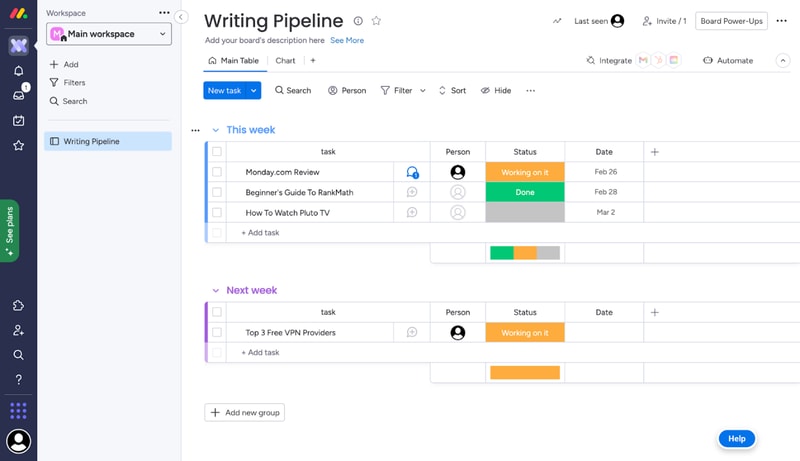
That’s not to say it’s a perfect tool. Monday can get expensive for large teams. Plus, people that aren’t tech-savvy might find it hard to get started. But by and large, we recommend it to anyone looking to level-up their productivity with a project management platform.
If you want the full scoop, keep reading this Monday.com review.
Monday.com Features
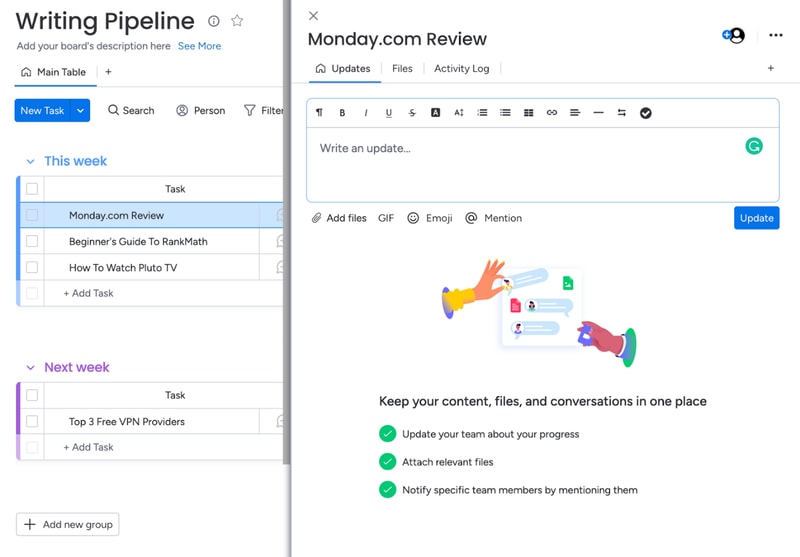
Each task you track with Monday has its own card. These cards store any data you need, like files, a task outline, updates from management, and even an activity log. All Monday cards are grouped in boards, which are themselves grouped into workspaces.
That’s the basic gist of how Monday works. But you can tweak this simple system quite a lot. Let me show you how.
Boards and Cards
Creating a new board is very easy. You just give it a title, choose a view for the project, and start adding tasks.
When you create your first board on Monday, you’ll get a dedicated guide to set it up.
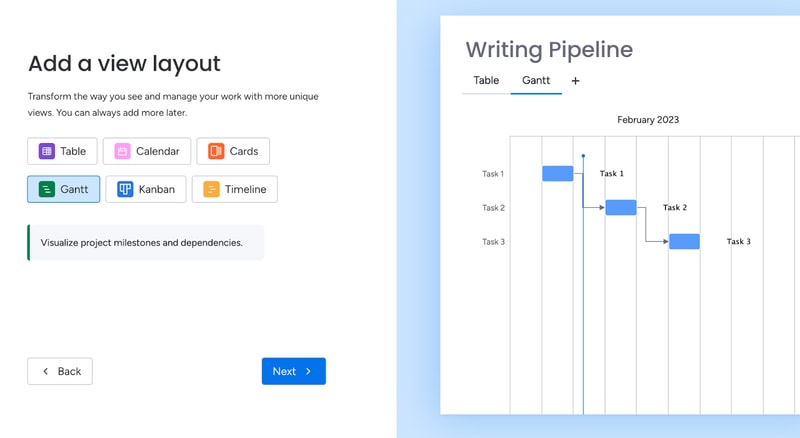
Monday offers plenty of ways to visualize tasks. You can arrange them in a table, in Gantt charts, in Kanban, in a calendar, and more.
As you’re adding cards to your first board, the guide will also give you a preview of how they’ll look:
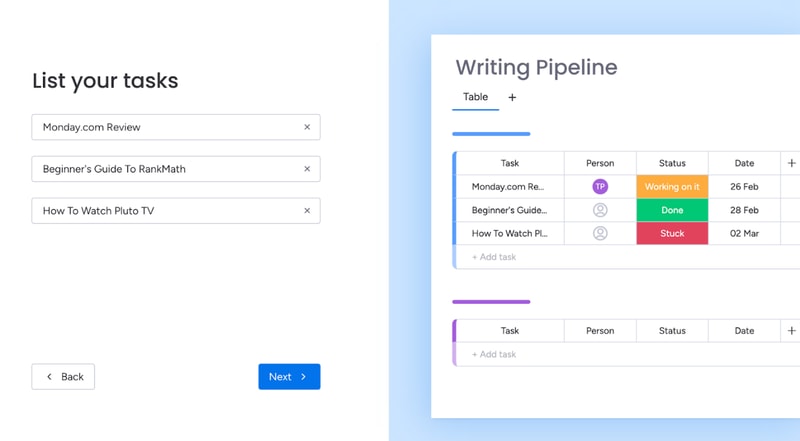
This makes it easy for most people to understand the core functionality of Monday.
You can further bundle cards from the same board in groups. For example, you can group them by what week the tasks are due.
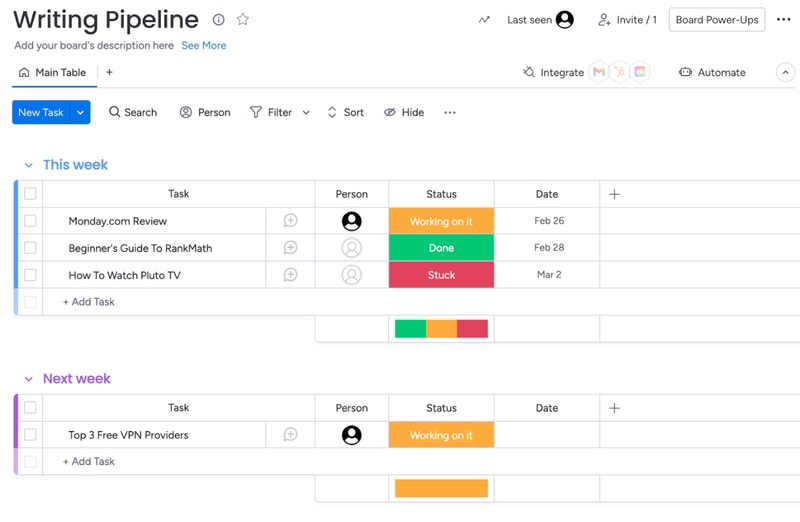
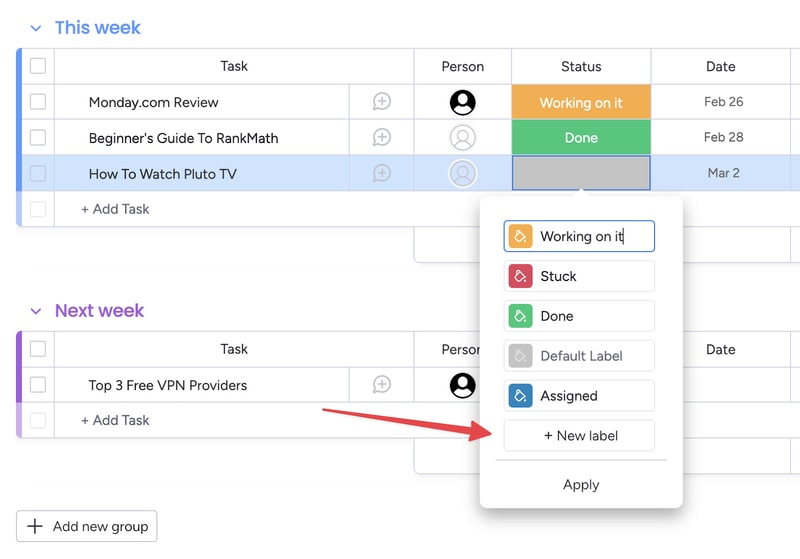
You also get visually-coded statuses for all tasks. The default ones are “Working on it,” “Done,” and “Stuck.” But you can create your own, to further customize your boards:
You can set due dates for all tasks, which helps you keep track of projects. In the Pro plan, you also get advanced time tracking, which lets you visualize how much time you have left before a deadline.
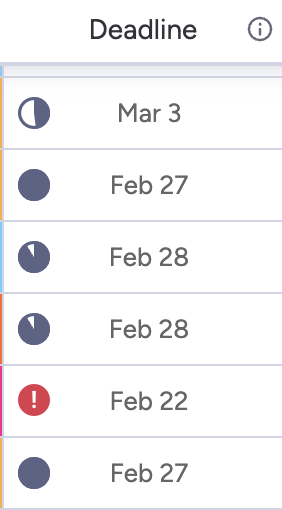
This is useful, but the feature does much more. By tracking time, managers can see the availability of each team member. This makes task allocation much easier.
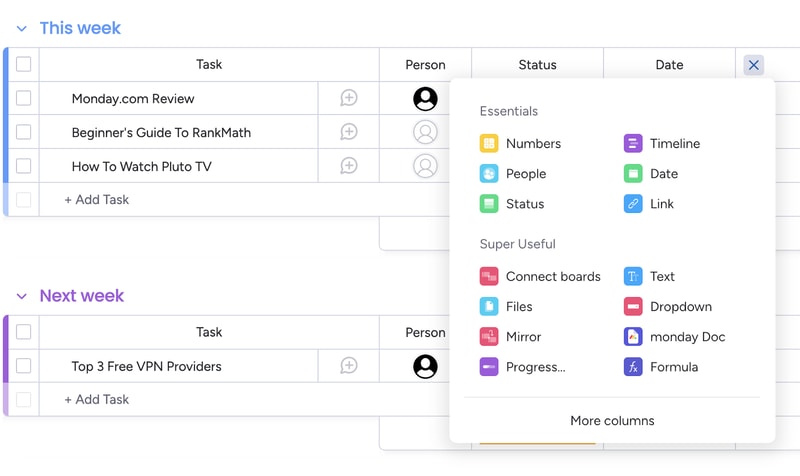
Of course, you can customize the board view in a ton of ways. For example, you can add different columns to the table view:
And you can analyze each card individually, to add comments, files, task lists and even check its activity log.
Monday’s core functionality is top-noth. Even beginners can use their project management software to create simple tasks and dashboards. But Monday’s true power lies in its advanced customization options.
Customizability
We’ve used Monday.com for years, and we researched all of its quirks for this review. Throughout all of this experience, Monday’s automation stood out the most. You can easily set-up automated processes with the platform, even if you’re a non-techie:
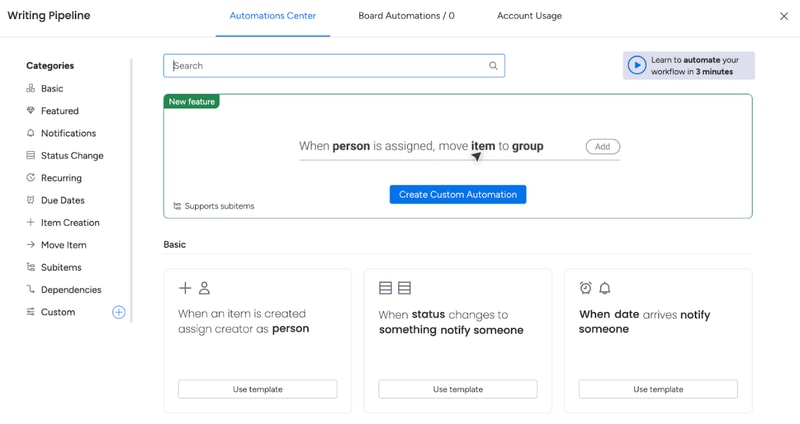
And the possibilities are endless. You get templates for the most commonly-used automations, like notifying someone when a task’s status changes. You also can create your own custom automations, or modify the dozens of templates that are already here.
For example, you can set up an automation that moves a task from one board to another when its status changes and then notifies the person responsible for it. This is useful for tasks that need oversight.
That’s how my editors know to check my work. I change a card’s status to “Needs Review”, and that automatically moves the card to the Editor’s board, and notifies the person that needs to give it a look.
And this is just one example. Monday.com’s automations can do a lot more. And again, they’re extremely easy to create. You don’t need to know any code or use complicated APIs. It’s all made with natural language:
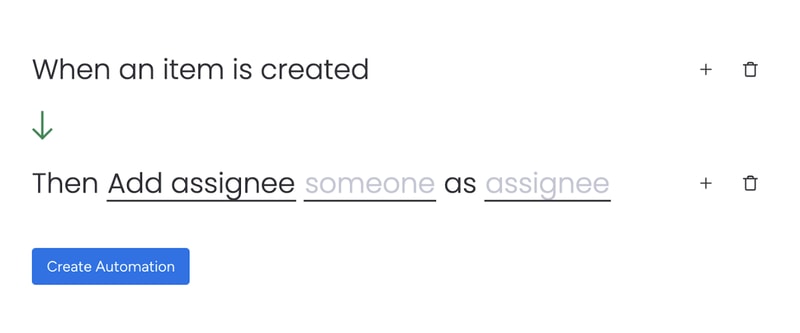
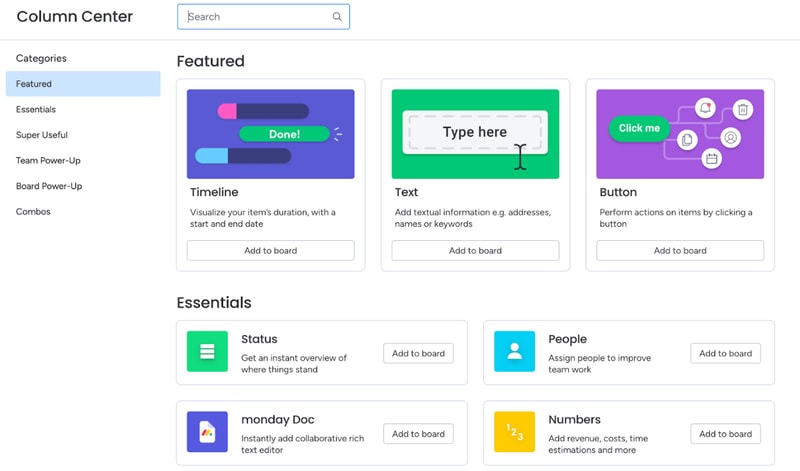
Besides automations, you can also heavily customize board views. You’ve already seen how to add new columns to the table view. But you might be surprised by how many options there are. You can include text, buttons, timelines, numbers, checkboxes, tags, and much more. There are so many options, Monday actually has a dedicated column center.
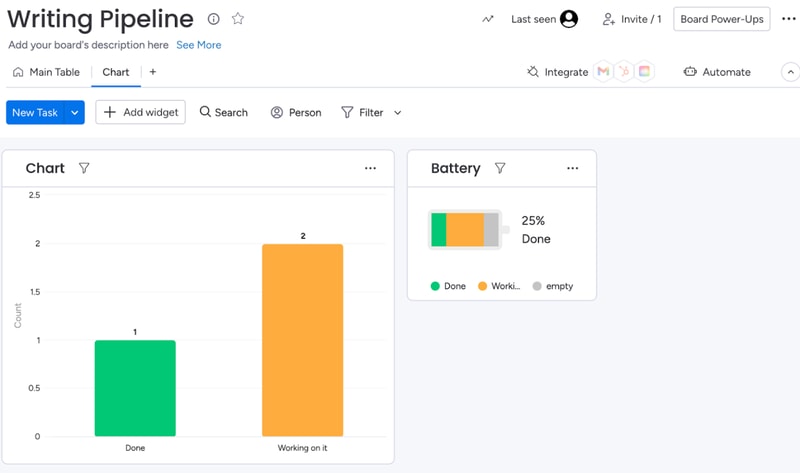
Each board can have multiple views, which makes dashboards on Monday.com very flexible. For example, team members can use the table view to see task details, deadlines, and manage their work. Managers can use the chart view for the exact same dashboard to get an overview of task statuses and deadlines.
When analyzing a board, you can also filter results by anything (person assigned, status, deadline, etc):
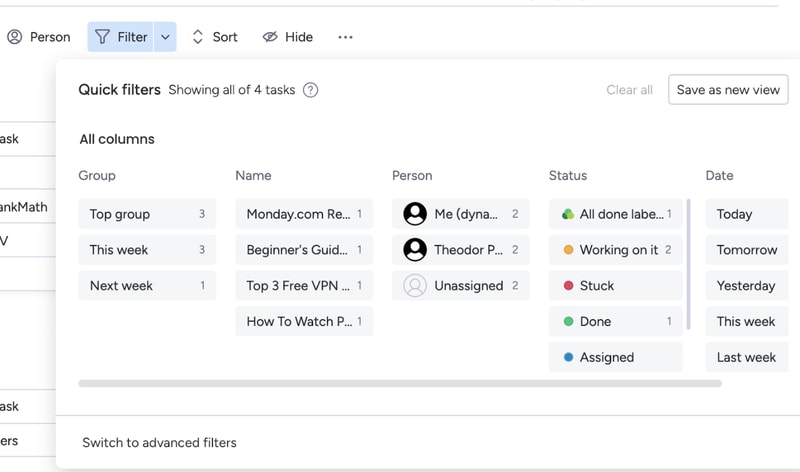
If a filter’s useful, you can turn it into a new view for that board.
All of these options make Monday.com extremely customizable. If you spend some time playing around with its features, you can most likely create anything your team needs. And if Monday’s suite is lacking, you can always complement it with integrations.
Integration with other tools
Monday.com has a lot of integrations. So many, they actually have an entire app marketplace to make it easier to find the extensions you need
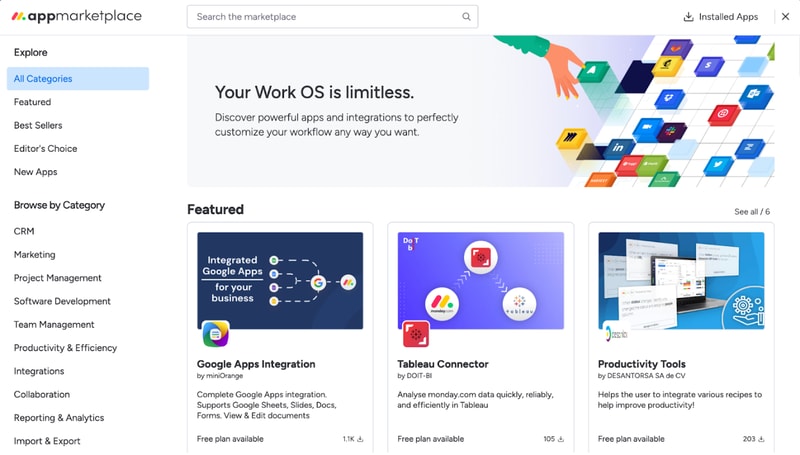
Monday’s integrations let you fine-tune your boards, cards, automations, and more.
For example, the Google Apps integration makes it extremely easy to embed and collaborate on Google Sheets, Slides, Docs, Forms, and more. If you’re using Monday as a CRM, you can use the Tableau Connector for advanced insights into your processes and results.
Not to mention, you can also integrate Monday.com with popular tools like Zapier, Zoom, Google Calendar, and more. These let you automate processes outside of Monday.com, so your team won’t have to worry about repetitive tasks.
Integrations are one of Monday’s biggest perks. The only downside is that you’ll need at least a Standard plan to use them. They’re not available with the free or Basic subscription.
Ease of Use
Monday.com is surprisingly easy to use, especially for how customizable it is. All plans come with onboarding guides, explanation videos, and loads of support articles to help you get started. Enterprise clients even get a customer success manager. They will help you set up all the advanced features, and provide dedicated support no matter what you need.
Even without all of that support, Monday.com is intuitive to use. And that’s mostly thanks to its well-made user interface.
User Interface
Monday.com has one of the best user interfaces out of all project management apps. The design’s smooth, you get color-coded statuses, big buttons, and detailed breakdowns of your tasks.
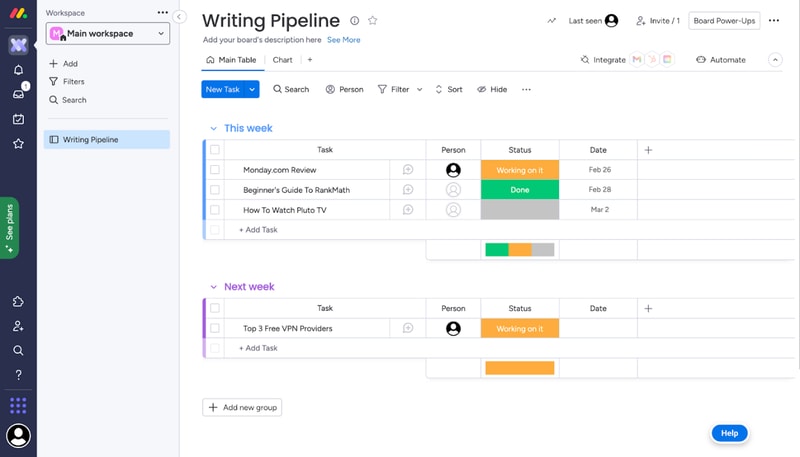
You can quickly switch between views on a board, all the options are pretty intuitive, and you don’t need a degree to find important features. It’s easy to navigate Monday.com even without an onboarding guide.
What we like most is their comments section. All cards have one, where you can write updates about a task, interact with your coworker’s messages, and make notes of everything related to that task.
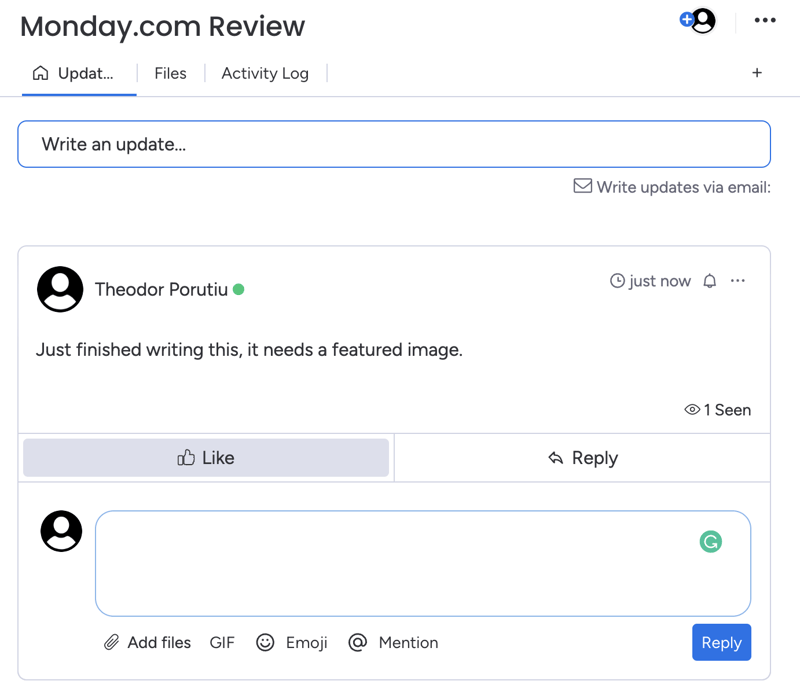
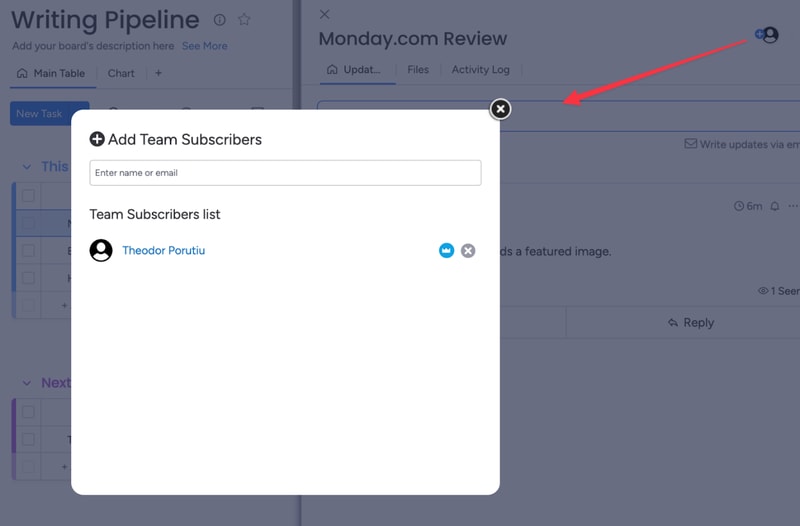
And if you need anyone to join the conversation, you can quickly add them as a card subscriber. This will automatically notify them about any messages.
Getting started and customizing Monday boards – is it easy?
When you sign-up for Monday, you’ll fill in some details about your company, like its size, industry, and what you’ll use Monday for. These choices will affect the features and templates recommended to you, but they won’t limit your tool stack..
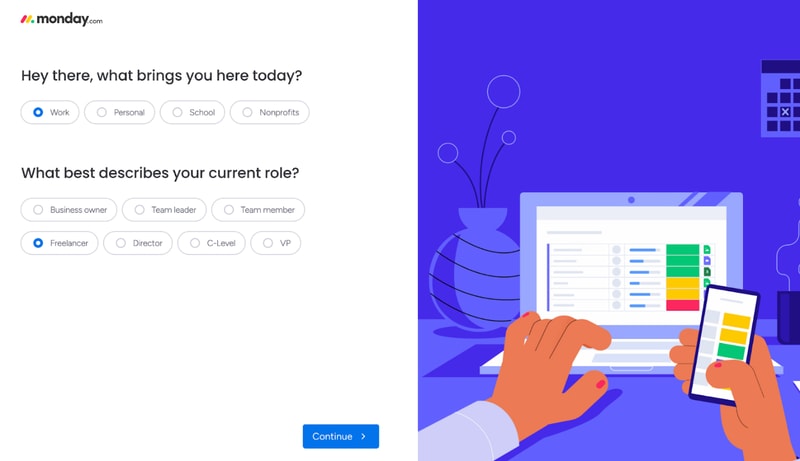
For example, I said I’ll use Monday for operations management. This made my automation recommendations the most commonly used for ops.
After this initial sign-up, you’ll also get a step-by-step guide on how to create boards and cards on Monday.
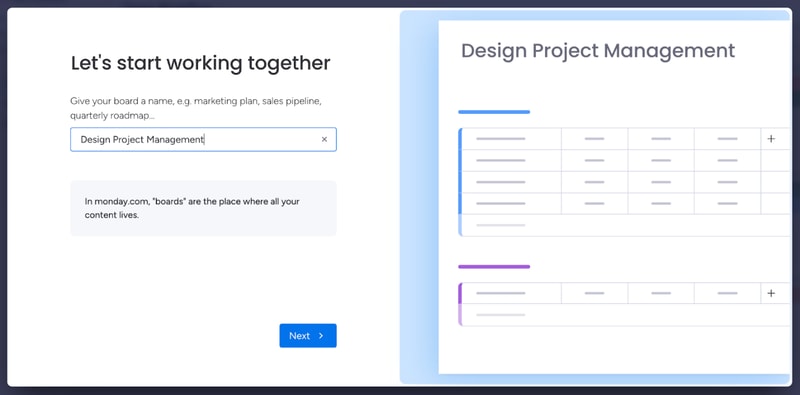
This guide is pretty good to understand how Monday’s core functionality works. If you have minimal experience with project management tools, it’s more than enough. However, it’s not the best if you’re a complete beginner.
You might need more guidance on how each view works, as well as the difference between views, boards, and workspaces. Not to mention, beginners might need a similar startup guide for other features, like automation. All of this support is available in the knowledge center. But it would be better fleshed out in a lengthier onboarding guide.
And we’re not saying this just to pick on Monday. A lot of the complaints you’ll see online about Monday.com mention a steep learning curve. Sometimes, these reviews even complain about the lack of features that are actually there, like more views beyond the default table. A more in-depth start-up guide could solve these issues.
Monday.com Security and Privacy
Monday is pretty serious about its security features. They have a trust center that outlines their stance on security and privacy, as well as a detailed security white paper, which showcases how they protect customer data.
Monday.com uses advanced encryption protocols (especially for Enterprise users) and high-end security methods. They analyze their vulnerabilities weekly and run a bug bounty program to avoid hacks. If you need a secure project management app, this is as safe as it gets.
Lastly, Monday.com collaborates with some sub-processors to collect and process your data. This might worry you, but the third parties are mandated to protect your data under the same terms Monday.com is, so your company is not at a higher risk because of it.
Customer Support
Monday.com has a very well-organized knowledge base, which provides most of the guidance you’ll need to get started with the platform.
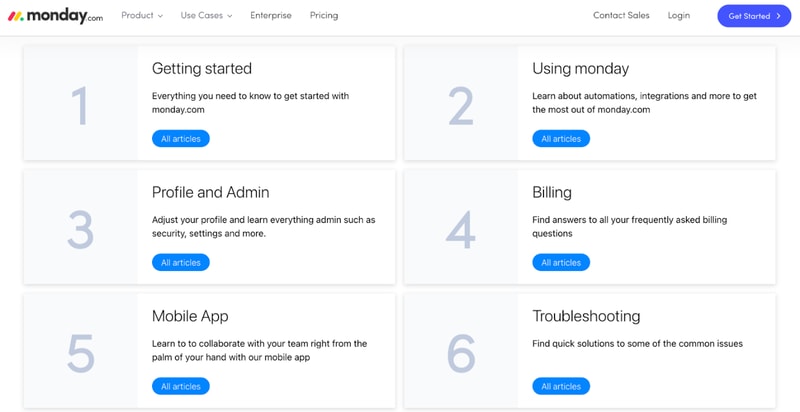
They also have a community where you can post or browse specific questions, a University center to learn more about Monday’s advanced features, and detailed API documentation.
If you need any extra guidance, Monday.com also offers 24/7 live chat support.
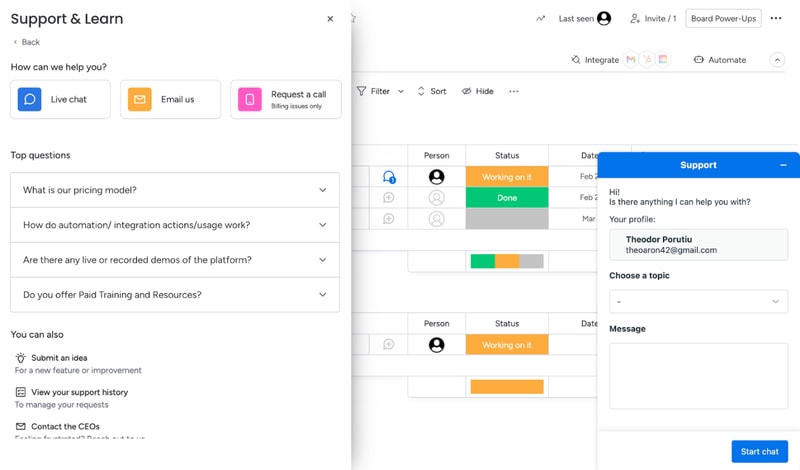
Their agents are prompt and helpful, especially if you’re on a paid plan. That will get you priority support. If your problem’s not urgent, you can also email Monday.com. If you have a billing issue, you can even hop on a call with a Monday agent.
Overall, Monday’s support system is robust. If you run into any problem, you’ll get the guidance you need to keep your project on track.
Monday.com Pricing
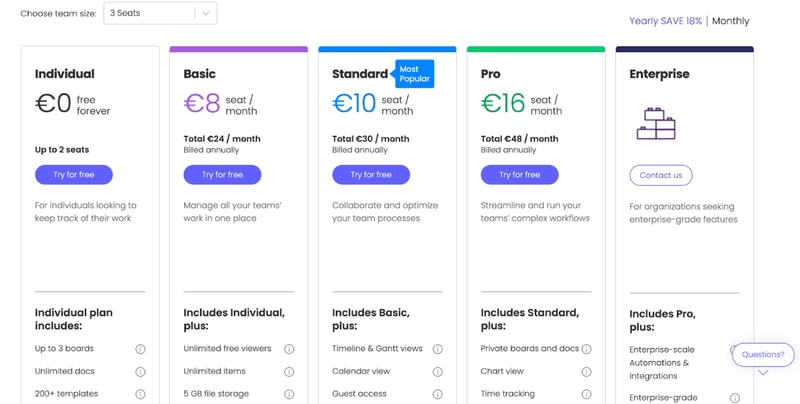
monday.com offers Individual (free), Basic, Standard, Pro, and Enterprise plans — see monday.com pricing for current rates.
The tool can get pricey if you have a big team. So if you’re not sure which plan works for your business, let’s break it down.
Individual
Monday.com’s free plan is a great choice for individuals that want some structure in their day-to-day life. But it’s not limited to personal use. The Individual plan works great for freelancers that want to manage their work and even small businesses. You can add up to 2 seats to your projects in the free plan.
Granted, you are limited by an Individual subscription. You can only create up to three boards, 1,000 items, and you only get 500 MB of storage. But it’s more than enough to test Monday.com and see if it’s right for you.
Basic
Monday’s Basic plan offers much more flexibility than the free tier. You can create unlimited items, you get 5GB of storage, unlimited boards, unlimited free viewers, and priority support.
However, you don’t get access to most of Monday’s automations with this plan.
Standard
The Standard plan probably has the best price-to-value ratio. It comes with guest access, more views, integrations, and automations, making it a better choice than a Basic subscription for most teams.
But if you want the full Monday.com experience, you’ll need the Pro plan.
Pro
Monday’s Pro plan offers 100 GB of storage, a full year of activity logs, unlimited guest access, time tracking, dependencies, a formula column, more views, and advanced security.
If you run a medium to big company, the Pro plan is probably the best for you.
Enterprise
Enterprise plans are custom-made for big organizations, so we can’t tell you how much it will cost, or exactly what features it will have. But we do know you’ll get premium integrations, a dedicated customer success manager, advanced security options, and better analytics.
User Reviews
People really like Monday.com. The platform has top scores across all big review aggregators.
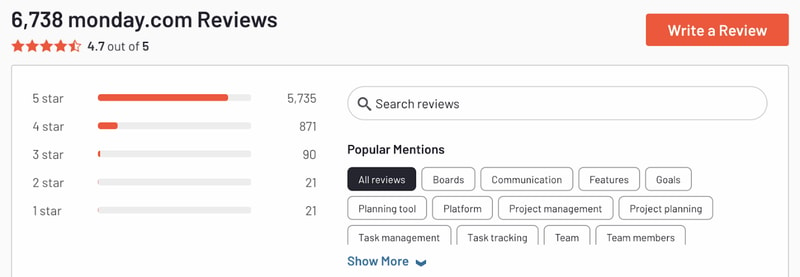
Monday gets praise for its advanced customization and great interface. But there are unhappy customers too. Most people that complained about the tool had problems with the slightly steep learning curve and higher pricing for big teams.
Pros
- Excellent and intuitive dashboards
- Fantastic for beginners
- Range of features like time tracking and budgeting
- Suitable for larger teams
- Supports extensive integrations for CRM, marketing, project management and more
- Visual boards allow for easy and accurate tracking
Cons
- Can be a steep learning curve for some users
- Can get pricey for larger teams
- Limited task dependencies, especially on the cheaper plans
Our biggest gripe with Monday.com was that you’re limited when creating task dependencies. You can only set them up via automations. Meanwhile, competitors like Asana let you take care of the same thing in 1-2 clicks. But it’s a minor issue and something that will probably be fixed in the future.
Quick Conclusion: Monday.com Review
monday.com has expanded beyond project management into a full work platform, offering monday CRM, monday Dev, and monday Service as dedicated products. The platform also includes AI-powered features for task automation, content generation, and project insights.
Monday.com does almost everything right. It has a strong project management suite, advanced customization, and some of the best integrations we’ve seen in project management software.
It is a bit hard to learn for non-techies. And it can be expensive for large teams. But in our opinion, these are minor inconveniences. Monday’s so good, they’re small hurdles to overcome.
You can see for yourself, Monday’s free to try:

Compare monday.com with other popular tools in the same category.

Percfet app to work and a new way to do work. Very neat and also begginer friendly. Team working is good on Monday app and technology that is very important and
Nevertheless nothing bad about Monday.com community maybe in future there could be some kind of behaviours or issues to tackle and an improvement would be needed
No stress in all your work well designed community to help people and begginer friendly people to do work easily with no panicking. Made simple and subscription
To be able to follow how well the different tasks are going and their status
There are two many functionnalities within monday and i tend to get lost
it's easy to keep track of how much time i spend on the different projets
It is visually appealing and has an assortment of tools I can use to plan the week. I like being able to allocate tasks to individuals in my team
It can become difficult to keep on top of when we have a lot of tasks on the go and we forget to log in and report any updates to the existing ones
My team can get overwhelmed by the number of tasks to do - Monday keeps it simple with prioritising
Easy to use and really simple UI. Good for small teams
Lacks some flexibility and some basic functionality for cheap plans. e.g. Dependencies, Private Boards/Workspaces, etc. These functionalities are available in many other tools, but not here
Project Managing tool for tracking some tasks and see the timelines, but still many things that I would like to have are not present in this tool
I am using it for my company BD activities mgmt and project task mgmt.
Performance is prolonged on the web. Slow
It helps me to manage my team assignment more effectively
The simplicity and ease of monday is wonderful! I used it to help with social media, but it's also a great tool to stay organized.
It can be complicated when you are only using it as an individual.
I used it to keep track of social media posts, but I think it's a great tool to stay on task especially with a project.
User Interface is a very friendly and easy way to interact with the content. I would like to see a few more options in permissions but there are a lot of great templates to be used and provide a lot of insight for how the site could be utilized.
I don't like that you cannot duplicate automation and have it work if you are not both the original owner of the board and the one who initiated the automation.
cloud based system allows my teams to access their inventory and send updates to the warehouse as I have assigned. I realized that communication is one of the largest obstacles in my org and automation (as long as they work) has been very useful. PLEASE FIX THE AUTOMATION DUPLICATE ISSUES!!!
It is better than basecamp, not that antiquated and a polished look.
- Uploaded images are very small when viewed and not the full quality; why? - The formatting buttons do not seem to be floating, and you often have to scroll back to the top to BOLD your text, etc. - Filters do not tend to save, I should not see everyone else's filter, but have mine be the #1 to choose from. Having to always save the filtered URL or reapply the filter is tedious
As I am not a PM there are not any particular problems being solved for me personally, but the whole workflow runs more smoothly by using monday than BC etc

The ease of use and accessibility from your mobile device.
The inability to sync seamlessley with outlook calendar.
I am able to easily understand workloads of staff without much effort. It is easy to communicate schedules with staff & clients.
I love how easy to use Monday is. Hats off to the UX team 👌🏻 Monday is simple and straightforward to use, this helps new uses get to grips easily and empowers veterans to get to the work that matters most.
We needed a master board recently containing all high level tickets. We wanted to connect the progress of those tickets to ground level activities. It was not possible.
We work as a marketing team on Monday.com. It's really helpful for keeping all of our projects under one place. It also has began helping us to manage the relationships with some of our SaaS app clients.
Monday was helpful for managing progress on projects with a visual element
It was time to setup and turned out to be unnecessary for my small team
It kept track of all tasks and provided a clear visual overview of how progress was going
the easy to use interface, it has a freadly appeal to it, I feel like there is more to be done on some areas of the application, phone version needs to be more friendly. and
it was very simple but a bit too simple, I will still like to have a bit more options and easier to use.
product release and product creation
This tool is somewhat a jack of all trades.. seems like a project management tool, task tracking, and scheduling, but requires manual integrations of everything.
Complex and learning curve is steep and with little to no example documentation.
Should include a more detail walkthru as to give the new user more context and detail on the how to do things.
It is really nice that you can customize boards and templates to your liking with tasks, assignees, reviewers, etc.
Monday.com is missing some project management steps that effect productivity negatively. For example, on my weekly to do list, it does not show which tasks are already done, and which ones are behind schedule. I also have no way of looking at all boards at once (I have to manually choose a handful) so that I can see everything from a big point of view.
It took me about 3 months working with Monday.com support to finally get email updates. Customer service was great but this was abig issue for a while.
I don't there are enough ways to organize in team folders.
I think there should be more features to this website.
To-do lists have become more manageable. I also like being able to see what coworkers are busy with.
The layout of the user interface, easy to use
lack of individual layout changes, without affect other users
Job scheduling and seeing tasks at hand
Love being able to schedule out tasks in future. We create monthly task boards so that our admin team of 3 can make sure tasks get done. You can leave notes for each other as well. We schedule out the boards so that we don't forget upcoming tasks, especially ones that are infrequent.
Wish there was a simple version that was not as expensive. we don't use most features like automation which can be overly complicated to figure out. We simply use it to organize tasks. However to do that you have to buy the upgraded version which seems odd.
staying organized especially while we all are working remotely!

It has a very nice user interface which makes it a fun tool to work with
Can create a confusion between colleagues especially in smaller organizations when everyone is involved in every task.
We were trying to create and maintain schedules on various projects and tasks that were happening simultaneously for managers to be able to see how much each of us has achieved in each task / project.
Good UX on ios and desktop. Clear workflow.
More complex than other tools. Long time needed to load project info.
Workflow coordination and team management.

Monday was easy to start using, has a clean interface and doesn't offer too many features.
While I did like its simplicity, it probably could have done with a little more customization flexibility.
I always have a ton of projects going on at the same time, Monday is good for keeping things straight at a glance.
Monday is easy to share with other colleagues that are working on the same projects! The different boards are helpful in organizing what each person needs to get done while still seeing the big picture of the project.
I do not like the calendar feature where your to-dos are listed. It is not easy to understand or view your week to week list.
It is great because several people can look at one place for upcoming items to get finished with a deadline to get them completed by.
I find it very useful.My boss introduced it to me and we just love how transparent it is.
I wish there was a way to connect it with gmail.
daily weekly communication
I like it because it is easy to use, very intuitive. Customizable for your projects and company. You can easily monitor the processes step by step in any department you have in your company.
I found that it lacks the ability to add secondary tasks or assign a task to several people and notifications can become a bit overwhelming especially if you are working on several projects although the mobile application works well, the notifications tab could work well , since you may feel overwhelmed by notifications, especially when you are working on many projects at once
It is quite beneficial to use it in the design and commercial marketing is a phenomenal program and with a price it is very accessible.
I found this tool really easy to use. My wider team used it as well, and we always had clear visibility on what everyone had on their plate at any given time.
The horizontal view of tasks. The reason I moved over to Asana was because I liked the layout, it also seems to have a 'cleaner' feel to it - a lot less cluttered!
Project management obviously. Having an overview as to what everyone had going on at one time was great. Our product team found Monday a little to simple so they're more into using Jira.
Love love love the UI! Very easy to use and understand.
The price is a bit on the expensive side and there is also no desktop download of the app
Team and task management. Helps coordinate with large teams
I like that it is an easy list to see where we are and what the team is working on.
Sometimes we just forget to use dapulse. Sometimes it is just another "thing" that we have to change a status on to report back to our boss
We were, and still are, searching for a way to keep our team updated and organized. I have not seen a change at all since they changed names from dapulse to "Monday"
Nice UI. Simple to use. Colorful. Boards were easy to customize.
Not being able to tag tasks across projects/boards. It was too simply for Marketing teams that I was working on. I was an avid user of Wrike but couldn't get myself to use monday daily.
We were using it as a marketing team collaboration tool.
The features are great and super easy to understand. Plenty of uses for a basic user but then when you get to grips with the more advanced stuff, it opens up a whole new world. Super responsive customer service via e-mail who seem to genuinely try and help rather than just attempting to pacify you.
Not being able to speak to customer service on the phone. Some features such as being able to have different columns for individual groups on a board can be frustrating. Poor communication when some plug-ins no longer work or are supported and a bit of a "tough luck" attitude on these. More issues have cropped up recently than previously experienced.
Workflow management is significantly easier, quicker and more easy to keep track of. Keeping track of projects as well as creating dashboards and forms for clients has been a godsend.
Handy to use this to communicate and collaborate.
Im new so it is confusing for new starters
Communication
It can be useful for creating lists and prioritising particular tasks in an itemised way.
I find navigation can be a bit ungainly if it's heavily populated.
It creates a centralised area for multidisciplinary teams to pool their resources.